Pawnbroker Booking Landing Page Template
Pledge is a single-page landing page template built for pawnbroker businesses. It uses a dark editorial design, structured comparison tables, and a transparent booking flow to turn hesitant first-time visitors into confident appointment bookings. The layout answers real customer doubts before the call to action ever appears, making trust the foundation of every conversion.
by Rocket studio
Quick summary
Pledge is a pawnbroker landing page template designed around one idea: transparency earns the click. The page uses dark editorial visuals, side-by-side comparison tables, and a step-by-step booking form to guide first-time pawners from uncertainty to a confirmed private valuation appointment. Every section dismantles doubt before asking for anything in return.
Who this template is for
This template is built for established and independent pawnbroker businesses that need a professional online presence. It suits operators who want to move beyond a generic directory listing and give customers a genuine reason to walk through the door.
- Pawnbrokers offering private valuation appointments for jewelry, electronics, instruments, and vehicles
- Shop owners who serve tradespeople, families in financial gaps, and collectors liquidating pieces
- Brokers who want to communicate regulated, transparent terms before a customer even picks up the phone
What problem this template solves
First-time pawners rarely search with confidence. They arrive with anxiety about judgment, hidden fees, and the fear of losing something valuable. A plain contact page does nothing to address those concerns. This template replaces that silence with structured clarity.
- Visitors leave without booking because no page explains what actually happens during a pawn transaction
- Customers compare pawnbrokers to predatory lenders and need a direct, factual rebuttal
- Brokers lose appointments because fees, terms, and redemption windows are never visible upfront
What you get with this template
The template delivers a complete single-page layout built specifically for pawnbroker appointment booking. Every section is pre-structured and ready to populate with your business details, branch locations, and item categories.
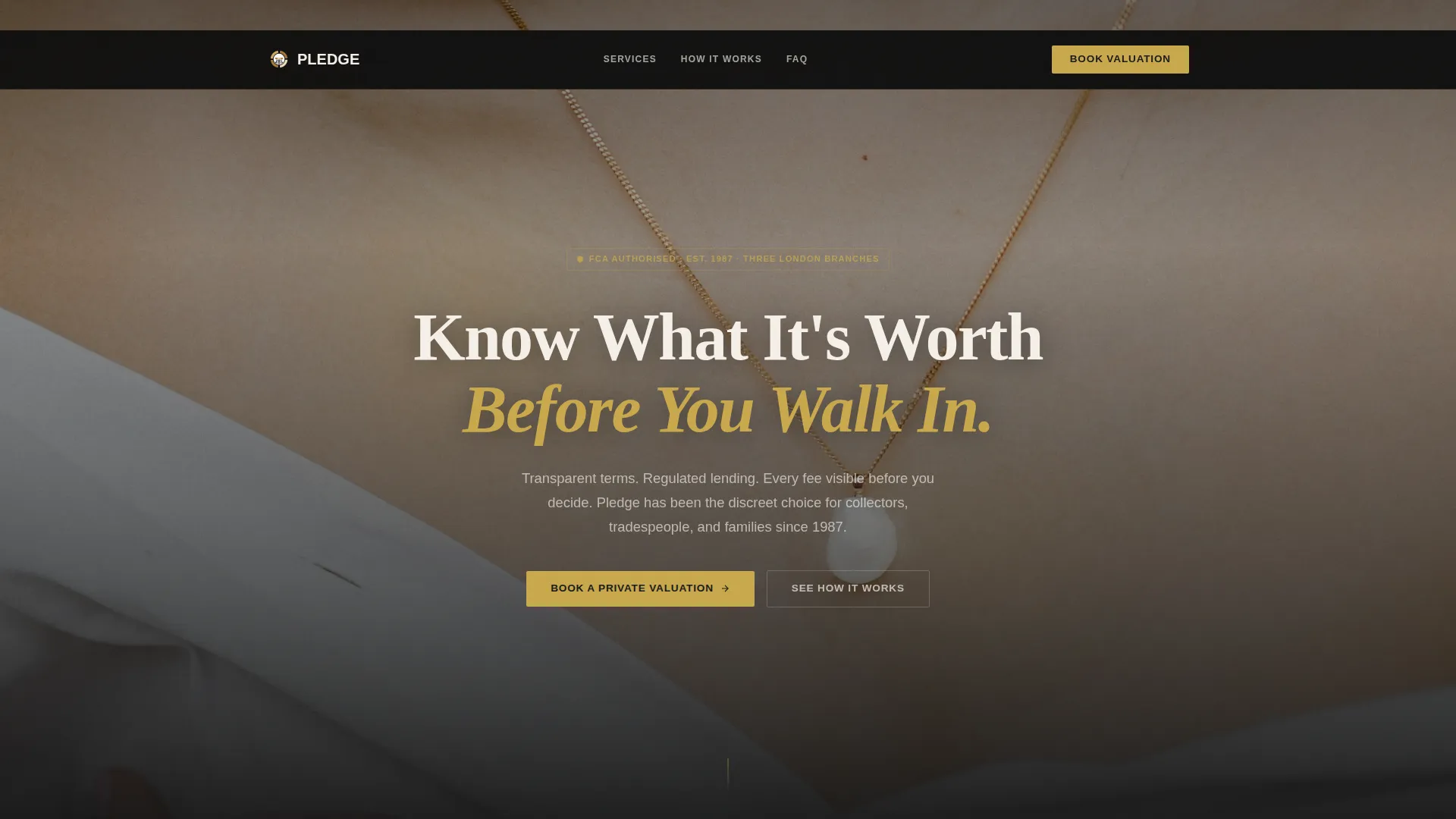
- A dark full-bleed hero section with a headline that sets an authoritative, unhurried tone
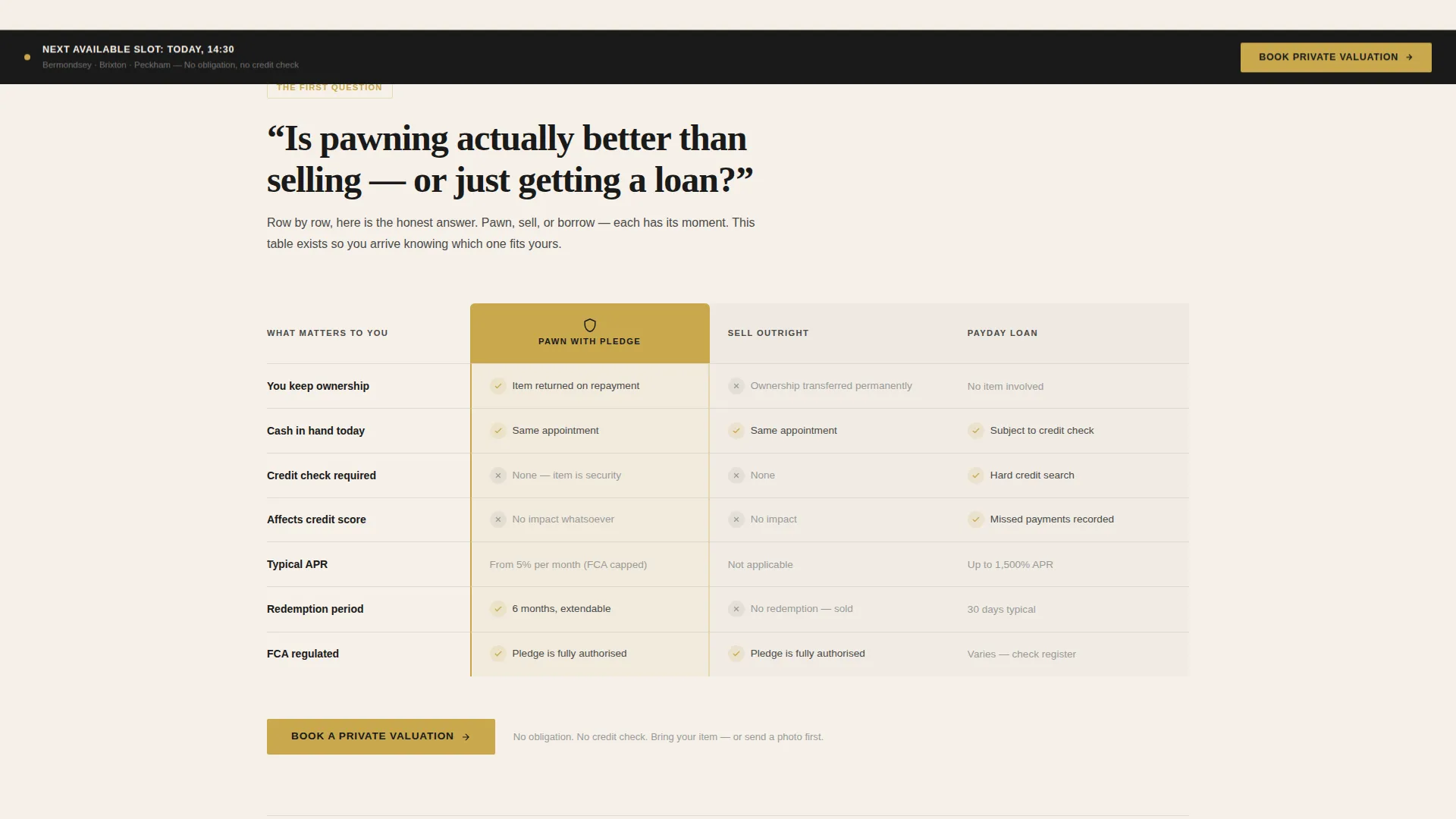
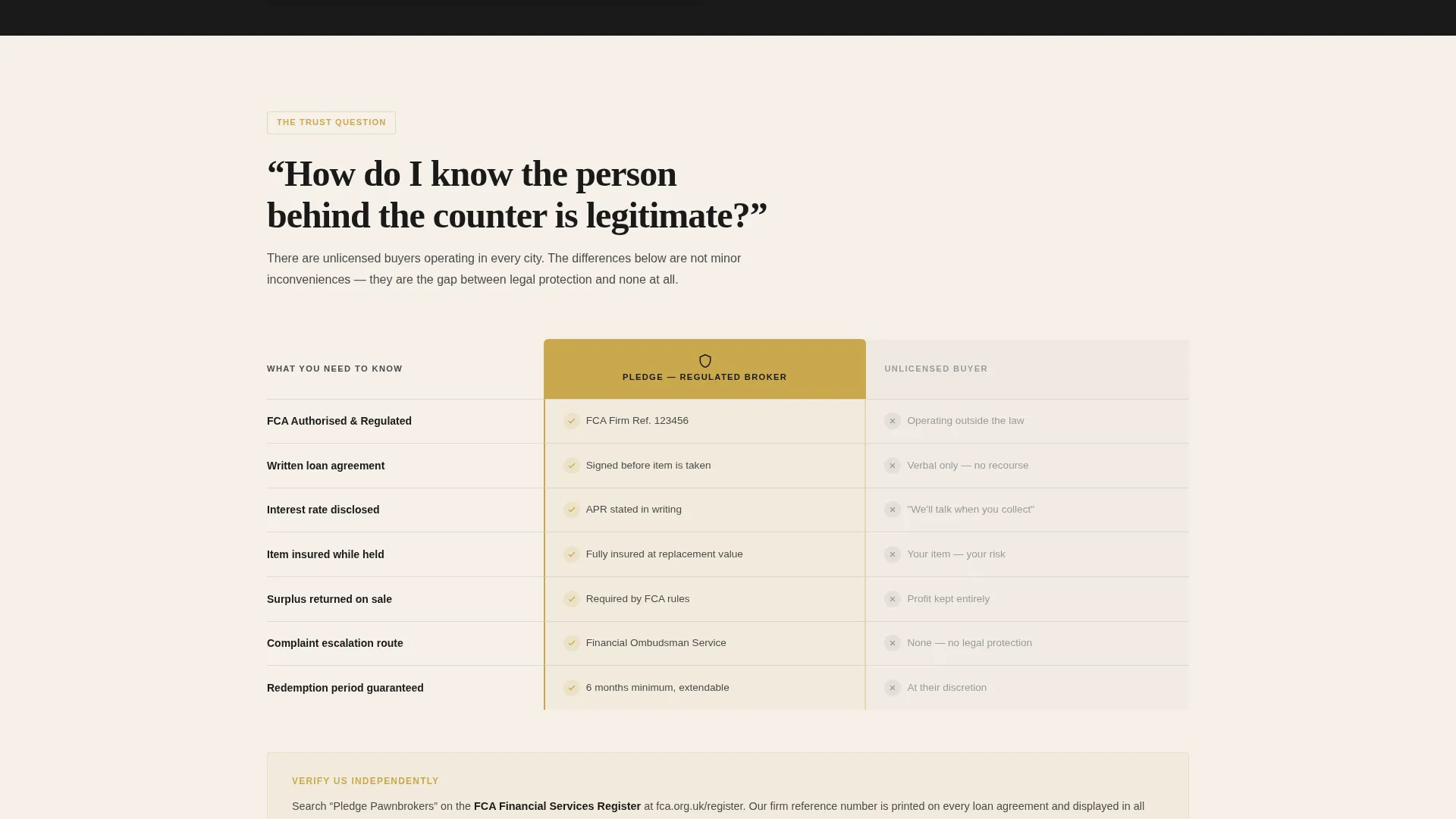
- Three embedded comparison tables covering pawn versus sell, pawn versus payday loan, and regulated broker versus unlicensed buyer
- A multi-step booking form with item category selection, branch location picker, date-and-time slot chooser, and an optional photo upload field
Feature list
This section covers the core built-in components of the Pledge template.
Dark Full-Bleed Hero Section
The header uses a tight, moody image of curated items arranged on black velvet under directional lighting. A gold watch, a vintage guitar tuner, and a small coin stack are lit from within by soft amber glow. The headline "Know What It's Worth Before You Walk In" fades in over the darkness, setting tone immediately.
Scroll-Driven FAQ Layout
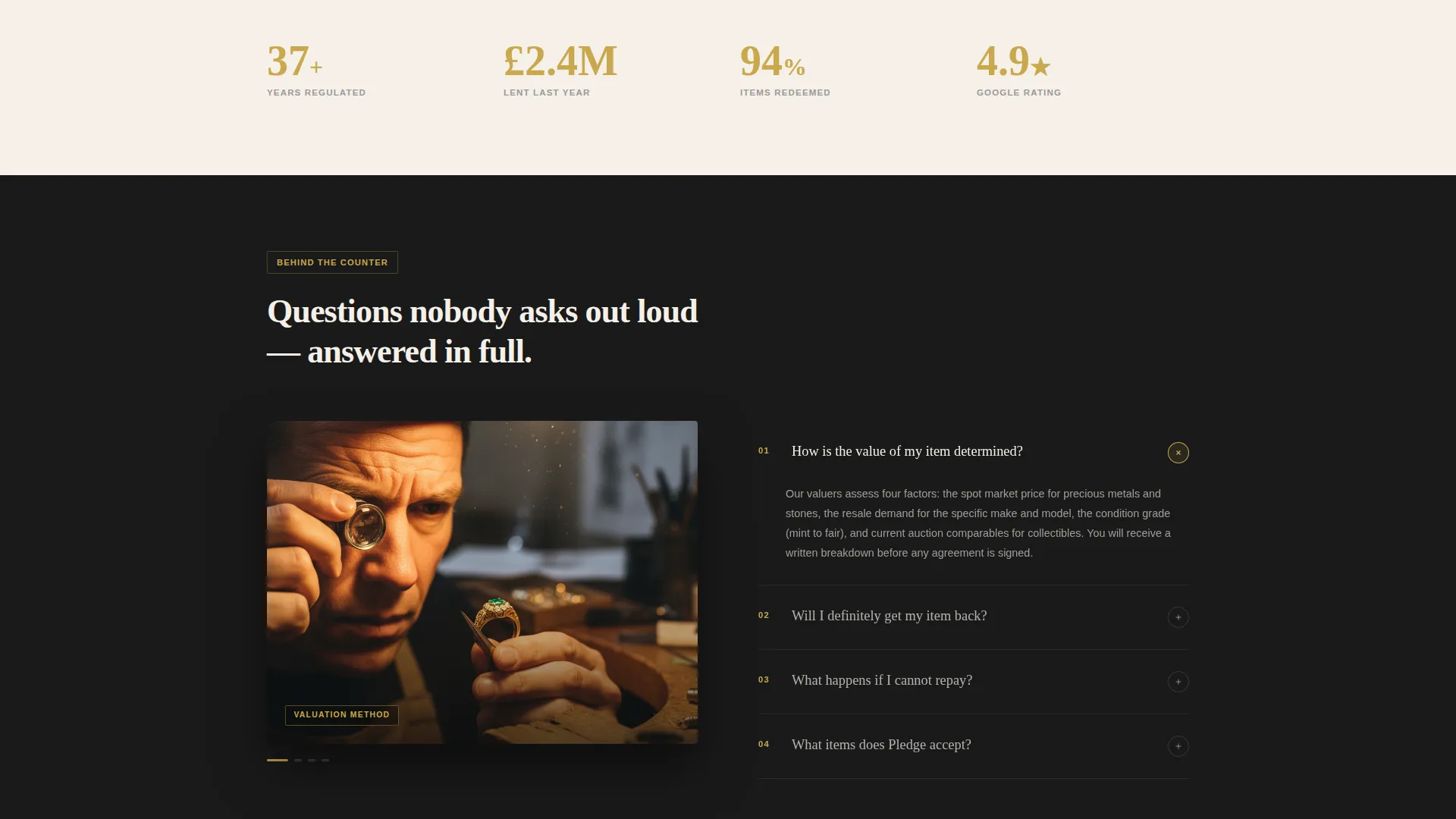
Each scroll section is structured around one honest question a first-time pawner hesitates to ask. Questions like "Will I get my item back?" and "What happens if I can't repay?" are answered clearly and calmly. The format turns an anxious browsing session into a guided, reassuring read.
Embedded Comparison Tables
Three comparison tables are built into the page flow. They cover pawn versus sell, pawn versus payday loan, and regulated broker versus unlicensed buyer. Each table converts a common fear into a factual, easy-to-scan answer before the booking form appears.
Private Valuation Booking Form
The booking flow is structured in logical steps. Visitors select an item category first, then choose a preferred branch location, then pick from next-available date and time slots. An optional photo upload field allows a preliminary item estimate before the in-person appointment.
Sticky Booking Call-to-Action Bar
After the first comparison table, a primary call-to-action button reading "Book a Private Valuation" appears. From the midpoint of the page onward, a sticky bar keeps this action persistently visible. The bar does not interrupt the reading flow but remains accessible at every scroll position.
Pre-Conversion Transparency Layer
Every fee, every term, and every redemption window is displayed visibly before the booking form is reached. This deliberate sequencing means the visitor has already seen the full picture by the time they are asked to book. The form feels like a formality, not a commitment.
Page sections overview
| Section | Purpose |
|---|---|
| Dark Hero Header | Sets authoritative tone and introduces headline |
| First Comparison Table | Contrasts pawn versus sell options |
| Primary Booking call to action | Prompts first valuation appointment booking |
| Second Comparison Table | Contrasts pawn versus payday loan |
| Third Comparison Table | Compares regulated broker versus unlicensed buyer |
| FAQ Scroll Sections | Answers one real pawner question per section |
| Transparent Terms Block | Displays all fees, terms, and redemption windows |
| Multi-Step Booking Form | Captures item, location, date, time, and photo |
| Sticky call to action Bar | Keeps booking action visible from midpage onward |
Design & branding system
The visual identity follows an Editorial Magazine theme built on an Ink and Paper color system. The palette is inspired by a broadsheet financial column printed on heavy cotton stock. It feels authoritative and unhurried without being cold or transactional.
- Core colors: deep editorial black (#1A1A1A) for backgrounds, aged parchment (#F5F0E8) for surface areas, tarnished gold (#C9A84C) for accents and hover states, and quiet graphite (#4A4A4A) for body text
- Gold is used sparingly throughout the layout, appearing only at key focal points like a jeweler's loupe catching the light
- Typography and spacing reflect a broadsheet editorial rhythm, with generous white space and unhurried line lengths that slow the reader down intentionally
Mobile & speed optimization
The template is structured with a single-page scroll layout, which naturally reduces load complexity on smaller screens. Each section is self-contained and designed to reflow cleanly from desktop to mobile without losing the editorial tone.
- The sticky booking bar adapts to mobile viewports, remaining accessible without blocking content
- Comparison tables are formatted to remain scannable on narrow screens without requiring horizontal scrolling
- The optional photo upload field on the booking form is touch-friendly and practical for mobile users photographing an item in hand
How this template helps you convert
The conversion strategy in Pledge is built on earned trust rather than persuasion pressure. Every element is sequenced to reduce hesitation before the call to action is presented.
- Comparison tables appear before the booking form, answering objections in the exact order a nervous visitor encounters them, so by the time the form loads, doubt has already been dismantled row by row.
- The transparent terms block displays all fees and redemption windows in plain language before any commitment is requested, which makes clicking "Book a Private Valuation" feel like a logical next step rather than a risk.
Other information about this template
The Pledge template sits within the Professional Services category and is matched specifically to the pawnbroker booking page niche. It is suited for operators who want a credible, content-led landing page that positions them clearly above less transparent competitors.
- The template style follows a Service Utility theme, keeping the focus on function and clarity over decorative flair
- The creative direction is FAQ-Driven, meaning content is organized to answer real first-visit questions rather than broadcast marketing claims
- The landing page direction is Content and Resource oriented, treating the page as a trust-building document rather than a hard-sell funnel
- The header concept uses a Half-Page Photo and Text pairing anchored by a dark full-bleed image and a single confident headline
- The Ink and Paper color system used here is well-suited to financial and professional services contexts where credibility and calm authority matter more than bold color energy
Theme
Service Utility
Creative direction
Stats-First Impact
Color system
Ink & Paper
Style
Sidebar Companion
Direction
Content/Resource
Page Sections
Dark Full-bleed Hero Section
Scroll-driven FAQ Layout
Embedded Comparison Tables
Multi-step Private Valuation Booking Form
Sticky Call-to-action Bar
Pre-conversion Transparency Block
Related questions
What type of business is this template designed for?
Can I customize the item categories and branch locations in the booking form?
Does the template include all three comparison tables?
Is the photo upload field required to complete a booking?
Why are fees and terms shown before the booking form appears?



