Kids Ballet Directory Website Template
Pli is a warm, modular landing page template built for kids ballet instructor directories. It presents neighborhood teachers through tactile instructor cards, a photo grid mosaic header, and a parent-quiz banner. The design feels handcrafted and human, using a watercolor palette and hand-script typography to help families find the right first ballet teacher with confidence.
by Rocket studio
Quick summary
Pli is a single-page directory landing page designed for curated kids ballet instructor listings. It combines a mosaic photo header, a filterable instructor card grid, rotating parent testimonials, and a quiz-matching banner into one warm, browsable experience. The template is built for families who want to feel the studio before they ever walk through the door.
Who this template is for
This template is made for anyone running a neighborhood-level ballet instructor directory or a boutique children's dance discovery platform. It speaks directly to the people browsing it and the people presenting their services through it.
- Parents of young children seeking a first ballet class, from toddlers to early teens
- Directory owners and community platforms connecting families with independent dance teachers
- Homeschool co-ops and local arts organizers listing vetted movement educators
What problem this template solves
Parents searching for a children's ballet instructor face a fragmented, confusing landscape. Studio websites are inconsistent, search results favor large chains, and nothing feels personal enough to trust with a four-year-old's first experience of movement.
- Families have no easy way to compare neighborhood instructors side by side
- Independent teachers lack a curated, trustworthy space to present their style and credentials
- Parents need to see real faces and real words from other parents before committing to a class
What you get with this template
The template delivers a complete, section-led landing page ready to populate with instructor profiles and parent testimonials. Every visual and interactive element is designed to build the kind of quiet trust a parent needs before booking a class.
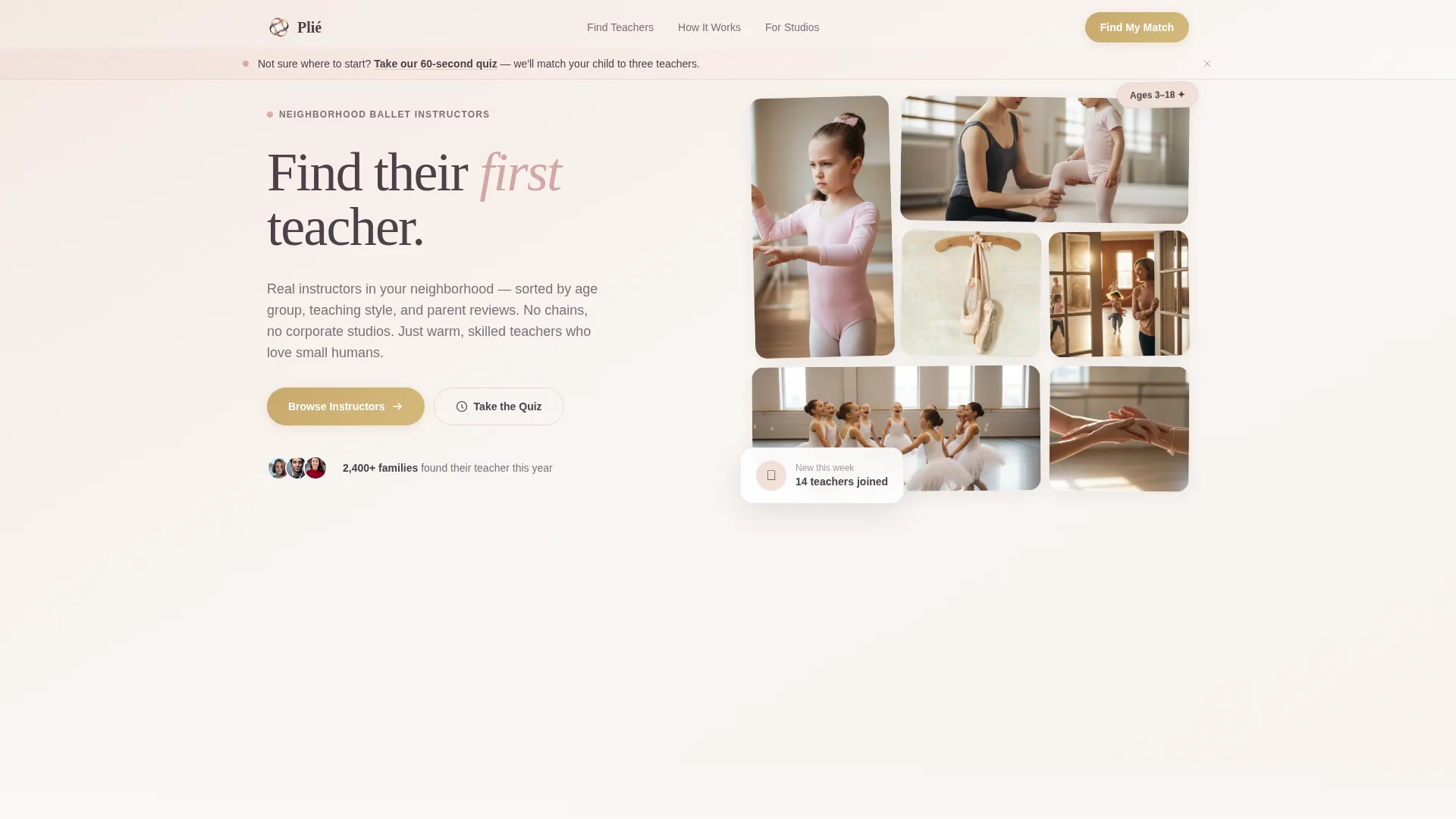
- A photo grid mosaic hero with a floating hand-script headline and a soft quiz banner
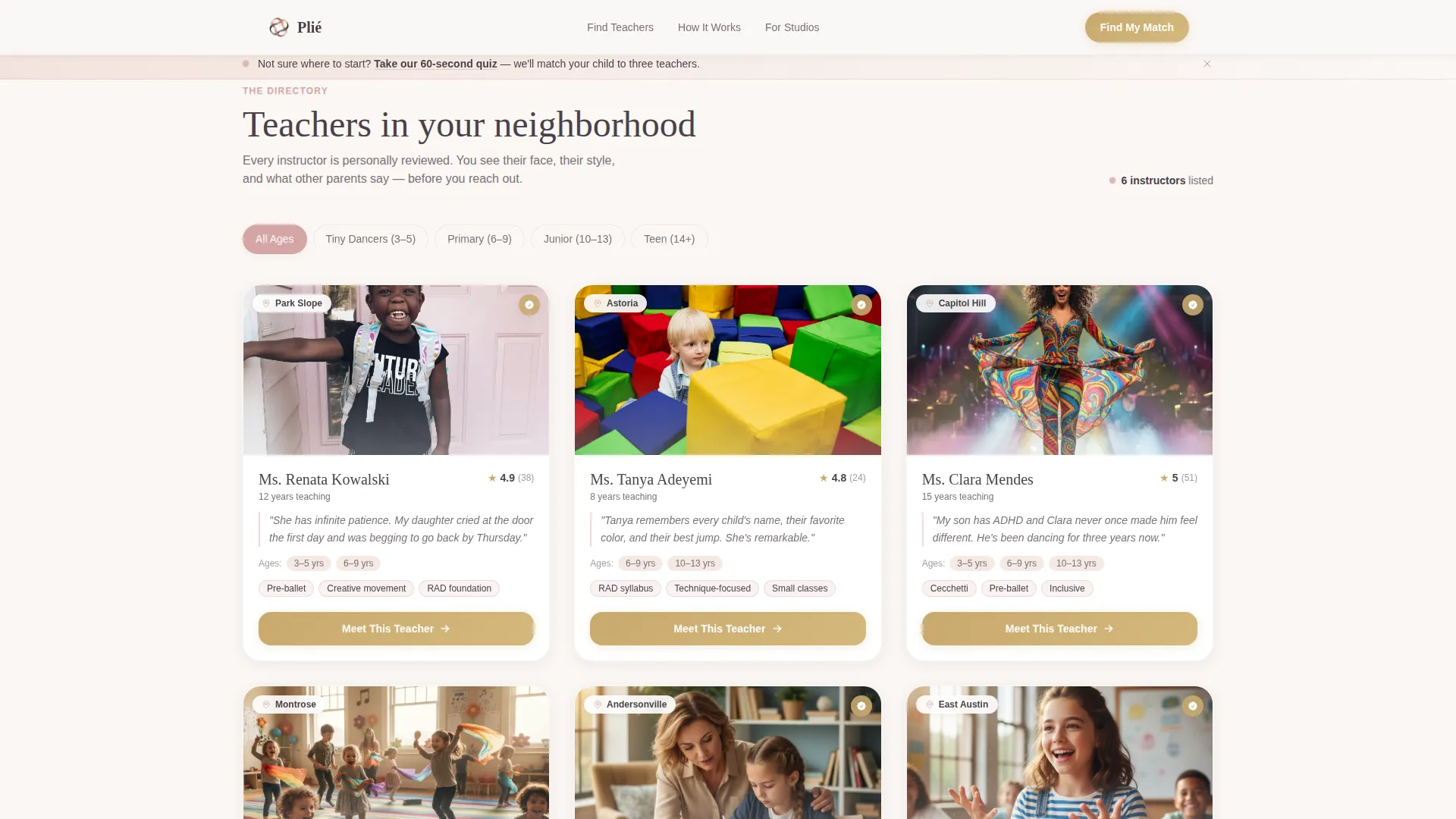
- A modular instructor card grid with portrait, neighborhood, age groups, parent quote, and style tags
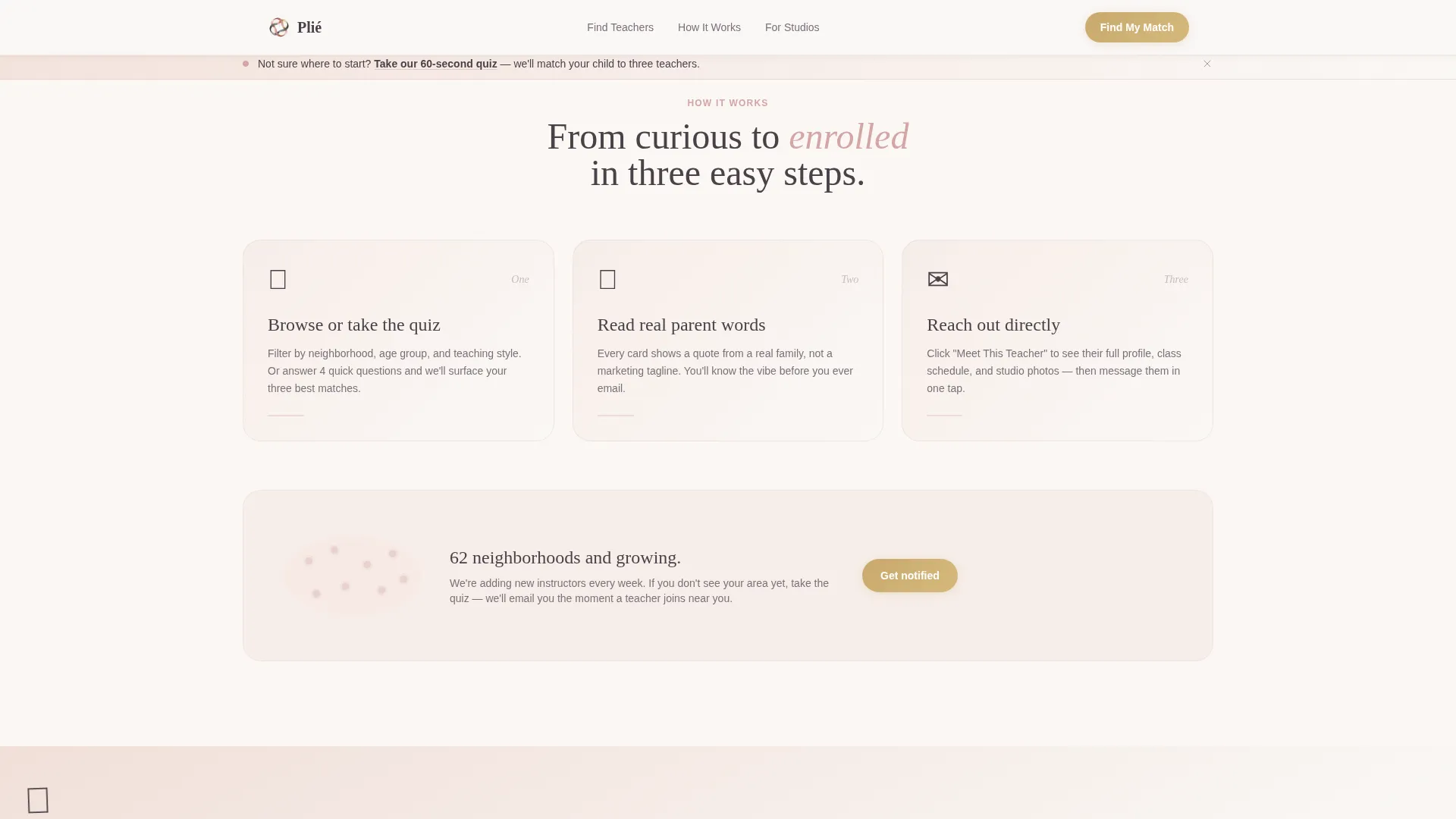
- A testimonial and stats interstitial, a three-panel "How It Works" section, and a quiz call-to-action with footer
Feature list
Mosaic Photo Header with Floating Headline
The header assembles real-moment photography into a tessellated, Polaroid-style collage. Images are slightly rounded, unevenly sized, and tilted a degree or two. A hand-script headline reading "Find their first teacher." floats over the mosaic, grounding the page in warmth from the first scroll.
Filterable Instructor Card Grid
Each instructor appears as a tactile card showing a portrait photo, neighborhood name, age groups taught, a single italicized parent quote, and class style tags such as "pre-ballet," "Royal Academy of Dance syllabus," or "creative movement." Filter tabs let visitors sort by age group, making it easy to surface the right teacher quickly.
Quiz Matching Banner
A persistent soft banner sits at the top of the page with the prompt "Not sure where to start?" It links to a short quiz that matches a child's age, neighborhood, and temperament to three recommended instructors. This gives hesitant parents a clear second path without overwhelming the primary card browse.
Rotating Testimonial Strip with Stats
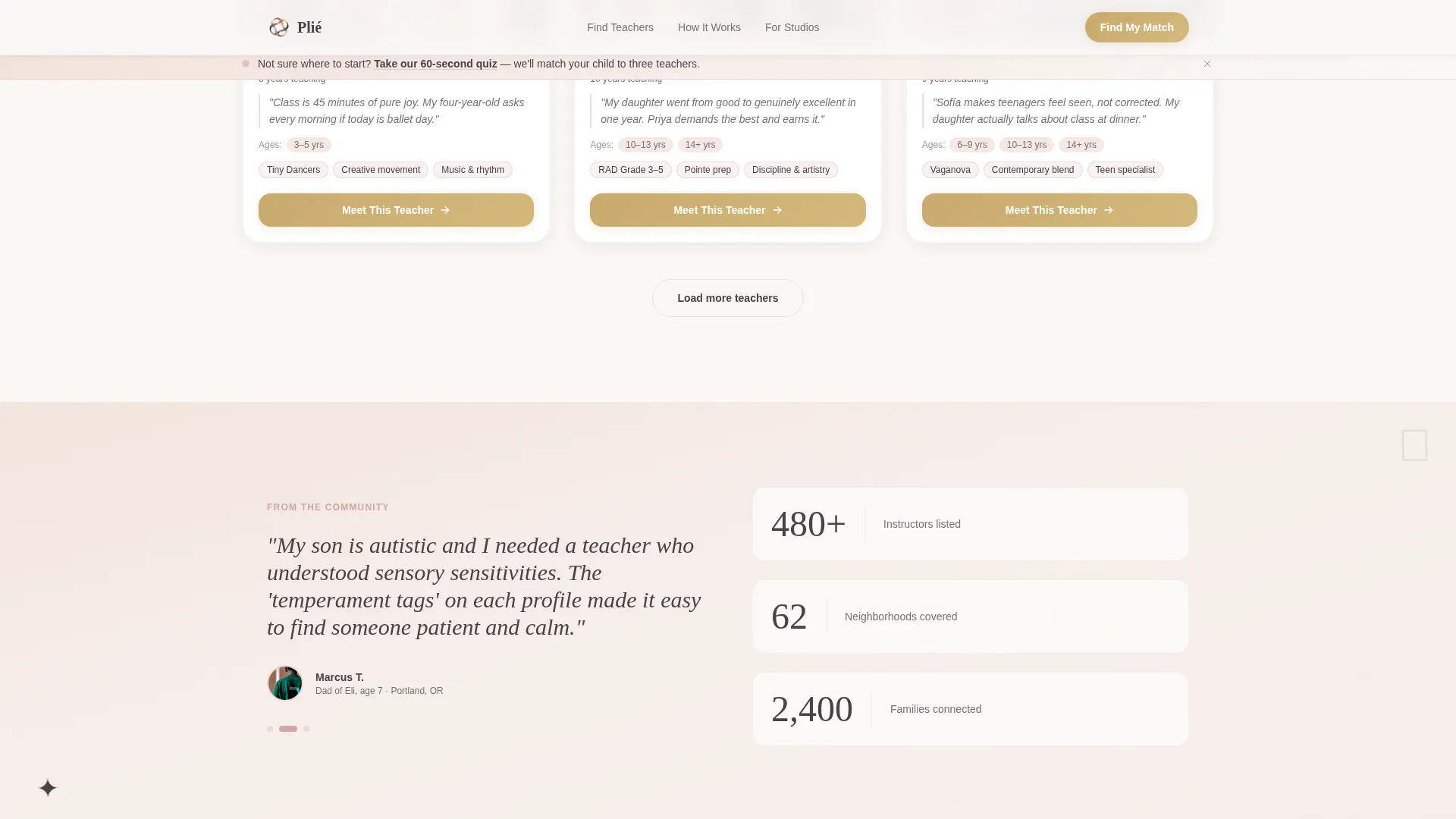
Between card rows, a rotating parent testimonial strip displays real quotes alongside three aggregate stat numbers covering instructors, cities, and families served. These interstitial moments add rhythm to the scroll and reinforce credibility without breaking the browsing flow.
Warm Gold "Meet This Teacher" Button
Every instructor card carries a call-to-action button in aged gold reading "Meet This Teacher." The button leads to a full instructor profile with class schedule, studio photos, and booking information. Hover states across the page use the same gold accent to create a consistent, inviting interaction layer.
Scroll-Reveal Animations and Staggered Grid
Cards load with staggered scroll-reveal animations, giving the grid a breathing, unhurried feel. Hover states lift individual cards slightly. The mosaic header uses a subtle tilt animation on load. All motion is set to medium intensity, never distracting, always reinforcing the handcrafted character of the page.
Page sections overview
| Section | Purpose |
|---|---|
| Hero mosaic header | Opens with a warm photo collage and floating headline to set the emotional tone |
| Quiz discovery banner | Offers a secondary path for unsure parents via a temperament-matching quiz |
| Instructor card grid | Presents filterable instructor profiles with portraits, quotes, and style tags |
| Testimonial stats interstitial | Builds credibility with rotating parent quotes and three key directory stats |
| How It Works panel | Explains the directory process through an asymmetric three-panel visual layout |
| Quiz call-to-action | Reinforces the quiz invitation with a warm pastel illustration |
| Page footer | Closes the page with a horizontal flow footer pattern |
Design & branding system
The visual identity follows a Warm Artisan theme built on the Cloud Canvas color system. Every choice, from palette to type, feels like something made by hand rather than assembled by algorithm.
- Color palette: soft chalk pink (#F2E0D9), warm linen white (#FAF7F4), muted ballet slipper rose (#D4A5A5), pencil graphite (#4A4148) for body text, and aged gold (#C9A96E) for hover states and rating stars
- Typography: Fraunces serif for display headlines and hand-script moments, DM Sans for body copy and card labels
- Visual style: Polaroid-imperfect image treatment, pastel ballet shoe illustrations between rows, and generous whitespace that lets the content breathe
Mobile & speed optimization
The template is built mobile-first, designed specifically for parents browsing on their phones while waiting in studio lobbies. Every layout decision prioritizes thumb-friendly readability and fast visual scanning.
- The card grid and mosaic header reflow cleanly for small screens without losing the Polaroid warmth
- Server components handle the static instructor grid for lighter initial loads, while client-side interactivity manages filter tabs and the quiz banner
How this template helps you convert
Every section is arranged to move a browsing parent steadily toward clicking through to an instructor profile or starting the quiz. The page earns the click rather than demanding it.
- The mosaic header and hand-script headline create immediate emotional connection, making a parent feel they have landed somewhere warm and trustworthy before reading a single word of body copy
- The instructor cards front-load social proof with real parent quotes and neighborhood context, so each "Meet This Teacher" click feels like a confident choice rather than a cold inquiry
- The quiz banner provides a low-pressure alternative path, reducing bounce for parents who feel overwhelmed and turning hesitation into an active, guided next step
Other information about this template
The Pli template is purpose-built for the kids ballet instructor directory niche inside the broader Kids and Family category. A few additional notes are worth knowing before you build.
- The template style is Card Grid (Modular), making it straightforward to add or remove instructor cards as your directory grows
- The Community Gallery creative direction means the page rhythm is intentionally browse-pause-feel, not a hard sales funnel
- The lp direction is Click-Through, so every section is calibrated to earn a profile visit rather than push an immediate form conversion
- The Photo Grid Mosaic header concept is designed for authentic photography; stock-perfect images will reduce the warmth the layout depends on
- Age group filter tabs are included for pre-ballet, creative movement, and technique-level classes, matching the directory's primary audience range from ages three through sixteen
Theme
Warm Artisan
Creative direction
Community Gallery
Color system
Cloud Canvas
Style
Card Grid (Modular)
Direction
Click-Through
Page Sections
Mosaic Photo Header with Headline
Filterable Instructor Card Grid
Quiz Matching Banner
Rotating Testimonial and Stats Strip
Warm Gold Call-to-action Buttons
Scroll-reveal and Staggered Animation
Related questions
Can I use this template for a single ballet studio instead of a directory?
How many instructor cards does the grid support?
Is the quiz feature a built-in interactive component?
Does the template include filter tabs for age groups?
Can I replace the default color palette with my own brand colors?



