Delhi Snow Removal Landing Page Template
Plowguard is a single-page landing page template built for Delhi snow removal businesses. It uses a comparison table layout, a bold Quote/Manifesto header, and a Transparent Process creative direction to convert property managers, restaurant owners, and HOA boards into clients. The Monochrome Steel palette and Executive Suite theme give it a cold-weather authority that competitors rarely match.
by Rocket studio
Quick summary
Plowguard is a high-trust landing page template for a Delhi snow removal operation. It opens with a stark manifesto header, then walks visitors through a transparent service breakdown, three-tier comparison tables, and two conversion paths: a gated Storm Preparedness Guide download and an interactive cost calculator. Every design choice projects operational confidence.
Who this template is for
This template is built for commercial snow removal companies in Delhi that serve time-sensitive clients. It works especially well for operations running multiple plows, salt spreaders, and sidewalk crews across several properties at once.
- Property managers handling multi-building portfolios who need to prove coverage to tenants
- Restaurant and retail owners whose revenue drops every hour a parking lot stays blocked
- HOA boards fielding resident complaints during early-morning snowfall events
What problem this template solves
Most snow removal websites list services without showing how they actually work. That vagueness breeds doubt, and doubt sends buyers to your competitor. This template solves the trust gap by making your entire operation readable on a single scroll.
- Buyers can see dispatch thresholds, equipment types, and surface-specific protocols before they ask
- The comparison table answers pricing questions with concrete numbers, not vague tiers
- Two distinct conversion paths serve buyers at different stages of the decision process
What you get with this template
You get a fully structured, single-page layout built around one core idea: showing everything so the buyer has no reason to hesitate. The page moves from manifesto to process to comparison to conversion without friction.
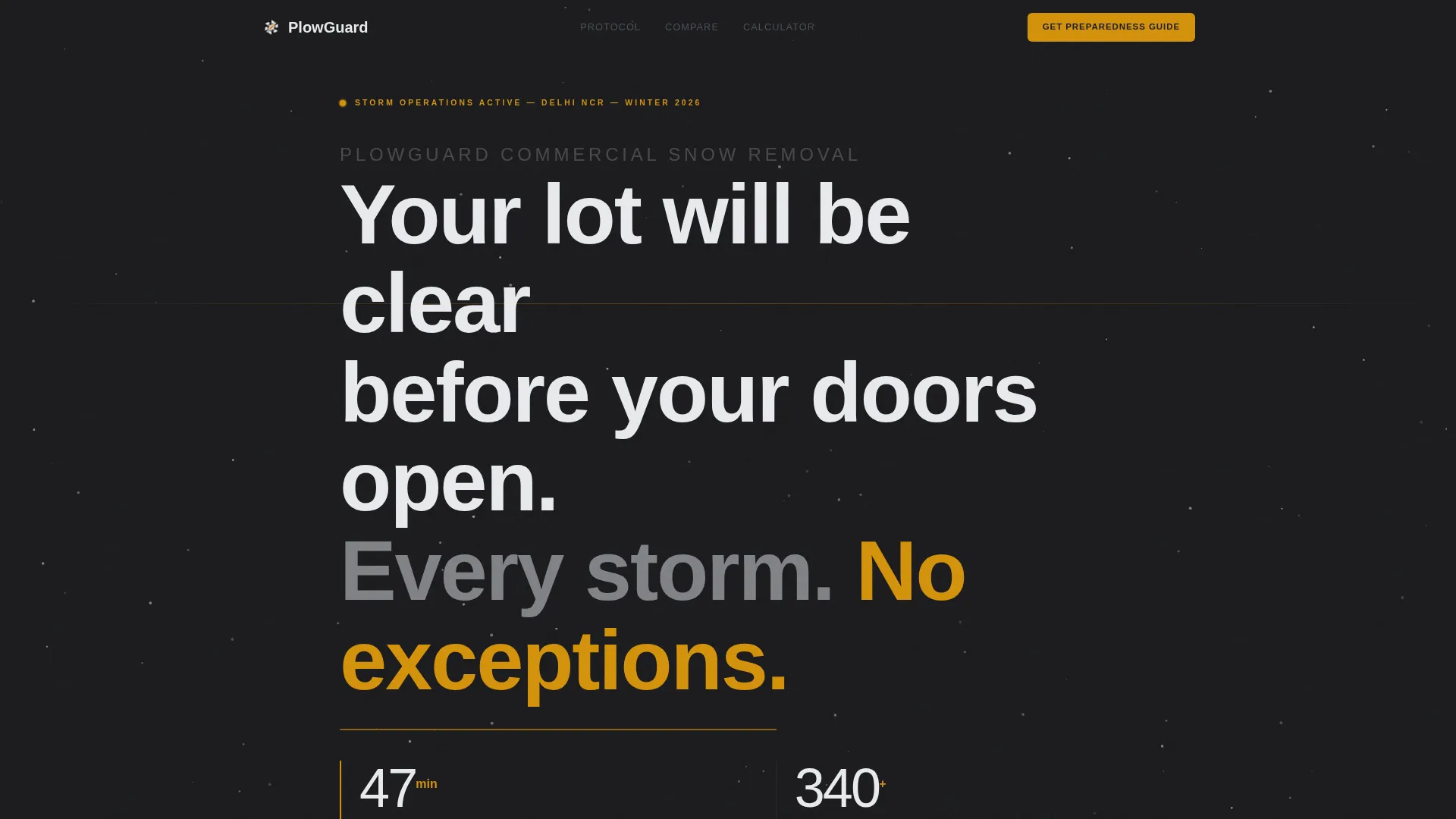
- A bold Quote/Manifesto header block with forge-black background and oversized geometric sans-serif typography
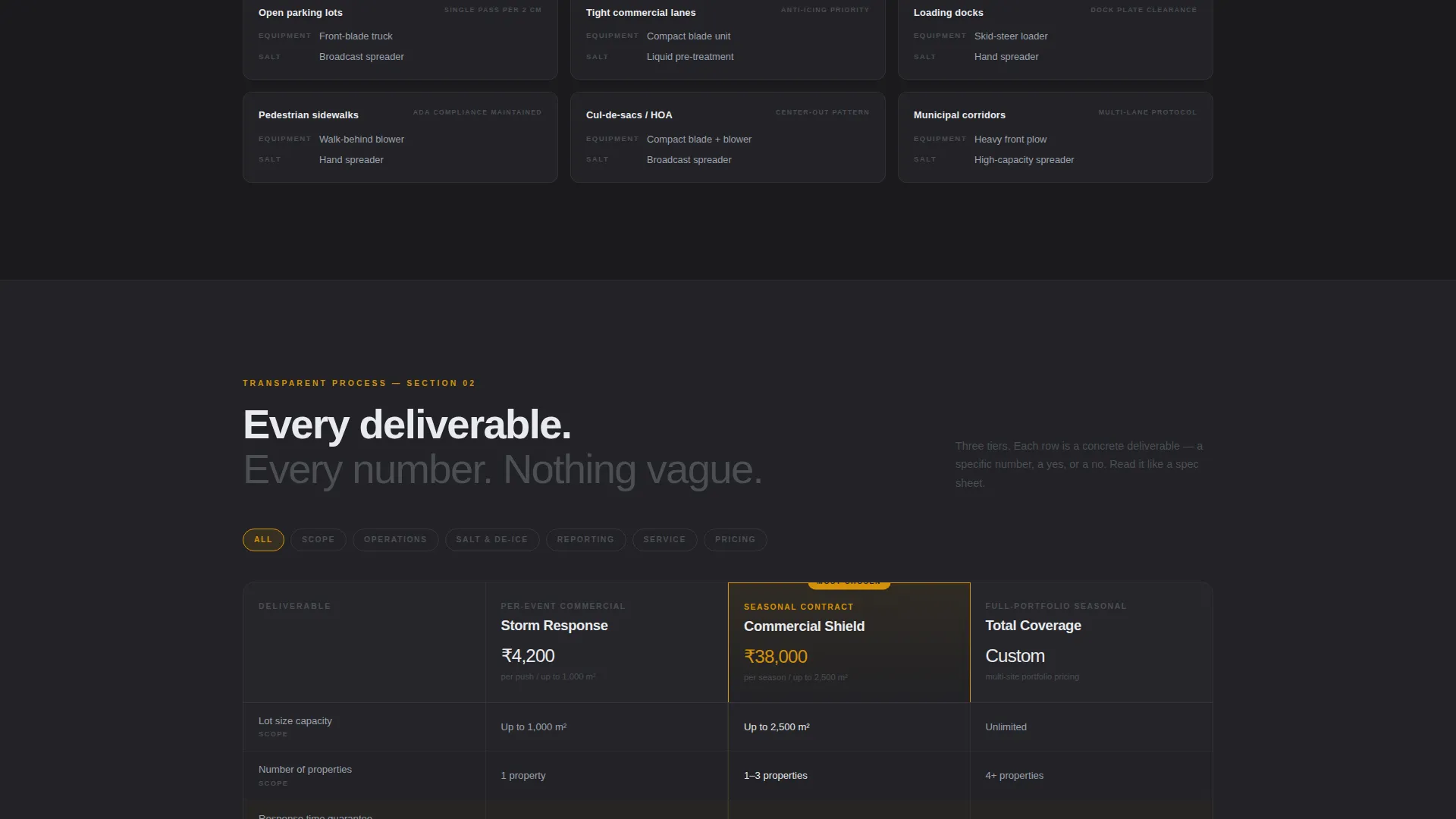
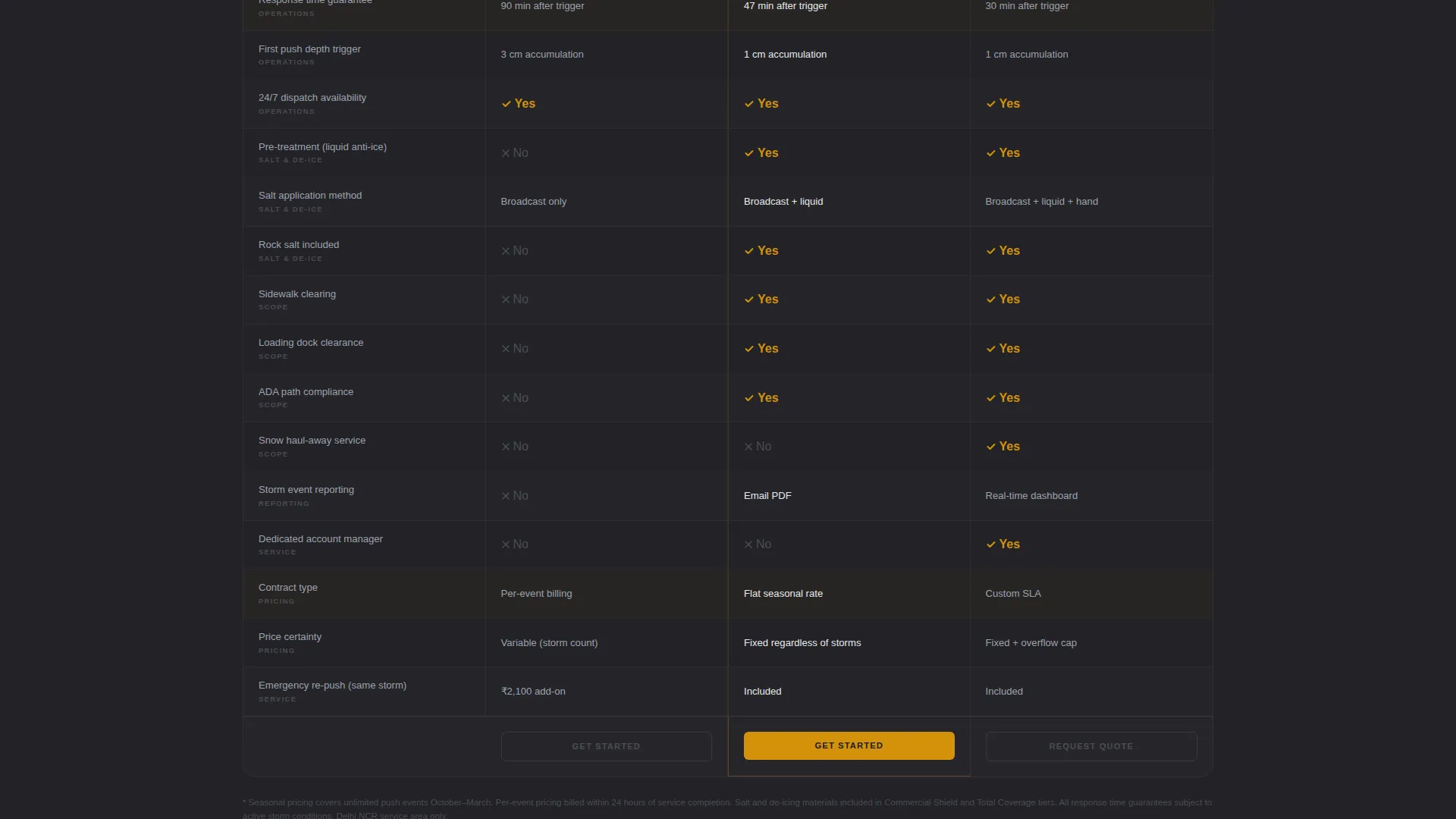
- A three-tier service comparison table with concrete deliverables in every cell
- A dual-call to action section with a gated guide download form and an interactive cost calculator
Feature list
This template includes six purpose-built sections, each with a defined visual role and conversion function.
Quote/Manifesto Header Block
The page opens on stark white text against forge-black, no photography, no distractions. A single line reads like a contract clause. Below it, a thin caution amber line draws the eye to the company's average response time. The effect is immediate and authoritative.
Three-Tier Comparison Table
Three service tiers sit side by side in a structured table. Each row covers a specific deliverable: lot size capacity, salt application method, sidewalk clearing, response time guarantee, and per-event versus seasonal pricing. Every cell contains a number or a clear yes/no. No vague descriptors are used anywhere in the table.
Trigger Protocol Section
This section reveals exactly how dispatch works. It shows the snowfall depth that starts operations, how routes get prioritized, and which equipment type is assigned to each surface. Visitors read it like a spec sheet from an engineering firm, which builds a different kind of trust than marketing copy ever could.
Gated Storm Preparedness Guide
The primary call to action offers a downloadable Storm Preparedness Guide. It is gated behind a single email field and a property-type dropdown with three options: commercial lot, residential community, and municipal contract. The gate is light enough to feel fair given the value of what is offered.
Interactive Cost Calculator
The secondary conversion path is a cost comparison tool. Visitors enter their current lot square footage and per-push rate. The calculator returns a side-by-side cost analysis against Plowguard's pricing. It turns abstract pricing into a concrete, personalized comparison.
Caution Amber Accent System
The amber accent color is used exclusively for calls to action and alert-state elements. This restraint keeps the palette feeling cold and professional while making every clickable element immediately visible. The color signals urgency without disrupting the Executive Suite tone.
Page sections overview
| Section | Purpose |
|---|---|
| Manifesto Header | Opens with a binding guarantee statement and response-time timestamp |
| Trigger Protocol Block | Explains dispatch depth thresholds, route priority, and equipment assignment |
| Comparison Table | Shows three service tiers with concrete per-row deliverables |
| Guide Download call to action | Gates the Storm Preparedness Guide behind email and property-type fields |
| Cost Calculator | Lets visitors compare their current contract cost against a live estimate |
| Footer / Contact | Closes the page with a direct contact path for immediate inquiries |
Design & branding system
The visual identity follows an Executive Suite theme built on a Monochrome Steel color palette. The overall feel is cold, precise, and built for trust rather than excitement.
- Four-color palette: forge-black (#1B1B1E), brushed gunmetal (#4A4E54), road-salt white (#E8EAED), and caution amber (#D4920B) reserved for calls to action and alerts only
- Typography is a geometric sans-serif set at oversized scale, tracked wide for maximum impact in the header
- Amber is used sparingly so that every interactive element stands out against the dark steel tones without breaking the professional mood
Mobile & speed optimization
The template is structured as a single-page layout, which keeps the total scroll path clean on both desktop and mobile viewports. The comparison table is the most complex component and is designed to remain readable at smaller screen sizes.
- Section-led flow means each block reads as a standalone unit, making mobile scanning natural
- The comparison table layout is built to reformat cleanly for narrower screens without losing cell content
- The form and calculator components use minimal fields, reducing friction on touch-based devices
How this template helps you convert
The page is built around two truths: buyers trust operations that show their work, and buyers convert when a next step feels low-risk. Every layout decision supports both.
- The Transparent Process direction answers objections before they form, reducing the back-and-forth that delays decision-making and giving buyers confidence to act on the same visit
- The dual-call to action structure serves two buyer stages at once: the guide download captures early-stage leads through a low-commitment exchange, while the cost calculator gives ready-to-buy visitors a direct comparison that moves them toward a contract conversation
Other information about this template
Plowguard is categorized under Professional Services and Delhi Local Services, making it a strong fit for any commercial snow removal operation targeting Delhi-area property owners and facility managers.
- The template style is a Comparison Table layout, suitable for operations with multiple service tiers or pricing structures
- The landing page direction is Content/Resource, meaning the primary conversion mechanism is a value-exchange download rather than a direct booking form
- The header concept is Quote/Manifesto, which works well for service businesses whose reliability is their main competitive advantage
- This template can support seasonal campaigns, contract renewal outreach, or year-round brand-building for snow and ice management companies

Theme
Executive Suite
Creative direction
Transparent Process
Color system
Monochrome Steel
Style
Comparison Table
Direction
Content/Resource
Page Sections
Quote/manifesto Header Block
Three-tier Comparison Table
Trigger Protocol Section
Gated Storm Preparedness Guide
Interactive Cost Calculator
Dual-cta Conversion Structure
Related questions
Can I customize the service tiers in the comparison table?
What does the interactive cost calculator do?
Is this template only suitable for Delhi snow removal companies?
How does the gated guide download work?
What is the landing page direction of this template?



