Commercial Cleaning Operations B2B Website Template
Spotless is a dashboard-style cleaning service landing page template built for commercial cleaning operations. It leads with a product screenshot header, escalating case study data grid tiles, and a two-step free site assessment form. The Monochrome Steel color system and stats-first layout communicate performance before a single word is read.
by Rocket studio
Quick summary
Spotless is a single-page, data-driven landing page template for commercial cleaning services. It opens with a dashboard screenshot hero, moves through escalating case study tiles, and closes with a two-step conversion form. Every section is built to show operational proof rather than stock photography, making performance the pitch.
Who this template is for
This template is designed for established commercial cleaning businesses that serve large-scale, professional clients. It works best when your operation already has numbers worth showing.
- Facility managers handling multi-building portfolios who need a credibility-first presentation
- Property management companies offering rapid unit turnover services with documented results
- Commercial cleaning operators targeting general contractors and post-construction sign-off clients
What problem this template solves
Most cleaning service pages rely on warm lifestyle photography and vague promises. Professional buyers in commercial and industrial settings do not respond to that. They want data, timelines, and proof of consistency before they ever fill out a form.
- Prospective clients have no quick way to verify your reliability or scale from a standard service page
- Generic cleaning templates fail to communicate operational metrics like turnaround time or job volume
- Two-step forms on most templates ask for contact details before delivering any value, reducing submission rates
What you get with this template
You get a fully structured landing page built around a dashboard visual identity and a stats-led narrative arc. Every section escalates trust before the conversion ask appears.
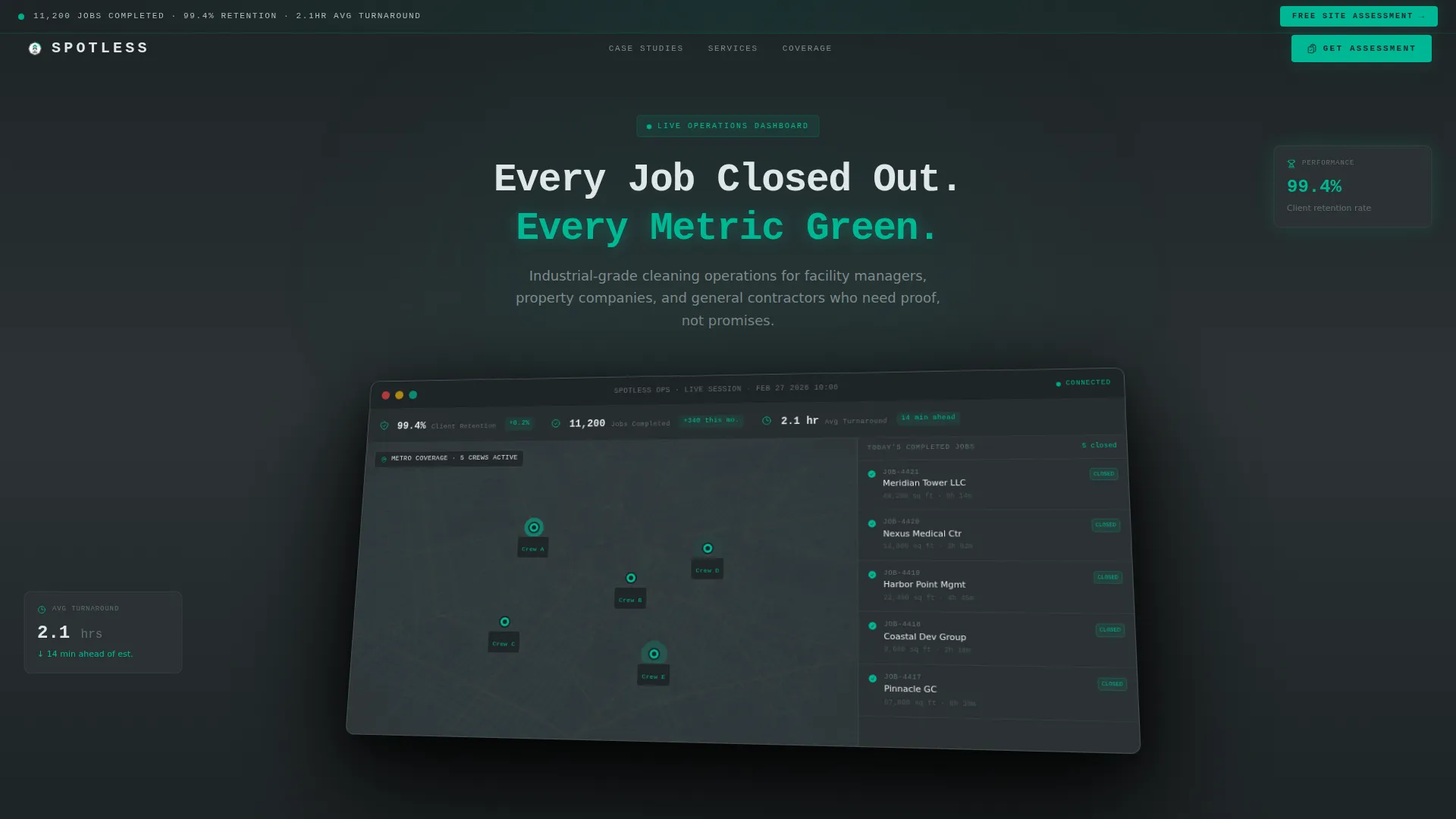
- A product screenshot hero section showing a simulated cleaning management dashboard with live crew pins and top-line stats
- Three escalating case study data grid cards covering a dental office, a corporate headquarters, and a post-construction hospital wing
- A two-step free site assessment form that delivers an instant estimate card before requesting contact details
Feature list
This template is built around specific functional sections and visual components. Each one is grounded in the brief rather than added for appearance.
Dashboard Screenshot Hero
The header features a pixel-perfect product screenshot of a cleaning management dashboard shown at a slight isometric tilt with a soft drop shadow. It displays live crew GPS pins, a cascading completed-jobs sidebar with green checkmarks, and a top-line stat bar reading 99.4% client retention, 11,200 jobs completed, and a 2.1-hour average turnaround. No stock photography is used; the screenshot itself is the proof statement.
Escalating Case Study Grid
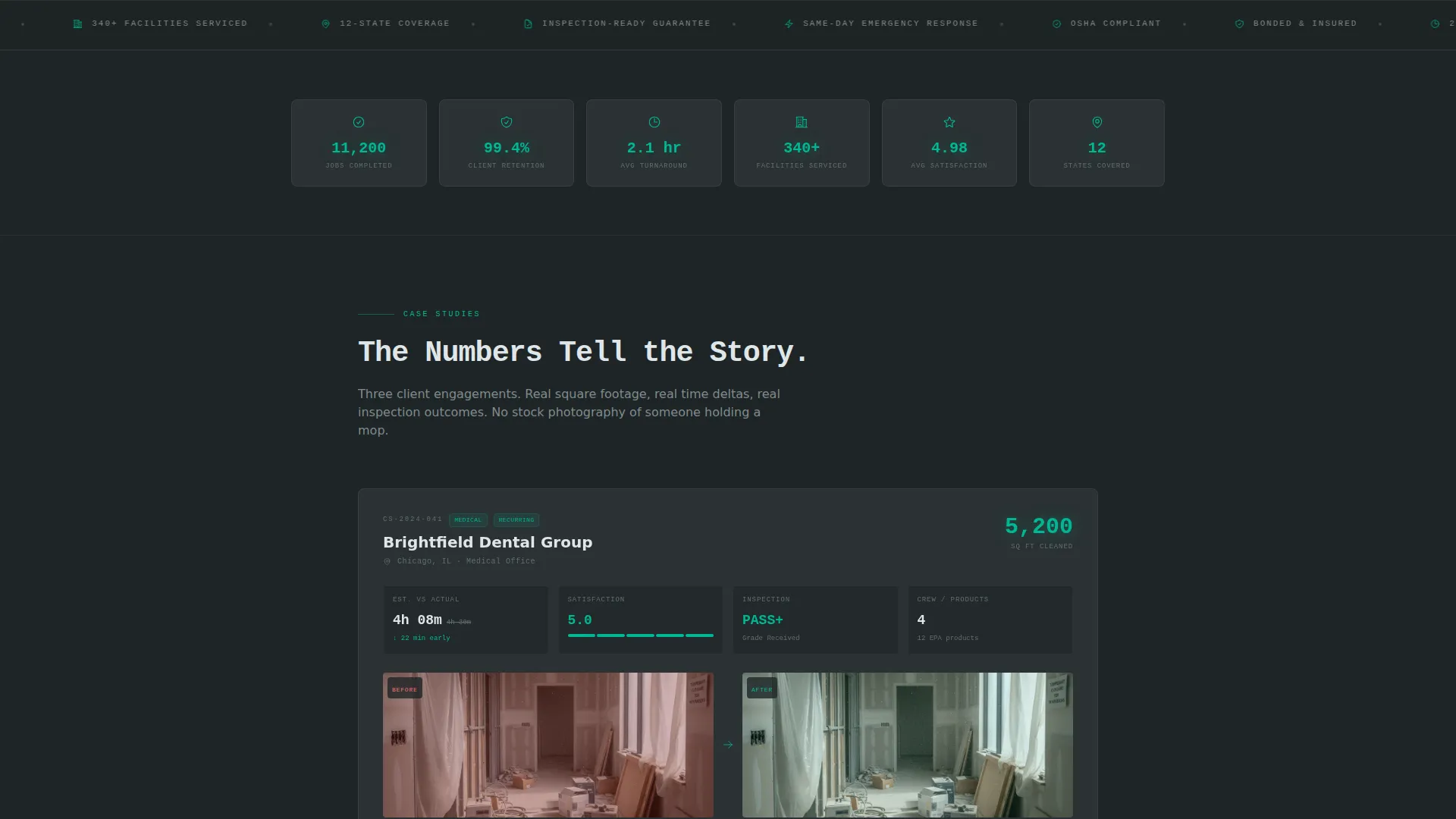
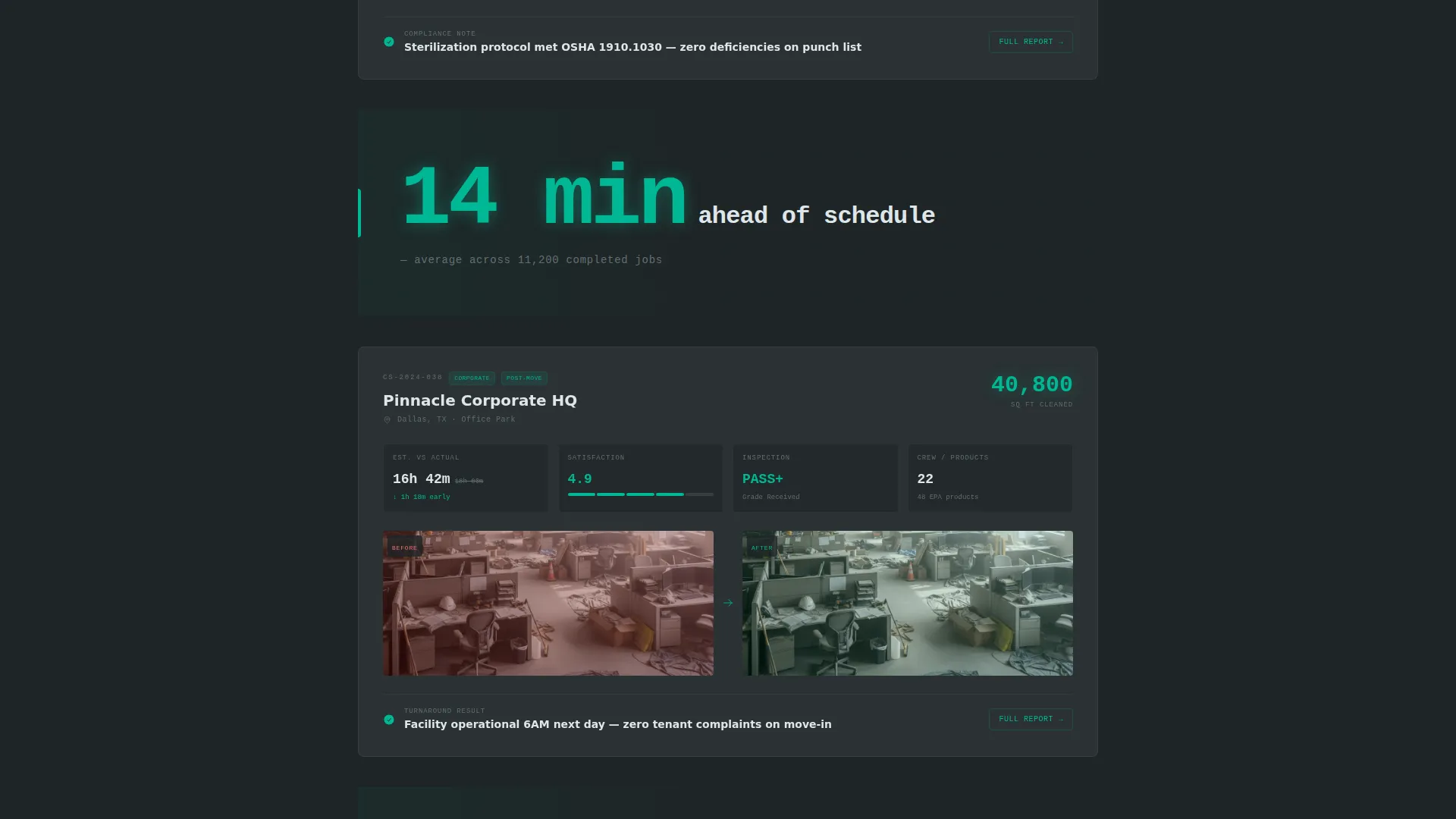
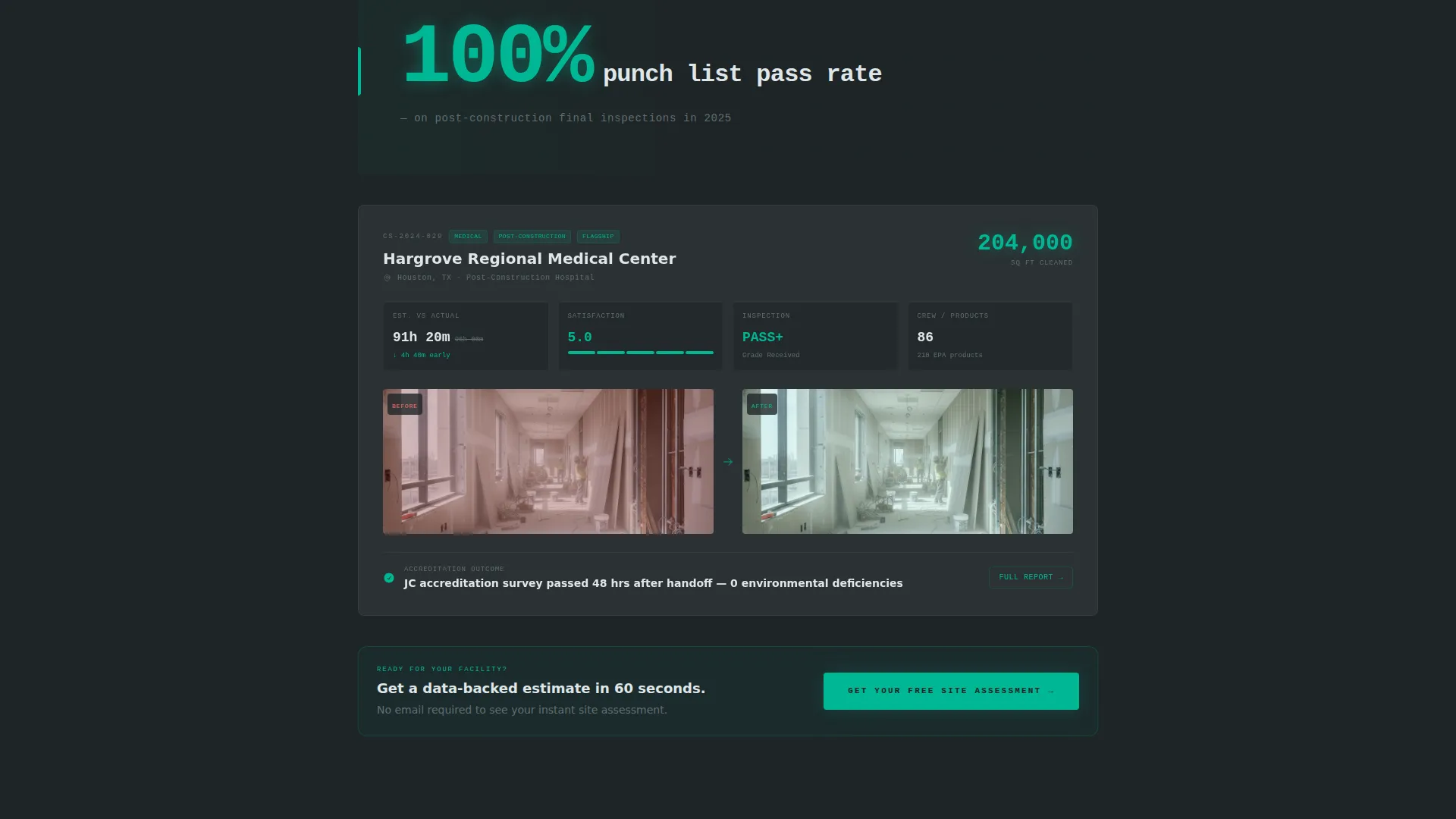
Three case study cards are arranged as data grid tiles, each showing a single client engagement. Each tile displays square footage cleaned, time-to-complete versus estimate, satisfaction score, and before-and-after inspection photo thumbnail pairs. The cards escalate in scale from a 5,000 square foot dental office to a 200,000 square foot post-construction hospital wing.
Single-Stat Interstitials
Between case study rows, full-width interstitial blocks display one oversized metric in monospaced typography against the dark gunmetal field. These breaks reset the reader's attention and reinforce the cumulative data story before the next card loads.
Two-Step Assessment Form
The primary conversion form collects only three fields in step one: facility type via dropdown, total square footage via slider, and zip code. Submitting step one reveals a personalized instant estimate card styled to match the dashboard tiles. Only then does the form ask for email and phone to unlock the full cleaning plan.
Persistent call to action Ribbon
A top-bar ribbon carries the primary call to action, "Get Your Free Site Assessment," from the very first scroll position. The same call to action reappears anchored below the third case study card, placed at the point of highest credibility in the page flow.
Monochrome Steel Color System
The entire page uses a four-token palette: gunmetal base (#2D3436), brushed aluminum (#636E72), clinical white (#DFE6E9), and a single signal-green accent (#00B894). The green is reserved exclusively for positive metrics, completed badges, and active call-to-action states, so it carries earned meaning every time it appears.
Page sections overview
| Section | Purpose |
|---|---|
| Persistent call to action Ribbon | Anchors the assessment offer at the top of every scroll position |
| Dashboard Screenshot Hero | Opens with operational proof via a simulated management dashboard |
| Top-Line Stat Bar | Displays 99.4% retention, 11,200 jobs, and 2.1-hour avg turnaround at a glance |
| Case Study Card One | Documents a 5,000 sq ft dental office engagement with full data grid |
| Stat Interstitial One | Punches through with a single oversized metric between card rows |
| Case Study Card Two | Documents a 40,000 sq ft corporate HQ engagement with grid and photo pairs |
| Stat Interstitial Two | Delivers a second single-metric break in monospaced type |
| Case Study Card Three | Documents a 200,000 sq ft post-construction hospital wing engagement |
| Assessment Form Step One | Collects facility type, square footage, and zip code before any contact ask |
| Instant Estimate Card | Returns a dashboard-styled estimate immediately after step-one submission |
| Assessment Form Step Two | Requests email and phone to unlock the full personalized cleaning plan |
Design & branding system
The visual identity follows a Dashboard Pro theme built on a Monochrome Steel palette. Every design decision prioritizes data legibility and earned-signal color use over decorative warmth.
- Four-token palette: gunmetal (#2D3436) as the base, brushed aluminum (#636E72) for secondary surfaces, clinical white (#DFE6E9) for light type on dark containers, and signal green (#00B894) reserved for completed states and active calls to action
- Dark containers carry all data tiles and case study cards, while light type floats above them at high contrast
- Monospaced typography is used for interstitial stat blocks to reinforce the dashboard and precision theme throughout
Mobile & speed optimization
The layout is designed to remain scannable and functional at smaller viewport sizes. Data grid tiles stack cleanly so card content stays readable without horizontal scrolling.
- Case study grid tiles reflow to single-column stacking on mobile, preserving before-and-after photo pairs and metric rows
- The two-step form fields, including the square footage slider and facility type dropdown, are sized for comfortable touch interaction
- Stat interstitials maintain their oversized mono-type impact at reduced scale without breaking the dark-field visual rhythm
How this template helps you convert
Every section in this template is sequenced to build trust before asking for anything. The conversion architecture is deliberate and tied to the data-first narrative.
- The dashboard screenshot hero and top-line stat bar establish credibility in the first viewport, giving professional buyers an immediate reason to keep scrolling rather than bouncing.
- The three escalating case study cards show documented results at increasing scale, so by the time the third card ends, the reader has already processed eleven data points proving operational reliability.
- The two-step form earns the click by delivering a personalized instant estimate card before requesting any contact details, reducing friction at the most sensitive moment of the conversion flow.
Other information about this template
This template sits in the Technology category under the Cleaning Service Website Templates subcategory, making it suitable for operators who want a tech-forward presentation. The Dashboard Pro theme and Stats-First Impact creative direction distinguish it clearly from lifestyle-led cleaning service pages.
- The template style is Dashboard and Data Grid, which makes it especially effective for case study pages targeting commercial and industrial facility buyers
- The Freemium and Trial landing page direction means the primary offer is a no-commitment free site assessment, lowering the barrier for first contact
- The Product Screenshot header concept is intentional: it positions the cleaning operation as a systems-driven business rather than a manual-labor commodity
- This template is well suited for the Cleaning Service Case Study Page niche, where the goal is to document and present past performance rather than describe generic service categories
Theme
Dashboard Pro
Creative direction
Stats-First Impact
Color system
Monochrome Steel
Style
Dashboard/Data Grid
Direction
Freemium/Trial
Page Sections
Dashboard Screenshot Hero Section
Escalating Case Study Data Grid
Oversized Single-stat Interstitials
Two-step Conversion Form
Persistent Top-bar Call to Action Ribbon
Monochrome Steel Visual System
Related questions
Can I update the case study numbers and client details to match my own jobs?
Does the two-step form require a backend or third-party service to work?
Is this template suitable for a residential cleaning business?
Can I change the signal-green accent color to match my brand?
How many case study cards does the template include?



