Fence Builder Business Professional Website Template
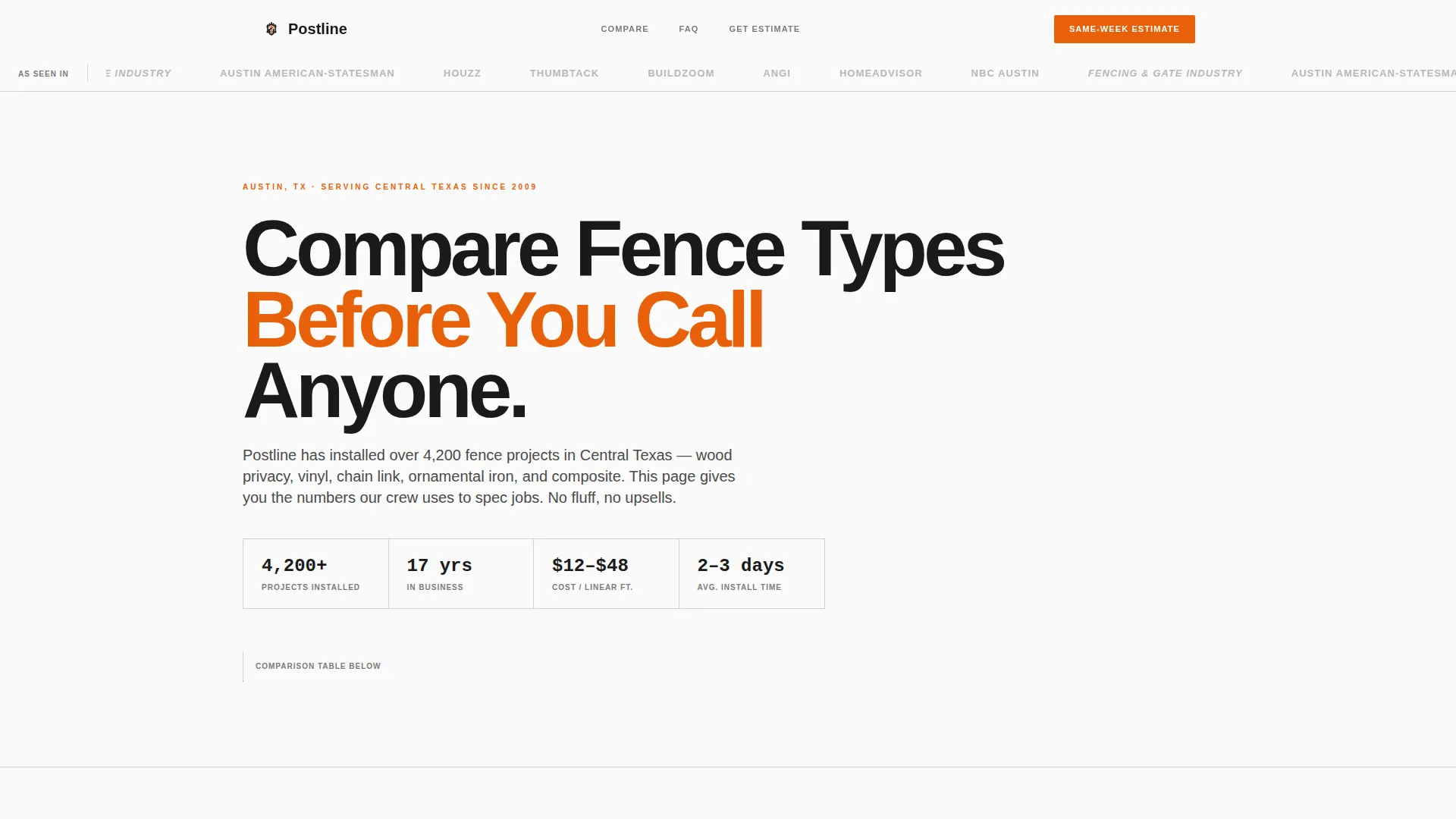
Postline is a single-page landing page built for fence contractors who need to earn trust before picking up the phone. It leads with a side-by-side fence-type comparison table, backs it with named expert answers, and converts visitors through a downloadable Fence Buyer's Guide and a short same-week estimate form. Clean, print-inspired design makes every detail feel credible.
by Rocket studio
Quick summary
Postline is a comparison-table landing page designed for fence builders. It opens with press-mention logos, moves into a structured fence-type comparison, and closes with two conversion paths: a downloadable buyer's guide and a quick estimate form. The Ink & Paper visual system keeps everything sharp, readable, and trustworthy from the first scroll.
Who this template is for
This template fits fence contractors who work across multiple material types and client segments. It is built for crews that handle residential, commercial, and contractor accounts without a dedicated sales team doing the explaining.
- Fence builders serving homeowners, property managers, and general contractors
- Contractors who install wood, vinyl, chain link, aluminum ornamental, and composite fencing
- Business owners who want to pre-qualify leads with clear, upfront pricing context
What problem this template solves
Most fence contractor pages ask visitors to call before giving them any real information. That creates friction and filters out the buyers who are closest to a decision. Postline solves this by delivering the comparison data first.
- Visitors leave other sites without enough detail to compare materials or budget
- Property managers and general contractors need structured information before approving a vendor
- Homeowners want to review options with a partner before committing to a quote call
What you get with this template
You get a fully structured single-page layout built around a detailed comparison table and a practical dual-conversion flow. Every section is designed to answer a specific question buyers carry before they reach out.
- A press-mentions header bar with logo placement for local media and trade publications
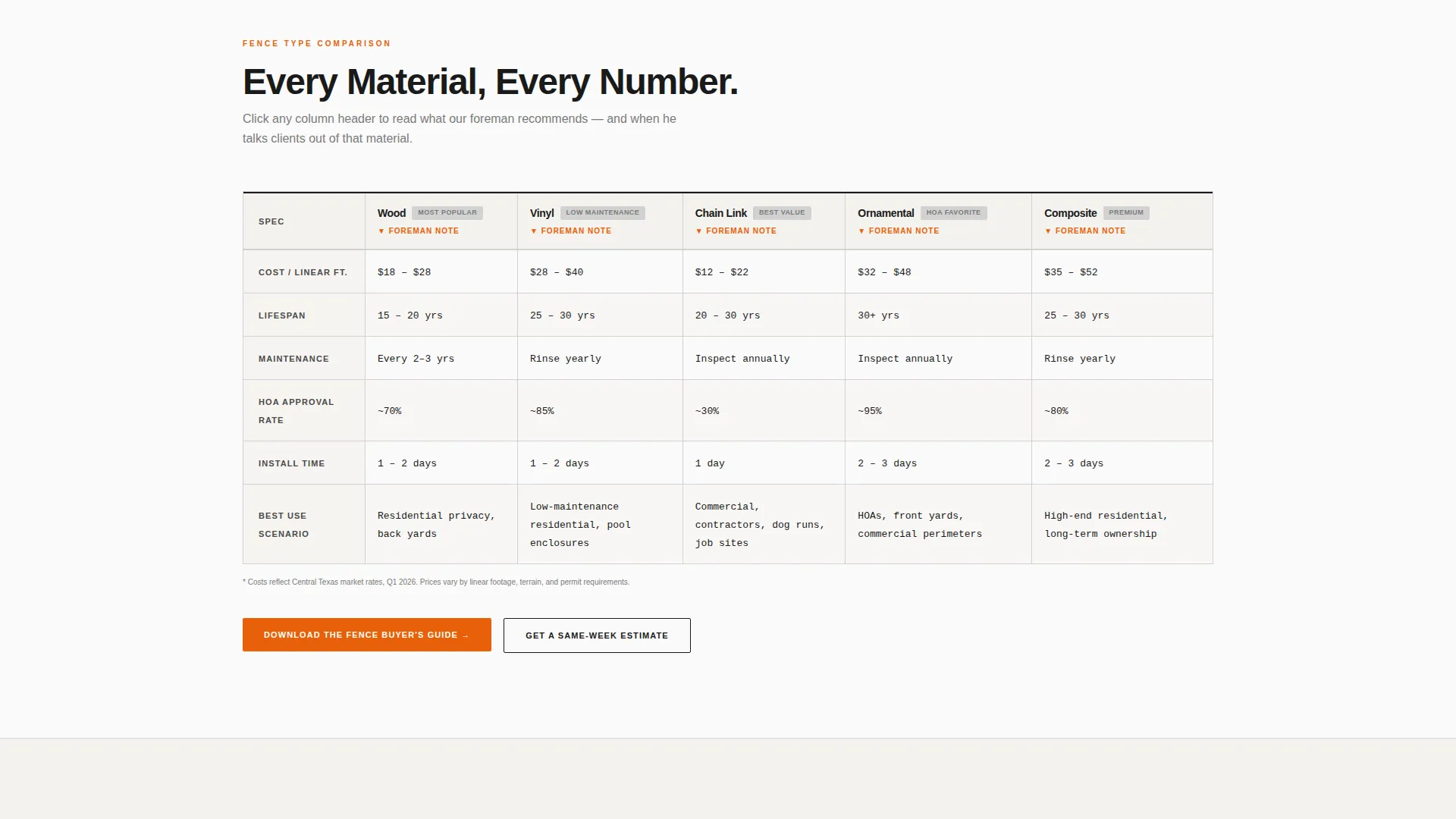
- A multi-row, multi-column fence-type comparison table with expandable expert commentary per column
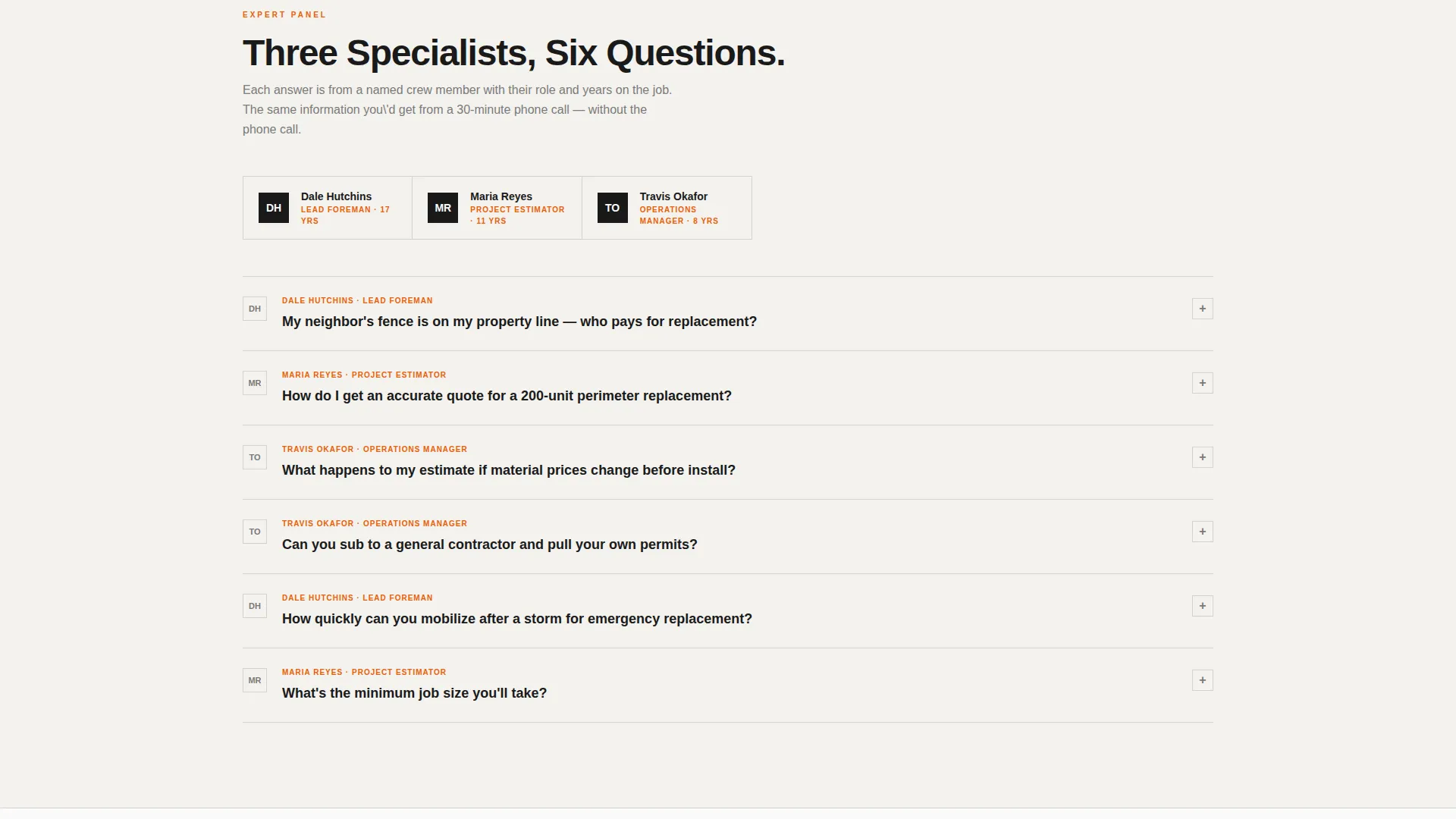
- A named-expert FAQ panel and two distinct conversion forms built into the page flow
Feature list
This template is built around a specific content and conversion architecture. Each feature below reflects what the brief describes and what the layout delivers.
Press Mentions Header Bar
A quiet top bar displays logos from local outlets and trade publications. It runs above the main headline and signals third-party recognition without competing with the core message.
Fence-Type Comparison Table
The comparison table spans five fence materials across rows covering cost range per linear foot, lifespan, maintenance frequency, HOA approval rate, and best-use scenario. Each column header is clickable and expands an expert-written paragraph explaining when that material is the right call and when it is not.
Named Expert FAQ Panel
Below the comparison table, an FAQ section attributes each answer to a specific team member by name, role, and years of experience. This gives the scroll the feel of consulting multiple specialists without requiring a phone call.
Dual Conversion Path
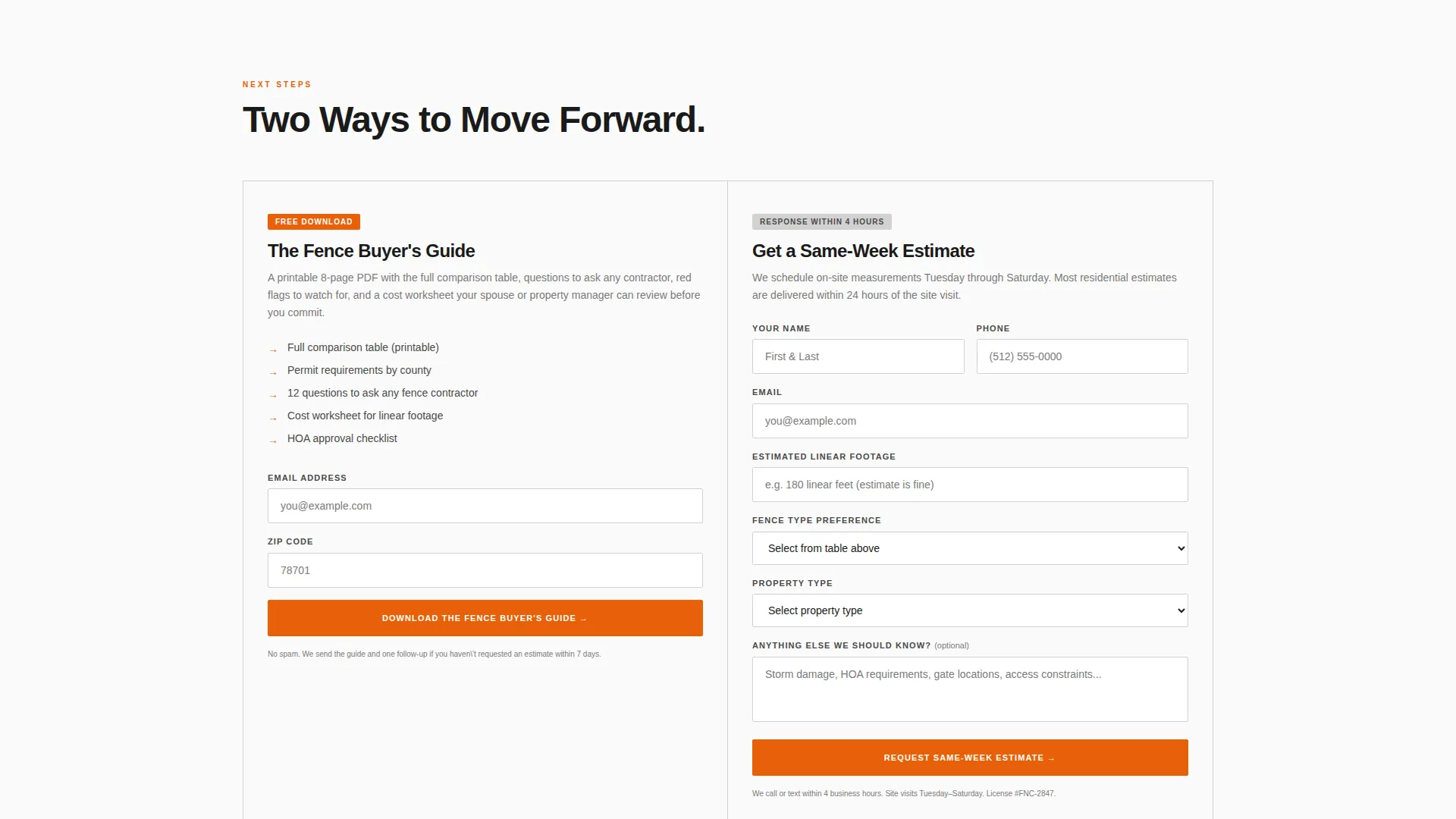
The primary conversion path offers a downloadable Fence Buyer's Guide in exchange for an email address and zip code. The secondary path is a short estimate form that captures linear footage, fence type preference, and property type. Both paths appear in the page flow and the mobile sticky bar.
Sticky Mobile Conversion Bar
On mobile, a persistent bottom bar keeps the primary call to action visible throughout the entire scroll. Visitors can download the guide without scrolling back to the top.
Service Utility Page Layout
The overall layout follows a Service Utility theme. Sections flow like a printed spec sheet, with each block of content answering one specific buyer question before moving to the next.
Page sections overview
| Section | Purpose |
|---|---|
| Press Mentions Bar | Establish authority with recognized logos above the headline |
| Main Headline Block | State the comparison offer and name the service area |
| Fence Comparison Table | Side-by-side material data across five fence types |
| Expandable Column Detail | Expert foreman commentary per fence type on click |
| Buyer's Guide call to action | Primary conversion form collecting email and zip code |
| Named Expert FAQs | Specialist answers by role and years of experience |
| Same-Week Estimate Form | Secondary conversion capturing footage, type, and property |
| Mobile Sticky Bar | Persistent guide download call to action during mobile scroll |
Design & branding system
The visual identity uses the Ink & Paper color system. Everything on the page feels like a freshly printed spec sheet rather than a polished marketing site.
- Flat white stock (#FAFAFA) as the base background, carbon black ink (#1A1A1A) for all body text and headings
- Pencil-line gray (#D2D2D2) on table borders and section dividers for clean structural separation
- Contractor orange (#E8600A) reserved for call-to-action buttons and active row highlights in the comparison table
Mobile & speed optimization
The layout is structured for a clean mobile experience. The comparison table and conversion forms remain functional and readable on smaller screens without requiring horizontal scrolling.
- Sticky bottom bar keeps the primary guide download call to action visible throughout the mobile scroll
- Table columns are structured for readability on narrow viewports
- No hero image, gradients, or decorative assets means the page loads lean from the top
How this template helps you convert
The conversion architecture is layered intentionally. Visitors absorb information before they see any form, which means the people who reach the call to action are already warm.
- The comparison table delivers upfront material data, so visitors arrive at the conversion form already informed and ready to take a next step.
- The Fence Buyer's Guide call to action uses a low-friction two-field form, making the first conversion easy enough for a visitor who is not yet ready to request a quote.
- The same-week estimate form captures high-intent visitors who have already reviewed the table and are ready to move toward a real conversation.
Other information about this template
This template is part of the Postline design family, built for trade and professional service businesses that earn trust through transparency rather than visual polish. It suits fence builder businesses operating in competitive regional markets where pre-sale education shortens the sales cycle.
- The no-image header approach lets press-mention logos and direct language carry the authority signal
- The expert panel creative direction is designed to feel consultative, not promotional
- The Content/Resource landing-page direction means the guide download doubles as a lead capture asset that can be shared between decision makers before a quote is approved
- The template style is a Comparison Table layout, making it especially useful for fence builders who want to position themselves as the knowledgeable regional reference rather than just another bidder
Theme
Service Utility
Creative direction
Expert Panel
Color system
Ink & Paper
Style
Comparison Table
Direction
Content/Resource
Page Sections
Fence-type Comparison Table
Press Mentions Header Bar
Named Expert FAQ Panel
Dual Conversion Path Design
Sticky Mobile Conversion Bar
Service Utility Page Layout
Related questions
What fence types does the comparison table cover?
Who is this landing page template built for?
Does the page support two conversion goals at once?
Does the template include a hero image in the header?
Is the landing page layout suitable for both residential and commercial fence work?



