Expert Surgical Booking Landing Page Template
Grasp is a sidebar companion landing page template built for hand surgeons who want to convert anxious patients into booked virtual consultations. It pairs an Organic Flow design system with a Transparent Process structure, walking visitors through anatomy, procedure steps, and recovery milestones while a persistent progress checklist tracks their engagement and builds the confidence to book.
by Rocket studio
Quick summary
Grasp is a single-page, sidebar companion template designed for hand surgery virtual consultation services. It uses a scroll-linked progress checklist, annotated medical illustrations, and a step-by-step procedure walkthrough to deliver surgical transparency at every section. The design is desktop-first, with a warm Arctic White palette and a living sage accent that pulses on every clickable element.
Who this template is for
This template is built for hand surgeons and specialist medical practices that provide virtual consultation services. It is the right fit for any surgeon who wants to replace patient anxiety with informed confidence before a single word is exchanged in a consult room.
- Hand surgeons offering virtual consultations for conditions such as tendon lacerations, trigger finger, carpal tunnel, or Dupuytren's contracture
- Medical practice managers creating a dedicated conversion page for surgery inquiry traffic
- Healthcare web designers and developers who need a fully structured, design-ready starting point for a hand surgery specialty page
What problem this template solves
Patients researching hand surgery face a wall of clinical language, unformatted procedure descriptions, and no clear sense of what will happen to them. That uncertainty kills bookings. Most hand surgery pages fail to provide the depth of explanation that anxious patients actually need before they will choose to take action.
- Patients cannot understand their diagnosis or the surgical steps involved, so they leave without booking
- Surgeons lose qualified leads because their page does not deliver the transparent process that builds real trust
- Practice staff face a high number of phone inquiries asking basic questions that a well-designed page could answer first
What you get with this template
Grasp delivers a fully structured, design-ready landing page set built specifically for hand surgery virtual consultation services. Every section is formatted to guide visitors from first curiosity through to a booked appointment, using illustrated content and a scroll-linked sidebar that tracks their reading progress.
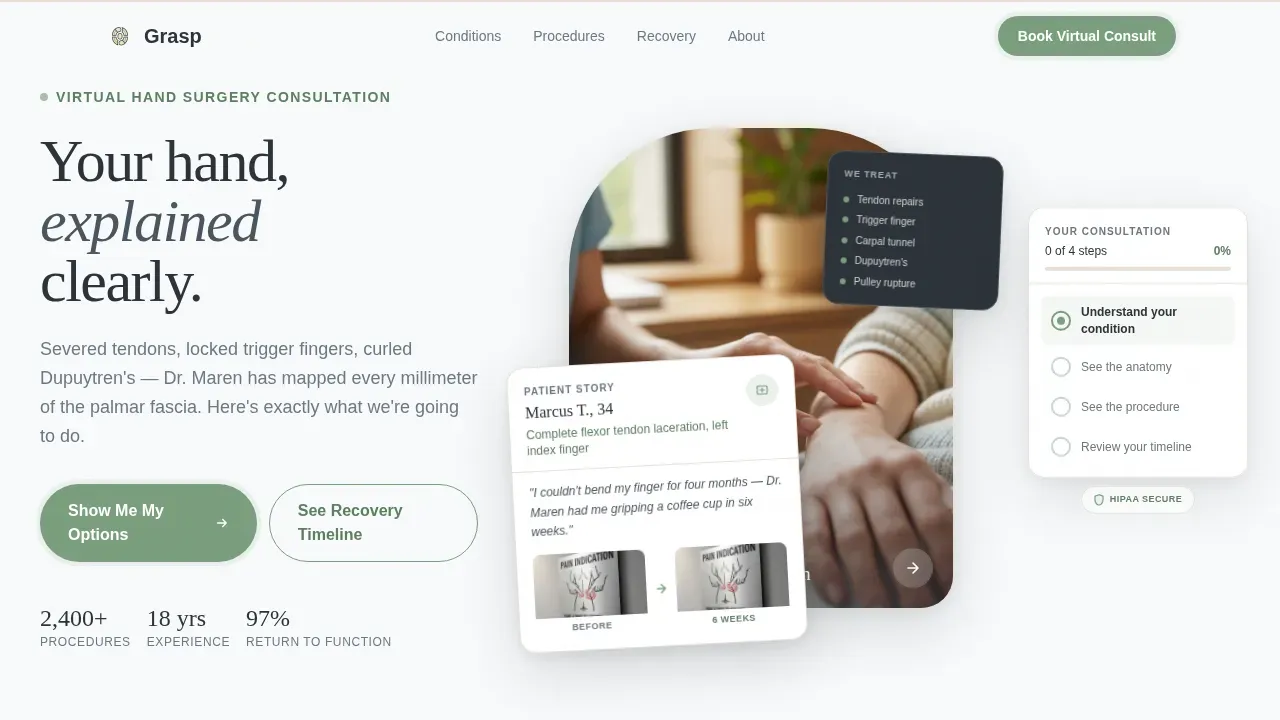
- A hero section featuring a floating Testimonial Card with patient name, plain-language diagnosis, outcome sentence, and before/after range-of-motion photo pair
- A persistent sidebar checklist fixed to the right panel, creating a visible progress tracker that fills in as the visitor scrolls through each section
- Five fully designed scroll sections including condition anatomy, procedure walkthrough, recovery timeline, and a final trust consolidation panel with credentials and primary call-to-action
Feature list
This template is built around creating a transparent, patient-first experience that converts education into action. Each feature below is included by design, not as an add-on.
Scroll-Linked Sidebar Progress Tracker
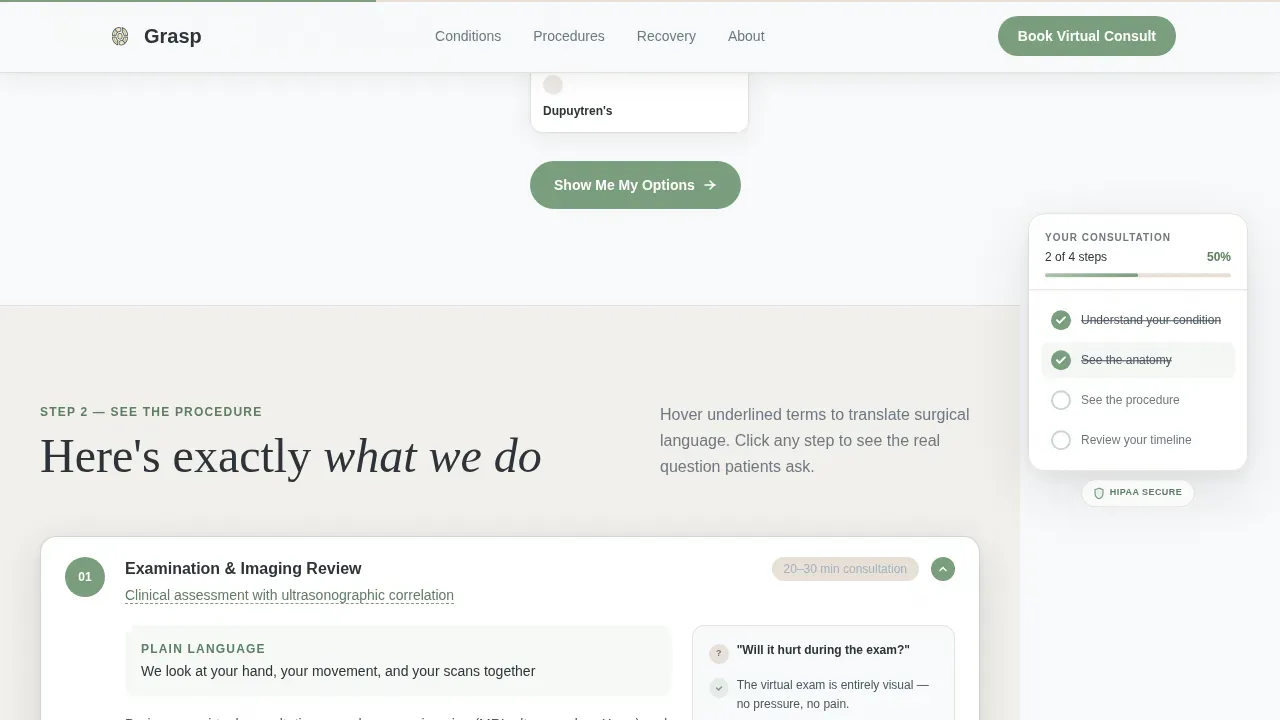
The sidebar companion stays fixed on the right as the visitor scrolls. It fills in four checklist items in sequence: understanding the condition, seeing the procedure, uploading imaging, and choosing a time. By the time all checkmarks are complete, the visitor has already invested real attention. Booking feels like a natural next step, not a cold ask.
Floating Testimonial Card Header
The hero opens with a softly shadowed card set over a blurred clinical background. It displays a patient's first name, their diagnosis in plain language, a single sentence describing their outcome, and a before/after photo pair showing range of motion before and after surgery. This design choice enhances trust from the first moment a visitor arrives on the page.
Illustrated Anatomy and Procedure Walkthrough
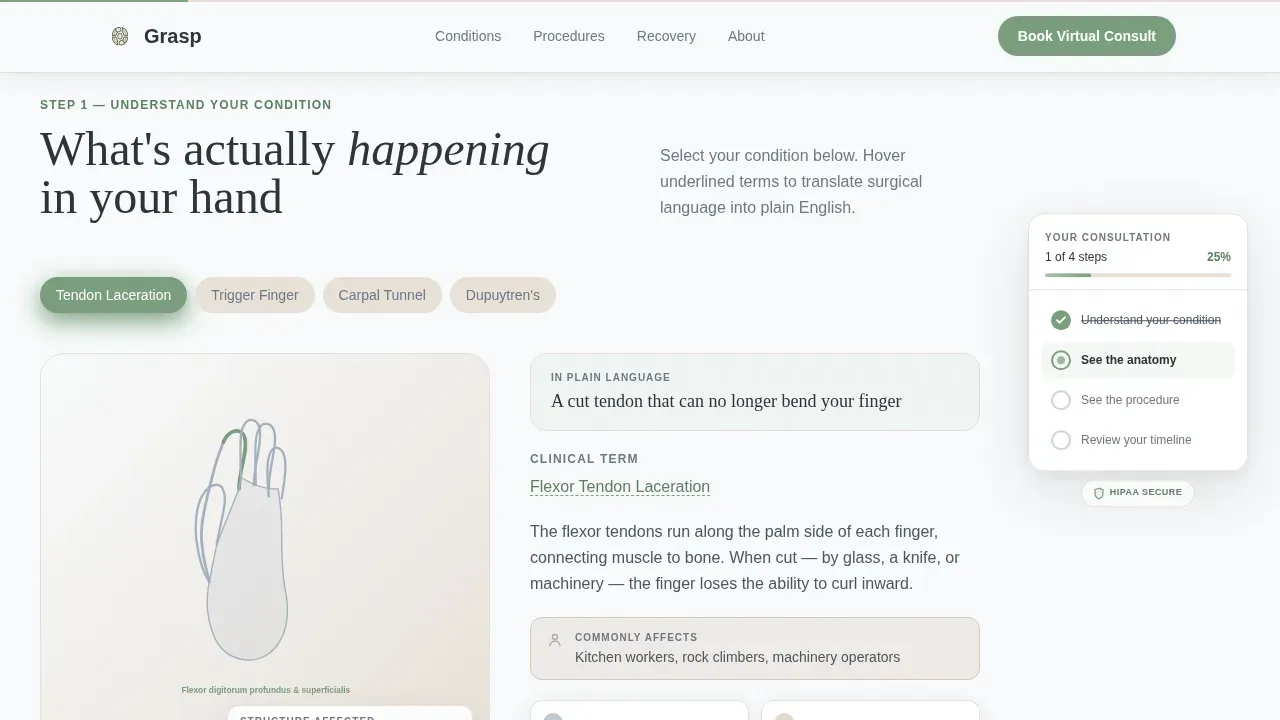
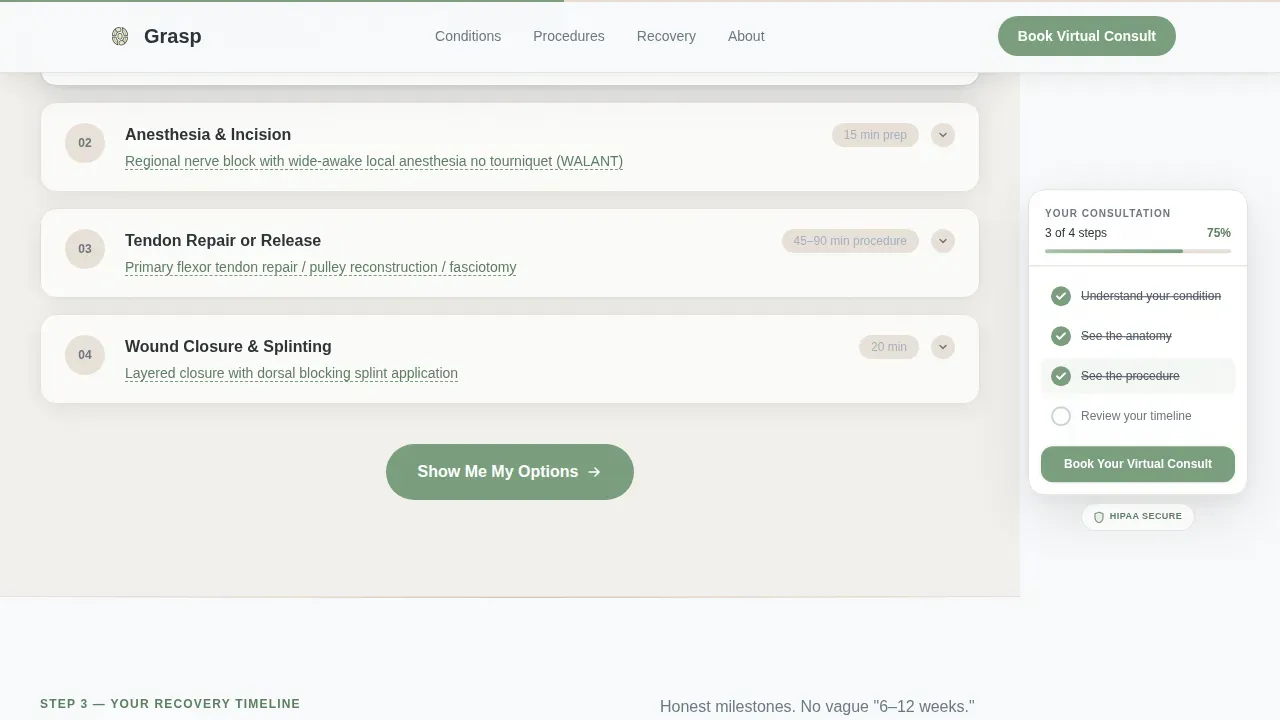
Each scroll section uses clean medical illustrations rather than photographs. An annotated hand diagram highlights the relevant anatomical structure. The procedure walkthrough delivers step-by-step illustrations with real-time jargon translation via hover tooltips, giving users immediate access to plain-language explanations of complex surgical terms.
Visual Recovery Timeline
The recovery section maps milestones week by week. Week one shows a splint. Week four shows therapy putty. Week twelve shows a full grip restored. This visual timeline delivers the depth of information patients are looking for, addressing the questions they feel uncomfortable asking directly: Will it hurt? Will it work? How long until I can use my hand again?
Progressive Call-to-Action System
Each scroll section closes with a call-to-action that deepens in commitment as the visitor moves forward. The first prompt reads "Show Me My Options." The final panel delivers "Book Your Virtual Consult." No form appears on the landing page itself. The click passes the visitor to a scheduling tool pre-filtered by condition type, keeping the page focused on education and the handoff clean.
Credentials and Trust Consolidation Panel
The final section is designed to display board certifications, fellowship training, and professional affiliations prominently. Surgeon expertise is presented with the same precision and clarity as the procedure content, giving patients the data they need to feel confident in the surgeon's qualifications before they book.
Page sections overview
| Section | Purpose |
|---|---|
| Hero Testimonial Card | Opens with patient outcome proof and range-of-motion photo pair |
| Sidebar Progress Checklist | Tracks scroll depth and fills checklist items as visitor reads |
| Condition Anatomy Diagram | Illustrated hand diagram with highlighted structures and hover tooltips |
| Procedure Walkthrough | Step-by-step medical illustrations with translated surgical terminology |
| Recovery Milestone Timeline | Week-by-week visual timeline from splint to full grip |
| Trust and Credentials Panel | Displays surgeon qualifications, affiliations, and primary booking call-to-action |
| Footer | Linear single-row pattern with practice information |
Design & branding system
The design system is built on an Organic Flow theme using an Arctic White color palette. The result feels like a freshly prepped operating suite where someone placed a single fern on the windowsill: sterile but breathing, precise but humane. Typography uses Fraunces for serif headlines and DM Sans for body text, a pairing that carries both clinical authority and human warmth.
- Color system: clinical snow (#F8FAFB) for backgrounds, warm bone (#E8E0D8) for secondary surfaces, surgical steel (#A3B1BF) for supporting elements, living sage (#7A9E7E) for all interactive elements and progress indicators, and deep graphite (#2C3339) for body text
- The sage accent appears only on clickable elements and checklist progress markers, giving every interactive moment a sense of gentle, purposeful energy
- Illustrations are clean line-art medical diagrams, not photographs, keeping the visual language consistent with the Transparent Process creative direction throughout
Mobile & speed optimization
Grasp is designed desktop-first to support the fixed sidebar companion panel, which requires a two-column layout to work as intended. On smaller screens, the sidebar converts to a bottom sticky bar, preserving the progress-tracking role without interrupting the scroll experience. Fast loading is a priority in the design approach, as patients researching surgery are often on mobile devices and will leave a page that does not respond quickly.
- Desktop layout uses a fixed right-panel sidebar with a main scroll column, allowing the checklist and content to work in parallel
- Mobile fallback converts the sidebar to a sticky bottom bar, maintaining progress visibility on any device
- Server Components handle static content sections while Client Components power the sidebar tracker and jargon tooltips, keeping the interactive elements running without slowing the overall page
How this template helps you convert
The Transparent Process structure is the core conversion mechanism. Every design and content decision in Grasp is built around creating informed patients who book with confidence rather than hesitating out of fear. The page earns the click by delivering real value before asking for anything in return.
- Education first, commitment later: each scroll section answers a specific patient fear before presenting the next call-to-action, so the visitor arrives at "Book Your Virtual Consult" already feeling prepared and reassured rather than pressured
- Visible progress creates momentum: the sidebar checklist gives users a tangible sense of how far they have come, making it psychologically easier to complete the journey and take action at the end
- Credential transparency builds authority: featuring board certifications, fellowship training, and procedure-specific expertise in the final panel provides the data-backed reassurance that patients need to choose a surgeon they have never met in person
Other information about this template
Grasp is a ready-to-use template that fits naturally into the workflow of medical web designers, practice marketing teams, and no-code platform users who need a high-quality starting point without building from scratch. AI-powered tools can streamline the process of creating landing pages for medical services, and this template is built to work well with that approach. Using AI, users can generate and customize landing pages from natural language prompts, making the process accessible to teams without traditional programming skills.
- The template is inspired by the Transparent Process creative direction, which involves sharing clear information regarding clinical outcomes, medical procedures, and financial costs so that patients face no surprises
- The color system and typography set are fully documented, allowing design teams to adapt the palette and typefaces to fit an existing practice brand without rebuilding the layout
- The Grasp transparent process hand surgeon landing page template is formatted for the Health and Medical category and is compatible with hand surgery specialty practices, virtual consultation services, and hospital-affiliated surgical programs
- Compatibility with modern front-end frameworks is supported through the Server and Client Component architecture described in the project details, giving development teams the advantage of a structured, production-ready codebase
- The template includes references to surgical instrument precision in the procedure walkthrough section, which can support educational content about tools such as Force Feedback instruments that allow surgeons to sense forces on patient tissue, or energy instruments that deliver precise control during surgery
- Surgeon credential sections can reference a medical degree, fellowship training, and years of specialized experience, with space to display an MD designation and any affiliated hospital or practice group
- The template is designed with patient safety as a guiding principle: every section of content is structured to give patients access to the information they need before, during, and after the decision to book
- No-code platform users can explore this template and begin running a live virtual consultation page without writing a single line of custom code
Theme
Organic Flow
Creative direction
Transparent Process
Color system
Arctic White
Style
Sidebar Companion
Direction
Click-Through
Page Sections
Scroll-linked Sidebar Progress Tracker
Floating Testimonial Card Hero
Illustrated Anatomy and Jargon Tooltips
Visual Recovery Milestone Timeline
Progressive Call-to-action System
Credentials and Trust Consolidation Panel
Related questions
Does this template include a booking form on the landing page?
Can the surgeon credentials section display board certifications and fellowship training?
How does the sidebar checklist work on mobile devices?
Can I adapt the color palette and typography to match an existing practice brand?
What types of hand surgery conditions does this template support?



