Pharmaceutical Marketing & Agency Advanced Portfolio Website Template
Prescribe is a bento grid landing page template built for pharmaceutical pay-per-click agencies that need to signal credibility fast. It layers a collage-style header, case study narrative scroll, and a three-step progressive lead form into one polished, obsidian-and-gold design. The result is a page that earns trust through proof before it ever asks for a commitment.
by Rocket studio
Quick summary
Prescribe is a single-page bento grid template designed for pharmaceutical pay-per-click agencies. It combines a layered collage header, scrollable case study narrative sections, and a structured lead generation flow into one cohesive experience. The Tech Glass visual theme and obsidian-and-gold color system give the page an authoritative, data-forward feel that resonates immediately with pharma marketing professionals.
Who this template is for
This template is built for specialist paid search agencies operating inside the pharmaceutical industry. It speaks directly to the teams and individuals who understand what compliant campaign management actually costs and why generic agencies routinely fall short.
- Marketing directors at mid-cap pharmaceutical companies launching branded direct-to-consumer campaigns
- Regulatory affairs teams managing Google Ads disapprovals and Office of Prescription Drug Promotion submission queues
- Agency-of-record leads outsourcing search buys to specialists with genuine indication-specific keyword expertise
What problem this template solves
Pharma pay-per-click agencies face a credibility gap that generic portfolio templates cannot close. Prospective clients arrive with hard questions about FDA fair balance requirements, indication-specific keyword architecture, and OPDP review processes. A template built without that context looks wrong before a single word is read.
- Standard portfolio pages bury proof points and delay trust, causing qualified visitors to leave before a conversion path appears
- Regulatory-aware clients need to see evidence of compliance fluency, not just design polish, before they consider a call
- Lead forms that ask for too much too soon lose prospects who are evaluating multiple agencies simultaneously
What you get with this template
Prescribe delivers a fully structured bento grid landing page that combines visual impact with a deliberate conversion architecture. Every layout decision supports the specific sales motion of a pharmaceutical pay-per-click agency.
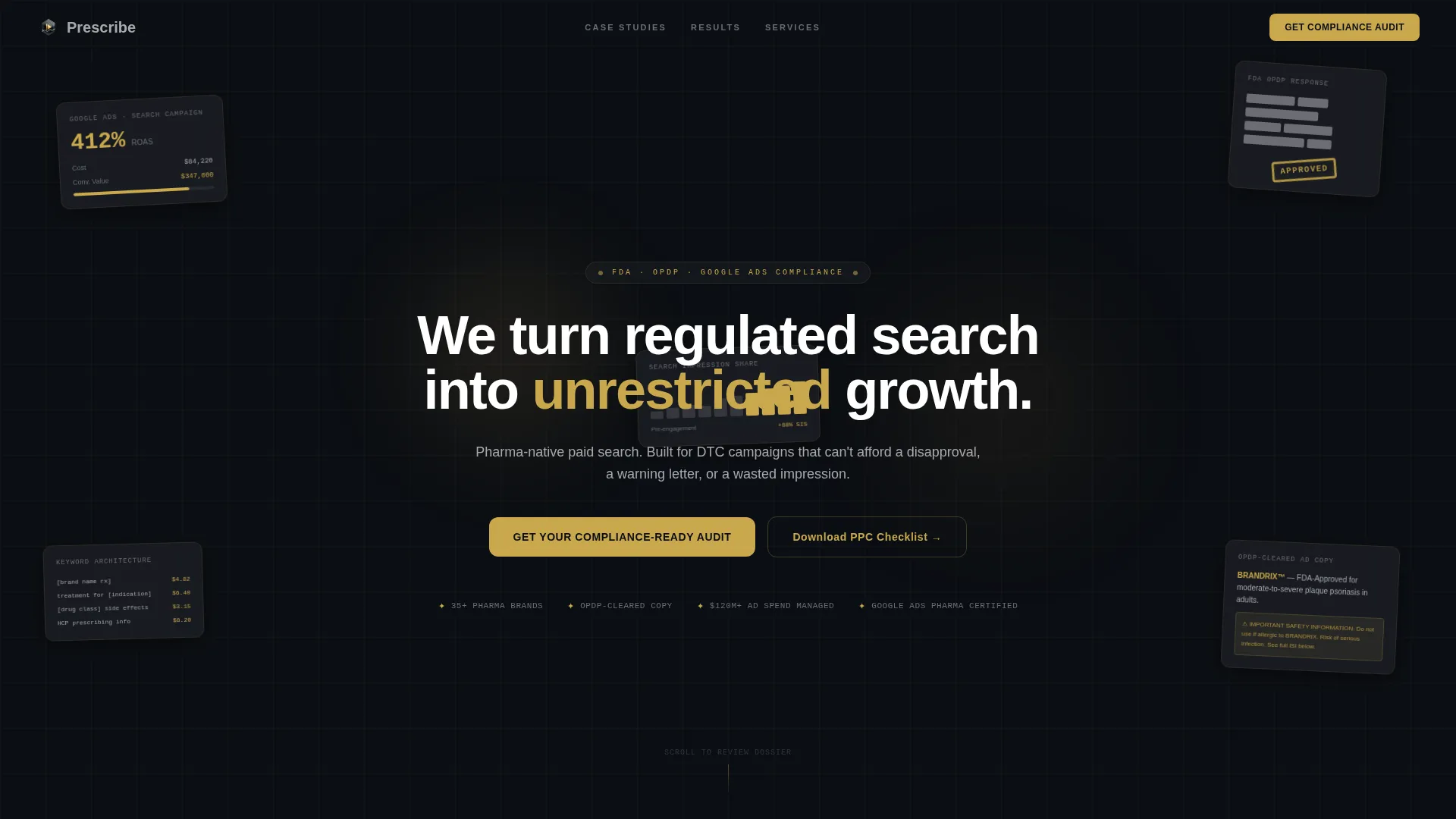
- A collage-style header composed of layered campaign artifacts, including a redacted OPDP approval letter, a Google Ads dashboard excerpt, and a visible keyword list with cost-per-click data
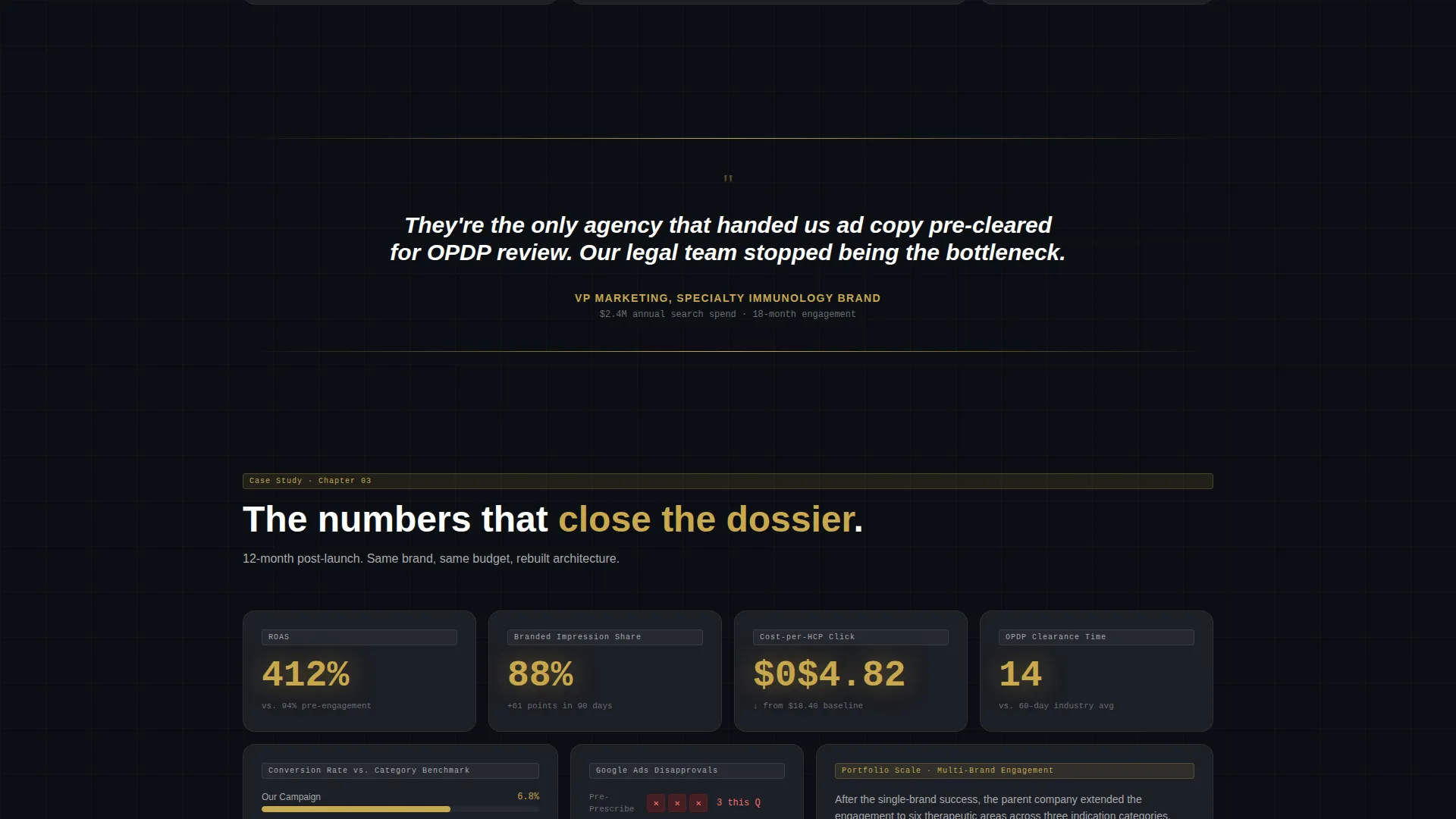
- A three-row case study narrative that escalates from single product launch to multi-brand portfolio engagement, with gold-highlighted proof metrics in oversized type
- A three-step progressive disclosure lead form plus a secondary email-gated PDF download path for visitors not yet ready for a direct conversation
Feature list
This section covers the core components built into the Prescribe template. Each feature reflects a deliberate design or structural decision tied directly to the pharmaceutical agency use case.
Bento Grid Layout System
The page is structured as a bento grid, grouping content into distinct cells with visual weight assigned by importance. Each cell functions independently as a proof point while the full grid reads as a single cohesive argument. The layout scales cleanly from header through results row without losing hierarchy.
Collage Scrapbook Header
The header arranges real-feeling campaign artifacts in a layered, slightly rotated composition against a deep obsidian field. Frosted-glass card panels sit behind each artifact, creating soft depth and separation. A single headline fades in over the collage, anchoring the visual story with a clear strategic statement.
Case Study Narrative Scroll
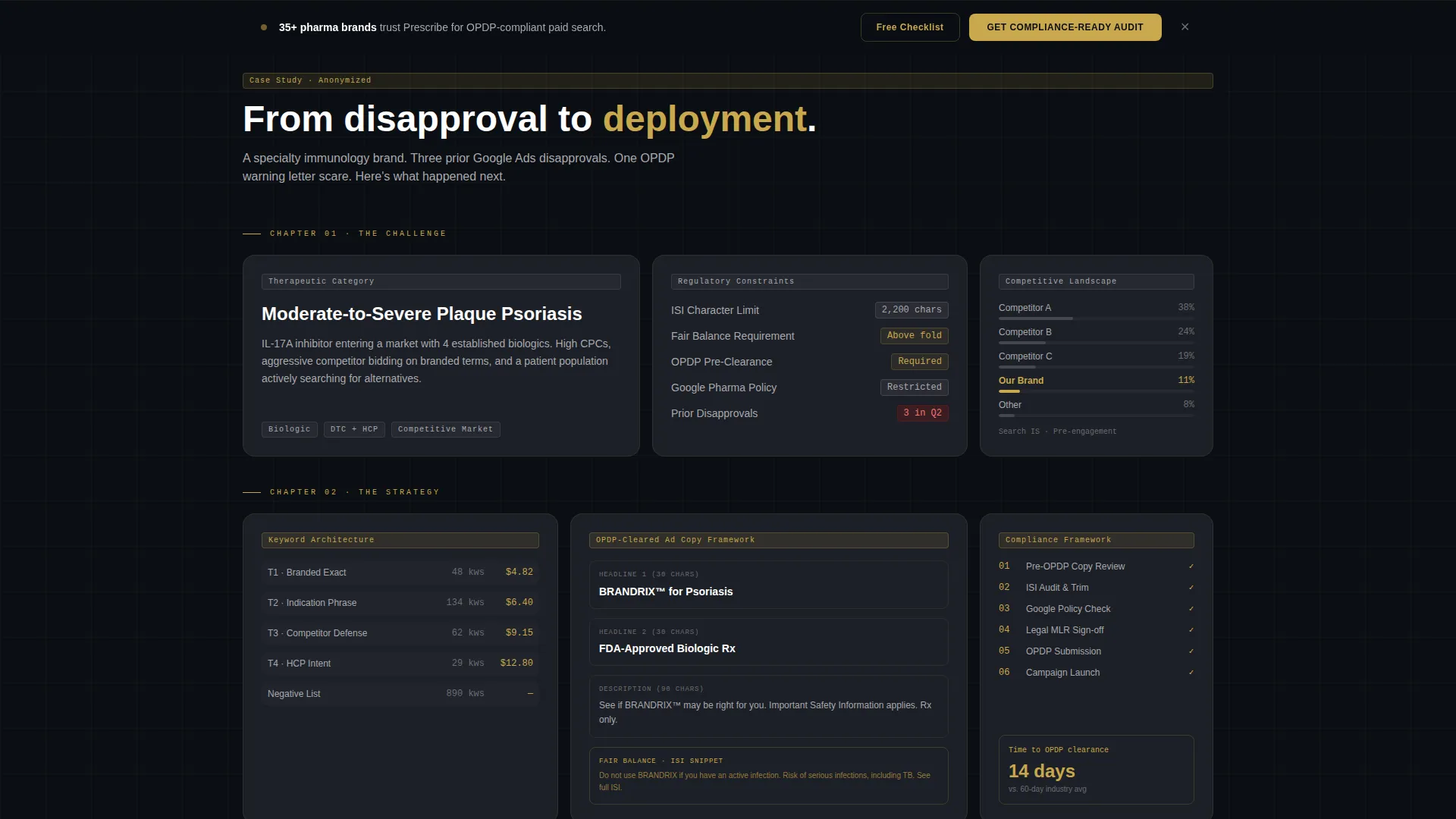
Scrolling past the header reveals three rows structured as chapters from an anonymized pharma campaign. The first row presents the challenge, the second opens the strategy, and the third delivers results with gold-highlighted metrics. Full-width client pull quotes separate each row, building a dossier-like reading rhythm.
Progressive Disclosure Lead Form
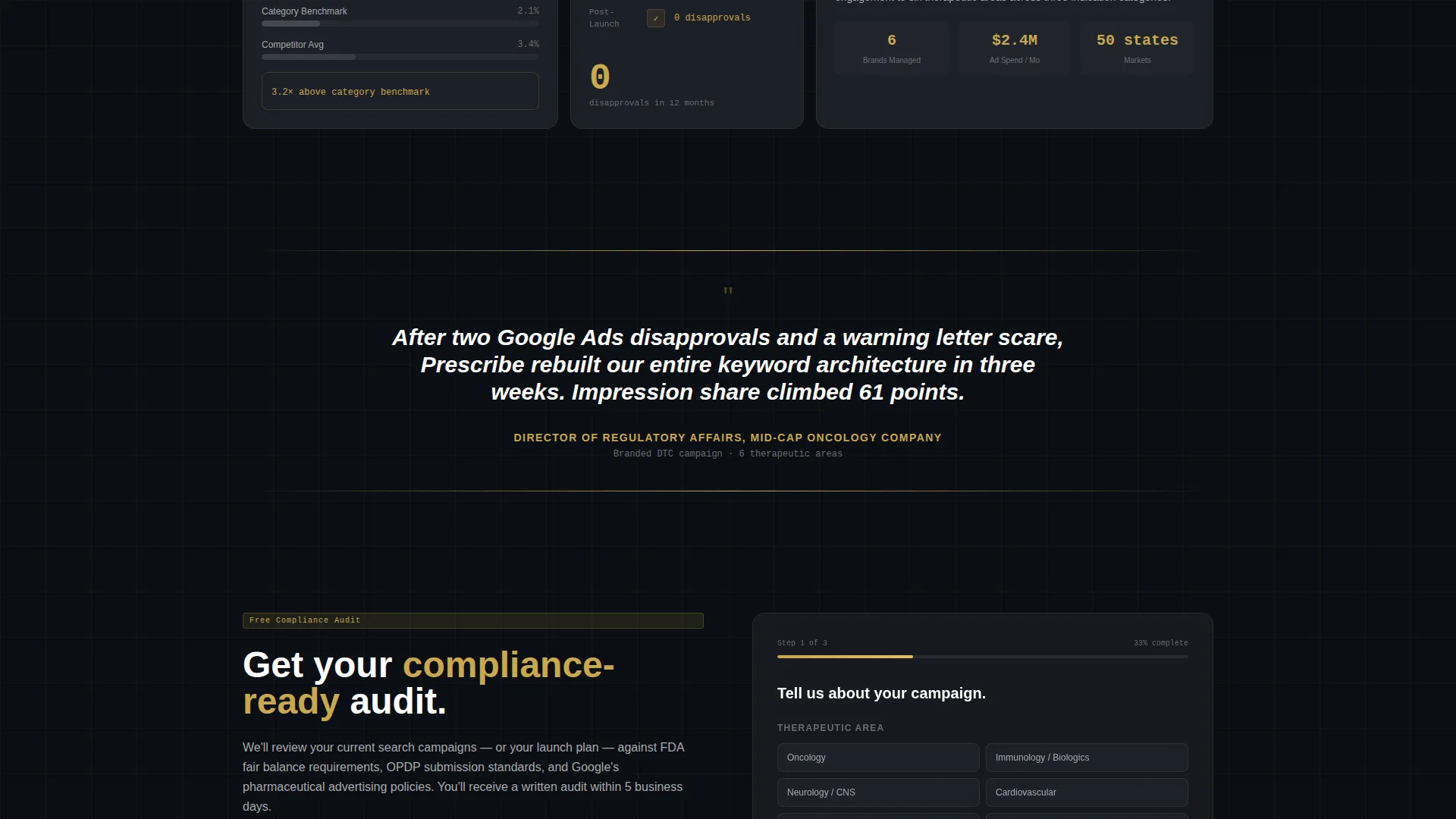
The primary conversion path uses a three-step form that reveals fields gradually. Step one asks for therapeutic area and monthly ad spend range. Step two asks about OPDP rejections or Google disapprovals. Step three captures name, company, and email. This structure reduces form friction while qualifying leads before any contact details are exchanged.
Secondary PDF Conversion Path
Visitors not ready for a consultation can access a downloadable PDF, "The Pharma PPC Compliance Checklist," gated behind email only. This secondary path captures mid-funnel interest without requiring a full commitment and widens the total addressable audience of each page visit.
Persistent Bottom Bar Call to Action
After the second scroll fold, a persistent bottom bar appears with the primary call to action in gold on obsidian. This ensures the conversion prompt remains accessible at every stage of the scroll without interrupting the case study narrative above it.
Page sections overview
| Section | Purpose |
|---|---|
| Collage Header | Establish credibility with layered campaign artifacts and a bold headline |
| Challenge Row | Introduce the therapeutic category, competitive landscape, and regulatory constraints |
| Strategy Row | Break down keyword architecture, compliant ad copy, and landing page compliance frameworks |
| Results Row | Deliver gold-highlighted proof metrics including cost-per-click and impression share data |
| Client Pull Quotes | Separate case study rows and reinforce trust with direct client voice |
| Portfolio Escalation | Progress the narrative from single product launch to multi-brand engagement |
| Lead Generation Form | Qualify and capture prospects through a three-step progressive disclosure form |
| PDF Download Gate | Offer a secondary conversion path for visitors not yet ready for a direct call |
| Persistent call to action Bar | Keep the primary call to action visible throughout the scroll experience |
Design & branding system
The Prescribe template uses a Tech Glass visual theme built on an obsidian-and-gold color system. Every design decision reinforces the agency's positioning as a data-forward, compliance-fluent operation.
- Color palette: deep obsidian black (#0B0E13) as the primary background, polished graphite (#1C1F26) on card surfaces, muted platinum (#A8A9AD) for body text, and pharma-grade gold (#C9A84C) reserved exclusively for metrics, calls to action, and proof points
- Glass-morphism panels with frosted borders and soft depth shadows separate each bento cell, with light appearing to refract at the edges of each panel
- Typography and layout follow a high-contrast hierarchy where gold numerals in oversized type draw the eye to proof metrics before any other element on the page
Mobile & speed optimization
The bento grid structure of Prescribe is designed to reflow gracefully across screen sizes. The layout prioritizes the case study narrative on smaller viewports without hiding key proof points.
- Bento cells stack vertically on mobile, preserving the chapter-by-chapter reading rhythm of the case study narrative
- The persistent bottom bar call to action remains anchored at the base of the viewport on all screen sizes, keeping the conversion path accessible throughout the scroll
- Frosted-glass panel styling and the obsidian background maintain visual coherence across both retina and standard displays
How this template helps you convert
Prescribe is built around a specific conversion principle: show results before asking for anything. Every structural decision supports that principle and moves qualified visitors toward one of two clear actions.
- The collage header and escalating case study rows establish proof early, so by the time a visitor reaches the lead form, the agency's competence is already demonstrated through visible campaign data and OPDP approval evidence.
- The three-step progressive form reduces abandonment by collecting context before contact details, which signals respect for the visitor's time and improves the quality of leads captured.
- The secondary PDF download path intercepts mid-funnel visitors who are researching options, converting them into email contacts without requiring a full sales conversation.
Other information about this template
The Prescribe template is purpose-built for a narrow, high-value niche. A few additional details are worth noting for anyone evaluating it for their agency or client project.
- The template title "Prescribe" signals the pharmaceutical context from the first brand touchpoint, reinforcing niche authority before the page content loads
- The header concept is classified as Collage/Scrapbook, a deliberate editorial choice that treats real campaign artifacts as both evidence and aesthetic, rather than generic hero imagery
- The creative direction follows a Case Study Narrative structure, making the template well suited to agencies that can present specific, anonymized campaign outcomes across multiple therapeutic categories
- The template sits within the Portfolio and Agency category, under the Pharmaceutical Marketing and Agency subcategory, making it a direct fit for specialist paid search shops rather than general digital marketing firms
- The intersection of Tech Glass theme, bento grid layout, obsidian-and-gold palette, and lead generation direction makes this template uncommon in pharmaceutical agency template libraries
Theme
Tech Glass
Creative direction
Case Study Narrative
Color system
Obsidian & Gold
Style
Bento Grid
Direction
Lead Generation
Page Sections
Bento Grid Layout System
Collage Scrapbook Header
Case Study Narrative Scroll
Progressive Disclosure Lead Form
Secondary PDF Download Path
Persistent Bottom Bar Call to Action
Related questions
Who is the Prescribe template designed for?
What conversion paths does the template include?
Can this template be adapted for different therapeutic categories?
Does the template include the actual PDF compliance checklist?
What makes this template different from a standard agency portfolio template?



