Historic Preservation Government Blog & Content Website Template
Preserve is a card grid landing page template built for county historic preservation offices. It leads with bold impact statistics, guides homeowners, developers, and council members through services at a glance, and drives action with a prominent parcel-lookup call to action. The Monochrome Steel palette and editorial serif typography give it the civic weight the subject demands.
by Rocket studio
Quick summary
Preserve is a single-page, modular card grid template designed for a county historic preservation office. It front-loads proof, structures protected, tax credits returned, nominations filed, so every visitor understands the office is active before they scroll past the hero. The layout serves homeowners, developers, and local government decision-makers equally, directing each audience toward the right next step.
Who this template is for
This template is built for civic government teams that protect historic properties and need a public-facing page that earns trust quickly. It works equally well for county preservation commissions, city landmark offices, and local historic district boards that manage a mix of property types, programs, and public inquiries.
- County preservation offices managing demolition permits, nominations, and tax credit programs
- City or local government departments overseeing historic districts and design guidelines
- Preservation staff who serve homeowners, downtown developers, and town council members from a single public resource
What problem this template solves
Many preservation offices rely on dense PDF downloads or buried municipal portals. Property owners searching for guidance on proposed changes to a historic building often give up before they find the right contact. This template solves that friction directly.
- It replaces a confusing municipal page with a focused, stats-first landing page that communicates authority and activity immediately
- It organizes services by audience type so homeowners, developers, and council members each find their path without hunting
- It places the primary call to action above the fold, reducing the cognitive load that causes visitors to abandon the page before engaging
What you get with this template
You get a fully structured, section-led page designed around civic preservation work. Every section of page section content has been developed to mirror how a real preservation office operates, from public hearing schedules to Certificate of Appropriateness guidance.
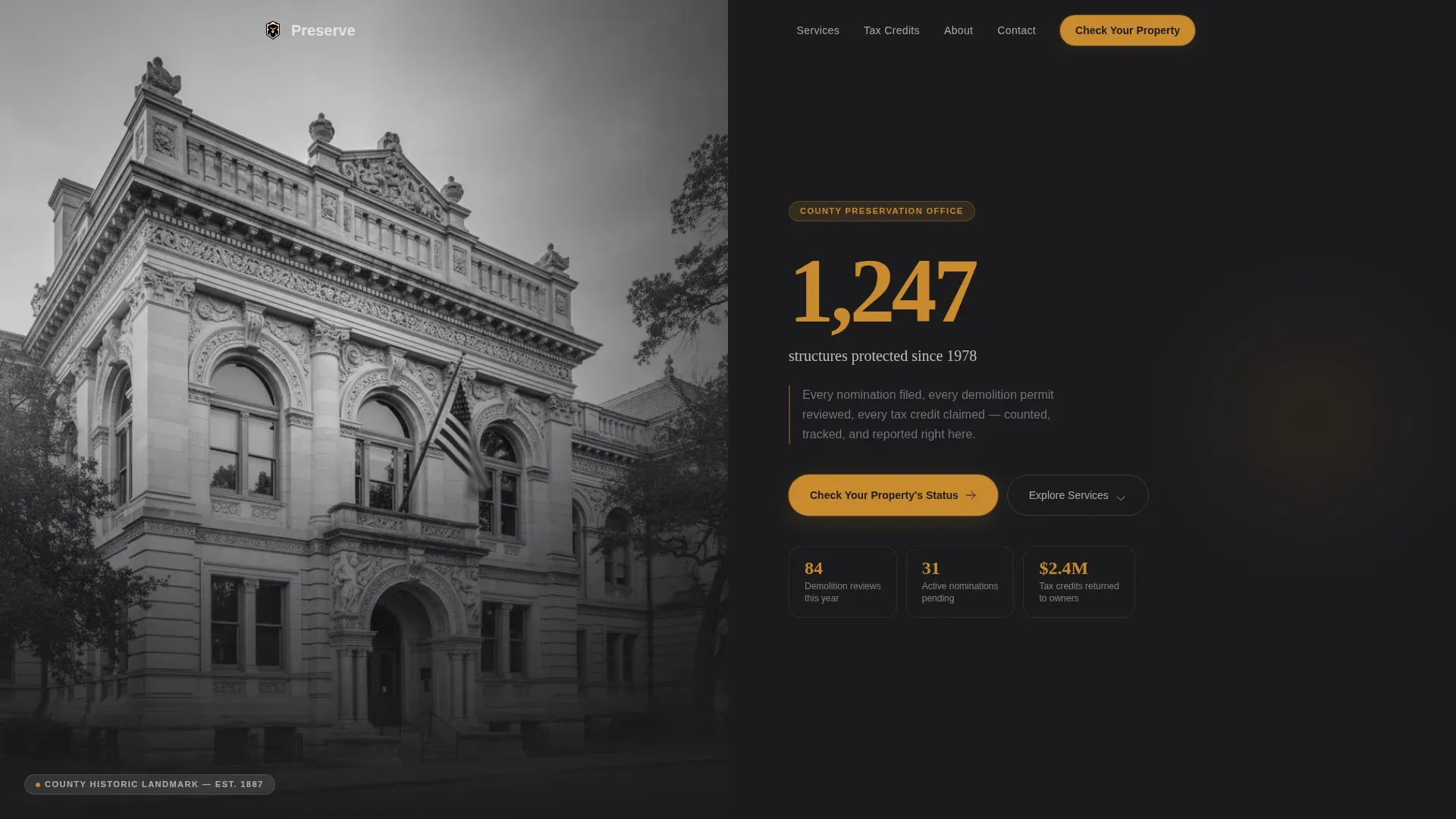
- A hero section with a half-page black-and-white landmark photograph, a 96-pixel amber impact statistic, and a primary call-to-action button above the fold
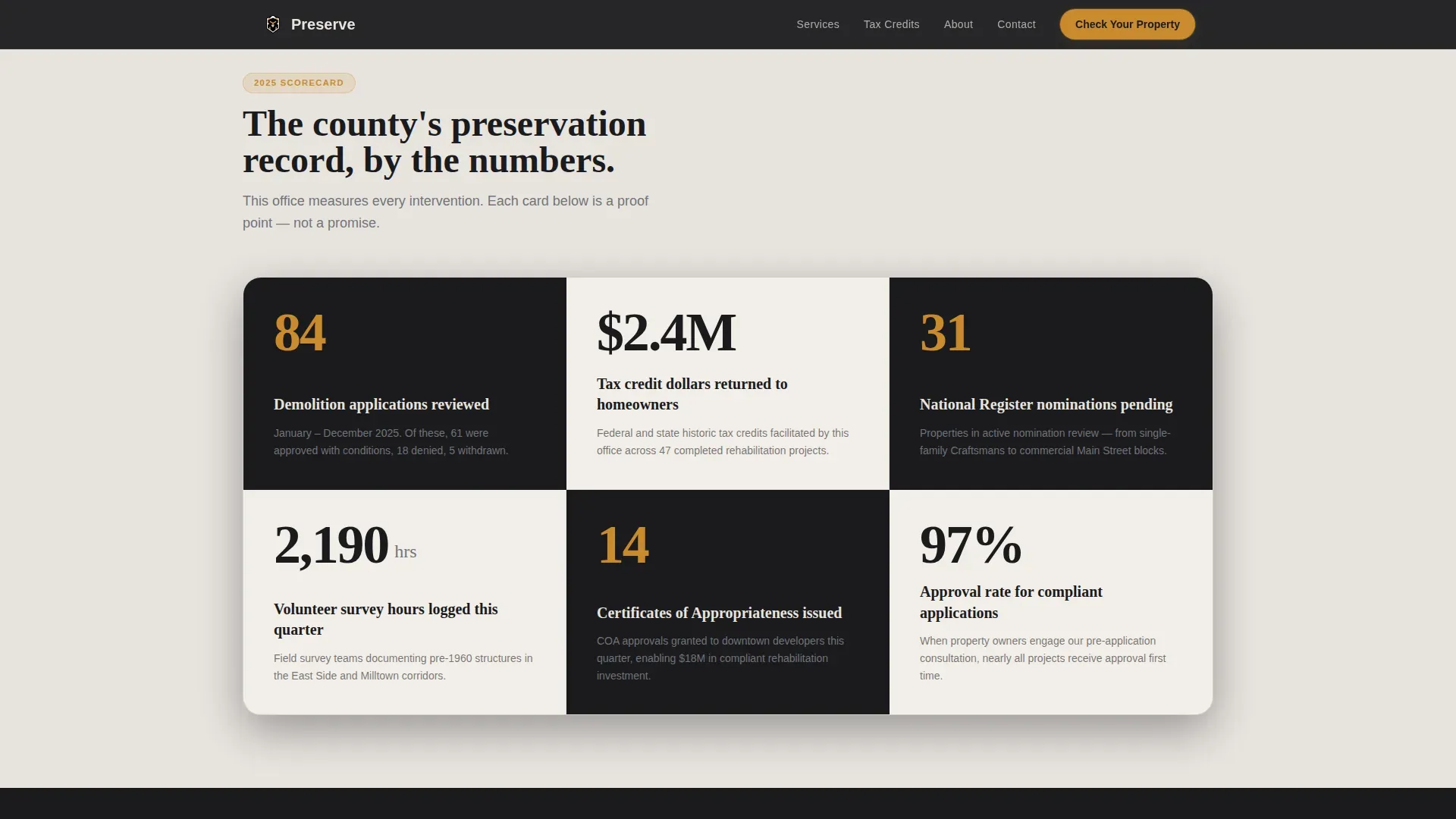
- A checkerboard card grid that displays preservation activity stats, demolition review counts, National Register nominations, and volunteer survey hours
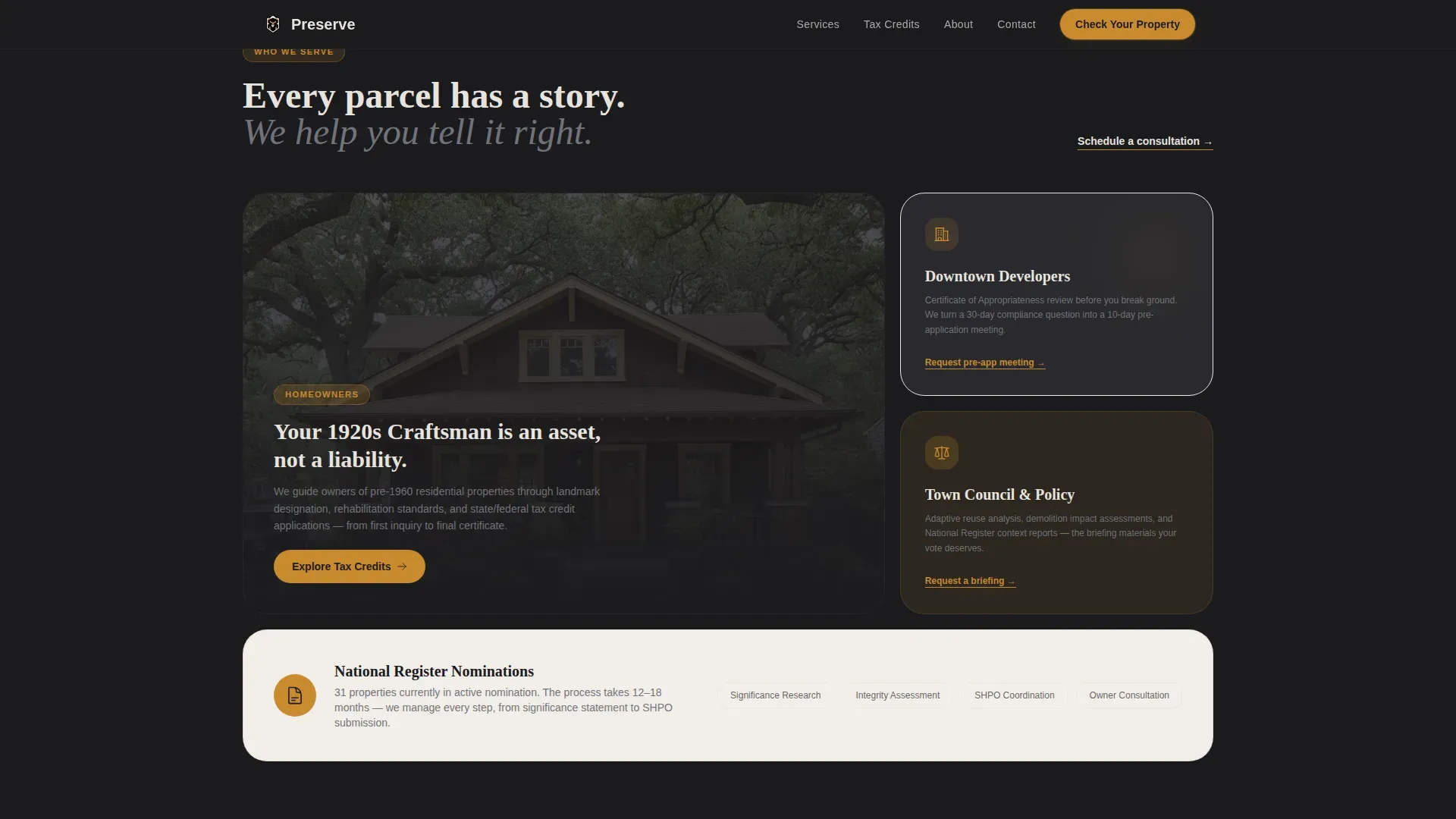
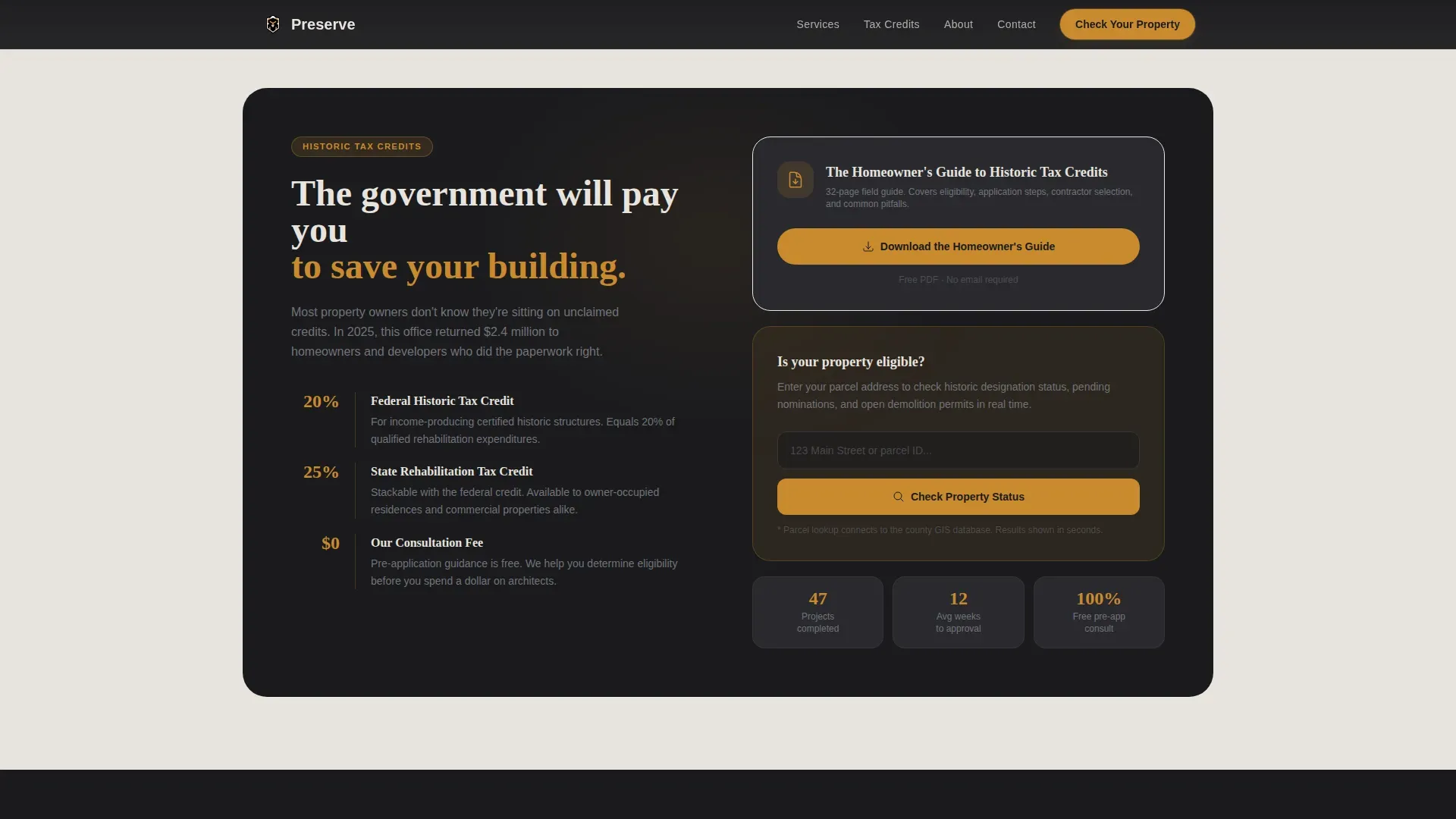
- Service bento panels for homeowners, downtown developers, and adaptive reuse participants, plus a tax credit feature card with a downloadable homeowner guide and community testimonial cards
Feature list
This section covers the core capabilities built into the template. Each feature reflects a specific design or structural decision described in the project brief.
Stats-First Hero Section
The header uses a half-page composition: a high-contrast black-and-white photograph of a county landmark on the left, and a typographically dominant 96-pixel statistic in hearth amber on the right. A single-sentence subhead and a downward-scroll cue sit below the stat. A bolded, high-contrast call-to-action button anchors the right panel and appears above the fold for immediate visibility. This placement follows the principle that a single, clear call to action placed above the fold drives stronger engagement and increases the likelihood of clicks.
Checkerboard Stats Card Grid
The modular card grid opens every card with a large, typographically dominant number before revealing context. Cards alternate between foundry-black and limestone-wash backgrounds, creating a visual rhythm that keeps the eye moving. Each card covers a distinct preservation metric: demolition applications reviewed, tax credit dollars returned to homeowners, historic sites nominated to the National Register, and volunteer survey hours logged this quarter. Scrolling through the grid feels like reading the county's scorecard, each module a small proof of momentum.
Services Bento with Audience Paths
An asymmetric bento layout organizes the three primary service paths. Homeowners find guidance on historic designation, building materials review, and rehabilitation project planning. Developers access the Certificate of Appropriateness process, design guidelines for proposed changes, and public hearing timelines. Council members and planners see adaptive reuse resources alongside new construction evaluation tools. Each panel links directly to the relevant process, so participants reach the right information without extra steps.
Tax Credit Feature Card
A dedicated economic impact card presents tax credit data alongside a secondary call to action: "Download the Homeowner's Guide." This section is designed for visitors who are not yet ready to search a parcel but want to understand the financial case for preservation. Rehabilitation can return significant value to property owners while preserving the historic fabric and character defining features of the structure. The card makes that case concisely, in numbers, before asking for any commitment.
Community Proof Section
Testimonial cards include named property owners, property addresses, and dollar amounts returned through tax credit programs. Real names and real figures build the kind of trust that generic civic copy cannot. Testimonials from residents about the significance of a historic building empower community connection and support. This section reinforces that the office has completed real work for real people across the local district and neighborhood.
Sticky Mobile Call-to-Action Bar
On mobile, the primary call to action "Check Your Property's Status" reappears as a sticky bottom bar that persists across all scroll positions. Over 60 percent of users access pages via phone, and conversion rates increase significantly when a mobile experience makes the primary action reachable at any point. The sticky bar ensures the parcel-lookup prompt is never more than a thumb-tap away, regardless of how far down the page a visitor has scrolled.
Page sections overview
| Section | Purpose |
|---|---|
| Hero half-page | Lead with landmark photo and bold amber impact stat |
| Stats card grid | Display preservation activity as a numbers-first scorecard |
| Services bento | Route homeowners, developers, and council members to relevant paths |
| Tax credit card | Present economic impact data and offer homeowner guide download |
| Community testimonials | Build trust with named resident stories and dollar figures |
| Footer arc split | Anchor page with logo, tagline, and organized resource links |
Design & branding system
The visual identity follows a Community Hearth theme executed through a Monochrome Steel color system. The palette draws from foundry black (#1B1B1E), galvanized gray (#71737A), limestone wash (#E8E4DF), and hearth amber (#C98A2E). Amber is reserved strictly for calls to action, active-state borders, and key statistics, ensuring it retains its visual weight every time it appears. Typography pairs Fraunces, an editorial serif, for statistics and headlines with DM Sans for body copy, giving the page the feel of a well-maintained civic document rather than a generic government portal.
- Foundry black cards alternate with limestone-wash cards in a checkerboard rhythm, protecting the eye from fatigue while sustaining a sense of momentum
- Hearth amber appears only on calls to action, active borders, and dominant statistics, maintaining contrast and click-attractiveness throughout the page
- Fraunces serif headlines give the preservation narrative editorial weight; DM Sans body copy keeps the service information clean and readable
Mobile & speed optimization
The template is built desktop-first, with a sticky mobile call-to-action bar added specifically for smaller screens. Scroll-reveal animations use IntersectionObserver with stagger delays to keep interactions smooth and purposeful. Hover states are active on all cards, and an image grayscale toggle is available on the landmark photography. Server Components handle static content to minimize JavaScript payload, keeping the page responsive across devices.
- Sticky bottom bar on mobile keeps "Check Your Property's Status" accessible at every scroll position
- IntersectionObserver scroll reveals and stagger delays provide medium-weight animation without blocking interactivity
- Static content delivered through Server Components reduces JavaScript load, supporting faster initial render on lower-bandwidth connections
How this template helps you convert
The entire page is structured around a single conversion goal: getting a property owner, developer, or council member to check a parcel or download a guide. Every design decision supports that goal.
- The hero stat and above-the-fold call-to-action button give first-time visitors an immediate reason to act before they have read a single paragraph of body copy; contrasting amber on dark backgrounds makes the button impossible to miss.
- The stats card grid builds a credibility case as visitors scroll, showing completed nominations, reviewed demolition permits, and tax credit dollars returned; by the time they reach the services bento, trust is already established.
- Named community testimonials with real addresses and real dollar figures close the emotional gap, connecting past preservation outcomes to the present visitor's situation and encouraging them to take the final step.
Other information about this template
This template supports the full range of work a local preservation office manages at the local level, from routine Certificate of Appropriateness (COA) reviews to large-scale historic district planning. A COA is required for any exterior changes to historic properties before obtaining permits or beginning construction, and the services bento makes that process clear to every visitor. The Historic and Cultural Landmarks Commission typically reviews COA applications to ensure compliance with preservation standards, and this template gives that workflow a clear public face.
Local preservation programs are generally governed by a historic preservation ordinance that defines the powers and duties of the local preservation commission. Design guidelines developed under that ordinance help architects, contractors, and property owners plan sensitive alterations that protect the historic, architectural, and cultural features that give a property its significance. The Secretary of the Interior's Standards for the Treatment of Historic Properties, administered through the National Park Service, provide the guiding principles behind sound preservation design practice across the country, and the template's content structure is compatible with communicating those standards to the public.
The CLG program, the Certified Local Government program administered jointly by the National Park Service and State Historic Preservation Offices, provides federal resources and technical assistance to local preservation commissions. Offices participating in the CLG program can use this template to communicate program benefits, application processes, and annual reporting requirements to local stakeholders.
Historic properties may be a single structure or an entire district, and they include historic buildings, bridges, landscape architecture features, and cemeteries. The designation process for historic properties offers an opportunity to compile detailed background information on each site. An accurate inventory of historic resources is also vital for informed disaster response, since natural disasters require special planning to protect historic sites and ensure community resilience. The Secretary of the Interior's Standards provide guidance on the treatment of historic properties during disaster recovery, and the template's resource-link structure can surface those materials for the public quickly.
- The template supports the Certified Local Government (CLG) program communication needs, including technical assistance details and program eligibility
- Design guidelines content can be organized by district, building type, or proposed change category within the services bento panels
- The page structure can accommodate links to the National Register nomination forms, historic designation criteria, and public hearing schedules
- Rehabilitation project resources, conservation guidance, and historic fabric protection materials can be housed in the tax credit and services sections
- The footer arc-split pattern organizes links by audience type, so resources for homeowners, developers, museums, and education programs remain easy to find
Theme
Community Hearth
Creative direction
Stats-First Impact
Color system
Monochrome Steel
Style
Card Grid (Modular)
Direction
Click-Through
Page Sections
Stats-first Hero with Amber Impact Stat
Checkerboard Card Grid Scorecard
Audience-routed Services Bento
Tax Credit Feature Card with Guide Download
Named Community Testimonial Cards
Sticky Mobile Call-to-action Bar
Related questions
Who is this template designed for?
What page sections are included in the template?
Can this template communicate design guidelines and COA requirements?
Does the template support mobile users?
How does the stats-first layout build credibility?



