Industrial Architecture Booking Website Template
Preserve is a horizontal scroll landing page built for a one-person industrial preservation consultancy. It uses an archival Ink and Paper visual identity to build credibility through layered document artifacts, scrapbook collage headers, and a casebook narrative structure. The page guides municipal planners, adaptive reuse developers, and architecture firms toward a detailed services and case study portal.
by Rocket studio
Quick summary
Preserve is a single-page horizontal scroll landing page template for an industrial preservation consultant. It opens with a scrapbook collage header and unfolds laterally through a casebook narrative. The design uses lampblack, drafting vellum, and oxide red to evoke a surveyor's field notebook. The primary call to action directs visitors to a full case file portal.
Who this template is for
This template is built for a solo consultancy that makes the case for preserving historic industrial buildings. The client's work spans landmark nominations, adaptive reuse feasibility studies, and Section 106 compliance reports that serve both preservation advocates and development teams.
- Municipal planning departments reviewing demolition permits for historic industrial structures
- Adaptive reuse developers who need historic tax credit documentation and feasibility support
- Architecture firms retrofitting century-old mills, grain elevators, or powerhouses into new uses
What problem this template solves
Industrial preservation consultants carry deep expertise but often struggle to communicate authority at a glance. A standard portfolio page feels too clean for work rooted in archives, field visits, and regulatory negotiation. Visitors need to feel the weight of the evidence before they trust the practitioner.
- Visitors leave before understanding the full scope of services offered
- A generic layout fails to convey the archival depth behind each engagement
- No single page effectively bridges the gap between developer skepticism and preservationist rigor
What you get with this template
You get a fully structured horizontal scroll landing page that unfolds like a physical casebook. Every section is art-directed with archival intent, from the rotated document collage in the header to the torn-edge callout card midway through the scroll.
- A scrapbook collage hero with layered, rotated document artifacts and a hand-lettered headline
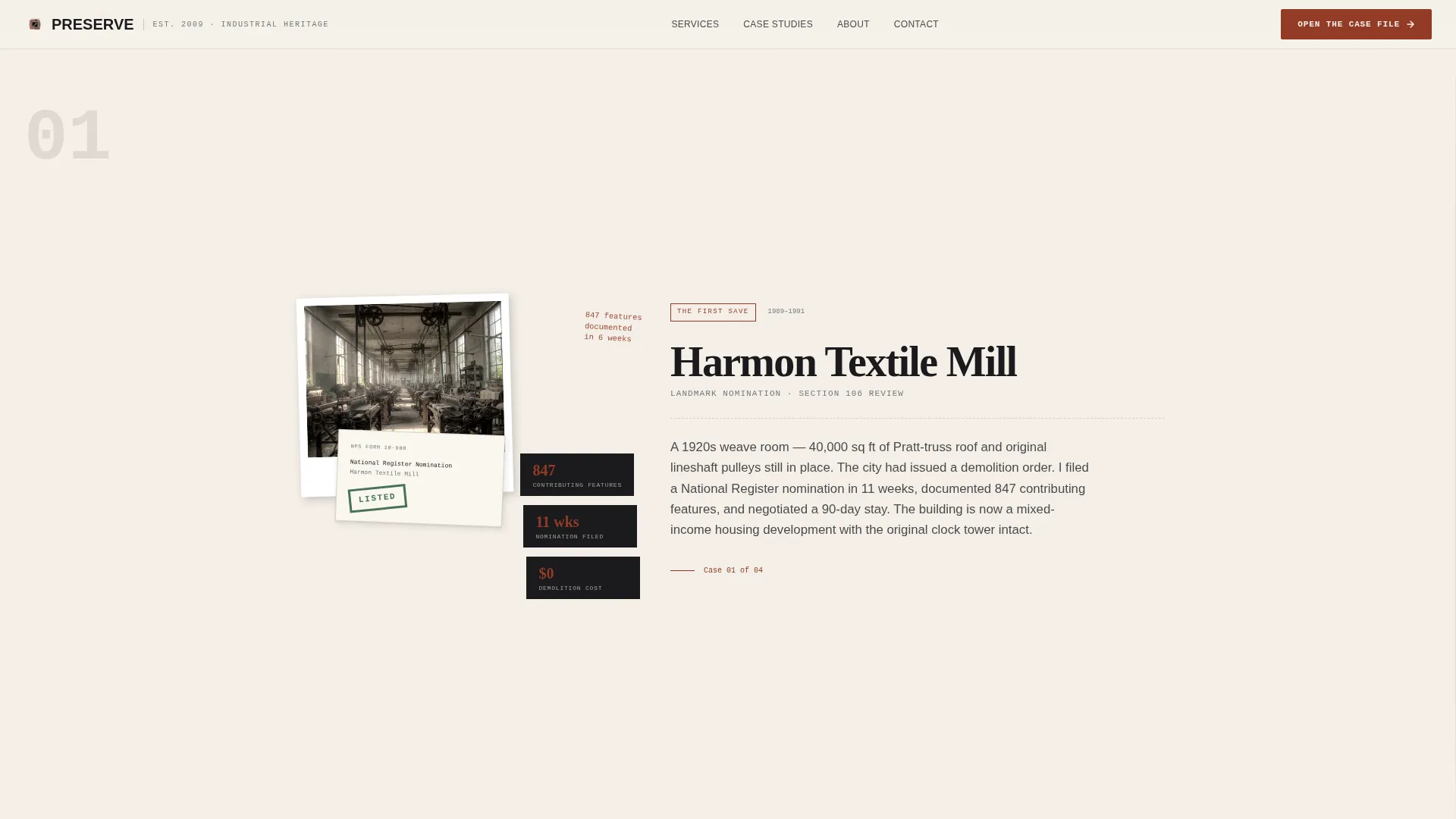
- A laterally scrolling origin story sequence that builds credibility through project evidence
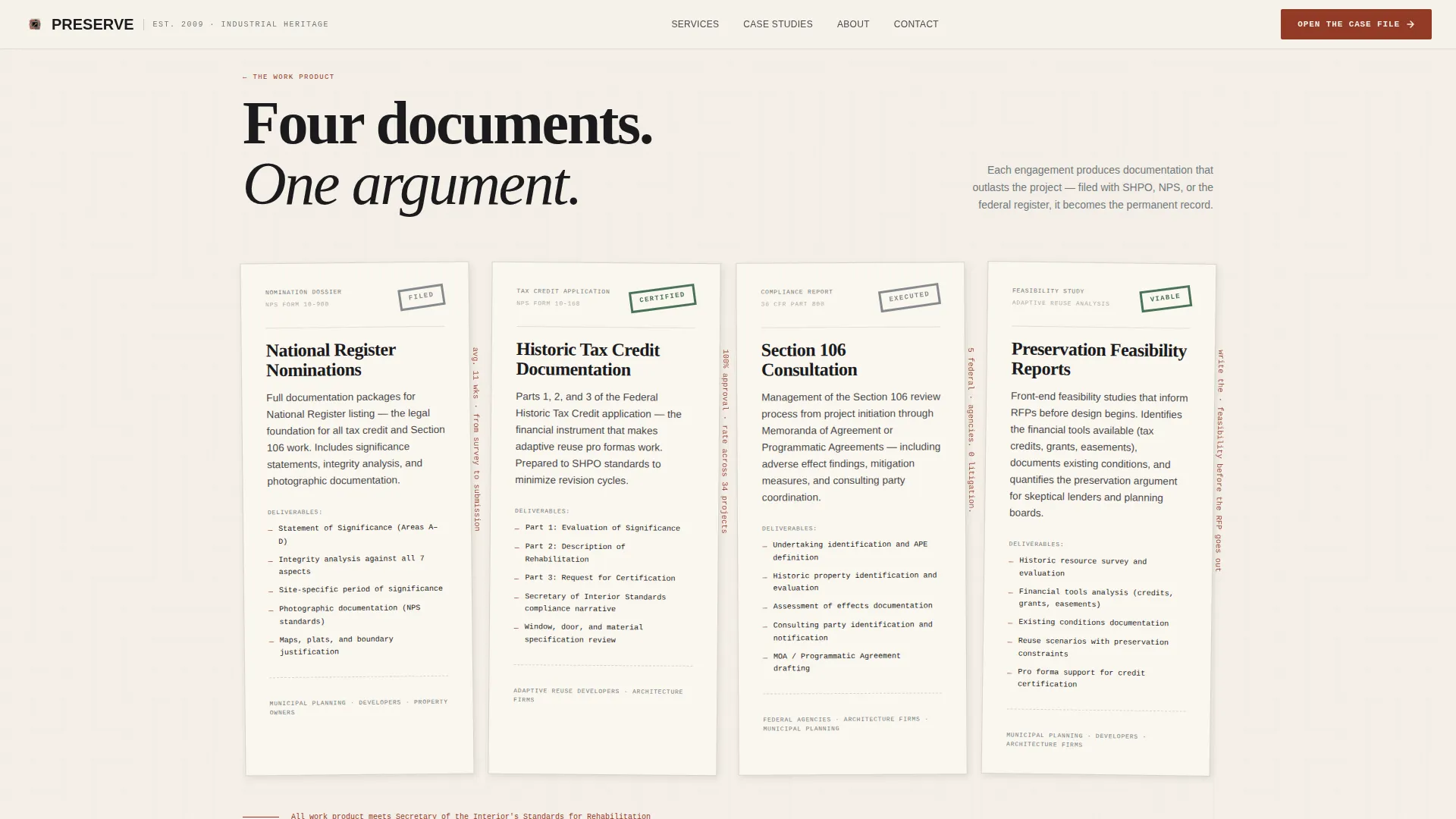
- A services section styled as physical documents, a mid-page email capture card, and a full-width closing call to action panel
Feature list
This template includes a focused set of purpose-built features drawn directly from the design brief.
Horizontal Scroll Casebook Navigation
The page uses scroll-hijacked horizontal panels that move visitors through the consultant's history like turning pages in an archive. Each panel layers in new project artifacts, approval stamps, and redlined site plans as the narrative grows more complex.
Scrapbook Collage Header
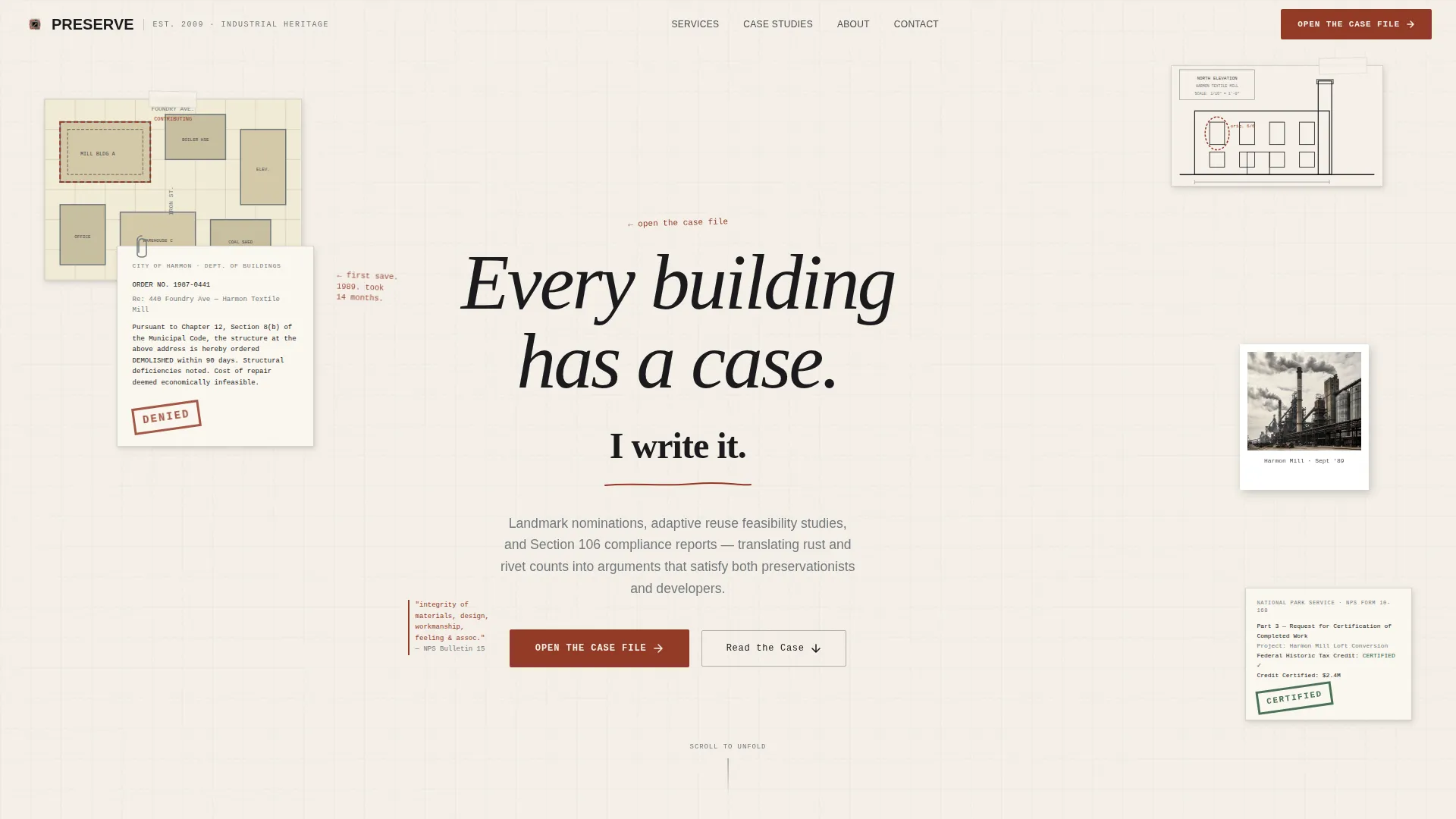
The header is a layered composition of overlapping documents: a Sanborn map fragment, a typewritten demolition order stamped "DENIED," a faded elevation drawing, and a Polaroid of an industrial skyline. Elements are slightly rotated with drop shadows to simulate a physical desktop arrangement.
Services as Document Panels
Each core service, including landmark nominations, adaptive reuse feasibility studies, and Section 106 compliance reports, is presented as a styled physical document rather than a conventional card or list block.
Torn-Edge Email Capture Card
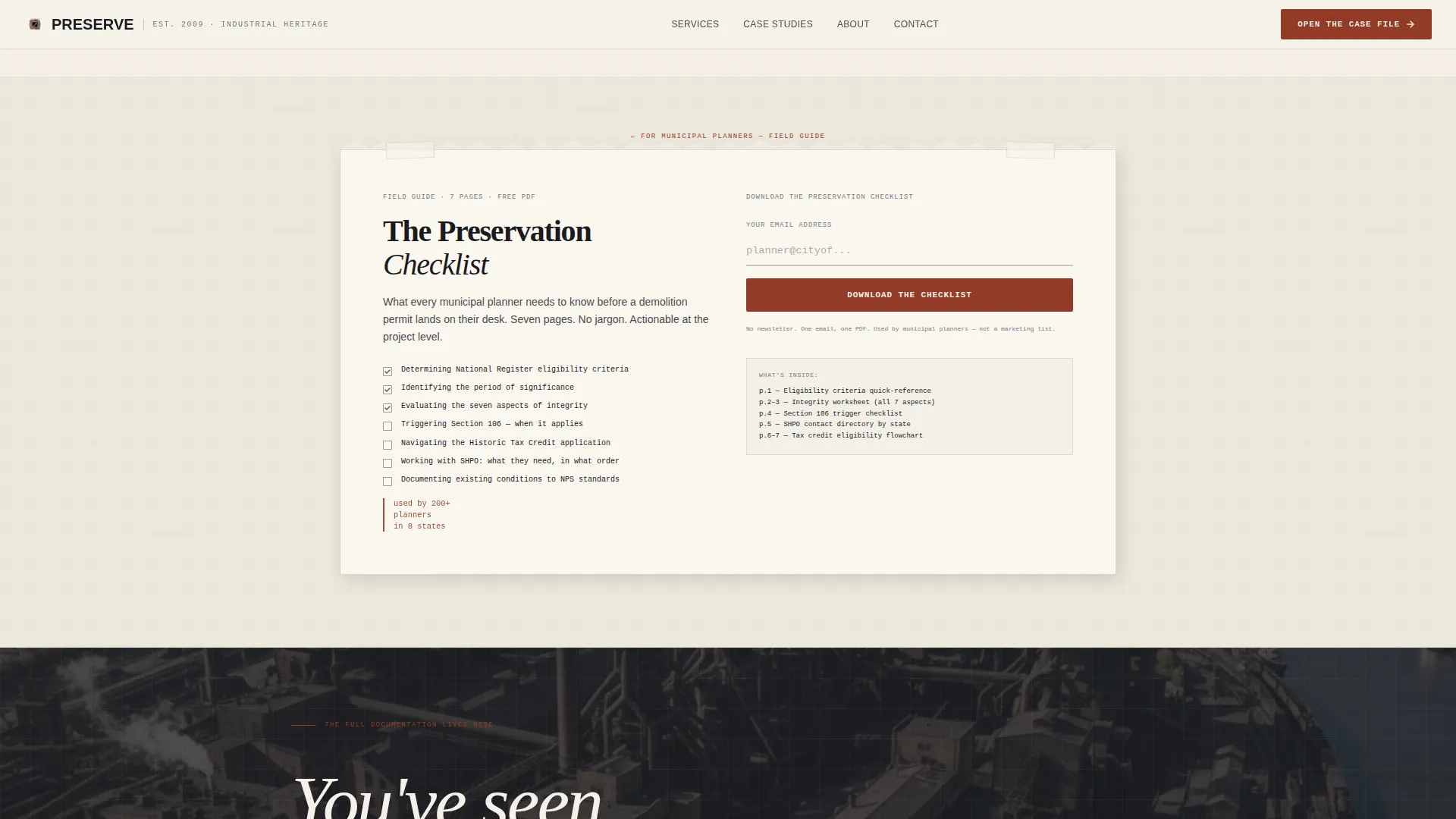
A mid-scroll callout styled as a torn-page card offers a downloadable preservation checklist PDF in exchange for an email address. It is positioned as a resource for municipal planners and sits naturally within the scroll flow.
Oxide Red Annotation System
Oxide red is reserved exclusively for annotations, marginalia, interactive hotspots, and the primary call to action label. This constraint keeps the accent color meaningful and directs the eye to the most important interactive elements.
Stamp Reveal and Parallax Layers
Document rotation, stamp reveal animations, and parallax depth layers respond to horizontal scroll progress. Hover states lift individual document elements. The cursor reacts to interactive zones, reinforcing the archival physical metaphor throughout the experience.
Page sections overview
| Section | Purpose |
|---|---|
| Hero Collage Header | Opens with layered archival documents and the hand-lettered headline |
| Origin Story Panels | Horizontal scroll casebook moving through project eras and evidence |
| Services as Documents | Presents landmark nominations, feasibility studies, and Section 106 reports |
| Checklist Capture Card | Torn-edge midpage card offering a preservation checklist PDF for email |
| Final Call to Action | Full-width "Open the Case File" button anchoring the last scroll panel |
| Linear Footer | Single-row footer with minimal navigation and contact references |
Design & branding system
The visual identity follows an Ink and Paper theme built around the Monochrome Steel color system. Every color choice references the physical materials of archival work: field notebooks, graphite surveys, and oxide-stained industrial surfaces.
- Lampblack (#1B1B1E) for primary text and structural elements, drafting vellum (#F5F0E8) for background surfaces, and galvanized gray (#71797E) for secondary details
- Oxide red (#923A27) used exclusively for annotations, stamps, interactive hotspots, and the primary call to action label
- Typography uses Fraunces for display serif headlines, DM Sans for body and interface text, and IBM Plex Mono for annotation and stamp-style labels
Mobile & speed optimization
The horizontal scroll experience is designed desktop-first, reflecting the deliberate, immersive nature of the casebook format. A mobile fallback transitions the layout to a vertical single-column reading flow so the content remains accessible on smaller screens.
- Desktop-primary horizontal scroll with GPU-accelerated transforms for smooth panel transitions
- IntersectionObserver-driven reveal animations to avoid layout-blocking behavior
- Mobile fallback converts horizontal panels to a stacked vertical sequence without losing the archival visual language
How this template helps you convert
The page earns its clicks by making visitors feel the archive before they see the full case file. Two conversion paths work together without requiring a form on the main page.
- The primary call to action, "Open the Case File," appears first as an oxide red annotation in the header margin and then returns as a full-width closing button, giving visitors two natural moments to click through to the services and case study portal.
- The mid-scroll preservation checklist card captures email addresses from municipal planners and other research-driven visitors who are not yet ready to engage directly but want a practical reference guide.
Other information about this template
This template is built for the Architecture and Design category under the Industrial Architecture subcategory. It is scoped for United States-based consultancies working within domestic historic preservation regulatory frameworks, including State Historic Preservation Office (SHPO) negotiation contexts and federal tax credit documentation processes.
- Date, currency, and localization defaults are set for a United States audience using the MM/DD/YYYY format and USD currency
- The page is a single-page click-through structure with no embedded contact form; visitor conversion flows entirely through the two call to action paths
- The design system is fully custom to the industrial preservation niche and is not a general-purpose architecture portfolio template
Theme
Ink & Paper
Creative direction
Origin Story
Color system
Monochrome Steel
Style
Horizontal Scroll
Direction
Click-Through
Page Sections
Horizontal Scroll Casebook Navigation
Scrapbook Collage Hero Header
Services as Document Panels
Torn-edge Email Capture Card
Oxide Red Annotation System
Scroll-linked Reveal Animations
Related questions
Who is this landing page template designed for?
Does this template include a contact form?
Can I adapt the services section for different preservation specializations?
Is the horizontal scroll layout usable on mobile devices?
What makes this template different from a standard architecture portfolio?