Special Collections Library Landing Page Template
The Stacks special collections library landing page is a split-screen event registration page built for public libraries hosting intimate archival evenings. It pairs warm photography with serif headlines, a live seat counter, and a focused three-field registration form. The design moves visitors from quiet curiosity to active sign-up through page-turn scroll transitions and a fixed bottom call-to-action bar.
by Rocket studio
Quick summary
This is a single-page event registration landing page for a special collections library. It uses a 50/50 split-screen layout, archival warm colors, and scroll-driven animations to turn a visitor's quiet interest into a confirmed seat at the table. Every section serves one goal: get the right person to reserve their place before capacity fills.
Who this template is for
This landing page is built for library professionals and community organizations who host curated archival events. It suits teams who want a polished, focused page without writing a line of code.
- Special collections librarians planning intimate evening programs for the public
- Public library marketing staff who need to create and launch event landing pages quickly
- Library directors at a university or community organization who want to showcase rare holdings and drive registration
What problem this template solves
Many libraries struggle to communicate the urgency and intimacy of a special collections event through a generic events calendar page. A plain list entry cannot describe the significance of holding a 200-year-old surveyor's journal or examining hand-pressed abolition broadsides in a reading room lit by warm lamps.
- Visitors leave before registering because the page does not convey the quiet gravity of the experience
- Staff spend hours on event promotion without a dedicated landing page that answers the right questions
- Patrons who are curious but undecided have no gentle nudge to confirm their interest before seats fill
What you get with this template
You get a complete, ready-to-deploy event landing page with every section pre-built and every interaction pre-wired. The layout is panel-based, so you can navigate between sections and save changes without restructuring from scratch.
- A 50/50 split hero, event narrative section, speaker profile, timeline strip, and registration form with live seat count
- Scroll-triggered page-turn animations and a fixed bottom call-to-action bar that stays visible as visitors explore
- A three-field registration form with a dropdown to help you understand what draws each person to the event
Feature list
This landing page template includes a focused set of built-in features drawn directly from the design brief. Each feature is designed to serve the registration goal while making the library's collection feel alive and worth the visit.
Split-Screen Hero with Serif Headline
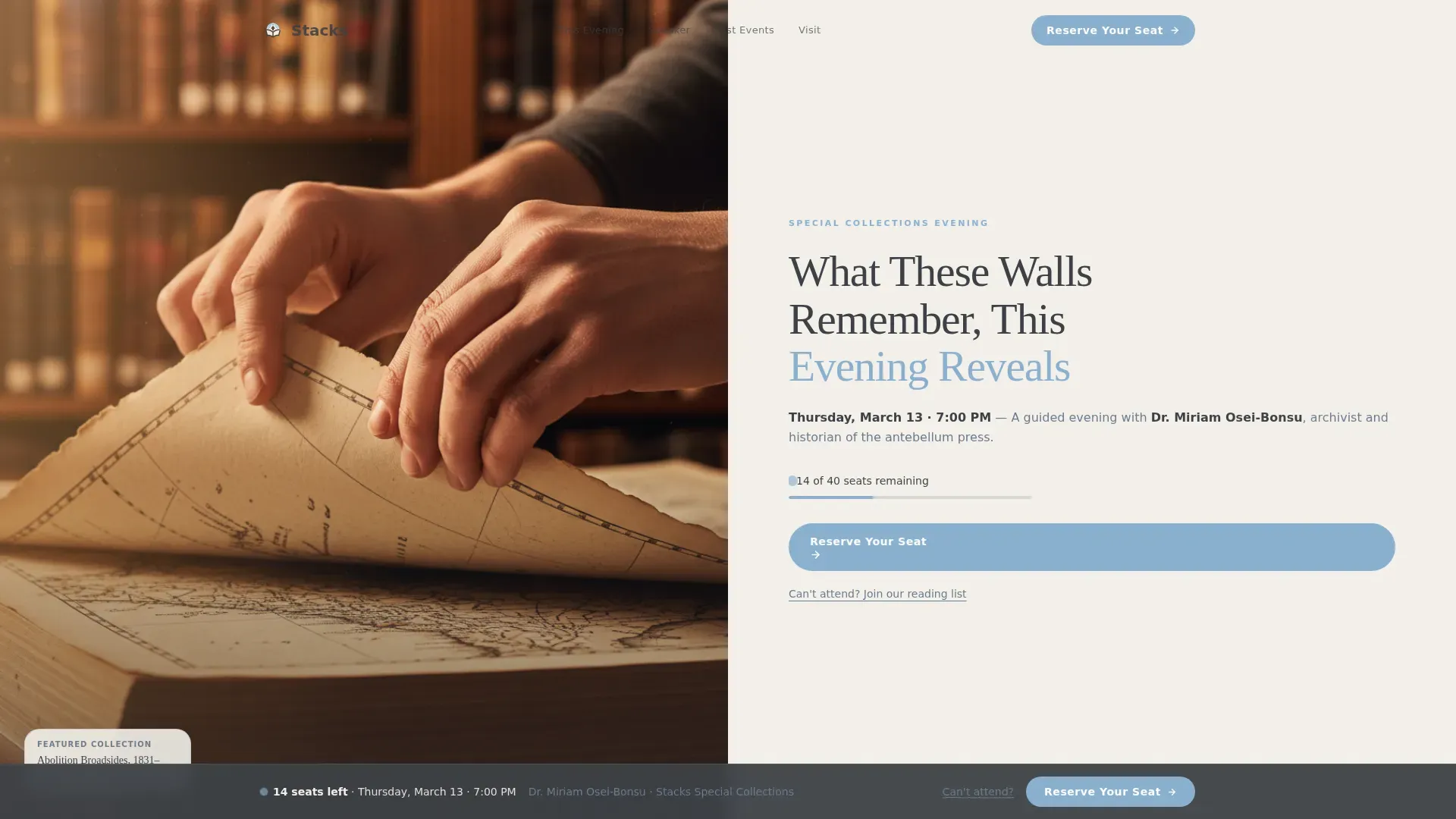
The hero occupies the full opening view as a balanced 50/50 composition. The left panel holds a warmly lit, close-cropped photograph of hands turning an oversize atlas. The right panel carries a large carved-serif headline and a single line naming the next event date, time, and speaker. A prominent "Reserve Your Seat" button in open-sky blue links directly to the registration form.
Scroll-Triggered Page-Turn Animations
As visitors scroll, the page transitions from quiet archive to living gathering space. Each section reveal is timed to feel like turning a page, with stagger reveals on text blocks and medium-weight motion on section entrances. The momentum builds from individual curiosity to collective urgency, making every scroll a step closer to the registration form.
Event Narrative Section
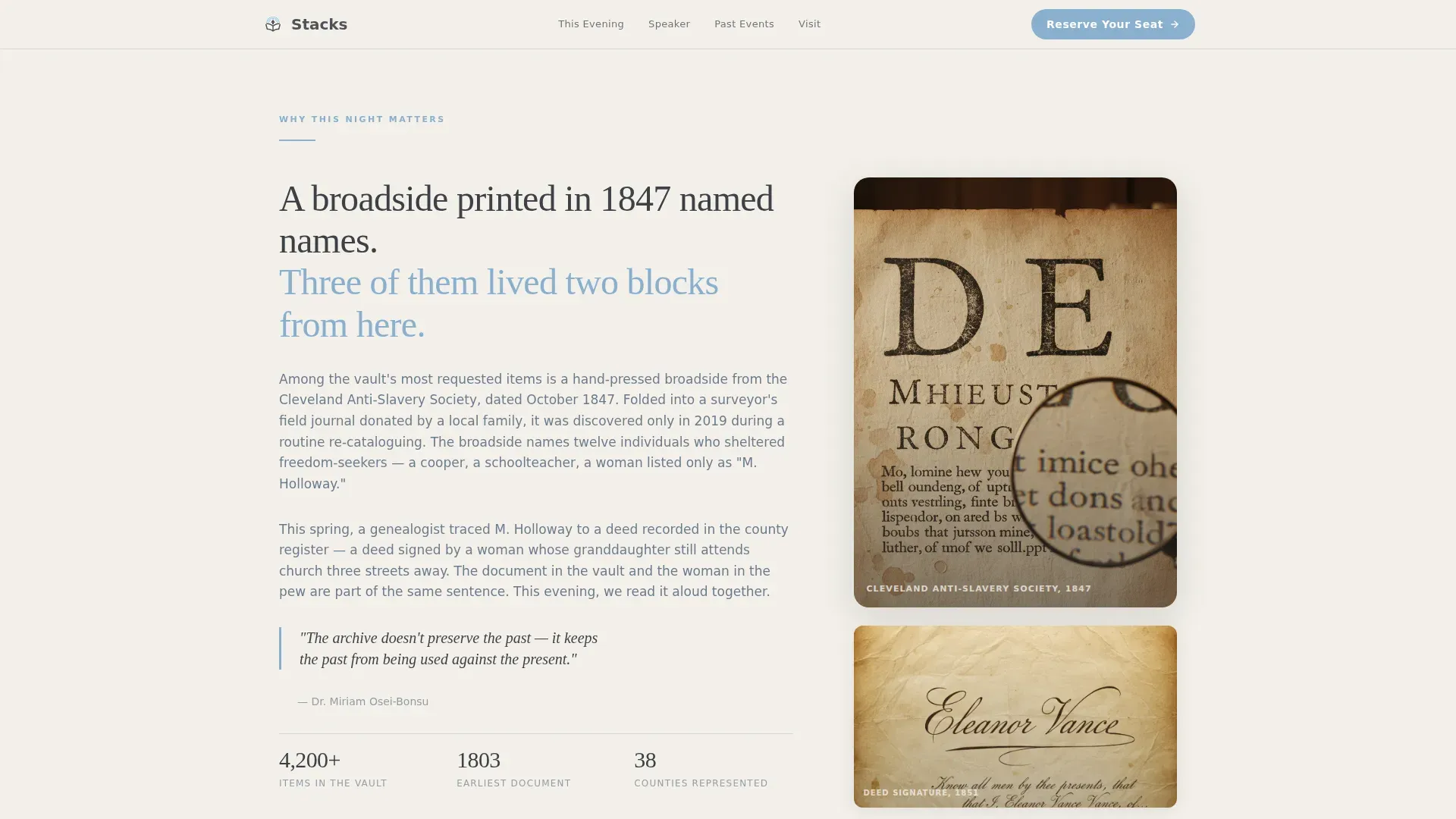
This section tells the story behind the collection being featured. It connects a specific historical document to a present-day community question, giving patrons a reason to care before they commit. The writing spaces are structured to hold a focused narrative without overwhelming the page body.
Speaker Profile with Overheard Quote
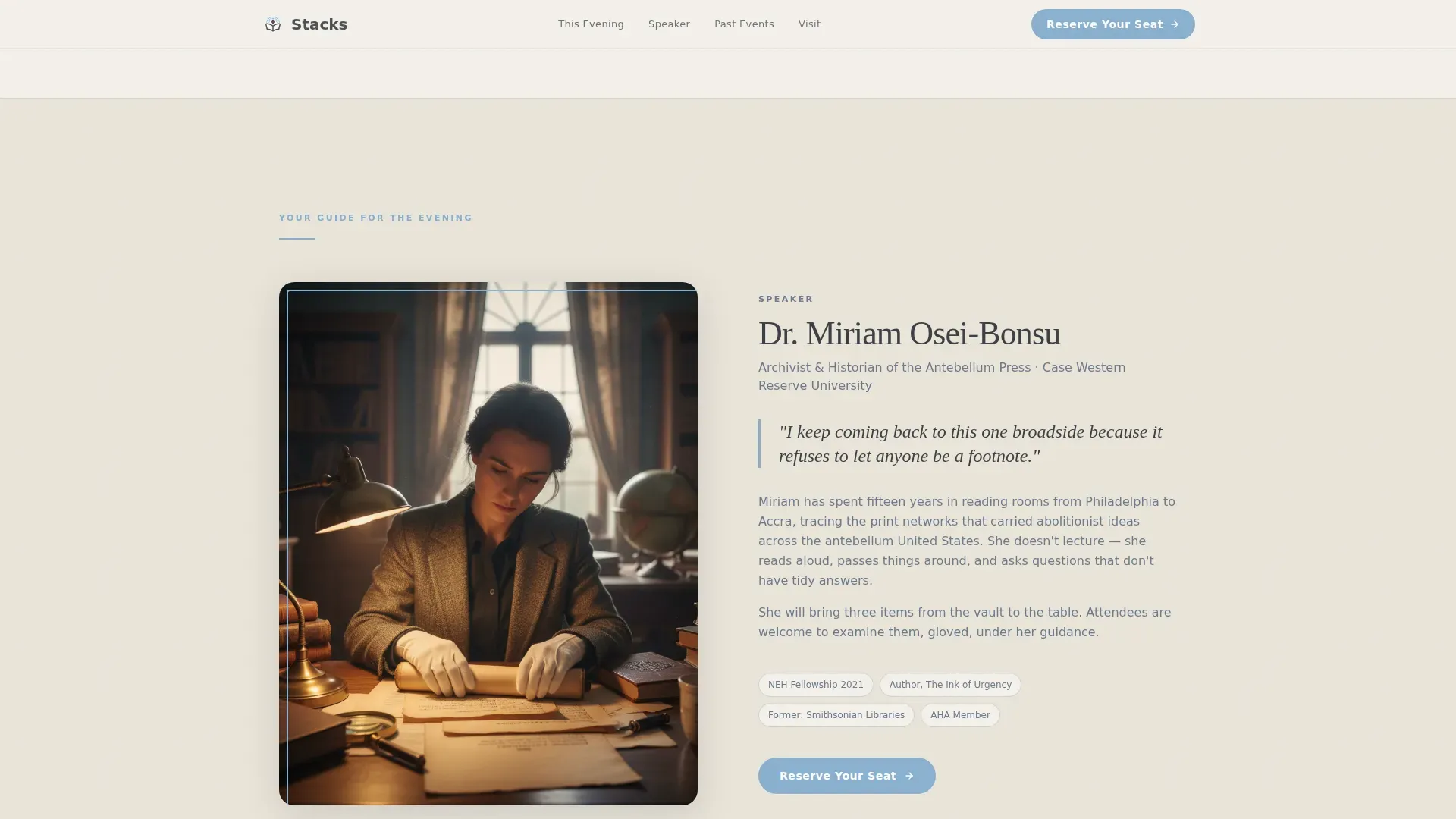
A candid photo and a single quoted sentence introduce the curator or guest speaker. The quote is styled to sound like something overheard in a reading room, not a scripted bio. This section builds personal trust and makes the event feel like a conversation worth joining.
Live Seat Count and Registration Form
The registration form uses three fields in sequence: name, email, and a dropdown asking what draws the visitor to the event. A live seat count displays remaining capacity, for example "14 of 40 seats remaining," creating gentle scarcity. A secondary text link below the form offers a reading list sign-up for those not ready to commit to a seat.
Timeline Strip of Past Events
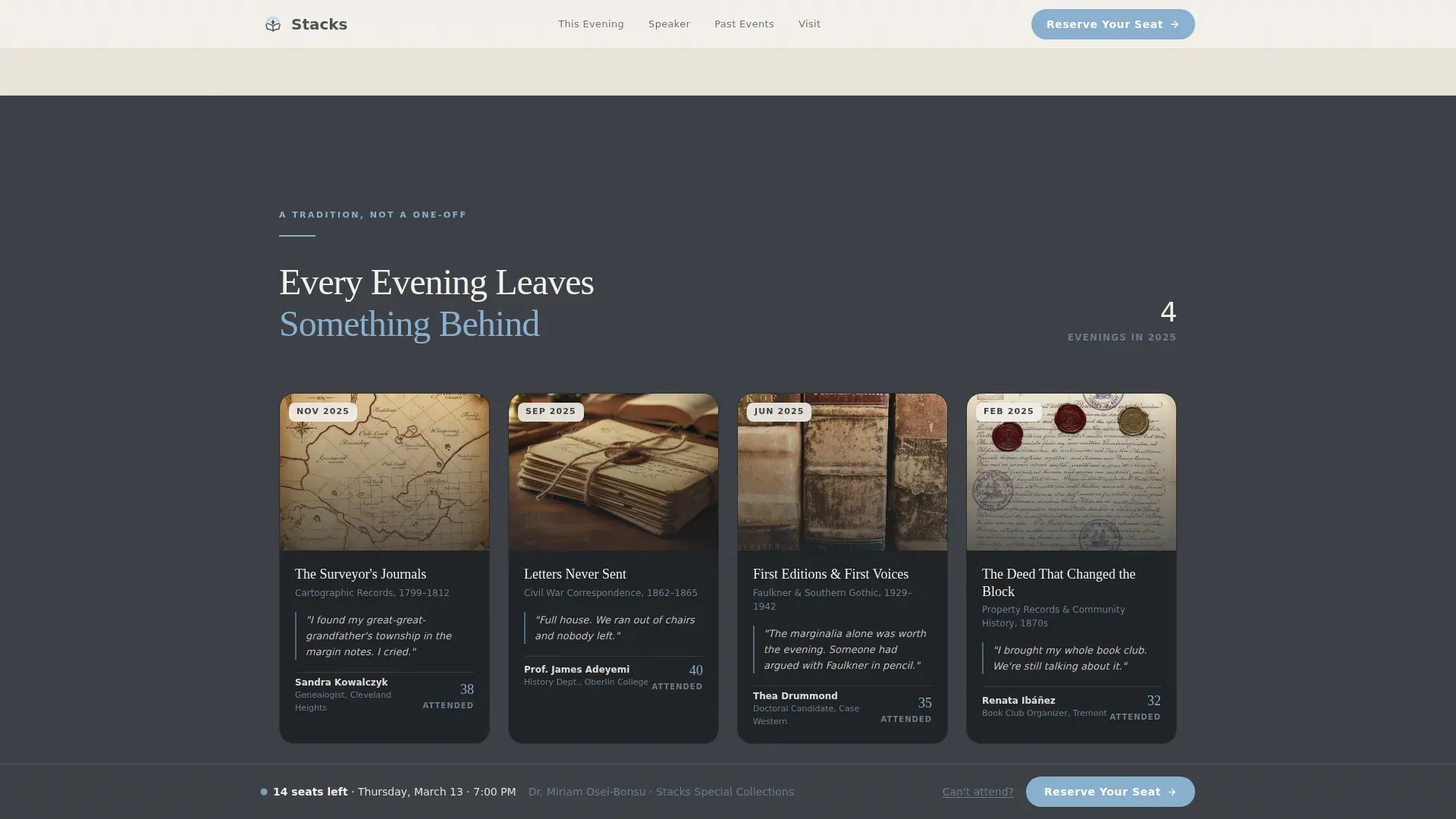
A horizontal strip of small photography, attendance counts, and one-line testimonials proves this is a recurring tradition. Each entry is compact and scannable, letting new visitors confirm that past events filled rooms and left people glad they came.
Page sections overview
| Section | Purpose |
|---|---|
| Split Hero Panel | Introduce event with photo and headline |
| Event Narrative | Connect collection to community question |
| Speaker Profile | Build trust with curator introduction |
| Past Events Timeline | Show tradition through photos and counts |
| Registration Form | Capture seat reservations with live count |
| Fixed Bottom Bar | Keep call to action visible while scrolling |
Design & branding system
The visual identity follows a Community Hearth theme using the Slate and Sky color system. The palette is designed to feel like a stone building whose windows face open sky: serious enough to house irreplaceable things, bright enough to invite any curious person inside.
- Colors: parchment white (#F4F1EB) for content panels, archival charcoal (#3B3F45) for body text and deep backgrounds, reading-room slate (#6B7B8D) for secondary surfaces and divider lines, and open-sky blue (#89B0D0) for buttons, hover states, and pull-quotes
- Typography: Fraunces serif for all headline writing, giving headings the look of carved stone; DM Sans for body copy, keeping reading light and comfortable
- Imagery: warm amber shelf-light photography with shallow depth of field, using real hands and physical objects to describe the tactile world of archival research
Mobile & speed optimization
The template is built desktop-first, with the split-screen layout collapsing gracefully on smaller screens. Server components handle all static sections, while client-side components manage the scroll behaviors and live seat count, keeping the interactive page elements responsive without slowing the static body down.
- The 50/50 hero stacks vertically on mobile so the photograph and headline each fill the window fully
- The fixed bottom call-to-action bar remains visible across screen sizes, so visitors on any device can always navigate back to the registration form
- Scroll animations use medium-weight motion that degrades cleanly on devices where reduced motion is preferred
How this template helps you convert
Every design decision on this landing page is made to move a hesitant visitor toward a reserved seat. The page does not simply list event details; it builds a case for why this particular evening is worth their hours.
- The live seat count creates real urgency without pressure. Seeing "14 of 40 seats remaining" answers the visitor's unspoken question about whether this event is popular, and makes confirming a spot feel like a smart move rather than a sales response.
- The secondary reading list link below the registration form captures emails from visitors who are interested but not yet ready to commit to attending. This means the page saves leads even when someone is still comparing options or waiting for a better time to visit.
Other information about this template
The Stacks Community Hearth Special Collections Library Landing Page Template is part of a broader platform for library and cultural institution landing pages. The platform uses a drag-and-drop dashboard, so librarians can manage and update the page without any coding skills. No-code tools like these are designed to help non-technical users build and launch production-ready landing pages and websites quickly.
Landing pages built on the platform use a panel-based framework. Panels may contain no content, a single content node, or multiple nodes. You can add previously created Callouts, Custom Blocks, Resource Flows, Sliders, Events, and News items to your landing pages. You can also change the column layout on any landing page and drag and drop content into new positions. Only users with the Moderator or Administrator role will be able to perform certain steps related to managing landing pages.
The platform supports location services directly on the page. Libraries can add a Locations block to their site to display location and hours of operation. A location modal can appear as a drop-down option in the top menu, and libraries can provide access to location information by adding a link to a pre-built location and hours list view page. Libraries can also display real-time occupancy levels in their spaces, which is useful for reading rooms with limited capacity.
Key elements of a complete library landing page include a clear title, search bar, call-to-action buttons, curated collection highlights, high-quality images, and location and hours information. A prominent discovery bar helps patrons search both special collections and the general site without confusion. Thematic browsing options can provide entry points for serendipitous discovery, which is especially valuable when examining a collection that spans fine art, civil war documents, and community letters from across multiple centuries.
Community engagement initiatives in libraries often include workshops, tutoring, and programs that cater to diverse audiences. This template is designed with that range of patrons in mind. The dropdown form field, for example, captures intent signals like "Personal research," "Professional interest," or "Bringing a group," giving library staff useful data about who is making the effort to attend.
- The template supports the addition of a university or institutional logo in the header menu icon area
- The footer uses a Vercel Horizontal Flow pattern (Pattern 3) with clear link groups for services, location, and hours
- The page icon set and menu navigation are pre-configured so staff can confirm the layout is correct before going live
- If you encounter an error or a bug during setup, the drag-and-drop dashboard allows you to retrieve any saved version of the page without losing your work
Theme
Community Hearth
Creative direction
Movement & Cause
Color system
Slate & Sky
Style
Split Screen (50/50)
Direction
Event Registration
Page Sections
50/50 Split-screen Hero
Page-turn Scroll Animations
Live Seat Count Registration Form
Fixed Bottom Call-to-action Bar
Speaker Profile Section
Past Events Timeline Strip
Related questions
Can I use this template without any coding skills?
How does the live seat count work on the registration form?
What happens to visitors who do not register for the event?
Can I add my library's location and hours to the page?
Who can edit and publish this landing page?



