Printing & Packaging Professional Website Template
The Press landing page template is built for label printing operations that need to convert serious buyers with operational proof. It uses a zigzag layout, an isometric header illustration, real-time production metrics, and a click-through structure that moves visitors toward a custom quote configurator. The Forest Trust color system gives the page authoritative, industrial credibility.
by Rocket studio
Quick summary
Press is a single-page label printing landing page template designed to earn buyer trust before asking for a click. The alternating zigzag layout presents production data, substrate comparisons, and durability proof in an Industry Report style. A live label counter, isometric header illustration, and two clear conversion paths make the page feel like evidence, not advertising.
Who this template is for
This template is built for label printing businesses that sell to demanding, detail-oriented buyers. It suits operations running high-volume flexographic presses and offering a range of substrate and finishing options.
- Craft beverage founders choosing substrates for their first product run
- Procurement managers at consumer packaged goods companies reordering millions of labels on recurring cycles
- Packaging engineers specifying labels that must pass durability certifications and survive harsh environments
What problem this template solves
Label printing buyers arrive with technical questions and skepticism. A generic service page cannot answer whether a printer can hit micron-level registration tolerances or survive freeze-thaw and ultraviolet exposure testing. This template closes that gap by presenting operational proof upfront.
- Visitors absorb hard production metrics before seeing any call to action
- Data stories replace vague claims, so buyers build confidence in the printer's capabilities
- The comparison chart at the bottom frames the click to a quote configurator as the obvious next step
What you get with this template
You get a fully structured single-page layout that functions as a visual case for your label printing operation. Every section is designed to carry a specific proof point or capability story.
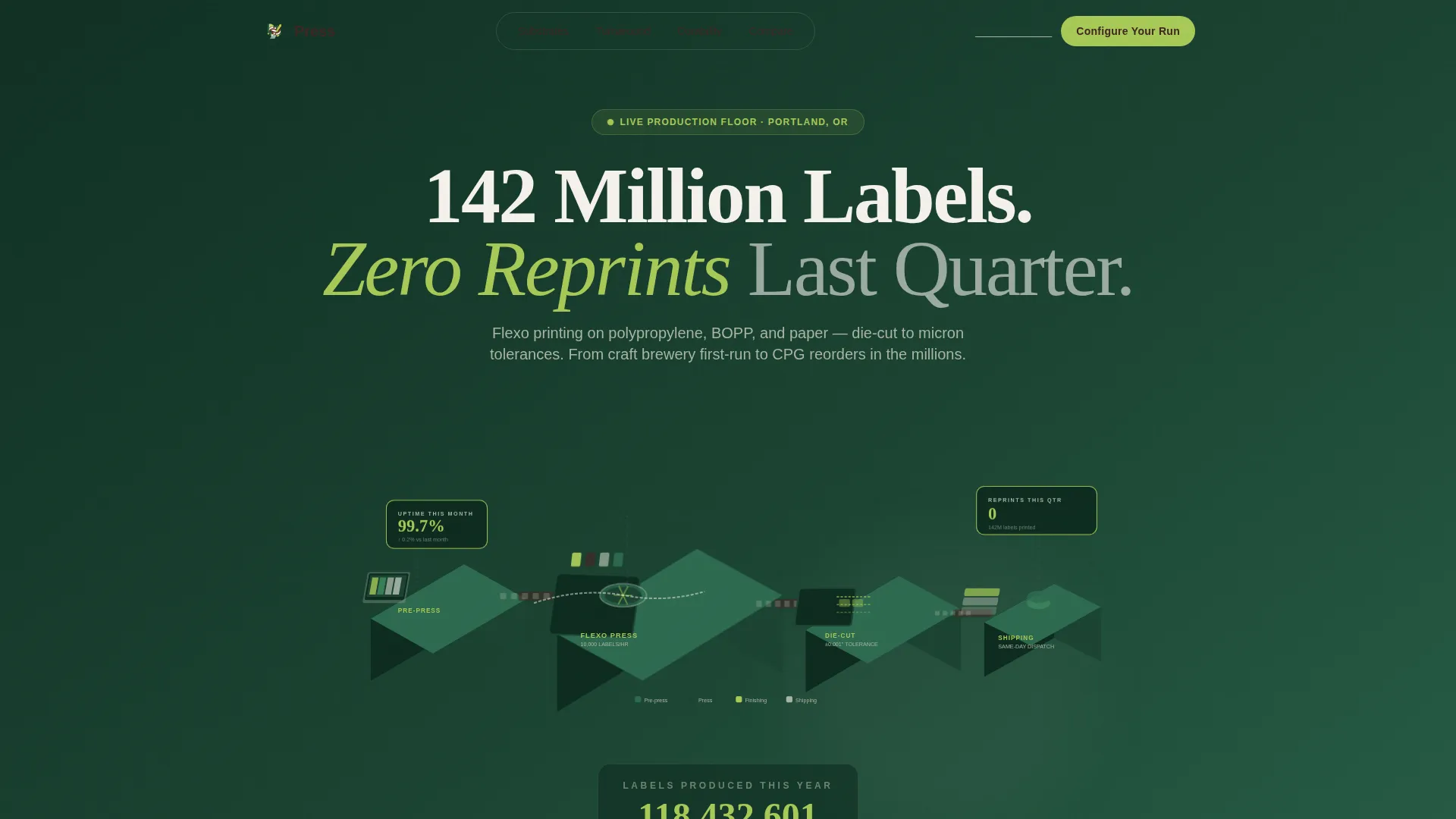
- An isometric header illustration showing the full production line from pre-press proofing to shipping dock, with animated details and a live label production ticker
- A zigzag section body alternating between data-dense panels and large-format label photography, covering substrates, turnaround benchmarks, and durability test results
- Two conversion paths: a primary click-through button leading to a quote configurator and a secondary email capture through a substrate guide download
Feature list
This section describes the core components built into the Press template.
Isometric Production Line Header
The header features a detailed isometric cutaway illustration of an entire label production line. Each station, from pre-press proofing through flexographic printing to the finishing and shipping dock, is color-coded in the Forest Trust palette. Tiny animated details include a roll unwinding, ink fountains cycling, and a conveyor belt advancing finished labels.
Live Label Production Ticker
A real-time counter beneath the header headline tracks labels produced so far this year. The ticker updates live, turning an abstract production claim into a visible, credible number. It anchors the page's data-first tone from the first scroll.
Zigzag Data Story Layout
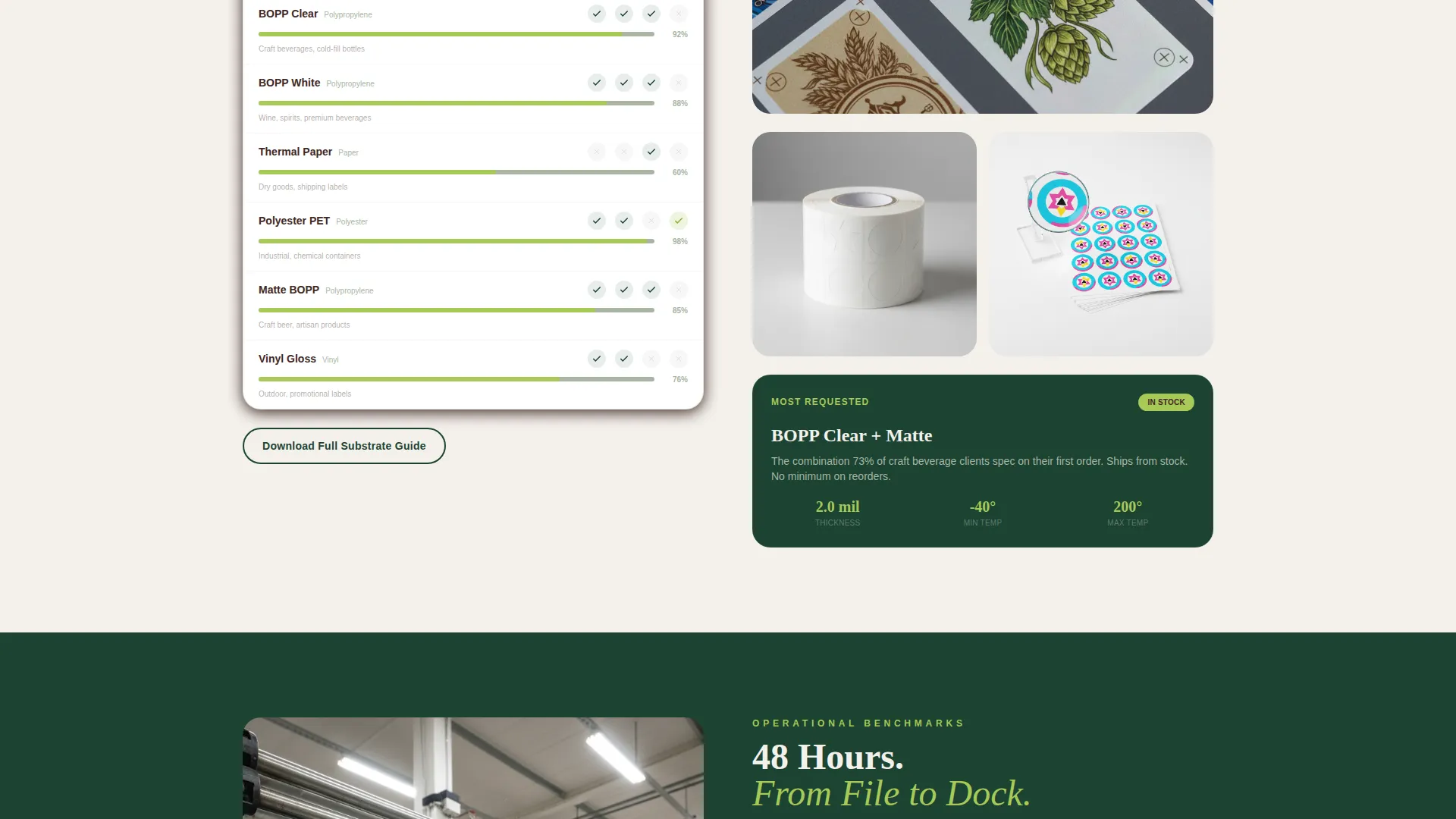
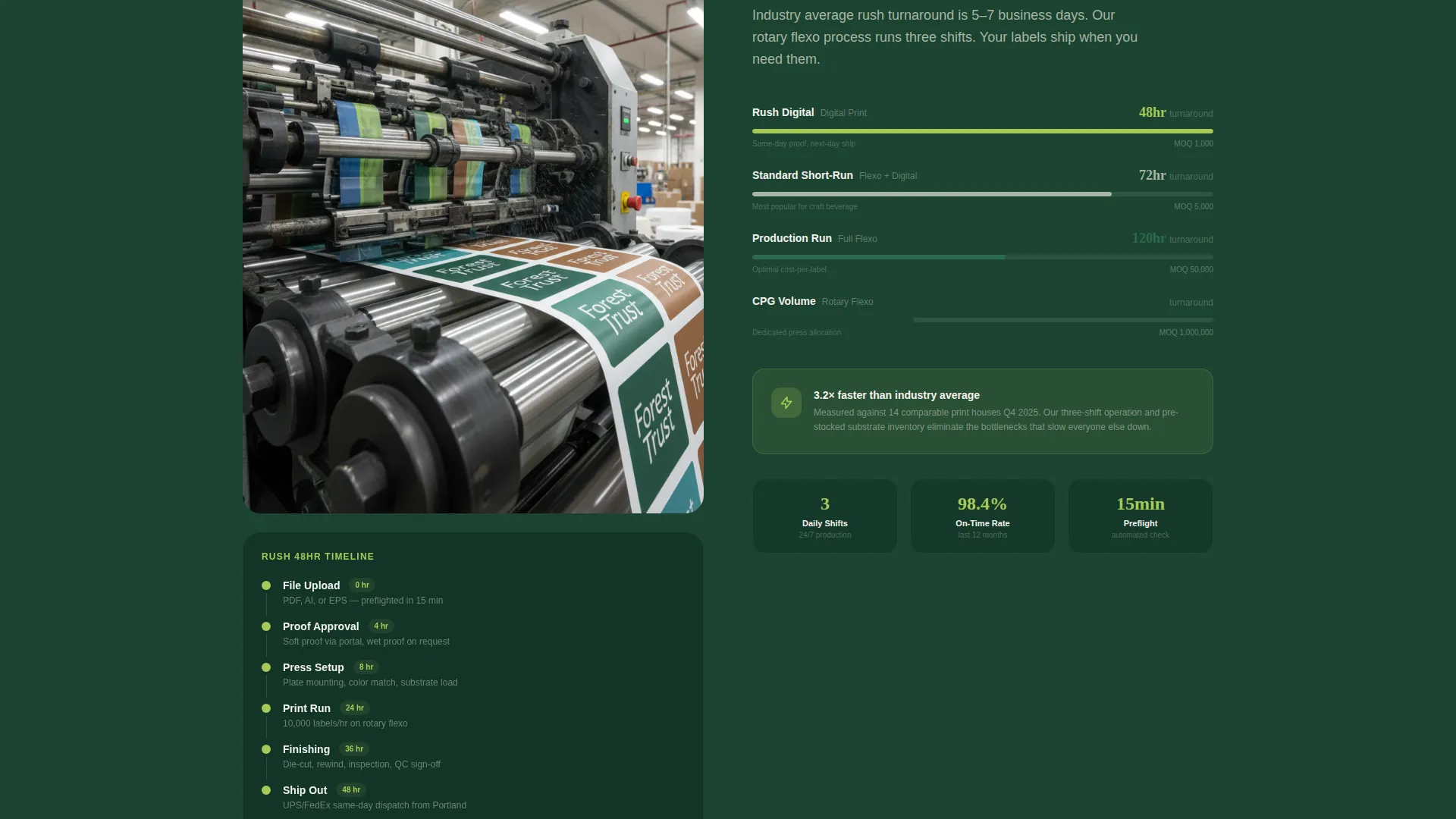
Each section in the alternating layout presents one operational metric or capability as a focused data story. Left panels carry data-dense content such as material comparison tables and timeline graphics. Right panels show large-format printed label photography, then the layout reverses, keeping the eye moving and building an evidence case.
Substrate and Durability Proof Sections
Substrate options are visualized as a material comparison table. Turnaround benchmarks are displayed as timeline graphics. Durability test results appear as before-and-after photography of labels surviving freeze-thaw cycles and ultraviolet exposure, giving technical buyers the specific proof they need.
Dual Conversion Path System
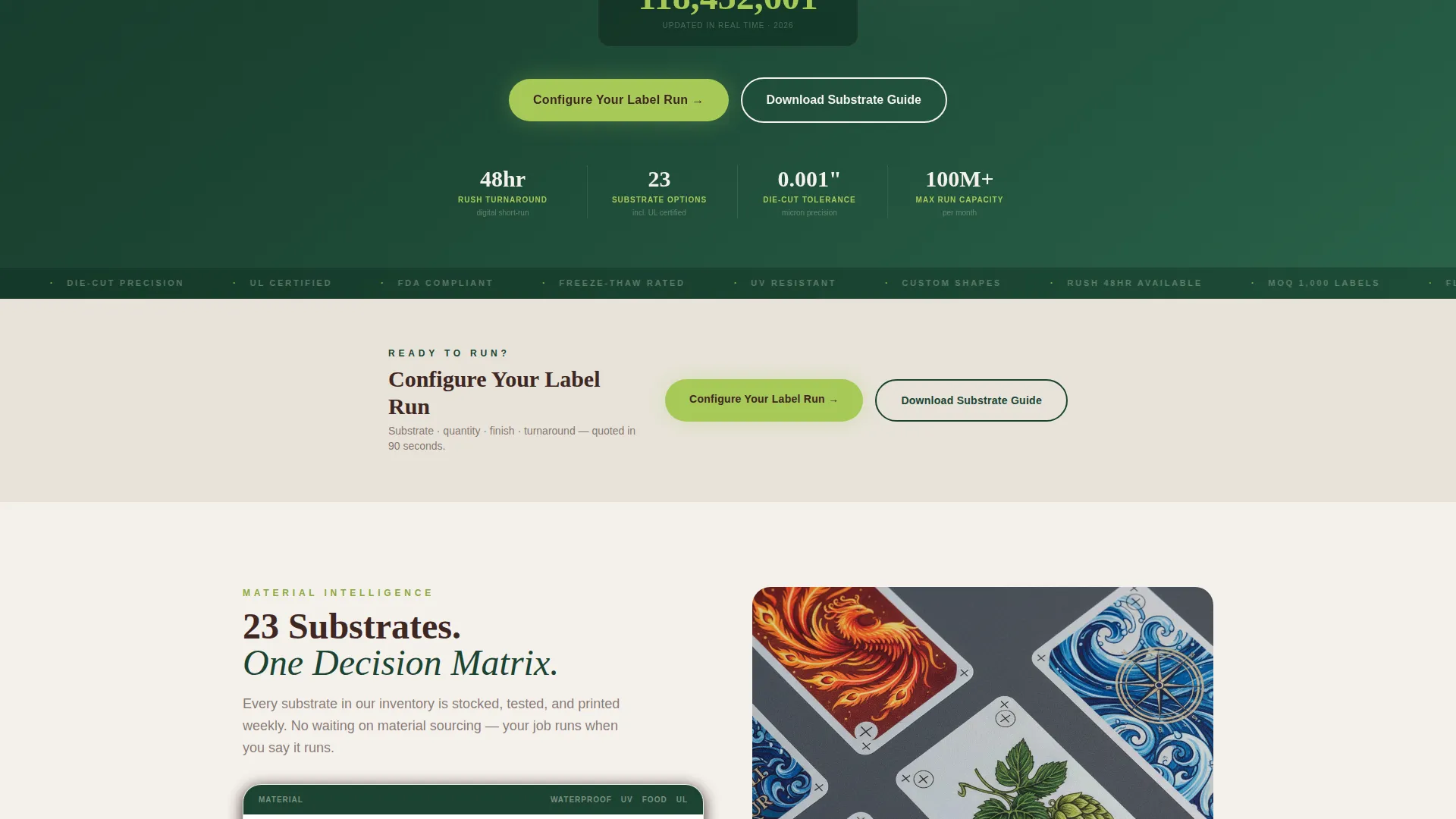
The primary call to action, "Configure Your Label Run," appears first below the header metrics and repeats at every third section. A secondary path, "Download Our Substrate Guide," captures contact details from visitors still in the research phase. No form lives on this page; the button carries UTM context forward to the quote configurator.
Industry Benchmark Comparison Chart
The page closes with a comparison chart measuring the printer's turnaround times, minimum order quantities, and certification coverage against industry averages. This section reframes the click to the configurator as a logical conclusion rather than a sales ask.
Page sections overview
| Section | Purpose |
|---|---|
| Isometric Header | Introduces the production line visually and anchors the headline metric |
| Live Production Ticker | Displays real-time label output to build immediate credibility |
| Primary call to action Block | Places the first "Configure Your Label Run" button below the header |
| Substrate Comparison Table | Visualizes material options to help buyers match substrates to their needs |
| Turnaround Timeline Graphic | Shows production speed benchmarks as a readable timeline |
| Durability Proof Section | Presents before-and-after photography of labels in harsh test conditions |
| Capability Data Panels | Alternating zigzag sections covering key operational metrics |
| Secondary call to action: Substrate Guide | Offers a downloadable guide to capture research-phase visitors |
| Benchmark Comparison Chart | Compares turnaround, minimum order quantity, and certifications to industry norms |
| Final call to action Block | Closes the page with the quote configurator button |
Design & branding system
The Forest Trust color system gives the template a tone that is both organic and industrial. It avoids the clinical look of generic print-industry sites while staying credible enough for procurement and engineering buyers.
- Core palette: deep canopy green (#1B4332) and near-white birch (#F4F1EC) alternate as section backgrounds, with bark brown (#3E2723) for body text
- Accent usage: lichen silver (#A8B5A2) carries data visualizations and supporting labels, while new-growth chartreuse (#A7C957) is reserved exclusively for call-to-action buttons and key metric highlights
- Visual style: the Dashboard Pro theme combines the Industry Report creative direction with isometric illustration, large-format photography, and data graphic components for a page that reads like a premium annual report
Mobile & speed optimization
The Press template is structured to translate its data-rich desktop layout into a clean, readable mobile experience. The zigzag column layout collapses gracefully so each section becomes a stacked, full-width block.
- Isometric header illustration and animated ticker are designed to occupy a full-width viewport on smaller screens without losing their visual impact
- Data tables, timeline graphics, and before-and-after photography reflow into single-column formats so mobile visitors can scan proof sections without horizontal scrolling
- Call-to-action buttons remain prominent and consistently spaced throughout the mobile layout, keeping the conversion path visible at every stage of the scroll
How this template helps you convert
The page is built as a click-through funnel. Every design and content decision is intended to move a confident, well-informed visitor toward the quote configurator.
- The page leads with the headline "142 Million Labels. Zero Reprints Last Quarter." and a live production ticker, establishing operational credibility before any product claim appears.
- Zigzag data sections build a progressive evidence case through substrate tables, turnaround benchmarks, and durability proof, so the visitor arrives at the comparison chart already persuaded.
- The final benchmark comparison chart and repeating "Configure Your Label Run" call to action make the next click feel like the natural conclusion of a well-reasoned decision.
Other information about this template
The Press template is part of the Dashboard Pro theme family and uses the full Forest Trust color system as defined in the matched design specification. It is classified under the Manufacturing & Industrial category, within the Printing & Packaging subcategory, targeting the label printing niche.
- The template style is Zigzag/Alternating, following the Industry Report creative direction for section-by-section data storytelling
- The landing page direction is Click-Through, meaning the page is optimized to carry visitors to an external quote configurator rather than converting them on-page
- The header concept is Isometric, using a multi-station production line illustration as the primary visual anchor
Theme
Dashboard Pro
Creative direction
Industry Report
Color system
Forest Trust
Style
Zigzag/Alternating
Direction
Click-Through
Page Sections
Isometric Production Line Header
Live Label Production Ticker
Zigzag Data Story Layout
Substrate and Durability Proof Sections
Dual Conversion Path System
Industry Benchmark Comparison Chart
Related questions
Who is this template designed for?
Does this template include a contact form?
Can I update the production metrics and live ticker?
How many call-to-action placements does the template include?
What makes this template different from a standard printing service page?



