Cardiology EMR Comparison Landing Page Template
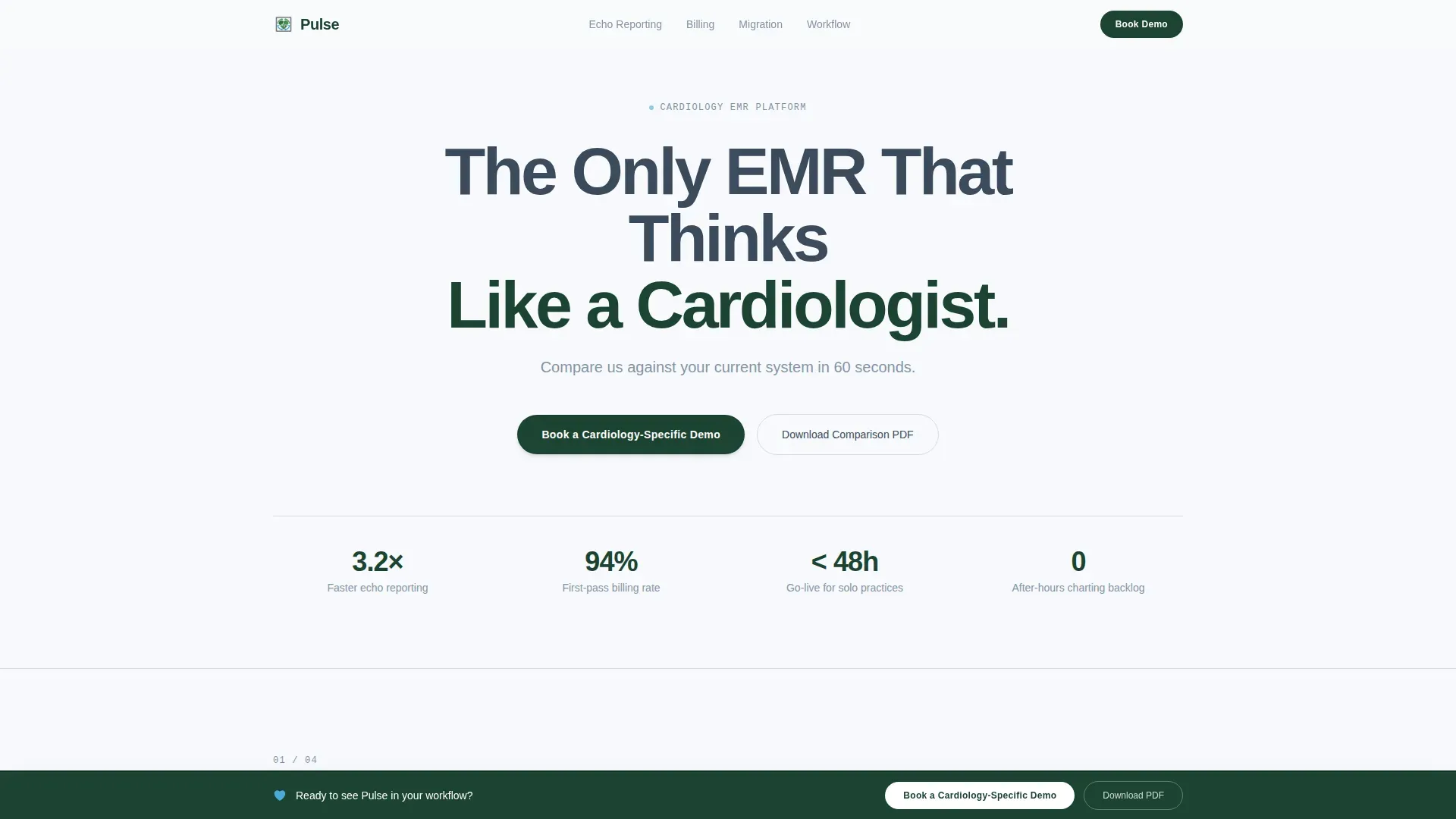
Pulse is a cardiology-specific electronic medical record (EMR) landing page template built around FAQ-driven comparison tables. It helps interventional cardiologists, practice managers, and group administrators evaluate the platform against generic and legacy systems in a single scroll. The template converts skepticism into demo bookings through structured questions, interactive comparison tables, and a focused booking form.
by Rocket studio
Quick summary
Pulse is a single-page, comparison-table landing page template designed for a cardiology EMR platform. It replaces the usual feature-list format with a scroll built around real evaluation questions. Each section answers one objection, adds a comparison table, and compounds the case. The result is a page that earns the demo booking before the visitor reaches the final call to action.
Who this template is for
This template is built for healthcare software teams selling a cardiology-specific EMR to clinical and administrative buyers. It speaks directly to the people who sit in evaluation committees and ask hard questions before signing multi-year contracts.
- Interventional cardiologists who spend after-hours time catching up on charting and documentation
- Practice managers tracking revenue loss from missed billing modifiers and manual reconciliation errors
- Cardiology group administrators who need a clear workflow comparison before committing to an enterprise switch
What problem this template solves
Most software landing pages list features. Cardiology buyers do not shop that way. They arrive with specific objections, and a generic feature grid does not answer them. This template is structured around that reality.
- It replaces passive feature lists with direct answers to the questions buyers actually ask during evaluation
- It shows workflow step counts and time-to-completion data so buyers can compare systems at a glance
- It removes friction from the booking process by letting visitors reach their own conclusions before the form appears
What you get with this template
The template delivers a fully structured, single-page layout built for desktop-first evaluation sessions. Every section is purposeful and follows the natural rhythm of a cardiology software review.
- A hero section with a centered giant headline, a subline, and an inline demo booking form
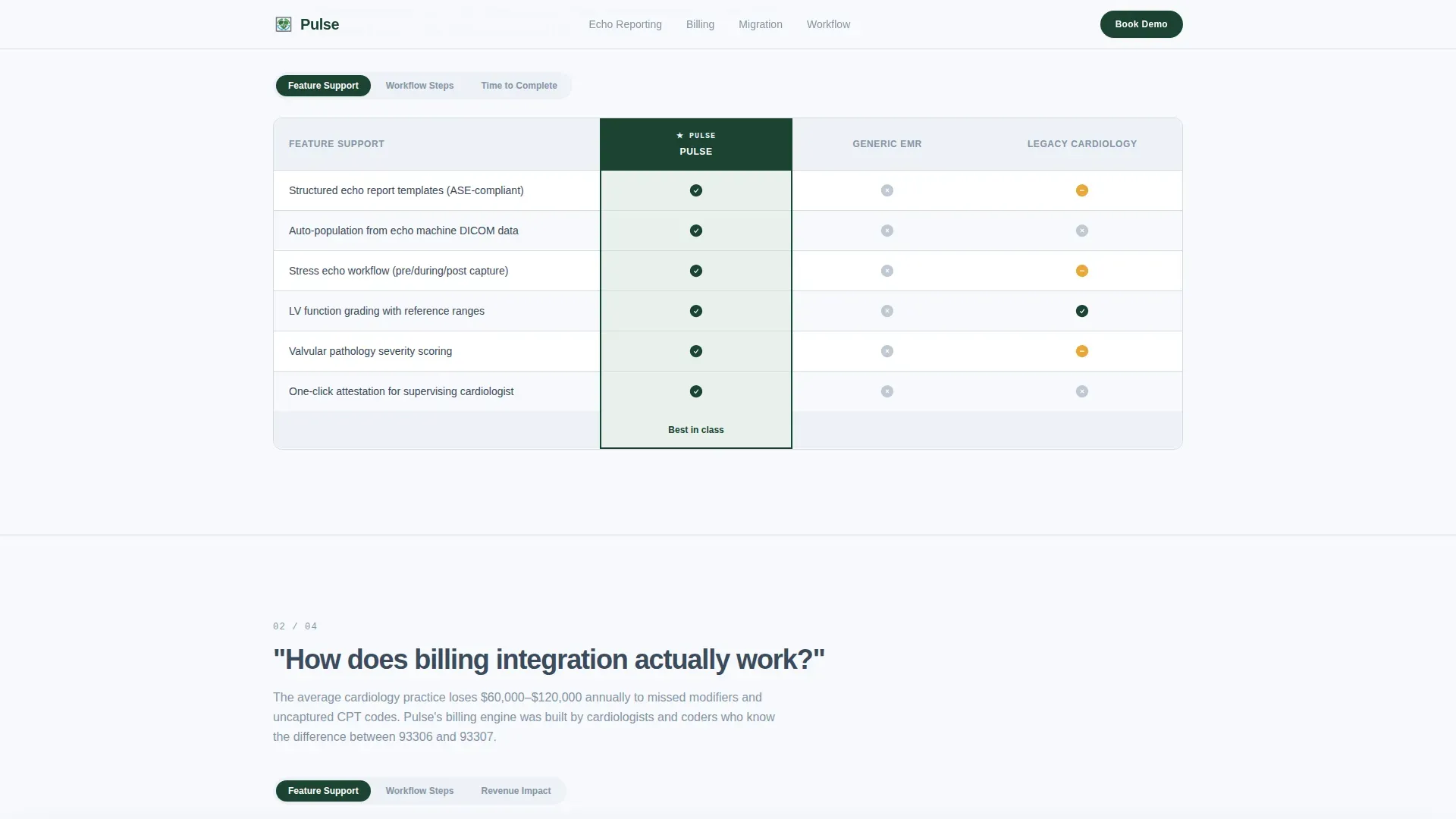
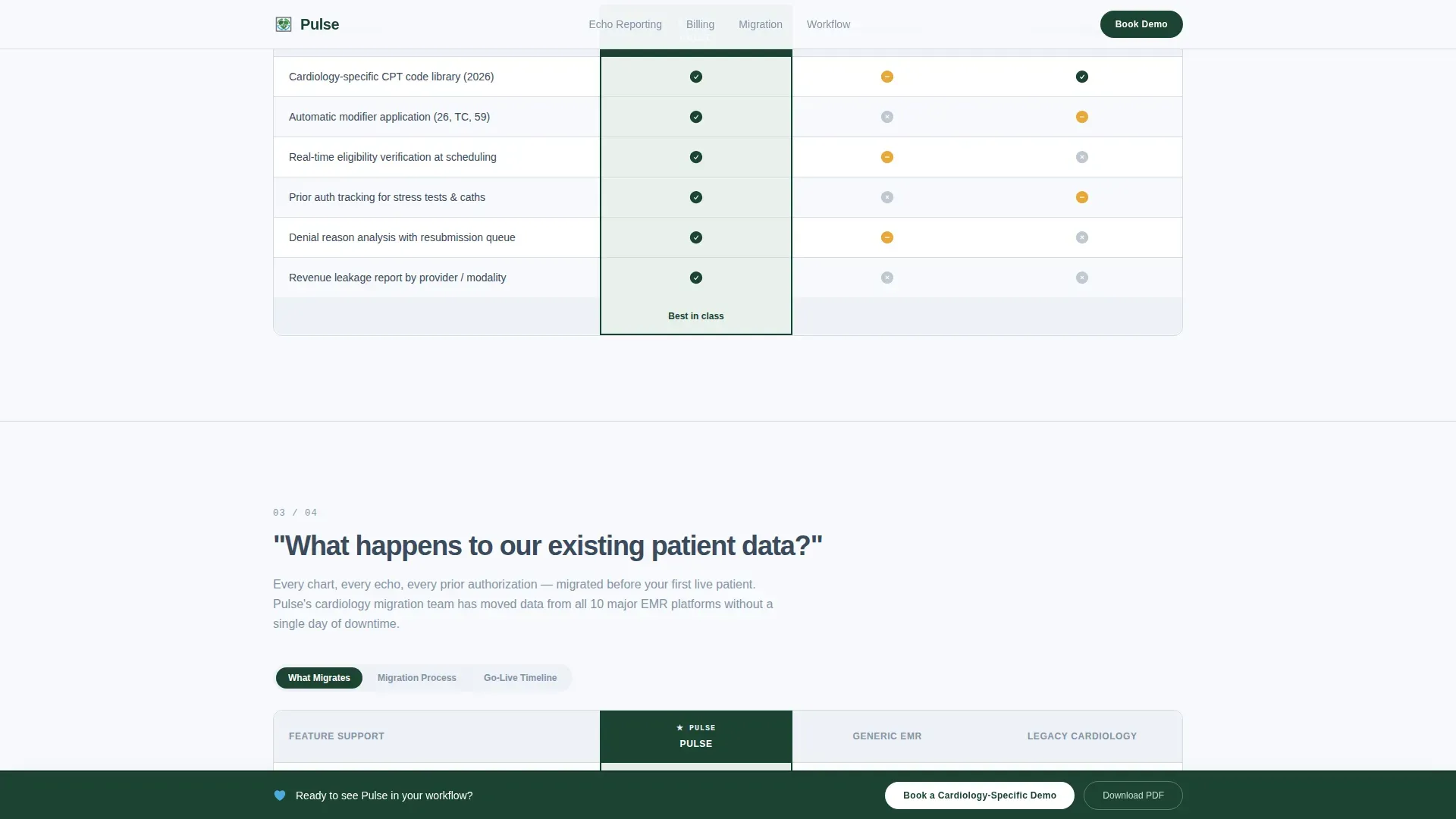
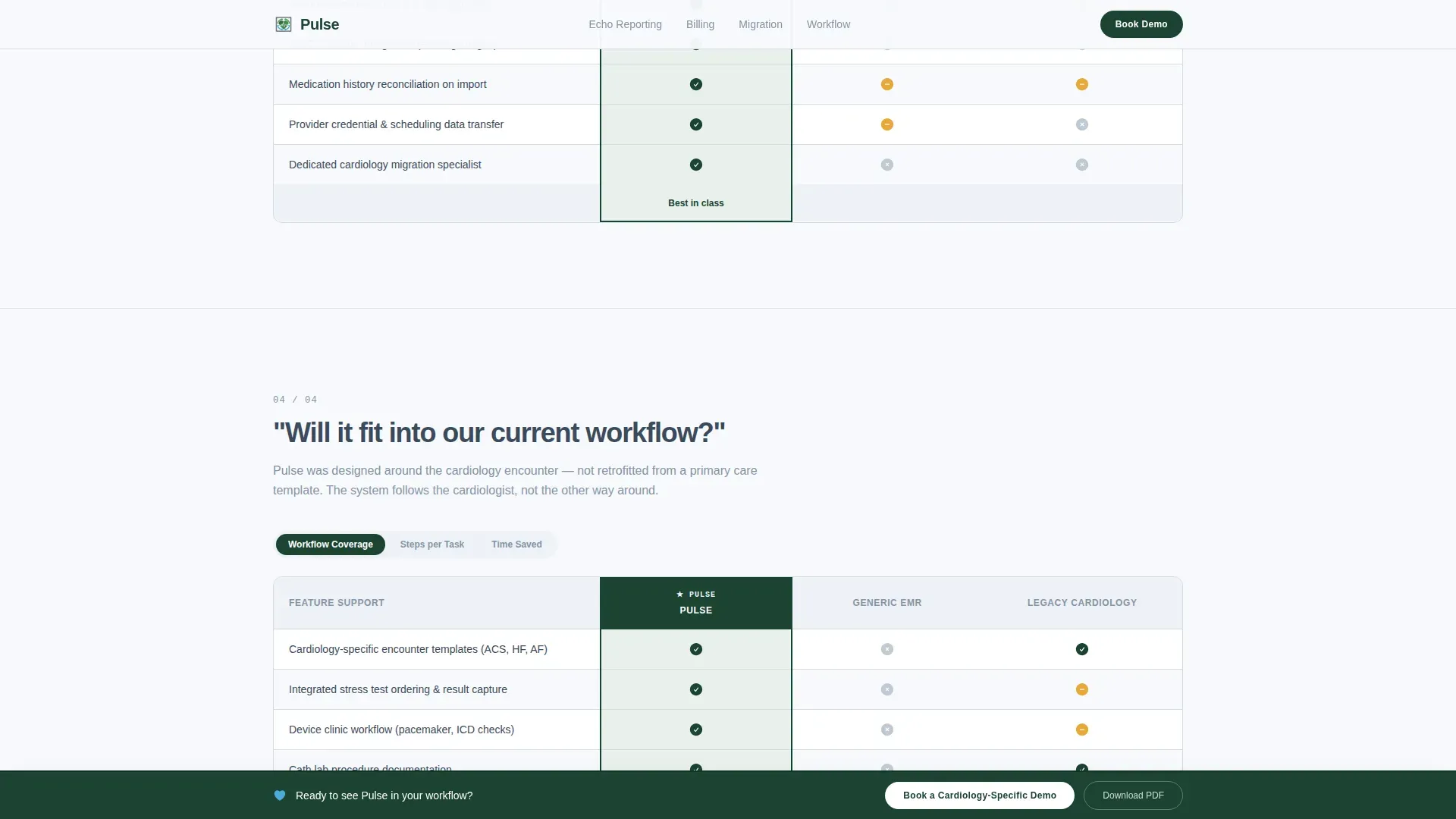
- Four FAQ-driven comparison sections, each pairing a real buyer question with a three-column interactive table
- A sticky call-to-action bar, a secondary PDF download path, and a linear single-row footer
Feature list
This template ships with a focused set of layout and interaction components drawn directly from the project brief.
FAQ-Structured Comparison Tables
Each of the four main sections opens with a large-type buyer question. Below it, a three-column table compares this platform against a generic EMR and a legacy cardiology system. Column toggles let visitors switch between feature presence, workflow step counts, and time-to-completion metrics.
Inline Demo Booking Form
The hero section includes a booking form that collects practice name, number of providers via a dropdown, current EMR system via a dropdown, and a preferred demo date through an inline calendar picker. The form is designed to qualify the lead before the visit ends.
Sticky Call-to-Action Bar
After the second comparison table, a sticky bar fades in and stays visible as the visitor scrolls. It carries the primary call to action, keeping the booking prompt accessible without interrupting the reading flow.
Secondary PDF Download Path
A secondary conversion path targets practices still in committee review. Visitors enter their email to receive a downloadable comparison document, giving the sales team a lower-friction lead while the committee deliberates.
Interactive Column Toggles
Comparison tables include toggle controls that let visitors switch the data view between three modes: feature presence, number of workflow steps, and time-to-completion figures. This interactivity makes the tables feel like a tool, not a chart.
Corporate Precision Visual System
The layout uses structural white space as a deliberate design element. Heavy sans-serif headlines, a restrained four-color palette, and clean table borders create a clinical aesthetic that matches the platform's positioning.
Page sections overview
| Section | Purpose |
|---|---|
| Hero headline block | Centers the primary value statement and hosts the inline demo booking form |
| FAQ comparison block 1 | Answers structured echo reporting question with a three-column comparison table |
| FAQ comparison block 2 | Answers billing integration question with workflow step data and triggers the sticky bar |
| FAQ comparison block 3 | Answers patient data migration question with time-to-completion metrics |
| FAQ comparison block 4 | Answers workflow fit question with a comparison table and PDF download call to action |
| Linear footer row | Closes the page with a single-row footer following Pattern 1 layout |
Design & branding system
The visual identity follows a Corporate Precision theme with an Alpine Fresh color system. Every design decision reinforces the platform's promise of clinical clarity.
- Summit white (#F7F9FC) backgrounds, glacial slate (#3B4A5C) body text and table borders, evergreen depth (#1B4332) for primary buttons and section anchors, and oxygenated blue (#4DA8DA) for hover states, toggle switches, and active comparison columns
- DM Sans typography at heavy headline weight for the hero and clean body weight for comparison content
- Structural white space used as a layout tool, not decoration, creating the same breathing room the software promises inside the chart
Mobile & speed optimization
The template is built desktop-first to match how cardiology administrators evaluate software during committee review sessions. Scroll reveals and column highlight transitions are kept low-intensity to maintain a focused reading experience.
- Low-animation approach with scroll reveals, table column highlight transitions, and a sticky bar fade-in that does not distract from the content
- Server components handle static sections so the initial load stays responsive for desktop evaluation sessions
- Dropdown menus and the inline calendar picker are designed for precise interaction on larger screens
How this template helps you convert
The page earns the booking by answering objections in sequence. Each comparison table adds another layer of evidence, so by the time the visitor reaches the final call to action, the decision is already made.
- The FAQ structure mirrors the real evaluation process, meeting buyers at their actual questions rather than interrupting them with a pitch
- The column toggle interaction turns each comparison table into a self-service tool, letting visitors validate the platform against their current system on their own terms
- The dual conversion path captures both high-intent buyers ready to book a demo and committee-stage practices who need a shareable PDF, so no qualified visitor leaves empty-handed
Other information about this template
This template is categorized under Health and Medical, specifically within the Cardiology Medicine subcategory and the Cardiology EMR and Software niche. It is localized for the United States market, using English copy, USD pricing context, US date format for the calendar picker, and US medical workflow terminology throughout. The template is designed for a business-to-business (B2B) enterprise software sales context, where the buying cycle involves multiple stakeholders and extended committee review periods. The page type is a single landing page, not a multi-page website, so all conversion paths live within one continuous scroll. The intersection match score of 13 reflects a highly specific niche alignment between the template style, the target audience, and the creative direction chosen.
- Designed for B2B enterprise healthcare software sales with multi-stakeholder evaluation cycles
- Localized for US medical context including US date formats, USD, and US EMR market references
- Template style is Comparison Table with FAQ-Driven creative direction and a Booking/Scheduling conversion goal
Theme
Corporate Precision
Creative direction
FAQ-Driven
Color system
Alpine Fresh
Style
Comparison Table
Direction
Booking/Scheduling
Page Sections
Faq-driven Comparison Table Layout
Interactive Column Toggle Views
Inline Demo Booking Form
Sticky Call-to-action Bar
Secondary PDF Download Path
Corporate Precision Visual System
Related questions
What types of practices is this landing page template designed for?
Can I customize the comparison table columns for my own platform?
How does the dual conversion path work?
Is this template built for desktop or mobile use?
Does this template include the actual EMR software?



