Dark Immersive Club Venue Landing Page Template
Pulse is a single-page landing page template built for club and live music venues. It uses a Dark Immersive design with an Obsidian and Gold color palette, a cinematic masonry grid, and a direct-sales layout. Every event card is a point of purchase, and the scroll experience mirrors the arc of a real night out.
by Rocket studio
Quick summary
Pulse is a moody, atmosphere-first landing page template for clubs and live music venues. The scroll tells a story, moving from empty room to packed floor to aftermath. A masonry event grid, a sticky ticket bar, and a minimal purchase modal make buying tickets fast and frictionless, while the visuals do the selling first.
Who this template is for
This template is built for venue operators, promoters, and booking managers who want a page that feels as good as the night they are selling. It works equally well for a basement club with a cult following and a mid-size live music room chasing touring acts.
- Club owners and independent venue operators promoting weekly events
- Promoters managing artist bookings and ticket sales for live music nights
- Touring DJ managers scouting venues and reviewing room details online
What problem this template solves
Most venue pages feel like event directories. They list shows, they show a price, and they ask for a click before the visitor feels anything. Pulse fixes that by letting atmosphere lead and commerce follow.
- Visitors leave before buying because the page feels flat and corporate
- Event cards lack the mood and context needed to make a night feel worth attending
- The path from interest to ticket purchase has too many steps and too much friction
What you get with this template
You get a complete single-page layout that guides a visitor from curiosity to purchase without ever leaving the page. Every visual and structural decision serves that goal.
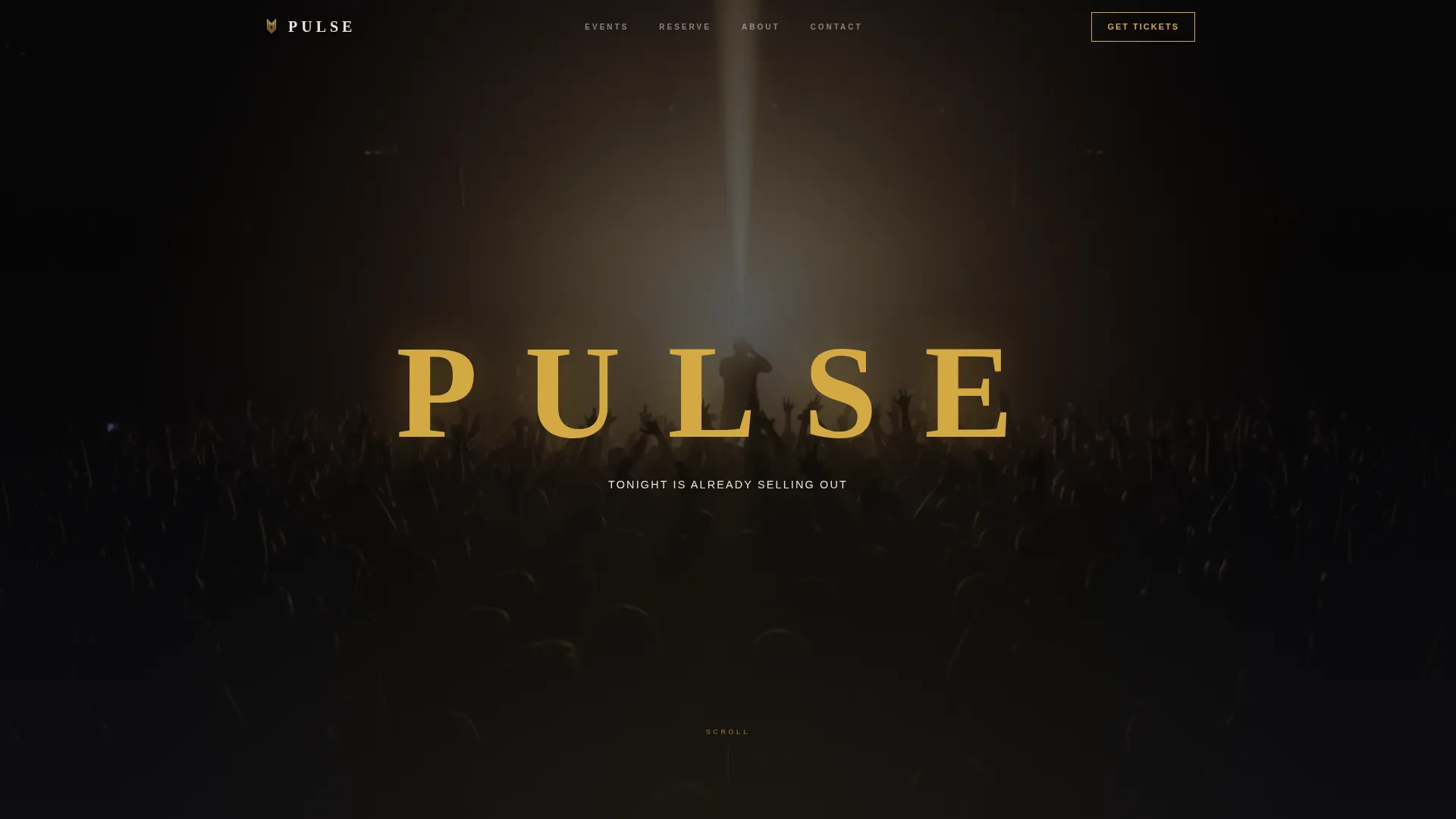
- A full-bleed cinematic header with an animated venue name reveal in thin gold type
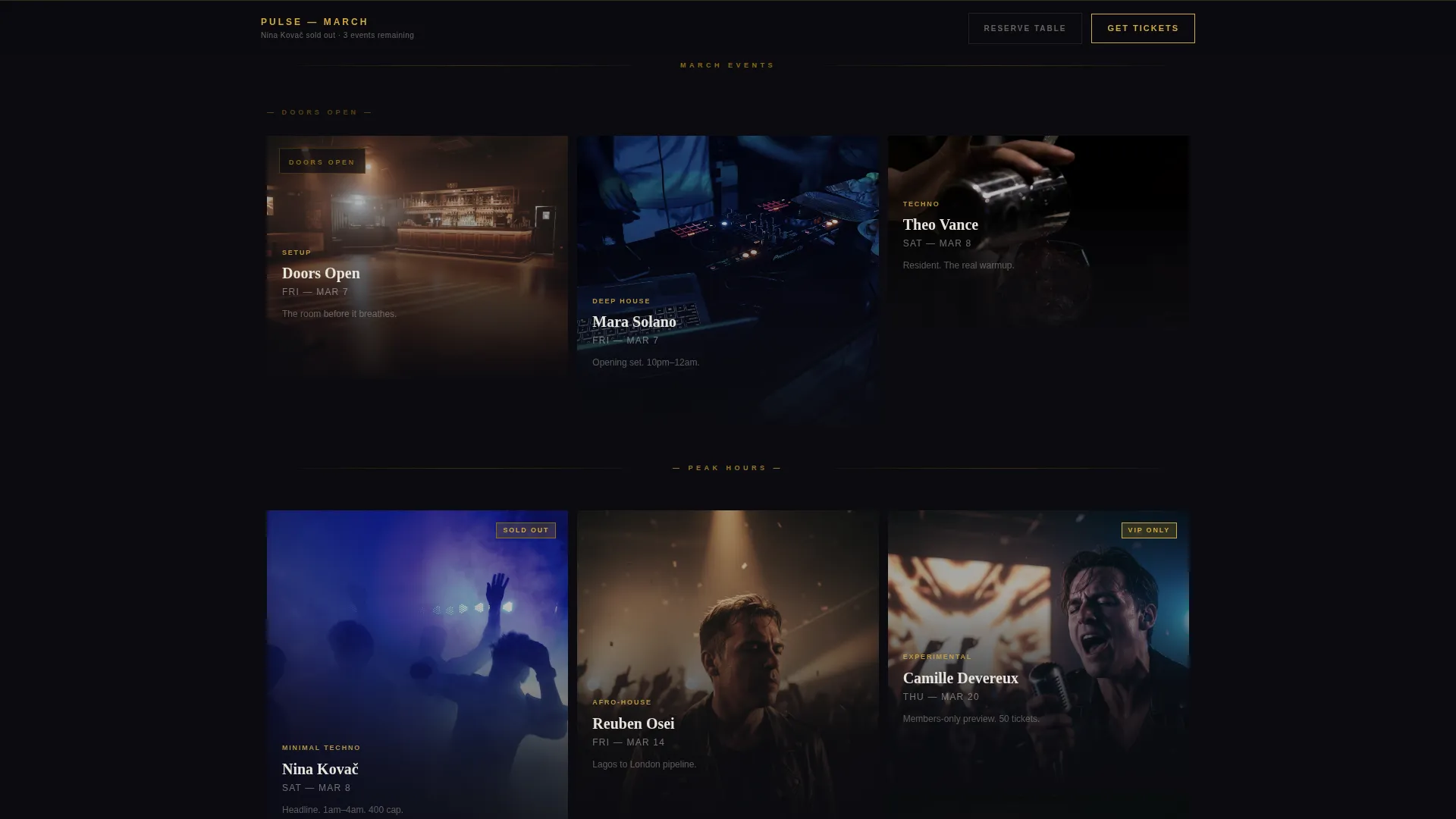
- A masonry event grid that scrolls like a single night, from setup to peak crowd to aftermath
- A sticky bottom ticket bar, a minimal three-field purchase modal, and a table reservation path
Feature list
This template ships with a focused set of built-in components. Each one is designed to support the atmosphere and the sale at the same time.
Cinematic Masonry Event Grid
Cards begin wide and moody at the top, then compress vertically as energy builds through the scroll. Each card carries a date, artist name, genre tag, and a gold "Get Tickets" button that glows on hover.
Full-Bleed Animated Header
The header opens on a near-black peak-moment photograph. After a held beat, the venue name materializes letter by letter in thin gold type. A bone-white tagline appears beneath it. The sequence pulls visitors in before any copy asks them to act.
Sticky Ticket Bar
Once a visitor scrolls past the header, a persistent bottom bar appears with a primary call-to-action. It stays visible throughout the entire scroll so the path to purchase is never out of reach.
Minimal Purchase Modal
Tapping "Get Tickets" opens a black modal overlay. The visitor selects ticket quantity, chooses General or VIP entry, and enters payment. Three fields, one tap, and the transaction is complete.
Table Reservation Path
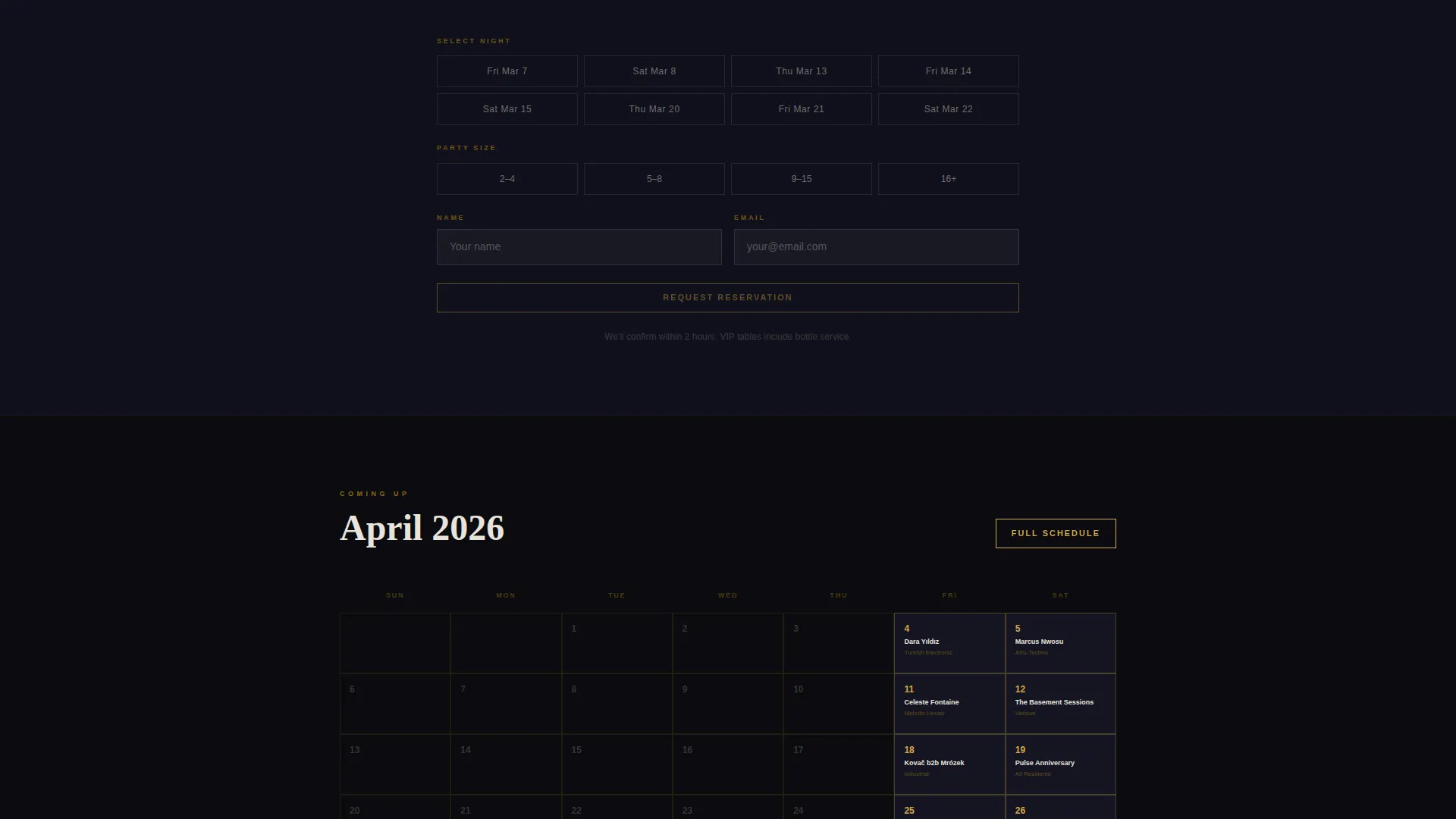
A secondary call-to-action serves groups and birthday bookings. It surfaces a date picker and a party size selector, giving a distinct flow for visitors who want a reserved experience rather than a general ticket.
Narrative Scroll Structure
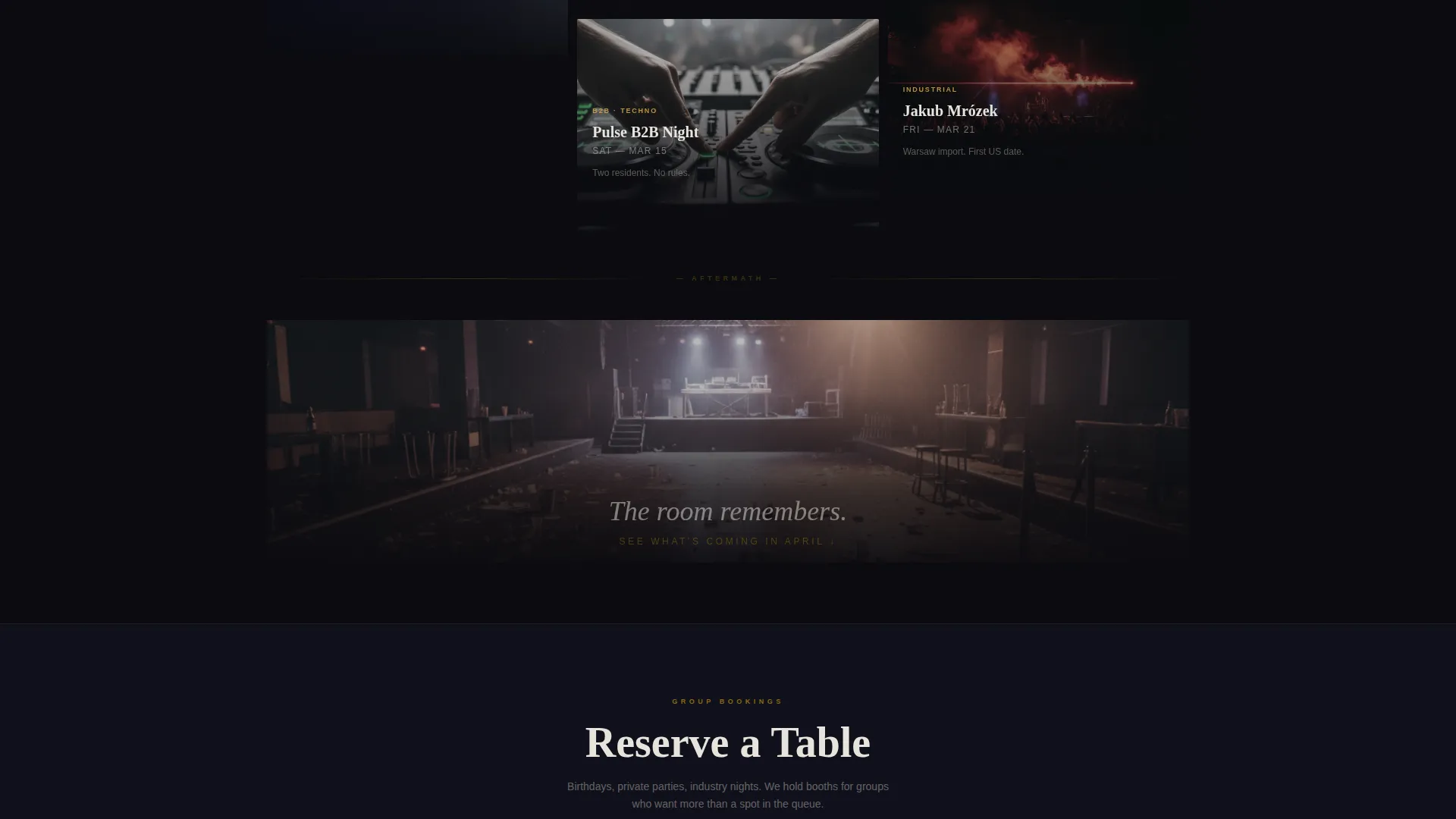
The page closes with a wide aftermath card showing the empty room under house lights, fog still hanging in the frame. A calendar of upcoming dates follows. The bottom of the page earns the next visit before the current one ends.
Page sections overview
| Section | Purpose |
|---|---|
| Full-Bleed Header | Opens the atmosphere with a peak-moment photograph and animated venue name reveal |
| Masonry Event Grid | Displays clickable event tiles with artist, date, genre, and ticket call-to-action |
| Sticky Ticket Bar | Keeps the primary purchase action visible after the visitor scrolls past the header |
| Purchase Modal | Handles ticket quantity, entry type selection, and payment in three fields |
| Table Reservation | Captures group bookings with a date picker and party size selector |
| Aftermath Card | Closes the scroll narrative with an empty-room image and upcoming calendar |
Design & branding system
The color system is built around contrast and restraint. Gold appears sparingly so every instance of it carries weight, like stage light catching an edge it was never meant to hit.
- True obsidian black (#0B0B0F) on backgrounds, deep charcoal (#1A1A2E) on card surfaces, and bone white (#E8E4DC) for body text
- Molten gold (#D4A843) reserved for headlines, hover states, and ticket button accents, with smoked amber (#8B6914) used for dividers and secondary details
- Typography runs in thin, wide-spaced letterforms on headlines to match the marquee warmup animation in the header
Mobile & speed optimization
The layout is designed to translate the cinematic scroll experience to smaller screens without losing the atmosphere. Vertical card stacking and touch-friendly tap targets keep the purchase flow fast on mobile.
- Masonry cards reflow into a single-column vertical stack on narrow screens, preserving the narrative scroll order
- The sticky ticket bar and modal are sized for thumb reach, keeping the purchase action accessible without zooming or scrolling back up
How this template helps you convert
Pulse is structured so that atmosphere builds trust before any ask is made. By the time a visitor sees a price, they already feel the room.
- The header sequence and masonry scroll create emotional buy-in before the first call-to-action appears, so the visitor is already sold on the experience.
- The sticky ticket bar and inline event-card buttons keep purchase options visible at every scroll depth, removing the need to hunt for a way to buy.
- The three-field modal and separate table reservation path reduce drop-off by matching the checkout flow to the visitor's intent, whether solo ticket or group booking.
Other information about this template
Pulse is a strong fit for venues that rely on atmosphere and word-of-mouth to fill rooms. The template style and creative direction make it easy to adapt for recurring weekly nights, one-off headline shows, or seasonal programming runs.
- Template style: Masonry and Pinterest-style grid layout
- Theme: Dark Immersive with a Cinematic Sequence scroll narrative
- Header concept: Dark full-bleed photograph with gold glow text animation
- Landing page direction: Direct Sales, with every event card acting as a point of purchase
- Category fit: Media and Entertainment, Music Festival and Concert Venue, Club and Live Music Venue niche
Theme
Dark Immersive
Creative direction
Cinematic Sequence
Color system
Obsidian & Gold
Style
Masonry/Pinterest
Direction
Direct Sales
Page Sections
Cinematic Masonry Event Grid
Full-bleed Animated Header
Sticky Purchase Bar
Minimal Three-field Modal
Group Table Reservation Path
Narrative Aftermath Section
Related questions
Can I use this template for a single recurring night rather than a full venue calendar?
How does the ticket purchase flow work on this template?
Is there a separate path for group bookings?
What kind of photography works best with this template?
Can I customize the color palette and venue name?