Radiologist Directory Website Template
This radiologist provider directory landing page template gives you a fully structured, comparison-table layout built for healthcare professionals, patients, and office staff. It features animated stats, a scroll-reveal vetting flowchart, a sortable and filterable radiologist table, and a progressive email capture. The Forest Trust color system and educational design tone build immediate credibility.
by Rocket studio
Quick summary
This single-page template is designed for a searchable radiologist directory. It opens with an animated stats wall, walks visitors through a transparent vetting process, then delivers a sortable comparison table of board-certified radiologists. A gated email capture earns the ask only after the visitor has seen genuine value. The result feels like a well-organized medical reference tool, not a marketing page.
Who this template is for
This template is built for teams and individuals who need fast, reliable access to verified radiologist information. It fits both professional and patient-facing use cases equally well.
- Primary care physicians who need quick subspecialty referrals before tight appointment windows
- Patients holding a referral slip and searching for the right imaging specialist late at night
- Office managers who handle credentialing requests and need a centralized, searchable resource
What problem this template solves
Finding a board-certified radiologist who accepts a specific insurance plan, works in a particular subspecialty, and has capacity should not require fax machines and outdated PDF rosters. This template replaces that friction with a structured, filterable interface.
- Referral bottlenecks caused by scattered provider information across hospital switchboards and paper lists
- Patients unable to quickly verify which radiologists accept their insurance or cover their imaging needs
- Office staff duplicating credentialing outreach because no single verified source exists
What you get with this template
You get a complete, single-page layout with every section pre-built and logically sequenced. From the animated header down to the progressive email form, nothing needs to be invented from scratch.
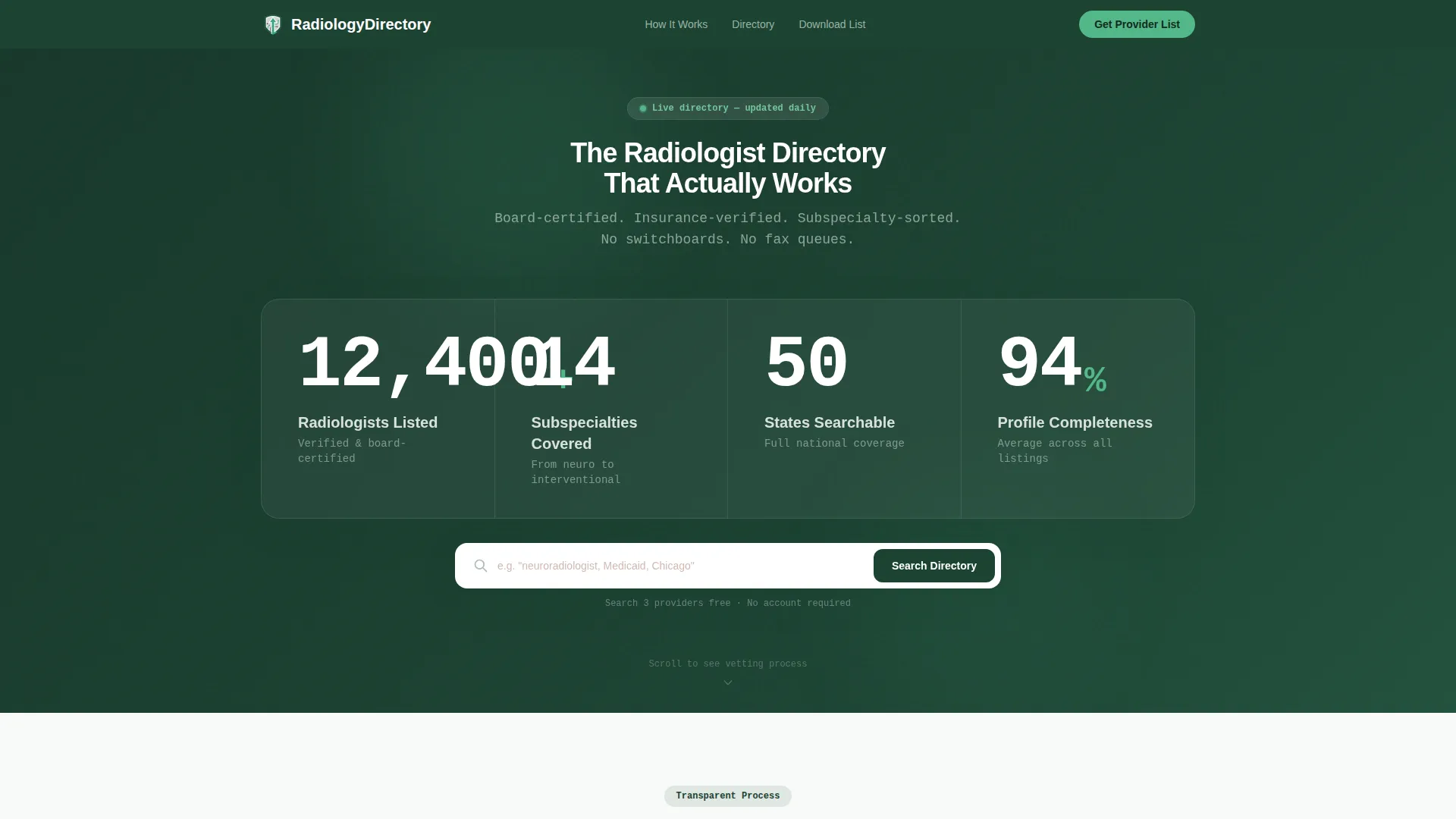
- An animated stats wall showing four oversized counters: 12,400 or more providers, 14 subspecialties, all 50 states, and a 94% profile-completeness score
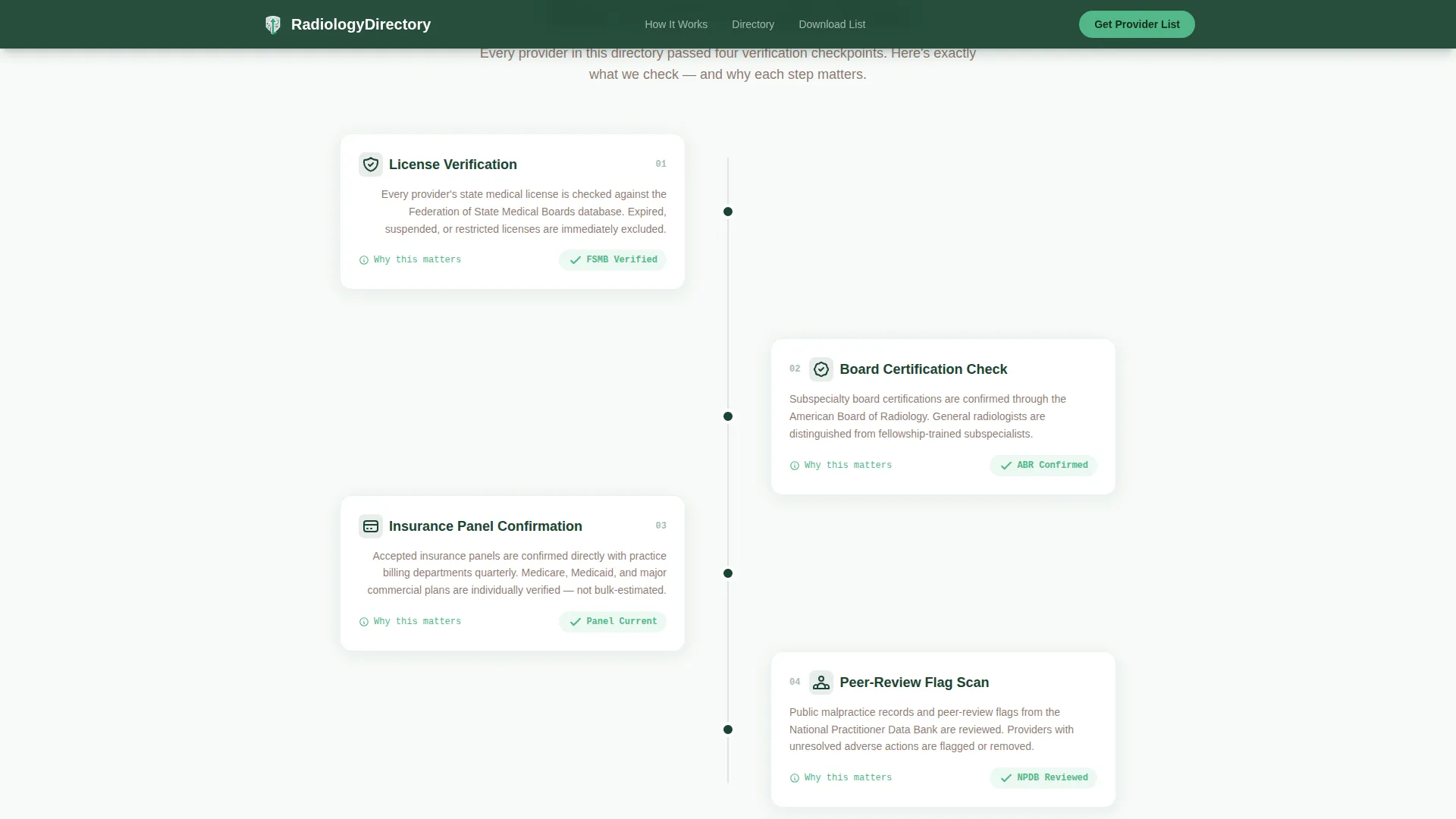
- A scroll-reveal vetting flowchart that walks visitors through license verification, board certification checks, insurance panel confirmation, and peer-review flag scanning
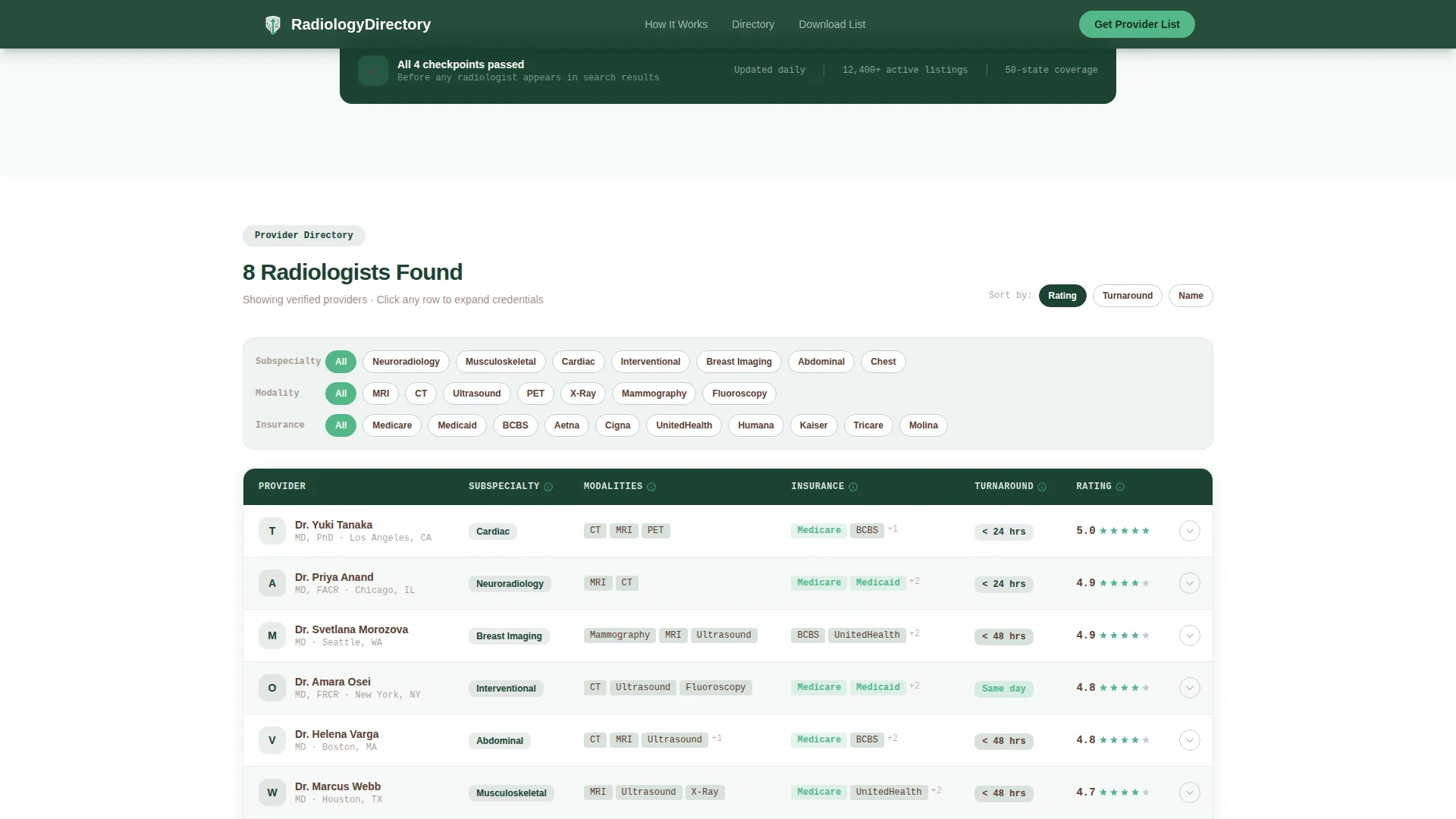
- A fully sortable and filterable comparison table with pinned column headers, row expand for mini-profiles, and filter chips tied to subspecialty, modality, insurance, turnaround time, and patient-satisfaction badges
Feature list
This template packages several purpose-built components that work together to inform, engage, and convert the right visitors.
Animated Stats Wall Header
Four large counters animate upward on page load against a deep evergreen background. Each number is paired with a single-line descriptor in lichen gray. The figures represent real scale signals: provider count, subspecialty range, state coverage, and average profile completeness.
Scroll-Reveal Vetting Flowchart
An animated flowchart appears step by step as the visitor scrolls. It covers four vetting stages: license verification, board certification check, insurance panel confirmation, and peer-review flag scan. Each step demystifies what it means for a radiologist to be listed in the directory.
Sortable and Filterable Comparison Table
The core of the page is a rich comparison table with sortable columns and filter chips. Visitors can narrow results by subspecialty, imaging modality, accepted insurance, read turnaround time, and patient-satisfaction badges. Column headers stay pinned so context is never lost while scrolling vertically.
Expandable Row Mini-Profiles
Each table row expands to reveal a brief provider profile. The expanded view shows credentials, fellowship details, and a plain-language summary of what that radiologist specializes in. Tooltip text on every filter column explains why each criterion matters.
Progressive Email Capture Gate
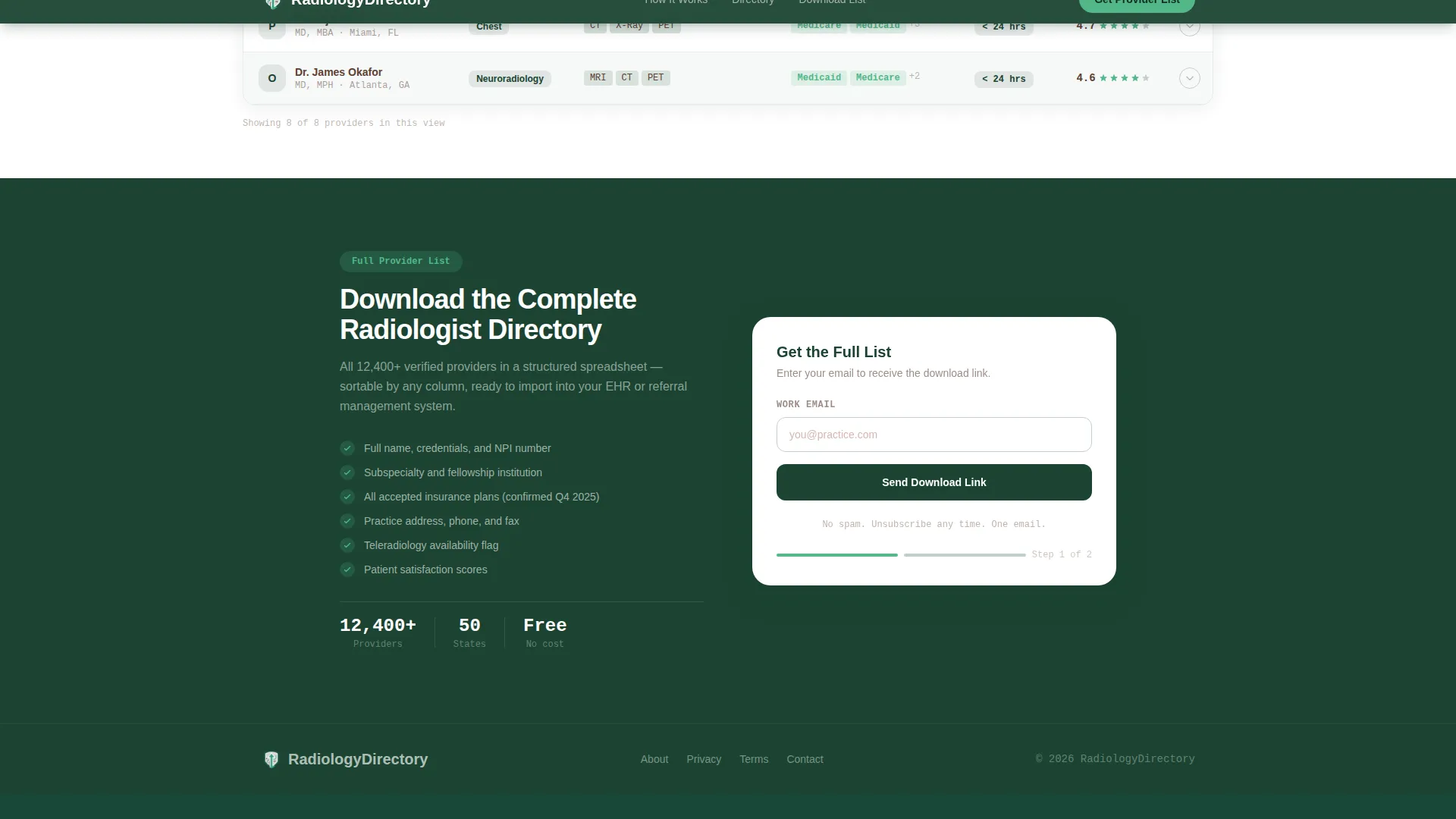
The primary call to action is a gated download of the full provider list. It appears only after the visitor has scrolled past the vetting flowchart and engaged with at least one table filter. The form collects email first, then asks for role on a follow-up screen, keeping the ask proportional to demonstrated interest.
Free Preview Search Path
Before the gate appears, visitors can search and view up to three provider profiles without signing up. This ungated path gives immediate value and builds trust before any commitment is requested.
Page sections overview
| Section | Purpose |
|---|---|
| Header and Nav | Minimal evergreen bar with logo and primary call to action |
| Stats Wall Hero | Four animated counters displaying directory scale metrics |
| Vetting Flowchart | Scroll-reveal process showing how providers are verified |
| Comparison Table | Sortable, filterable radiologist directory with row expand |
| Email Capture Form | Progressive disclosure gate for full provider list download |
| Footer | Linear single-row footer with essential links |
Design & branding system
The visual identity follows an Educational Guide theme. The palette and typography choices are deliberately clinical and unhurried, evoking a university medical library rather than a consumer health app.
- Deep evergreen (#1B4332) anchors the header, footer, and primary headings; soft lichen gray (#D8E2DC) washes table backgrounds; weathered bark brown (#5C4033) carries all body text
- Clear-stream teal (#52B788) is reserved exclusively for clickable links, active filter states, and interactive call-to-action elements, ensuring the eye goes only where action is needed
- Typography pairs DM Sans for headings with JetBrains Mono for data, numbers, and table values, reinforcing the clinical precision of the directory content
Mobile & speed optimization
The template is designed desktop-first, reflecting the primary audience of physicians and office managers working on workstations. A functional mobile fallback is included for patients who search late at night on a phone.
- Static page sections such as the header, flowchart, and footer are built as server components to keep initial load lean
- The interactive comparison table and filter chips are handled as client components, keeping heavy interactivity isolated from the static shell
- Horizontal scroll in the table is avoided by design; column headers stay pinned so the layout remains readable without side-scrolling on any screen width
How this template helps you convert
Every conversion decision in this template is sequenced intentionally. Value is delivered before anything is asked.
- The stats wall and vetting flowchart build trust and demonstrate the depth of the directory before any filter or form appears, so visitors arrive at the table already primed to engage.
- The free three-provider preview lets visitors confirm the data quality is real before the email gate surfaces, making the signup feel like a natural next step rather than an interruption.
- The progressive disclosure form collects email first, then role on a follow-up screen, reducing friction and mirroring the way a radiology read works: overview first, detail on request.
Other information about this template
This template is a strong fit for teams building or relaunching a healthcare provider directory with a serious, reference-grade identity. A few additional details worth knowing before you start:
- The comparison table supports subspecialty filters including musculoskeletal, cardiac, and interventional radiology, plus modality filters for MRI, computed tomography (CT), ultrasound, and PET imaging
- Insurance filter options are scoped to United States coverage, including Medicare, Medicaid, and Blue Cross Blue Shield (BCBS) plans
- No stock photography or lifestyle imagery is used anywhere in the template; credibility is communicated through data, structure, and typography alone
- The template is localized for United States use, using state names, US insurance terminology, and USD references throughout
Theme
Educational Guide
Creative direction
Transparent Process
Color system
Forest Trust
Style
Comparison Table
Direction
Content/Resource
Page Sections
Animated Stats Wall Header
Scroll-reveal Vetting Flowchart
Sortable Filterable Comparison Table
Expandable Row Mini-profiles
Progressive Email Capture Gate
Free Three-provider Preview Path
Related questions
Who is this template designed for?
How does the email capture gate work?
Can I customize the comparison table filters and columns?
Is this template suitable for both patients and medical professionals?
What sections are included in this template?



