Real Estate Agency Advanced Professional Website Template
The Roster template is a data-first real estate agent comparison landing page. It presents every agent's performance metrics in a sortable, filterable table and earns buyer trust before asking for contact details. A sticky "Match Me to an Agent" call to action and a three-step progressive form turn informed visitors into qualified leads.
by Rocket studio
Quick summary
Roster is a high-converting real estate agency team landing page built around a sortable agent comparison table. Every agent row shows closed transactions, average days on market, neighborhoods served, and more. A live stats ticker, inline agent dossiers, market intelligence charts, and a sticky lead-capture form work together to turn data-curious visitors into real leads.
Who this template is for
This template is built for real estate brokerages and agency teams that want to win clients through transparency rather than personality. It suits offices where agents have strong, verifiable track records worth showing off.
- Brokerages serving relocating professionals who research agents the same way they research stocks
- Teams working with first-time buyers and divorcing couples who need speed and clear communication
- Agency owners tired of team pages that look like social media profiles instead of performance dashboards
What problem this template solves
Most real estate team pages bury performance behind headshots and taglines. Clients who care about actual results have no way to compare agents side by side. This template replaces that guesswork with structured, sortable data.
- Visitors cannot easily compare agents by closed volume, days-on-market average, or neighborhood focus on a typical team page
- Trust is lost when claims are unverifiable and every agent bio reads the same way
- Lead forms appear before competence is demonstrated, so conversion suffers
What you get with this template
You get a complete single-page layout that functions as both a team directory and a local market intelligence brief. Every component is designed to keep a data-minded visitor engaged from the first scroll to the final form submission.
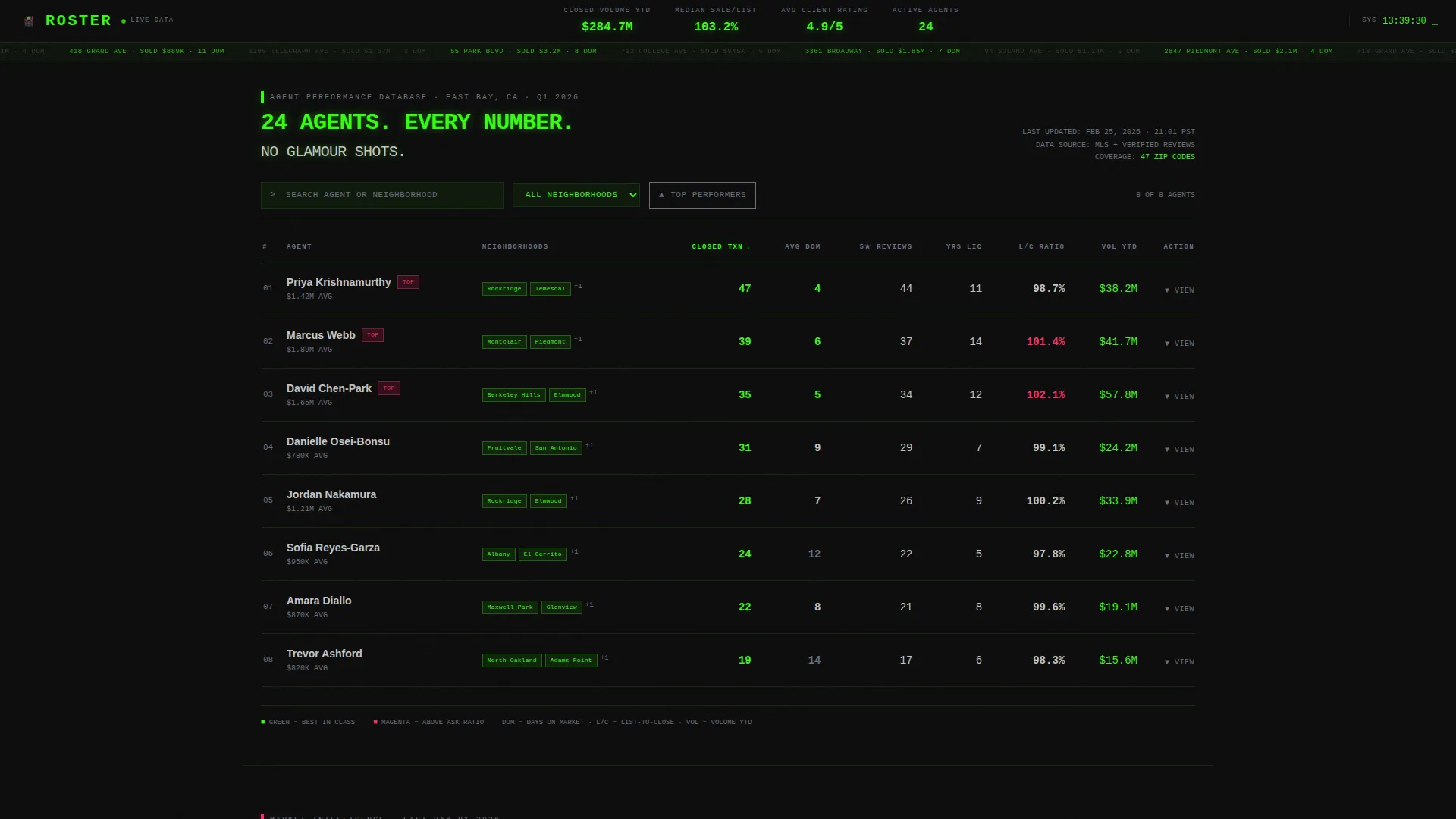
- A sortable, filterable agent comparison table with expandable inline dossiers per agent row
- A live-updating header ticker showing total closed volume year to date, median sale-to-list ratio, and average client rating
- A three-step progressive lead-capture form triggered by a sticky bottom bar after table interaction
Feature list
This template is built around a specific set of interactive and visual components, each serving the data-transparency value proposition directly.
Sortable Agent Comparison Table
Every agent is a row. Columns include closed transactions, average days on market, neighborhoods served, five-star review count, years licensed, and listing-to-close ratio. Visitors can sort any column or filter by neighborhood to narrow the field instantly.
Inline Agent Dossier Expansion
Clicking any agent row expands an inline panel without leaving the page. The panel shows recent closed sales with addresses, a sixty-word third-person analyst-style bio, and a direct "Request This Agent" button that pre-fills the lead form with that agent's name.
Live Stats Ticker Header
The header displays no hero image and no slogan. Instead, a slim locked-top bar shows three brokerage-level aggregate metrics that update with quiet animation, signaling to the visitor that they have accessed a real performance dashboard.
Market Intelligence Charts
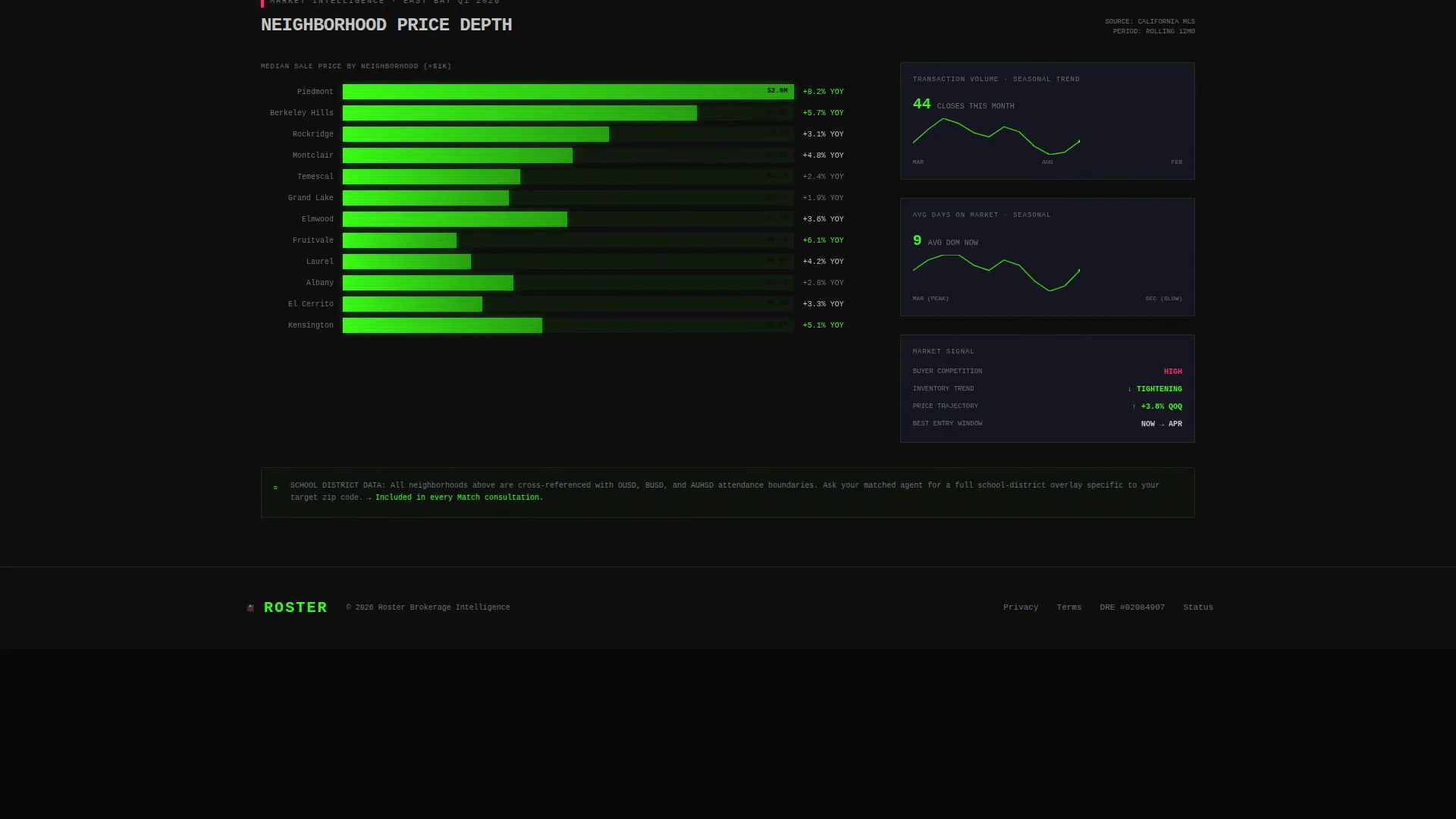
Below the agent table, the template layers in neighborhood median price bars, seasonal trend sparklines, and school-district overlays. All charts render in terminal green on void black, reinforcing the mission-control visual language while delivering genuine local context.
Sticky Match-Me Form
A bottom bar activates after the visitor interacts with the table. Clicking it opens a three-step progressive form: zip code or neighborhood first, transaction type and timeline second, then contact details and optional pre-approval status third.
Data Command Visual Theme
Typography pairs JetBrains Mono for all numbers and data labels with DM Sans for body text and form fields. The phosphorescent color palette makes every metric feel authoritative without relying on decorative imagery.
Page sections overview
| Section | Purpose |
|---|---|
| Logo Bar Header | Display brokerage mark and live aggregate stats ticker |
| Agent Comparison Table | Sortable, filterable rows with per-agent performance metrics |
| Inline Agent Dossier | Expandable row panel with sales history, bio, and request button |
| Market Intelligence Charts | Neighborhood price bars, trend sparklines, school-district overlays |
| Sticky Match call to action | Bottom bar activating post-interaction to open the lead form |
| Three-Step Lead Form | Progressive form capturing location, intent, timeline, and contact info |
| Minimal Footer | Clean footer in GitHub developer minimal pattern |
Design & branding system
The template follows a Data Command visual theme built on an Acid Digital color palette. Every design decision is meant to feel like a mission control screen, not a lifestyle brand.
- Four-color palette: void black (#0D0D0D) as the base, terminal green (#39FF14) for data elements, cool data gray (#1A1A2E) for panel backgrounds, and signal magenta (#FF2D6B) reserved for top-performer badges and hover states
- JetBrains Mono handles all numeric and data-label typography; DM Sans handles body copy, form labels, and descriptive text
- No hero images, no decorative photography; visual weight comes entirely from live numbers and structured data layouts
Mobile & speed optimization
The template is designed desktop-first to honor the Bloomberg terminal aesthetic, but the layout responds cleanly to smaller screens. Performance architecture separates static and interactive concerns.
- Server Components render the static page shell for fast initial load; Client Components handle the table interactions, row expand and collapse, and the three-step form
- The sticky bottom bar, sort transitions, and live counter animations are scoped to client-side rendering to avoid blocking the page paint
- Mobile breakpoints restack the comparison table columns into a prioritized card-style view so key metrics remain readable on smaller screens
How this template helps you convert
The conversion strategy in this template is built on earning trust through data before making any ask. The structure deliberately sequences information and interaction to move visitors toward the lead form naturally.
- The live ticker and sortable table demonstrate brokerage credibility immediately, so visitors stay engaged long enough to compare agents and develop a preference.
- The "Request This Agent" path in each inline dossier captures high-intent visitors who have already chosen an agent, pre-filling the form to reduce friction.
- The sticky "Match Me to an Agent" bar activates only after table interaction, making the call to action feel responsive rather than intrusive, and the three-step form keeps commitment low at each stage.
Other information about this template
This section covers practical details about the template's build context and intended use that complement the feature descriptions above.
- The template is localized for the United States market: currency displays in USD, dates follow MM/DD/YYYY format, and time zones cover Pacific, Mountain, and Eastern regions
- Animation intensity is high by design: the live counter ticks, table sort transitions animate smoothly, rows expand and collapse with motion, and the sticky bar activates with a slide-up transition
- The footer follows a GitHub developer minimal pattern, keeping the bottom of the page clean and on-brand without adding decorative noise
- This template is categorized under Real Estate Agency Website Templates with a niche focus on the real estate agency team page use case, making it a strong fit for brokerages that want to differentiate through data transparency


Theme
Data Command
Creative direction
Industry Report
Color system
Acid Digital
Style
Comparison Table
Direction
Lead Generation
Page Sections
Sortable Agent Comparison Table
Inline Expandable Agent Dossier
Live Stats Ticker Header
Market Intelligence Charts
Sticky Three-step Lead Form
Data Command Visual System
Related questions
Can I customize which columns appear in the agent comparison table?
Does the lead form support both buyer and seller inquiries?
How does the Request This Agent button work?
Is this template suitable for a small team as well as a large brokerage?
What does the market intelligence section include?



