B2B Aquarium Services Comparison Table Landing Page
Reef is a high-impact B2B landing page template built for commercial aquarium service providers. It uses a dark Executive Suite aesthetic, a Charcoal and Amber color system, and a Stats-First Impact layout to convert corporate prospects. A full-bleed header, three-tier comparison table, case-study cards, and dual conversion paths make it purpose-built for partnership and site-survey inquiries.
by Rocket studio
Quick summary
Reef is a single-page B2B landing page template for commercial aquarium installation and management services. The design leads with data, builds trust through a structured comparison table, and closes with two clear conversion paths. Every section earns attention before asking for it. The template suits service providers pitching high-value partnerships to corporate, hospitality, and luxury property clients.
Who this template is for
This template is built for aquarium service businesses that sell to corporate and commercial buyers rather than individual hobbyists. If your pitch involves multi-year service agreements, lobby installations, or bespoke living centerpieces for premium venues, this page speaks that language.
- Commercial aquarium companies targeting property management firms, restaurant groups, and corporate wellness directors
- Aquarium installation and maintenance providers who need a credible B2B sales tool
- Service providers pitching luxury residential or hospitality clients on managed reef partnerships
What problem this template solves
Most aquarium service pages look like retail fish stores. They lead with species photos and price lists instead of the business case. Corporate buyers need to justify spend internally, and a page that opens with a clownfish does not close a boardroom deal.
- The template leads with measurable impact before showing any product, building fiscal credibility first
- It replaces scattered service descriptions with a structured three-tier comparison table that simplifies decision-making
- It provides two distinct conversion paths so prospects can either book a site survey or download a portfolio, matching different buying stages
What you get with this template
You get a complete, single-page layout designed around a B2B sales journey. Every section is sequenced to move a skeptical commercial buyer from curiosity to inquiry without friction.
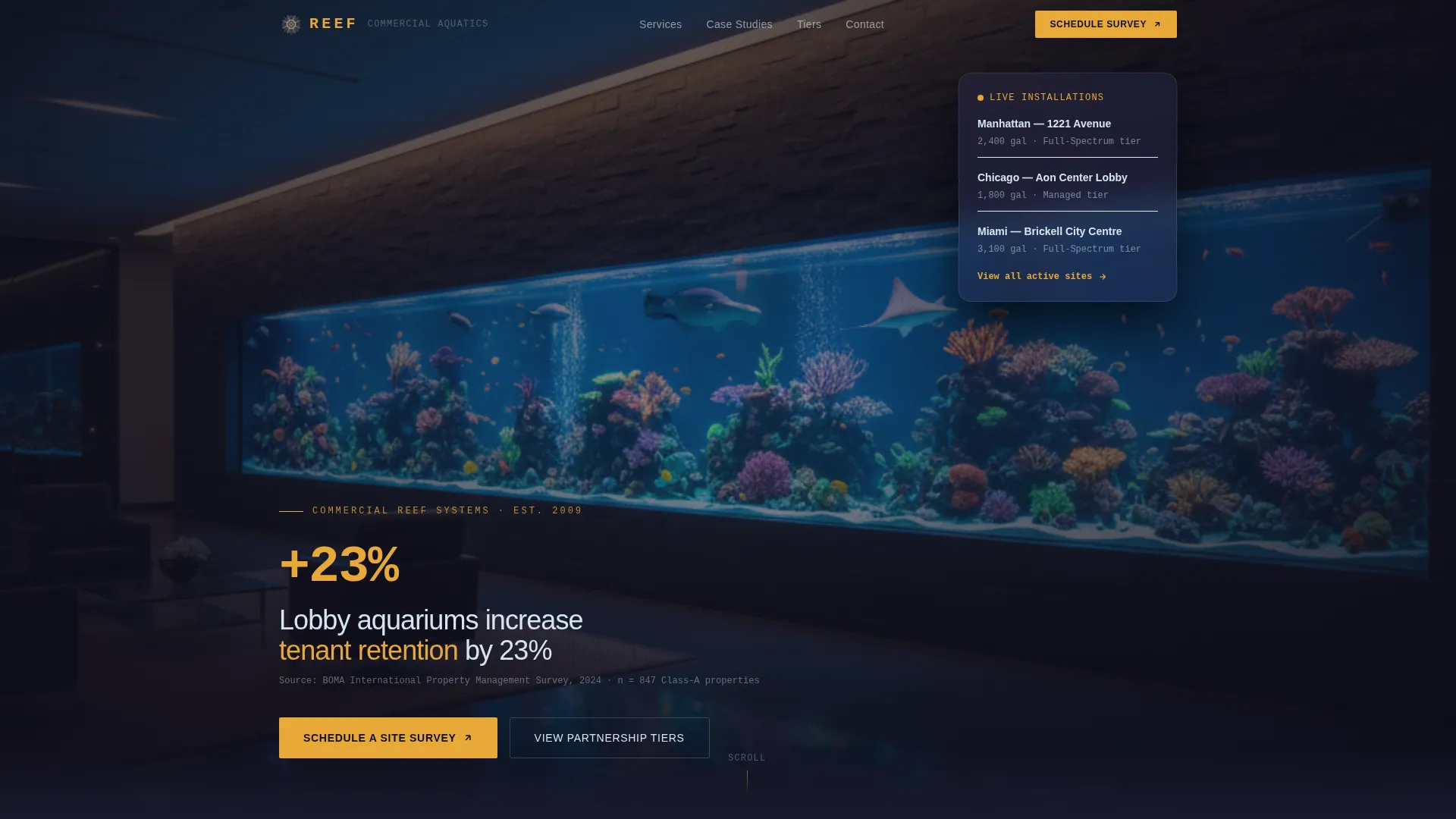
- A dark full-bleed header with a glowing reef tank photograph and a bold retention statistic rendered in amber at 68-pixel weight
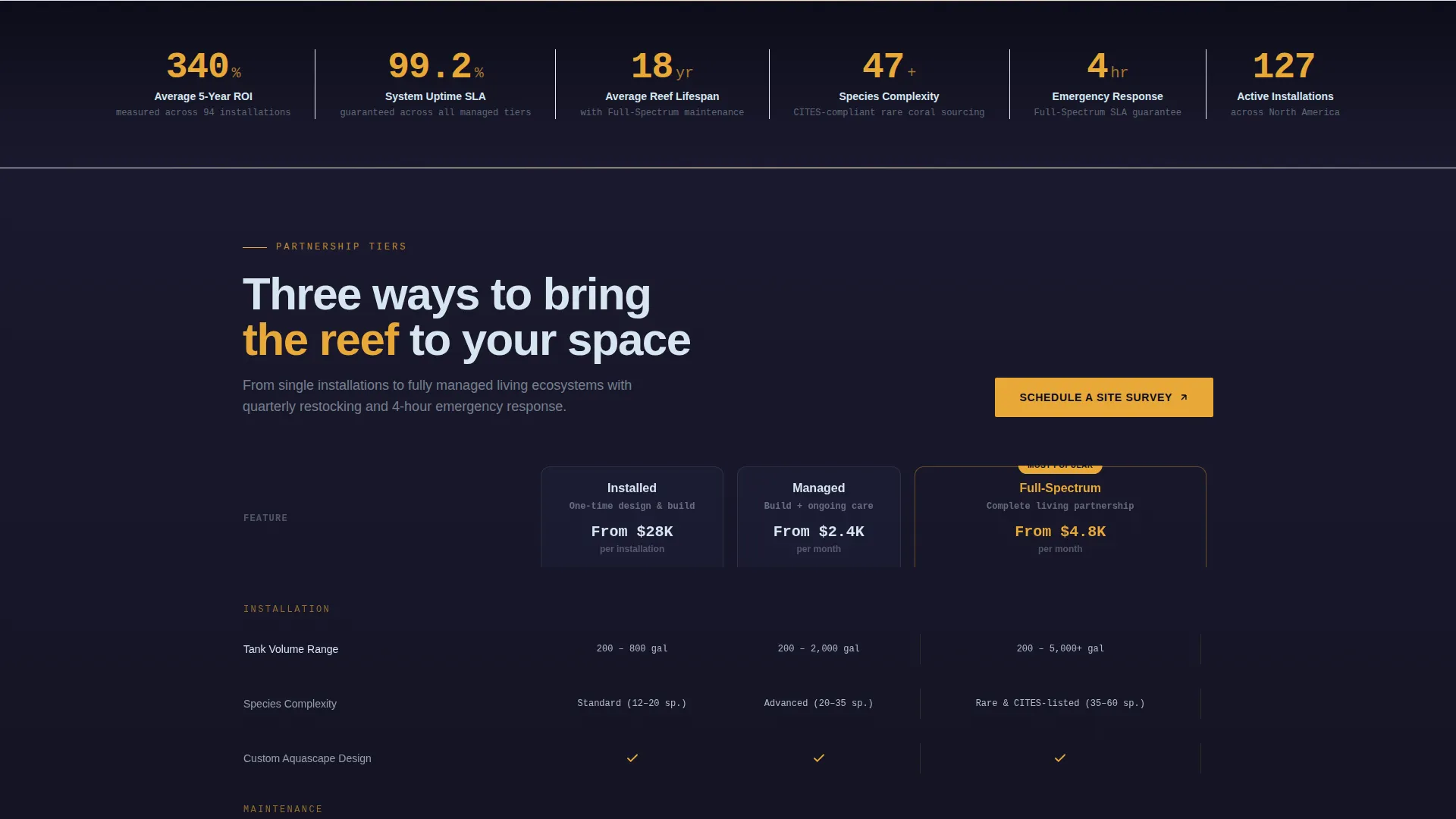
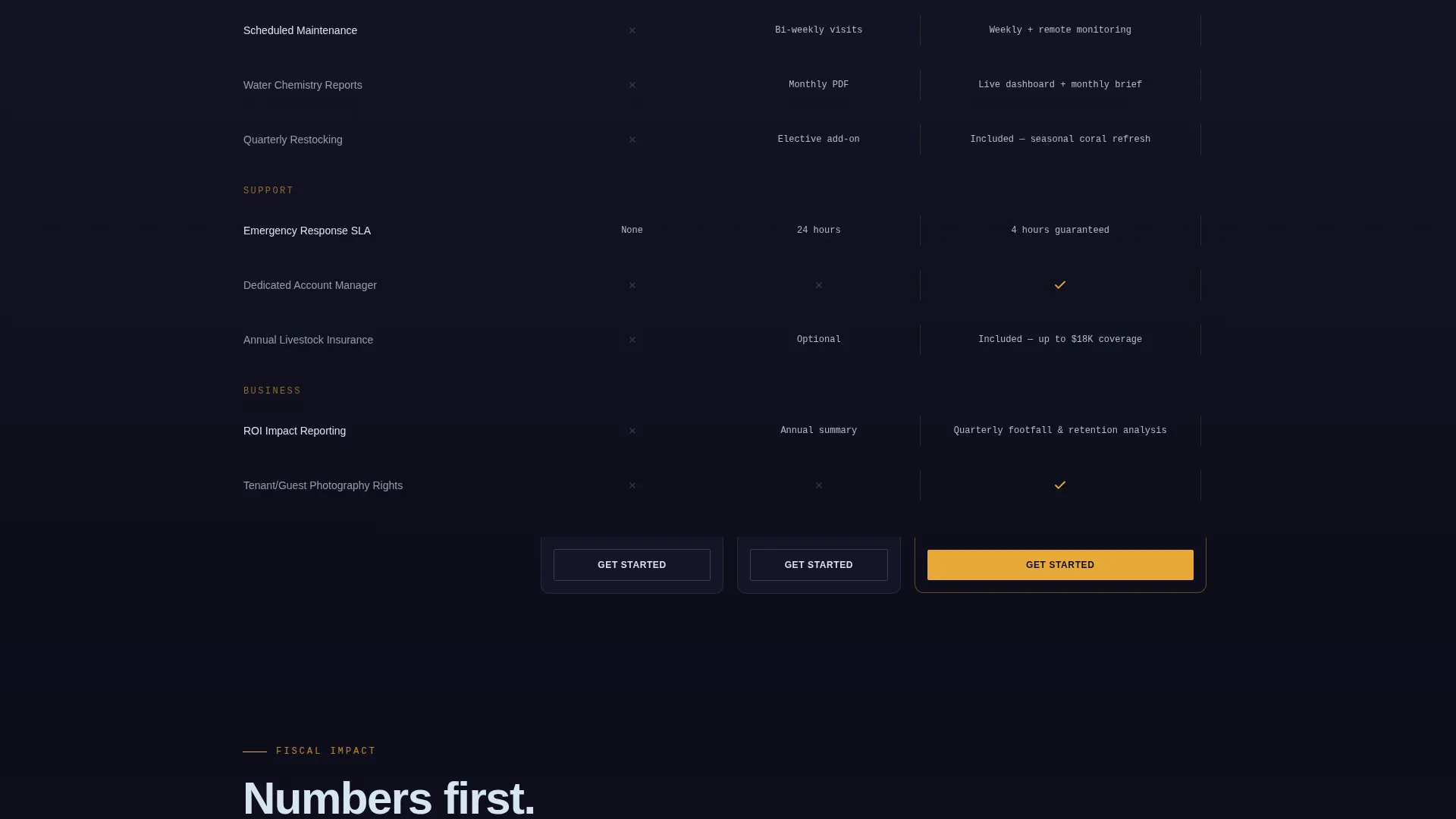
- A three-tier partnership comparison table contrasting Installed, Managed, and Full-Spectrum tiers across rows including tank volume, species complexity, maintenance frequency, emergency response service-level agreement, and quarterly restocking
- Dual conversion components: a floating call-to-action bar locked after the header and a form anchoring the comparison table, plus a secondary gated portfolio download path
Feature list
This section covers the core design and functional components built into the Reef template.
Dark Full-Bleed Header with Ambient Glow
The header uses a night-shot photograph of a custom reef aquarium embedded in a slate-gray corporate lobby wall. Actinic lighting casts amber and cerulean reflections across polished concrete floors. After a two-second hold, a single bold statistic fades in at 68-pixel weight in amber, with a source citation in reef-white beneath it.
Three-Tier Comparison Table
The comparison table is the structural spine of the page. It contrasts three partnership tiers, Installed, Managed, and Full-Spectrum, across clearly labeled rows. Row topics include tank volume, species complexity, maintenance frequency, emergency response service-level agreement, and quarterly restocking. Graphite structures the rows; amber and reef-white handle data text and table borders.
Stats-First Scroll Rhythm
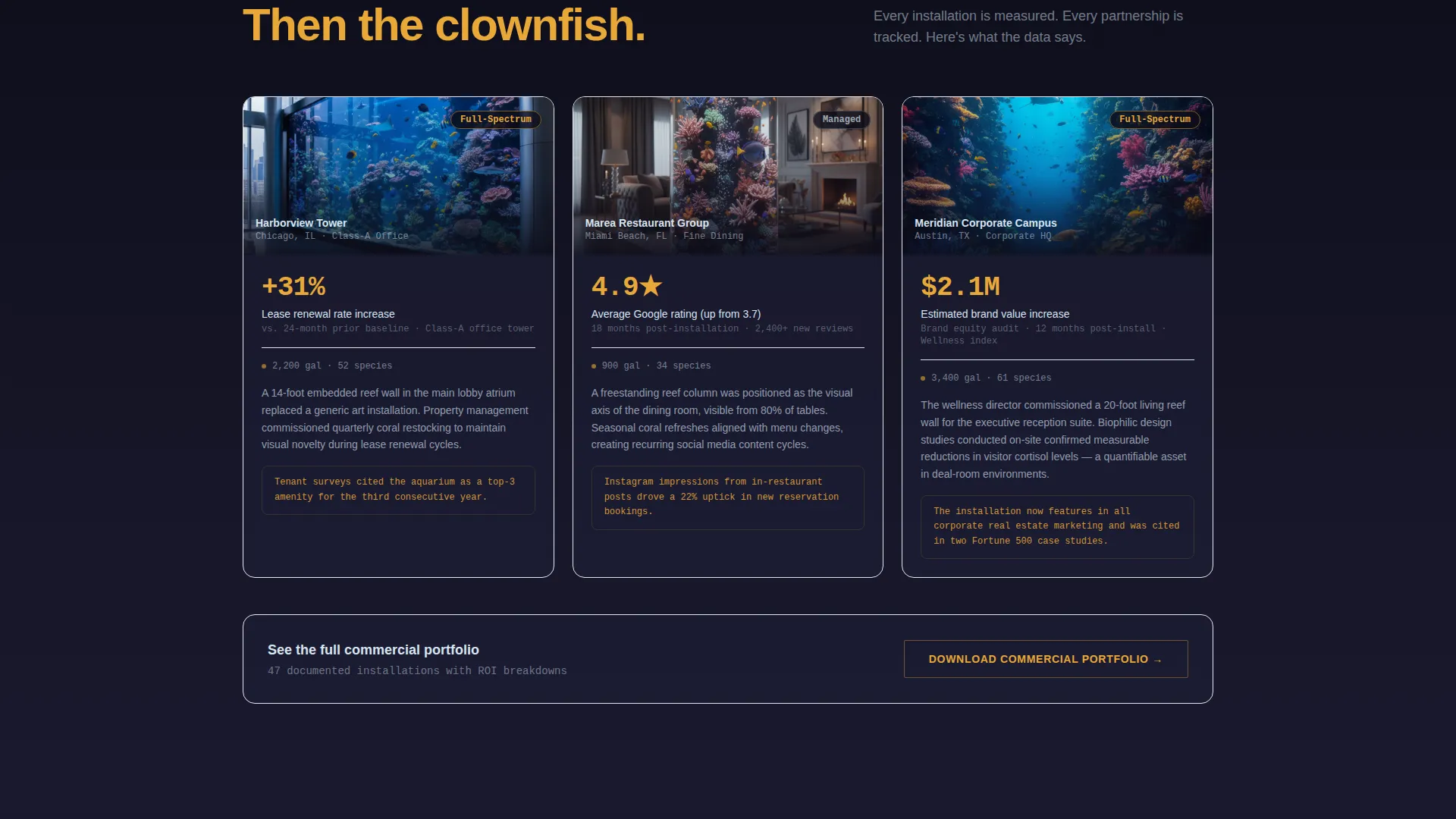
Every scroll increment leads with a number before context fills in. Case-study cards open with a return-on-investment figure or footfall statistic before revealing the venue photograph. This sequencing builds commercial credibility at each stage and rewards continued reading.
Dual Conversion Path Design
The primary call to action, "Schedule a Site Survey," appears in amber on carbon-black buttons. It sits once in a floating bar after the header and once anchoring the comparison table. A secondary path offers a gated portfolio download behind a business email field, serving prospects who are earlier in the buying process.
B2B Inquiry Form
The embedded inquiry form collects property type via a dropdown covering hotel, office, restaurant, medical, and residential luxury categories. It also asks for approximate installation wall or footprint dimensions and a preferred contact window. This structure pre-qualifies leads before the first conversation.
Executive Suite Color System
The Charcoal and Amber palette uses deep carbon black (#1A1A2E), polished graphite (#30305A), warm amber glow (#E8A838), and cool reef-white (#D6E5F0). Amber carries every accent, hover state, and call-to-action surface. Carbon black fills the background so glowing elements carry visual weight naturally.
Page sections overview
| Section | Purpose |
|---|---|
| Full-Bleed Header | Opens with ambient reef photography and a bold retention statistic |
| Floating call to action Bar | Locks "Schedule a Site Survey" in view after the header scrolls past |
| Stats Impact Row | Leads each scroll step with a quantified business outcome |
| Comparison Table | Contrasts three service tiers across key operational and service rows |
| Case Study Cards | Opens each card with a ROI or footfall figure before the venue photo |
| B2B Inquiry Form | Collects property type, dimensions, and preferred contact window |
| Portfolio Download | Gates the commercial portfolio behind a business email field |
Design & branding system
The template follows an Executive Suite visual theme built for credibility and atmosphere. The palette is minimal and intentional, using only four values so every color choice carries meaning.
- Carbon black (#1A1A2E) bleeds behind every section; graphite (#30305A) structures the comparison table rows and dividers
- Warm amber (#E8A838) handles all accent elements including hover states, call-to-action buttons, and the hero statistic; reef-white (#D6E5F0) is reserved for data text and table borders
- The overall visual impression is a mahogany boardroom with a 300-gallon reef running against the far wall: corporate gravity meets bioluminescent warmth
Mobile & speed optimization
The template layout is designed so the dark, image-heavy header and comparison table remain readable and navigable at smaller screen sizes. The floating call-to-action bar stays accessible as users scroll through the page on any device.
- The comparison table is structured to remain legible on mobile viewports without losing row context or tier labels
- The dual conversion path, floating bar and anchored form, are positioned so at least one is visible at any scroll depth on both desktop and mobile screens
How this template helps you convert
Reef is engineered to move commercial buyers through a specific psychological sequence: prove value first, then invite action.
- The page opens with a quantified business outcome, a 23-percent tenant retention increase, before any service description appears, giving procurement-minded buyers an immediate reason to keep reading.
- The three-tier comparison table reduces decision complexity by letting buyers self-select a tier and arrive at the inquiry form already oriented toward a specific scope.
- The secondary portfolio download path captures buyers who are not yet ready to book a call, keeping them inside the sales journey through a lower-commitment conversion step.
Other information about this template
Reef is a landing page template, meaning the entire buyer journey unfolds within a single scrollable page rather than across multiple navigable views. This suits paid social and outbound email campaigns where keeping a prospect in a single focused environment improves conversion rates.
- The template is built for the aquarium store marketing category within professional services, making it a strong fit for businesses running targeted outreach or paid advertising campaigns to corporate prospects
- The page direction is explicitly Partnership and B2B, so the content structure, form fields, and calls to action are designed around considered purchases rather than impulse decisions
- The Stats-First Impact creative direction means the template relies on real numbers from your business; the layout reserves prominent display positions for your own performance data, case-study figures, and service-level metrics
- The template style is a Comparison Table layout, which performs well when a service provider offers tiered offerings and wants buyers to self-qualify before making contact
Theme
Executive Suite
Creative direction
Stats-First Impact
Color system
Charcoal & Amber
Style
Comparison Table
Direction
Partnership/B2B
Page Sections
Dark Full-bleed Header with Glow Effect
Three-tier Partnership Comparison Table
Stats-first Scroll Sequencing
Dual Conversion Path Layout
Pre-qualifying B2B Inquiry Form
Executive Suite Color System
Related questions
Who is the Reef template designed for?
What are the three service tiers shown in the comparison table?
What does the inquiry form collect from prospects?
Can I use this template for paid social campaigns?
Does the template include a lead capture path for early-stage buyers?



