Preschool Referral Program Landing Page Template
Refer is a warm, corkboard-style preschool referral landing page built for neighborhood schools that grow through parent word-of-mouth. It pairs emotional testimonial tiles with a clear reward-tier comparison table, then guides visitors to either schedule a tour for a friend or share a personalized referral link. Every section earns trust before asking for action.
by Rocket studio
Quick summary
Refer is a single-page referral program landing page designed for community preschools. It opens with animated stats, moves through a mosaic of parent testimonials styled as handwritten index cards, presents a side-by-side reward-tier comparison table, and closes with a two-part tour-scheduling form. The page turns enrolled parent enthusiasm into a structured referral engine.
Who this template is for
This template is built for small, community-rooted preschools that rely on parent-to-parent recommendations more than paid advertising. It suits school directors and enrollment coordinators who want a single, focused page to capture and reward referrals.
- First-time parents who are overwhelmed by waitlists and need a trusted shortcut to enrollment
- Dual-income couples managing daycare logistics who prefer a clear, fast path to scheduling a tour
- Grandparents researching preschool options on behalf of busy adult children who need a page that is easy to read and share
What problem this template solves
Most preschool referrals happen in passing, at playgrounds and coffee shops, with no structured follow-through. A recommendation gets made, but the referred family has no easy next step. The school has no way to track who sent whom, or to reward the family who referred.
- Referred families arrive at the page with no clear path to book a tour or even confirm availability
- Referring parents have no visible incentive structure, so the motivation to recommend stays informal
- Schools miss the chance to convert warm word-of-mouth into a measurable, repeatable enrollment process
What you get with this template
You get a complete, ready-to-customize referral landing page that guides visitors from emotional resonance to a concrete booking action. The layout is self-contained and section-led, designed so every scroll reinforces the decision to enroll.
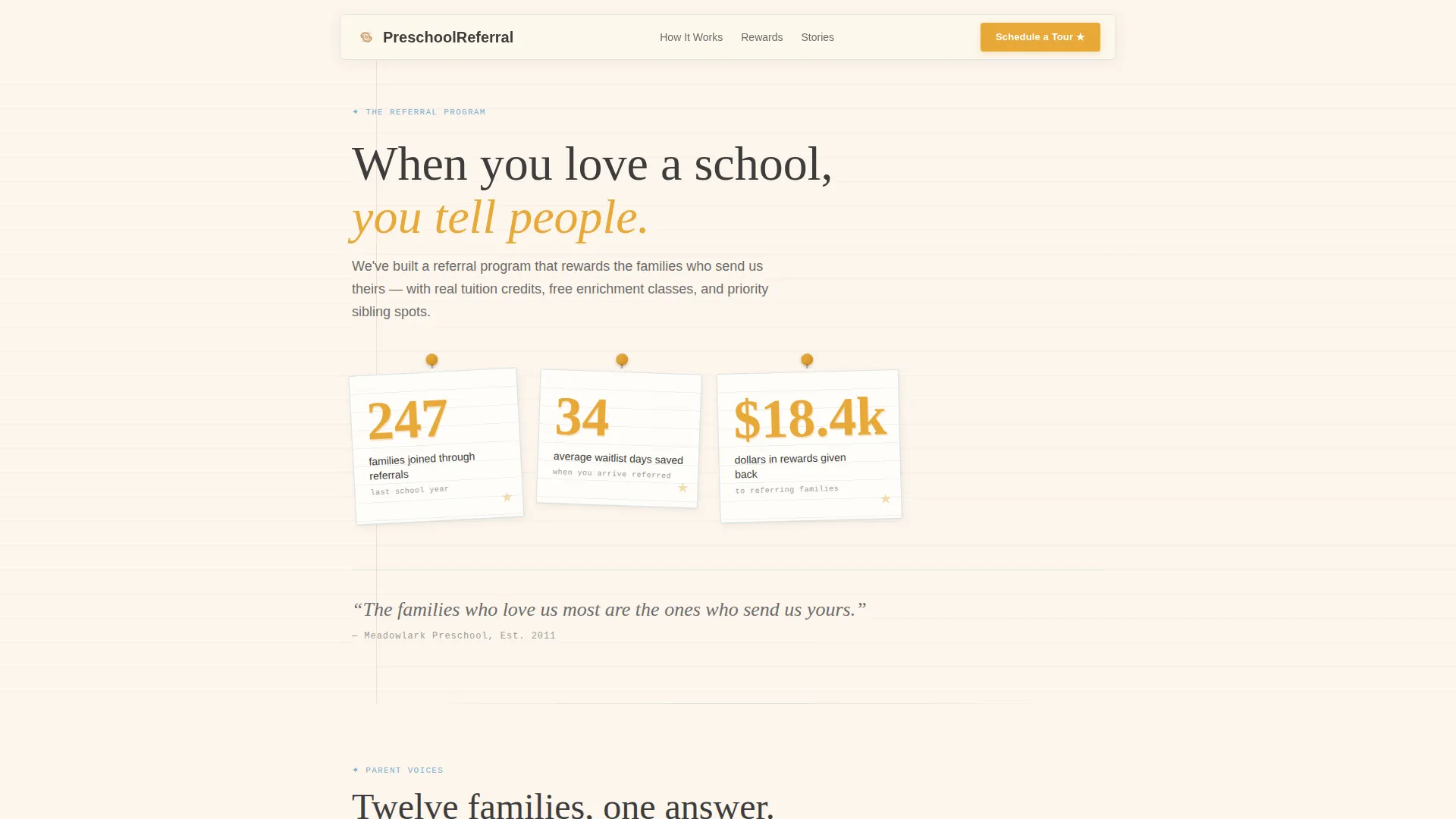
- An animated stats header showing referral volume, waitlist days saved, and total reward value distributed
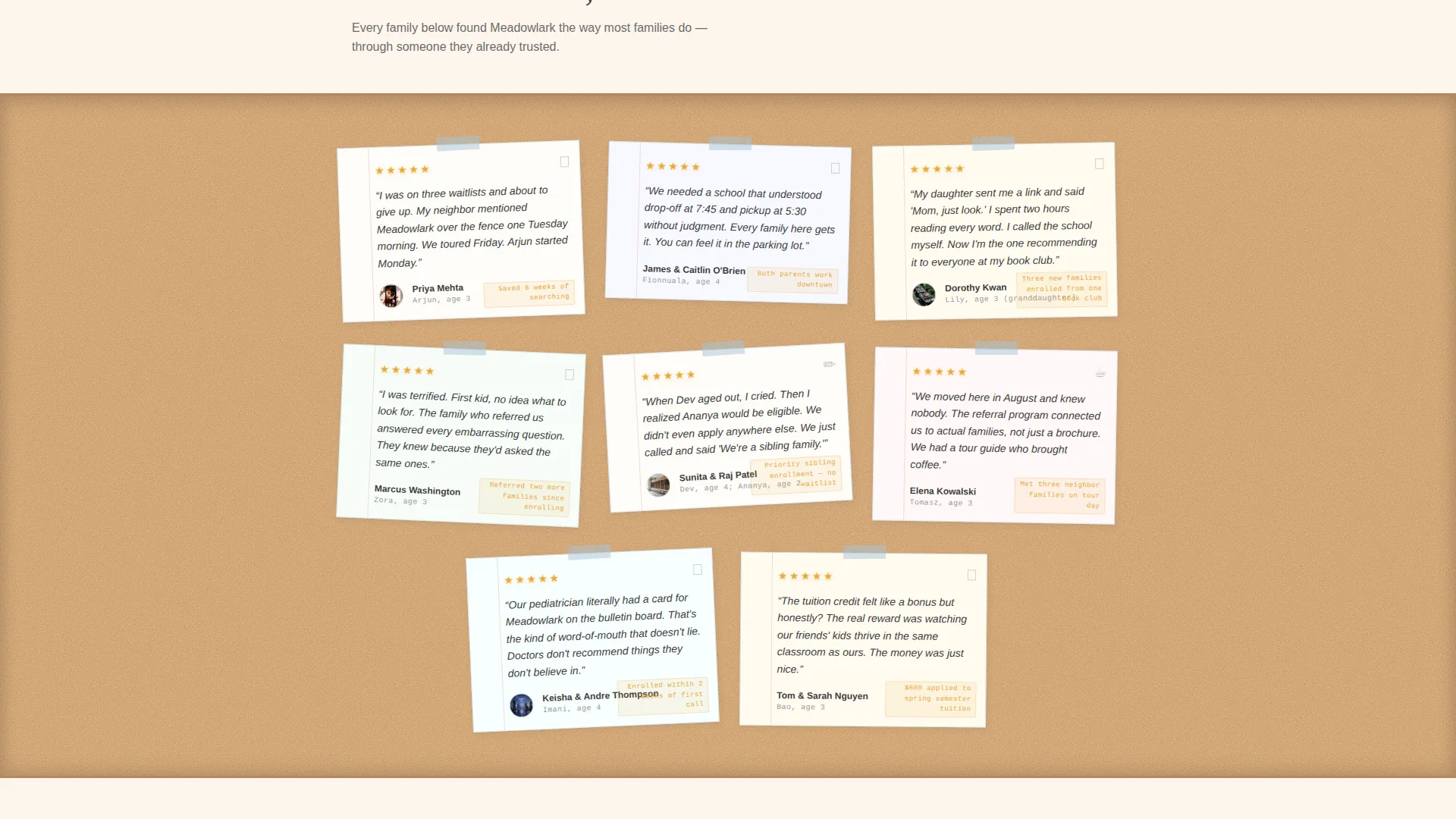
- A testimonial mosaic of handwritten-style index card tiles alternating with a comparison table of referral reward tiers
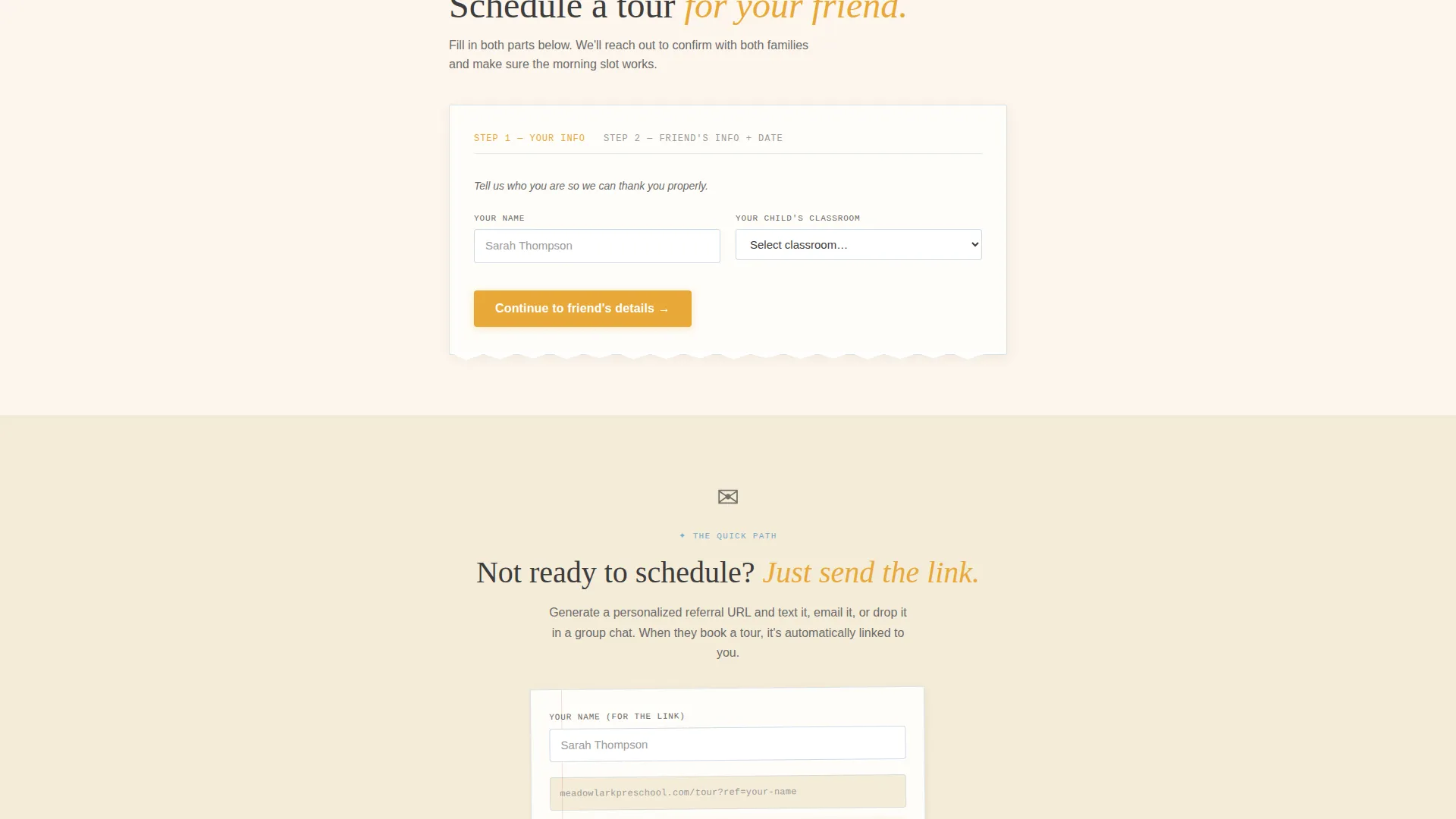
- A two-part tour scheduling form and a secondary "Just Send the Link" path for quick sharing
Feature list
This template delivers a focused set of components built specifically for preschool referral conversion. Each feature reflects a distinct moment in the parent decision journey.
Animated Stats Header
Three oversized handwritten-style numerals animate into view on page load. Each number sits inside a torn-paper card shape, slightly tilted like a pinned corkboard note. The stats cover referral families enrolled last year, average waitlist days saved when referred, and total reward value returned to referring families.
Testimonial Mosaic Layout
The page scrolls through a living corkboard of parent voices. Each testimonial tile is styled as a handwritten index card, some with crayon doodle accents in the margins and small photos of smiling toddlers. This mosaic creates a layered sense of community trust before any form appears.
Referral Reward Comparison Table
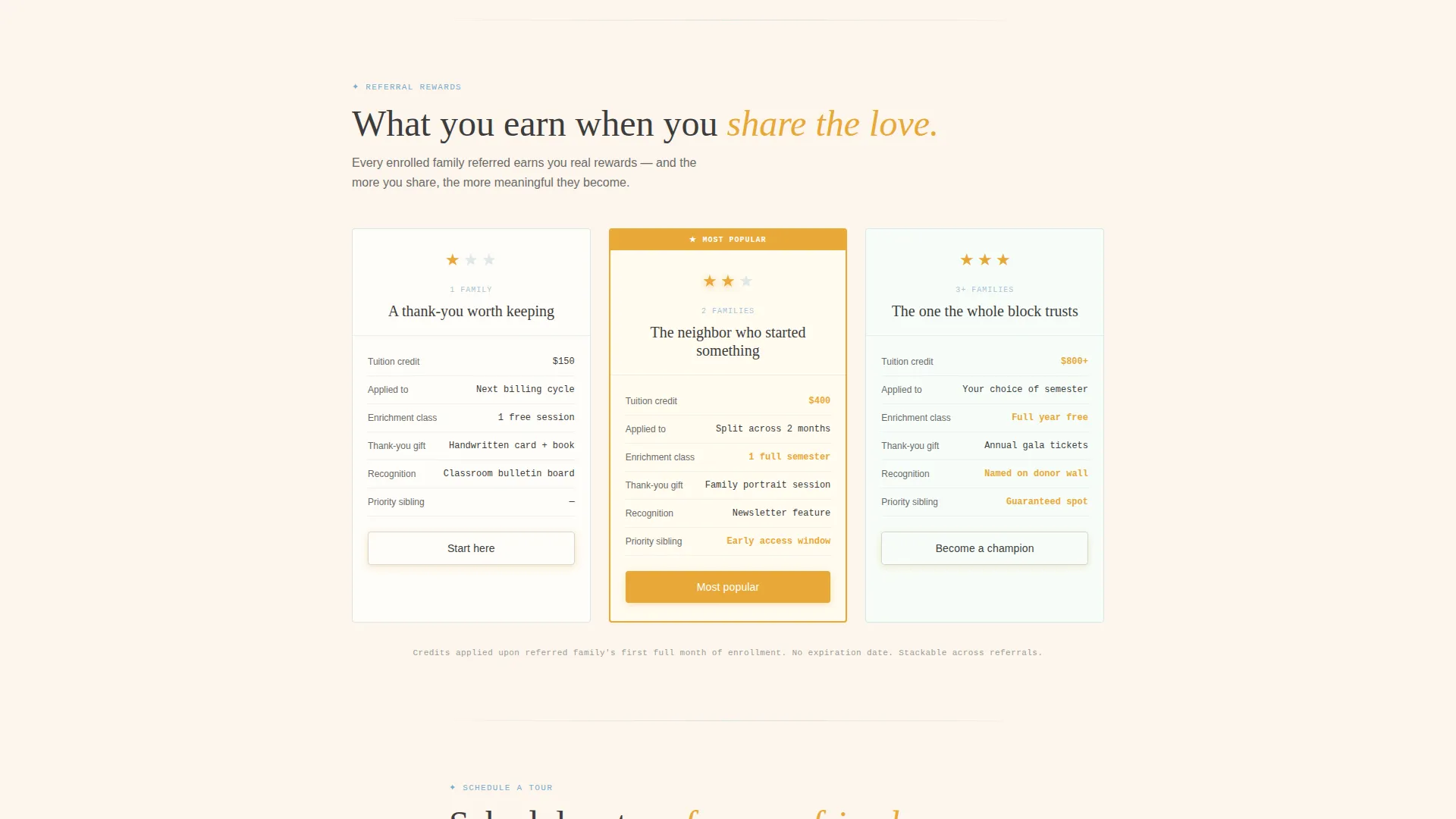
Between testimonial clusters, a side-by-side comparison table shows reward tiers for one referral, two referrals, and three or more referrals. Each column is topped with a gold-star icon and details escalating benefits including tuition credits, free enrichment classes, and priority sibling enrollment.
Two-Part Tour Scheduling Form
The primary call to action is "Schedule a Tour for Your Friend." The form collects the referrer's name and enrolled child's classroom in the first part, then the referred family's name, child's age, and a preferred tour date in the second part. A date picker shows real available morning slots.
Personalized Referral Link Path
A secondary conversion path labeled "Just Send the Link" lets parents generate and share a personalized referral URL by text or message. This option removes friction for parents who want to recommend the school without filling out a form themselves.
Ink and Paper Visual Theme
The Educational Guide visual identity uses warm parchment cream as the dominant background, soft graphite for all body text, ruled-line blue to separate sections, and gold-star accents on every reward milestone and call-to-action element. The result feels like a beloved children's picture book left open on a reading rug.
Page sections overview
| Section | Purpose |
|---|---|
| Animated Stats Header | Opens with three key referral numbers to establish immediate credibility |
| Tagline Anchor Line | A single graphite sentence that frames the emotional value of referrals |
| Testimonial Mosaic | Rotating index-card parent quotes that build layered social proof |
| Reward Tier Table | Side-by-side comparison of one, two, and three-plus referral benefits |
| Tour Scheduling Form | Two-part form for referring and referred family details with date picker |
| Send the Link Path | Secondary call to action for parents who prefer to share a personal referral URL |
Design & branding system
The visual identity follows an Educational Guide theme built around an Ink and Paper color system. Every color and typographic choice is rooted in the feeling of a handwritten recommendation rather than a corporate enrollment portal.
- Warm parchment cream (#FDF6EC) dominates all backgrounds, soft graphite (#3D3D3D) carries body text, and ruled-line blue (#A8C4D8) acts as a section divider
- Gold-star accent (#E8A838) marks every reward milestone, call-to-action button, and interactive highlight throughout the page
- Torn-paper card shapes, tilted pinned-note angles, and crayon doodle details reinforce the handcrafted, community-first aesthetic
Mobile & speed optimization
The page layout is designed to translate cleanly from desktop to smaller screens. The corkboard mosaic reflows into a single-column card stack, and the comparison table scrolls horizontally so no content is hidden on narrow viewports.
- The two-part form fields stack vertically on mobile, keeping each input large and easy to tap
- The "Just Send the Link" secondary path sits prominently below the primary form on small screens, giving mobile users a fast one-tap sharing option
How this template helps you convert
This template is structured so that emotional conviction arrives before rational decision-making is required. By the time a visitor reaches the form, the page has already made the case through numbers, neighbor voices, and a clear reward structure.
- The animated stats header gives new visitors an instant, credible reason to keep reading before a single testimonial has loaded
- The alternating rhythm of testimonial tiles and reward-tier tables means every emotional moment is followed by a concrete, structured reason to act
- The dual conversion paths, one for scheduling and one for sharing, reduce drop-off by matching the page to two distinct parent behaviors
Other information about this template
This template is a strong fit for preschool enrollment marketing where community trust and referral incentives are the primary growth drivers. It is designed as a standalone landing page, not a full school website, so it can be published alongside an existing site without conflict.
- The comparison table layout is particularly useful for schools that offer tiered referral rewards and want families to see the full benefit scale at a glance
- The corkboard and index-card visual language is deliberately approachable, making the page feel appropriate for both first-time parents and grandparents browsing on behalf of their families
- This template suits preschool marketing contexts where the goal is to convert warm word-of-mouth into a measurable scheduling action rather than generate cold traffic
Theme
Editorial Magazine
Creative direction
Logo Wall Authority
Color system
Monochrome Steel
Style
Sidebar Companion
Direction
Partnership/B2B
Page Sections
Animated Stats Header with Torn-paper Cards
Testimonial Mosaic with Index-card Styling
Referral Reward Tier Comparison Table
Two-part Tour Scheduling Form
Personalized Referral Link Sharing Path
Ink and Paper Color System
Related questions
Who fills out the tour scheduling form, the referring parent or the new family?
Can a parent skip the form and still refer someone?
Does the comparison table show all reward tiers on mobile screens?
Is this template suitable for a preschool that already has a website?
How many testimonials can the mosaic section display?



