Advanced Regulatory & Licensing Professional Website Template
The Permit landing page template helps municipal business licensing offices guide first-time and returning business owners through every step of obtaining licenses and permits. Built with a sidebar companion layout, a fixed navigation panel, and a scroll-driven journey, this template turns a confusing city process into a clear, confident path from search to submitted application form.
by Rocket studio
Quick summary
The Permit template is a single-page sidebar companion designed for a government business licensing office. It walks visitors through identifying the right business permit, gathering required documents, and clicking through to the online application portal. Every section mirrors the real licensing journey, removing confusion at each scroll so visitors arrive at the call to action fully ready to act.
Who this template is for
This template serves any city or county licensing department that wants to reduce confusion and increase completed applications. It speaks directly to the people who need it most.
- First-time business owners, such as restaurant operators, home bakers, and service providers, who are unfamiliar with local regulations and permit requirements.
- Accountants and renewal agents filing licenses and permits for multiple clients before a deadline, who need fast, scannable information.
- Immigrant families and second-location owners who need a clear guide to conduct business legally in a new city or county jurisdiction.
What problem this template solves
Many small businesses struggle to identify which business license or business permit applies to them. Government rules vary by industry, business location, and business activities, making the application process feel overwhelming before it even begins.
- Visitors land on a page with no clear path and leave without submitting an application form, even when they are ready to operate legally.
- Businesses operating without the correct licenses and permits risk legal action, fines, and temporary closure until they obtain proper paperwork.
- Common challenges in the business permit application process include incomplete information, missing documents, and uncertainty about fees, all of which this template addresses upfront.
What you get with this template
This template packages a full sidebar companion landing page into one ready-to-use design. You get every section needed to guide a visitor from discovery to a submitted application form without friction.
- A fixed sidebar with active section tracking and a license-type filter, so visitors always know where they are in the process and can jump to what they need.
- A scrollable main content area that mirrors the real licensing journey: find your permit, review requirements, check the timeline, read real testimonials, and complete the pre-application checklist.
- A document upload portal area and accordion document lists, giving visitors a secure and organized way to review and gather required files before they contact the issuing authority.
Feature list
A brief overview of the template's core capabilities follows below.
Business Type Search with Autocomplete
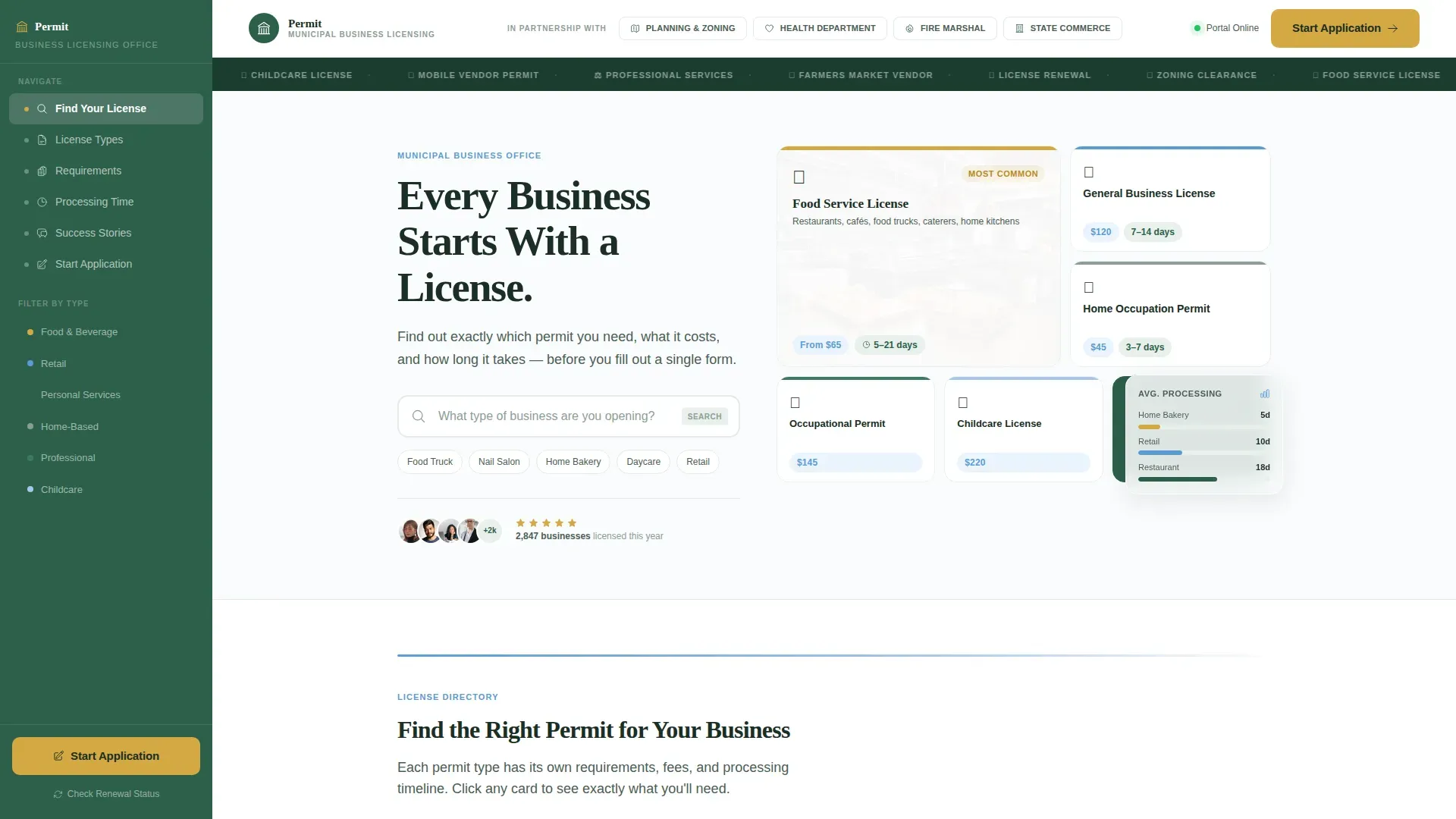
A prominent search field sits directly below the headline: "What type of business are you opening?" Autocomplete suggestions appear as the visitor types, instantly filtering relevant licenses and permits by business category. This removes the single biggest friction point for first-time applicants.
License Finder Bento Grid
Permit-type cards are arranged in a bento grid layout, each showing a preview of requirements for that category. Visitors can scan food handler permits, fire department permit details, home occupation permit criteria, a seller's permit summary, liquor license conditions, and more without leaving the page.
Scroll-Triggered Processing Timeline
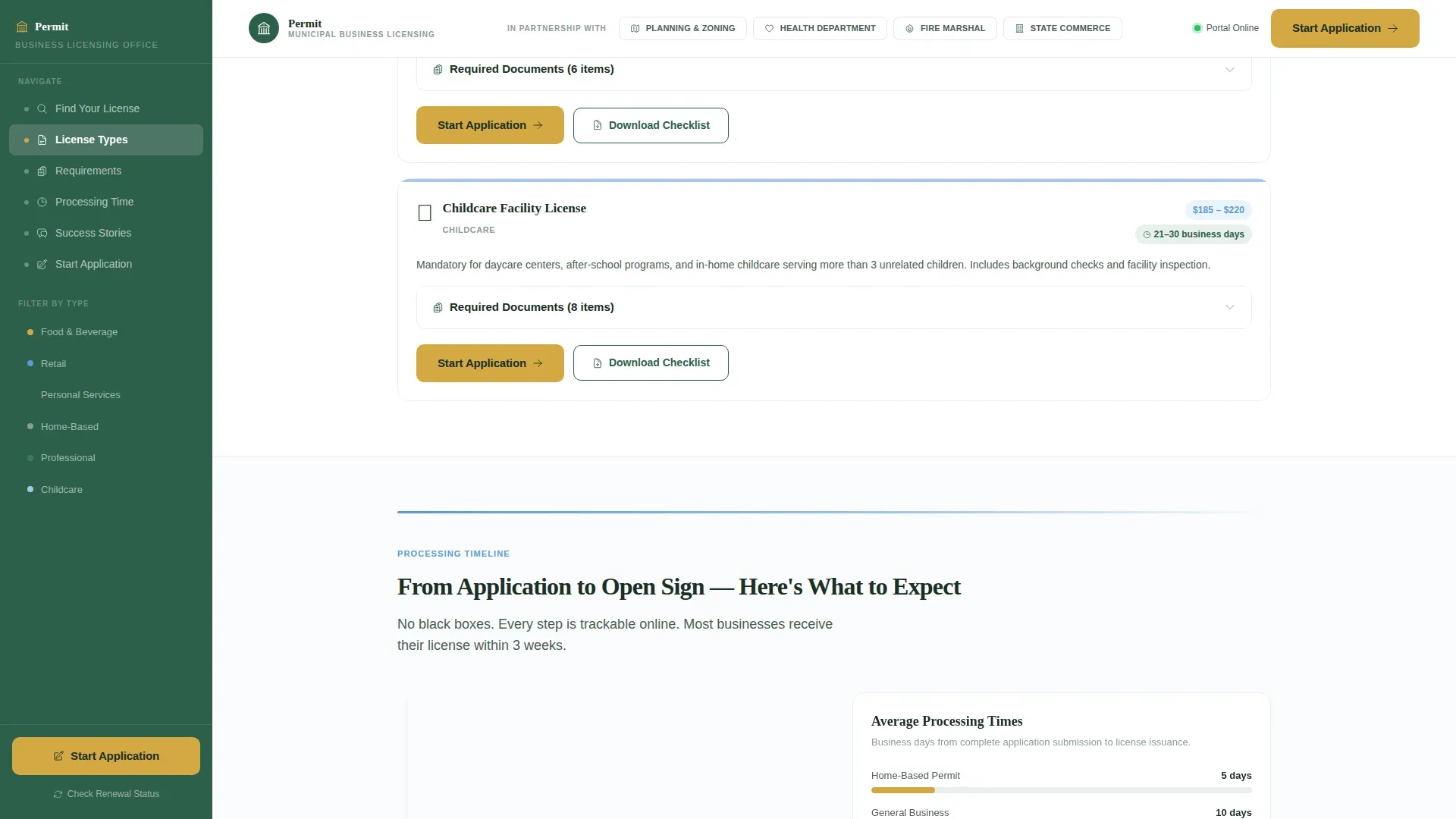
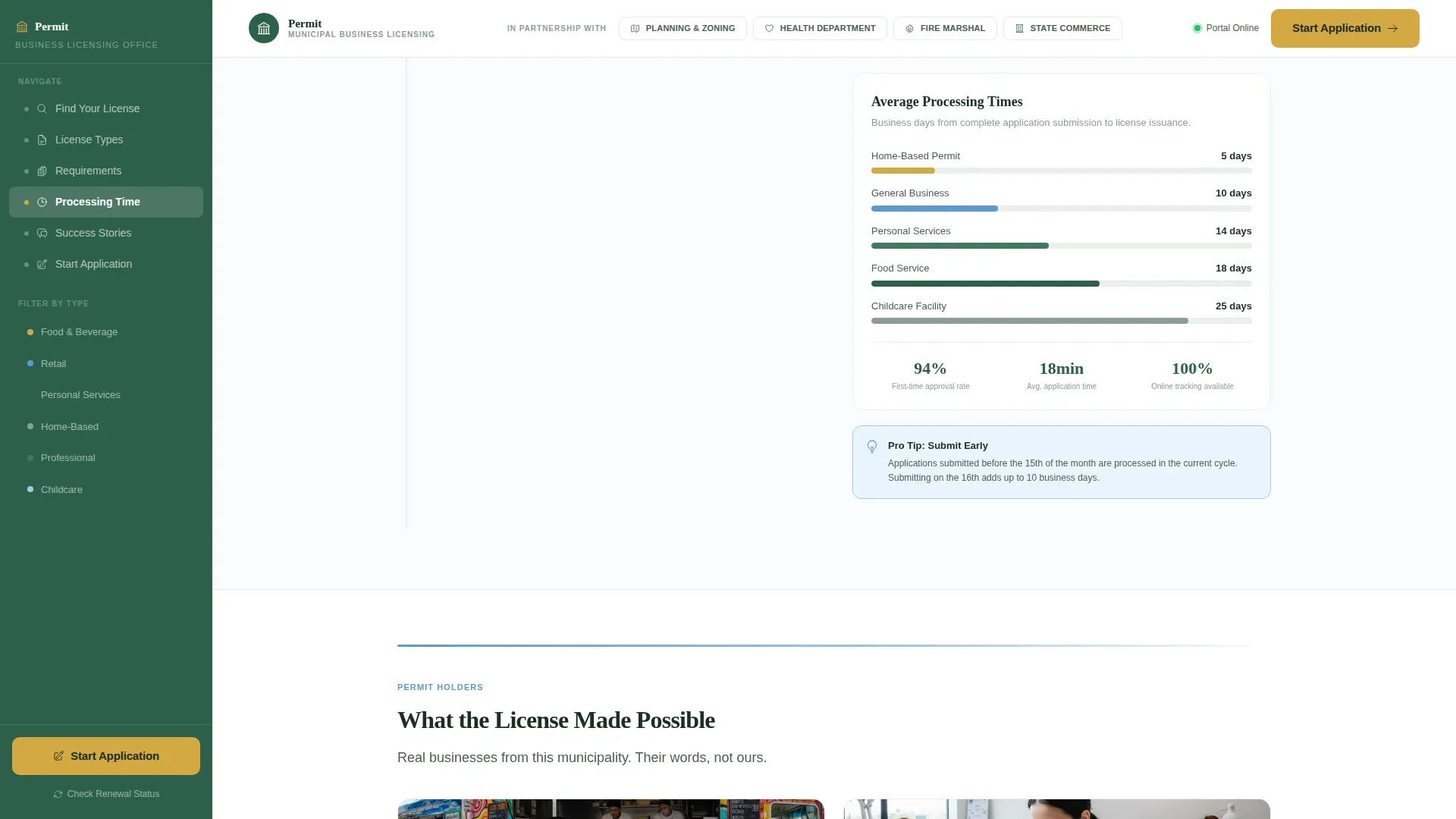
An animated timeline shows average processing days shrinking as each step completes. This sets clear timeline expectations, reduces anxiety about wait times, and gives both first-time applicants and renewal agents a realistic picture of the full application process.
Cause-Story Testimonial Cards
Real permit-holder testimonials appear as story cards, each tied to a specific business type such as a taco truck, nail salon, or daycare. Each card shows what the license made possible, providing social proof and reinforcing that the city's process works.
Pre-Application Document Checklist
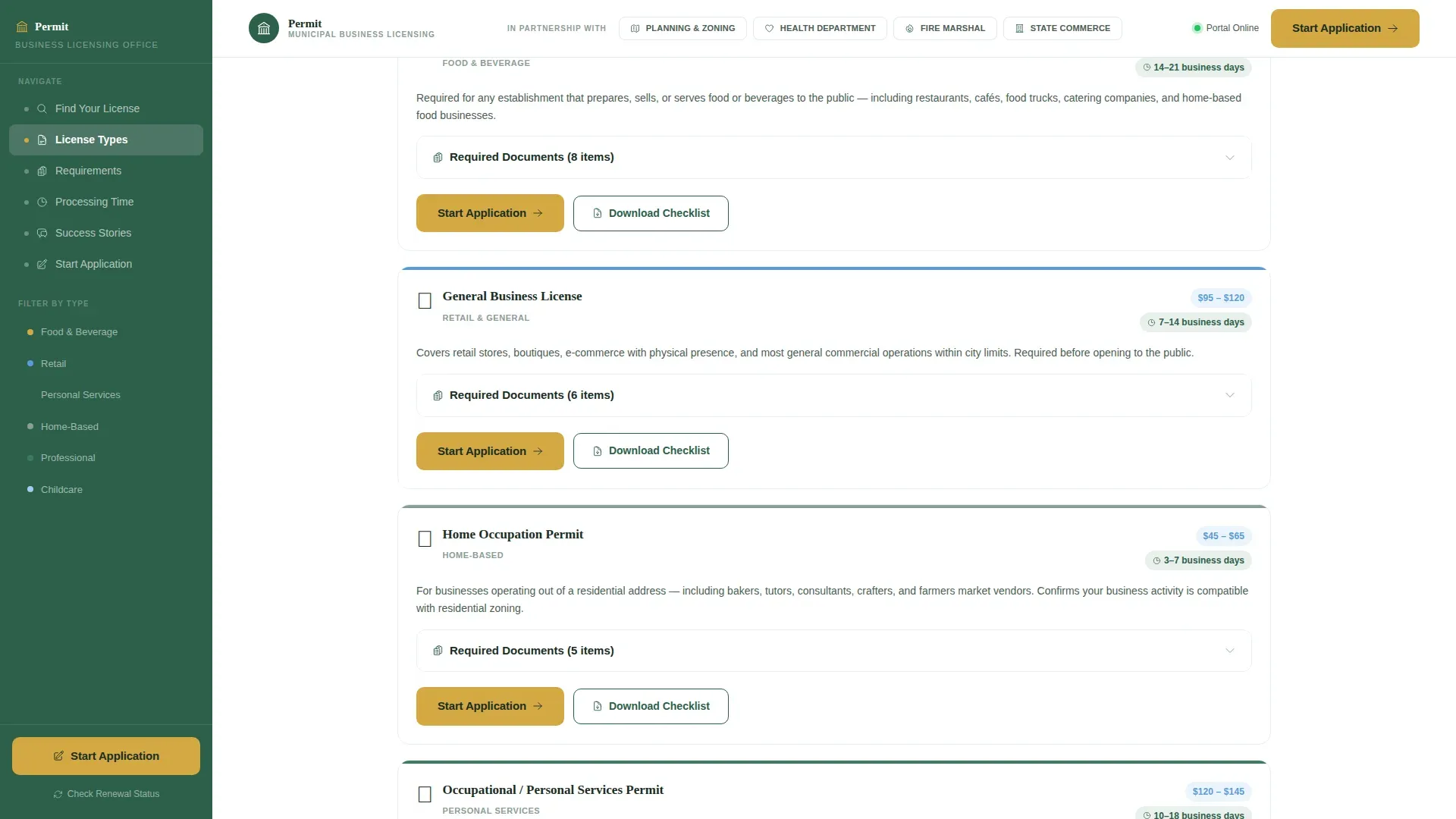
A per-license checklist details exactly what to gather before starting the application form: business plan, employer identification number, trade name registration, and other required approvals. Accordion-style lists keep the details organized without overwhelming the page.
Fixed Sidebar Navigation
The sidebar stays visible throughout the scroll, always showing the visitor's current position in the process. It includes section jump links and a license-type filter panel, reducing back-and-forth and keeping momentum toward the primary call to action.
Page sections overview
| Section | Purpose |
|---|---|
| Logo Bar Header | Municipal seal and partner agency logos establish institutional authority |
| Hero Search Area | Bold headline and autocomplete search field launch the license discovery journey |
| License Finder Grid | Bento cards display each permit type with a requirements preview |
| Processing Timeline | Animated scroll section shows estimated days per completed application step |
| Testimonial Cards | Cause-story cards from real permit holders build trust and momentum |
| Pre-Application Checklist | Per-permit document checklist prepares visitors before the application form |
| Fixed Sidebar Panel | Active section tracker and license filter stay visible throughout the scroll |
| Footer Row | Single-row footer with contact links and department information |
Design & branding system
The visual style follows a Directory and Discovery theme built on the Alpine Fresh color system. The palette is designed to feel like a national park wayfinding sign: impossible to misread, trustworthy, and respectful of the visitor's time.
- Colors: snow white (#FAFCFD) as the background, evergreen authority (#2D5F4A) for the sidebar and primary text, glacier stream blue (#5B9BD5) for section dividers and accents, and trail-marker gold (#D4A843) reserved exclusively for calls to action and status indicators.
- Typography: DM Sans handles body text and user interface elements for clean readability, while Fraunces drives the display headlines with authoritative weight.
- The header is a Logo Bar featuring the municipal seal alongside partner agency logos from the Planning and Zoning department, Health Department, Fire Marshal office, and State Commerce office, establishing legitimacy before the visitor reads a single word.
Mobile & speed optimization
The template is built desktop-first to match the primary audience of accountants and office workers, with mobile-responsive stacking for late-night Googlers on their phones.
- The sidebar stacks above the main content on smaller screens, preserving navigation access without hiding key license-type filters.
- Server Components handle static sections such as the testimonials, checklist, and footer, while Client Components power the search field, sidebar tracker, and accordion document lists for a smooth interactive experience.
How this template helps you convert
The page is structured specifically for click-through, driving visitors toward the municipality's online application portal. Every design decision reduces the distance between landing and clicking.
- The gold "Start Your Application" call to action appears first below the license-type search results and repeats after each permit category section, so visitors encounter the prompt exactly when they have enough information to act.
- A secondary "Check Renewal Status" path keeps returning businesses from bouncing, addressing their specific business needs without disrupting the primary conversion flow.
- By answering every prerequisite question, including required documents, fees, and estimated timeline, before the button appears, the template ensures that by the time visitors see the call to action, the only friction left is clicking it.
Other information about this template
This template is a strong fit for any city or county office that wants to modernize how it presents licenses and permits online. Several additional details are worth noting for teams evaluating this design.
- Licenses and permits related to business operations are granted at the federal, state, county, and city level. The template's structure accommodates all tiers, from a general business license and state license to federal license categories such as those required when crossing state lines or dealing with a federal agency.
- The checklist section can display items relevant to a sole proprietorship, a corporation, or any structure in between, including the employer identification number, employee identification number, fictitious business name registration, and seller's permit number for tangible goods subject to sales tax.
- Special licenses such as a liquor license for alcoholic beverages, a fire department permit for relevant occupational licenses in high-risk environments, and a home occupation permit for home based businesses are all accommodated in the bento grid layout.
- The page supports coverage of the sales tax permit, gst registration context for businesses with cross-border revenue considerations, and a seller's permit for businesses that sell taxable goods.
- Businesses that sell food, operate from a residential business address, or conduct business activities that cross state lines will find dedicated permit categories within the grid.
- For businesses that sell guns or require other federally regulated special licenses, the template's federal section cards can be customized by the issuing authority to display the correct federal agency contact details and application form links.
- Many jurisdictions require a business name registration and a fictitious business filing before the city will process any application form. The checklist section prompts visitors to complete these steps early.
- Zoning regulations and zoning codes determine where businesses operating in residential or mixed-use areas can legally function. The template's frequently asked question section and checklist address zoning regulations directly so visitors understand local compliance before they apply.
- Once you start editing, the template's section layout, color tokens, and accordion structure are fully adjustable to match your municipality's current department branding and contact details.
Theme
Directory & Discovery
Creative direction
Movement & Cause
Color system
Alpine Fresh
Style
Sidebar Companion
Direction
Click-Through
Page Sections
Autocomplete License Type Search
License Finder Bento Grid
Animated Processing Timeline
Cause-story Testimonial Cards
Per-permit Document Checklist
Fixed Sidebar with Section Tracking
Related questions
What types of licenses and permits does this template cover?
Can this template support both first-time applicants and renewal filers?
What information does a business permit application form typically include?
What are the consequences of operating without the correct business license?
How do I start using this template?



