Specialist Regulatory & Licensing Professional Website Template
Bench is a sidebar companion landing page built for bar associations and legal regulators. It combines a twelve-tile icon grid hero, a locked sidebar progress tracker, and a guided multi-step event registration form into one authoritative interface. The Slate & Sky color system and Corporate Precision theme make every action feel like an official instruction, not a suggestion.
by Rocket studio
Quick summary
Bench is a precision-built registration landing page for legal regulatory bodies. It handles Annual Conference event registration through a sidebar-locked step tracker, auto-populating attorney data from a bar number lookup to reduce friction. The page presents essential information above the fold, guides visitors through each step with clarity, and keeps the primary call-to-action visible at every scroll depth.
Who this template is for
This template serves the people who interact with a bar association every day. It is designed for organizations that need a professional, high-authority event website that can register participants efficiently and handle multiple visitor types in one interface.
- Licensed attorneys renewing Continuing Legal Education (CLE) credits or registering for the Annual Conference
- Newly admitted JD graduates tracking bar admission status or verifying licensure details
- Paralegals, CLE coordinators, and legal staff researching disciplinary records or approved credit hours
What problem this template solves
A poorly structured registration page leads to confusion, drop-offs, and missed opportunities. Legal professionals expect precision. When the event registration form is unclear or the sign up process feels bureaucratic rather than guided, potential attendees abandon the flow before completing it. This template solves that directly.
- The sidebar progress tracker keeps every step visible, so visitors never wonder how far they are or what comes next
- Bar number auto-population removes redundant data entry, collecting only relevant information the system already holds
- A pinned sky-blue call-to-action button keeps the registration page conversion path open at every scroll depth
What you get with this template
You get a complete, fully optimized sidebar companion landing page built around a guided event registration process. Every section, from the icon grid header to the multi-step form panels, is designed to create a seamless user experience for legal professionals visiting the event website.
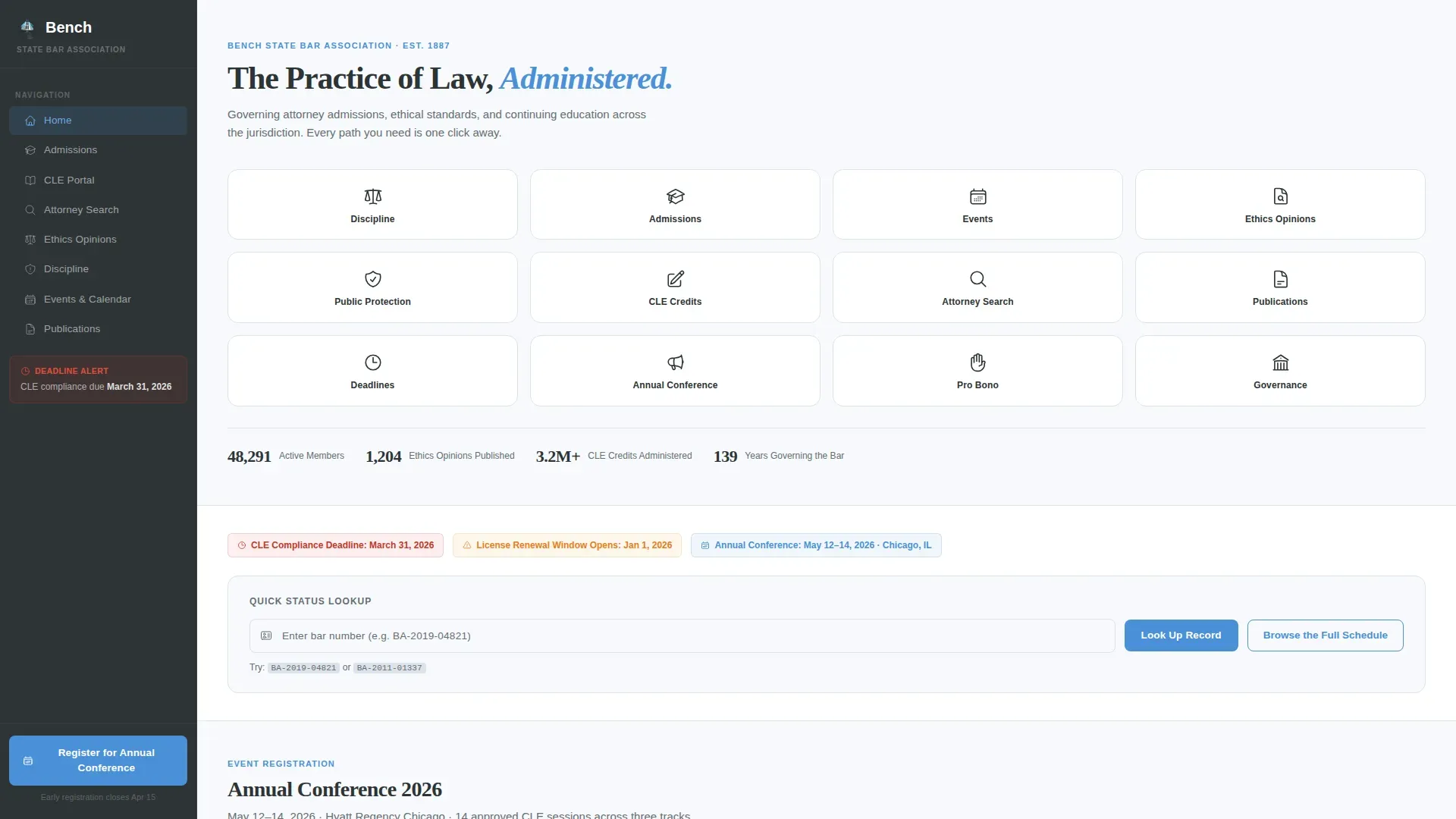
- A twelve-tile icon grid hero with hover states, a single headline, and direct pathways into every core association function
- A locked sidebar step tracker with five numbered steps, a filling progress line, and a pinned "Register for the Annual Conference" button
- Multi-step form panels covering event selection, bar number lookup, session checkboxes, CLE credit calculator, and payment details
Feature list
This template ships with a focused set of built-in components. Each one directly supports the event registration flow and the authority aesthetic of a legal regulatory body.
Icon Grid Header with Hover States
The header is a structured matrix of twelve minimal line icons representing core association functions. Each icon tile sits on a brief-paper white background with a sky-blue hover state, giving potential attendees an immediate visual directory. No photography is used, keeping the event website clean and load-efficient.
Sidebar Step Tracker with Progress Fill
Once a visitor enters the event registration flow, the sidebar locks into a vertical progress tracker. Five numbered steps remain visible at all times: Select Event, Verify Bar Number, Choose Sessions, Confirm CLE Credits, and Payment. A thin sky-blue line fills downward as the visitor advances, reducing drop offs by making progress feel tangible and earned.
Bar Number Auto-Population Panel
The registration form opens by asking for the attorney's bar number. The template is designed so that input auto-populates the visitor's name, admission date, and current CLE status. This removes redundant fields and proves the system recognizes the user, making the sign up process feel authoritative rather than generic.
Session Selection with CLE Credit Calculator
Step three of the event registration page presents session checkboxes across multiple tracks. A built-in credit calculator updates as sessions are selected, showing the total CLE credits the attorney will earn. Event planners can display the event name, track category, and credit type clearly for each session, helping attendees build a compliant schedule.
Pinned Primary Call-to-Action Button
The "Register for the Annual Conference" button is pinned to the bottom of the sidebar rail in sky-blue. It stays visible at every scroll depth across the full registration landing page. This placement ensures the conversion path is never more than one click away, even while the visitor is still reviewing event details or comparing ticket options.
Browse the Full Schedule Secondary Path
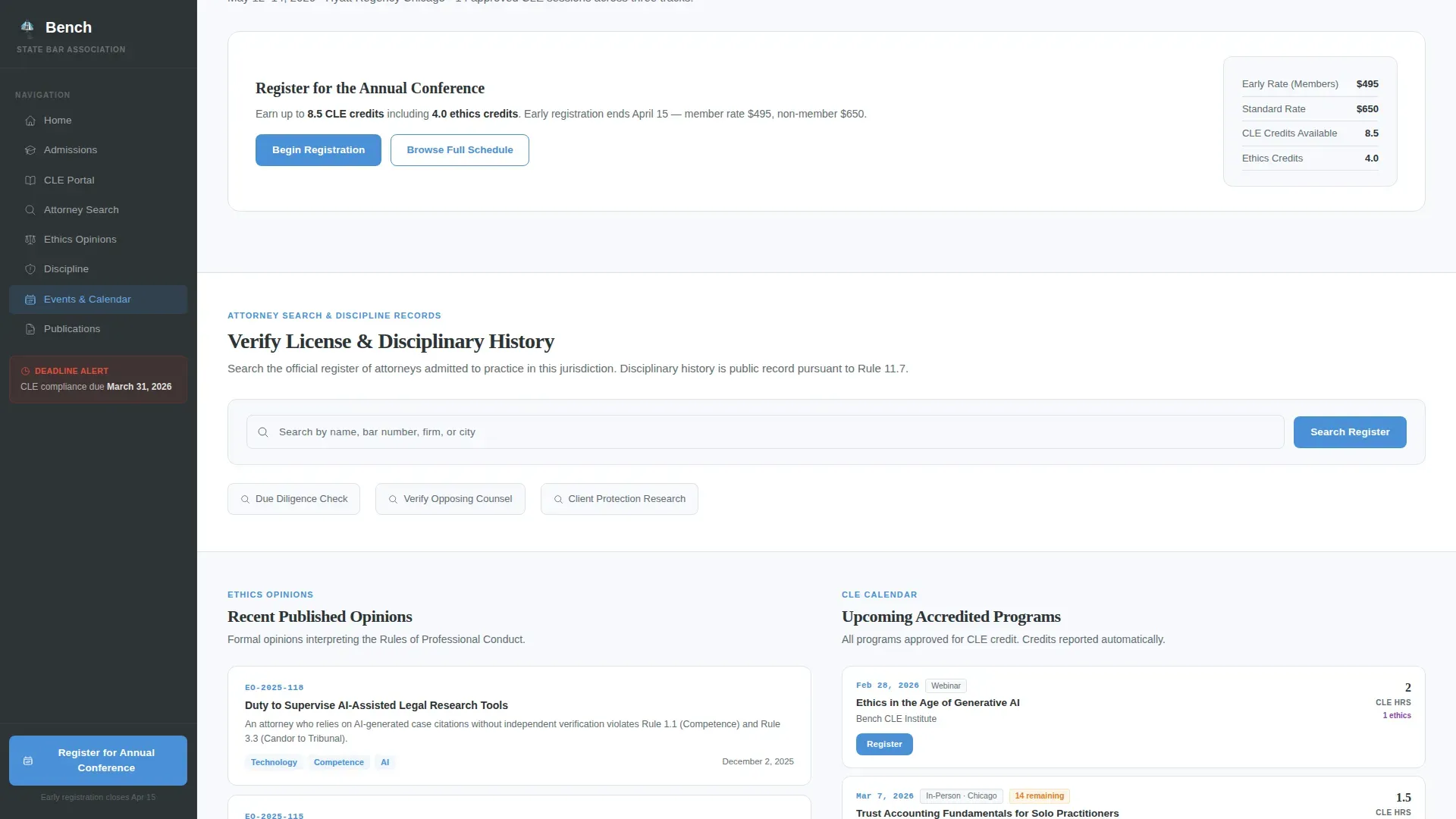
A secondary "Browse the Full Schedule" link lets undecided visitors explore session descriptions, speaker bios, and credit breakdowns before committing. This path builds value through specificity, turning the registration page into a resource that earns trust before asking for payment details.
Page sections overview
| Section | Purpose |
|---|---|
| Icon Grid Header | Directory of twelve association functions with hover states |
| Headline Above Grid | Single authority statement anchoring the page |
| Quick Access Bar | Status lookup and urgent deadline notices |
| Event Registration Flow | Sidebar step tracker with multi-step form panels |
| Session Selection Panel | Checkboxes, track filters, and CLE credit calculator |
| Attorney Search Section | Search interface with disciplinary record result cards |
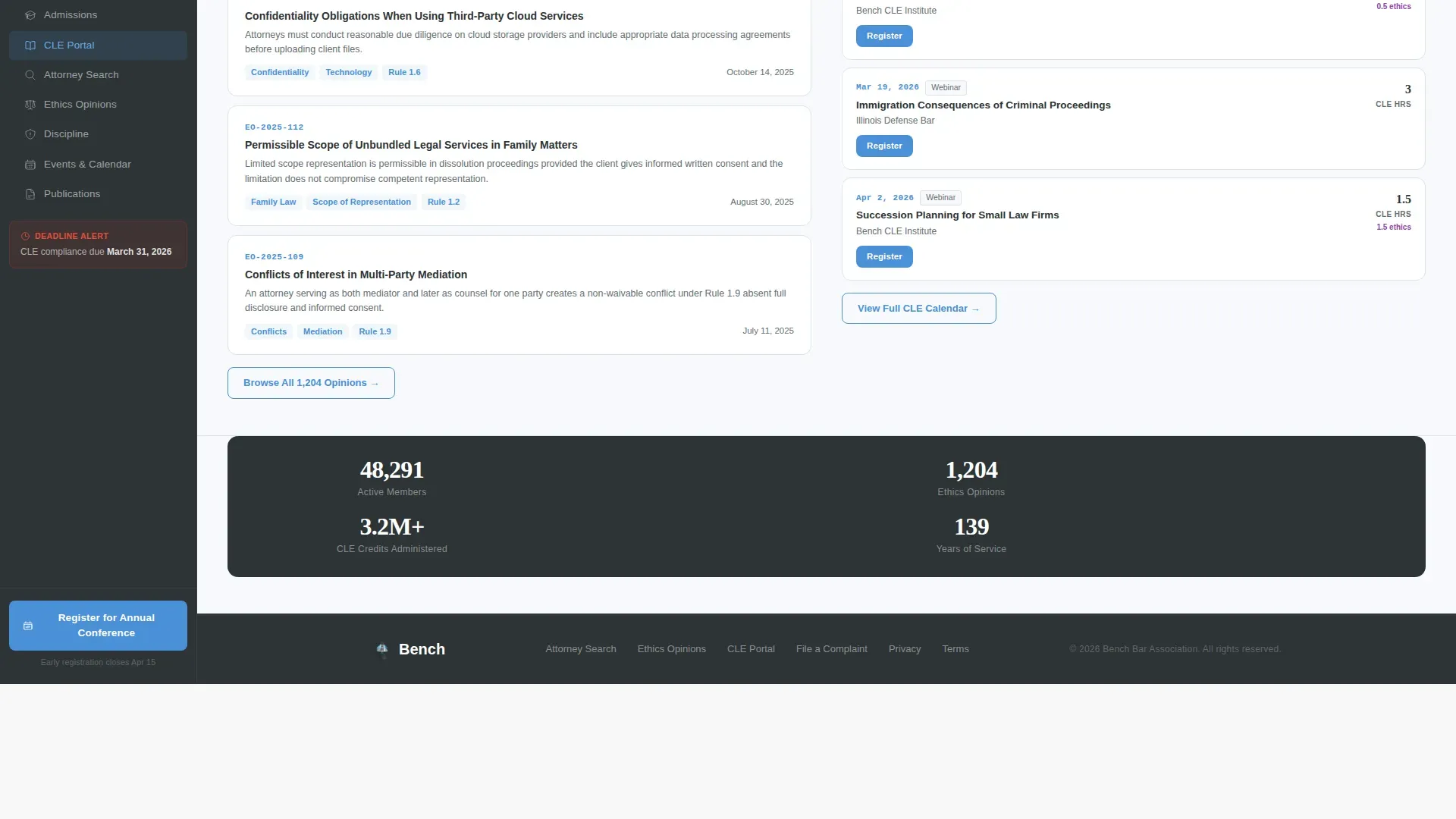
| CLE & Publications Panel | Credit tracker and recent ethics opinions listing |
| Full Schedule Browser | Session descriptions, speaker bios, and credit breakdowns |
| Social Proof Strip | Active attorney count, CLE hours, opinions published |
| Footer (Single-Row) | Linear footer with links, policies, and contact details |
Design & branding system
The visual identity follows a Corporate Precision theme. Every color choice is purposeful: slate dominates structure, sky blue signals action, and brief-paper white keeps content panels readable. Event branding is embedded at the system level rather than applied as decoration.
- Deep charcoal slate (#2D3436) covers the persistent sidebar rail, primary text, and footer, giving the page a courthouse authority
- Open-sky blue (#4A90D9) appears exclusively on actionable elements, progress indicators, and the pinned registration button, making every interaction feel like an official instruction
- DM Sans handles all interface and body copy; Fraunces handles display headings, creating a typographic contrast that is both readable and formally precise
Mobile & speed optimization
The template is built desktop-first, reflecting the professional legal workflow and form-heavy interactions of its target audience. Mobile optimization is still addressed so attorneys registering from mobile devices are not blocked from completing their registration form.
- The registration landing page layout presents essential information above the fold, minimizing friction before the visitor reaches the form
- Thumb-friendly button sizing and fast-loading static content panels keep the event registration page accessible on smaller screens
- Server components handle static content while client components power interactive registration elements, balancing performance with high interactivity
How this template helps you convert
A high-converting event registration page removes friction and boosts conversions by combining clear calls-to-action, optimized form templates, and a seamless user experience. This template is structured to do exactly that for legal regulators running in-person and virtual events.
- The bar number lookup at the top of the registration form auto-populates attendee details, cutting form length and reducing the chance of drop offs before the payment step
- The pinned sidebar button and visible step counter create a guided filing experience, so the event registration process feels structured and inevitable rather than optional
- The "Browse the Full Schedule" secondary path lets undecided visitors collect essential information and review event details before committing, increasing the likelihood they complete the registration form
Other information about this template
This template is designed for event organizers who need to create a professional event registration page without writing custom code. No coding required means a legal association's communications team can adapt the template, update event details, and publish the registration landing page quickly. The template supports both free events and paid events, and the form can be configured to collect ticket type selections, ticket tiers, and early bird pricing options within the existing step structure.
- The registration form supports attendee management by collecting attendee details such as name, bar number, job title, session preferences, and payment details in a structured multi-step flow
- Countdown timers can be added to the quick access bar to create urgency and encourage sign ups before a deadline passes, helping boost ticket sales for the Annual Conference
- Email campaigns and social media posts can link directly to the registration landing page, supporting a multiple channels promotional strategy that drives event registrations across platforms
- The event summary and hotel information sections can be added to the schedule browser panel to provide essential information for out-of-town attendees planning travel
- Platforms like Jotform and an Eventbrite account offer comparison-ready event registration form templates, but this template is purpose-built for legal regulators who need authority, compliance framing, and a guided multi-step form that those general tools cannot replicate
- Analyzing form completion rates can provide valuable insights and help event planners monitor registrations in real time data dashboards connected downstream
- The template can support ticket sales for both in person and virtual events, with ticket options and ticket tiers configurable inside the payment step
- Exclusive content such as downloadable session agendas with CLE credit breakdowns can be surfaced in the schedule browser to maximize engagement and give potential attendees a reason to register early
- Artificial intelligence tools can be used alongside this template to generate session descriptions or draft email campaigns pointing back to the registration page
- Social proof elements, including active attorney counts and CLE hours administered, are built into the design as a credibility strip, reassuring first-time visitors before they begin the registration process
- For further information on creating an event registration flow for a bar association or legal regulator, review the template's included form structure and adapt each step panel to your event type and jurisdiction

Theme
Corporate Precision
Creative direction
Step-by-Step Guide
Color system
Slate & Sky
Style
Sidebar Companion
Direction
Event Registration
Page Sections
Icon Grid Header with Function Tiles
Sidebar-locked Step Tracker
Bar Number Auto-population
Session Checkboxes and CLE Calculator
Pinned Registration Call-to-action
Browse Full Schedule Secondary Path
Related questions
Does this template work for both free events and paid events?
Can the registration form collect CLE credit information?
Is any coding required to use this template?
How does the sidebar step tracker reduce drop offs?
Can this template support virtual events as well as in-person conferences?



