RTO Vehicle Registration Landing Page Template
Registry is a precision-built, card grid landing page for digital RTO and vehicle registration services in India. It turns a confusing, hours-long paperwork ordeal into a clean, same-day submission experience managed by licensed agents. Designed for dealers, fleet managers, and first-time buyers, this template builds trust fast and converts high-intent visitors into qualified leads.
by Rocket studio
Quick summary
Registry is a single-page, FAQ-driven landing page template built for digital RTO and vehicle registration services. It pairs a Navy Authority color system with a modular card grid layout, giving every visitor a clear, confident experience from the first scroll. The concept is simple: answer the real question first, then earn the lead.
Who this template is for
This template works for any business offering vehicle registration support, ownership transfer services, or RTO liaison work in India. The concept behind the design is to serve people who arrive with a specific paperwork problem and need an immediate, credible answer. Whether you run a solo agent practice or a regional fleet compliance firm, this site works for you.
- Used-car dealers who handle bulk ownership transfers and need a fast, trustworthy digital surface for clients
- Fleet managers keeping dozens of commercial vehicles compliant across multiple RTO stations and districts
- First-time vehicle buyers confused by Form 29 or Form 30, hypothecation removal, or interstate No Objection Certificate (NOC) requirements
What problem this template solves
Most people searching for RTO help are already frustrated. They have stood in queues, received conflicting feedback at the counter, or spent hours trying to find the right document checklist online. They arrive at your site late in the day, on their phone, looking for a straight answer, not another wall of text. The concept of this template is to meet that visitor exactly where they are.
- Visitors find no clear entry point on generic service pages, so they leave without converting
- The paperwork process feels opaque and difficult, making people hesitant to trust a new service provider
- High-intent visitors who are ready to act do not always want to fill a form first, they want a human on the line
What you get with this template
You get a complete, lead-generation landing page with every section pre-structured and ready to populate. The design thinking behind each component reflects the RTO services niche directly. Nothing is generic filler. Every element has a clear job to do, from the navy search header to the saffron call-to-action buttons that surface at precisely the right moments during the scroll.
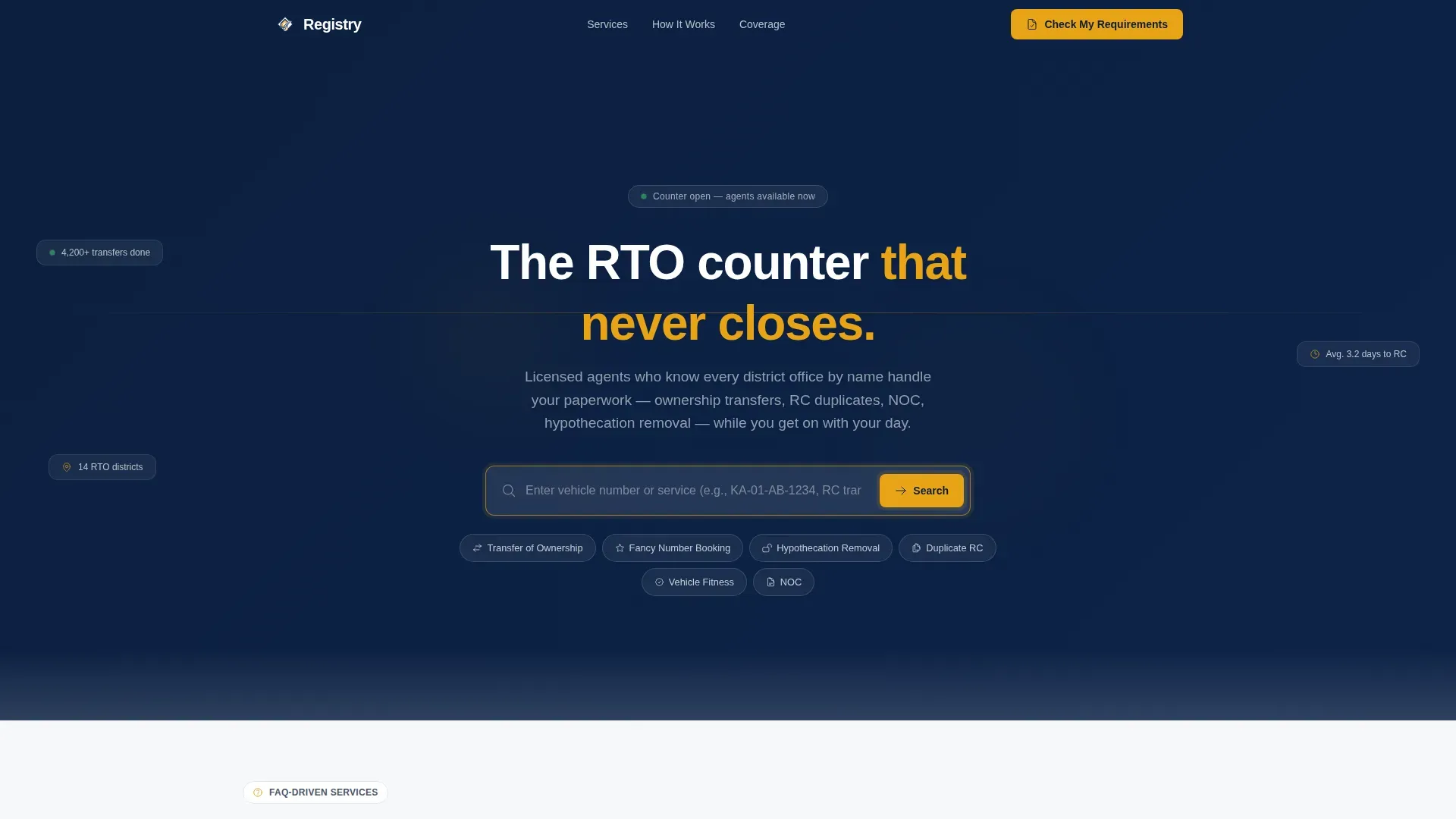
- A full-width navy search header with a vehicle number input and six quick-link pills for instant service entry
- A modular FAQ card grid with document checklists, contextual calls to action, and a mid-page stats band showing real processing numbers
- A two-step lead capture modal titled "Check My Requirements" plus a sticky bottom bar offering a direct call to an RTO expert
Feature list
This template is built around a tightly managed set of interactive and visual components. Each feature is grounded in the brief and designed to work together across the full scroll journey.
Full-Width Navy Search Header
The header opens on a clean, deep navy (#0B1D3A) field with a single centered search input. Ghost text reads "Enter your vehicle number or service (for example KA-01-AB-1234, RC transfer, NOC)..." and a saffron search button sits beside it. Below the input, six pill-shaped quick links, including Transfer of Ownership, Fancy Number Booking, Hypothecation Removal, Duplicate RC, Vehicle Fitness, and NOC, give visitors a direct jump into the service they need. The concept is immediate utility: no hero image, no decorative stock photography, just a command center that works from the first second.
FAQ-Driven Modular Card Grid
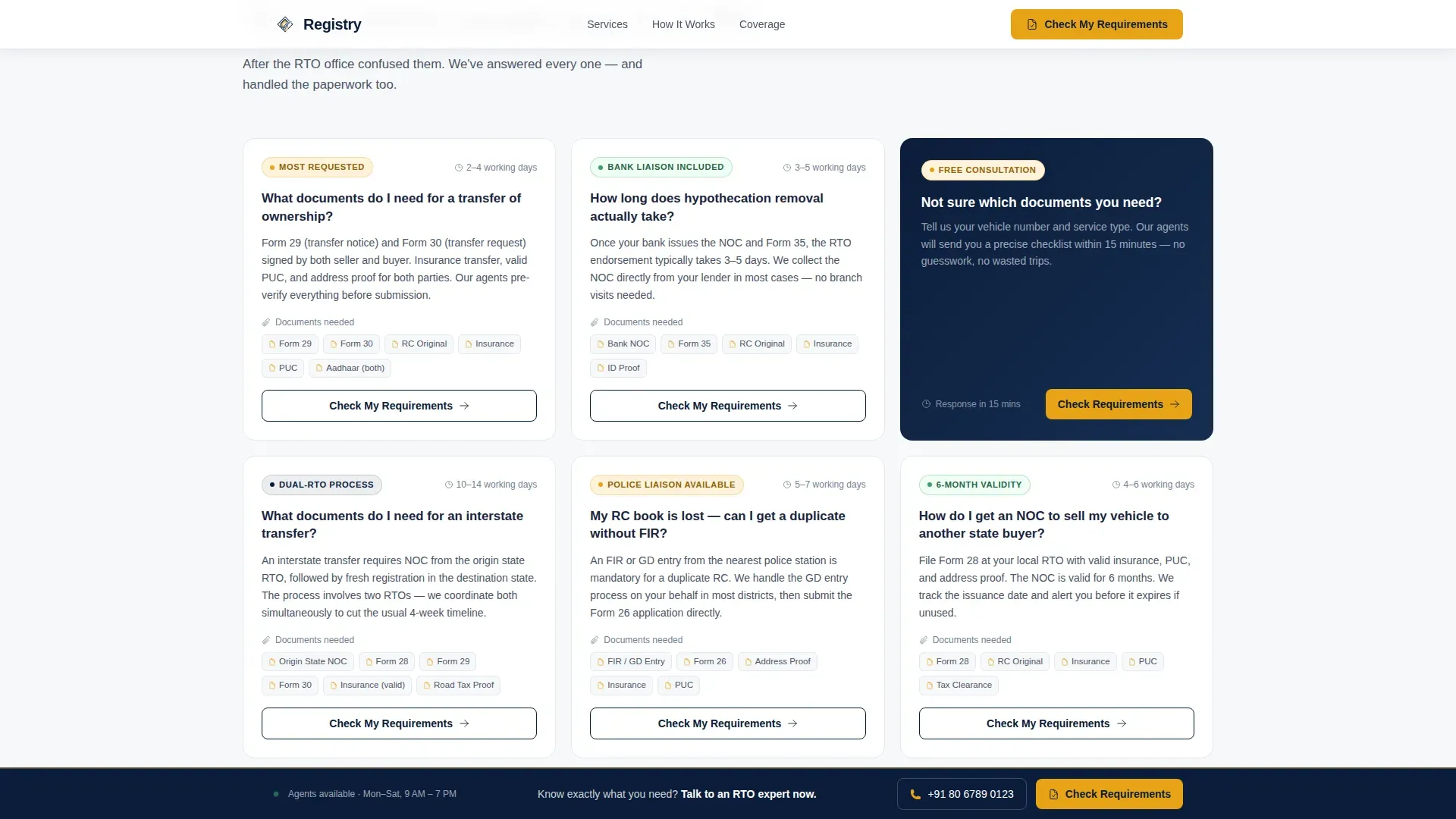
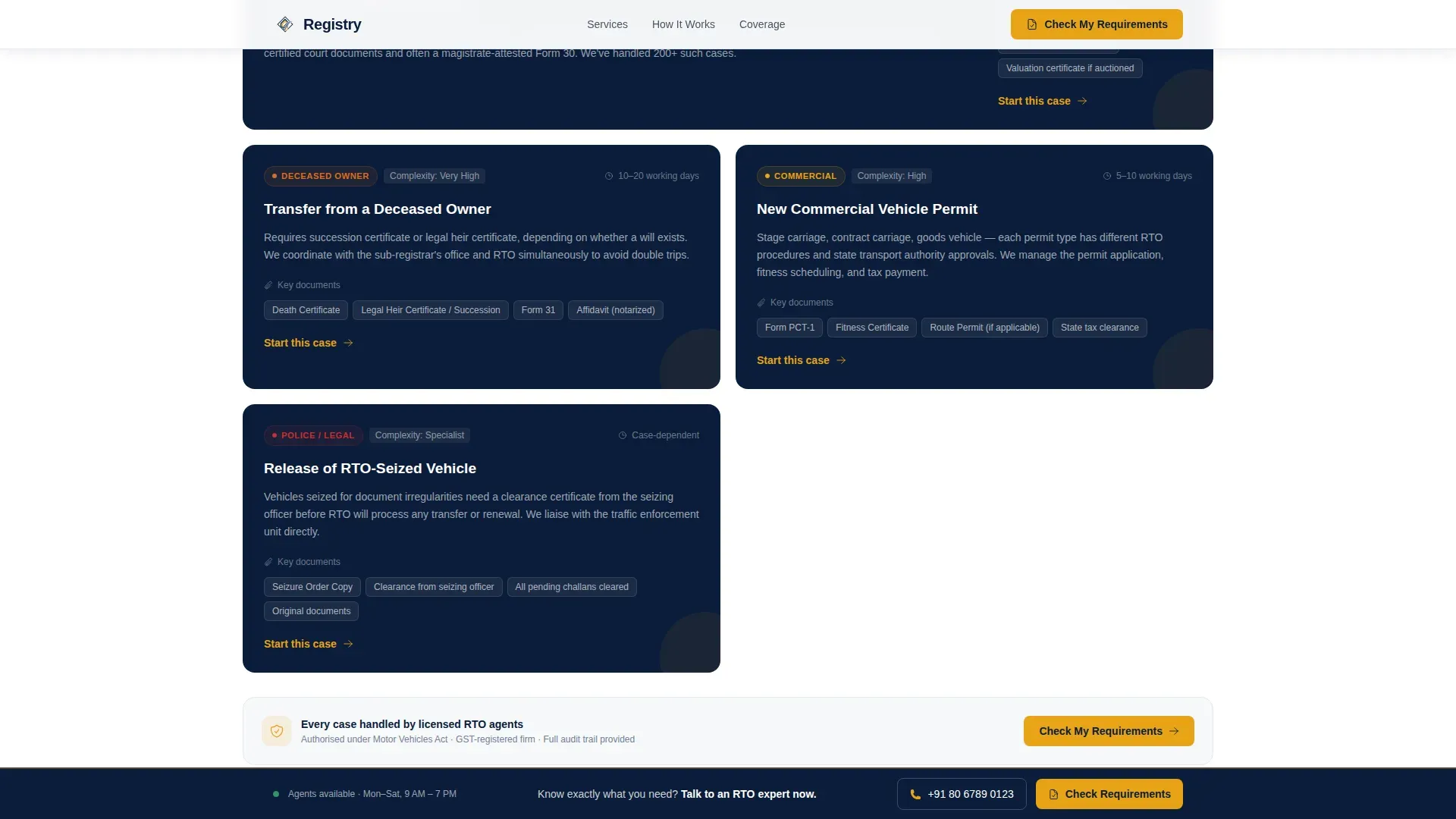
Each card in the grid opens with a real, boldly stated question, the kind people type into a search engine at 11 PM after a confusing day at the RTO office. The card then delivers a tight three-line answer, a document checklist, and a contextual call-to-action button. Cards are arranged so complexity builds as visitors scroll, starting with standard new registrations and working through to court-order transfers and deceased-owner cases. This approach lets the site carry the weight of trust-building before a single form is shown.
Stats Band Dashboard
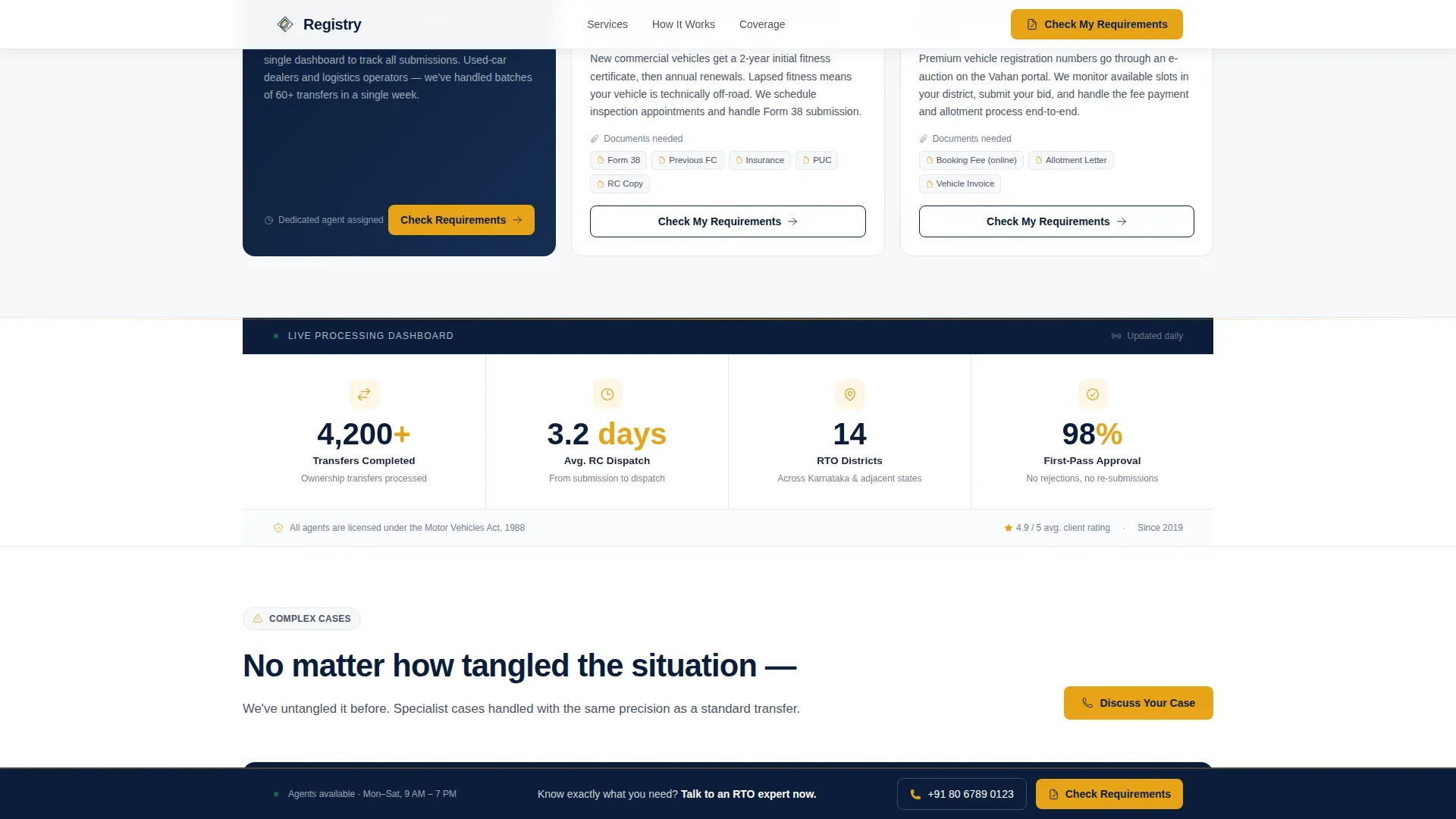
A full-width horizontal band breaks the card grid midway through the scroll. It surfaces real processing metrics, such as "4,200+ transfers completed," "Avg. 3.2 days to RC dispatch," and "14 RTO districts covered," rendered in navy text on a white (#F7F8FA) surface. The layout echoes a government dashboard: structured, specific, and impossible to dismiss. Trust signals like these add depth to every claim made in the FAQ cards above them.
Two-Step Lead Capture Modal
The primary call to action, "Check My Requirements," appears on every third FAQ card. When clicked, it opens a focused two-step modal. Step one asks for the vehicle number and a service type from a dropdown. Step two asks for name, phone number, and preferred contact time. The approach keeps friction low because the visitor has already been answered by the time the form appears. The modal does not feel like an interruption; it feels like the logical next step.
Sticky Expert Call Bar
A secondary sticky bar is fixed to the bottom of the page for the duration of the scroll. It offers a "Call an RTO Expert Now" prompt with a click-to-call number. This bar is built for high-intent visitors who have already decided they want help but prefer a voice conversation to a web form. It runs quietly in the background and does not compete with the card grid above it.
GSAP ScrollTrigger Animations
Card reveals, staggered grid animations, and floating depth effects in the hero are driven by GSAP ScrollTrigger. The animation concept adds momentum to the scroll without distracting from the content. Each card surfaces smoothly as the visitor moves down the page, making the experience feel polished and purposeful rather than static.
Page sections overview
| Section | Purpose |
|---|---|
| Navy Search Header | Entry point for vehicle number and service lookup |
| Quick-Link Pills | Six instant service shortcuts below the search field |
| FAQ Card Grid | Modular answer cards with checklists and calls to action |
| Stats Band | Processing metrics displayed as a mid-page dashboard |
| Complex Services Grid | Escalating-complexity cards for difficult transfer cases |
| Lead Capture Modal | Two-step "Check My Requirements" form triggered from cards |
| Sticky Call Bar | Persistent click-to-call bar for high-intent visitors |
| Footer | Single-row linear footer with essential links |
Design & branding system
The visual identity follows a Corporate Precision concept built entirely on the Navy Authority color system. The palette is designed to feel like the inside of a well-run government liaison office: starched, credible, and free of ambiguity. The only intentional flash of color is saffron, reserved for actions and status indicators, like the stamp that says approved.
- Colors: deep institutional navy (#0B1D3A) for backgrounds, pressed-shirt white (#F7F8FA) for card surfaces, gunmetal (#4A5568) for body text, and confident saffron (#E8A317) for all calls to action, status badges, and progress indicators
- Typography: Manrope in bold weights for all headings, DM Sans for body text, creating a clean hierarchy that is easy to scan on any screen
- Layout: card grid (modular) with consistent square card proportions, structured spacing, and no decorative imagery, keeping every surface functional and distraction-free
Mobile & speed optimization
This template is built mobile-first because most visitors searching for RTO help do so on their phones, often late at night, after a frustrating day dealing with paperwork. The card grid reflows cleanly across screen sizes, and the sticky call bar remains accessible without covering key content. Server Components are used for all static sections, while Client Components manage interactive elements like the search box, modal form, and sticky bar.
- Mobile-first layout ensures the card grid, search header, and sticky bar all work correctly on small screens without layout breaks
- Client and Server Component separation keeps the interactive areas fast and the static content areas lean, so the page loads quickly even on slower mobile connections
- GSAP ScrollTrigger animations are managed to run smoothly without impacting scroll performance on mid-range Android and iOS devices
How this template helps you convert
This landing page is built for lead generation from the ground up. Every design and content decision is made to move a hesitant, frustrated visitor toward confident action. The page earns the click rather than demanding it.
- The FAQ card grid answers the visitor's specific question before asking for anything in return, building enough trust that the "Check My Requirements" call to action feels like a helpful next step rather than a sales push
- The stats band mid-page adds a layer of social proof at the exact moment a visitor might start to hesitate, reinforcing that real work gets done here and that the process is managed by people who know the details
- The sticky expert call bar gives high-intent visitors a zero-friction path to a human, so leads who are ready to act right now do not have to scroll back up to find a phone number
Other information about this template
This template sits at the intersection of Government and Public services, Indian Government Services, and the RTO and Vehicle Registration niche. It is designed for the specific way Indian users search for bureaucratic help: question-first, mobile-heavy, and deeply skeptical of generic service pages. The following notes cover additional context that will help you get the most from this template.
- The concept of no-code building is directly relevant here. No-code tools allow users to create websites and landing pages without traditional programming skills. AI-powered platforms can help users build production-ready sites from natural-language prompts, and platforms like these often feature intuitive drag-and-drop builders that make the process easier for non-technical business owners.
- No-code tools can significantly reduce the time required to launch a site. Users can leverage these tools to add functionalities such as lead capture and service dropdowns without writing a single line of code.
- In the broader rail transit and transport technology space, the Railhead Live Network Discovery rail transit landing page template represents a different but instructive design approach: real-time network monitoring features, system health dashboards, and automated device mapping on trains and rail vehicles share some structural similarities with this template's stats band and service-status concept.
- Railhead Live Network Discovery refers to the automated, real-time identification and mapping of networked devices within rail transit infrastructure. Railhead Corporation specializes in solutions for video and data recording in rail transit systems, and live discovery keeps track of IP cameras on a train to ensure they stay in communication with the main recorder.
- The technology improves operational health by detecting when devices are down, allowing for proactive maintenance. Automation minimizes manual configuration time when new devices are added or existing devices fail in large fleets.
- Real-time mapping creates a visual, up-to-date map of network device connections. The system can detect unauthorized or rogue devices and monitor for vulnerabilities. Automated, real-time discovery addresses manual, slow inventory checks and security risks from unmonitored devices.
- The technology enables faster data downloads and supports live streaming of video from trains to a central office. Automated device mapping uses a neighbor-walking method to discover all connected onboard hardware.
- Safety compliance is a shared concern across transport categories. Asset Protection and Optimisation (ASPRO) teams provide expert railway assistance to those planning activities on or near the railway. It is important to contact your local ASPRO team when working on or near the railway to ensure compliance with relevant legislation. ASPRO teams advise on the potential impact of different kinds of work, including construction, maintenance, and work near level crossings. Network Rail is committed to safety and aims to help deliver works safely and securely. ASPRO provides rail safety assurance services for construction, engineering, and infrastructure access.
- For builders thinking about rail transit websites, modern rail landing pages benefit from a mobile-first approach, a streamlined lead capture form, real-time train tracking features, interactive maps of rail routes, and a solid FAQ section. Multilingual support and SEO optimization are valuable additions for rail companies serving diverse passengers across multiple stations and railway lines.
- Rail website templates are designed to cater to the needs of rail companies and related businesses. Templates include features like online ticket booking systems and real-time train tracking. Templates for rail websites can be personalized using a visual editor, making it easy to run a successful service site quickly.
- In creative and narrative contexts, the concept of using trains as a means of interstellar travel offers a fun twist in science fiction stories. Incorporating trains into a sci-fi setting can create a relatable experience for readers, as most people have traveled by train at some point in real life. Using trains as a central theme in a sci-fi narrative can evoke nostalgia and personal memories, enriching the storytelling experience. The use of sentient trains in a narrative can add depth to character interactions. Worldbuilding in science fiction often involves creating a technological future that imagines the implications of current advancements, including railways, freight systems, and transport networks that carry passengers across vast distances, past towns, forests, and even water.
- Trust signals such as client logos and testimonials build credibility for rail industry technologies. High-quality visuals or screen recordings should be used in marketing to demonstrate live monitoring capabilities. A blog section can help surface stories and ideas that impress both early visitors and returning readers.
- Party integrations, graffiti-resistant surfaces on physical rail assets, and wildlife corridor management near railway lines are real-life areas that rail operators deal with day to day. These are the kinds of details that surface in the stories operators and passengers hear and share.
Theme
Corporate Precision
Creative direction
FAQ-Driven
Color system
Navy Authority
Style
Card Grid (Modular)
Direction
Lead Generation
Page Sections
Full-width Navy Search Header
Faq-driven Modular Card Grid
Mid-page Stats Band
Two-step Lead Capture Modal
Sticky Expert Call Bar
GSAP Scrolltrigger Animations
Related questions
Can I edit this template without coding experience?
Does this template include the two-step lead capture form?
Is this template designed for mobile users?
Can I use this template for a fleet management or dealer business?
What sections are included in this template?



