Housing Government Professional Website Template
The Registry Transparent Housing Allocation landing page template is a civic-grade, single-page layout built for government housing departments. It leads with an animated metrics dashboard, walks visitors through the full allocation pipeline in a zigzag section layout, and closes with an event registration form for the Housing Allocation Open Day. Every design decision prioritises clarity, trust, and public accountability.
by Rocket studio
Quick summary
This landing page template gives housing departments a single-page civic portal that does one thing exceptionally well: it makes the allocation process legible. Animated counters show live operational numbers. A zigzag process walkthrough reveals each pipeline stage in sequence. A focused registration form drives attendance at the Housing Allocation Open Day. The result is a real estate landing page built around transparency, not decoration.
Who this template is for
This template serves organisations that handle public housing allocation and need to communicate openly with a mixed, often anxious audience. It suits departments where accountability is not optional and where every visitor deserves a clear answer about where they stand.
- Housing department staff and municipal administrators publishing allocation decisions and managing public-facing registration
- Applicants tracking queue position, social workers pursuing emergency placements, and landlords registering rental stock for compliance
- Civic organisations and non-profit housing bodies that need a structured, visually appealing landing page to present properties and process steps to potential clients
What problem this template solves
Housing allocation systems are frequently perceived as opaque. Applicants refresh portals without understanding the process. Social workers struggle to find relevant information quickly. Landlords cannot easily locate compliance steps. Municipal staff lack a single public-facing surface that communicates the full picture. This landing page template solves exactly that.
- It replaces ambiguity with a visible pipeline, showing every stage from application submission to unit inspection so potential customers and potential buyers of the process understand where decisions are made
- It converts a bureaucratic wall into a structured, user friendly interface that guides each visitor toward the desired action, whether that is registering for the Open Day or checking their queue position
- It presents a unique value proposition for civic digital marketing: a landing page that earns trust before it asks for participation, reducing drop-off and improving conversion rates
What you get with this template
You get a fully structured, single-page civic landing page with six distinct content zones, a strong visual system, and a conversion-oriented registration form. Every section is built from the brief, with no filler blocks or placeholder content.
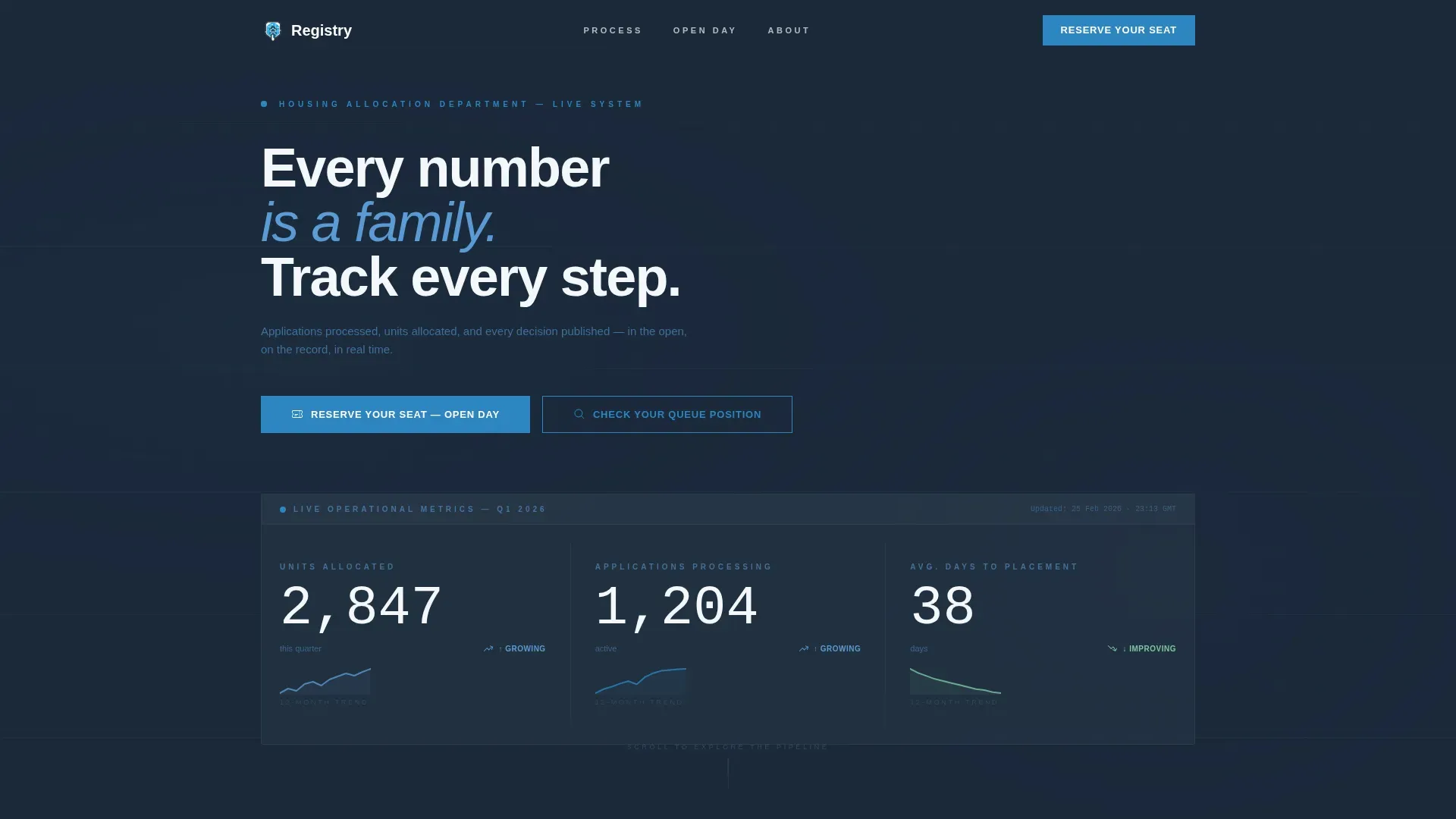
- A header metrics dashboard with three animated counters, micro-sparklines, a catchy headline, and dual calls to action for registration and queue tracking
- Three zigzag process sections covering application submission, eligibility verification, assessment scoring, queue placement, allocation matching, and unit inspection, each with interactive checklists, scoring rubrics, and Gantt-style timeline bars
- A lead capture form for the Housing Allocation Open Day collecting full name, optional application reference number, preferred session time via radio buttons, and accessibility requirements as an open text field
Feature list
This landing page template includes several purpose-built components. Each one reflects a deliberate design and functional decision from the source brief.
Animated Metrics Dashboard Header
The header opens with three oversized animated counters set in tabular figures against deep charcoal. Each counter tracks a key metric: units allocated this quarter, applications currently processing, and average days from application to placement. Twelve-month micro-sparklines accompany each number to provide trend context at a glance. This is real data presented as social proof, giving potential customers an immediate, honest signal that the system is active and accountable. A catchy headline in cloud-white reads: "Every number is a family. Track every step." The composition functions as a control room display, authoritative and impossible to dismiss.
Zigzag Process Walkthrough
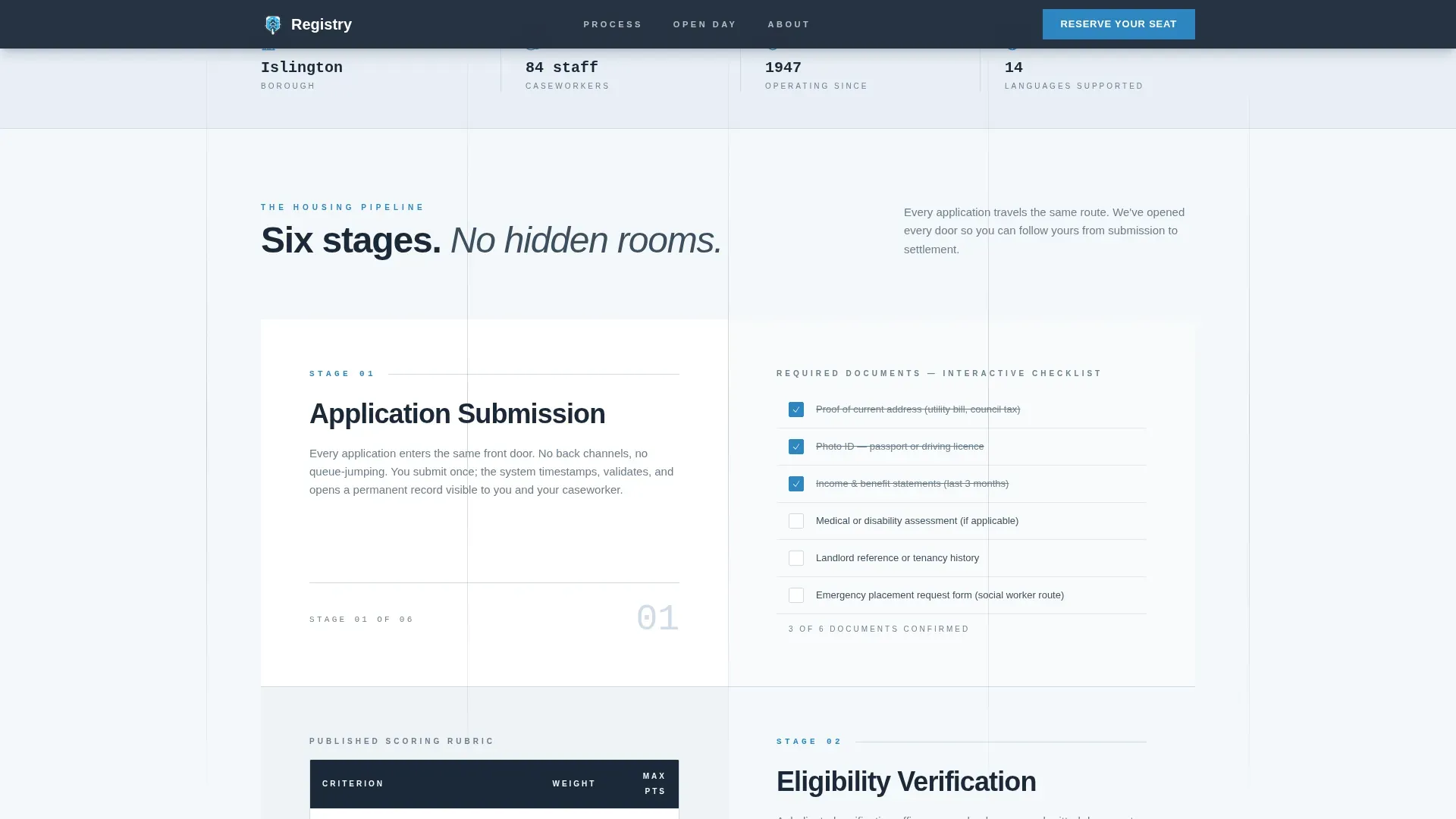
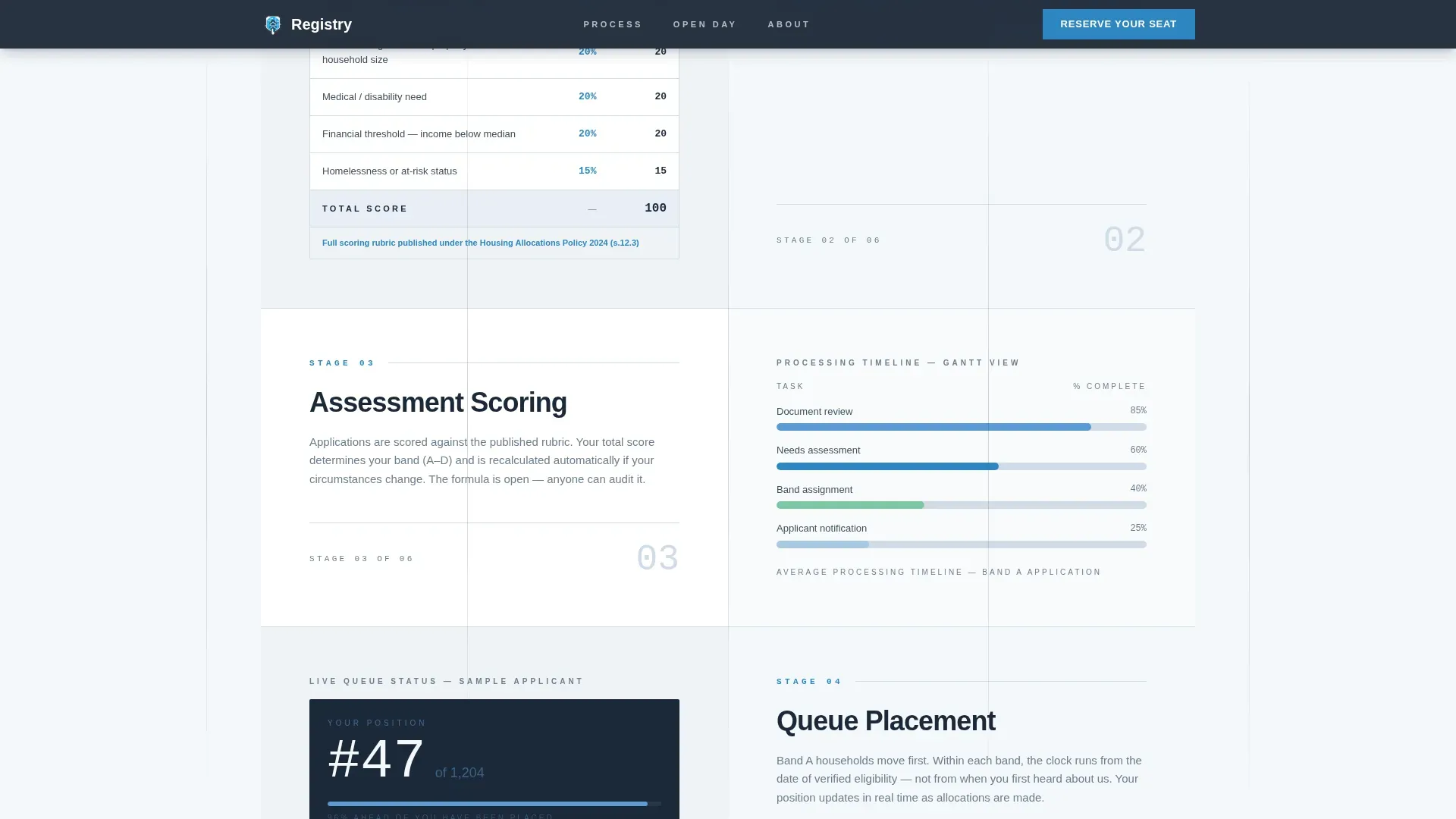
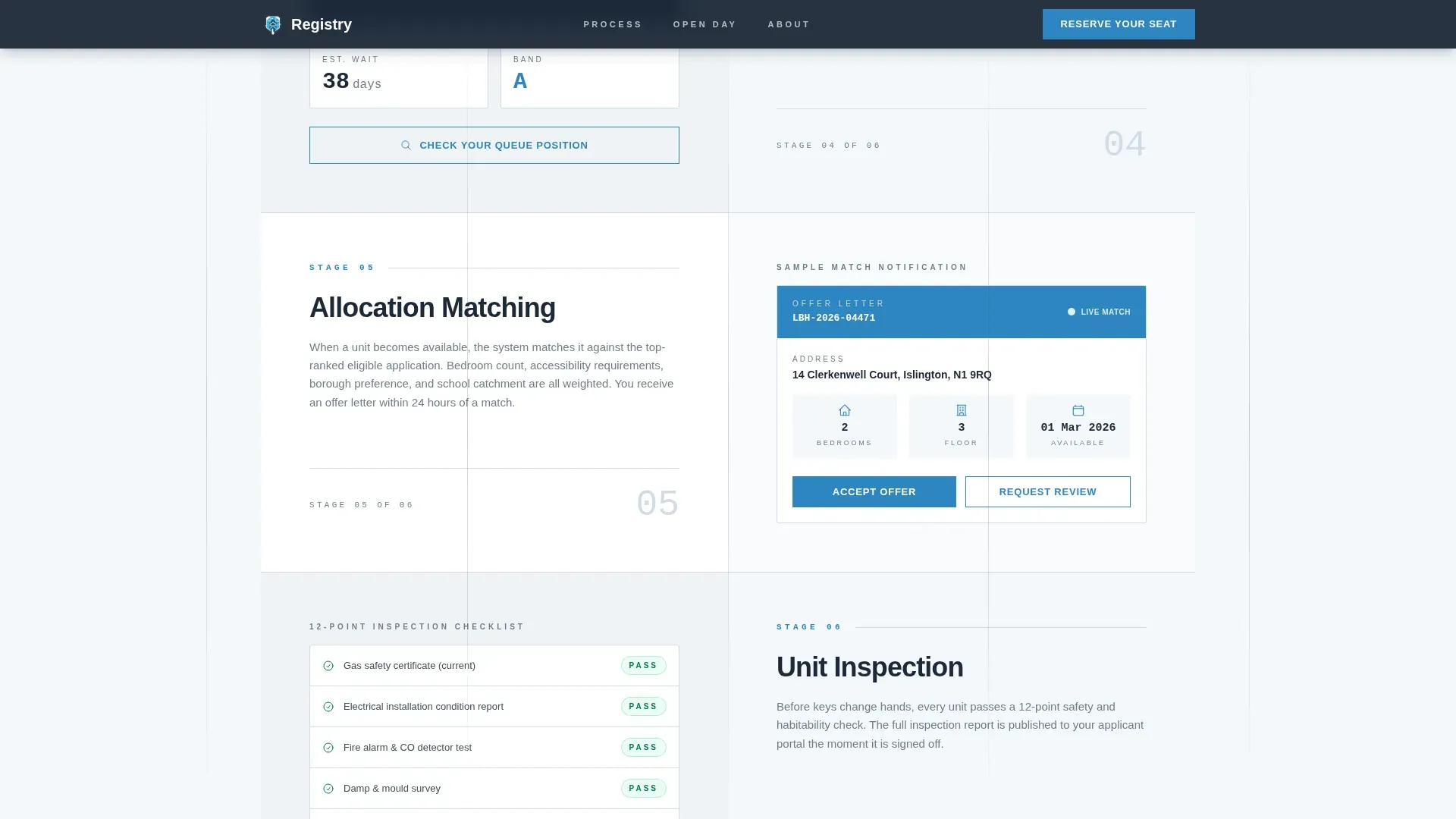
Three alternating section pairs walk visitors through the housing pipeline in sequence. The first example pairs application submission on the left with eligibility verification on the right. The second example shows assessment scoring opposite queue placement. The third reveals allocation matching facing unit inspection. Each pair surfaces details that potential buyers of the process never normally see: supporting documents rendered as interactive checklists, scoring rubrics displayed as open tables, and timelines shown as horizontal Gantt-style bars. This structure builds trust progressively, section by section, so visitors arrive at the registration form already informed.
Event Registration Form
The registration form drives attendance at the Housing Allocation Open Day. It collects full name, an optional application reference number with helper text for first-time attendees, preferred session time via morning or afternoon radio buttons, and accessibility requirements in a single open text field. The form fields are deliberately minimal to reduce friction and improve conversion rates. A well-designed lead capture form like this is crucial for converting visitors into leads without creating unnecessary barriers.
Dual Call-to-Action System
Two distinct calls to action serve two distinct visitor intentions. The primary call to action, "Reserve Your Seat," appears in accent cerulean directly below the header metrics and again after the process walkthrough. A secondary path, "Check Your Queue Position," links to the department's status portal for visitors who arrived for tracking rather than registration. Using a single call to action per intent zone on a landing page can significantly boost conversion rates by removing decision fatigue. This dual system ensures every visitor type finds a clear next step.
Interactive Checklists and Progress Bars
Each process section includes interactive checklists for supporting documents and animated progress bars that visualise pipeline movement. These components give visitors a hands-on way to engage with the content. They also serve a practical purpose: helping applicants understand what documentation they need at each stage, reducing incomplete submissions and caseworker back-and-forth. Detailed property descriptions in civic housing contexts mean full transparency on unit details, including square footage, location, and accessibility features.
ScrollTrigger Zigzag Reveals
Each section pair enters the viewport through a ScrollTrigger-driven clip-path reveal animation. The motion is directional, alternating left-right in sync with the zigzag layout. This creates a scroll experience that feels like walking through the process rather than scrolling past content. It builds momentum without creating noise, keeping the page visually appealing and the visitor engaged across all six process stages.
Page sections overview
| Section | Purpose |
|---|---|
| Header Metrics Dashboard | Displays animated allocation counters, sparklines, headline, and dual calls to action |
| Process Stage 1 | Shows application submission paired with eligibility verification in zigzag layout |
| Process Stage 2 | Presents assessment scoring opposite queue placement with open scoring rubrics |
| Process Stage 3 | Reveals allocation matching facing unit inspection with checklists and timelines |
| Open Day Registration | Captures attendee details via a minimal lead capture form with session radio buttons |
| Footer | Single-row linear footer with contact info and navigation links |
Design & branding system
The visual identity follows a Directory and Discovery theme using a Slate and Sky colour system. The palette is built for a civic context: serious enough to communicate authority, open enough to feel honest. Consistent branding across all sections reinforces brand identity and signals professionalism to every visitor, whether they arrive from ad campaigns, social media platforms, or a direct link.
- Colours: deep civic charcoal (#1B2838) anchors typography, administrative slate (#3D4F5F) dominates headers and data containers, open-sky blue (#5B9BD5) marks status indicators and progress bars, cloud-white (#F4F7FA) provides breathing room, and accent cerulean (#2E86C1) highlights every clickable and actionable element
- Typography: Plus Jakarta Sans handles all body and heading text for readability; DM Mono is used for tabular figures in the metrics dashboard to ensure precise, scannable number display
- Using high-contrast colours and clear fonts enhances readability and ensures the site accommodates users with visual impairments, supporting accessibility standards compliance across devices
Mobile & speed optimization
This template is built desktop-first with full mobile responsiveness. Over 70% of users may browse for housing on mobile devices, so the layout adapts without losing hierarchy or interactivity. The metrics dashboard, zigzag sections, and registration form all reflow cleanly on smaller screens. A mobile-responsive landing page is essential for reaching the full range of potential clients, from municipal staff on desktop workstations to applicants checking queue positions on smartphones.
- Animated counters, sparkline SVG draws, and ScrollTrigger zigzag reveals are handled by dedicated client components to keep static sections lightweight
- The registration form is optimised for touch input on mobile devices, with large radio buttons, spacious form fields, and clear helper text
- Brand consistency is maintained across breakpoints, so the visual appeal and user friendly interface remain intact whether the page loads on a 27-inch monitor or a mid-range mobile handset
How this template helps you convert
A real estate landing page works best when it earns the click before it asks for it. This template is designed around that principle. It shows the process in full before presenting the registration form, which means visitors arrive at the call to action already informed and already trusting the system. The page is built around a single conversion goal: Open Day registration, with a secondary path for queue tracking that captures visitors who would otherwise leave without taking any action.
- The header metrics dashboard provides social proof immediately on load, displaying live operational data that signals the department is active, accountable, and worth engaging with, which directly improves click through rates and reduces early bounce
- The zigzag process walkthrough guides potential customers through six pipeline stages, converting abstract bureaucracy into a clear, readable sequence that helps convert visitors from passive browsers into active registrants
- The minimal registration form and prominent "Reserve Your Seat" call to action ensure seamless functionality at the point of conversion, removing friction and making it easy for every visitor to complete the desired action
Other information about this template
This template sits at the intersection of civic digital marketing and transparent public administration. It draws on principles that real estate professionals, housing coordinators, and digital marketing practitioners all recognise as foundational to high-converting landing pages. The sections below cover additional context relevant to how this template performs across different use cases and how it connects to broader landing page best practices.
- A registry transparent housing allocation landing page template is a pre-designed, public-facing web interface used by municipalities or non-profit organisations to openly list available affordable housing, and this template delivers exactly that in a structured, deployable format
- Real estate landing pages are important tools in the real estate industry, providing a platform to highlight a property or service's unique features and benefits; this civic template applies those same principles to housing allocation in the public sector
- The average real estate landing page conversion rate is 7.4%, while the median is 2.6%; this template's trust-first structure and minimal form are designed to push results above the median by reducing friction at every stage
- Real estate landing page optimization principles such as a single call to action per intent zone, simplified lead capture form design, and prominent social proof are all built into this template's structure by default
- High converting landing pages in both the private real estate business and public housing sectors share a common trait: they focus on a single conversion goal per page and remove all distractions from the path to that goal
- The opendoor landing page model, which the term opendoor landing references in broader landing page optimization discussions, demonstrates how transparent process communication can drive registration in property-related contexts; this civic template applies a comparable transparency-first approach
- Real estate agents and real estate professionals working on behalf of housing bodies can adapt this template for landlord registration campaigns, compliance drives, or digital marketing campaigns tied to specific housing programmes
- In a competitive real estate market, landing page optimization and conversion optimization are priorities for any real estate marketing effort; housing departments face similar pressure to communicate clearly and convert visitors efficiently
- The template supports a data driven approach to public communication: real-time allocation dashboards can show live data such as recent allocations and current waiting list lengths, reinforcing transparency and giving potential buyers of the process actionable insights
- Real estate landing pages often include virtual tours or property walkthrough videos to provide an immersive experience; while this template is focused on the allocation pipeline rather than property showcase, the layout can support videos real estate teams embed to present properties and add visual context to available units
- High quality images, high impact visuals, and professional photos can be added to any section where visual appeal supports the message; the template's cloud-white backgrounds and charcoal typography ensure that imagery integrates cleanly without disrupting brand consistency
- The registration portal features a multi-step-style form structure that collects applicant details progressively, emphasising privacy protection by collecting sensitive information only at the point of need
- Maintaining an open data portal supports compliance and transparency in housing allocation systems; this template can support that goal by presenting detailed property descriptions, property details such as square footage and location, and key details about each available unit in a structured, readable format
- Real estate services and real estate leads are typically managed through dedicated customer relationship management tools; this template's lead capture form is designed to feed into whatever backend system the department uses for managing Open Day attendees
- Teams looking to track performance, run A/B tests, and generate leads from marketing campaigns can use this template as a new landing page within a broader digital marketing strategy, connecting it to ad campaigns or social media platforms as needed
- For real estate marketing teams supporting housing bodies, this template provides a strong starting point from a template library that bridges civic communication and modern design principles
- Video testimonials and virtual tours can be embedded in the process sections to add depth to relevant information and help potential clients understand what attending the Open Day will involve
- Key metrics, key information, and contact details are all surfaced at the right moment in the scroll journey, ensuring that potential customers always have access to relevant information without having to search for it
- Landing page optimization, consistent branding, and a user friendly interface are not optional extras in civic contexts; they are the difference between a page that builds trust and one that reinforces suspicion
- Start creating with this template by customising the animated counters with your department's real allocation figures, updating the process section copy to match your specific eligibility criteria, and replacing the placeholder contact info with your team's actual booking details
Theme
Directory & Discovery
Creative direction
Transparent Process
Color system
Slate & Sky
Style
Zigzag/Alternating
Direction
Event Registration
Page Sections
Animated Metrics Dashboard Header
Zigzag Process Walkthrough
Event Registration Form
Dual Call-to-action System
Interactive Checklists and Progress Bars
Scrolltrigger Zigzag Reveals
Related questions
Who is this landing page template designed for?
What sections are included in this landing page?
Can this template be adapted for real estate marketing campaigns?
How does the registration form work?
Is the template responsive on mobile devices?



