Tech & App Compliance Law Firm Website Template
The Terms Electric Compliance Law Firm Landing Page Template is a high-energy, split-screen single-page layout built for developer-focused legal practices that draft terms of service and compliance documents for apps and SaaS products. It combines an interactive estimator, animated document assembly, violation-to-compliant transformation visuals, and a low-friction free audit flow to convert technical founders into paying clients fast.
by Rocket studio
Quick summary
This template is a single-page, split-screen layout designed for a law firm that writes legally binding terms of service, privacy policies, and compliance documents for digital products. It opens with an interactive estimator, accelerates through animated social-proof sections, and closes with a sticky free-audit call to action. Every section builds momentum toward one conversion moment.
Who this template is for
This template is built for legal practices that serve the developer and startup ecosystem. If your law firm drafts website terms, conditions agreements, and legal documents for apps, platforms, or SaaS products, this layout speaks directly to your clients' urgency and vocabulary.
- Solo developers and startup founders who need compliant terms before launch day
- Growth-stage operations leads managing compliance across multiple locations and product lines
- Law firm marketers and owners who want landing pages that convert prospective clients without reading like a legal brief
What problem this template solves
Most law firm landing pages lose technical buyers in the first ten seconds. They look like brochures, bury the value proposition, and ask for a phone call before proving any competence. Founders building apps at midnight need to understand immediately that your law firm can deliver, how fast, and at what cost. Generic terms and copy-pasted legalese do not earn that trust.
This template solves the credibility-gap problem by making the tool the hero. The interactive estimator replaces the hero image. The animated document assembly replaces the features list. The violation-to-compliant split replaces the testimonial paragraph.
- It removes friction before the ask, letting visitors self-qualify through the estimator before seeing any price or contact form
- It builds trust through motion and specificity, showing real document structure assembling in real time rather than stock photography
- It converts at the right moment, presenting the free audit after the visitor has already engaged with the tool and absorbed the social proof
What you get with this template
You get a fully structured, single-page landing page layout with five distinct content sections, a sticky conversion bar, and a linear single-row footer. Every component is defined with clear purpose and interaction logic, so your developer or no-code builder has a precise implementation blueprint.
- A 50/50 split-screen header with an interactive estimator on the left and a live animated document preview on the right
- Four scroll-driven content sections covering stats, violation comparison, engagement timeline, and the free audit call to action
- A sticky bottom bar that slides up after the second scroll section and persists until conversion, keeping the primary call to action visible across the entire page
Feature list
This template delivers six core designed capabilities, each grounded in the source brief and built to serve a law firm converting technical buyers through a single focused landing page.
Interactive Compliance Estimator
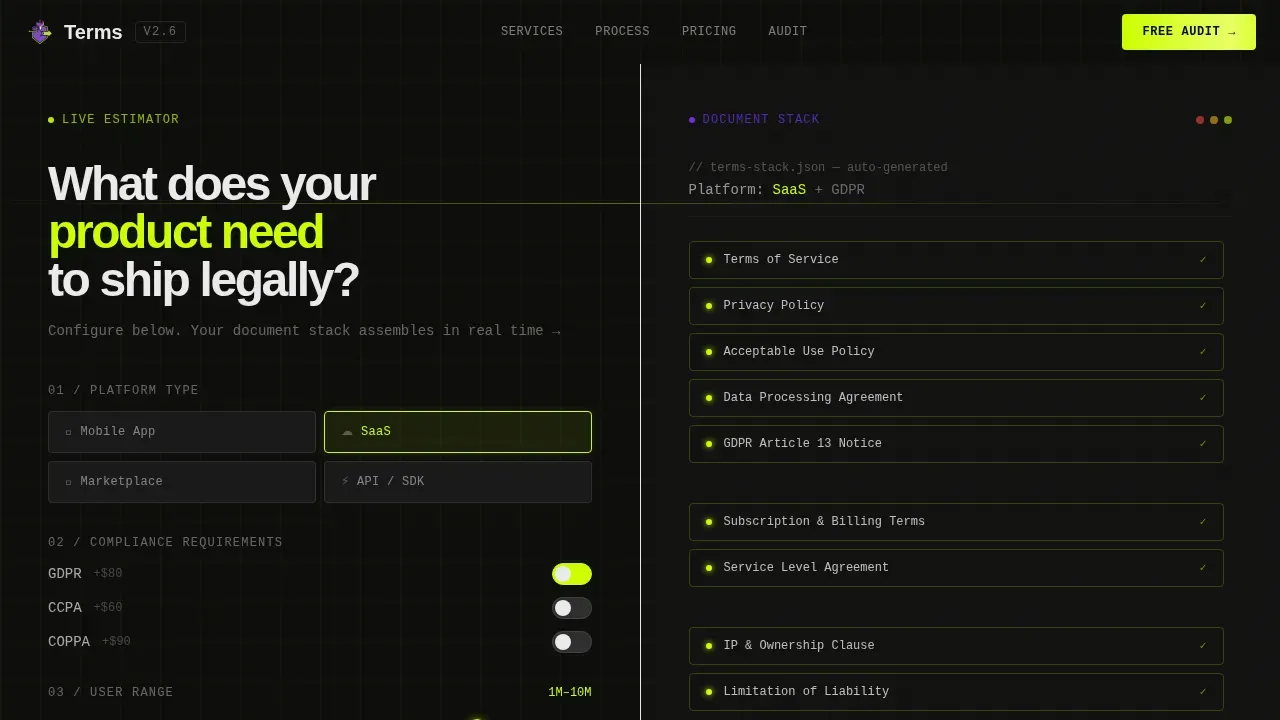
The left panel of the header holds a live tool where visitors select their platform type, choosing from mobile app, SaaS, marketplace, or application programming interface (API). They toggle compliance needs including General Data Protection Regulation (GDPR), California Consumer Privacy Act (CCPA), and Children's Online Privacy Protection Act (COPPA), then slide a user-count range. Every input fires in real time without a page reload. This is the primary engagement hook, and it keeps visitors on the page far longer than any static headline.
Animated Document Assembly Panel
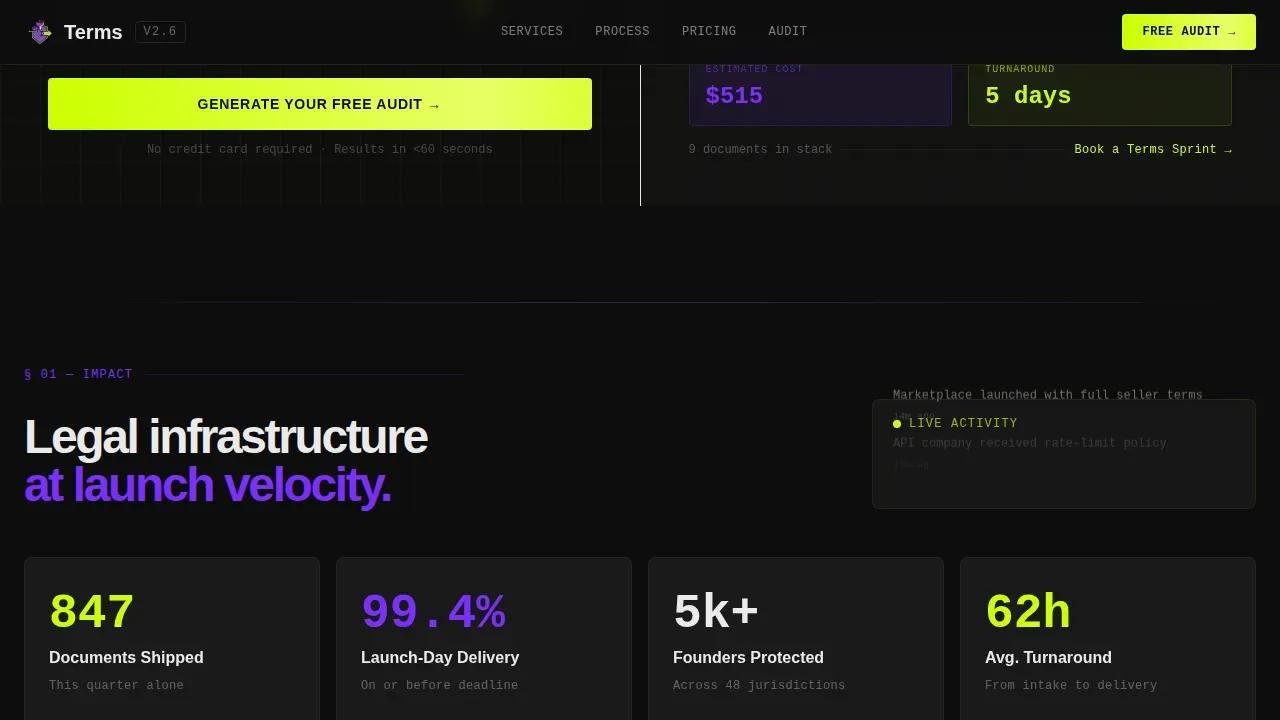
The right panel responds to every estimator selection. A stylized terms document assembles itself line by line, with sections lighting up in electric chartreuse as each input registers. Clauses snap into place like code compiling. The estimated cost and turnaround time pulse at the bottom in ultraviolet. This panel makes the abstract process of creating terms feel immediate, specific, and real, which is exactly what technical buyers need to feel before they trust a law firm with their product.
Launch Energy Scroll Sequence
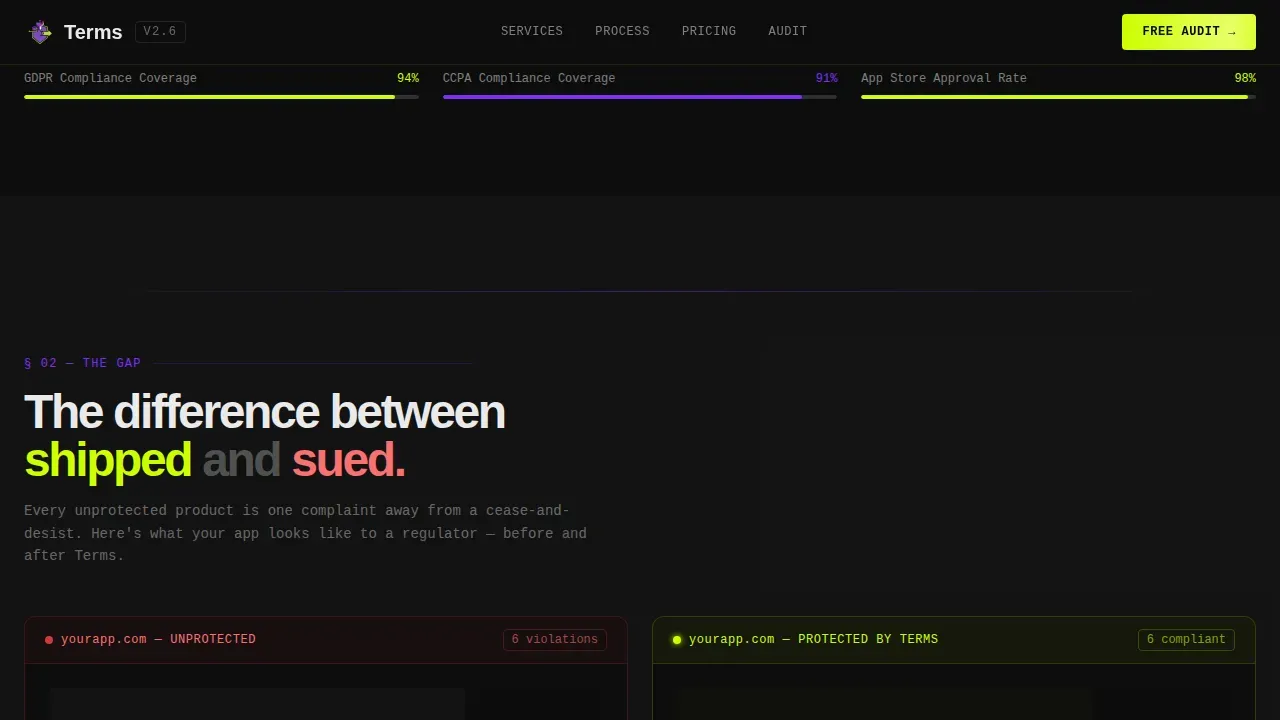
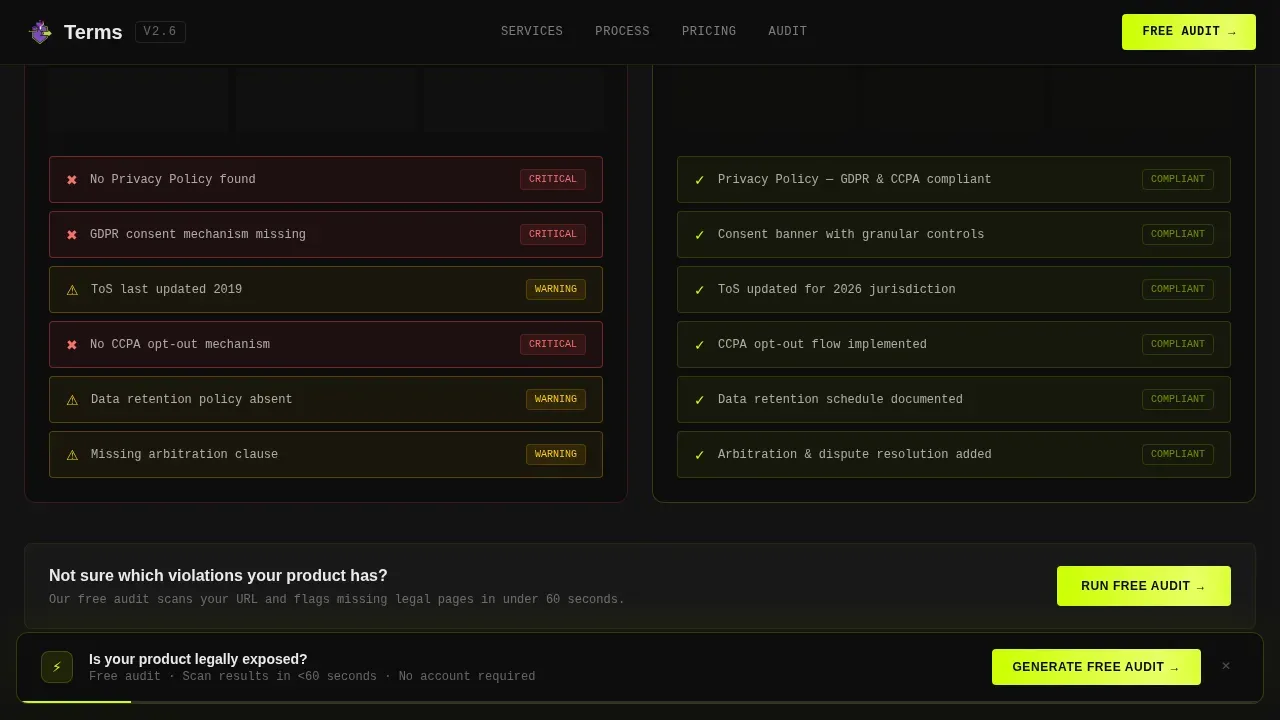
Past the estimator, the page accelerates through four tightly sequenced sections. A live counter shows how many terms documents the firm has shipped this quarter. A split-screen comparison animates red violation flags into green compliance checkmarks. A horizontal-scrolling timeline walks through a real five-day engagement from intake call to delivered document. Each section gets shorter and snappier, building rhythm toward the conversion moment like a countdown.
Freemium Free Audit Conversion Flow
The primary call to action reads "Generate Your Free Audit" and appears in two places: embedded inside the header estimator and again in a sticky bottom bar that slides up after the second scroll section. The audit form asks for a URL field first, which is the lowest-friction entry point, then platform type (pre-filled if the visitor used the estimator), then email. Submitting triggers an automated scan that flags missing legal pages, outdated clauses, and jurisdiction gaps, delivered to the visitor's inbox quickly. This flow earns the click by delivering specific value before asking for any commitment.
Secondary Booking Path
Visitors who are ready to engage immediately see a secondary call to action labeled "Book a Terms Sprint." This links to a calendar embed, giving the law firm a direct path to a paid engagement without forcing every visitor through the audit funnel. Having both options on a single landing page accommodates the full spectrum of buyer readiness without cluttering the primary conversion flow.
Acid Digital Visual System
The template is built on a terminal-and-IDE aesthetic using a four-color Acid Digital palette. Void black (#0D0D0D) floods every background. Electric chartreuse (#CCFF00) drives all calls to action, hover states, and progress indicators. Ultraviolet (#7B2FFF) marks section dividers and accent typography. Interface white (#EAEAEA) is reserved for body text and form fields. Typography combines DM Sans for readability with JetBrains Mono for the monospace terminal feel used in document preview panels and code-style counters.
Page sections overview
| Section | Purpose |
|---|---|
| Split-Screen Estimator | Interactive header where visitors configure platform type, compliance toggles, and user count; right panel assembles a live document preview with animated cost and turnaround output |
| Stats Detonation Counter | Animated counter showing total terms documents shipped this quarter, building credibility through volume and live activity signals |
| Violation versus. Compliant Split | Side-by-side comparison animating red violation flags on an unprotected product into cascading green compliance checkmarks, making the risk tangible |
| Five-Day Velocity Timeline | Horizontal-scrolling timeline of a real engagement from intake call to delivered document, each milestone triggering a motion burst |
| Free Audit Call to Action | Low-friction form collecting URL, platform type, and email; sticky bottom bar version persists across scroll depth |
| Linear Single-Row Footer | Minimal footer with contact details, firm name, and essential navigation links |
Design & branding system
The visual identity is driven by the Dynamic Motion theme and Acid Digital color system. The aesthetic references a terminal window at midnight: dark, precise, and kinetic. Every color has a fixed role and is never used interchangeably. Typography is split between a clean sans-serif for body copy and a monospace typeface for code-style panels, reinforcing the developer-audience signal without sacrificing readability.
- Void black (#0D0D0D) backgrounds, electric chartreuse (#CCFF00) calls to action and hover states, ultraviolet (#7B2FFF) section dividers and accent type, interface white (#EAEAEA) body text and form fields
- DM Sans for all paragraph and heading copy; JetBrains Mono for document preview panels, counters, and terminal-style estimator outputs
- Animation driven by CSS transforms and Intersection Observer scroll triggers, including counter animation, document assembly, violation-to-compliant transformation, and horizontal scroll timeline motion bursts
Mobile & speed optimization
The template is designed desktop-first, matching the complexity of the interactive estimator and animated panels. However, the layout includes a responsive mobile fallback so visitors accessing the landing page on a mobile device still reach the core content and conversion flow without losing orientation. Landing pages should be responsive on all devices because a significant portion of web traffic arrives from mobile users.
- The sticky bottom bar persists on mobile, keeping the "Generate Your Free Audit" call to action reachable without scrolling back to the header
- The estimator collapses gracefully on smaller screens, prioritizing the platform-type selector and compliance toggles above the document preview panel
- Contact forms on landing pages are kept minimal; this template asks for URL, platform type, and email only, reducing friction on any screen size
How this template helps you convert
A law firm landing page is a marketing tool. Its only job is to help prospective clients take action. This template is built around that single goal, sequencing trust, proof, and ask in the exact order that technical buyers need to see them.
- The interactive estimator hooks attention immediately above the fold, giving visitors a personalized output before they scroll, which increases time on page and signals relevance before any sales language appears
- The Launch Energy scroll sequence delivers three progressive trust signals: volume proof through the document counter, risk clarity through the violation comparison, and process confidence through the five-day timeline, each one reducing a specific objection before the audit form appears
- The sticky free audit bar closes the loop by keeping the primary call to action visible at all times after the second section, so no matter where a visitor stops reading, the next step is always one tap away
Other information about this template
This template is purpose-built for a law firm operating in the legal tech and developer services space. The sections below cover additional context that will help you understand the broader content decisions behind the layout and what to consider when populating it with real firm data.
- A terms and conditions page is not legally required, but it is strongly recommended. Well written terms protect your firm's clients from potential legal trouble by setting clear rules for user accounts, governing law, and acceptable behavior on their platforms.
- Every terms and conditions page should carry an effective date so users know when the current version took effect. When clauses change, the firm should notify users in advance with prior notice before the new version applies.
- A strong conditions agreement covers the liability clause, limitation of liability, applicable law, governing law, dispute resolution, and the dispute resolution process. These are the sections that make a conditions legally binding document enforceable under applicable law to the maximum extent permitted.
- Clauses covering user generated content, user contributions, and own content should clarify what users agree to grant the platform when they submit material. Common grants include royalty free licenses to publicly display and publicly perform content within the service.
- A liability clause should specify what the platform will not be held liable for, including actions taken by other users, behavior on third party websites, and links to other websites or third party sites. Users access external links at their own risk.
- Terms should identify restricted parties, including terrorist supporting entities and users who engage in prohibited behavior such as spam, chain letters, or harassment based on attributes such as sexual orientation.
- User accounts sections should explain who is solely responsible for account activity, what constitutes account misuse, and the conditions under which the firm may terminate access at sole discretion.
- The maximum extent permitted by applicable law governs how broadly the limitation of liability and maximum extent clauses apply across jurisdictions, which matters for firms with clients operating at multiple locations or selling to users in different regions.
- Copyright infringement, trade secret misappropriation, and intellectual property rights violations are common reasons platforms face legal fees and lawsuits. A well-structured terms and conditions page reduces this exposure.
- Intellectual property clauses should clarify who owns what. The firm's own content, branding, and marketing materials remain the firm's intellectual property, while user generated content rights depend on the license granted in the conditions agreement.
- The website footer is the standard location to link the terms and conditions page, privacy policy, and any legal information the platform is required to surface. Keeping contact details visible in the footer also keeps customers informed.
- Legal templates and sample terms can give founders a starting point, but generic terms and else's terms copied from a competitor's site create real potential legal trouble. This template is designed to make the case that professional legal services are worth the investment.
- Free terms generators can be a useful reference, but they often miss jurisdiction-specific legal requirements, data protection obligations, and platform-specific clauses. The free audit section of this template is designed to make that gap visible and actionable.
- Founders who sell products online or operate a SaaS platform as a business entity need terms that address user accounts, applicable law, and the dispute resolution process specific to their product type and audience.
- This template can support a legal practice that serves clients across mobile app, SaaS, marketplace, and API platform categories, covering the full range of legal documents a digital business needs before launch.
- Professional legal advice from a qualified attorney remains the only reliable path to enforceable, jurisdiction-specific legal agreements. This template helps a law firm communicate that value clearly to buyers who might otherwise rely on generic terms or copy-pasting someone else's terms.
- Legal information displayed on landing pages should not be mistaken for professional legal advice. A well-structured terms and conditions page makes this distinction clear, and the template includes structural space for appropriate disclaimers.
- The best law firm landing pages drive approximately six conversions for every one hundred clicks. This template's dual call-to-action structure, combining a free audit path and a direct booking path, is designed to capture both early-stage and ready-to-buy visitors within that window.
- A/B testing different headline treatments and call-to-action copy is a natural next step after launching this landing page. The template's clearly separated sections make it straightforward to isolate and test individual components.
- The google ads quality score for law firm landing pages improves when the page message matches the ad copy closely. This template's modular headline structure makes it easier to align page messaging with paid traffic campaigns.
- Social media posts driving traffic to this landing page benefit from the estimator as a hook. Messaging that leads with "find out what your app is missing" maps directly to the free audit entry point.
- Data capture forms on landing pages allow the firm to follow up with prospective clients who are not ready to book immediately. The email collected during the free audit becomes the starting point for that follow-up sequence.
- Sample terms documents shipped by the firm can be referenced as social proof within the stats section. The more specific the sample terms count and turnaround data, the stronger the credibility signal for new visitors.
- Creating terms for a new platform is one of the most commonly deferred tasks in early product development. This template is designed to make that deferral feel expensive by surfacing the violation comparison section before the ask.
- Write terms that reflect your actual platform behavior, not a competitor's. This template helps the firm communicate that principle as a differentiator, separating its legal services from template-mill alternatives.
- Plain language in legal documents is increasingly expected by regulators and users alike. The template's document assembly animation can be used to highlight that clauses are written in plain language, not dense legalese.
- Key points from the terms and conditions page, such as the effective date, governing law, and the limitation of liability summary, can be surfaced in the estimator output panel to show visitors what they will receive.
- Inform users clearly about what data is collected, how disputes are handled, and what happens to their own content. These are the clauses users actually read when something goes wrong.
- A business owner launching a new product should understand that creating terms is not just a legal checkbox. It sets expectations for other users, limits what the platform can be held liable for, and protects the firm's intellectual property from day one.
- Legal agreements that cover multiple platforms or serve clients across multiple locations require careful scoping of applicable law. The estimator's jurisdiction toggle is the template's way of surfacing that complexity early in the conversation.
- This template includes structural support for the website footer with contact details, making it easy for the firm to keep customers informed and meet basic legal requirements around disclosure and reachability.
- Sample terms displayed in the animated preview panel should be reviewed by a qualified attorney before being presented as representative of actual deliverables. The preview is a demonstration of structure, not final legal documents.
Theme
Dynamic Motion
Creative direction
Launch Energy
Color system
Acid Digital
Style
Split Screen (50/50)
Direction
Freemium/Trial
Page Sections
Interactive Compliance Estimator Header
Animated Document Assembly Preview
Launch Energy Scroll Sequence
Dual Call-to-action Conversion System
Acid Digital Visual and Motion System
Sticky Bottom Conversion Bar
Related questions
What kind of law firm is this template designed for?
Does the estimator require custom development to function?
Can I use this template if my firm also handles other legal services beyond terms of service?
What makes this different from a generic law firm website template?
How should I populate the stats section with real data?