Occupational Therapy Landing Page Template
Regulate is a data-led occupational therapy landing page template built for practices serving pediatric, adult rehabilitation, and workplace clients. It leads with animated outcome counters, a structured comparison table, and an inline booking form. Every section stacks measurable evidence, guiding visitors from first impression to scheduled assessment without friction.
by Rocket studio
Quick summary
Regulate is a precision-built occupational therapy landing page template designed for practices that need to demonstrate results, not just describe services. It opens with animated performance counters, moves through outcome comparison tables, and closes with a three-step inline booking form. The layout turns clinical data into a clear, confidence-building case for booking an assessment.
Who this template is for
This template is built for occupational therapy practices that serve a mixed client base and need one page to speak credibly to all of them. It suits practices where proof of outcomes matters more than brand storytelling.
- Pediatric occupational therapy practices working with school referrals and developmental milestones
- Adult neurological rehabilitation providers supporting post-stroke or post-injury recovery
- Workplace health consultants offering ergonomic assessments for injury prevention or workers' compensation cases
What problem this template solves
Many occupational therapy practices struggle to communicate measurable value online. A generic services page rarely convinces a skeptical parent, a cautious employer, or a discharged rehab patient to book. Regulate solves this by replacing vague descriptions with structured evidence.
- Visitors leave without booking because they cannot see proof of outcomes
- Practices serving multiple client types have no clear way to segment and address each audience
- Leads who are not ready to commit have no softer path to stay connected
What you get with this template
You get a single, fully structured landing page that leads with data and ends with a booking action. Every layout decision serves the goal of building confidence through accumulated evidence.
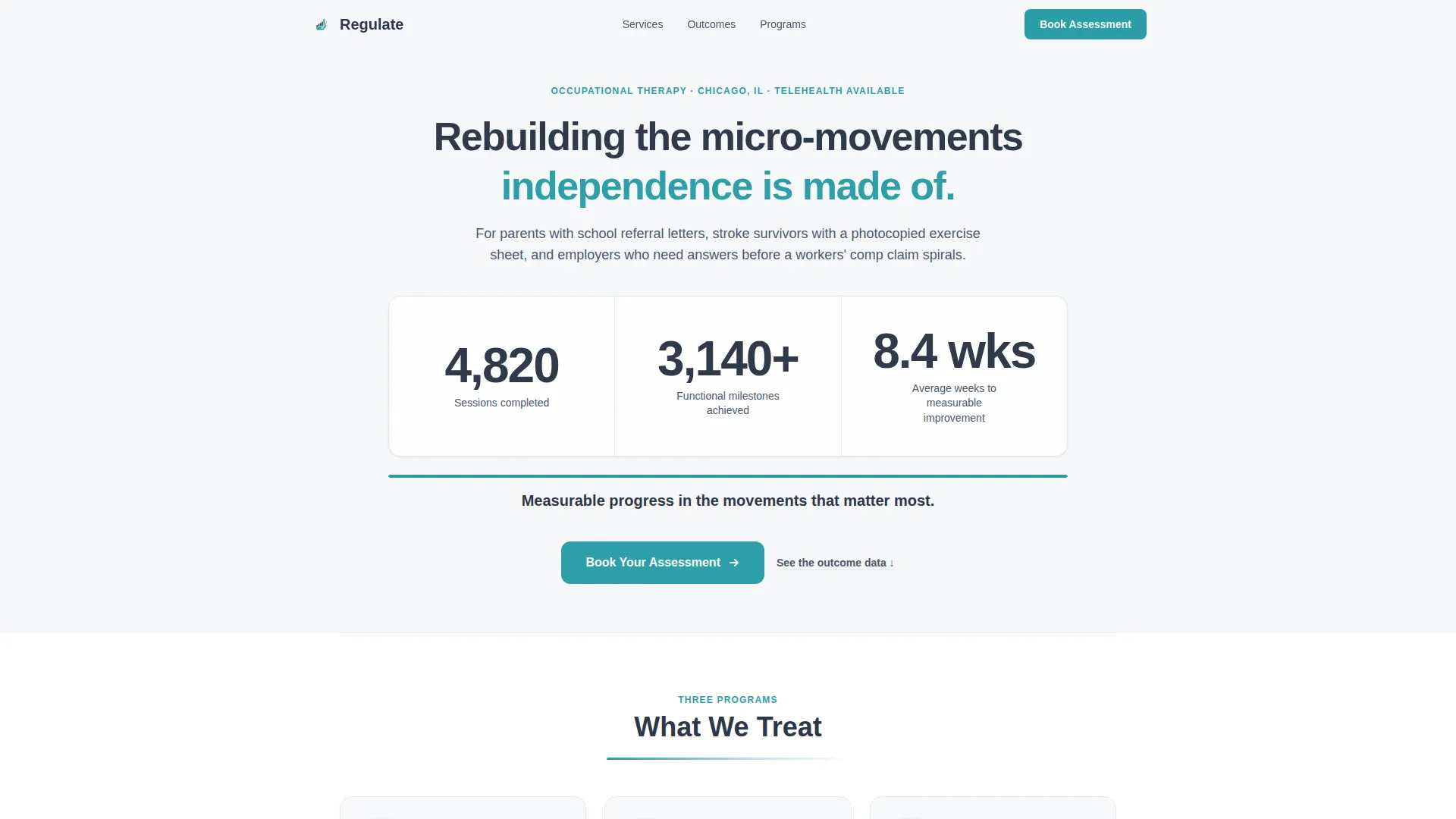
- An animated header section with three live-style outcome counters and a teal progress bar
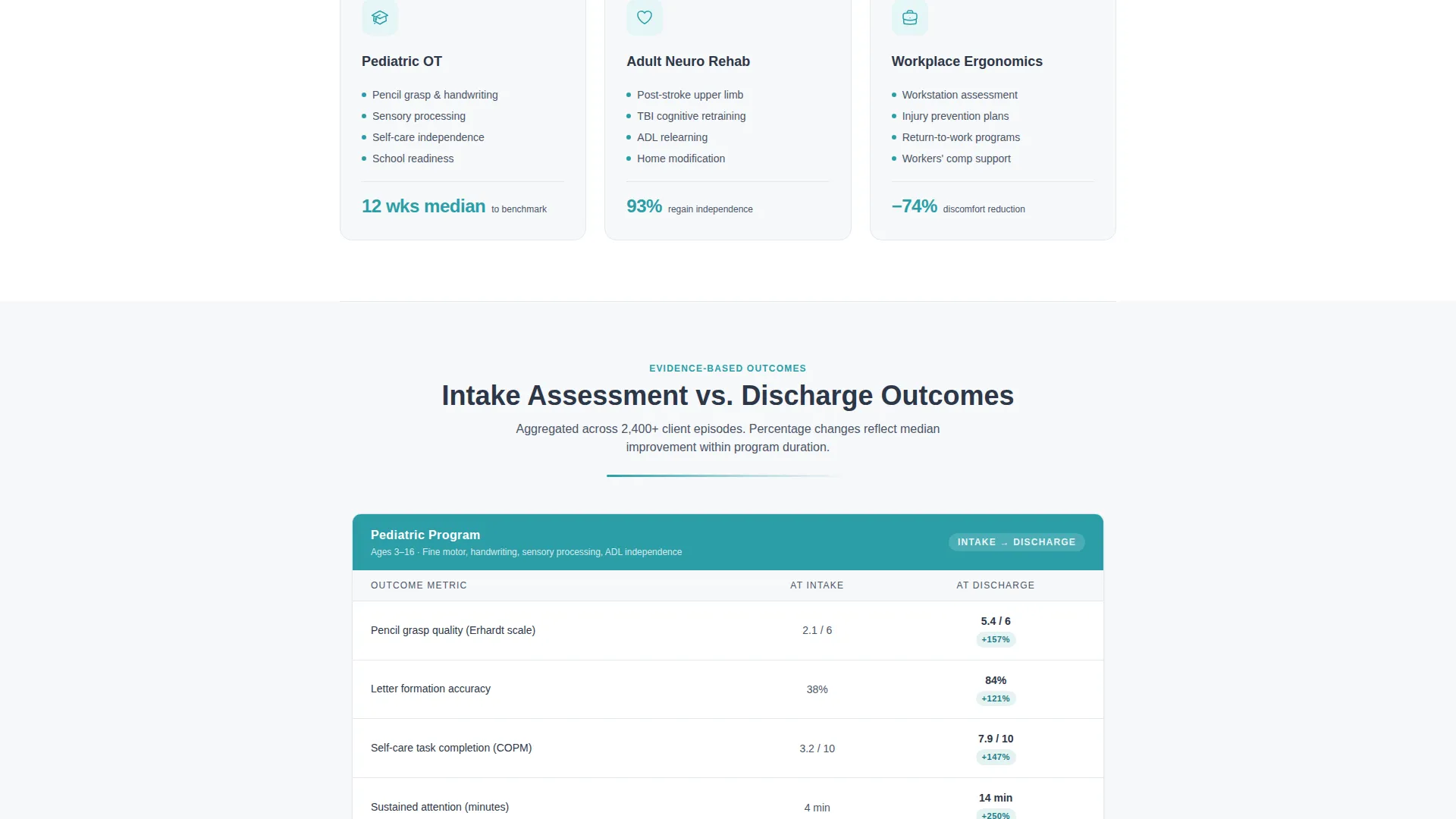
- A multi-program comparison table contrasting intake scores against discharge outcomes across three client programs
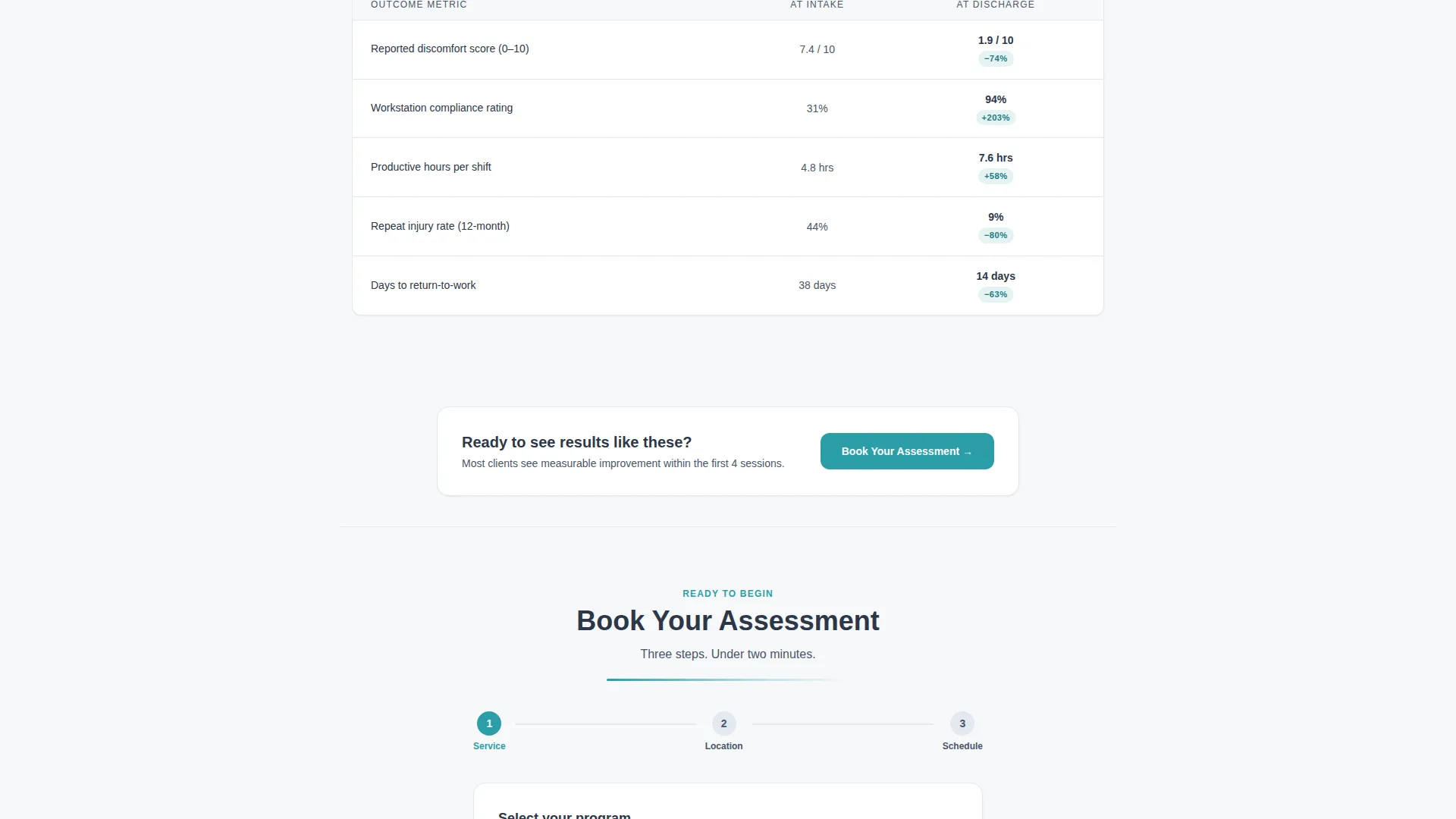
- A three-step inline booking form with service type selection, location or telehealth toggle, and a calendar picker
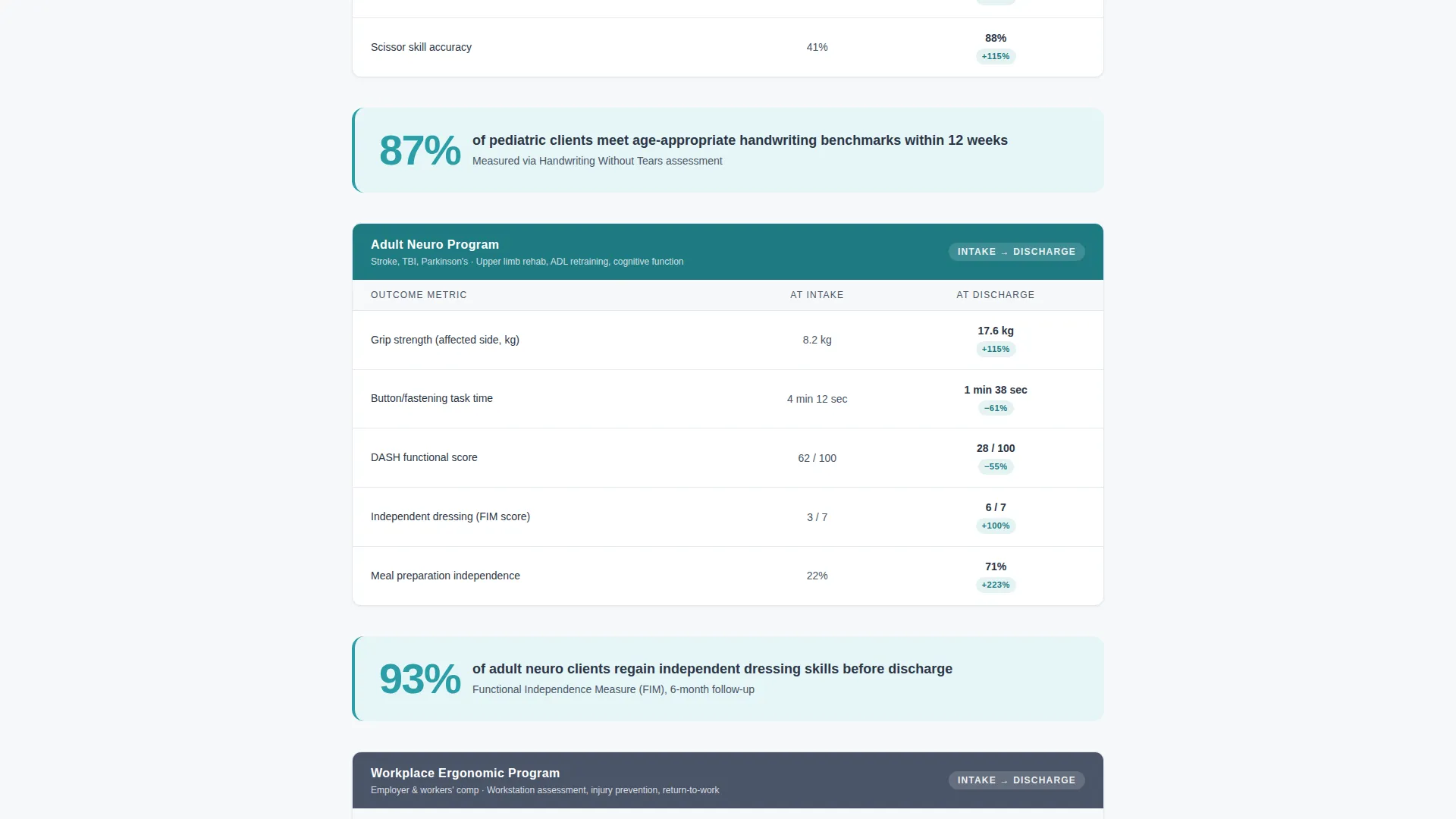
- Single-stat callout cards placed between table sections to break rhythm and reinforce key results
- A secondary lead-capture path offering a downloadable outcomes report in exchange for an email address
Feature list
This section covers the core functional and design components built into the Regulate landing page template.
Animated Outcome Counters Header
Three large counters tick upward against a cloud-white background, each tracking a key practice metric: sessions completed, functional milestones achieved, and average weeks to measurable improvement. A single descriptor line in clinical slate sits beneath each number. A teal progress bar fills left to right below the counters, anchoring the section with a focused headline.
Outcome Comparison Table
The central data section contrasts intake assessment scores against discharge results across three programs: pediatric, adult neurological rehabilitation, and workplace ergonomics. Metrics include grip strength gains, task completion time, and self-care independence ratings displayed as real percentage improvements. This structure gives each visitor type a direct, relevant evidence set.
Three-Step Inline Booking Form
The primary call to action opens an inline form without redirecting to a new page. Step one selects the service type. Step two sets a preferred location or activates a telehealth toggle. Step three presents a calendar picker showing next-available slots in real time.
Single-Stat Callout Cards
Between comparison table sections, individual stat cards interrupt the scroll with a single bold figure and a one-line context statement. These cards reinforce key findings and sustain attention across longer page sessions without adding visual clutter.
Email Lead Capture Path
A secondary conversion option invites visitors to download a full outcomes report in exchange for their email address. This path captures leads who are researching options but are not yet ready to book, keeping them connected to the practice.
Anchored Section calls to action
The "Book Your Assessment" call-to-action button appears first beneath the header counters, then again at the base of each comparison section. This repetition reduces scroll-back friction and keeps the booking action within reach at every stage of the page.
Page sections overview
| Section | Purpose |
|---|---|
| Animated Counters Header | Opens with three outcome metrics and a teal progress bar leading into the page headline |
| Primary Book call to action | First booking prompt placed directly beneath the header counters |
| Pediatric Outcomes Table | Compares intake and discharge scores for pediatric program clients |
| Pediatric Stat Card | Single callout figure reinforcing a key pediatric result |
| Adult Neuro Table | Contrasts intake and discharge data for adult neurological rehabilitation |
| Adult Stat Card | Standalone metric card breaking the scroll between adult sections |
| Workplace Ergonomics Table | Shows assessment-to-outcome gains for workplace ergonomic clients |
| Workplace Stat Card | Single-figure card closing the workplace evidence section |
| Inline Booking Form | Three-step form for service type, location preference, and appointment slot |
| Outcomes Report Download | Secondary email capture offering a PDF of the featured data |
| Footer Anchor call to action | Final "Book Your Assessment" prompt anchoring the page close |
Design & branding system
The Regulate template uses a Corporate Precision visual theme built on the Cloud Canvas color system. The palette is deliberately restrained, keeping every element purposeful and readable.
- Backgrounds stay in the soft cumulus white (#F7F8FA) to clinical slate (#4A5568) range, giving the page a clean, report-like quality
- Body text and headings use warm graphite (#2D3748) for strong contrast without harshness
- Teal (#2B9EA8) appears only on buttons, progress indicators, and data highlights, directing the eye to action points
- Typography uses a precise sans-serif at large display sizes for counter figures, with proportional sizing for descriptors and body copy
Mobile & speed optimization
The Regulate template is structured for clear readability across screen sizes. Layout decisions prioritize content hierarchy so data tables and counter figures remain legible on smaller displays.
- Comparison tables are structured to reflow cleanly on narrow screens without losing column context
- The inline booking form steps are sequenced to work as a tap-friendly vertical flow on mobile devices
- Callout stat cards stack cleanly in a single-column layout on smaller viewports
How this template helps you convert
The Regulate landing page is built on a single conversion principle: accumulated evidence lowers resistance. Every scroll deeper adds another layer of proof until booking feels like the logical next step.
- The header counters establish immediate credibility with practice-level outcome data before the visitor reads a single word of body copy
- The comparison tables address each client type directly with program-specific results, reducing the effort needed to self-identify and stay engaged
- The dual conversion paths, a direct booking form and a report download, match different levels of readiness, capturing both committed leads and early-stage researchers
Other information about this template
The Regulate template sits within the Professional Services category, specifically aligned with the Occupational Therapist Online Presence subcategory. It is designed as a single-page, section-led landing page rather than a multi-page site.
- The template style follows a Sidebar Companion layout approach, with content structured for clear sequential reading
- The creative direction is rooted in Transparent Process principles, showing visitors exactly how outcomes are measured and tracked
- The header concept uses a high-contrast data-forward treatment rather than photographic imagery, keeping the focus on numbers
- The landing page direction is Content and Resource focused, meaning the page itself functions as a credibility asset
- No stock photography is used anywhere in the template design; data visualization and structured layout carry the full visual load
- The template is suitable for practices considering tools such as Webflow, Framer, or similar no-code platforms for deployment, though platform compatibility depends on where the template is offered
Theme
Executive Suite
Creative direction
Transparent Process
Color system
Cloud Canvas
Style
Sidebar Companion
Direction
Content/Resource
Page Sections
Animated Outcome Counters Header
Program Outcome Comparison Table
Three-step Inline Booking Form
Single-stat Callout Cards
Email Lead Capture Path
Anchored Repeat Ctas
Related questions
Can this template work for a practice that serves more than one client type?
What does the inline booking form include?
Is there a way to capture leads who are not ready to book an assessment?
Does the template use photography or stock images?
Can the outcome figures and statistics be customized?



