Pain Management Clinic Landing Page Template
Relief is a lead generation landing page template built for interventional pain management clinics. It uses three evidence-based comparison tables to move chronic pain patients from doubt to action. A line art hero, progressive assessment form, and scroll-triggered gradient transitions create a precise, trustworthy experience that converts hesitant visitors into booked consultations.
by Rocket studio
Quick summary
Relief is a single-page, comparison-table landing page designed for pain management clinics. It replaces vague promises with structured evidence: three side-by-side tables walk visitors through diagnostic differences, treatment options, and real outcome metrics. A progressive lead capture form with a body diagram closes the page, turning informed visitors into qualified consultation requests.
Who this template is for
This template is built for interventional pain management clinics that need to educate patients before converting them. It suits practices whose value lies in precision diagnostics rather than generic referrals.
- Clinics offering procedures such as epidural steroid injections, radiofrequency ablation (RFA), and spinal cord stimulation (SCS)
- Practices targeting chronic pain patients aged roughly 35 to 65 who have already tried conventional care
- Healthcare providers who want a lead generation page that builds trust through specifics, not stock imagery
What problem this template solves
Chronic pain patients arrive skeptical. They have tried over-the-counter medication, rest, and general practitioner referrals without lasting relief. A generic clinic page cannot earn their trust. This template solves that credibility gap directly.
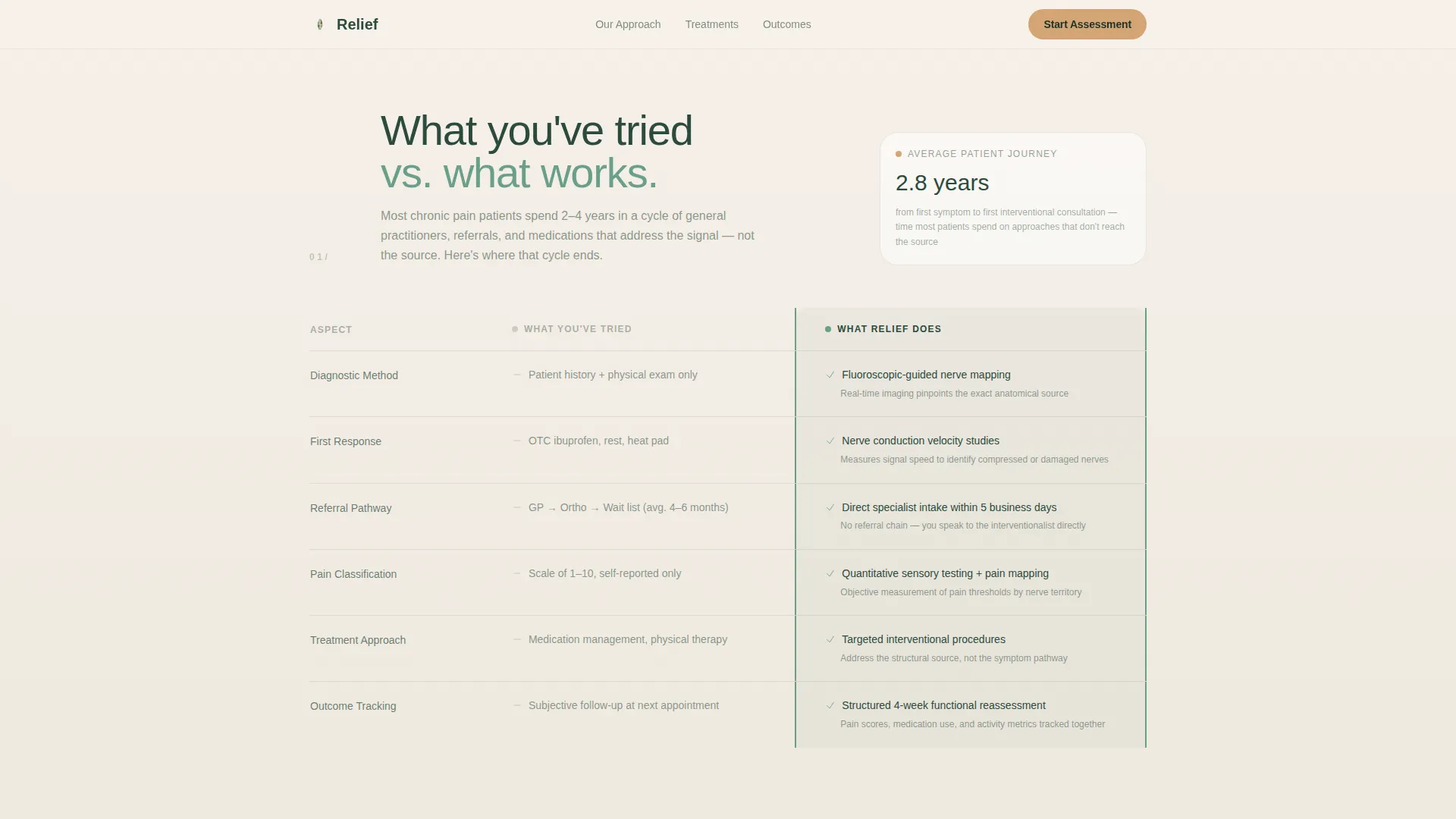
- It shows, side by side, what patients have already tried versus what interventional care actually involves
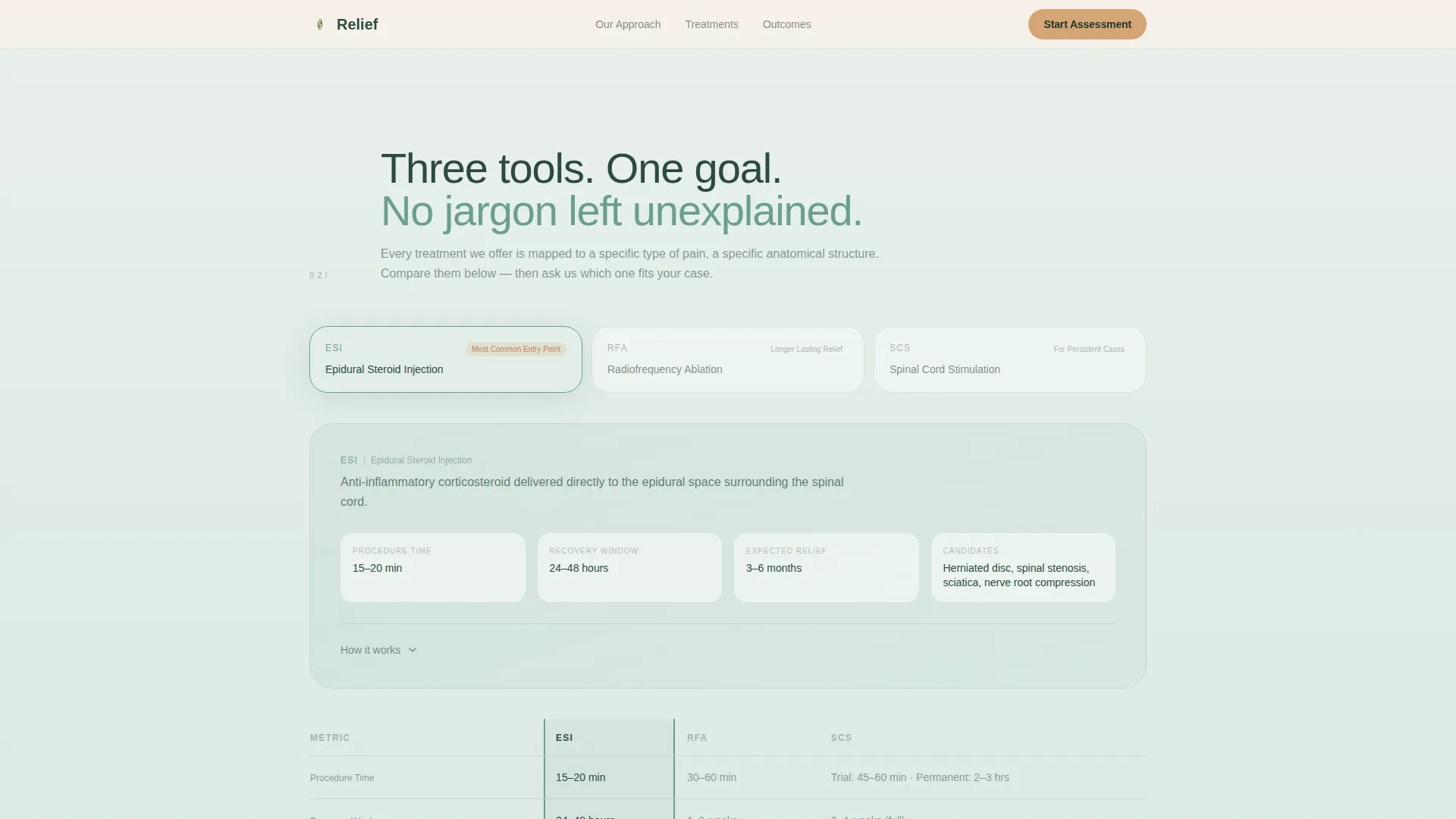
- It explains procedure time, recovery window, and expected relief duration for each treatment option
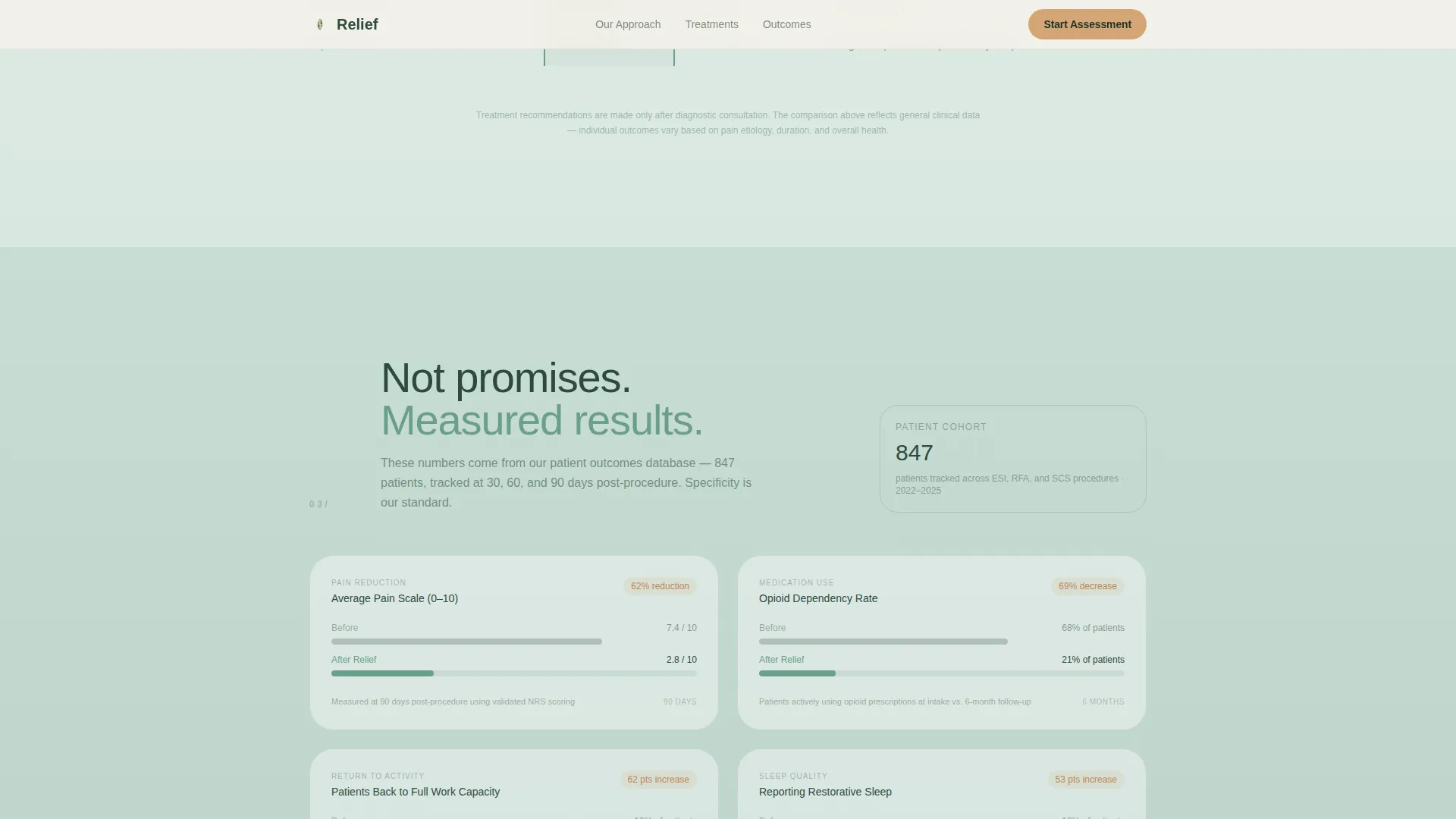
- It replaces vague outcome language with real metrics: pain scale reduction, medication dependency change, and return-to-activity timelines
What you get with this template
You get a fully structured, single-page layout with every section pre-built and copy-ready for a pain management clinic context. The design is medically precise without feeling cold or institutional.
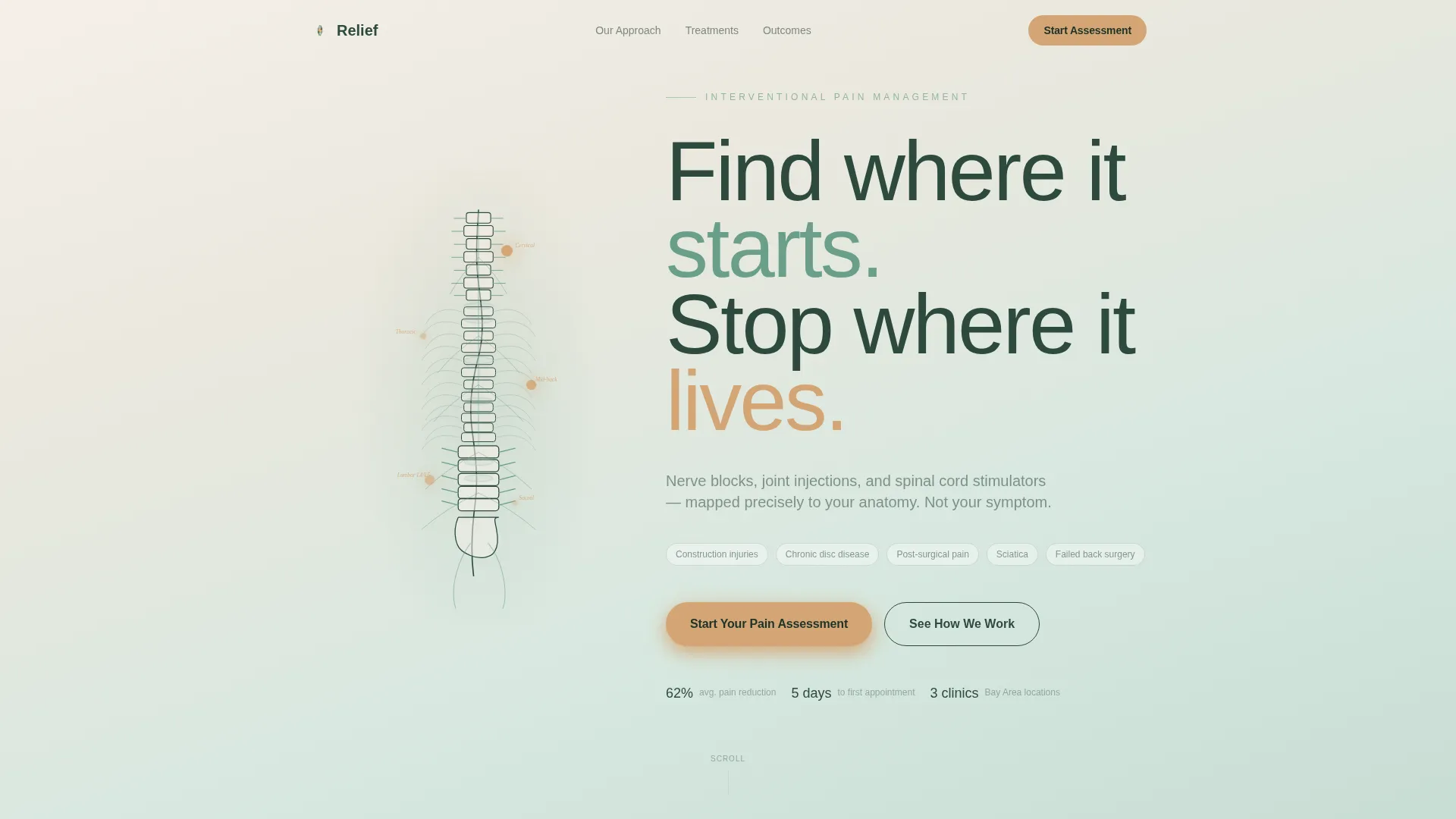
- A line art hero section with an animated SVG spine illustration and a headline fade-in effect
- Three structured comparison tables covering diagnostics, treatment options, and outcome metrics
- A multi-step progressive lead capture form with a body diagram interaction and a secondary email-only download path
Feature list
This section covers the core built-in components and interaction patterns that make this template functional for a pain management clinic.
Animated SVG Spine Hero
The header features a line art anatomical illustration of the spine and nervous system. Pain points along the spine pulse softly in amber, mimicking a slow heartbeat. The headline "Find where it starts. Stop where it lives." fades in beside the illustration using a scroll-triggered animation.
Three-Phase Comparison Table System
The page is structured around three sequential comparison tables. The first compares conventional patient approaches against the clinic's interventional diagnostic methods. The second compares epidural steroid injections, radiofrequency ablation, and spinal cord stimulation across procedure time, recovery window, and relief duration. The third presents measurable outcome data to replace vague claims with evidence.
Progressive Multi-Step Lead Form
The primary call to action opens a multi-step form. It starts with a single question shown on a tappable body diagram, then reveals pain duration, previous treatments via checkboxes, and insurance provider via a dropdown. Each step is revealed progressively to reduce form fatigue.
Secondary Email Capture Path
Visitors not ready to book a consultation can download a treatment guide by submitting only their email address. This secondary path keeps softer leads inside the funnel without forcing commitment before they are ready.
Scroll-Triggered Gradient Transitions
The page background transitions from birch bark cream through morning fern to deep evergreen as the visitor scrolls deeper. Section reveals and comparison table rows animate in with staggered timing, reinforcing the emotional arc from uncertainty toward confidence.
Mobile-First Layout with Hover and Tap Interactions
All comparison tables include hover states on desktop. The body diagram in the form is built for tap interaction on mobile. The entire layout is structured mobile-first, reflecting the reality that chronic pain patients often browse on phones during late nights.
Page sections overview
| Section | Purpose |
|---|---|
| Hero with spine art | Establish precision and emotional resonance immediately |
| Diagnostics comparison table | Show why conventional care falls short |
| Treatment options table | Compare ESI, RFA, and SCS side by side |
| Outcome metrics section | Replace vague claims with measurable patient results |
| Pain assessment form | Capture qualified leads via progressive multi-step form |
| Footer (linear single-row) | Provide essential clinic links without distraction |
Design & branding system
The visual identity uses a Forest Trust color system built around four values that together feel grounded, unhurried, and safe. No stock photography appears anywhere on the page.
- Deep evergreen (#2D4A3E) for primary text on light backgrounds, morning fern (#6B9F8A) for mid-tone gradients, and birch bark cream (#F5F0E8) for background sections
- Warm amber (#D4A574) is reserved exclusively for calls to action, progress indicators, and the pulsing pain points on the spine illustration
- Typography uses Plus Jakarta Sans for headings and DM Sans for body text, keeping the tone medical but approachable
Mobile & speed optimization
The template is built mobile-first because the target audience frequently browses late at night on a phone. Every interaction is designed to work by touch as naturally as it does by cursor.
- The body diagram in the lead form supports tap interaction for mobile users selecting their pain location
- Comparison tables are structured for readable scroll behavior on small screens without horizontal overflow
- Static page sections use server-side rendering logic while the form and animation components are handled client-side to keep the experience smooth
How this template helps you convert
Every section is sequenced to move a skeptical chronic pain patient toward taking action. The comparison tables do the persuasion work before the form ever appears.
- The three comparison tables build progressive trust: by the time a visitor reaches the call to action, they have already seen that their current approach is incomplete and that this clinic speaks in specifics
- The progressive form reduces friction by starting with a single visual question and revealing additional fields only as the visitor engages, which lowers abandonment at the most critical conversion point
- The secondary download path captures email addresses from visitors who are not yet ready to book, keeping them inside the funnel for future follow-up
Other information about this template
This template is part of a broader set of healthcare and medical landing page designs built around niche-specific audience needs and evidence-led conversion flows.
- The template is categorized under Health & Medical, specifically the Pain Management and Pain Management Clinic subcategory
- The creative direction follows a Step-by-Step Guide structure, meaning the page educates before it asks
- Animation intensity is set to medium: SVG pulse on pain points, scroll-triggered section reveals, gradient background transitions, and staggered table row reveals are all included
- Interactivity is set to high: the multi-step form, body diagram tap interaction, and comparison table hover states are all built into the template
- The footer follows a linear single-row pattern, keeping the bottom of the page clean and distraction-free
- This template is localized for English-language use with United States dollar formatting and US date conventions
Theme
Soft Gradient
Creative direction
Step-by-Step Guide
Color system
Forest Trust
Style
Comparison Table
Direction
Lead Generation
Page Sections
Animated SVG Spine Hero Section
Three-phase Comparison Table System
Progressive Multi-step Lead Form
Secondary Email-only Download Path
Scroll-triggered Gradient Transitions
Mobile-first Touch Interactions
Related questions
Who is this landing page template designed for?
Can I customize the comparison tables for my clinic's specific treatments?
What does the progressive lead capture form include?
Does this template use stock photography?
Is this template suitable for mobile users?



