Pet Adoption & Rescue Professional Website Template
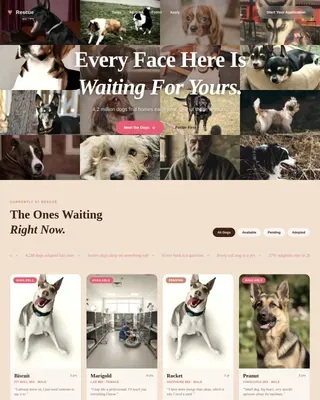
Rescue is a heartfelt dog adoption landing page built around a modular card grid. It pairs emotional dog profiles with a low-friction application flow, letting visitors browse available dogs, open detail drawers, and start an adoption or foster application in minutes. The warm Desert Rose palette and Polaroid-style photography give every scroll the feeling of an adoption day.
by Rocket studio
Quick summary
Rescue is a dog adoption landing page template designed for shelters and rescue organizations. It uses a modular card grid to showcase individual dogs, each with a name, age, personality bio, and an availability badge. A stepped application form and a "Foster First" toggle give visitors two clear paths forward, making the conversion feel personal rather than clinical.
Who this template is for
This template is built for anyone running or supporting a dog rescue operation who needs a page that connects real dogs with real people. It works equally well for small independent rescues and larger municipal shelters.
- Shelter coordinators and rescue directors who need a ready-to-launch adoption page
- Nonprofit volunteers building a first web presence for their rescue organization
- Foster network coordinators who want to offer a low-commitment entry path alongside full adoption
What problem this template solves
Most adoption pages feel like database printouts. Long lists, clinical language, and zero emotional pull mean visitors bounce before they ever fall in love with a dog. This template solves that disconnect by putting personality first.
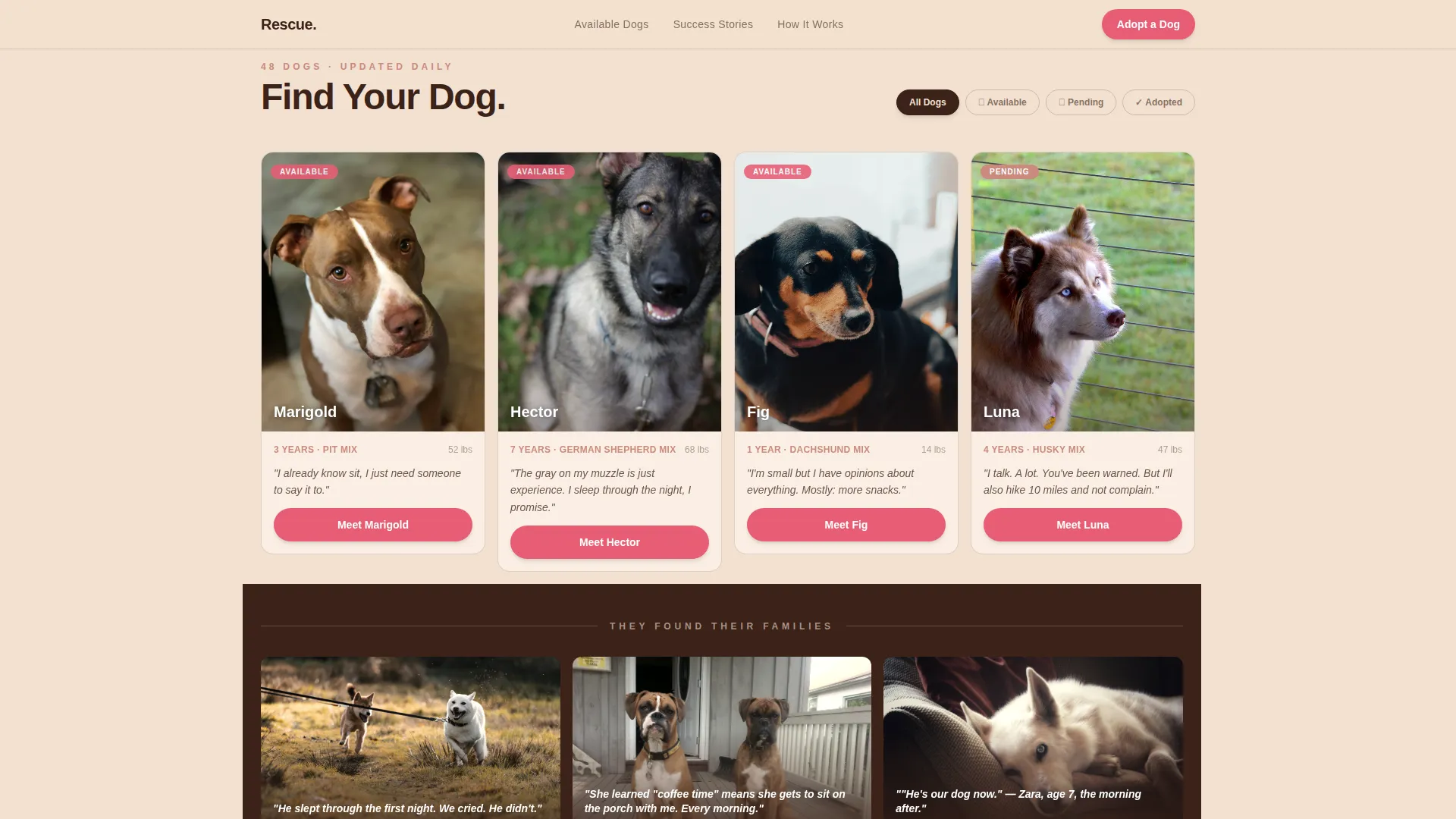
- Browsing feels cold and impersonal, so dog-voice bios and Polaroid-style photography replace generic shelter listings
- Visitors who are "foster-curious" have no easy on-ramp, so the "Foster First" toggle drops the form to just three fields
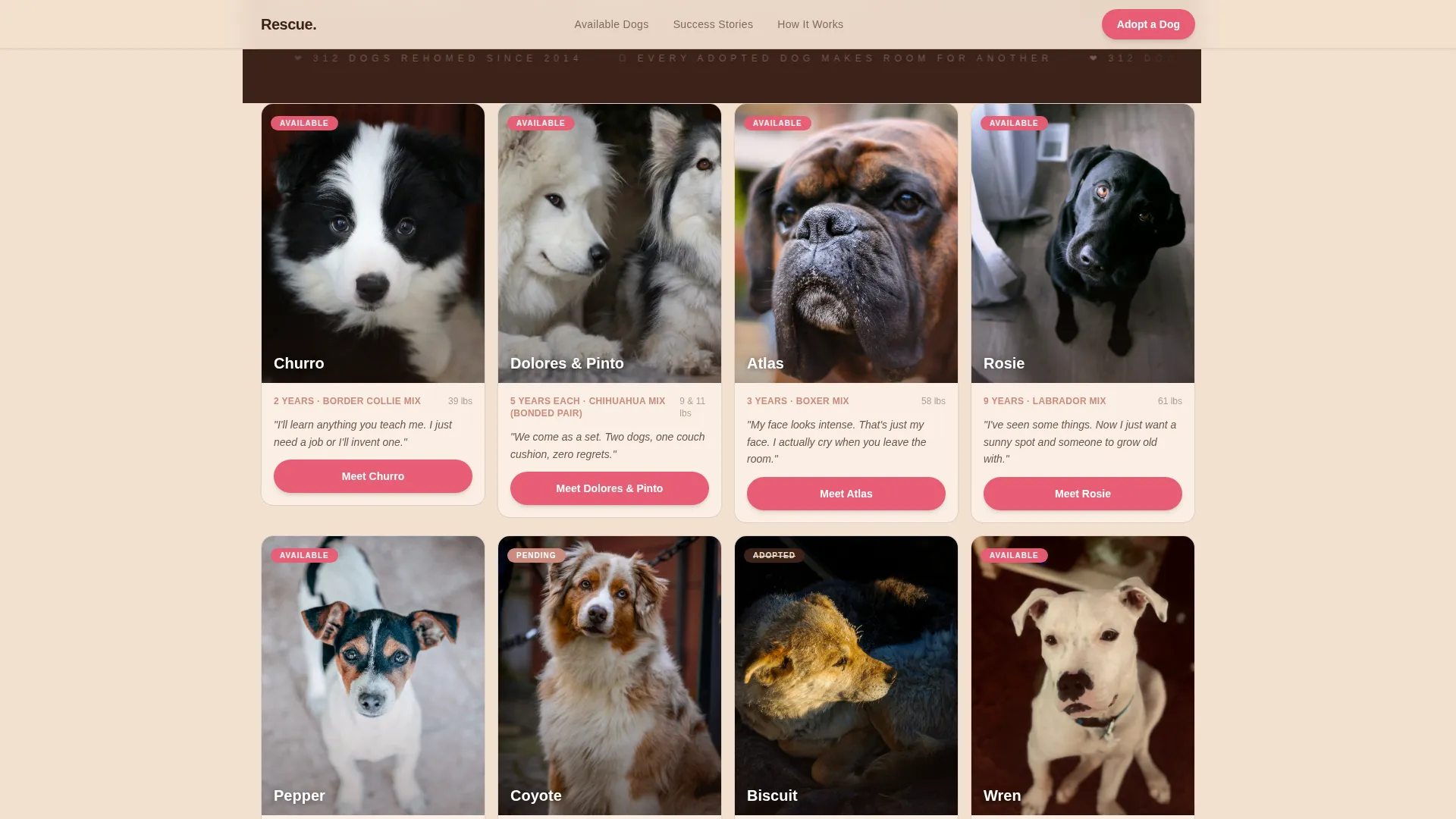
- Urgency is hard to communicate without pressure tactics, so Available, Pending, and Adopted badges signal real-time status naturally
What you get with this template
You get a fully structured, single-page adoption experience built around a Community Gallery creative direction. Every section serves a specific role in moving a visitor from curious browser to committed adopter.
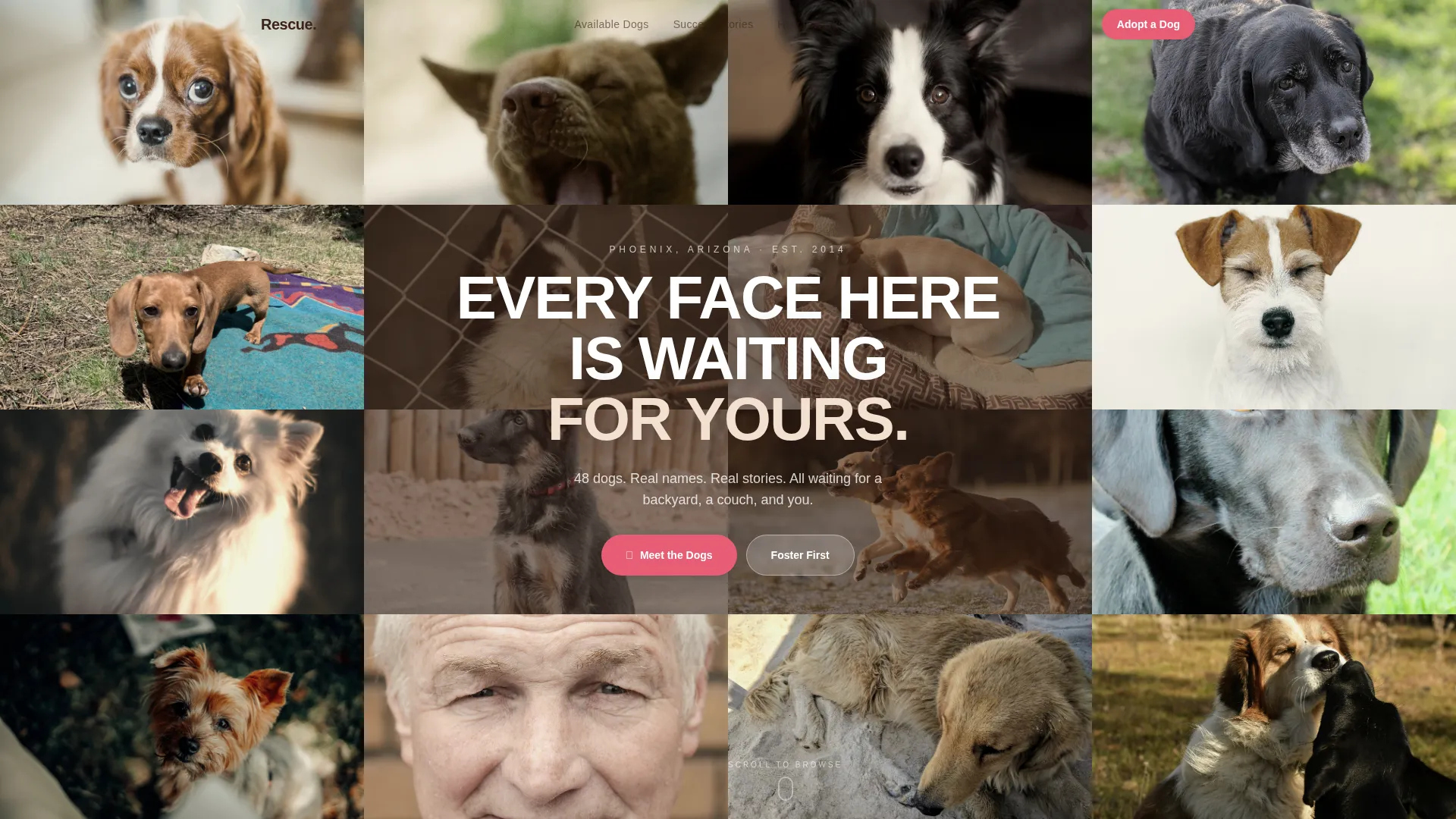
- A 16-portrait Photo Grid Mosaic header with a knockout headline overlay
- A modular dog card grid with interactive Meet drawers, badge filters, and a stepped application form
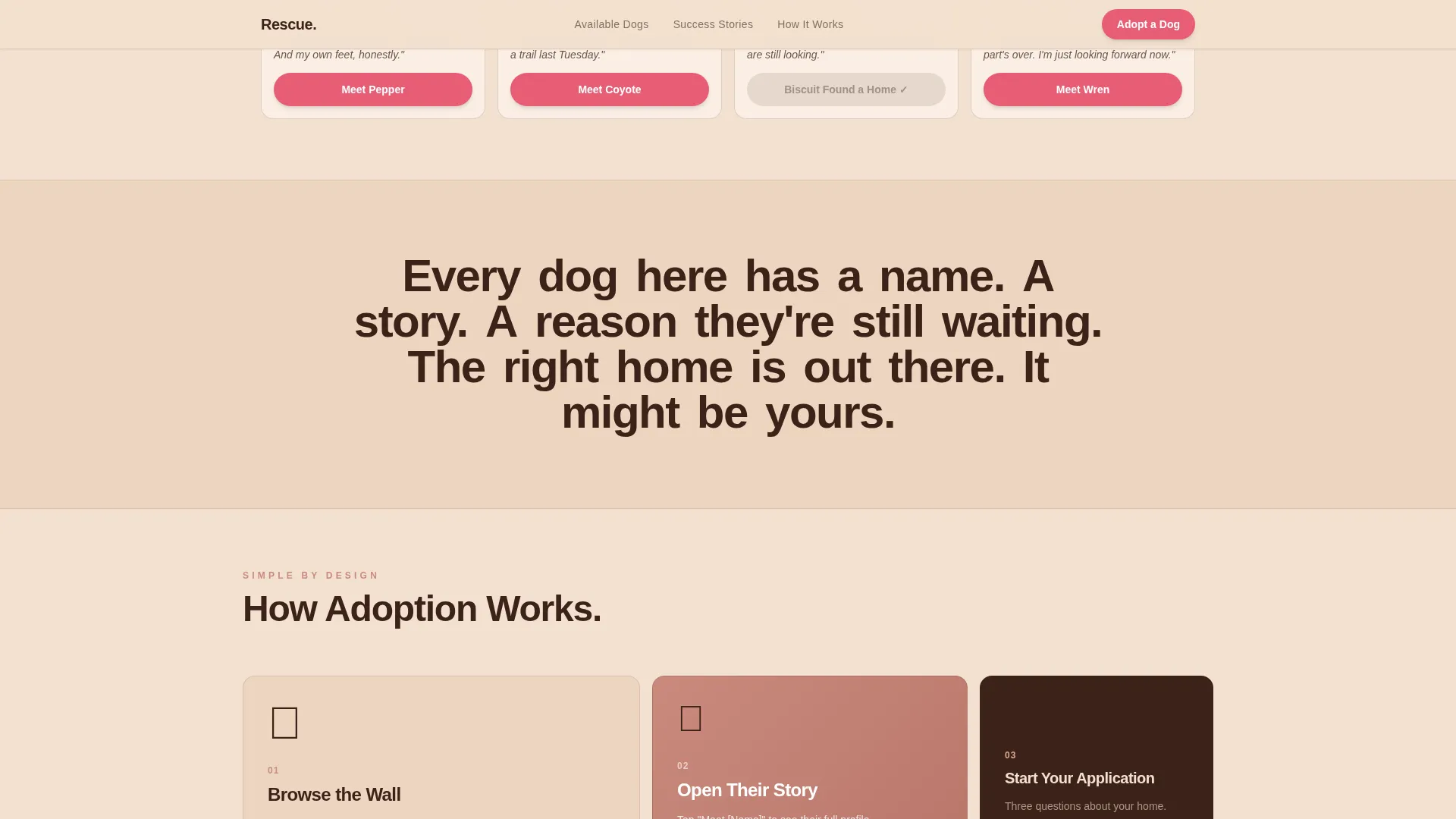
- An Adopted Gallery strip with adopter-submitted captions and dates, plus an asymmetric three-step "How Adoption Works" bento layout
Feature list
This template is built with a high level of interactivity and visual detail. Every feature listed here is grounded in the brief.
Photo Grid Mosaic Header
Sixteen unevenly cropped dog portraits fill the viewport edge to edge with no gutters. The images are warm-graded and slightly desaturated in a Polaroid-aged style. A knockout white headline sits centered over the middle four tiles, reading "Every Face Here Is Waiting For Yours."
Modular Dog Card Grid
Each card displays a dog portrait, a hand-lettered first name, an age, and a single sentence written in the dog's own voice. Cards are filterable by badge status: Available in pear pink, Pending in terracotta, and Adopted in mesquite with a strikethrough. The grid staggers on load for a polished editorial feel.
Interactive Meet Drawer
Every dog card includes a "Meet [Name]" button that slides open a detail drawer. The drawer contains medical notes, temperament tags, and a foster-or-adopt toggle. This keeps the main grid clean while giving serious visitors all the detail they need.
Stepped Adoption Application Form
The primary call to action is a multi-step form asking household type, other pets, and an open-text "Why this dog?" field. The form reduces friction by breaking the ask into small, conversational steps. A "Foster First" toggle simplifies the form to just name, email, and zip code for visitors who are not yet ready to commit.
Adopted Gallery Strip
Full-width strips between card rows show adopter-submitted photos of previously listed dogs, now on couches, in cars, and at beaches. Each strip includes a short caption and a date. This social proof confirms the rescue's track record without needing a testimonials section.
Asymmetric How Adoption Works Bento
A three-step bento layout explains the adoption process in a non-linear, visually distinct format. It replaces the typical numbered timeline with an asymmetric card arrangement. This keeps the page feeling editorial and warm rather than procedural.
Page sections overview
| Section | Purpose |
|---|---|
| Photo Grid Mosaic | Opens with 16 warm dog portraits and a centered knockout headline |
| Dog Card Grid | Displays every available dog with badges, bios, and Meet drawers |
| Adopted Gallery Strip | Shows post-adoption photos with captions to build trust |
| How Adoption Works | Three-step bento explains the process simply and visually |
| Application Call to Action | Stepped form with Foster First toggle for two conversion paths |
| Footer | Horizontal flow layout anchors contact and navigation links |
Design & branding system
The template uses a Desert Rose color system inspired by a dusty ranch porch at golden hour. Every color has a specific role, so the palette stays cohesive no matter how much content is added.
- Sand (#F2E0D0) dominates all backgrounds, mesquite brown (#3B2218) anchors body text and card borders, and terracotta (#C98A7D) warms section dividers and secondary headings
- Pear pink (#E85D75) is reserved exclusively for buttons, calls to action, and Available badges, so every action element pulses with the same energy
- Typography uses Plus Jakarta Sans for all headings and DM Sans for body copy, pairing editorial warmth with clean readability
Mobile & speed optimization
Adoption browsing happens on phones, so this template is designed mobile-first from the ground up. The card grid, drawer interactions, and stepped form are all built to perform cleanly on smaller screens.
- Image lazy loading is applied across the mosaic header and card grid to keep initial load times manageable
- Server Components handle the static card grid, reducing the JavaScript burden on the client side
- The mosaic reveal, card stagger, scroll word-reveal, and drawer slide-in animations are high-impact but scoped to avoid blocking the main thread
How this template helps you convert
The template is built around a Marketplace and Multi-conversion model, meaning it supports more than one type of visitor outcome in a single page flow.
- Dog-voice bios and Polaroid-aged photography create emotional gravity before any ask is made, so visitors are already attached by the time they see the application button
- The "Foster First" toggle gives hesitant visitors a low-commitment path with a minimal three-field form, capturing leads who would otherwise leave without any action
- Pending badges and the Adopted Gallery strip manufacture gentle urgency and prove the pipeline works, reinforcing that acting sooner matters without using countdown timers or pressure copy
Other information about this template
This template is categorized under Pet and Animal, specifically the Pet Adoption and Rescue subcategory with a Dog Rescue niche focus. It carries a Family First theme and is localized for English-language audiences in the United States.
- The template style is Card Grid (Modular), making individual dog profiles easy to add, update, or remove as the roster changes
- Animation intensity is set to high, covering mosaic reveal on load, staggered card entry, scroll-triggered word reveal, and drawer slide-in transitions
- The footer follows a horizontal flow layout pattern, keeping the page visually consistent from header to close
Theme
Family First
Creative direction
Community Gallery
Color system
Desert Rose
Style
Card Grid (Modular)
Direction
Marketplace/Multi
Page Sections
Photo Grid Mosaic Header
Modular Dog Card Grid
Interactive Meet Drawer
Stepped Adoption Application Form
Adopted Gallery Strip
Asymmetric How Adoption Works Bento
Related questions
Can I add or remove dog profiles without rebuilding the layout?
What is the difference between the full adoption form and the Foster First path?
How do the availability badges work on the dog cards?
Does the Meet drawer replace a separate detail page for each dog?
Is this template suitable for a rescue that lists cats or other animals?