Restoration & Preservation Portfolio & Case Study Website Template
Restore is a single-page water damage restoration landing page built around a five-step damage assessment quiz. It guides distressed homeowners, property managers, and insurance adjusters from raw panic to a clear action plan. The Agrarian Root visual identity and Transparent Process gallery turn a chaotic emergency into a structured, trustworthy service experience.
by Rocket studio
Quick summary
Restore is a focused water damage restoration landing page that combines a sequential process gallery with an interactive damage assessment quiz. Visitors scroll through each restoration phase, from moisture mapping to final readings, and receive a prioritized action plan in under 60 seconds. The design is purposeful, dark, and calm, built to reassure people in crisis.
Who this template is for
This template is built for water damage restoration companies that need to convert emergency traffic into booked calls. It speaks directly to the people who land on your page at the worst moment of their week.
- Homeowners dealing with a burst pipe or flooded basement at any hour
- Property managers handling urgent tenant calls after a storm or plumbing failure
- Insurance adjusters who need clear documentation and a credible restoration partner
What problem this template solves
When water damage strikes, visitors are frightened, time-pressed, and uncertain about what to do first. A generic service page does nothing for someone standing in a flooded room at 2 a.m. This template solves the trust and urgency gap in a single scroll.
- Visitors often leave without calling because they cannot judge the severity of their damage
- Service pages rarely explain what the restoration process actually looks like step by step
- Emergency prospects need both fast answers and a clear reason to call right now
What you get with this template
The template delivers a complete single-page layout structured around emergency conversion. Every section is designed with a specific role in moving the visitor from fear to confident action.
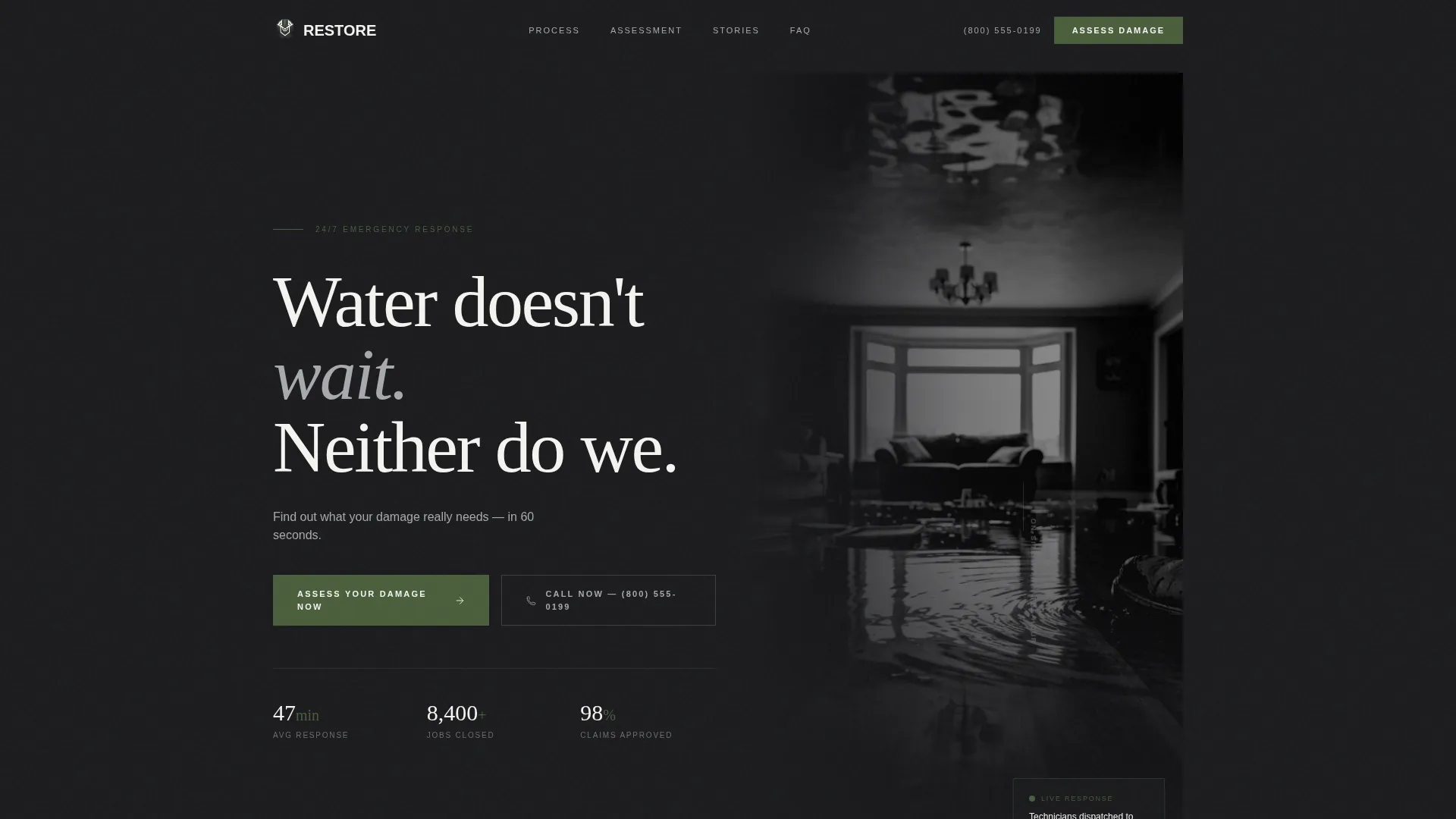
- A half-page header with a high-contrast photo and a direct, urgent headline
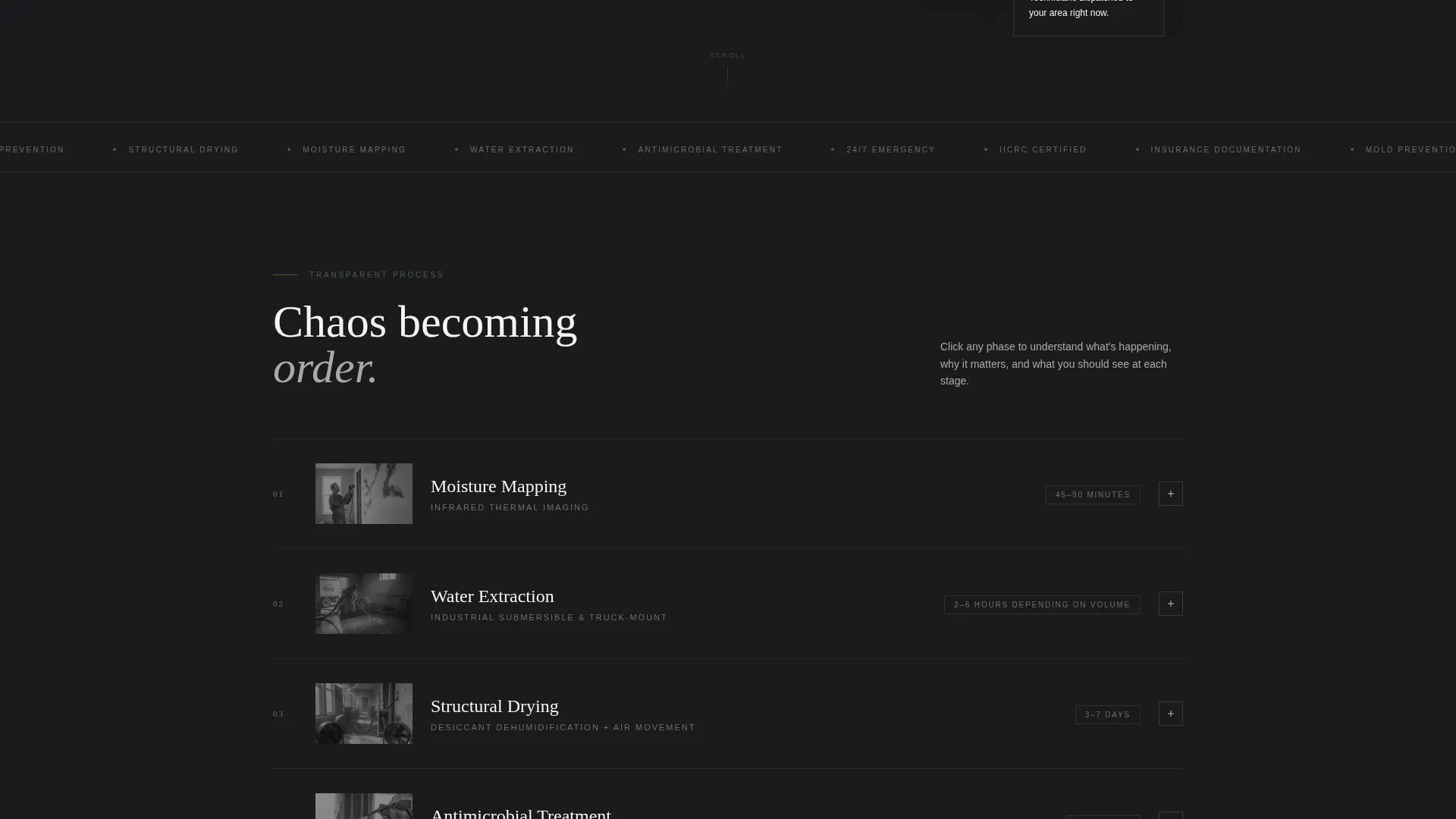
- A sequential gallery showing each restoration phase with expandable detail panels
- A five-step damage assessment quiz that ends with a severity rating and a direct call button
Feature list
This template is built around practical, visible components that serve a real purpose for both the visitor and the business.
Half-Page Photo and Text Header
The header splits the screen into two halves. The left side holds a black-and-white photograph shot from knee height inside a flooded room, water reflecting the overhead light. The right side carries a heavy slab-serif headline and a single supporting line that invites the visitor to assess their damage in 60 seconds.
Sequential Restoration Gallery
Each gallery card represents one restoration phase. Cards cover moisture mapping with infrared cameras, industrial extraction fans, antimicrobial treatment on exposed studs, and final pinless meter readings. Clicking any card expands into a detail panel that explains what is happening, why it matters, and what the homeowner should expect to see at that stage.
Five-Step Damage Assessment Quiz
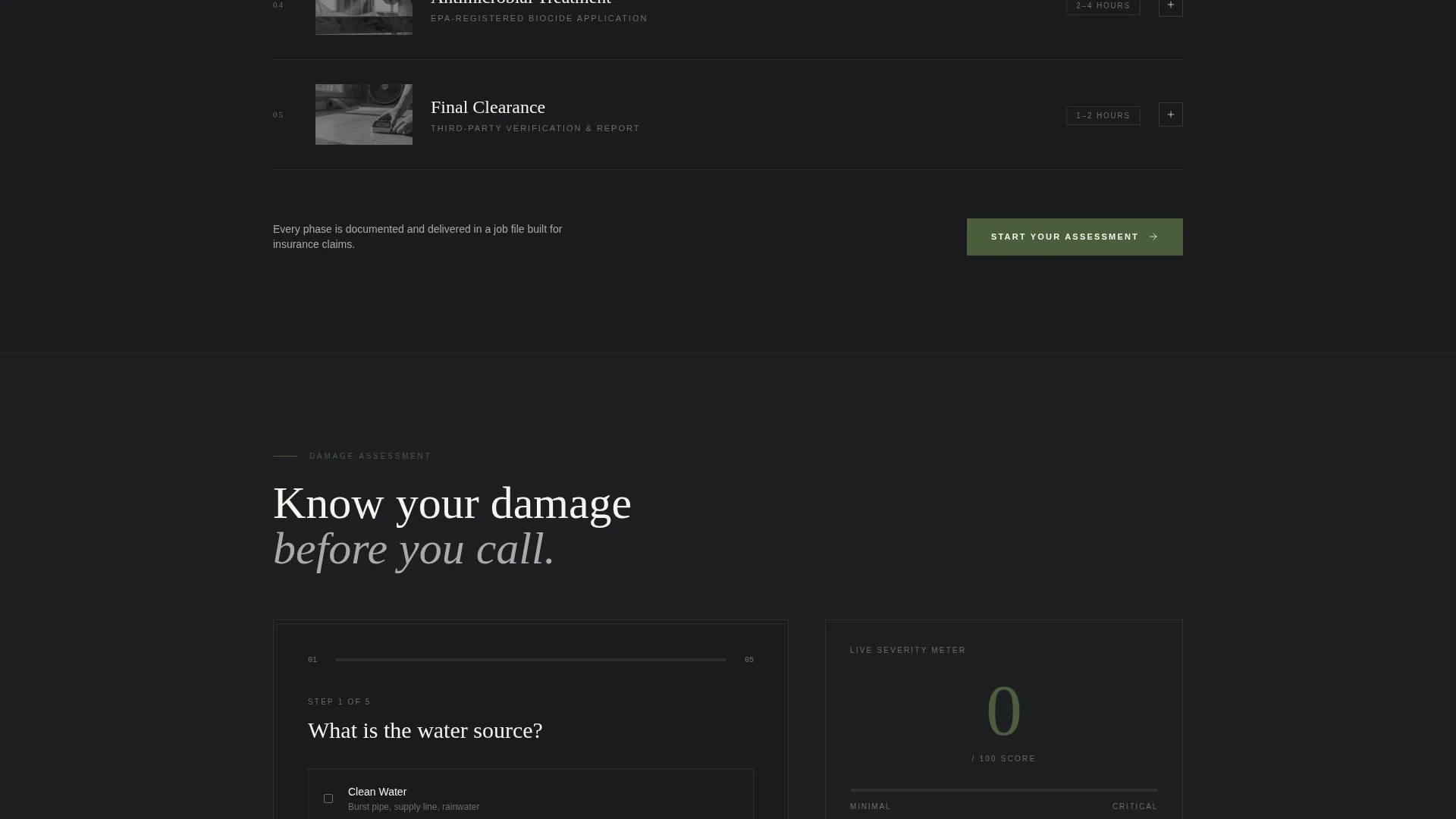
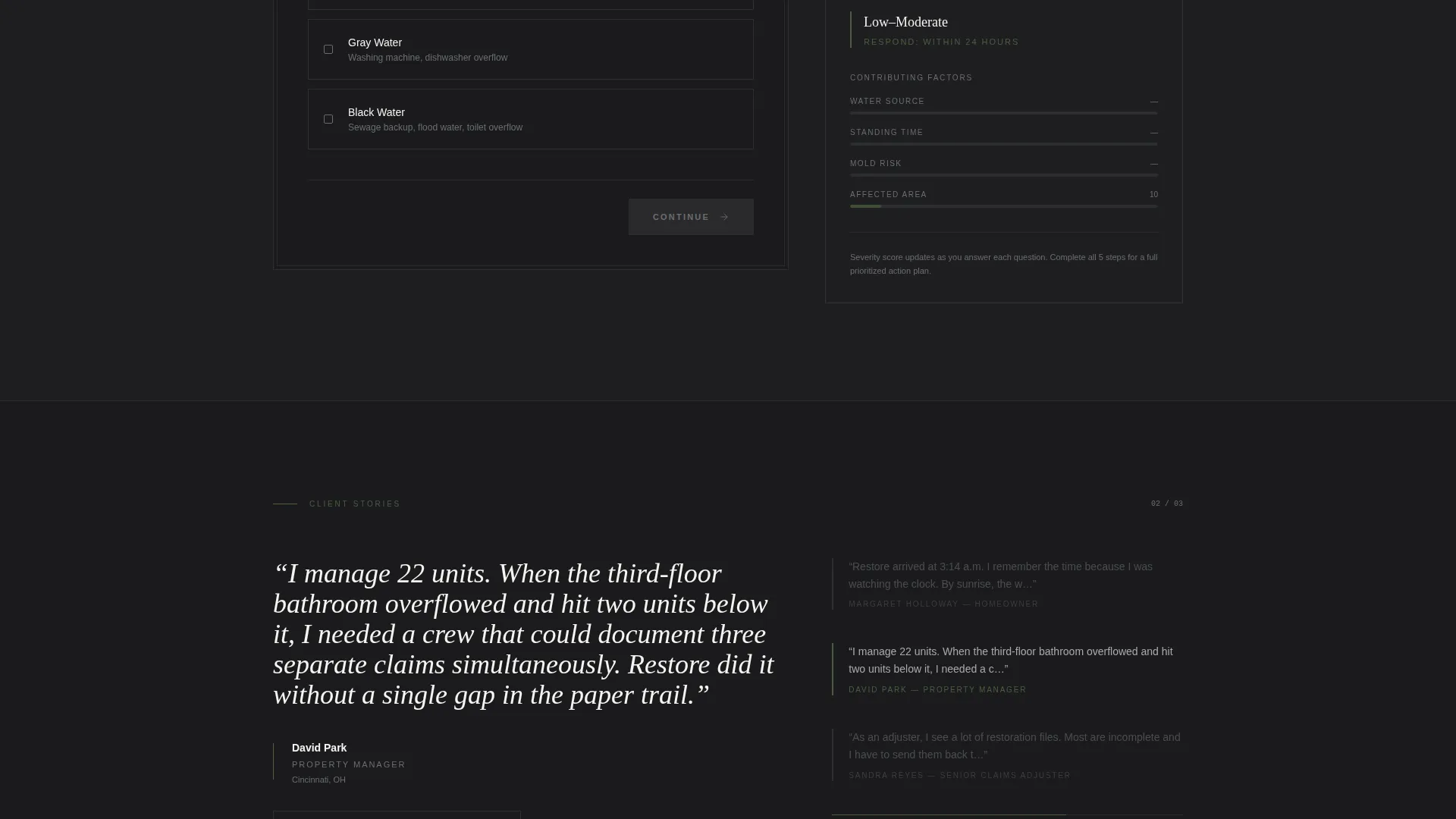
The primary call to action launches a structured five-question diagnostic. It collects water source type, affected square footage via a visual range slider, time the water has been standing, whether visible mold is present, and insurance claim status. Each answer adjusts an on-screen severity meter in real time.
Live Severity Meter
As the visitor answers each quiz question, a severity meter rendered in root-water green updates on screen. The visual feedback makes the assessment feel responsive and personalised, building engagement and urgency simultaneously.
Prioritized Result Page with Call Button
After completing the quiz, the visitor receives a prioritized action plan with an urgency rating. A prominent click-to-call button labeled "Talk to a Tech Now" gives them an immediate, low-friction path to reach the team before the next hour passes.
Transparent Process Narrative Layout
The page scroll is designed as a sequential reveal. Each section is visually calmer and drier than the last, moving from chaotic water-damage imagery to a fully restored room that looks indistinguishable from the day it was built.
Page sections overview
| Section | Purpose |
|---|---|
| Half-Page Header | Establish urgency and invite damage assessment |
| Urgency Sub-Headline | Reinforce the 60-second assessment hook |
| Restoration Phase Gallery | Show the full process through expandable photo cards |
| Phase Detail Panels | Explain each stage in plain language for the homeowner |
| Damage Assessment Quiz | Capture visitor context through five diagnostic steps |
| Severity Meter Display | Provide real-time visual feedback during the quiz |
| Result and Action Plan | Deliver urgency rating and prioritized next steps |
| Talk to a Tech call to action | Convert quiz completions into direct phone calls |
Design & branding system
The visual identity follows an Agrarian Root theme expressed through a Monochrome Steel color system. The palette avoids polish and pretense entirely, favoring materials that feel built to outlast the emergency they are addressing.
- Core colors: forge-black (#1B1B1E), galvanized silver (#A8A9AD), and weathered barn gray (#6B6E70) form the base of all backgrounds, text, and structural elements
- Accent color: root-water green (#4A5E3C) is reserved exclusively for calls to action, the severity meter, and progress indicators
- Typography: heavy slab-serif type anchors headlines, reinforcing weight and reliability without decorative flourish
Mobile & speed optimization
The layout is built to perform on the device most likely to be in a panicked visitor's hand at 2 a.m. Clean structure and deliberate component choices support fast rendering across screen sizes.
- The half-page header stacks vertically on smaller screens so the headline and call to action remain immediately visible
- The gallery cards and expandable detail panels are touch-friendly, allowing mobile visitors to tap through each restoration phase without friction
- The five-step quiz uses a visual range slider and clear tap targets sized for reliable use on mobile devices
How this template helps you convert
Every structural decision in this template is aimed at reducing hesitation and accelerating the call. The page does not ask visitors to browse; it guides them through a decision.
- The quiz gives visitors a personalized severity rating, which replaces generic uncertainty with a concrete, named problem and a specific reason to call your team
- The gallery-to-detail panel format builds visible credibility by showing real process steps, so visitors trust the company before they ever speak to anyone
- The "Talk to a Tech Now" button appears at the moment of highest intent, immediately after the result page delivers the visitor's action plan
Other information about this template
This template is designed specifically for the water damage restoration niche inside the broader construction and home services category. It fits naturally within restoration and preservation service businesses.
- The template style is Gallery plus Detail, meaning photography and process documentation are central to the layout rather than decorative
- The creative direction is called Transparent Process, reflecting the page's core purpose of showing clients exactly what happens after they call
- The header concept is Half-Page Photo plus Text, a layout that balances emotional visual impact with clear messaging in a single above-the-fold frame
- The quiz-based conversion path, called a Quiz/Assessment landing page direction, is particularly effective for emergency services where visitors need help quantifying a problem before they feel ready to call
Theme
Agrarian Root
Creative direction
Transparent Process
Color system
Monochrome Steel
Style
Gallery + Detail
Direction
Quiz/Assessment
Page Sections
Half-page Photo and Text Header
Sequential Restoration Gallery
Five-step Damage Assessment Quiz
Live On-screen Severity Meter
Prioritized Action Plan with Call Button
Transparent Process Narrative Scroll
Related questions
Who is this landing page template designed for?
Can I edit the quiz steps and severity meter for my own service tiers?
Does this template work for both residential and commercial restoration projects?
What makes this template different from a standard service page?
Is this layout suitable for use as a paid advertising landing page?



