Kids Drums After-School Program Landing Page
Rhythm is a masonry-style landing page template built for kids drums after-school programs. It features a UGC photo wall header, an interactive age-explorer grid with flip cards, and a sticky "Grab the Free Practice Kit" banner. The botanical color palette and playful geometric layout speak to both curious kids and the working parents making enrollment decisions on their phones.
by Rocket studio
Quick summary
Rhythm is a single-page template designed for a kids drums after-school program. It combines a photo mosaic header, an age-filtered masonry explorer, studio proof section, and community wall into one scrollable journey. The sticky practice-kit banner appears only after a visitor has already engaged with two tiles, so the ask feels earned.
Who this template is for
This template is built for local enrichment studios that teach kids drums on real instruments. It speaks directly to the families most likely to enroll: working parents making quick decisions between school pickup and dinner.
- Studio owners running weekday after-school drums programs for ages 6 to 12
- Program directors who need a mobile-first page that converts curious parents into leads
- Independent music teachers looking to grow enrollment without a complex website build
What problem this template solves
Most music program pages feel like flyers: a list of days, a phone number, and a stock photo of a generic guitar. That approach loses the parent who is standing in a school parking lot with 90 seconds to decide. Rhythm solves this by showing the journey before asking for anything.
- Parents cannot picture what their child's first lesson actually looks like, so they leave
- Generic enrollment forms appear too early and feel pushy before trust is built
- Static pages cannot show the difference between a six-year-old's first boom-tap and a twelve-year-old's first solo
What you get with this template
You get a fully designed, single-page layout with every section pre-built and ready to customize. The structure moves a visitor from first impression to form submission through interaction, not pressure.
- A hero photo wall, age-explorer grid, studio proof split, community wall, and sticky call-to-action banner
- Interactive masonry tiles with flip cards, age-filter tabs, and scroll-triggered reveal animations
- A lightweight three-field practice-kit form and a one-field recital RSVP path
Feature list
This template ships with six built-in feature areas. Each one is grounded in the brief and designed to serve a specific moment in the parent's decision journey.
UGC Photo Wall Hero
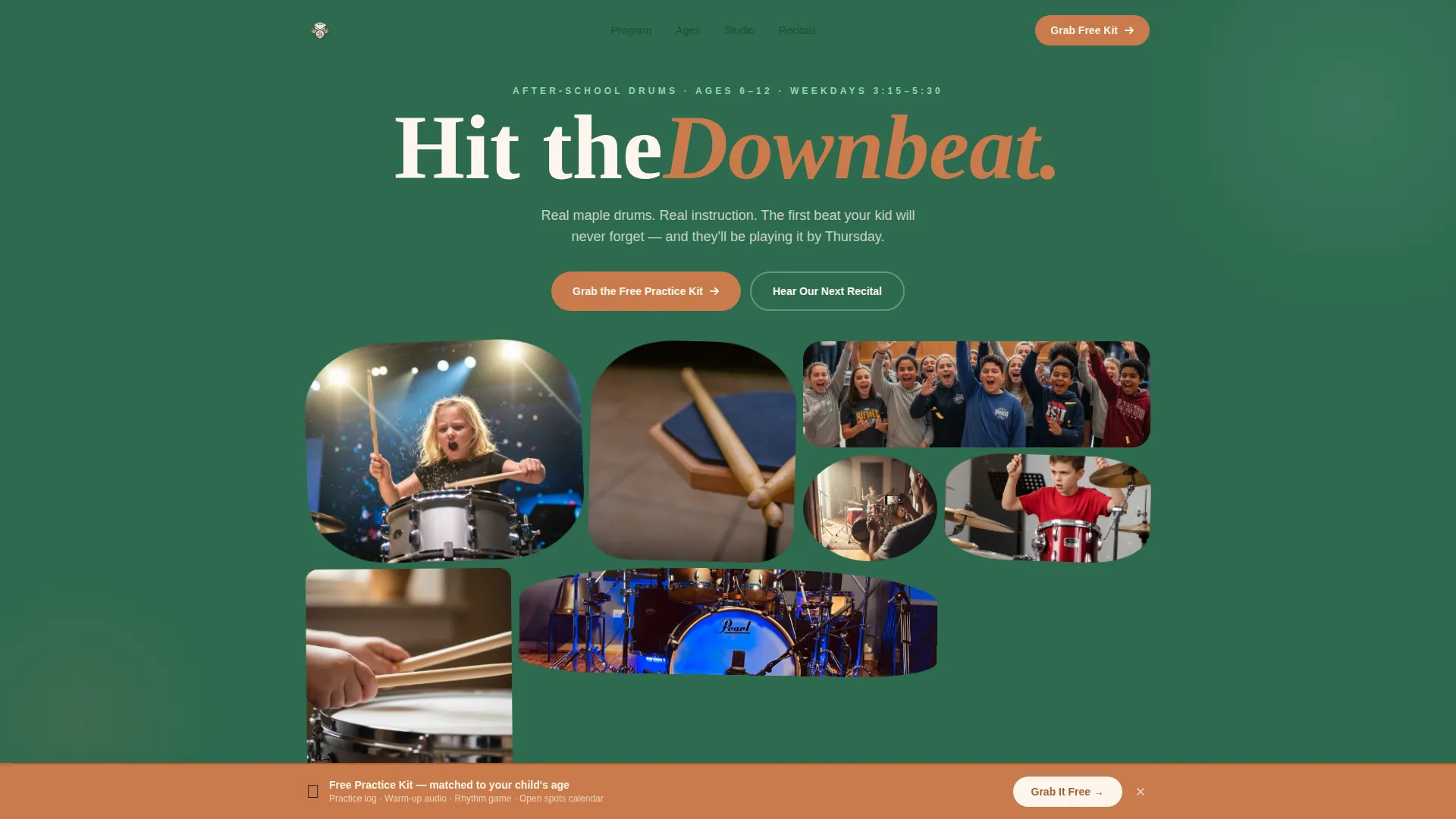
The header is a full-width mosaic of geometric photo tiles in hexagon, rounded trapezoid, and offset circle shapes. Tiles float into position on load with a staggered animation, giving the page an alive, handcrafted first impression.
Age-Filtered Masonry Explorer
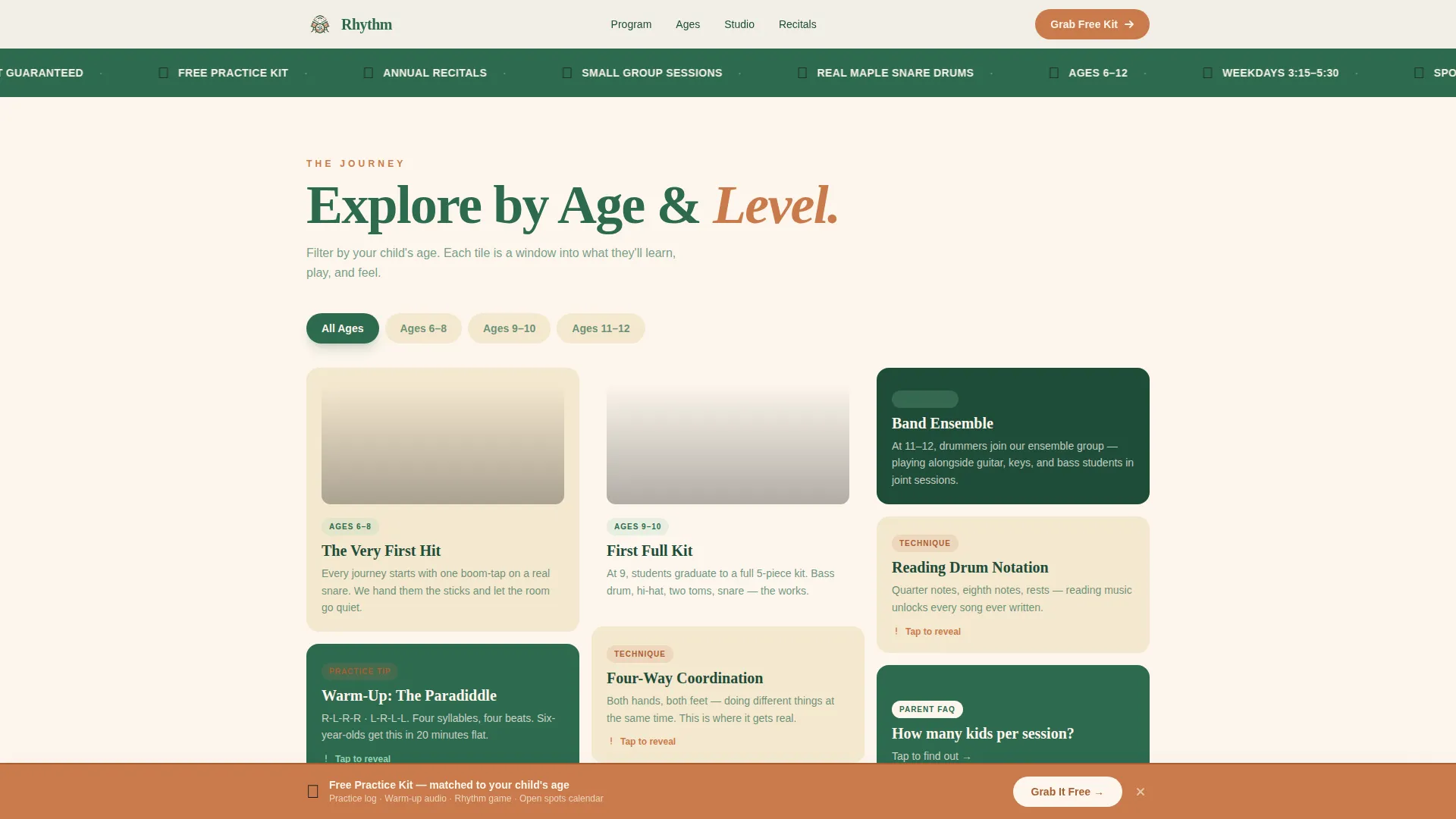
Visitors click age-range tabs (covering ages 6 through 12) to filter the masonry grid and see content relevant to their child. Each tile is a content resource: a warm-up video clip, a downloadable practice-log PDF, a rhythm game, or a parent FAQ flip card.
Flip Card Tile Interactions
Masonry tiles flip on tap to reveal their back-face content. This interaction keeps parents engaged and lets the page deliver information progressively without overwhelming a single screen.
Sticky Practice-Kit Banner
A terracotta sticky banner appears after a visitor interacts with two tiles. It presents a three-field form asking for the child's first name, age, and a parent email. The trigger timing ensures value is shown before the ask is made.
Studio Proof Section
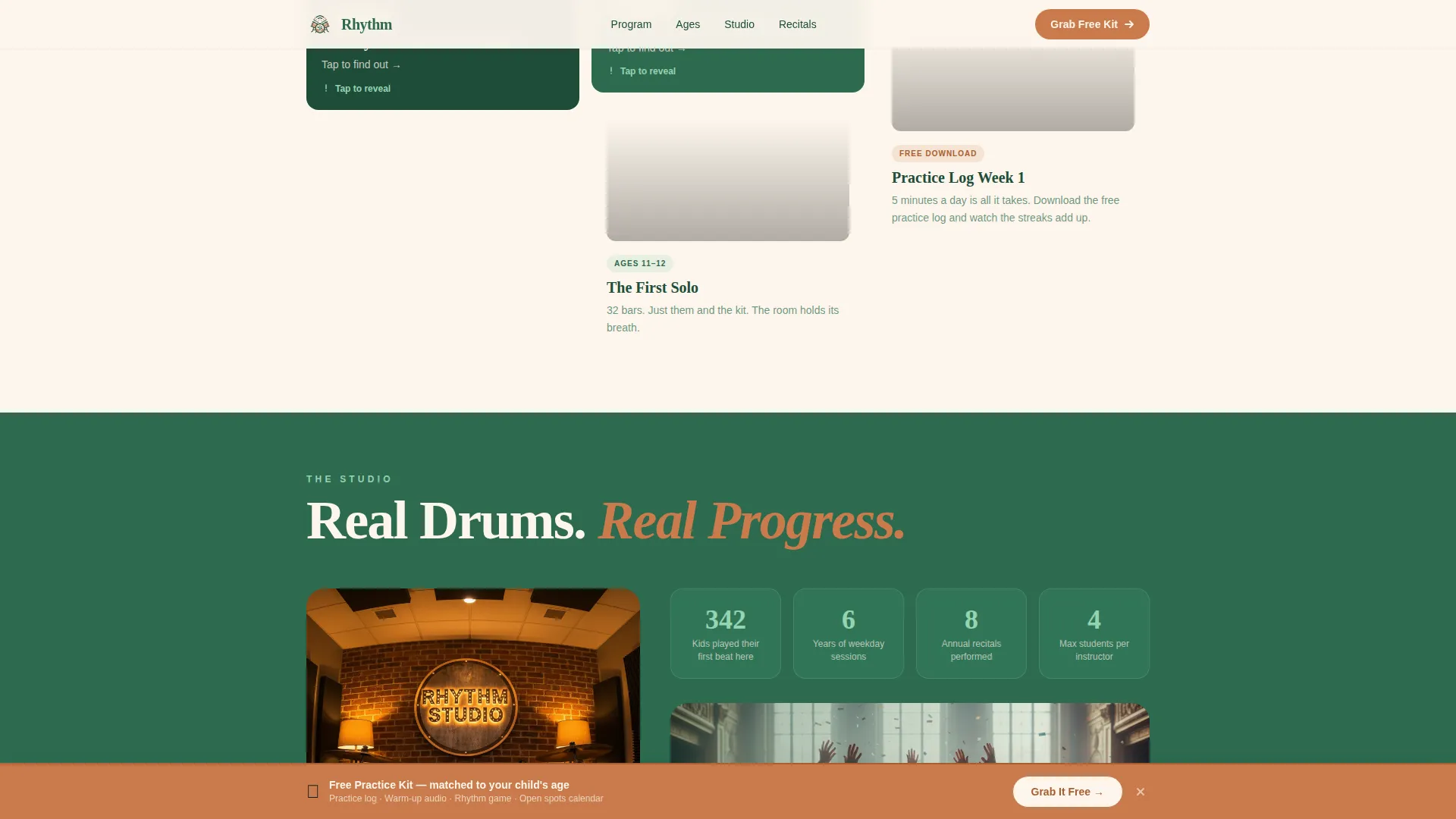
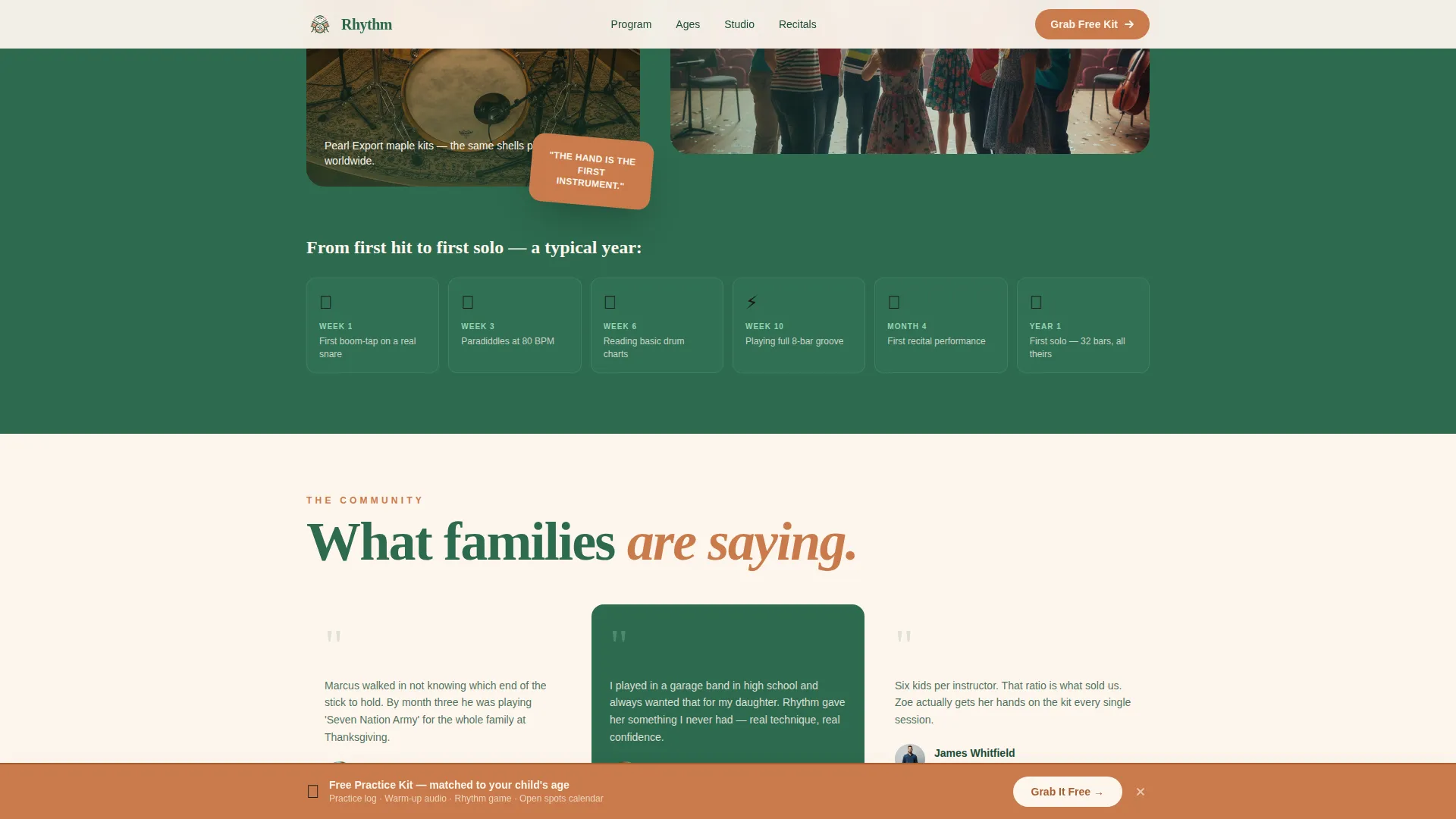
An asymmetric split layout displays real instruments alongside curriculum milestone beats. This section establishes credibility by showing the physical studio environment and the structured learning path from first paradiddle to full kit.
Community Wall with Recital Strip
Parent testimonials with names and children's ages sit alongside a recital photo strip. A secondary call-to-action button lets visitors RSVP to the next recital with just an email address.
Page sections overview
| Section | Purpose |
|---|---|
| Hero Photo Wall | Opens with a mosaic of real studio photos in geometric clip-path tiles |
| Age Explorer Grid | Masonry filter by age group with flip card content tiles |
| Studio Proof Split | Shows real maple instruments and curriculum beat milestones |
| Community Wall | Parent testimonials, recital photo strip, and secondary RSVP path |
| Sticky call to action Banner | Triggers after two tile interactions with the practice-kit form |
| Footer | Linear single-row footer with essential links and contact details |
Design & branding system
The visual identity uses a Playful Geometric theme built on a Botanical color system. The palette balances earthy warmth with enough brightness to appeal to children and reassure parents at the same time.
- Deep fern green (#2D6A4F) for primary backgrounds and structural elements, terracotta (#C97B4B) for headlines and call-to-action buttons, and creamy seed white (#FDF6EC) for alternating section backgrounds
- Bright moss (#95D5B2) activates on hover states and interactive tiles, animating on scroll to suggest new growth
- Fraunces is used for display headlines to add a warm, expressive character; DM Sans handles body copy and interface labels for clean readability
Mobile & speed optimization
The template is built mobile-first because the primary audience is parents checking their phones in the school pickup line. Every interaction and layout choice prioritizes that small-screen context.
- Age-filter tabs, flip cards, and the sticky banner are all touch-optimized for one-handed mobile use
- Animations use native CSS scroll and IntersectionObserver, keeping the page light without heavy third-party libraries
- The masonry grid reflows cleanly across screen sizes so tile content is never clipped or misaligned on smaller devices
How this template helps you convert
The conversion strategy is built on demonstrated value first, ask second. By the time a visitor sees the practice-kit form, they have already explored the program through interactive tiles.
- The age-explorer grid filters content to the visitor's child, making the page feel personally relevant before any form appears
- Flip card interactions and short video tiles show the program in motion, building confidence that this is a real, structured, joyful experience
- The sticky terracotta banner appears only after two tile interactions, so the three-field form arrives at a moment of genuine interest rather than as an interruption
Other information about this template
This template is categorized under Kids and Family, specifically within the Kids Drums and Kids Drums After-School Program niche. It is designed as a Content and Resource landing page, meaning the primary goal is lead generation through interactive engagement rather than a hard direct sell.
- The template uses the Masonry and Pinterest layout style to organize diverse content types (video tiles, PDF downloads, rhythm games, FAQ cards) into one coherent scroll
- The social proof layer includes a "342 kids have played their first beat here" milestone figure, parent testimonials with first names and child ages, and a recital photo strip
- Copy and date formats are set for English-language, United States audiences using the USD currency format
- The Interactive Explorer creative direction and UGC Photo Wall header concept are core to the template's identity, not optional add-ons
Theme
Playful Geometric
Creative direction
Interactive Explorer
Color system
Botanical
Style
Masonry/Pinterest
Direction
Content/Resource
Page Sections
UGC Photo Wall Hero
Age-filtered Masonry Explorer
Flip Card Tile Interactions
Sticky Practice-kit Banner
Studio Proof Split Section
Community Wall and Recital Strip
Related questions
Who is this landing page template designed for?
Can I change the age ranges shown in the explorer grid?
How does the sticky practice-kit banner work?
What fonts and colors come with this template?
Is there a second conversion path for parents who are not ready to sign up?



