Precision Crane Landing Page Template
A precision crane landing page built for one-operator rigging services working mid-rise steel and industrial lift windows. The Stats-First layout leads with verified numbers, comparison tables, and a regional service map before asking for the booking. It converts general contractors, steel erectors, and facility managers without wasting a single scroll.
by Rocket studio
Quick summary
This landing page template is purpose-built for a single-operator crane service tackling precision lifts on mid-rise construction, industrial shutdowns, and tight steel erection schedules. A Stats-First design leads with hard numbers, comparison tables, and a regional service map. Every section earns trust before the booking form appears.
Who this template is for
This template serves crane operators who work demanding, high-stakes lift environments and need a page that speaks directly to the people making the call at 5 AM on a job site.
- General contractors managing tight concrete pour windows on mid-rise projects
- Steel erectors who need a certified operator on-site by a specific morning
- Facility managers at refineries or industrial plants scheduling single-window shutdowns
What problem this template solves
Most crane operator pages list equipment specs and a phone number. That does not help a contractor decide if you can clear a six-story parking deck or reach a foundation bolt in a wind corridor. This template solves the credibility gap before your phone rings.
- Visitors leave without enough information to make a confident booking decision
- No structured way to communicate service area, mobilization cost, or crane class capability
- Leads arrive too late in the project timeline to influence pre-bid planning
What you get with this template
You get a full comparison-table landing page designed around one goal: turning a first visit into a scheduled lift or a pre-bid conversation. The layout is structured to educate first, then convert.
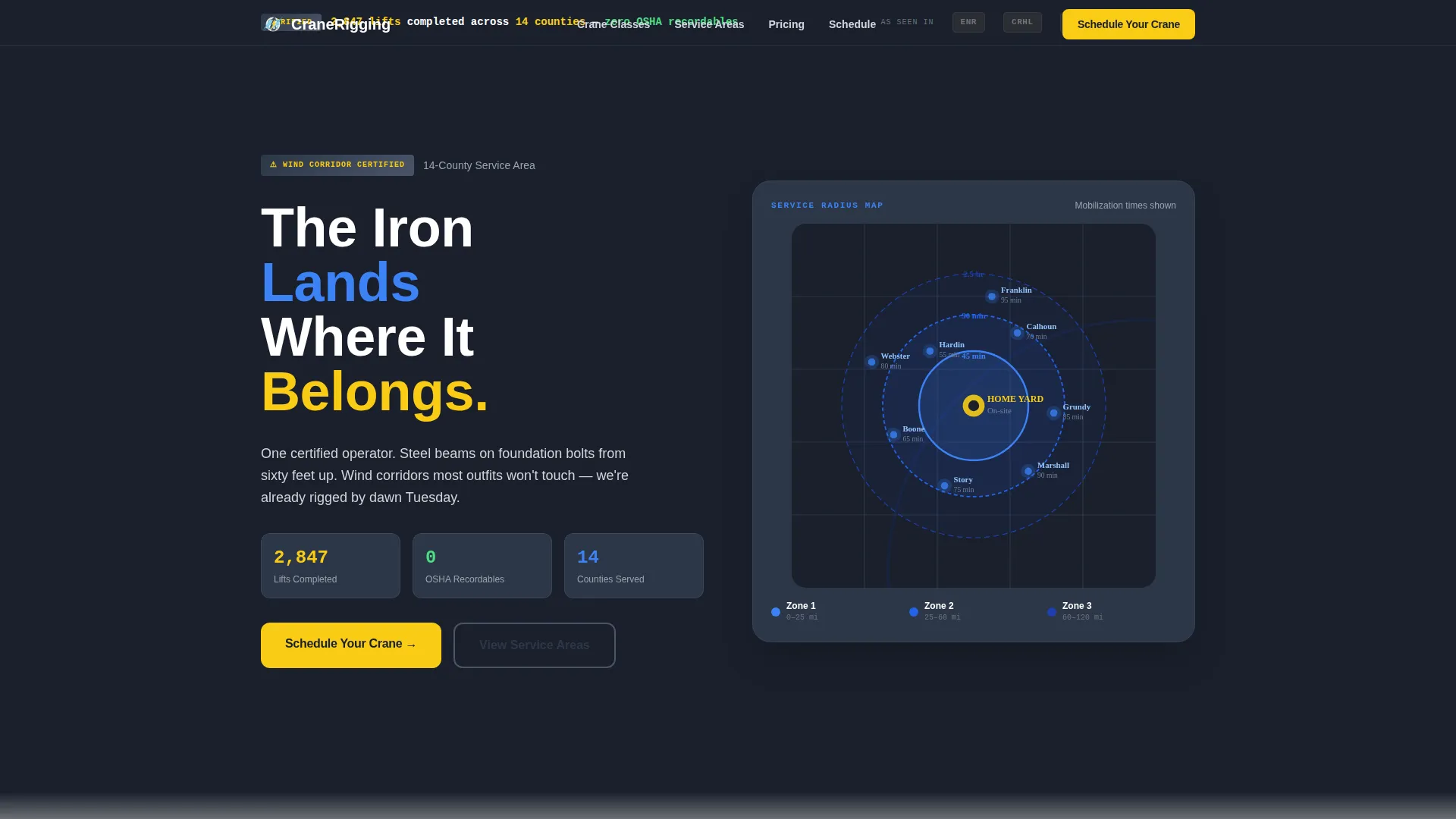
- Press mentions bar with industry logo strip and a bold zero-recordables lift stat
- Regional service map rendered in sky blue with pulsing mobilization-time zone labels
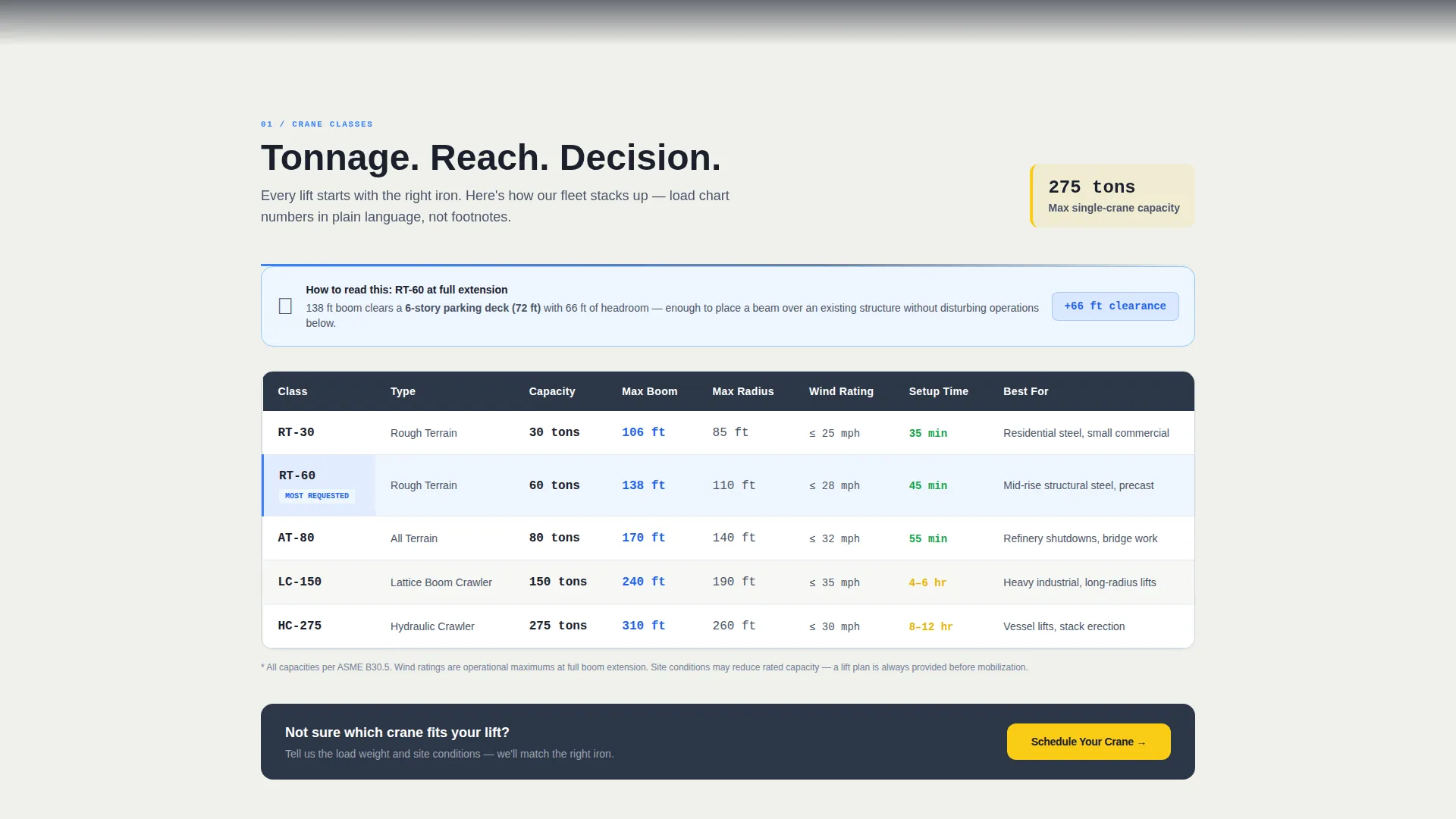
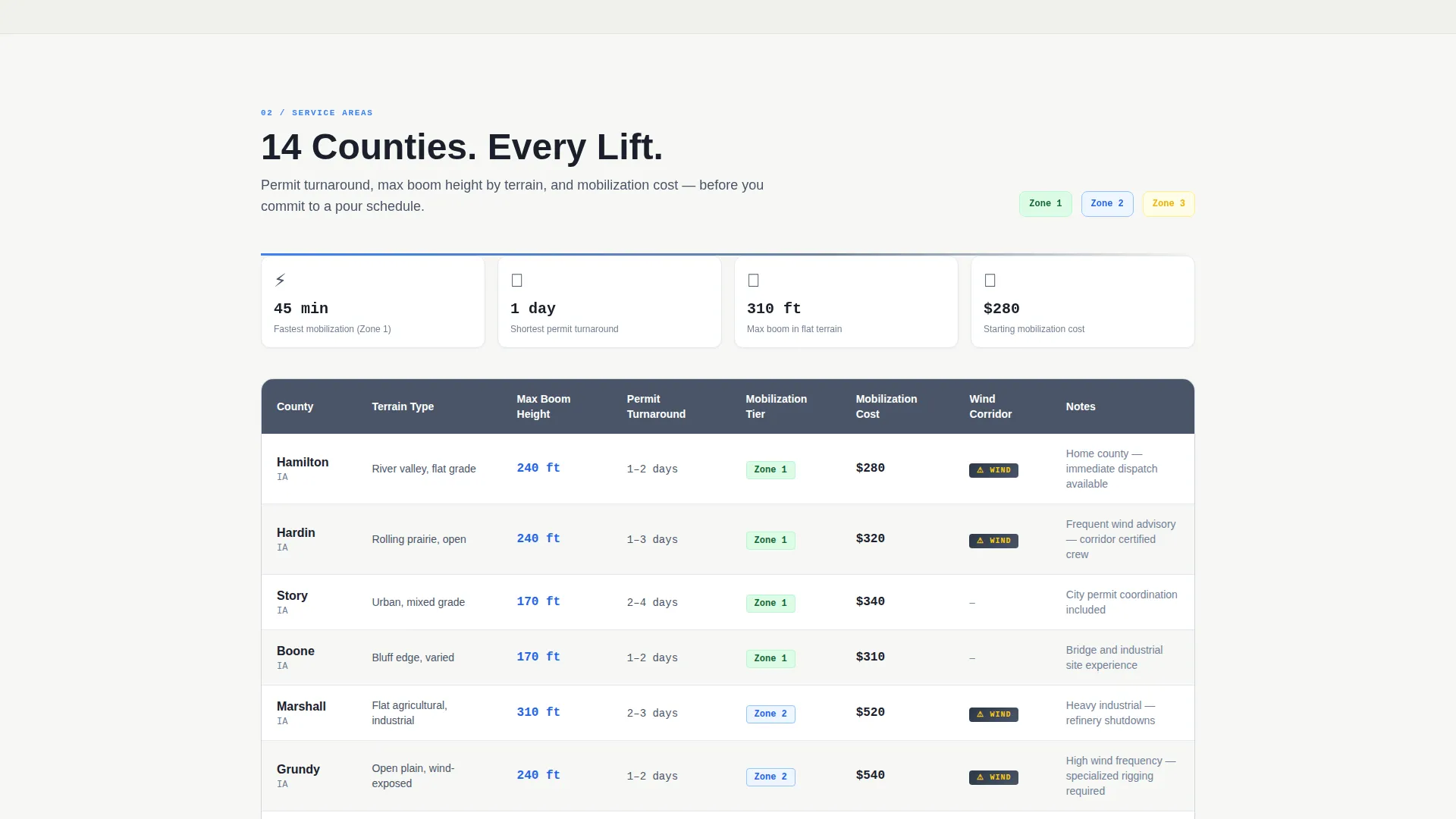
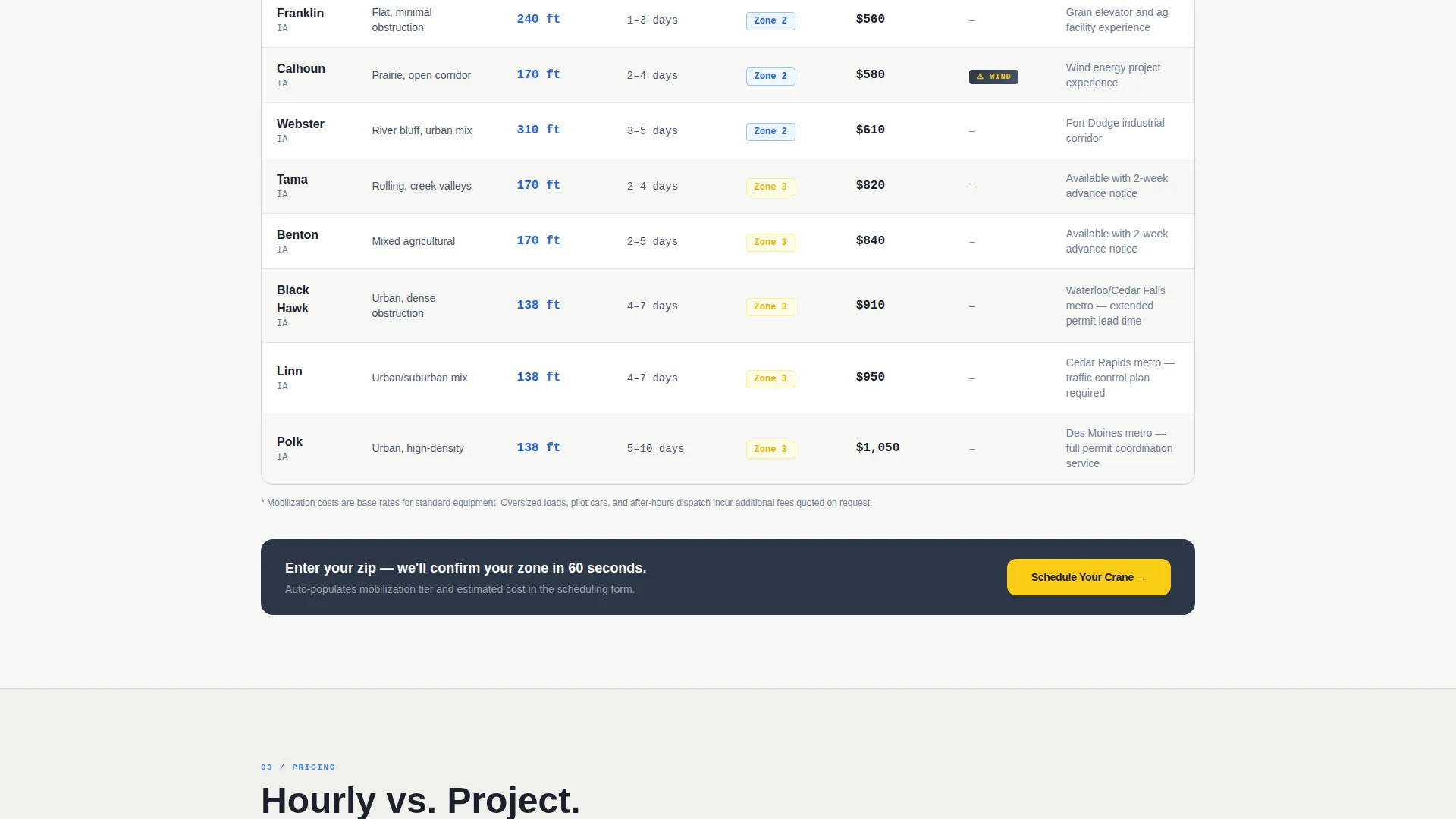
- Two structured comparison tables covering crane class tonnage and service-area details
- A scheduling form that auto-populates service area and mobilization tier from zip code input
- A secondary lead path for "Request a Lift Plan Review" targeting pre-bid contractors
Feature list
This template packs every element a one-operator crane service needs to stand out in a competitive service area. Here is what is built in.
Press Mentions Header Bar
A horizontal strip displays industry publication logos above a single dominant stat: 2,847 lifts completed across 14 counties with zero OSHA recordable incidents. Logos render desaturated until hover, keeping the number the first thing the eye finds.
Regional Service Map
A sky-blue map renders service radii pulsing outward from the home yard. Each zone is labeled with mobilization time rather than raw distance, giving contractors the answer they actually need when planning a 6 AM crew call.
Crane Class Comparison Table
The first data table compares tonnage capacity across crane classes in plain language. Load charts are simplified and reach diagrams are overlaid on familiar building references so any visitor can read them without an engineering background.
Service Area Detail Table
A second table organizes coverage by county, listing maximum boom height per terrain type, typical permit turnaround time, and mobilization cost tier. It turns a wall of text into a fast, scannable decision tool.
Booking and Scheduling Form
The scheduling form opens with lift date, then collects zip code to auto-populate service area and mobilization tier. Fields for estimated load weight and a crane type dropdown with a "not sure, help me choose" option reduce friction for first-time callers.
Dual Conversion Paths
The primary call to action reads "Schedule Your Crane" in high-vis yellow, pinned to the mobile viewport and repeated after each comparison table on desktop. A secondary path, "Request a Lift Plan Review," captures pre-bid leads without forcing an immediate commitment.
Page sections overview
| Section | Purpose |
|---|---|
| Press Mentions Bar | Establish credibility with industry recognition and a zero-recordables lift stat |
| Regional Service Map | Show coverage zones with mobilization time labels per service radius |
| Crane Class Table | Compare tonnage capacity across crane types in plain, readable language |
| Service Area Table | Detail county coverage, boom height, permit time, and mobilization cost tier |
| Rate Comparison Section | Show hourly versus project-based pricing with breakeven thresholds |
| Reach Diagrams | Overlay crane reach on familiar building types for visual context |
| Booking Form | Collect lift date, zip code, load weight, and crane type preference |
| Lift Plan Review call to action | Capture pre-bid leads with a low-commitment secondary action |
Design & branding system
The visual identity follows an Educational Guide theme built on the Slate and Sky color system. It feels like looking up through an iron skeleton at a clear morning: industrial weight paired with open overhead clearance.
- Weathered steel gray (#4A5568) for primary text and all table headers
- Open-sky blue (#3B82F6) for active states, map highlights, and service-area callouts
- Poured-concrete off-white (#F0F0EB) across section backgrounds for breathing room
- High-vis safety yellow (#FACC15) reserved exclusively for call-to-action buttons and urgent callouts
Mobile & speed optimization
The mobile layout is built around the reality that a general contractor may be checking service coverage from a job trailer on a 4G connection. The template keeps the most important elements fast and accessible on small screens.
- "Schedule Your Crane" call-to-action button is pinned to the bottom of the viewport on mobile for constant visibility
- Comparison tables are structured to remain readable on narrow screens without horizontal scrolling
- The booking form uses a minimal field order, starting with lift date, to reduce drop-off on mobile
How this template helps you convert
The Stats-First creative direction is built to move a skeptical contractor from scroll to scheduled lift. Education removes doubt before the ask appears.
- Every scroll reveals a concrete number or table before its explanation, building familiarity and trust with each section.
- The zip-code auto-populate in the booking form removes the most common friction point: "Do you even cover my area?"
- The "Request a Lift Plan Review" secondary path captures leads weeks earlier in the project timeline, long before competitors receive a call.
Other information about this template
This template is designed as a single-page, section-led landing page. It is well-suited for crane operators who serve a defined multi-county region and want a page that handles both urgent booking and longer pre-bid sales cycles at the same time.
- Template style is Comparison Table, making it straightforward to update crane classes, service counties, and rate tiers as your business grows
- The Educational Guide theme works especially well in professional services niches where trust must be earned before a visitor picks up the phone
- The Stats-First Impact creative direction is particularly effective for crane operator service area and location pages where specificity builds credibility faster than general copy
- The header concept follows a Press Mentions format, which signals industry authority to visitors who may be evaluating multiple operators in a region
Theme
Educational Guide
Creative direction
Stats-First Impact
Color system
Slate & Sky
Style
Comparison Table
Direction
Booking/Scheduling
Page Sections
Press Mentions Bar with Lift Stat
Pulsing Regional Service Map
Crane Class Comparison Table
County-level Service Area Table
Smart Booking and Scheduling Form
Dual Lead Capture Paths
Related questions
Can I update the service area counties and mobilization tiers myself?
Does the booking form support both urgent lift scheduling and pre-bid inquiries?
Can I swap in my own press or trade publication logos?
How does the zip-code auto-populate feature work in the booking form?
Is this template a good fit for a crane service covering just one metro area?



