Trusted Deckhardware Landing Page Template
A modular card-grid landing page built for deck hardware and outdoor structure suppliers. It walks visitors through every phase of a deck build, from footings to finishing, using a timeline-driven layout and side-by-side product comparison cards. A persistent checklist builder helps buyers lock in the exact parts they need, while a direct specialist path serves contractors ordering at volume.
by Rocket studio
Quick summary
This landing page template is designed for deck equipment and hardware suppliers. It uses a modular card-grid layout and a timeline progression that mirrors the five stages of a real deck build. Visitors can compare product options side by side, build a personalized hardware checklist, or connect directly with a deck specialist for bulk orders.
Who this template is for
This template is built for suppliers who sell to working builders and property owners, not browsing consumers looking for inspiration. The layout matches the way trade buyers actually think: by phase, by spec, and by quantity.
- General contractors mid-build who need specific fasteners or structural hardware delivered on a tight schedule
- DIY homeowners who are partway through a deck project and need guidance on which brackets, clips, or screws apply to their exact stage
- Property managers sourcing replacement railing hardware or deck fasteners across multiple rental units
What problem this template solves
Most hardware supplier pages list products without context. A buyer lands on the page, sees a wall of SKUs, and has no clear way to know which part applies to their current build phase. That friction causes drop-off before the order is placed.
- Visitors leave when they cannot match a product to their specific need or stage of work
- Contractors seeking volume pricing have no clear path to reach a specialist quickly
- Buyers comparing material types, such as stainless versus galvanized, have no structured way to evaluate options without leaving the page
What you get with this template
The template delivers a single, structured landing page with a layout built around how deck hardware is actually purchased. Every section earns its place by reducing buyer uncertainty at a specific decision point.
- A five-stage timeline layout with modular product cards organized by build phase, from concrete anchors at foundation to sealant hardware at finishing
- A side-by-side product comparison toggle on each card, showing load rating, corrosion resistance, and price per unit across two options
- A floating "Build Your Hardware List" button that opens a checklist builder where visitors enter their deck stage, dimensions, and material type to generate a tailored parts list
Feature list
This template includes purpose-built components that reflect how deck hardware buyers actually make decisions. Each feature is grounded in the structure described for this page.
Five-Stage Build Timeline
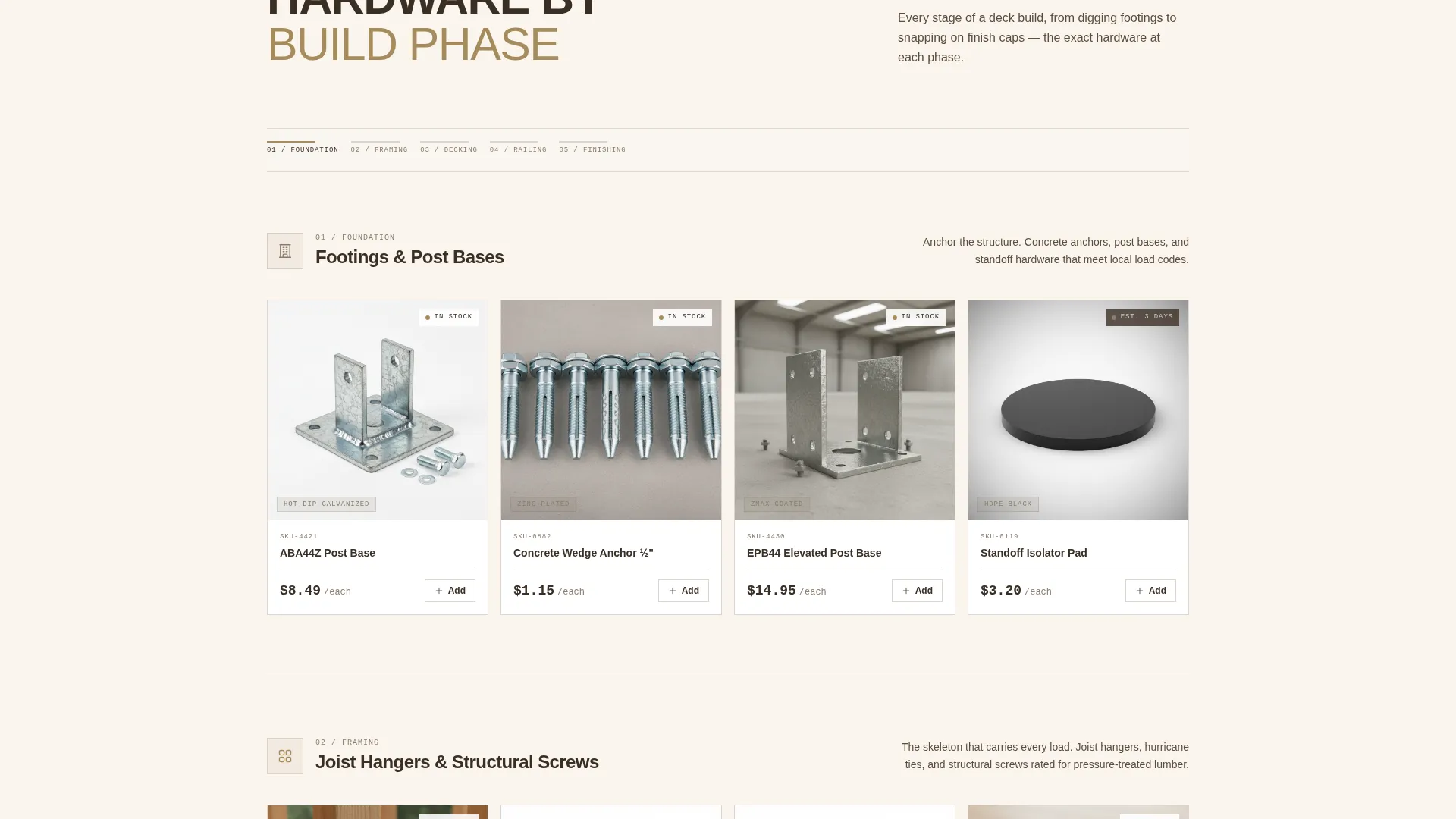
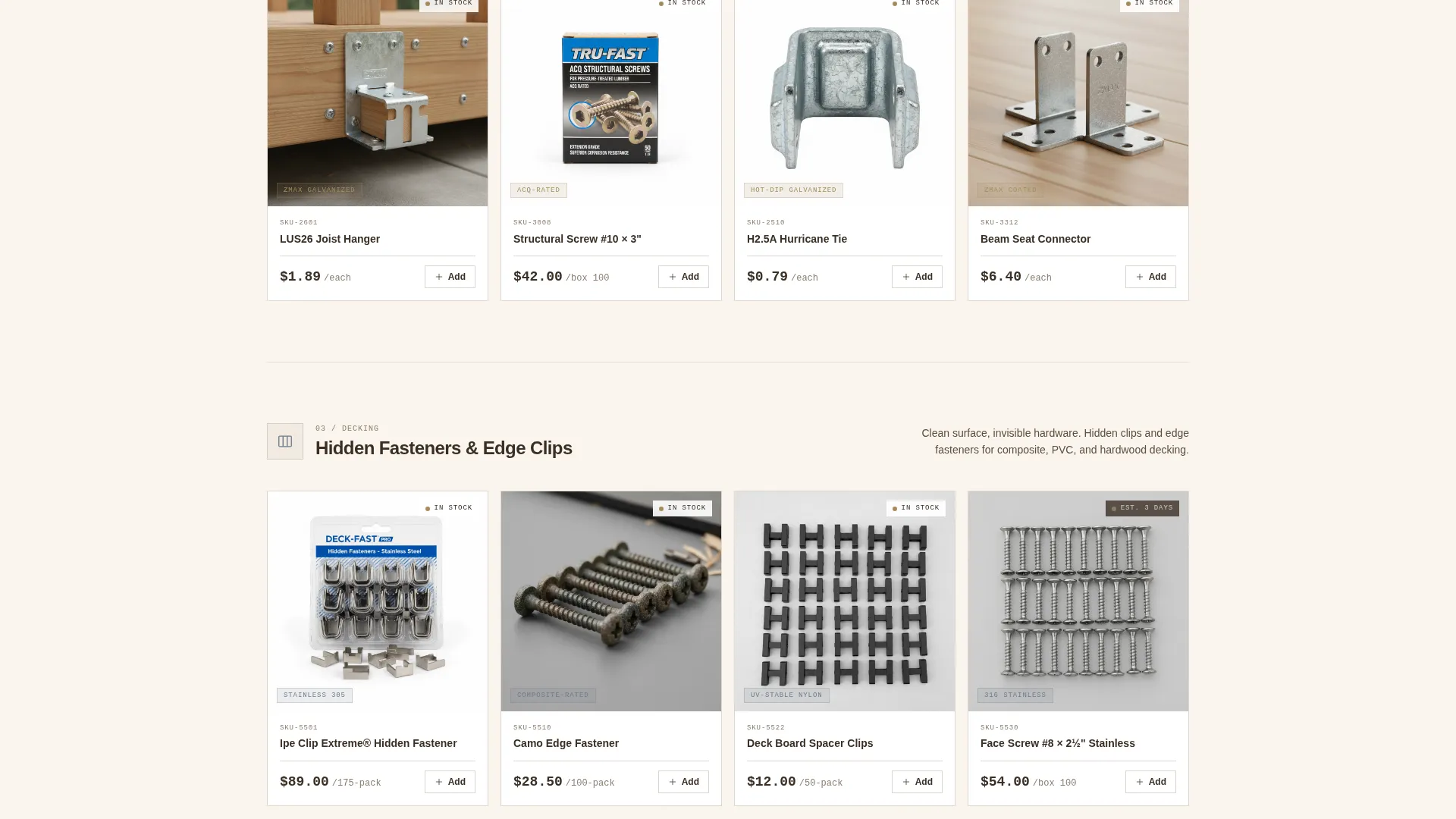
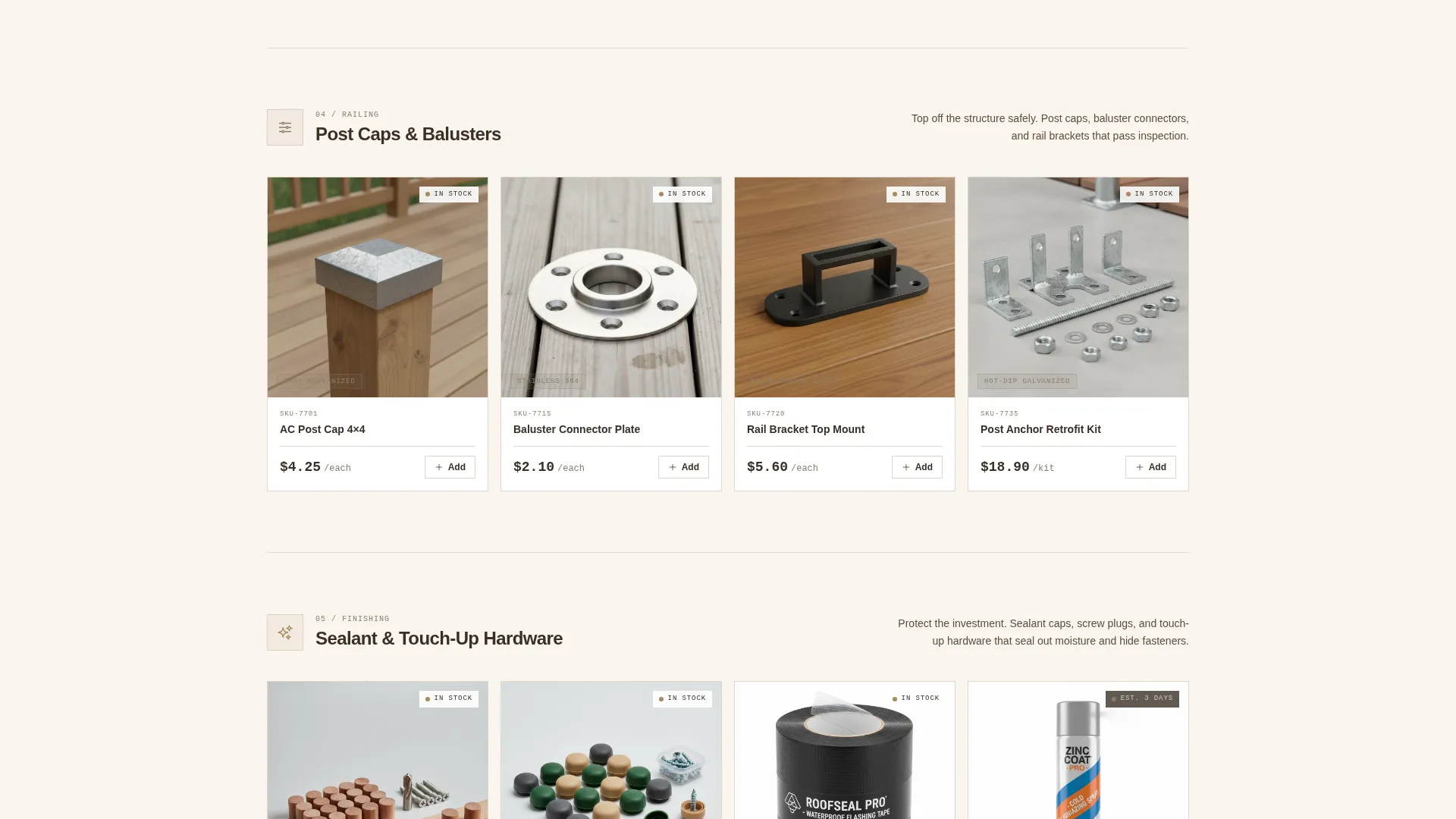
The page scroll follows the five phases of a deck build: foundation, framing, decking, railing, and finishing. Each phase is its own row of modular cards showing the exact hardware required at that stage. Visitors get a mental blueprint of the full project while seeing catalog depth across every phase.
Modular Product Card Grid
Each product card is a self-contained unit displaying the item, its application, and a quick-compare toggle. The grid layout is consistent across all five build stages, making it easy to scan and compare without losing context.
Side-by-Side Comparison Toggle
Each card includes a toggle that stacks two product options side by side. A specs table shows load rating, corrosion resistance, and price per unit for direct comparison, covering pairings like stainless versus galvanized or hidden clip versus face screw.
Persistent Checklist Builder
A floating "Build Your Hardware List" button stays visible throughout the scroll. Clicking it opens a checklist builder where visitors input their deck stage, dimensions, and material type to receive a complete parts list tailored to their project.
Specialist Contact Path
A secondary call to action, "Talk to a Deck Specialist," is available for contractors placing bulk orders or seeking volume pricing. This path keeps high-value trade buyers moving toward a conversation rather than an abandoned cart.
Behind-the-Scenes Header
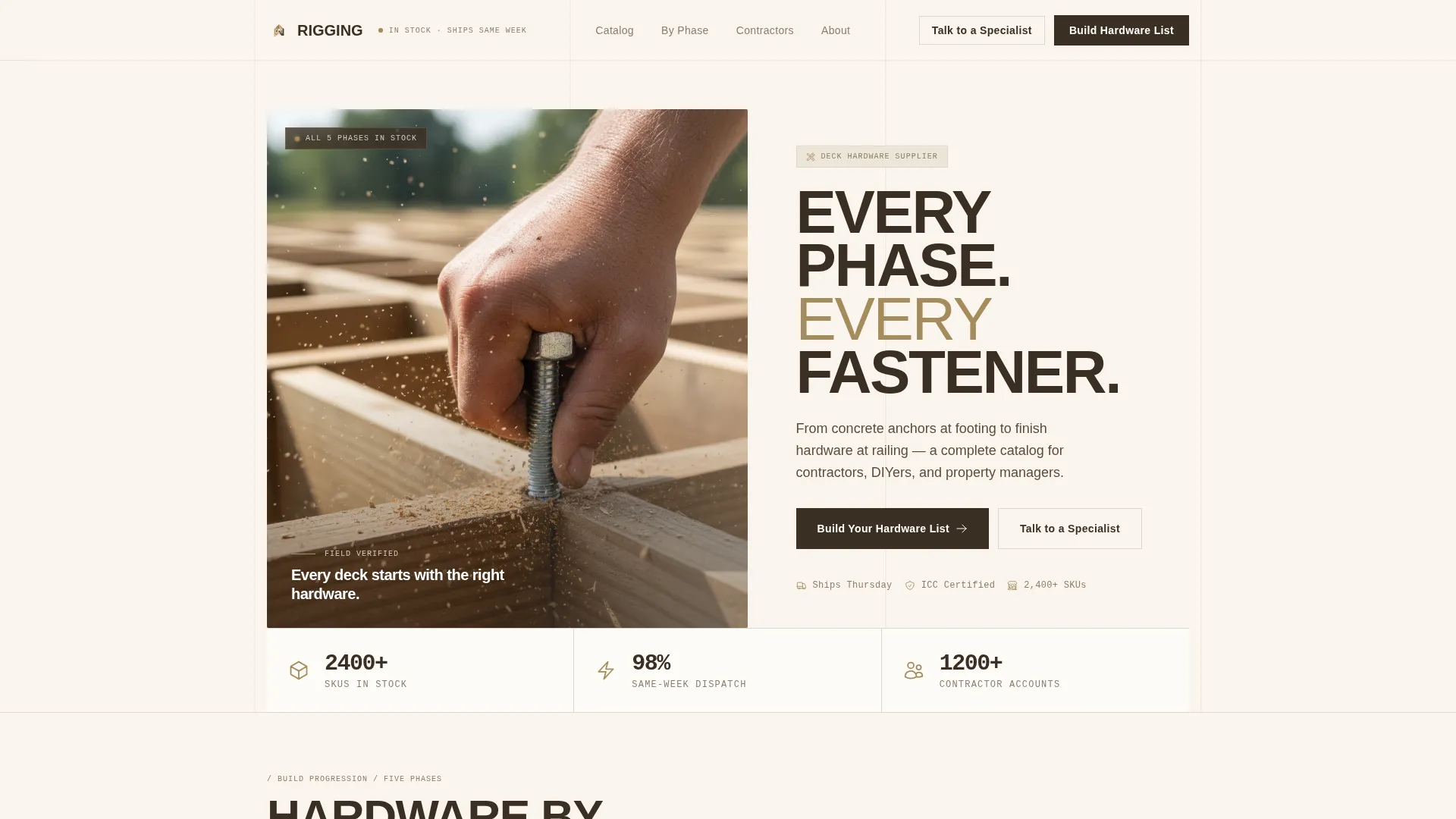
The header uses a close-up, shallow-depth-of-field photograph of a calloused hand driving a lag bolt into a ledger board, with sawdust mid-air and a soft-blur deck frame in the background. A caption fades in: "Every deck starts with the right hardware." It sets a practical, no-glamour tone immediately.
Page sections overview
| Section | Purpose |
|---|---|
| Hero Header | Opens with a real construction photograph and a fading caption to set the tone |
| Foundation Stage Cards | Shows concrete anchors and post bases for the footings phase |
| Framing Stage Cards | Displays joist hangers and structural screws for the framing phase |
| Decking Stage Cards | Features hidden fasteners and edge clips for the decking phase |
| Railing Stage Cards | Presents post caps and balusters for the railing phase |
| Finishing Stage Cards | Covers sealant and touch-up hardware for the finishing phase |
| Comparison Toggles | Lets visitors stack two product options side by side with a specs table |
| Checklist Builder | Floating button opens a parts-list generator based on project inputs |
| Specialist call to action | Secondary path for bulk and volume-pricing inquiries |
Design & branding system
The visual identity follows a Service Utility theme built on a Warm Stone color system. The palette is drawn from real outdoor materials: weathered flagstone, kiln-dried timber, and zinc-coated hardware. It feels honest and worksite-ready without being rough or uninviting.
- Core colors include weathered flagstone (#8B7D6B), kiln-dried timber (#A68B5B), concrete footer gray (#D1CBC3), zinc fastener silver (#6E7B8B) for interactive borders and hover states, and deep creosote brown (#3B2F24) anchoring all body text
- The overall feel is warm grain meeting cool hardware, the same tactile contrast you get running a hand along a freshly sanded cedar rail on a cool morning
- Typography and layout reinforce the Service Utility theme: organized, labeled, and direct, like a well-sorted steel drawer in a professional shop
Mobile & speed optimization
The modular card-grid structure is well-suited for responsive display across screen sizes. Contractors checking specs on a phone mid-build and office-based property managers reviewing orders on a desktop both get a usable layout.
- The card-grid format stacks cleanly on smaller screens without losing the phase-by-phase progression logic
- The floating checklist button remains accessible on mobile throughout the scroll, keeping the primary conversion action always within reach
- The comparison toggle is designed to present specs clearly even on narrower viewports, keeping the two-option table readable without horizontal scrolling
How this template helps you convert
The page is structured around the Comparison/Versus direction, which means every layout decision works to reduce buyer hesitation before asking for a commitment. Visitors arrive with a specific need and leave with a plan.
- The five-stage timeline positions the supplier as a complete source for the entire project, not just a single product category, which builds confidence and increases average order intent before the visitor reaches the call to action
- The side-by-side comparison toggle answers the most common trade buyer question, "which option is right for my project," directly on the page, removing the need to look elsewhere and keeping the buyer closer to a decision
- The floating checklist builder turns browsing into a structured task, giving the visitor a tangible output and a reason to engage before they have committed to anything
Other information about this template
This template sits at the intersection of the Marine and Maritime category, specifically within the Deck Equipment and Hardware niche under Marine Equipment and Supply. While the template focuses on outdoor structural hardware for deck builds, the category context means it is also suited for suppliers whose product range extends to dock hardware, pier fasteners, or marine-grade corrosion-resistant fittings.
- The template style is Card Grid (Modular), making it straightforward to add or reorder product rows as your catalog grows or seasonal inventory shifts
- The Intersection Match Score for this template is 13, reflecting a strong alignment between the Service Utility theme, Warm Stone color system, Timeline Progression creative direction, and the Deck Equipment and Hardware niche
- The header concept is Behind-the-Scenes, which signals authenticity to trade buyers who are skeptical of polished lifestyle photography in a worksite context
Theme
Service Utility
Creative direction
Timeline Progression
Color system
Warm Stone
Style
Card Grid (Modular)
Direction
Comparison/Versus
Page Sections
Five-stage Build Timeline Layout
Side-by-side Product Comparison Toggle
Persistent Checklist Builder Button
Specialist Contact Call to Action
Behind-the-scenes Hero Header
Warm Stone Visual Identity System
Related questions
Can I use this template if I only sell hardware for one or two deck build phases?
How does the side-by-side comparison toggle work?
Is this template suited for suppliers who also sell marine dock hardware?
What does the floating checklist builder do?