Dishwasher Repair Booking Landing Page Template
Rinse is a warm, conversion-focused landing page template built for small dishwasher repair businesses. It opens with a zip-code map interaction that confirms service coverage instantly, then walks visitors through real before-and-after repair photos in a zigzag layout. A step-by-step booking form guides homeowners from zip code to scheduled visit in minutes.
by Rocket studio
Quick summary
Rinse is a single-page template designed for independent dishwasher repair services. It uses a map-based header, alternating before-and-after photo panels, and a guided booking form to turn a homeowner in crisis into a confirmed appointment. The Sunset Mesa color palette keeps every section warm, calm, and trustworthy.
Who this template is for
This template is built for small repair operations that rely on local trust rather than brand recognition. It suits a one- or two-person team that does hands-on appliance repair and needs a page that communicates competence quickly.
- Independent dishwasher repair technicians serving suburban neighborhoods
- Small appliance repair businesses looking to replace a basic web listing with a real booking flow
- Landlords or property managers who want a reliable repair contact page for tenant-facing communication
What problem this template solves
Most repair service pages either look too corporate or feel too bare. Homeowners in a mid-crisis moment need fast reassurance: are you nearby, can you fix this, and how do I book you right now? Generic templates fail that test.
- Visitors leave when they cannot confirm the service covers their area quickly
- Long contact forms feel like paperwork and reduce completed bookings
- Pages without real repair evidence give no reason to trust a new provider
What you get with this template
You get a fully structured, single-page layout built specifically for dishwasher repair booking. Every section has a clear job to do, and the flow moves visitors from doubt to decision without detours.
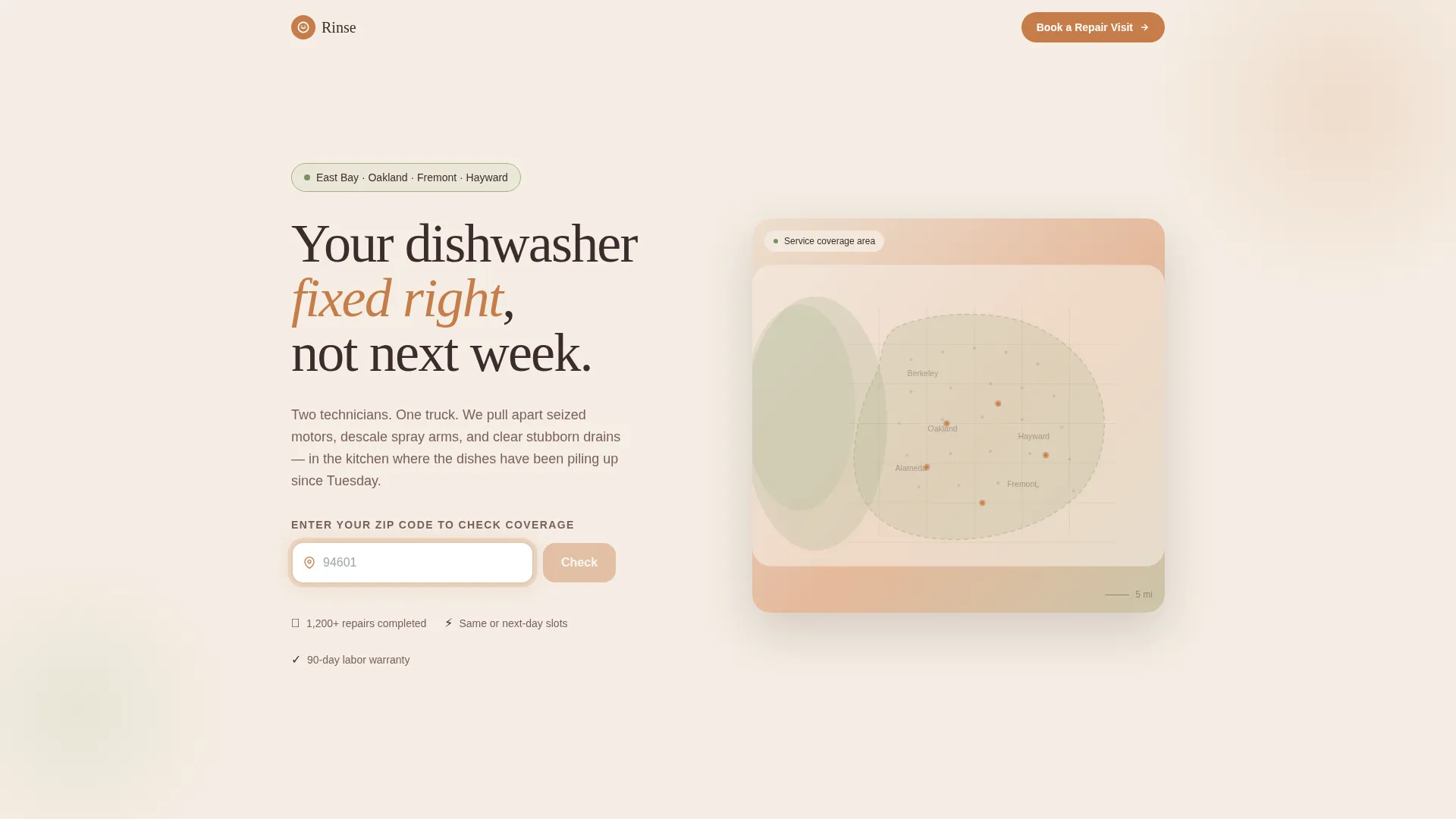
- A zip-code map header that pulses on entry and confirms service coverage
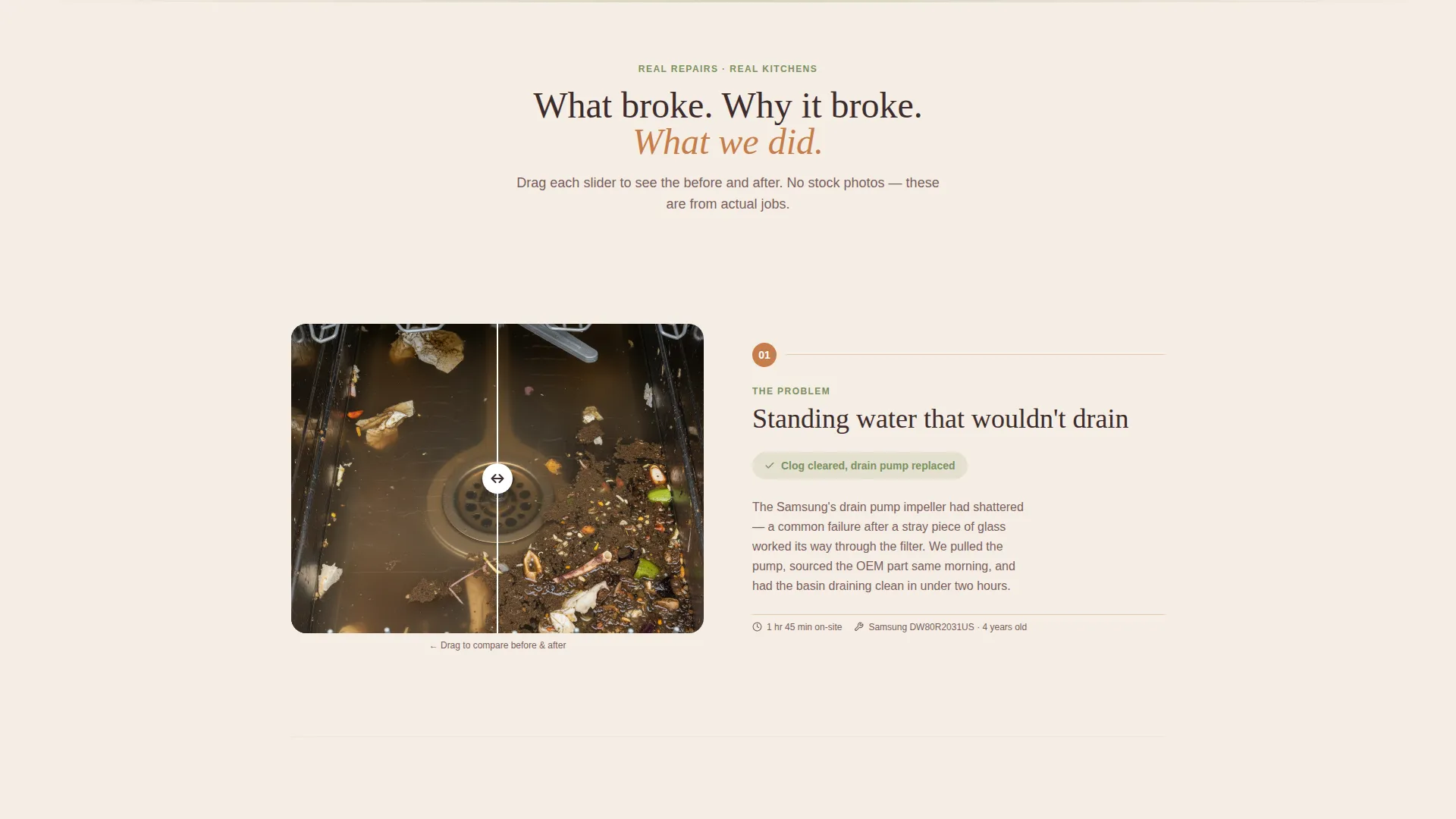
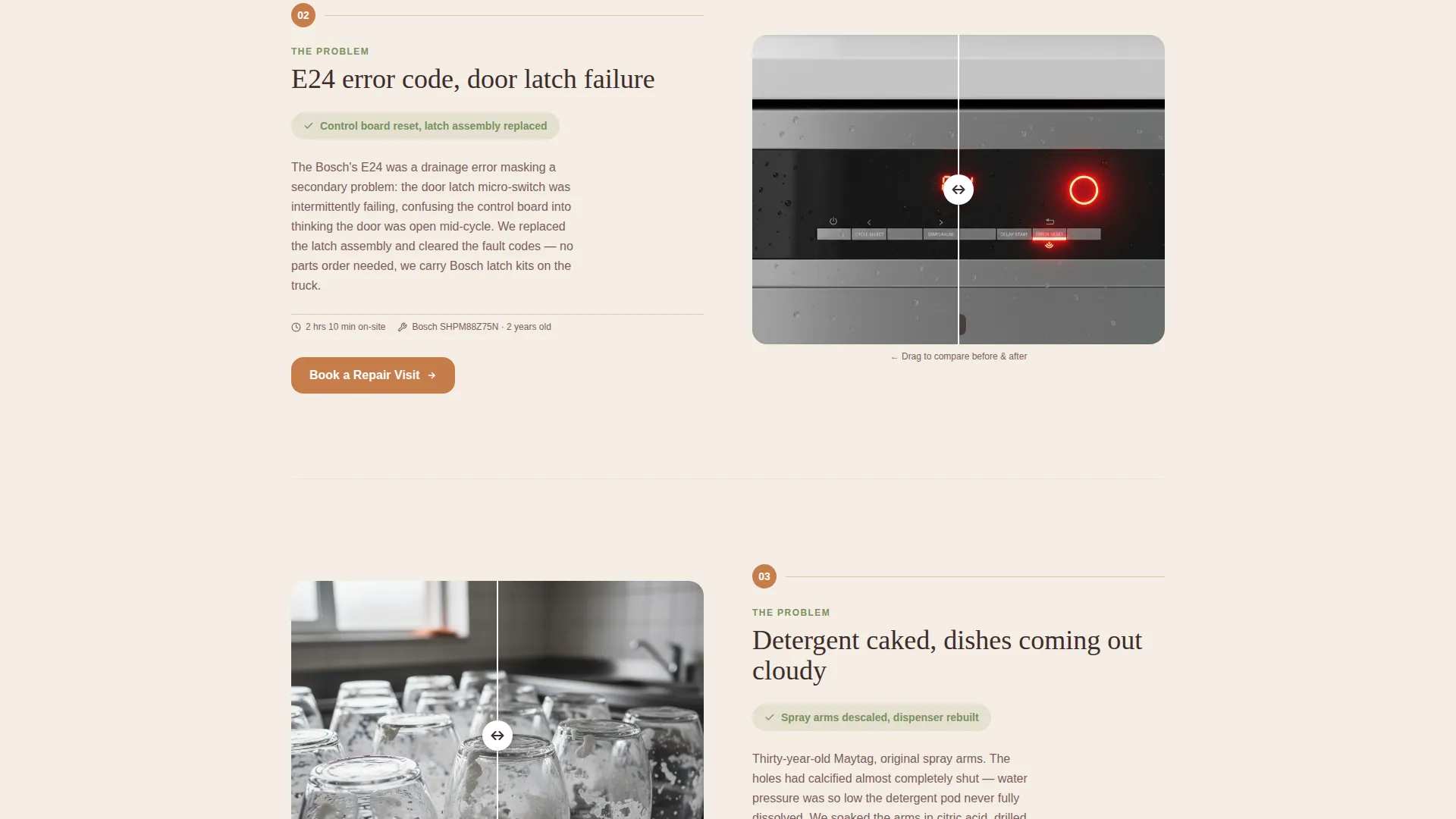
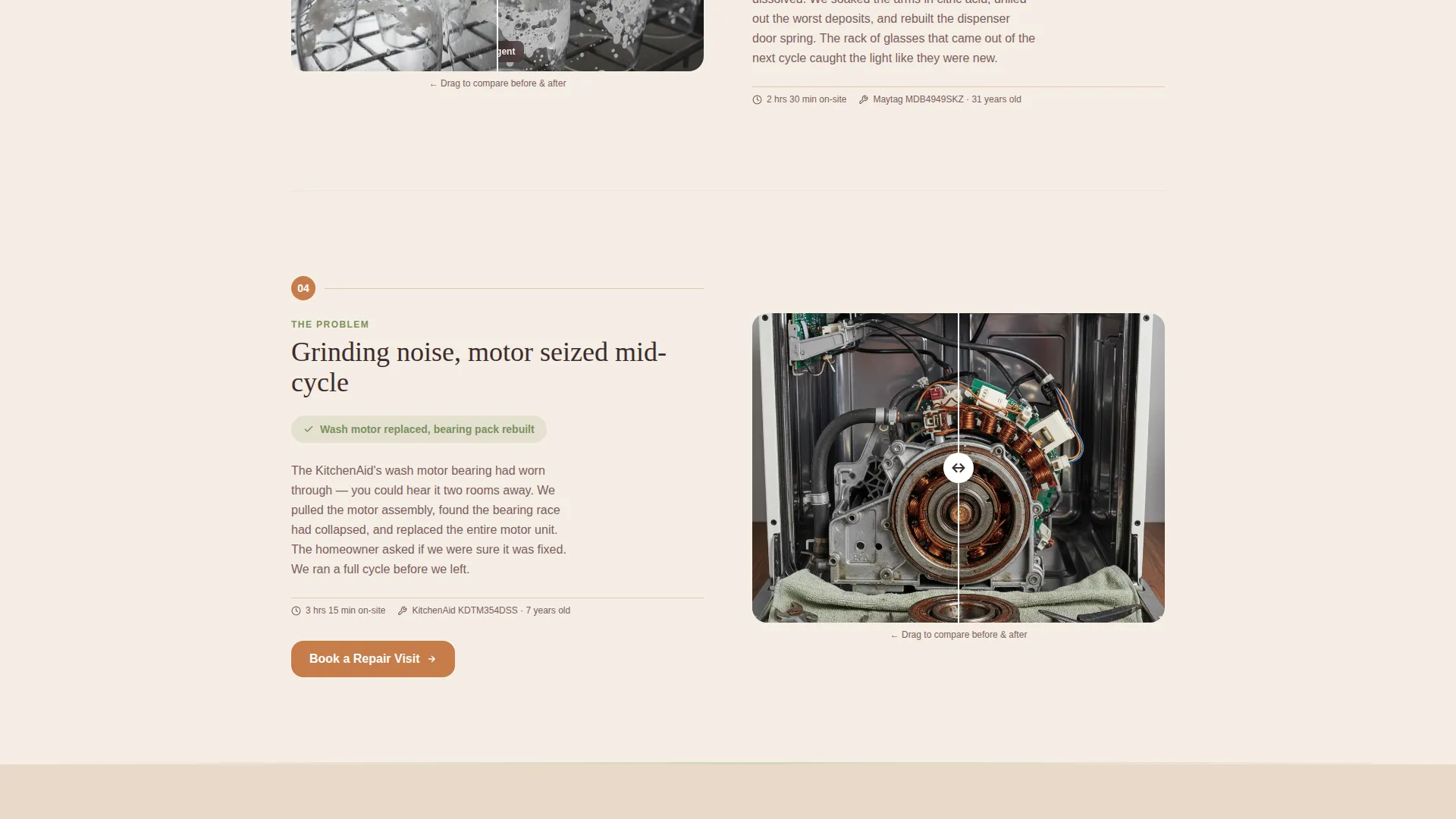
- A zigzag photo layout showing real before-and-after repair moments
- A guided booking form with brand icon selection, symptom picker, and a date chooser
Feature list
This template includes purpose-built components that match the pace and expectations of a homeowner looking for fast, reliable repair help.
Interactive Service Area Map
The header features a softly illustrated map rendered in warm mesa tones. Visitors enter their zip code and the map pulses outward from that point, confirming coverage. A confirmation line reads "We can be there tomorrow." This interaction answers the first question every visitor has before they read another word.
Zigzag Before-and-After Panels
Each alternating section pairs a real kitchen photo showing the problem on one side with the resolved state on the other. Standing water, blinking error codes, and caked detergent contrast with clear drains, lit displays, and spotless glassware. A short plain-spoken caption on each panel explains what broke, why, and what was done.
Guided Booking Form
The booking flow breaks the appointment process into four calm steps: zip code confirmation, dishwasher brand selection via a visual icon grid, symptom selection from a plain checklist, and a date picker showing next-available slots highlighted in terracotta. The form feels like a conversation rather than a data entry task.
Secondary Diagnostic Chat Path
Visitors who are unsure what is wrong with their appliance can follow a secondary path labeled "Not Sure What's Wrong?" This opens a quick diagnostic chat widget that helps them identify the issue before committing to a booking.
Repeating Call-to-Action Placement
The primary call to action, "Book a Repair Visit," appears first inside the map header interaction and repeats at every third section. This keeps the booking path accessible throughout the scroll without interrupting the repair story.
Pastoral Calm Visual Theme
The Sunset Mesa palette runs consistently across every panel. Terracotta anchors buttons and interactive highlights. Sage softens section dividers and icon backgrounds. Clay white breathes across panels, and arroyo shadow grounds headlines. The result feels like a calm, competent presence rather than a pushy sales page.
Page sections overview
| Section | Purpose |
|---|---|
| Map Header | Confirms zip-code coverage and surfaces the first booking prompt |
| Before/After Panel 1 | Shows a common fix like a clogged drain with a plain explanation |
| Booking Call to Action | Repeats the primary booking button after the first repair panel |
| Before/After Panel 2 | Escalates to a mid-complexity repair with a real photo pair |
| Before/After Panel 3 | Covers a complex rebuild scenario with a matching explanation |
| Booking Call to Action | Second repeat of the primary booking prompt mid-page |
| Symptom Selection Section | Lets visitors identify their issue before the full form |
| Full Booking Form | Captures brand, symptom, and preferred appointment date |
| Diagnostic Chat Prompt | Offers the secondary path for undecided visitors |
| Final Booking call to action | Closes the page with the booking button and availability reassurance |
Design & branding system
The Sunset Mesa color system gives every element a desert-kitchen warmth that feels earned rather than applied. The palette is specific enough to feel intentional but neutral enough to let real repair photos carry the story.
- Terracotta (#C67D4A) for buttons, active states, and the highlighted date slots in the booking form
- Faded sage (#A3B18A) for section dividers, icon backgrounds, and soft visual breaks between panels
- Dusted clay white (#F5EDE3) as the base panel background across every section
- Deep arroyo shadow (#3D2C2E) for headline text, grounding each section with quiet authority
Mobile & speed optimization
The layout is built to hold its structure on smaller screens without losing the warmth of the desktop experience. Zigzag panels stack naturally, and the booking form steps remain easy to tap through on a phone.
- The map interaction and zip-code field are centered and touch-friendly on mobile viewports
- The booking form steps are spaced for comfortable thumb navigation on standard phone screens
- Before-and-after photo panels reflow to vertical stacks on narrow screens without losing context
How this template helps you convert
The page earns the booking by building trust in a specific order rather than leading with a generic pitch.
- The zip-code map interaction answers the proximity question first, so visitors know immediately whether the service reaches them before they read anything else.
- The before-and-after zigzag panels demonstrate real competence through documented repairs, giving visitors evidence of quality without requiring testimonials or reviews.
- The step-by-step booking form reduces friction by breaking the commitment into small, familiar choices, making the final "Book a Repair Visit" click feel natural rather than pressured.
Other information about this template
This template was designed around a two-person suburban repair operation where personal trust and fast availability matter more than scale. It suits any independent appliance repair service that handles dishwasher work as a primary or core offering.
- The visual style avoids stock photography of uniformed technicians, relying instead on real kitchen photos that feel honest and unscripted
- The "Not Sure What's Wrong?" diagnostic widget supports visitors who are unsure of their issue, reducing drop-off before the booking form
- The template is built for a single-page flow, making it straightforward to launch without managing multiple pages or navigation structures
- Symptom options in the booking form cover the most common dishwasher complaints: won't drain, won't start, leaking, noisy operation, and error code display
Theme
Pastoral Calm
Creative direction
Before/After Reveal
Color system
Sunset Mesa
Style
Zigzag/Alternating
Direction
Booking/Scheduling
Page Sections
Interactive Zip-code Service Map
Zigzag Before-and-after Panels
Step-by-step Booking Form
Diagnostic Chat Widget
Repeating Primary Call to Action
Sunset Mesa Visual System
Related questions
Can I use this template for a general appliance repair business, not just dishwashers?
Do I need design experience to customize the colors and photos?
How does the zip-code coverage confirmation in the header work?
What does the diagnostic chat widget do?
Is this template suitable for a solo technician or one-person operation?



