Real Estate Agent Comparison & Selection Website Template
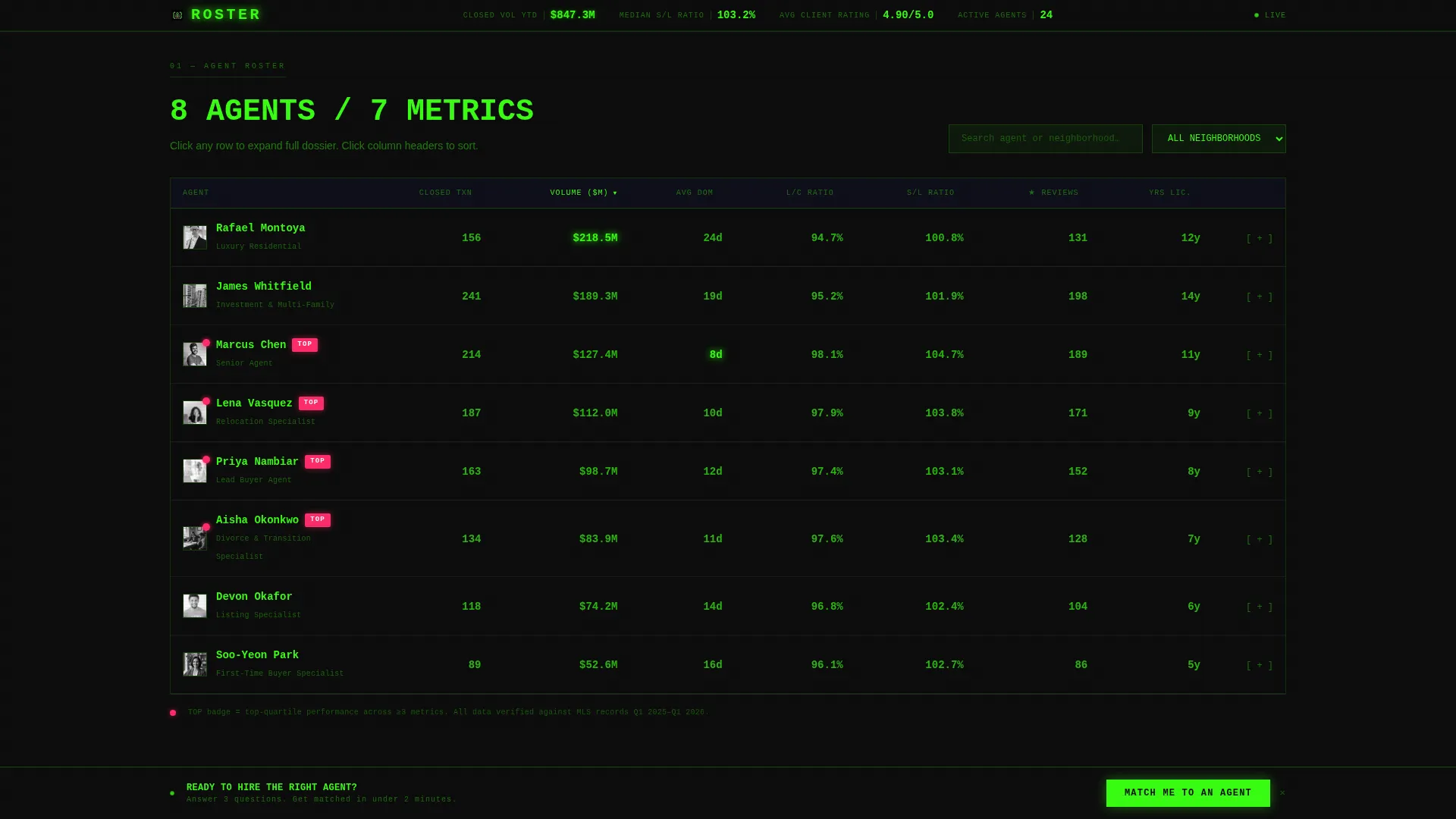
Roster is a data-command landing page template for real estate agency teams. It replaces the typical headshot gallery with a sortable, filterable agent comparison table built around verified performance metrics. Closed volume, days on market, neighborhood coverage, and review counts are all visible at a glance, giving serious buyers and sellers the intelligence they need before reaching out.
by Rocket studio
Quick summary
Roster turns a standard agency team page into a performance intelligence dashboard. Every agent's track record sits in a sortable comparison table, so visitors evaluate on data rather than personality. A sticky "Match Me to an Agent" call to action and expandable inline agent dossiers guide serious buyers and sellers toward a confident, informed next step.
Who this template is for
This template was built for real estate brokerages and agency teams that want to compete on verified performance rather than brand polish. It serves organizations whose clients arrive with specific, data-driven questions.
- Brokerages onboarding relocating tech workers who compare agents by zip-code fluency and closed volume
- Agents representing divorcing couples or first-time buyers who need fast closings and clear communication
- Agency teams tired of losing leads to Instagram-heavy competitors with thin track records
What problem this template solves
Most real estate team pages are vanity galleries. Headshots, slogans, and curated testimonials replace the one thing serious clients actually want: proof. Roster addresses that gap directly by making every metric visible and every claim verifiable.
- Visitors cannot compare agents side by side on a typical team page
- Performance numbers like average days on market and listing-to-close ratio are usually buried or absent
- First-time buyers and relocating professionals leave the page without enough information to make a confident choice
What you get with this template
You get a fully structured, single-page lead generation layout built around one core idea: data earns the click. Every section works together to move a skeptical visitor from curiosity to contact without asking for trust they haven't earned yet.
- A live-stats header rail showing total closed volume year to date, median sale-to-list ratio, and average client rating
- A sortable and filterable agent comparison table with expandable inline dossiers, each containing recent sale addresses, a third-person analyst-style bio, and a direct request button
- A three-step progressive lead form anchored in a sticky bottom bar, plus a neighborhood market context section with median price indicators and seasonal trend bars
Feature list
The template packs a focused set of interactive components, each chosen to serve the data-first visitor experience described in the brief.
Sortable Agent Comparison Table
Every agent occupies one row. Columns cover closed transactions, average days on market, neighborhoods served, five-star review count, years licensed, and listing-to-close ratio. Visitors sort any column with a single click, and filter results to surface the agents most relevant to their situation.
Expandable Inline Agent Dossiers
Clicking any agent row opens an inline dossier without leaving the page. The dossier shows recent closed sales with addresses, a roughly sixty-word third-person bio written in analyst note style, and a "Request This Agent" button that pre-fills the lead form with that agent's name.
Live-Ticking Header Stats Rail
The slim locked-top header displays the brokerage logo alongside three aggregate statistics that update in real time: total closed volume year to date, median sale-to-list ratio, and average client rating. No hero image, no tagline. The numbers function as the headline.
Sticky Match Me Bottom Bar
After the visitor interacts with the comparison table, a sticky bottom bar activates with the primary call to action: "Match Me to an Agent." The bar stays visible as the visitor scrolls, maintaining a low-friction entry point without interrupting the data review.
Three-Step Progressive Lead Form
Clicking the sticky bar or any "Request This Agent" button opens a focused three-step modal. Step one collects the zip code or neighborhood. Step two captures intent (buying, selling, or both) and timeline. Step three gathers name, phone, and optional pre-approval status.
Neighborhood Market Context Section
Below the comparison table, the template layers in supporting market intelligence: neighborhood median price indicators, seasonal trend bars, and school-district overlays. All rendered in terminal green on void black, extending the data-command aesthetic and adding context that justifies agent specializations.
Page sections overview
| Section | Purpose |
|---|---|
| Header Stats Rail | Displays live aggregate brokerage performance numbers |
| Agent Comparison Table | Sortable, filterable roster of all agents by metric |
| Inline Agent Dossier | Expandable row detail with sales history and bio |
| Neighborhood Market Context | Median prices, seasonal trends, school-district data |
| Match Me Form | Three-step progressive modal for lead capture |
| Sticky Bottom Bar | Persistent primary call to action after table interaction |
| Footer | Single-row linear footer with brokerage essentials |
Design & branding system
The visual identity follows a Data Command theme that deliberately avoids real estate industry clichés. The palette and typography treat the page like a mission control screen, where every bright pixel represents something real.
- Color system: void black (#0D0D0D) as the base, terminal green (#39FF14) as the primary data color, cool data gray (#1A1A2E) for panel backgrounds, and signal magenta (#FF2D6B) reserved for top-performer badges and hover states
- Typography pairing: JetBrains Mono for all numerical data and metric displays, DM Sans for body copy, labels, and form fields, creating a clear visual hierarchy between human language and performance data
Mobile & speed optimization
The template is designed desktop-first to honor the Bloomberg-terminal aesthetic at full width. A responsive mobile fallback ensures the core experience holds on smaller screens without losing the data-first structure.
- Desktop-first layout preserves the full comparison table at wide viewports, where sortable columns and inline dossiers are easiest to navigate
- Server components handle the static shell for fast initial load, while client components manage the interactive table, row expansion, and modal form separately
How this template helps you convert
Every structural decision in Roster is oriented toward earning the lead rather than demanding it. The sequence is deliberate: prove competence first, then ask for contact.
- The live header stats and sortable table establish credibility before any form appears, so visitors arrive at the call to action already convinced the brokerage operates at a measurable standard.
- The sticky bottom bar activates only after table interaction, meaning the "Match Me to an Agent" prompt surfaces at the moment a visitor has already shown intent, reducing friction and increasing the likelihood of a completed form.
Other information about this template
This template is part of the Roster collection, a series of agency-facing layouts built around verifiable data rather than visual persuasion. It is categorized under real estate agency website templates with a specific focus on the agent team page niche.
- Template style: Comparison Table, suitable for brokerages with multiple agents and distinct performance profiles
- Theme: Data Command with an Acid Digital color system, making it visually distinct from standard real estate page designs
- The landing page is built for English-language, USD-denominated, US-formatted markets
- Animation intensity is high: ticking counters in the header, table sort transitions, row expand and collapse motion, and sticky bar activation are all included in the interaction layer



Theme
Data Command
Creative direction
Industry Report
Color system
Acid Digital
Style
Comparison Table
Direction
Lead Generation
Page Sections
Sortable Agent Comparison Table
Expandable Inline Agent Dossiers
Live-ticking Header Stats Rail
Three-step Progressive Lead Form
Sticky Match Me Bottom Bar
Neighborhood Market Context Section
Related questions
Can I customize the agent metrics shown in the comparison table?
How does the 'Request This Agent' button connect to the lead form?
Is this template suitable for a small agency team as well as a large brokerage?
Does the sticky bottom bar appear as soon as the page loads?
What makes this template different from a standard real estate team page?



