Emergency Pet Grooming Landing Page Template
Safeguard is a split-screen emergency pet grooming landing page built for 24/7 clinics that handle urgent cases no regular salon will touch. It combines trust-building credential displays, a scrolling testimonial mosaic, and a three-field booking form to move panicked pet owners from first click to confirmed appointment fast.
by Rocket studio
Quick summary
Safeguard is a single-page template designed for emergency pet grooming services that operate around the clock. It opens with credential shields, leads through a testimonial mosaic of real late-night cases, and closes with a frictionless booking form. The tone is calm, authoritative, and reassuring, built for clients who are scared and searching at 2 a.m.
Who this template is for
This template is built for pet care professionals who handle urgent, after-hours grooming situations that standard salons turn away. It fits service providers who need to earn trust fast and convert anxious visitors into booked appointments.
- Emergency and 24/7 pet grooming clinics taking late-night calls
- Veterinary offices looking for a grooming partner for post-surgical discharge prep
- Rescue coordinators managing neglect cases that require trauma-informed grooming care
What problem this template solves
Most grooming websites look like they were built for spa-day appointments, not midnight emergencies. When a pet owner is panicking over porcupine quills or severe matting on a newly rescued animal, a generic booking page loses them immediately.
- Visitors arrive in distress and need immediate confidence that someone qualified will answer
- Standard templates offer no way to communicate emergency availability or specialized credentials
- There is no clear, fast path to booking or calling when every minute feels urgent
What you get with this template
Safeguard delivers a fully structured, single-page layout that guides a distressed visitor through credential proof, social evidence, and a simple booking flow without unnecessary friction.
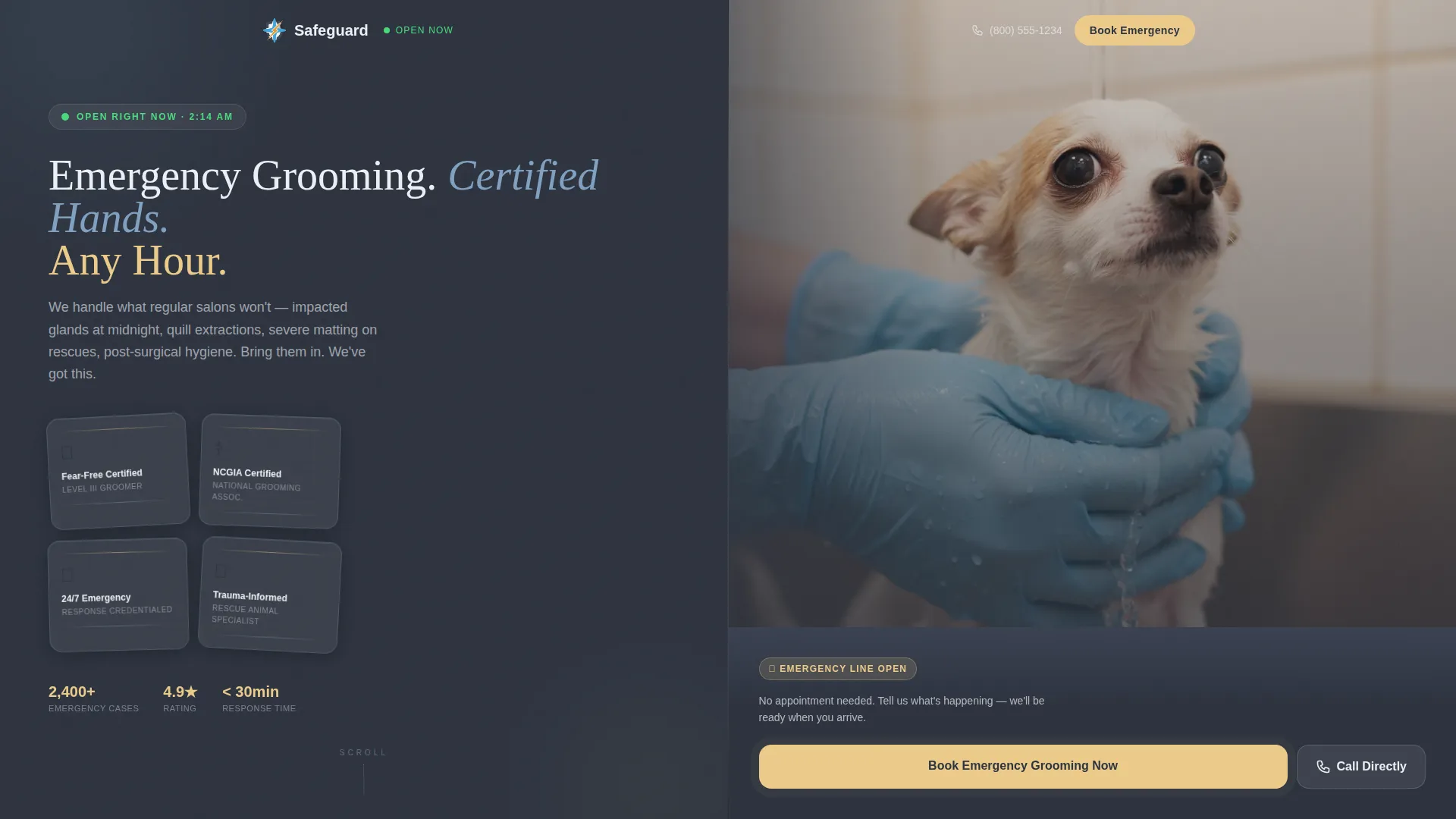
- A split-screen header featuring embossed certification shields alongside a close-up photograph of a calm groomer at work
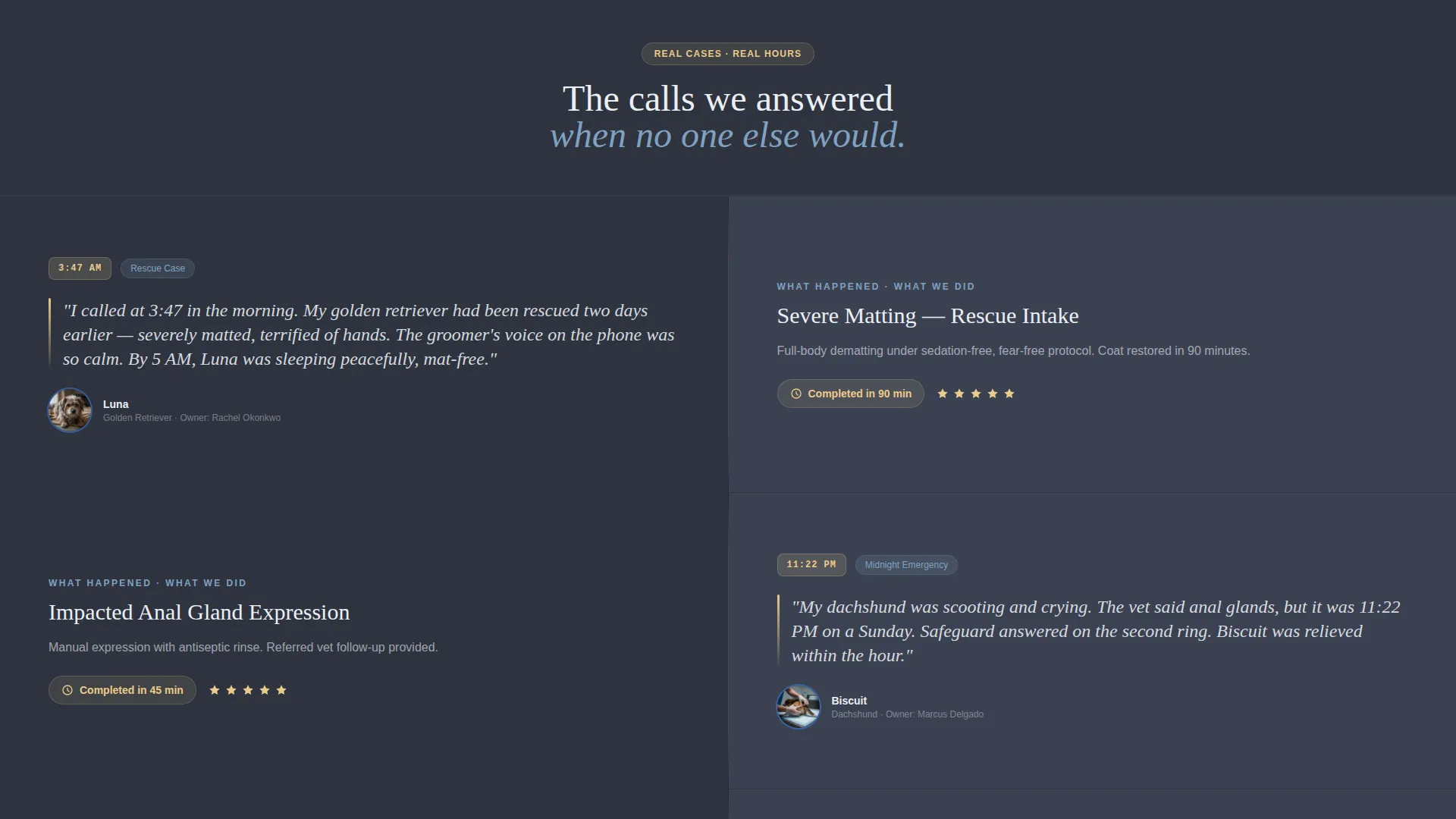
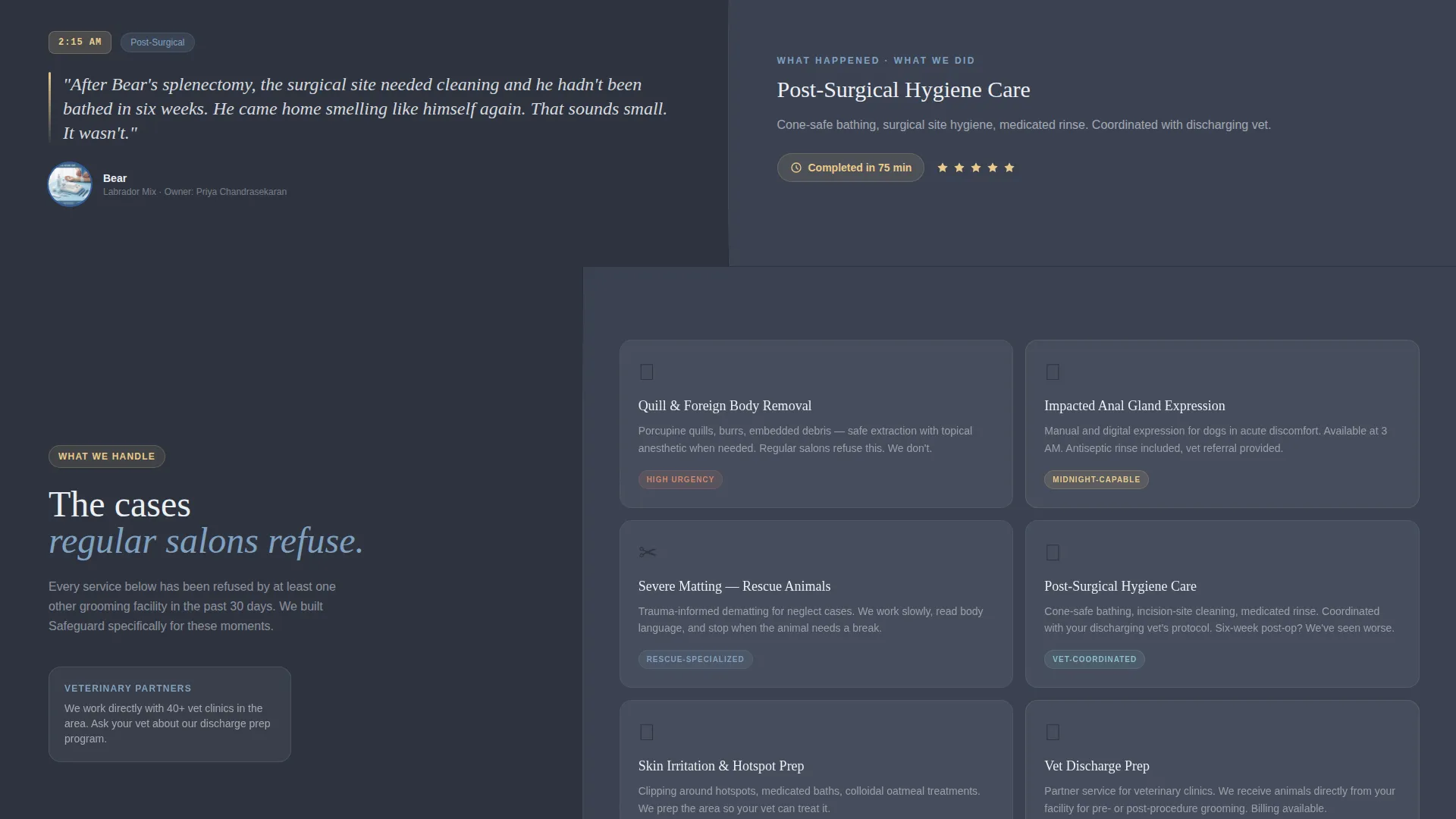
- A scrollable testimonial mosaic pairing client stories with service explanations and real timestamps
- A pinned three-field booking form with an emergency-first time selection and a tap-to-dial secondary option
Feature list
This template includes purpose-built sections and visual components drawn directly from the brief. Each one serves a specific conversion role on the page.
Credential Shield Header
The header opens with a stacked column of certification badges rendered in embossed metallic detail against deep slate. Each badge is slightly rotated like framed diplomas. A headline fades in over the display, anchoring authority before the visitor scrolls a single pixel.
Testimonial Mosaic with Timestamps
Each mosaic block pairs a handwritten-style client quote and pet photo on the left with a service breakdown on the right. Timestamps such as 3:47 a.m. or 11:22 p.m. make the emergency context immediate and believable.
Progressive Before-and-After Grid
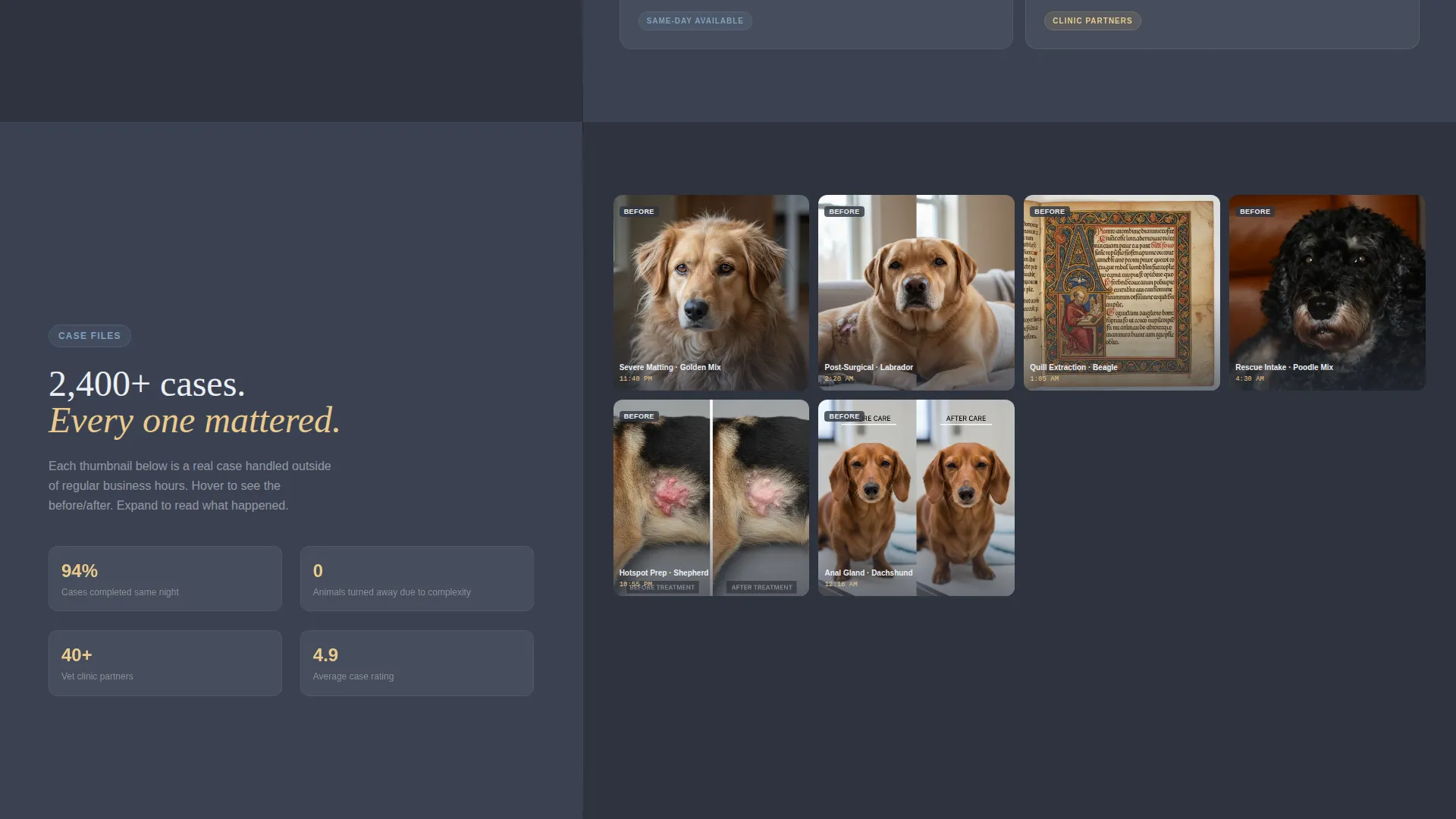
Midway through the page, the mosaic shifts to a grid of fifty thumbnail before-and-after photos. The grid loads progressively as the visitor scrolls, and each thumbnail is expandable. This creates the feeling of opening a case file of successful interventions.
Pinned Emergency Booking Form
The primary call-to-action button reads "Book Emergency Grooming Now" in emergency amber. On mobile it pins to the bottom of the viewport. On desktop it anchors at the top of the right panel. The form collects three fields: pet name and species, issue type via dropdown, and preferred time with "Right Now" as the first option.
Tap-to-Dial Secondary Path
Below the form, a "Call Us Directly" option with a tap-to-dial phone number serves owners who are too panicked to type. This secondary path ensures no high-intent visitor leaves without a conversion option.
Split-Screen Zigzag Layout
Every section uses a 50/50 alternating split. Left panels are anchored in deep courtroom slate and carry the story or credential content. Right panels are washed in clinical sky blue and carry the service context or form. The layout keeps visual pacing fast and purposeful.
Page sections overview
| Section | Purpose |
|---|---|
| Credential Shield Header | Opens with certification badges and a calm groomer photograph to establish trust immediately |
| Headline Fade-In | Displays the core value statement over the credential display |
| Testimonial Mosaic | Pairs individual client stories with service detail to build credibility through accumulation |
| Before-and-After Grid | Progressively loaded thumbnail grid reinforces pattern of competent, real-world results |
| Emergency Booking Form | Three-field form with pinned call to action captures the booking with minimal friction |
| Tap-to-Dial Option | Secondary conversion path for visitors too distressed to complete the form |
Design & branding system
The visual identity follows an Executive Suite aesthetic adapted for veterinary-grade trust. It feels like a well-funded animal hospital intake room: serious enough to trust with your pet's safety, but never cold or intimidating.
- Deep courtroom slate (#3B4252) anchors all left panels and credential displays for a grounded, authoritative feel
- Clinical sky blue (#81A1C1) washes right panels, sterile white (#ECEFF4) fills text backgrounds and form fields, and emergency amber (#EBCB8B) is reserved exclusively for call-to-action buttons and urgent-notice badges
Mobile & speed optimization
The template is structured to perform on a mobile device first, which matters most when a pet owner is searching from their phone at midnight.
- The "Book Emergency Grooming Now" button pins to the bottom of the mobile viewport so it is always one tap away
- The tap-to-dial phone link gives mobile users a direct call path without needing to navigate or type
How this template helps you convert
Safeguard is designed so that every scroll builds enough evidence to eliminate hesitation before the visitor reaches the booking form.
- The credential shield header and fade-in headline establish authority within the first second of landing on the page, reducing the instinct to keep searching elsewhere.
- The testimonial mosaic and before-and-after grid accumulate proof across multiple real cases, so by the time a visitor reaches the form they have already decided to trust the service.
- The three-field form and tap-to-dial option remove the last barriers, offering both a typed and a voice path to booking for visitors at different levels of distress.
Other information about this template
This template is well-suited for professional services businesses in the pet care space that need to present credentials and urgency simultaneously. It works as a standalone emergency grooming landing page or as a dedicated campaign page layered alongside a broader pet groomer marketing presence.
- The Partnership and B2B landing page direction makes it straightforward to position the service toward veterinary clinics and rescue organizations, not just individual pet owners
- The alternating zigzag layout and Team and People creative direction keep the page feeling human and story-driven rather than corporate or transactional
- The Slate and Sky color system is fully adaptable, meaning colors can be adjusted to match an existing brand while keeping the structural hierarchy intact
Theme
Executive Suite
Creative direction
Team & People
Color system
Slate & Sky
Style
Zigzag/Alternating
Direction
Partnership/B2B
Page Sections
Credential Shield Header with Fade-in Headline
Timestamped Testimonial Mosaic
Progressive Before-and-after Photo Grid
Pinned Three-field Booking Form
Tap-to-dial Secondary Conversion Path
Split-screen Zigzag Section Layout
Related questions
What type of business is this landing page designed for?
Can the booking form dropdown be customized for different service types?
How does the template handle both mobile and desktop visitors?
What is the testimonial mosaic and how is it structured?
Is this template suitable for reaching veterinary clinic referral partners?



