Education Department Professional Website Template
SafePass is a sidebar companion landing page built for school district safety teams. It presents a unified command center aesthetic, walking visitors through five operational steps with scroll-linked navigation, a district map visualization, and a clear click-through path to a capabilities assessment. No form required. Just focused, institutional-grade presentation that earns trust before asking for commitment.
by Rocket studio
Quick summary
SafePass is a single-page, sidebar companion landing page designed for school safety departments. It pairs a live-feeling district map header with a five-step scroll journey that turns abstract safety promises into concrete incident responses. The page drives cautious public-sector buyers toward one low-friction action: discovering their district's safety score.
Who this template is for
This template speaks directly to the people responsible for keeping school buildings safe and accountable. It is built for decision-makers who need to present, justify, and operate district-wide safety infrastructure.
- District safety directors who need unified visibility across multiple school buildings and must satisfy state compliance mandates
- Superintendents who need board-ready materials and budget justification for school security investments
- Building principals who need consistent, repeatable lockdown and drill protocols across every wing of every campus
What problem this template solves
Safety departments often struggle to communicate the scale and reliability of their systems to both internal stakeholders and the school board. A generic page with stock photography and vague promises does not build institutional confidence. SafePass solves that gap.
- It replaces abstract safety claims with concrete, scenario-based operational sequences that show exactly how the system responds
- It gives superintendents a secondary take-away link for board presentations, reducing the pressure to commit on the first visit
- It removes the form-fill barrier entirely, making it easier for cautious public-sector buyers to explore before they engage
What you get with this template
You get a fully structured, desktop-first landing page with a sidebar chapter navigation system and a scroll-linked progress indicator. Every section is purpose-built for institutional trust and operational clarity.
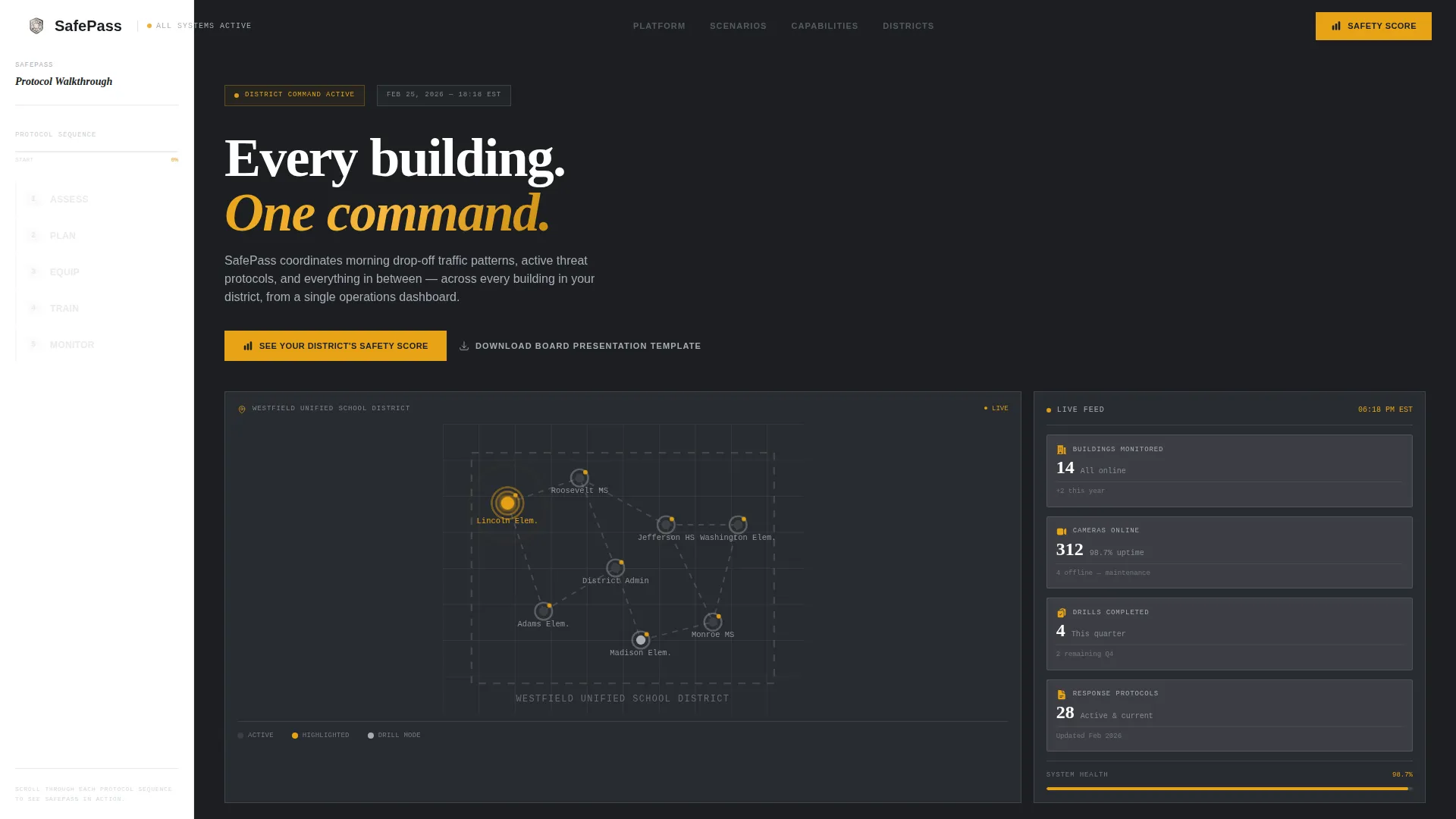
- An interactive district map header with pulsing amber status nodes and a live metrics panel showing buildings monitored, cameras online, and drills completed
- A five-step sidebar navigation (Assess, Plan, Equip, Train, Monitor) with a filling amber progress bar that tracks scroll position through each scenario section
- Two conversion touchpoints: a primary amber call-to-action button and a secondary text link for downloading a board presentation template
Feature list
This template includes a focused set of purpose-built components. Each one is designed to communicate system-level authority and move safety directors toward action.
Interactive District Map Header
The hero section renders a stylized district map in steel grays. School buildings appear as geometric nodes, each marked with a pulsing amber status dot. One building displays concentric notification rings, and a sidebar panel shows real metrics: 14 buildings monitored, 312 cameras online, 4 drills completed this quarter. No stock imagery is used. Authority comes from the infrastructure visualization itself.
Scroll-Linked Sidebar Navigation
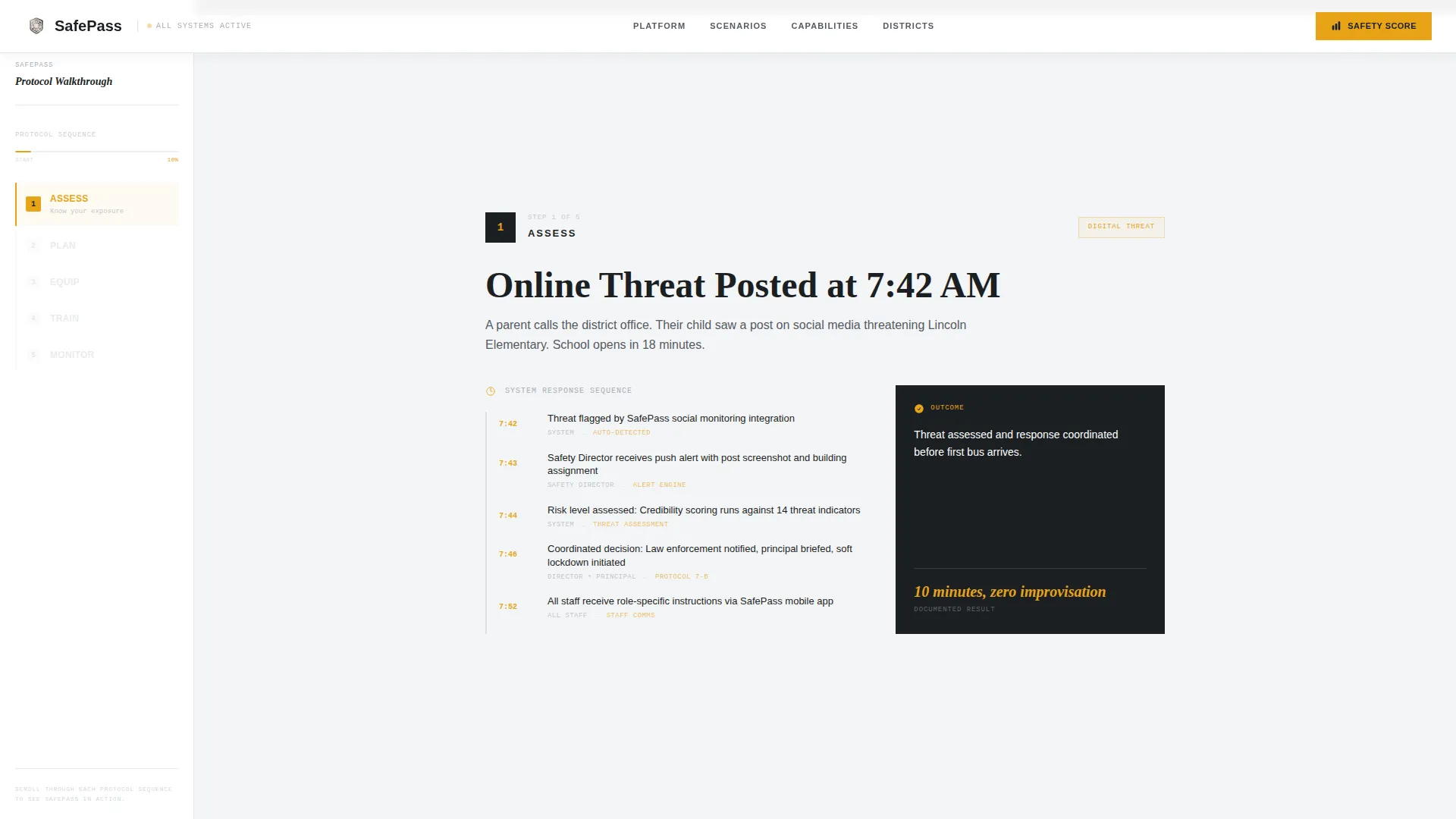
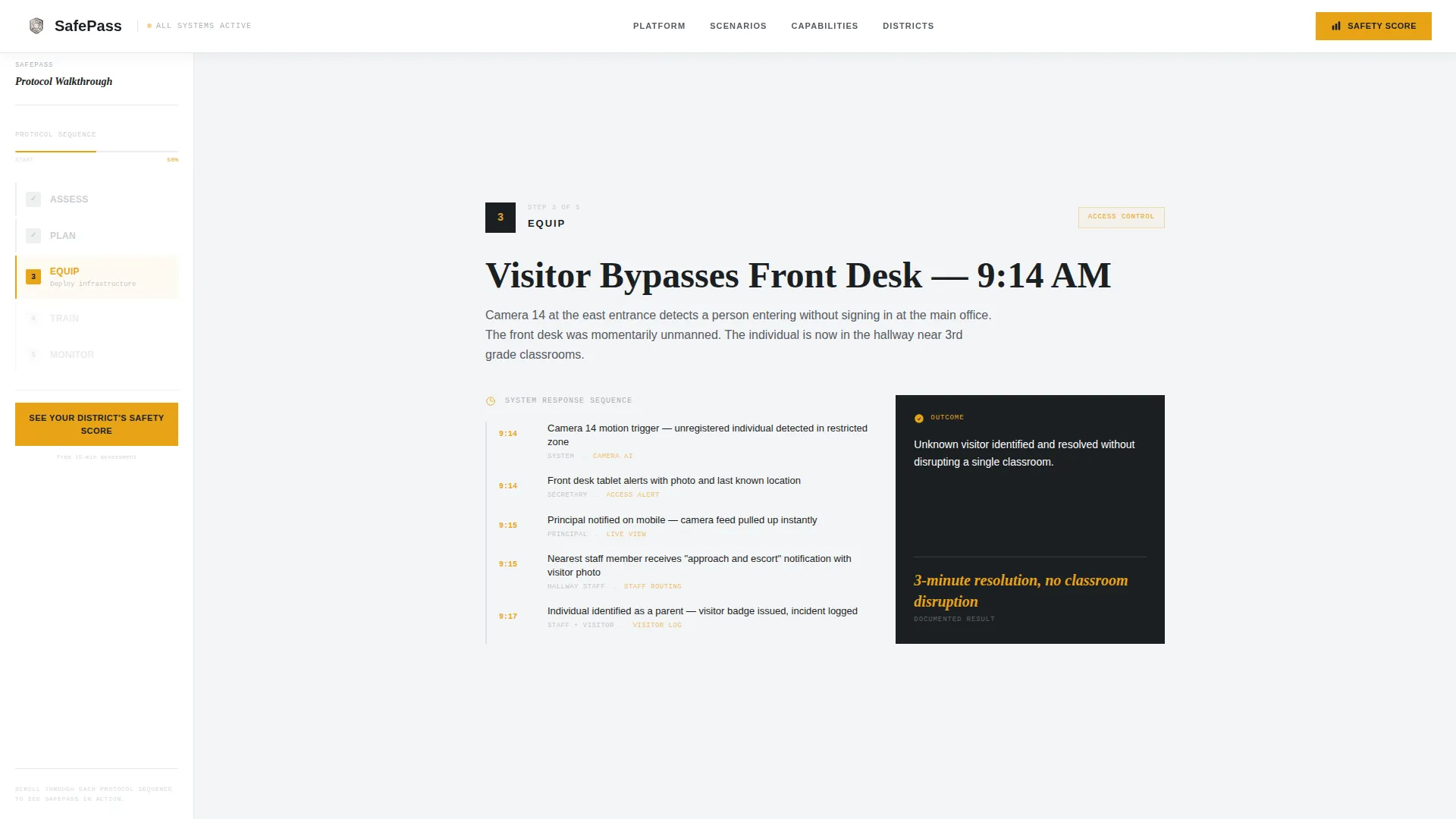
The persistent sidebar displays a numbered chapter list: 1. Assess, 2. Plan, 3. Equip, 4. Train, 5. Monitor. As the visitor scrolls, an amber bar fills progressively to track their position in the journey. Each chapter corresponds to a full-viewport content section in the main area.
Scenario-Based Step Sections
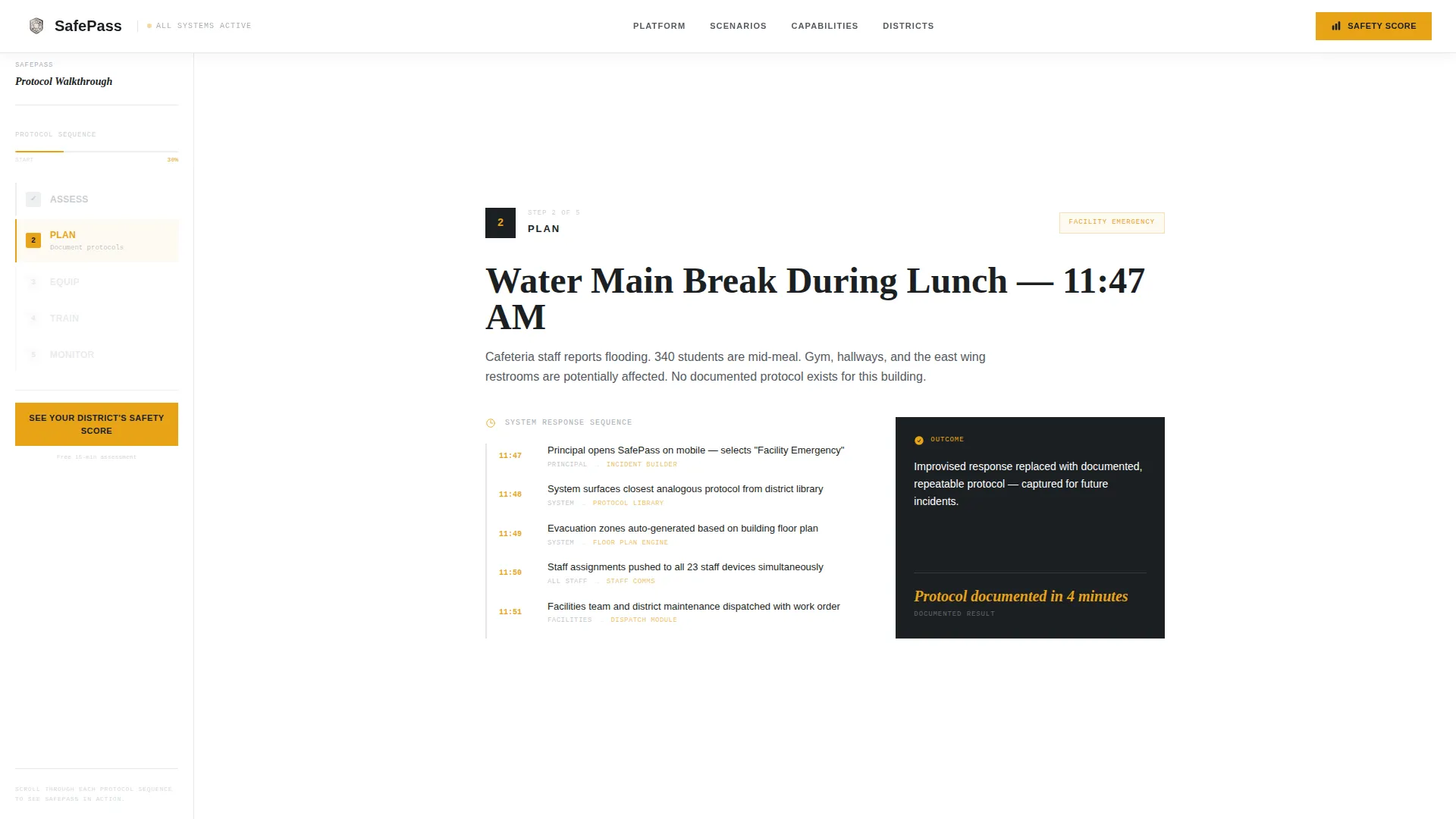
Each of the five steps opens with a specific real-world incident scenario. Examples include a parent calling about an online threat, a water main breaking during lunch, or a visitor bypassing the front desk. The section then walks through exactly how the system responds. This transforms safety promises into operational muscle memory for the reader.
Dual Conversion Touchpoints
The primary call-to-action, "See Your District's Safety Score," appears first in the sidebar after Step 2. It reappears as a fixed bottom bar after Step 4. A secondary text link, "Download the Board Presentation Template," captures the superintendent who needs something tangible before committing to the next step.
Capabilities Bento Grid
An asymmetric bento-style grid section presents the core platform modules. The layout gives each capability its own visual weight without crowding the page or requiring equal-sized cards.
Proof and Metrics Section
A dedicated proof section surfaces district-level metrics alongside named director testimonials and state compliance badges. Specific numbers and real voices replace generic trust signals.
Page sections overview
| Section | Purpose |
|---|---|
| Hero District Map | Establishes system scale with a pulsing node map and live metrics panel |
| Step-by-Step Scenarios | Walks through five incident sequences using scroll-linked sidebar chapter navigation |
| Capabilities Bento Grid | Showcases core platform modules in an asymmetric visual layout |
| Proof and Metrics | Displays district statistics, director quotes, and compliance badges |
| Primary Call-to-Action | Drives click-through to capabilities assessment; no form required |
| Institutional Footer | Closes the page with a minimal developer-style footer adapted for institutional tone |
Design & branding system
The visual identity follows an Institutional Authority theme. Every design choice reinforces the feeling of a well-organized operations room: controlled, sober, and built for pressure rather than aesthetics.
- Color system uses a Monochrome Steel palette: gunmetal base (#3B3F45), brushed aluminum (#A8ADB5), corridor white (#F4F5F7) for backgrounds, and signal amber (#E8A317) reserved exclusively for calls-to-action and alert-state indicators
- Typography pairs DM Sans for body text and user interface elements, Fraunces for editorial headings, and JetBrains Mono for data and metrics displays
- Animations include pulsing map nodes, scroll-linked sidebar progress fill, staggered section reveals, and map node hover states
Mobile & speed optimization
The template is built desktop-first to match how safety directors actually work: at command stations, not on phones. A responsive mobile fallback is included for secondary access scenarios.
- Static page sections use server-rendered components to keep load times predictable for institutional network environments
- Interactive elements, including the district map and scroll-tracking sidebar, are handled as client components to isolate rendering overhead
- The desktop layout prioritizes the sidebar-plus-main-content split, which collapses gracefully on smaller screens without losing navigational clarity
How this template helps you convert
This template is designed around the psychology of cautious public-sector procurement. It reduces commitment at every stage and builds trust through operational specificity rather than marketing language.
- The scroll-based scenario journey converts skeptical readers into informed buyers by showing system responses to real incidents before asking for anything
- The fixed amber call-to-action bar appears only after Step 4, so visitors have already built confidence through four full sections before the prompt to act becomes persistent
Other information about this template
This template is categorized under Government and Public, Education Department, with a specific niche focus on school safety departments. It is suited to business-to-government software-as-a-service contexts where trust, compliance signaling, and board-level communication matter as much as the product itself.
- The page layout style is Sidebar Companion, pairing a persistent navigation panel with full-viewport main content sections
- The header concept is Map-Based, using a district-level geographic visualization instead of photography or illustrated imagery
- The landing page direction is Click-Through, meaning the sole conversion goal is a low-friction button click to a capabilities assessment on the next page
- The creative direction is Step-by-Step Guide, with each numbered chapter building institutional confidence sequentially
- This template does not include a contact form, inline sign-up, or embedded data collection of any kind on the page itself
Theme
Institutional Authority
Creative direction
Step-by-Step Guide
Color system
Monochrome Steel
Style
Sidebar Companion
Direction
Click-Through
Page Sections
Interactive District Map Header
Scroll-linked Sidebar Navigation
Scenario-based Step Sections
Dual Conversion Touchpoints
Capabilities Bento Grid
Proof and Metrics Section
Related questions
Does this template include a contact form or sign-up flow?
Can I update the district metrics shown in the map header?
Is this template designed for multi-building districts only?
What does the secondary text link on the page do?
What device layout does this template prioritize?