Consulting Landing Page Template - Charcoal & Amber
A single-page consulting landing page built for beauty and salon management consultants. It leads with three bold revenue metrics, walks visitors through three side-by-side comparison tables, and captures leads through a direct contact form and a free downloadable pricing audit worksheet. The charcoal and amber design feels serious, warm, and immediately credible.
by Rocket studio
Quick summary
This landing page template is built for a solo beauty and salon management consultant. It opens with an animated stats wall, moves through three expert-led comparison tables, and closes with two lead capture paths. The layout earns trust by showing real financial thinking before asking for anything in return.
Who this template is for
This template is designed for independent consultants who work directly with salon and spa owners. It fits a one-person practice that needs a professional page without a bloated website build.
- Salon business consultants ready to present their methodology online
- Consultants serving clients who run salons with revenue growth but weak profit margins
- Beauty industry advisors helping owners navigate commission, booth rental, or hybrid staffing models
What problem this template solves
Salon owners are often too close to their own numbers to see the problem clearly. A consultant needs a page that communicates credibility fast, before a single call is booked.
- Visitors arrive skeptical and need proof of expertise, not just a list of services
- Most consultant pages bury the value proposition in generic copy instead of demonstrating actual thinking
- Potential clients do not know how to articulate their problem, so the page must name it for them
What you get with this template
You get a complete, single-page lead generation layout structured as a consultation already in progress. Every section is designed to do diagnostic work on the visitor's behalf.
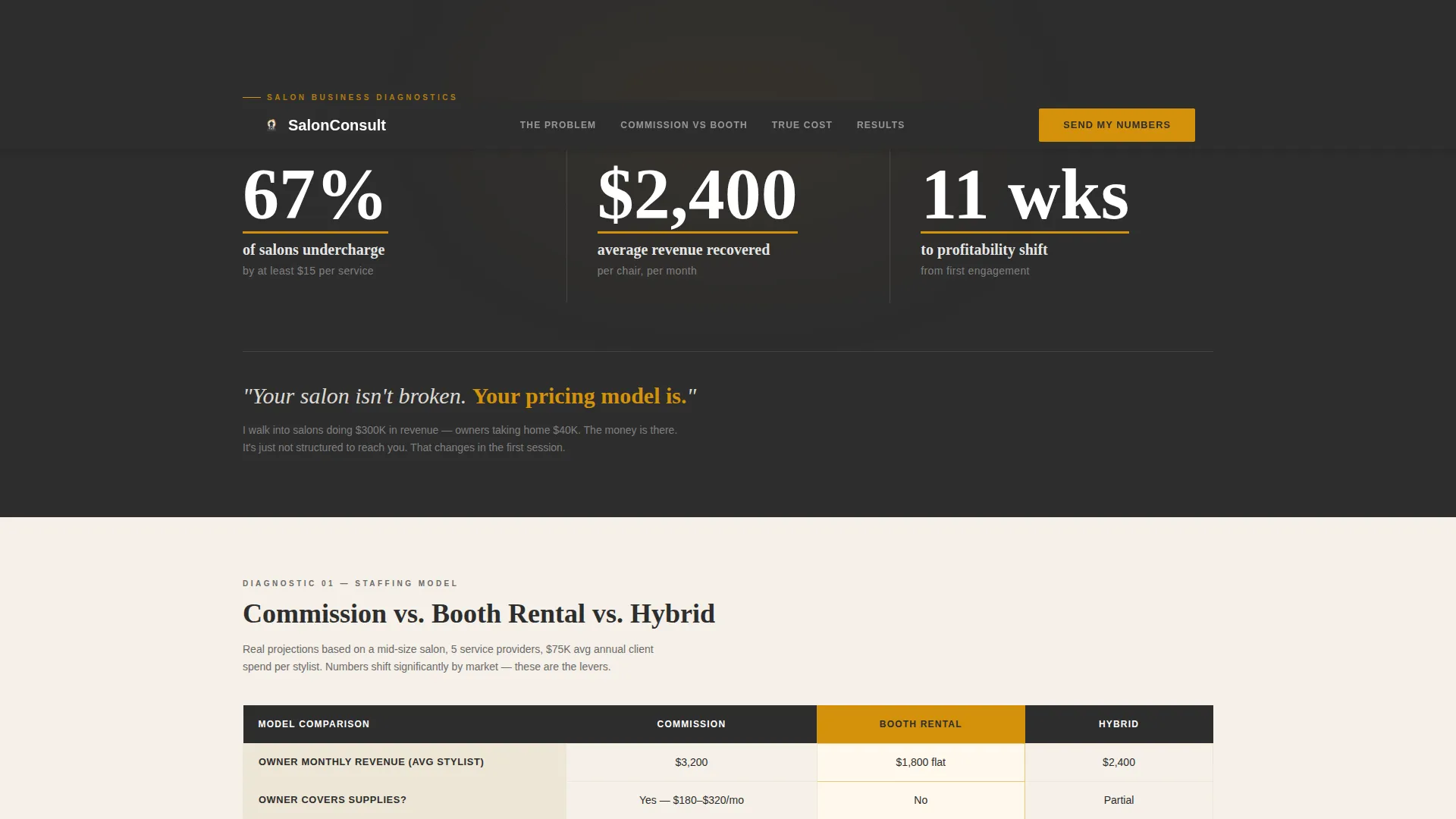
- An animated metrics header with three oversized revenue and profitability statistics
- Three comparison tables covering staffing models, color service cost breakdowns, and before-and-after client profit and loss panels
- A two-path lead capture system: a direct inquiry form and a free downloadable pricing audit worksheet
Feature list
This template is built around a core set of components that demonstrate expertise and move visitors toward action.
Animated Stats Header
Three large numbers count upward against a deep charcoal background. The statistics cover undercharging rates, average revenue recovered per chair, and weeks to a profitability shift. Amber underlines guide the eye across each metric in sequence.
Three Comparison Tables
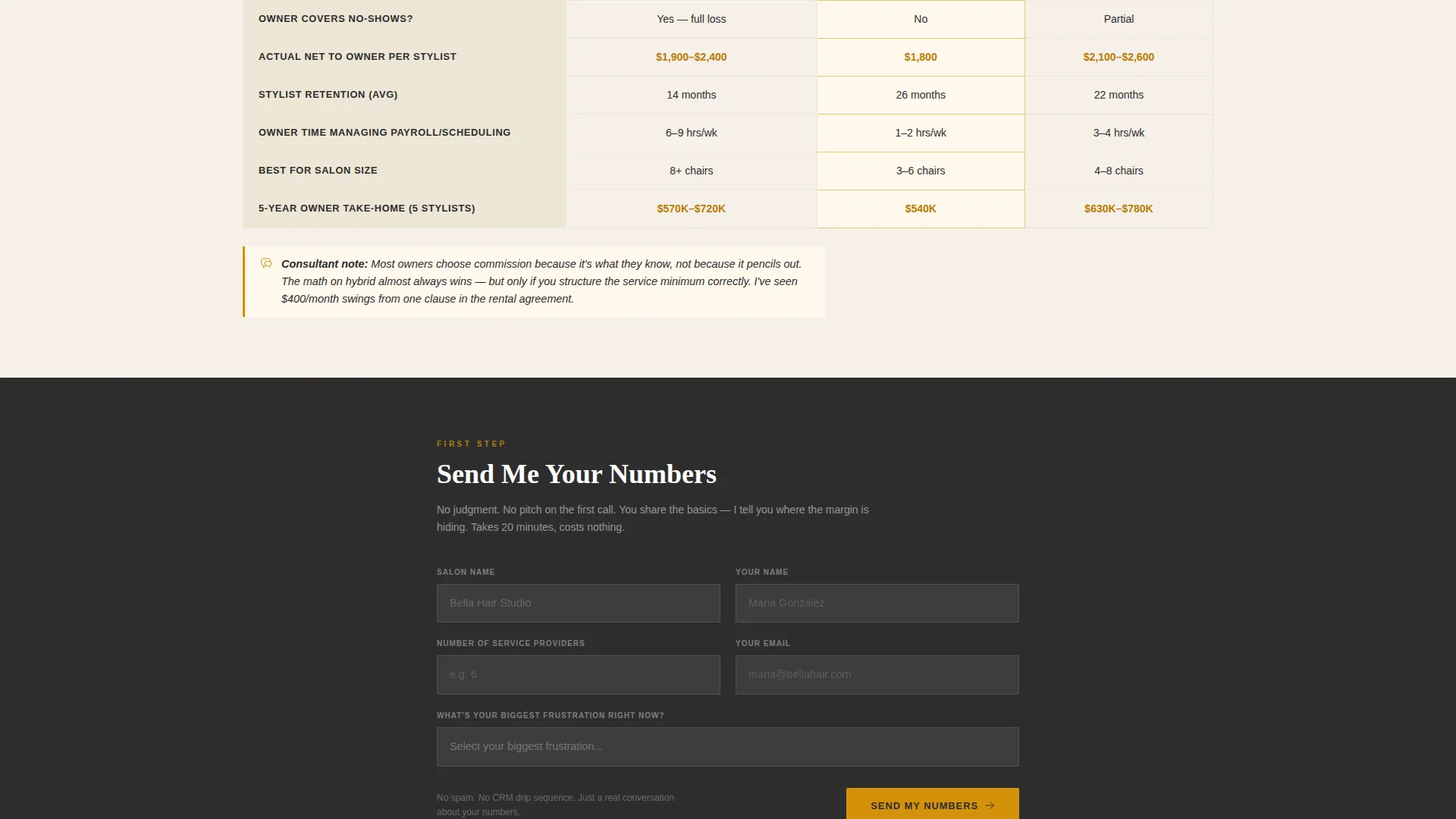
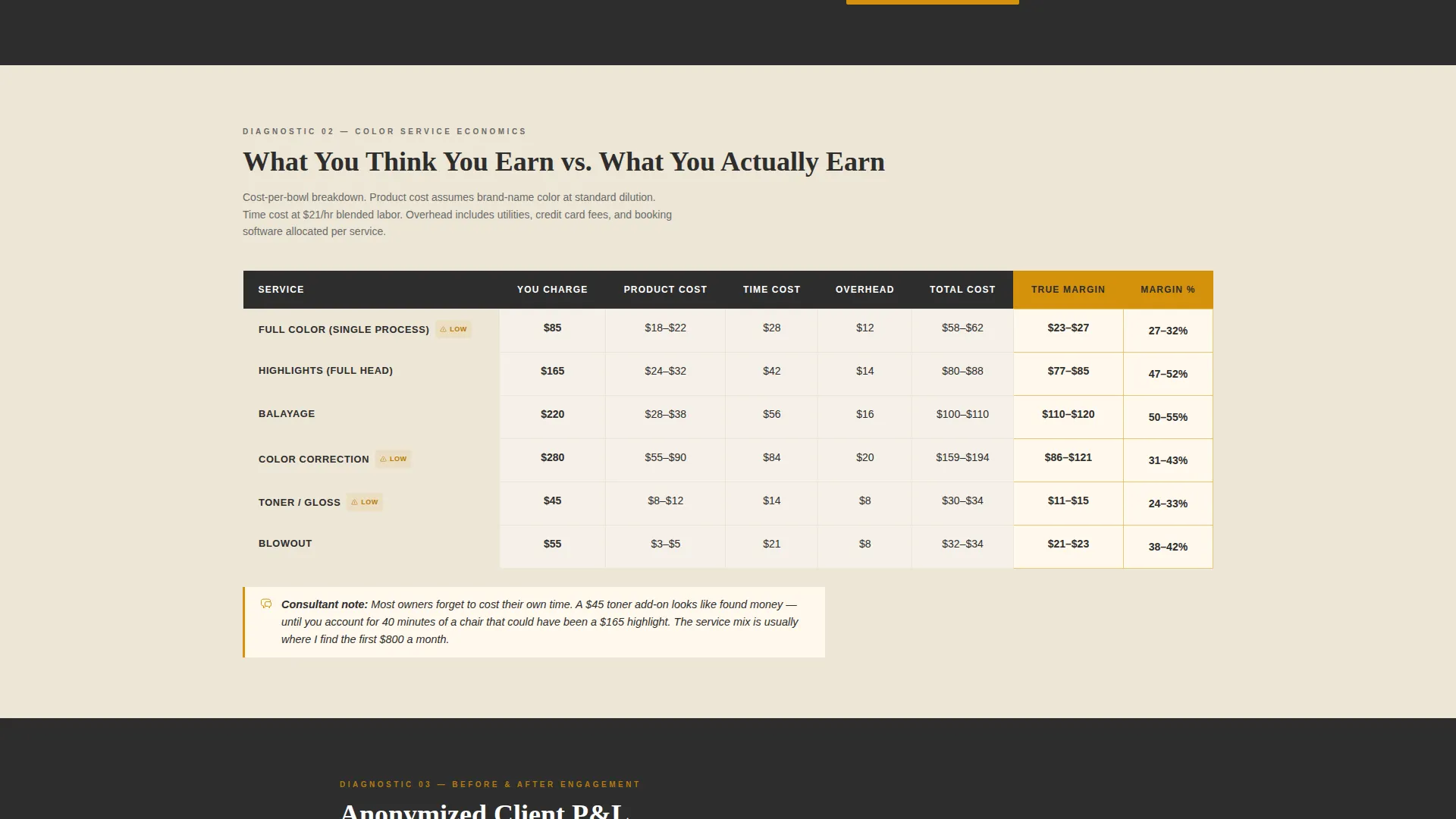
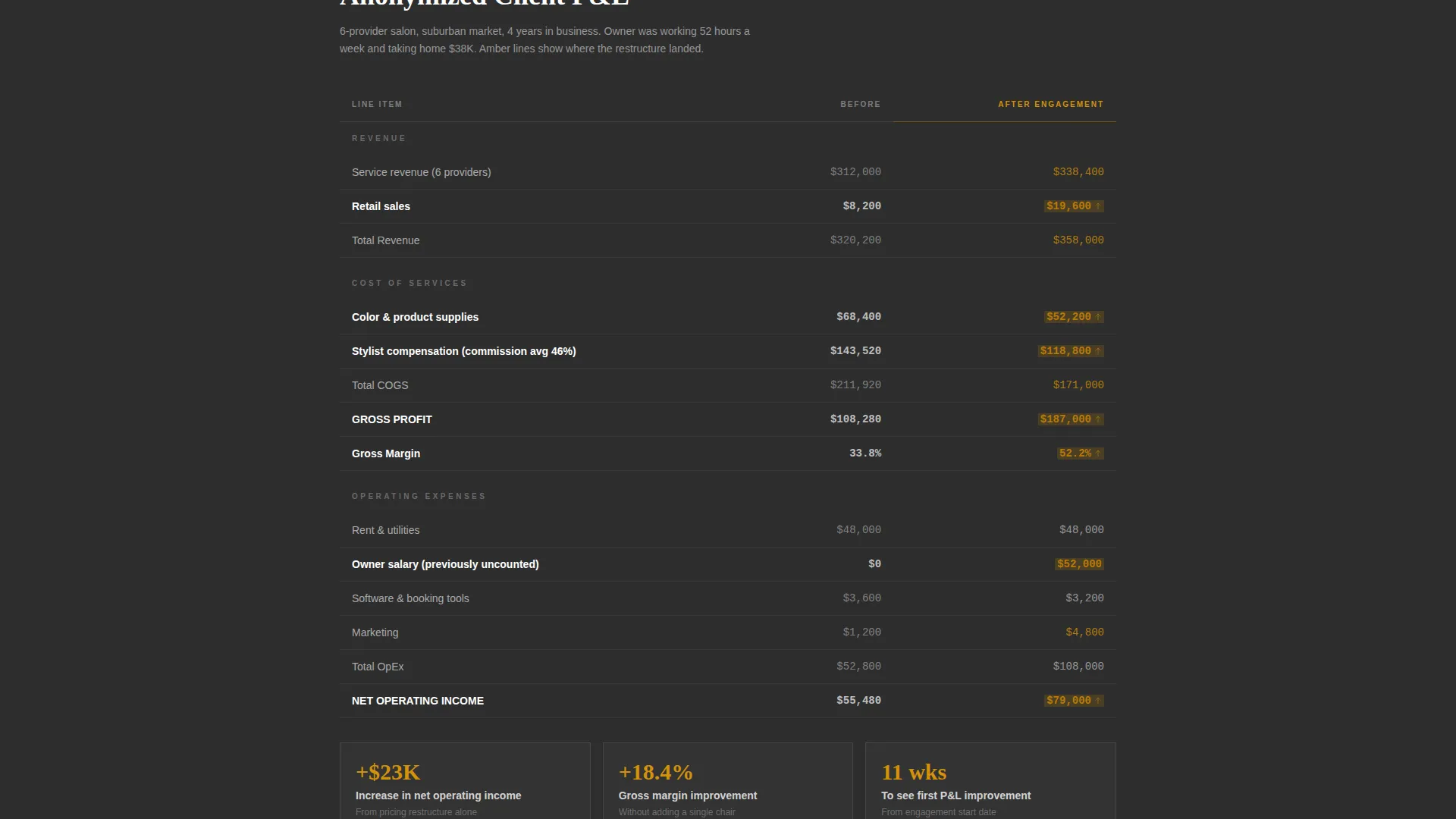
Each table serves a different diagnostic purpose. The first compares commission, booth rental, and hybrid staffing models with dollar projections per stylist. The second breaks down what salons believe they earn on color services versus the actual cost per bowl. The third shows anonymized before-and-after client profit and loss statements with amber-highlighted line items.
Expert Annotation Layer
Each comparison table includes a short italicized consultant note. These are written as direct, blunt observations rather than sales copy. They reinforce the consultant's voice and demonstrate real industry knowledge.
Primary Lead Capture Form
Placed after the second comparison table and repeated at the bottom of the page. The form collects salon name, number of service providers, and a dropdown asking for the visitor's biggest current frustration. Dropdown options reflect real pain points: retention, profit gaps, and pre-opening uncertainty.
Downloadable Pricing Worksheet
A secondary conversion path for visitors who are not ready to book a call. An amber button offers the free pricing audit worksheet in exchange for an email address. This path captures early-stage leads before they are ready to commit.
Service Utility Visual System
The layout uses a warm but serious design language. Deep charcoal anchors the page, amber draws attention to data and calls to action, soft linen creates breathing room in table cells, and muted graphite handles supporting type and borders.
Page sections overview
| Section | Purpose |
|---|---|
| Metrics Stats Wall | Opens with three animated revenue and profitability numbers to establish instant credibility |
| Hero Headline | Delivers one direct line that names the real problem: pricing, not the salon itself |
| Commission versus. Rental Table | Compares three staffing models with dollar projections and an expert annotation |
| Color Service Cost Table | Shows the gap between perceived and actual earnings on color services |
| Primary call to action Form | Collects salon name, provider count, and current frustration via dropdown |
| Before and After Panel | Displays anonymized client profit and loss data with highlighted margin improvements |
| Pricing Worksheet call to action | Offers a free downloadable worksheet to capture email leads at a lower commitment level |
| Bottom call to action Repeat | Repeats the primary form to catch visitors who scrolled past the first placement |
Design & branding system
The visual identity follows a Service Utility theme. It pairs the authority of financial reporting with the warmth of a trusted advisor. The overall feel is described in the brief as a leather-bound appointment book next to a brass desk lamp.
- Deep charcoal (#2D2D2D) anchors primary backgrounds and text blocks; warm amber (#D4920B) highlights data callouts, accent lines, and call-to-action buttons
- Soft linen (#F5F0E8) provides breathing room in table cells and section breaks; muted graphite (#6B6B6B) handles secondary type and table borders
- Typography uses a clean serif for metric figures and headlines, reinforcing a financial-report aesthetic without feeling cold or corporate
Mobile & speed optimization
The page layout is structured for clean rendering across screen sizes. Table-heavy designs require deliberate layout choices to stay readable on smaller devices.
- Comparison tables are built to adapt for narrow viewports without losing their column structure or readability
- The animated stats header and amber accent system maintain visual hierarchy on mobile without relying on images or photography
How this template helps you convert
This template is built around two conversion paths and a scroll structure that earns trust before asking for commitment.
- The comparison tables do visible analytical work for free, which positions the consultant as the expert a visitor wants to hire before the form even appears.
- The primary "Send Me Your Numbers" form, placed mid-page and repeated at the bottom, captures visitors who are ready to start a conversation with a low-friction three-field entry.
- The pricing worksheet download button offers a second path for visitors who need more time, converting them into email leads without requiring a call commitment.
Other information about this template
This template is a strong fit for beauty and salon management consultants who want a page that reflects the depth of their practice. It is built to communicate without overselling.
- The page uses no stock photography of smiling women in robes; the numbers and tables carry the visual weight instead
- The dropdown frustration options in the lead form ("I cannot keep stylists," "Revenue is up but profit is not," "I am about to open and do not know where to start") are pre-written to reflect real salon owner pain points
- This template works well for consultants building a client base in the spa management, booth rental advisory, or salon profitability space
- The before-and-after profit and loss panel uses anonymized client data format, making it usable even for consultants early in their practice
Theme
Service Utility
Creative direction
Expert Panel
Color system
Charcoal & Amber
Style
Comparison Table
Direction
Lead Generation
Page Sections
Animated Metrics Stats Wall
Three Diagnostic Comparison Tables
Italicized Expert Annotations
Two-path Lead Capture System
Service Utility Color and Type System
Repeating Bottom Call to Action
Related questions
Can I edit the comparison table data with my own numbers?
Do I need design experience to customize the colors and fonts?
What should I put in the before-and-after panel if I am new to consulting?
Is the pricing worksheet download file included with the template?
Can I use this template if I offer group workshops instead of one-on-one consulting?



