Seal - Executive Mobilenotary Landing Page Template
Seal is a sidebar companion landing page template built for executive mobile notary services. It combines a deep plum and champagne ivory palette with a pinned graphite sidebar to position a mobile notary as an indispensable professional partner. The layout guides title companies, law firms, and real estate brokerages toward a partnership inquiry with quiet authority and operational proof front and center.
by Rocket studio
Quick summary
Seal is a landing page template designed for a mobile notary service targeting professional partners. It uses a sidebar companion layout, an expert-panel scroll structure, and a refined Executive Suite color palette to present the notary as a subject-matter authority. Every section builds credibility before asking visitors to commit to a signing partnership.
Who this template is for
This template speaks directly to mobile notaries who work with institutional clients rather than one-off walk-ins. It is built for professionals who position their service as a reliable operational partner to other businesses.
- Title company closers managing multiple concurrent file deadlines
- Elder law attorneys who require discreet bedside signing arrangements
- Real estate brokerages that lose deals when notary access is unavailable after business hours
What problem this template solves
Professional partners such as title companies and law firms often cannot afford to let signings become a scheduling bottleneck. They need to know quickly whether a notary is qualified, available, and equipped for their specific scenario. A generic service page does not answer those questions with enough confidence.
- Visitors struggle to assess notary credentials and scenario coverage at a glance
- Partnership-ready leads leave before finding the right contact path
- Operational proof like response time and coverage radius is buried or missing entirely
What you get with this template
You get a fully structured, single-page layout that moves a professional visitor from first impression to partnership inquiry without unnecessary friction. The page is built around the notary's authority rather than a generic service description.
- A typographic manifesto header with founder credentials presented in letterhead style
- A pinned graphite sidebar that updates contextual trust signals as visitors scroll
- Two conversion paths: a partnership inquiry form and a gated signing partner guide download
Feature list
This template includes a set of purpose-built sections and interactive components drawn directly from the brief. Each one serves a specific role in moving a professional visitor toward a signed partnership.
Typographic Manifesto Header
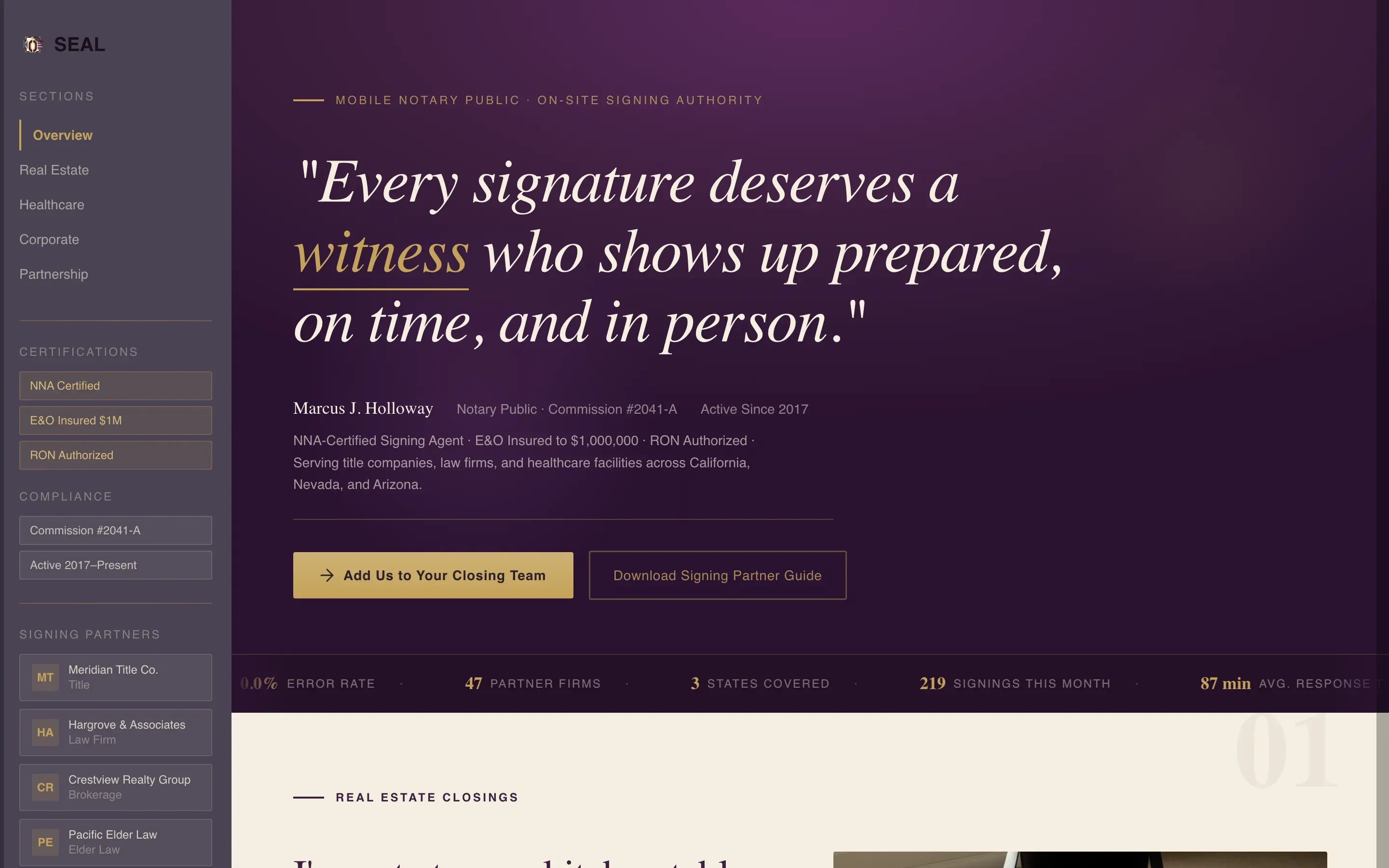
The header opens without images. A single serif quote commands the viewport against a deep plum background. Below it, a sans-serif subline presents the founder's commission number and years of service with the understated gravity of a law firm letterhead.
Persistent Sidebar Companion Rail
A graphite sidebar is pinned to the left and stays visible as the visitor scrolls. It displays a vertical stack of partner logos in muted champagne and updates with contextual trust signals tied to the active section, including relevant certifications and state-specific compliance badges.
Expert Panel Scroll Sections
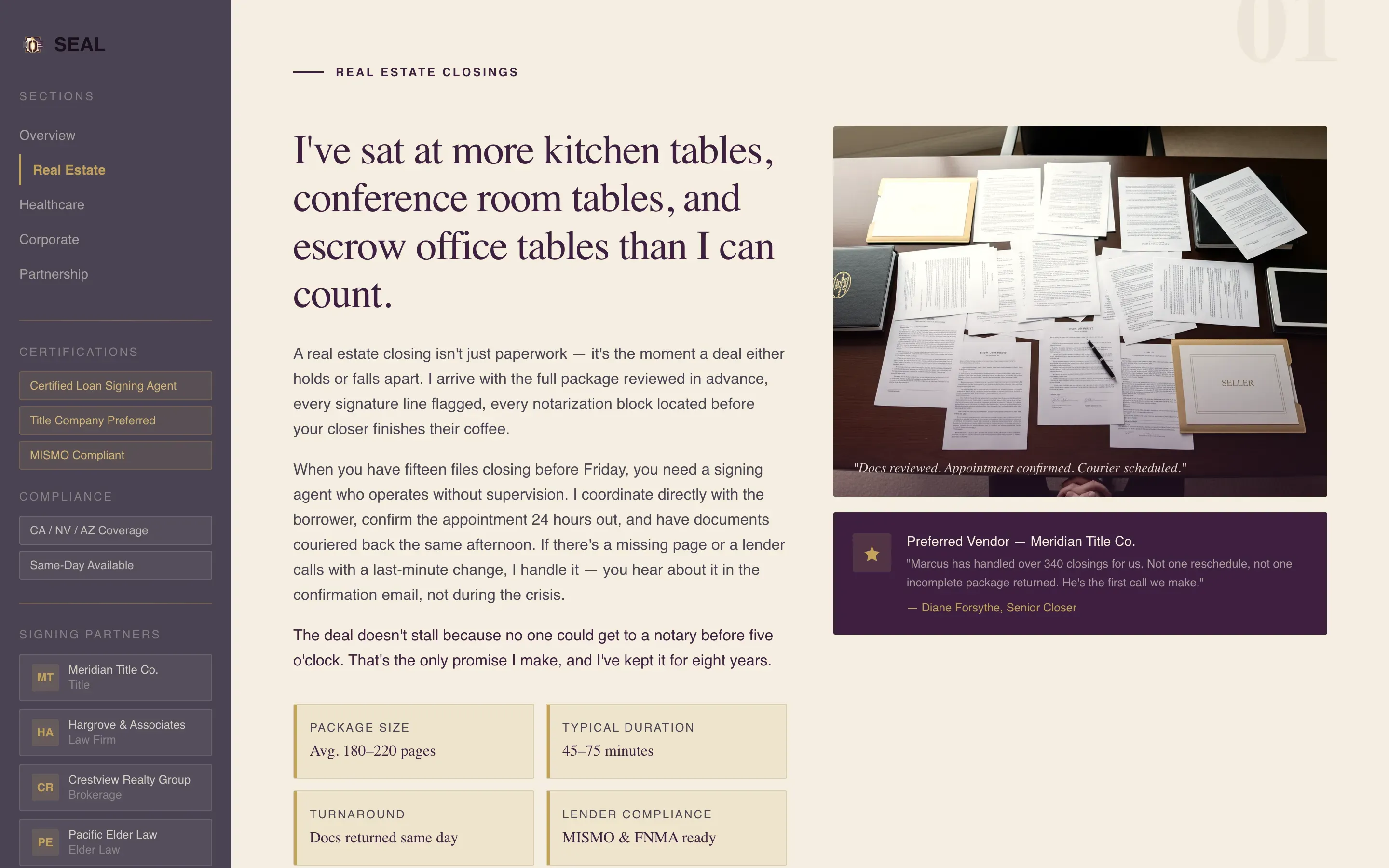
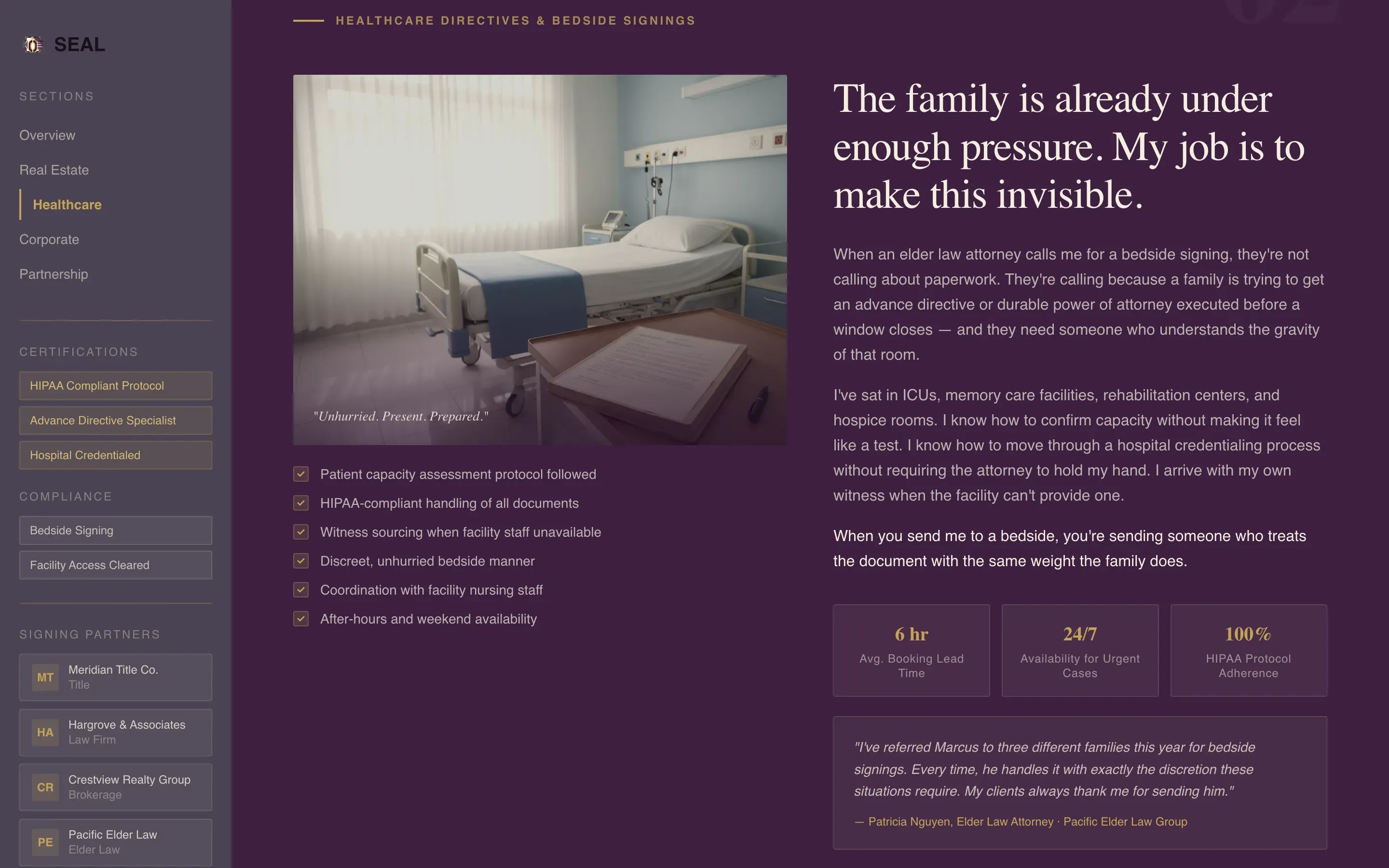
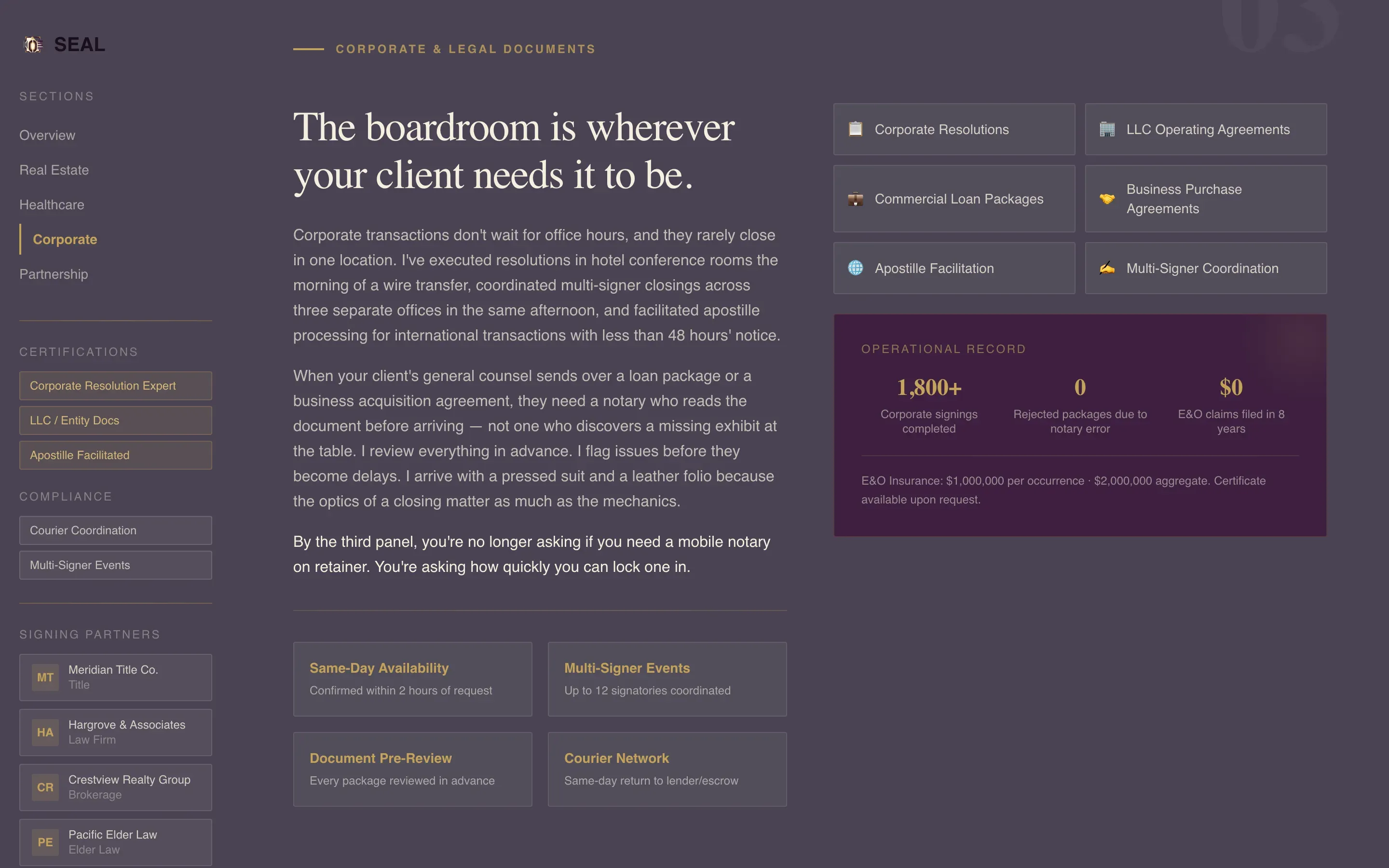
Each scroll section covers a distinct signing scenario: real estate closings, loan document packages, healthcare directives, and corporate resolutions. Narrated in first person with procedural precision, these panels position the notary as an embedded workflow expert rather than a vendor.
Partnership Inquiry Form
The primary call to action opens a short-form inquiry capturing company name, industry vertical, average monthly signing volume via dropdown, and a preferred contact method toggle between phone and email. It is designed for closers and attorneys who are ready to act.
Operational Proof Ticker
Before the first scroll, visitors see a rotating ticker of signings completed this month alongside average response time, coverage radius, and error-and-omission insurance limits. This front-loaded proof reduces hesitation before a visitor has read a single panel.
Gated Partner Guide Download
A secondary conversion path offers a downloadable signing partner guide in exchange for a business email address. This captures leads who are evaluating options and not yet ready to fill out the full partnership form.
Page sections overview
| Section | Purpose |
|---|---|
| Manifesto Header | Opens with founder credentials and a commanding serif quote |
| Sidebar Partner Rail | Pins trust signals and partner logos throughout the scroll |
| Operational Proof Ticker | Front-loads response time, coverage, and insurance detail |
| Real Estate Panel | Covers closing scenarios in first-person procedural narrative |
| Loan Documents Panel | Addresses loan package signings with scenario-specific authority |
| Healthcare Directives Panel | Handles bedside and elder law signing scenarios discreetly |
| Corporate Resolutions Panel | Positions the notary for boardroom and corporate document needs |
| Partnership Inquiry Form | Primary call to action for companies ready to add the notary to their team |
| Partner Guide Download | Secondary gated path for leads still comparing options |
Design & branding system
The palette is built around an Executive Suite theme that feels formal without being cold. Every color has a defined role, and gold appears sparingly so that interactive elements carry real visual weight.
- Deep plum (#3D1F3E) anchors all headers and section dividers with quiet authority
- Polished graphite (#4A4453) fills the persistent sidebar navigation rail
- Champagne ivory (#F5EFE0) provides comfortable reading surfaces for body text, and signing-ink gold (#C4A35A) is reserved exclusively for call-to-action buttons and interactive highlights
Mobile & speed optimization
The sidebar companion layout is designed to remain functional and readable on smaller viewports. The content hierarchy keeps the most critical trust signals accessible regardless of screen size.
- The pinned sidebar collapses gracefully so mobile visitors still access key trust signals
- Typography-led sections render cleanly without relying on heavy image assets
- The operational proof ticker and form components are kept lightweight for fast visual loading
How this template helps you convert
The page is structured to move a skeptical professional partner from curiosity to commitment across three clear stages of escalating confidence.
- Operational proof appears above the fold so visitors see response time, coverage radius, and insurance detail before they read a single panel, removing the most common reasons for early exit.
- The expert panel scroll builds scenario-specific authority section by section, so by the third panel a visitor is no longer questioning the notary's capability but calculating how to integrate the service.
- Two conversion paths serve two buyer stages: the partnership form captures ready-to-act partners, while the gated guide captures leads who need one more reason to choose this notary over a competitor.
Other information about this template
Seal is categorized under Professional Services with a focus on notary and legal support. The template is designed for a single-page, sidebar companion layout rather than a multi-page site. It is particularly well suited for mobile notaries operating in markets where institutional clients such as title companies, elder law practices, and real estate brokerages are the primary revenue source.
- The page direction prioritizes partnership and business-to-business conversion over individual appointment booking
- The Expert Panel creative direction and Corporate Precision theme drive a tone that feels like a credentialed professional briefing rather than a marketing pitch
- The template can support a notary serving multiple signing verticals who needs one page to cover all of them without losing focus or authority
Theme
Corporate Precision
Creative direction
Testimonial Mosaic
Color system
Navy Authority
Style
Single Column Flow
Direction
Booking/Scheduling
Page Sections
Typographic Manifesto Header
Persistent Sidebar Companion Rail
Expert Panel Scroll Structure
Operational Proof Ticker
Partnership Inquiry Form
Gated Partner Guide Download
Related questions
Who is this landing page template designed for?
What are the two conversion paths included on this page?
Can I use this template if I cover multiple signing scenarios?
What does the pinned sidebar display during the scroll?
What operational details appear above the fold?



