Sedation Dentist Specialist Booking Website Template
Sedate is a sedation dentistry landing page template built to convert dental-anxious adults into booked consultations. It pairs a portrait-centered hero with a three-tier comparison table, a five-step process timeline, layered social proof, and a low-friction three-question booking form. The design uses a calming Alpine Fresh color system to deliver clinical confidence with unexpected warmth.
by Rocket studio
Quick summary
Sedate is a single-page lead generation template for sedation dental practices. It opens with a portrait-centered hero that projects quiet clinical authority, then walks anxious visitors through a transparent sedation comparison table, a step-by-step process timeline, and a short booking form. Every section is designed to reduce fear and move hesitant patients toward their first consultation.
Who this template is for
This template suits sedation dentistry practices that need to convert high-anxiety adults into scheduled consultations. It works especially well for clinics where the primary barrier is fear, not awareness.
- Sedation dentists targeting adults who have avoided care for five or more years
- Practices managing referrals from general dentists for complex procedures
- Clinics that want to capture leads through both a direct booking form and a downloadable patient guide
What problem this template solves
Dental-phobic patients do not book appointments because the process feels opaque and frightening. This template removes that friction by making the entire sedation experience visible before the patient ever calls.
- Patients cannot compare sedation options without clinical jargon getting in the way
- Anxious visitors abandon pages that lead with procedures instead of reassurance
- Practices lose soft leads who need information first and a booking form second
What you get with this template
You receive a fully structured, single-page layout built specifically for sedation dentistry lead generation. Every section has a defined role in moving the visitor from fear to commitment.
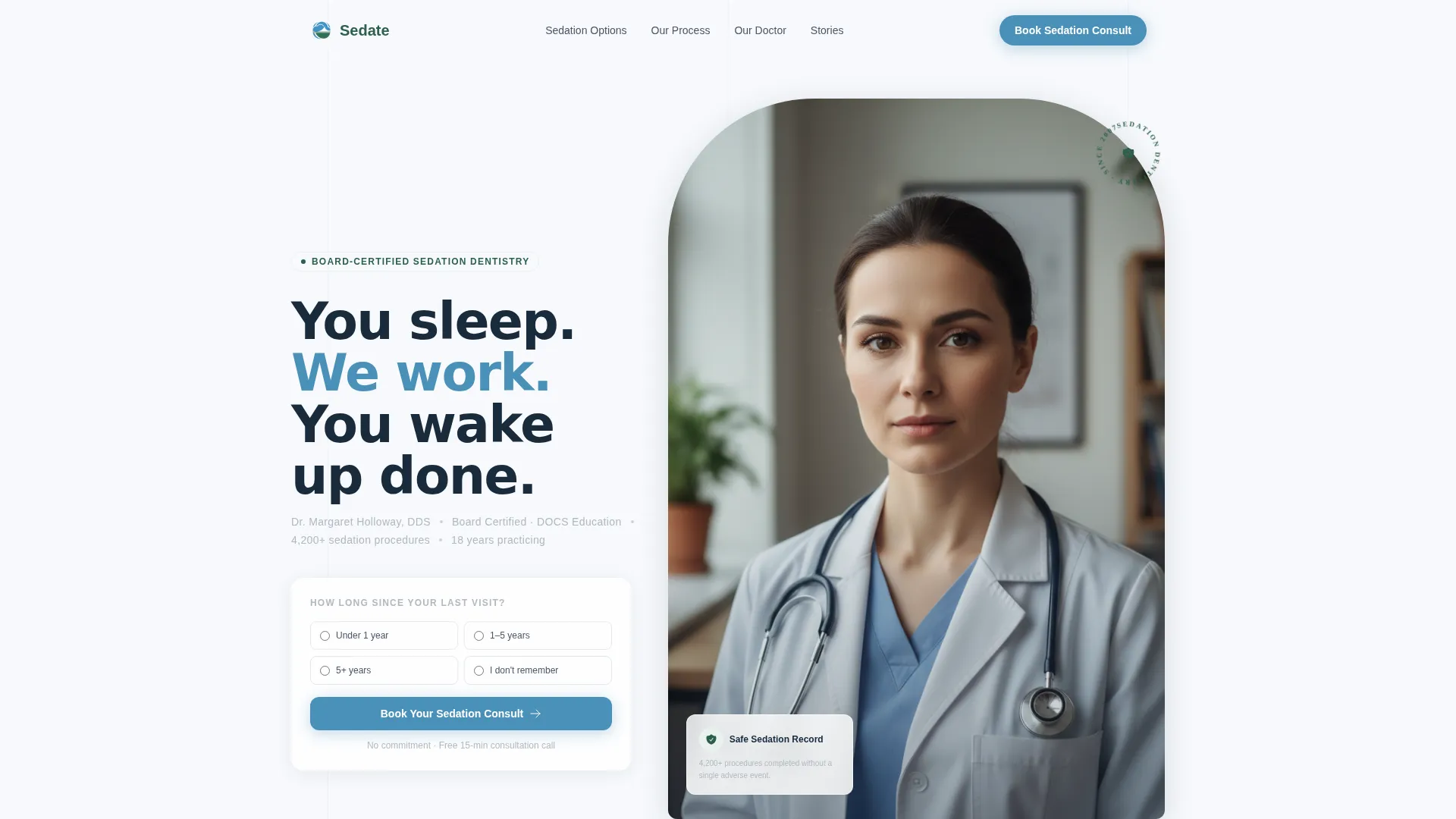
- A portrait-centered hero section with headline, credential line, and primary call to action
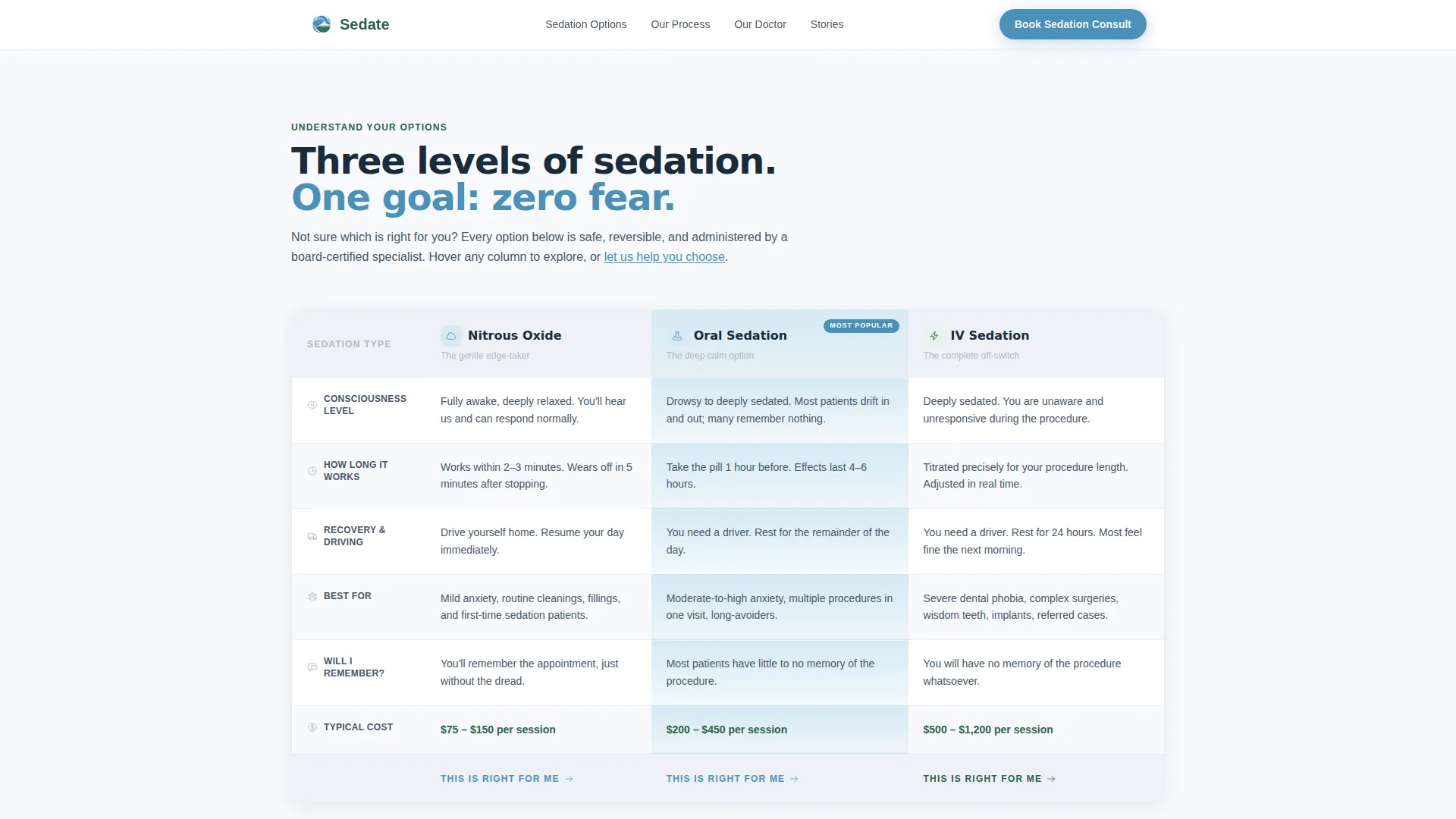
- A three-column sedation comparison table covering nitrous oxide, oral sedation, and intravenous sedation
- A five-step illustrated process timeline, a social proof section, a three-question booking form, and a secondary PDF guide lead capture path
Feature list
This template ships with purpose-built components matched to the real concerns of dental-anxious patients.
Three-Tier Sedation Comparison Table
The comparison table places nitrous oxide, oral sedation, and intravenous sedation side by side. Rows cover consciousness level, procedure duration, recovery time, ideal candidate profile, and cost range. Every cell uses plain human language so patients can self-select without needing a consultation just to understand their options.
Portrait-Centered Hero with Credential Line
The hero section frames the lead sedation dentist in a tightly cropped clinical portrait set against a summit white background. A two-line headline sits beside the portrait. Directly below it, a single credential line displays board certification status, case count, and years in practice in stone gray type, small but legible.
Five-Step Process Timeline
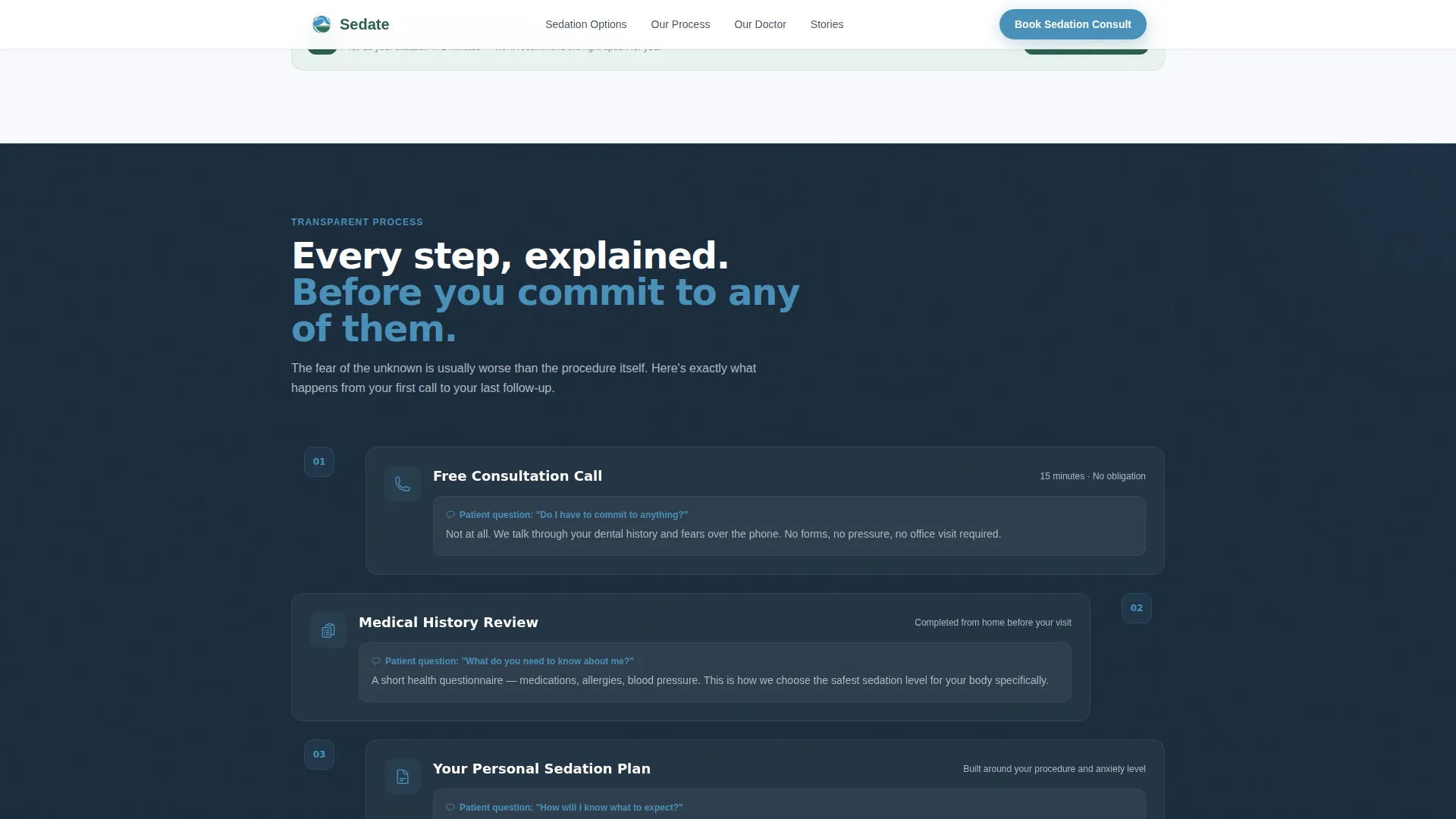
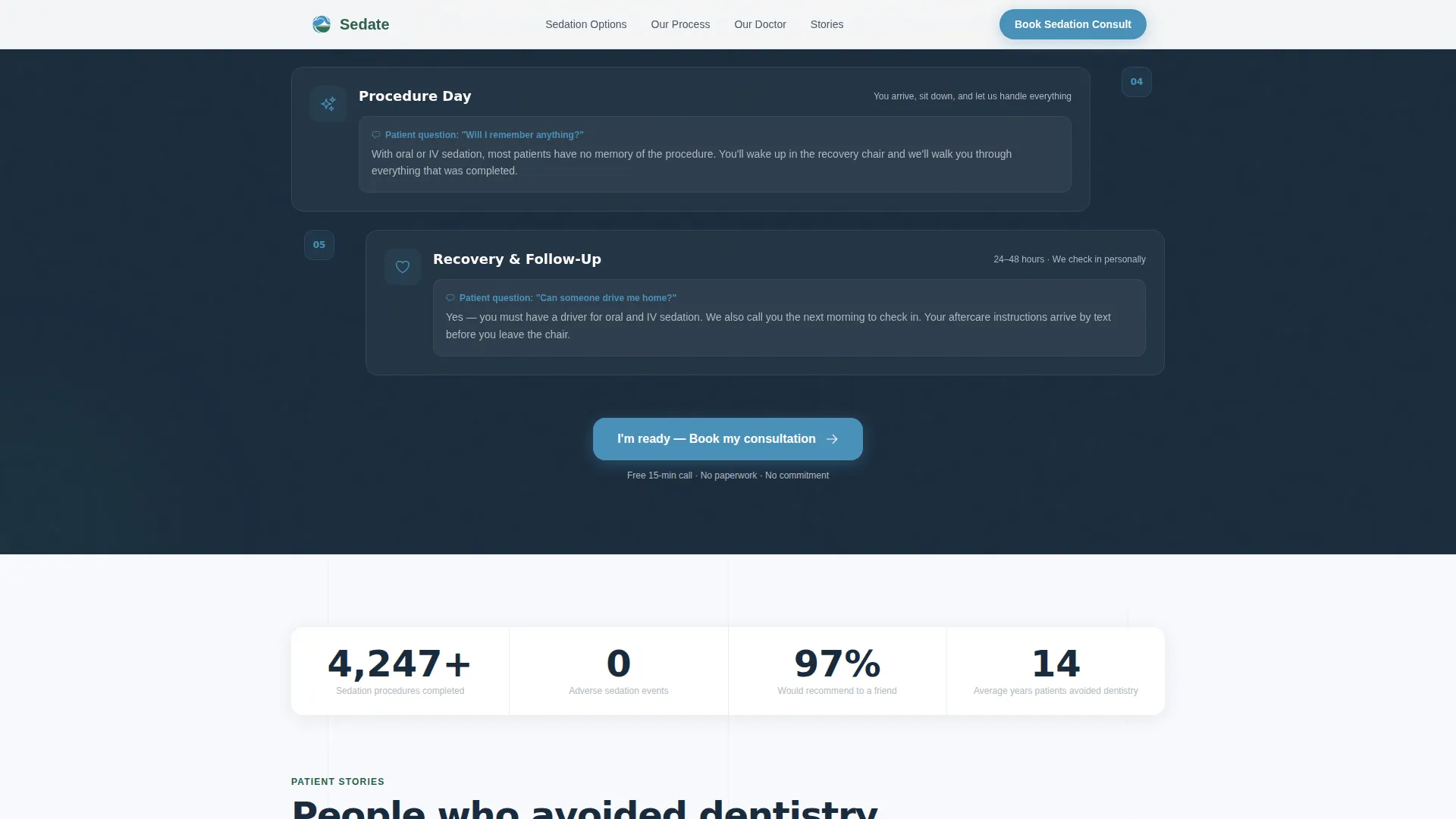
A numbered, icon-illustrated timeline walks patients through every stage: consultation call, medical history review, sedation plan creation, procedure day walkthrough, and recovery protocol. Each step answers the question the patient is actually thinking, such as whether they will remember anything or whether they need a driver.
Layered Social Proof Section
The social proof section combines video testimonial slots for long-term dental avoiders, a credentials panel showing board certifications and hospital affiliations, and a live counter displaying the total number of sedation procedures completed without incident.
Low-Friction Three-Question Booking Form
The booking form opens with a low-stakes radio button asking how long it has been since the patient's last dental visit. It then asks about preferred sedation level, with a "not sure, help me choose" option included. The final step collects name, phone number, and best time to call.
Secondary PDF Guide Lead Capture
Visitors who are not ready to book can download a twelve-page fear-to-procedure walkthrough in exchange for their email address. This path captures soft leads who need more information before committing to a call.
Page sections overview
| Section | Purpose |
|---|---|
| Hero Portrait | Establish authority and present the primary booking call to action |
| Sedation Comparison Table | Help patients choose between nitrous, oral, and IV sedation options |
| Process Timeline | Walk patients through each step and answer their real fears |
| Social Proof Panel | Build trust with video testimonials, credentials, and a case counter |
| Lead Capture Form | Convert ready visitors with a short, low-friction booking form |
| PDF Guide Gate | Capture email from visitors who need more information before booking |
| Footer | Provide contact details and practice information in a single linear row |
Design & branding system
The template uses a Corporate Precision visual theme expressed through the Alpine Fresh color palette. The overall feel is clinical certainty delivered with unexpected gentleness, like a well-lit consultation room that does not feel sterile.
- Summit white (#F7F9FC) covers all backgrounds; glacier blue (#4A90B8) marks every clickable element including buttons and active form states
- Surgical pine (#2C5F4B) grounds trust-critical elements such as headings, credential badges, and safety data; stone gray (#B0B8C1) handles secondary text and table dividers
- Typography uses Plus Jakarta Sans for headings and DM Sans for body copy, keeping the layout precise but approachable
Mobile & speed optimization
The template is built with a mobile-first layout priority. Patients searching for sedation options on a phone receive the same structured experience as desktop visitors.
- The primary call-to-action button is pinned to the bottom of the viewport on mobile so it remains accessible throughout the scroll
- On desktop, the booking form anchors beside the comparison table so high-intent visitors can act without scrolling to a separate section
- Scroll-triggered section reveals and a staggered animation system keep the page feeling responsive without overloading the initial view
How this template helps you convert
Every layout decision in this template is tied to a specific conversion behavior observed in high-anxiety patient audiences.
- The comparison table appears immediately below the hero, addressing the single most common question dental-anxious patients have before they are willing to engage with a form.
- The process timeline dismantles uncertainty step by step, so visitors arrive at the booking form already understanding what will happen to them, which reduces hesitation at the point of commitment.
Other information about this template
This template is categorized under Health and Medical and is specifically aligned with the sedation dentist appointment booking use case. It is a strong fit for practices in the sedation dentist website category that need a single focused page rather than a full multi-page site.
- The footer follows a Pattern 1 linear single-row layout, keeping the bottom of the page clean and uncluttered
- Animation intensity is set to medium, with staggered reveals on section entry and a counter animation on the live procedure total
- The interactivity level is high, including a comparison table toggle, a multi-step form experience, and a sticky call-to-action bar on mobile
Theme
Corporate Precision
Creative direction
Transparent Process
Color system
Alpine Fresh
Style
Comparison Table
Direction
Lead Generation
Page Sections
Three-tier Sedation Comparison Table
Portrait-centered Hero with Credentials
Five-step Illustrated Process Timeline
Layered Social Proof Section
Low-friction Three-question Booking Form
Secondary PDF Guide Lead Capture
Related questions
Can I edit the sedation comparison table to match my practice's offerings?
Does the template include the PDF guide content?
Is this template suitable for a general dentist who offers some sedation services?
How does the booking form reduce friction for anxious patients?
What layout does the footer use?



