Anesthesiology Clinic Consultation Landing Page
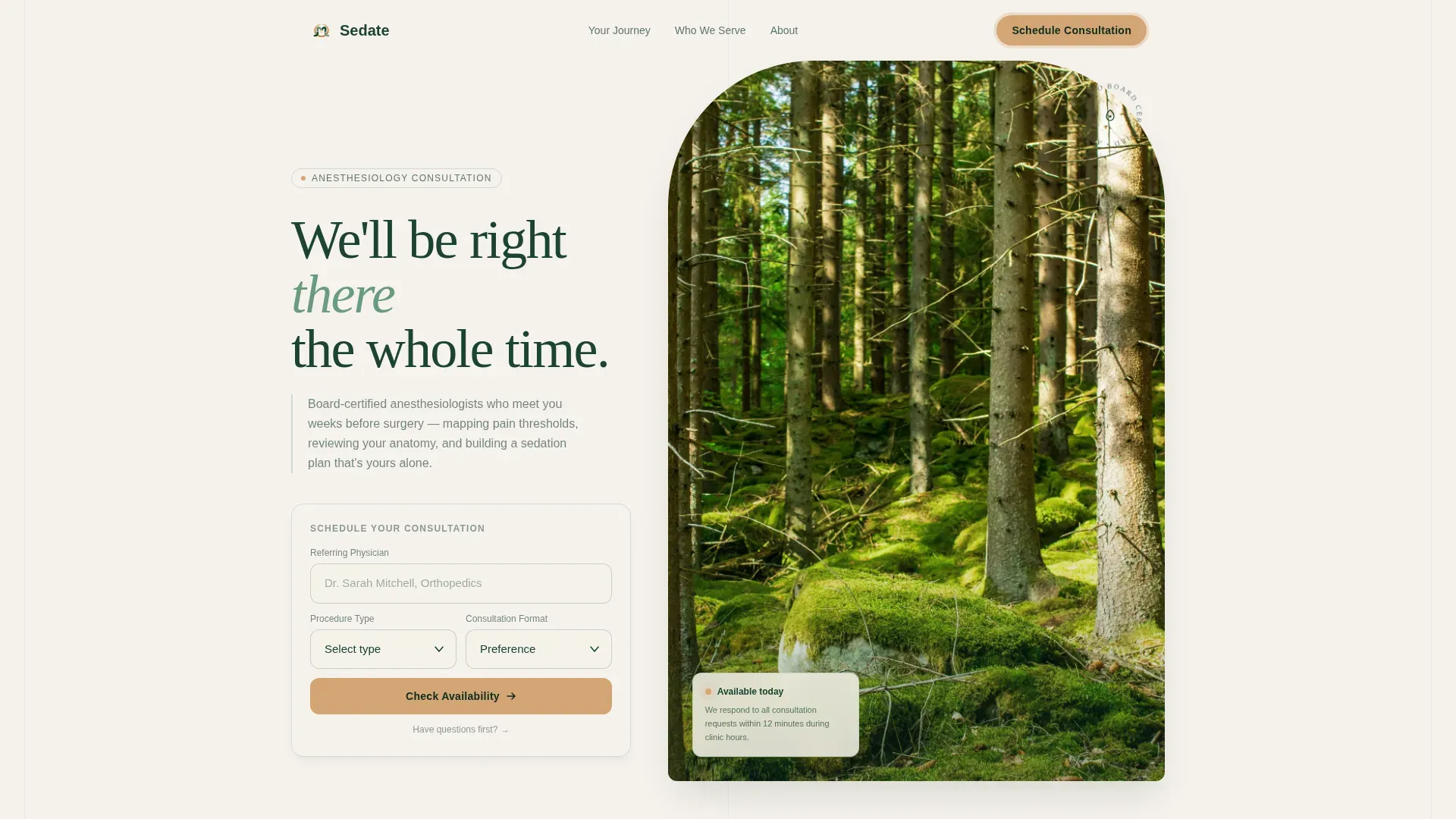
Sedate is a single-column landing page built for anesthesiology clinics that need to convert anxious pre-surgical patients into booked consultations. It pairs a calming Forest Trust color system with a scroll-driven patient journey, trust-building stats, and a structured booking form that makes the unfamiliar feel mapped and safe before the first appointment.
by Rocket studio
Quick summary
Sedate is a warm, focused landing page for anesthesiology clinics. It guides pre-surgical patients from first anxiety to scheduled consultation through a five-step scroll journey, softly weighted trust metrics, and an amber-lit booking form. Every section is designed to reduce fear and earn the click before a patient types a single word.
Who this template is for
This template is built for anesthesiology clinics and centers that handle pre-surgical consultations. It suits practices where board-certified anesthesiologists meet patients weeks before a procedure to build personalized sedation plans.
- Anesthesiology clinics serving orthopedic, obstetrics and gynecology, and colonoscopy referrals
- Outpatient centers managing pediatric pre-surgical consultations alongside adult cases
- Practices seeking a direct, mobile-first booking path for anxious patients referred by surgeons
What problem this template solves
Pre-surgical patients arrive online at night, alone, and afraid of what they do not know. A generic medical website does nothing to close that emotional gap. Sedate solves the communication problem between a capable clinical team and a frightened first-time patient.
- Patients have no clear picture of what a pre-anesthesia consultation involves or why it matters
- Referring physicians need confidence that their patients will be received promptly and professionally
- Standard contact forms create friction when patients most need reassurance before they can commit
What you get with this template
You get a complete single-column landing page built around one clear goal: converting a worried visitor into a scheduled consultation. Every section earns trust before asking for action.
- A hero area with large, softly weighted stats that establish safety and responsiveness immediately
- A five-step scroll timeline that maps the full patient journey from referral to recovery follow-up
- A structured booking form with a referring physician field first, a procedure-type dropdown, and a secondary "Have Questions First?" message path
Feature list
This template includes purpose-built components that address the specific emotional and logistical needs of pre-surgical patients seeking anesthesiology care.
Stats and Metrics Header Block
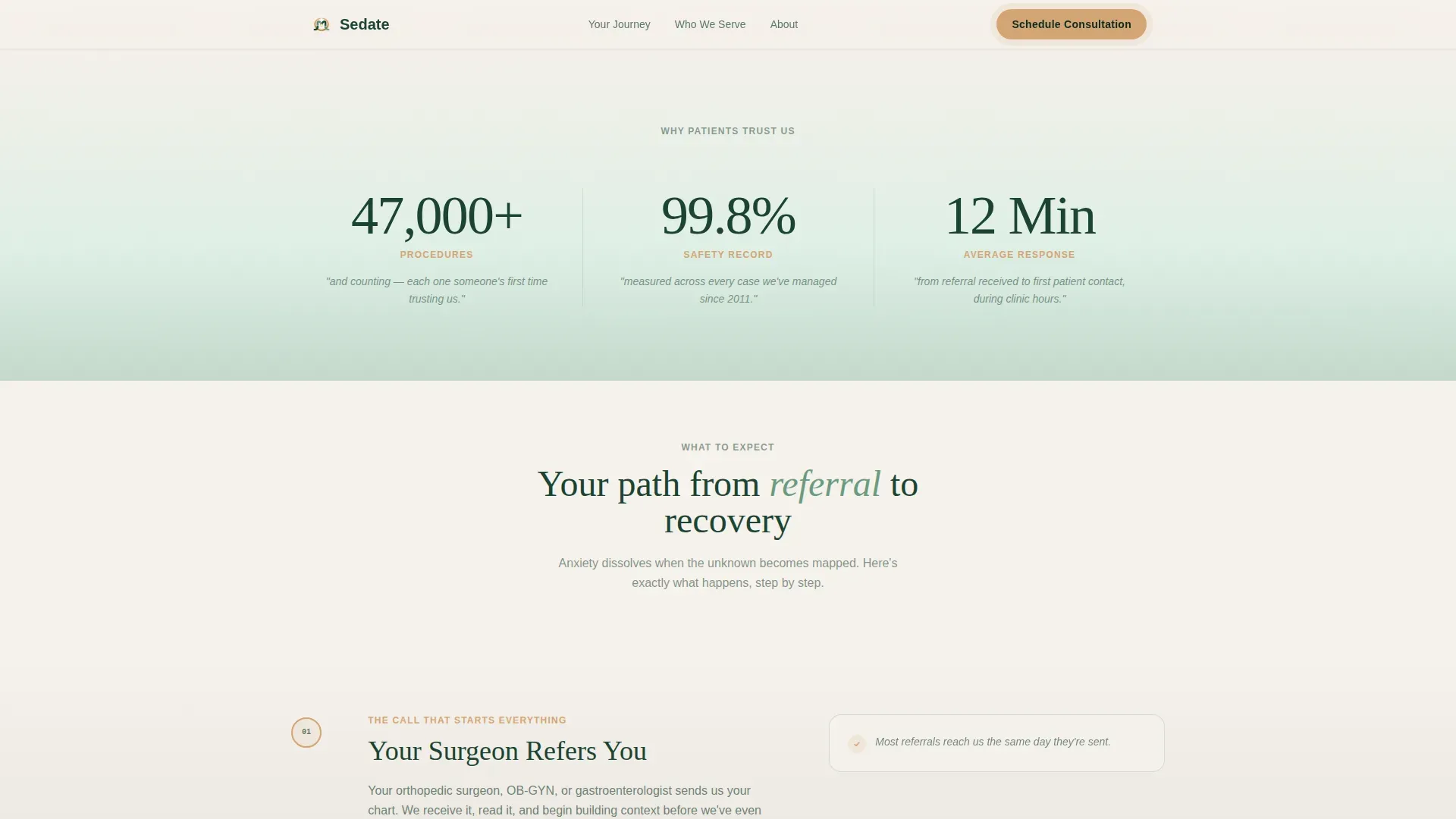
Three large trust metrics sit on a birch-to-sage gradient: procedure count, safety record, and average consultation response time. Each number carries a single humanizing detail beneath it in smaller evergreen type, letting the data speak before any paragraph is read.
Five-Step Patient Journey Timeline
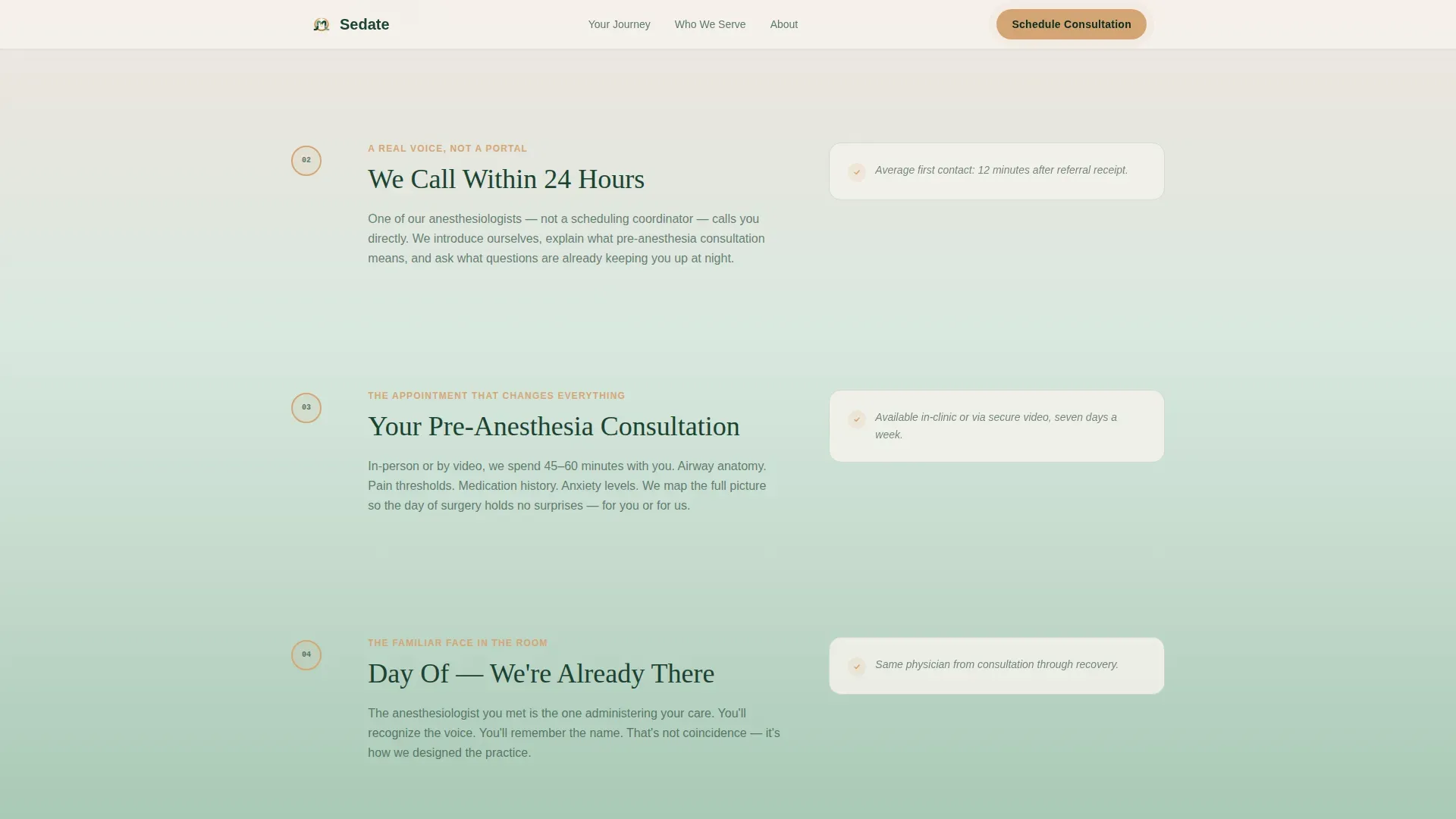
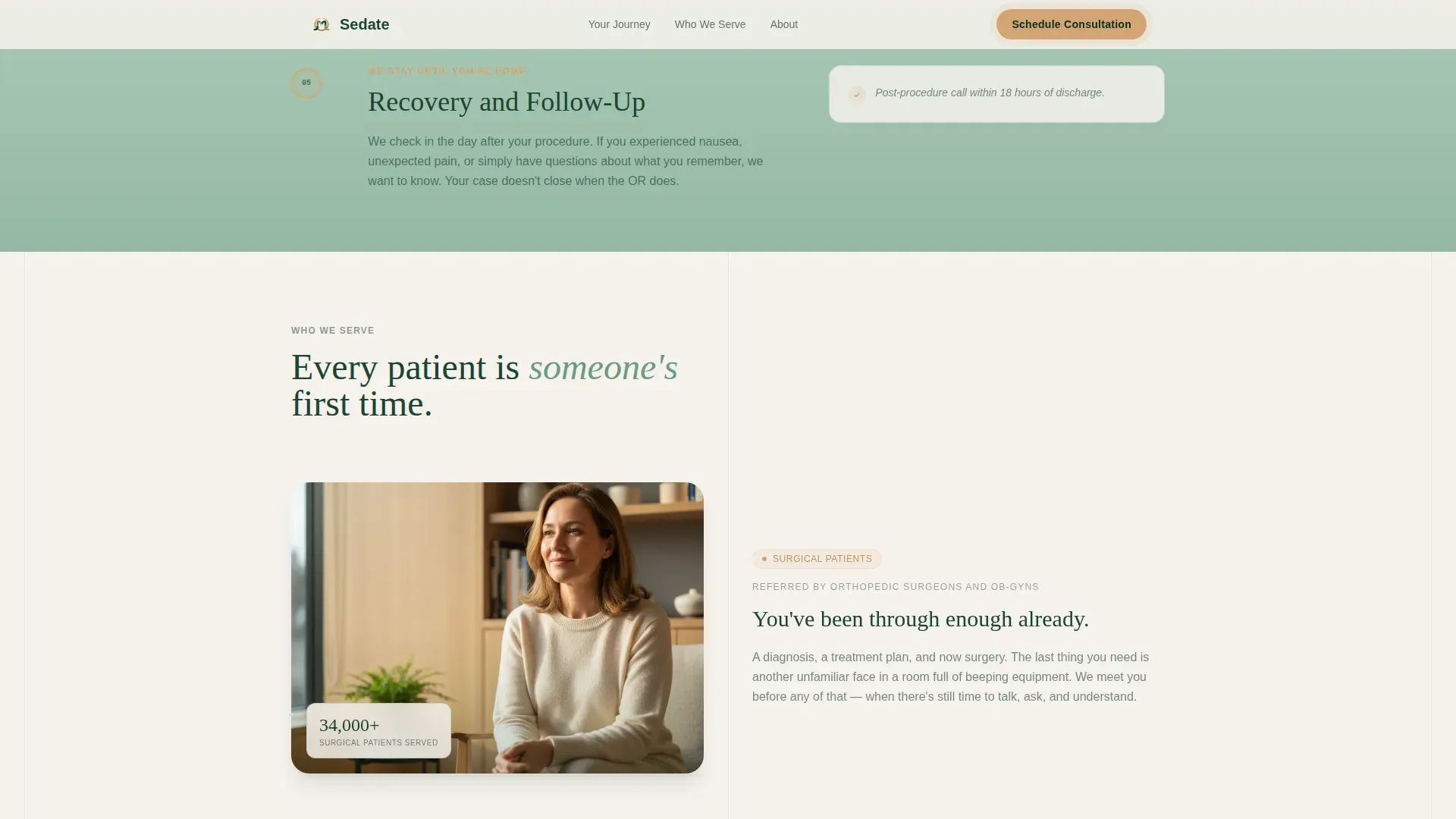
A scroll-linked timeline walks visitors through every stage: surgeon referral, the 24-hour callback, the pre-anesthesia consultation, the day of the procedure, and recovery follow-up. Gradient tone deepens with each step and amber indicators light sequentially, turning an unknown process into a familiar path.
Structured Consultation Booking Form
The form opens with the referring physician name field, establishing medical context and trust from the first input. It continues with a procedure-type dropdown, preferred consultation format (in-person or video), and patient name and phone number.
Secondary "Have Questions First?" Path
A single-field message box sits alongside the primary booking form. It offers patients a lower-commitment first step, reducing drop-off from visitors who are not yet ready to schedule but still need contact.
Sticky Call-to-Action Bar
After the visitor scrolls past the third section, a fixed call-to-action appears at the bottom of the viewport. The "Schedule Your Consultation" button in amber on evergreen remains visible without interrupting the reading experience.
Who We Serve Persona Section
Three distinct patient personas are presented with human-centered copy. They cover the orthopedic or obstetrics patient referred by a surgeon, the adult facing a first colonoscopy, and the parent accompanying a child to an outpatient procedure.
Page sections overview
| Section | Purpose |
|---|---|
| Hero with Stats | Open with trust metrics on a birch-to-sage gradient |
| Step One | Confirm the surgeon referral and set expectations |
| Step Two | Show the 24-hour callback commitment |
| Step Three | Describe the pre-anesthesia consultation in detail |
| Step Four | Reassure patients about day-of presence |
| Step Five | Explain recovery and follow-up care |
| Who We Serve | Present three patient personas with specific copy |
| Consultation Booking | Capture referral details and schedule the appointment |
| Footer | Single-row linear footer with essential links |
Design & branding system
The visual identity uses a Forest Trust color system built to feel grounded and oxygenated rather than clinical. Backgrounds transition from birch white (#F5F1EB) to sage mist (#95B8A2) in slow vertical gradients as the visitor scrolls deeper.
- Deep evergreen (#1B4332) carries all primary text and interface framing
- Sage mist (#95B8A2) fills mid-page gradient zones and supporting backgrounds
- Gentle amber (#D4A574) appears only on buttons and progress indicators, reserved to draw the eye toward action
- Fraunces serif is used for headlines and Demi Sans (DM Sans) for body text, pairing warmth with clarity
Mobile & speed optimization
This template is designed with mobile-first priority, recognizing that anxious patients most often search and decide late at night on a phone. The single-column flow removes layout complexity across all screen sizes.
- Scroll-linked animations and staggered reveals are built for smooth performance on mobile viewports
- The sticky call-to-action and booking form are structured as interactive client components, keeping static content lean
- Form fields are ordered to feel natural on a small touchscreen, starting with referring physician before personal details
How this template helps you convert
Every layout and interaction decision in Sedate is made to move a reluctant visitor toward a scheduled consultation. The template reduces friction by making the patient feel known and the process feel safe before any form is shown.
- The stats block earns immediate trust with quantified proof before a single line of body copy appears
- The five-step timeline removes the fear of the unknown by turning the patient journey into a clear, walkable path
- The booking form places the referring physician field first, which signals clinical credibility and frames the interaction as a medical referral rather than a cold inquiry
Other information about this template
Sedate is part of a Health and Medical template category, specifically designed for the anesthesiology medicine subcategory. It suits any anesthesiology clinic or center that wants a direct, conversion-focused online presence without relying on generic stock imagery or operating room photography.
- The template uses no stock medical imagery; trust is built through typography, color, and data
- Animation level is set to medium, including marquee effects, scroll-linked gradient deepening, and amber path lighting
- The page is localized for United States English with 12-hour time formatting
- Server components handle all static content while client components manage the sticky call-to-action and booking form interactions
- The single-column flow template style suits practices that want one clear path from arrival to scheduled appointment
Theme
Soft Gradient
Creative direction
Step-by-Step Guide
Color system
Forest Trust
Style
Single Column Flow
Direction
Booking/Scheduling
Page Sections
Stats and Metrics Header Block
Five-step Patient Journey Timeline
Structured Consultation Booking Form
Secondary Question Path
Sticky Call-to-action Bar
Patient Persona Section
Related questions
Who is this landing page template designed for?
What does the booking form collect from patients?
Does the template include a way to contact the clinic without booking?
Can this template work for pediatric anesthesiology consultations?
How is trust established before the booking form appears?



