Local Sedation Dentist Appointment Booking Website Template
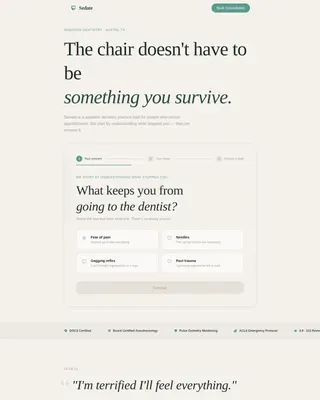
Sedate is a single-column sedation dentistry landing page built for anxious patients who keep canceling appointments. It opens with a three-step fear-selection form, walks visitors through fear-specific sedation explanations, and ends with a low-pressure booking flow. The Forest Trust color system and generous whitespace create calm authority before a single word is read.
by Rocket studio
Quick summary
Sedate is a patient education landing page designed for sedation dentistry practices that want to convert avoidant visitors into booked consultations. The template leads with empathy, answers fear before asking for commitment, and guides anxious patients through a structured Problem-Solution Arc toward a clear booking call to action. Every scroll builds confidence, not pressure.
Who this template is for
This template is built for any dental practice that serves patients who carry real fear into every search query. It speaks directly to people who search for "sleep dentistry" or "gentle dental care" because clinical language alone has never been enough to get them through the door. Whether the practice focuses on routine sedation or complex surgical work, this landing page meets those patients where they are.
- Sedation dentistry practices converting dental-avoidant adults with a seven-year or longer gap since their last visit
- Dental clinics serving parents of children with sensory processing disorders and executives requiring full-mouth reconstruction
- Any dental practice that needs a high converting dental landing page to increase appointment bookings and reach new patients online
What problem this template solves
Most dental landing pages ask for a booking before they earn one. They lead with smiling stock photos and bullet-pointed service lists while nervous patients quietly close the tab. The Sedate template solves the exact conversion gap where standard dental websites fail: the moment a frightened visitor arrives, scans for proof that this practice actually understands their fear, and finds nothing that speaks to them.
Potential patients who have avoided dental care for years are not unconvinced by the quality of your work. They are unconvinced that anyone will take their fear seriously. This landing page changes that dynamic by listening first.
- Anxious patients abandon standard booking forms because nothing on the page addresses their specific fear before asking for personal information
- Nervous patients researching sedation options late at night on mobile devices need a page that loads fast, feels calm, and keeps contact details easily accessible
- Dental practices lose patient acquisition momentum when their online presence fails to bridge the gap between a visitor's fear and their need for dental care
What you get with this template
The Sedate template delivers a complete, single-column flow landing page structured around five primary content zones. Each zone is purpose-built to move a fearful visitor one step closer to booking an appointment without ever feeling rushed or pushed. The template includes a multi-step intake form, a full Problem-Solution Arc with three escalating fear-response sections, a persistent booking call to action, and a footer built for trust.
Every section is designed so that a dental practice can populate it with its own clinical details, patient stories, and contact information without rebuilding the layout from scratch.
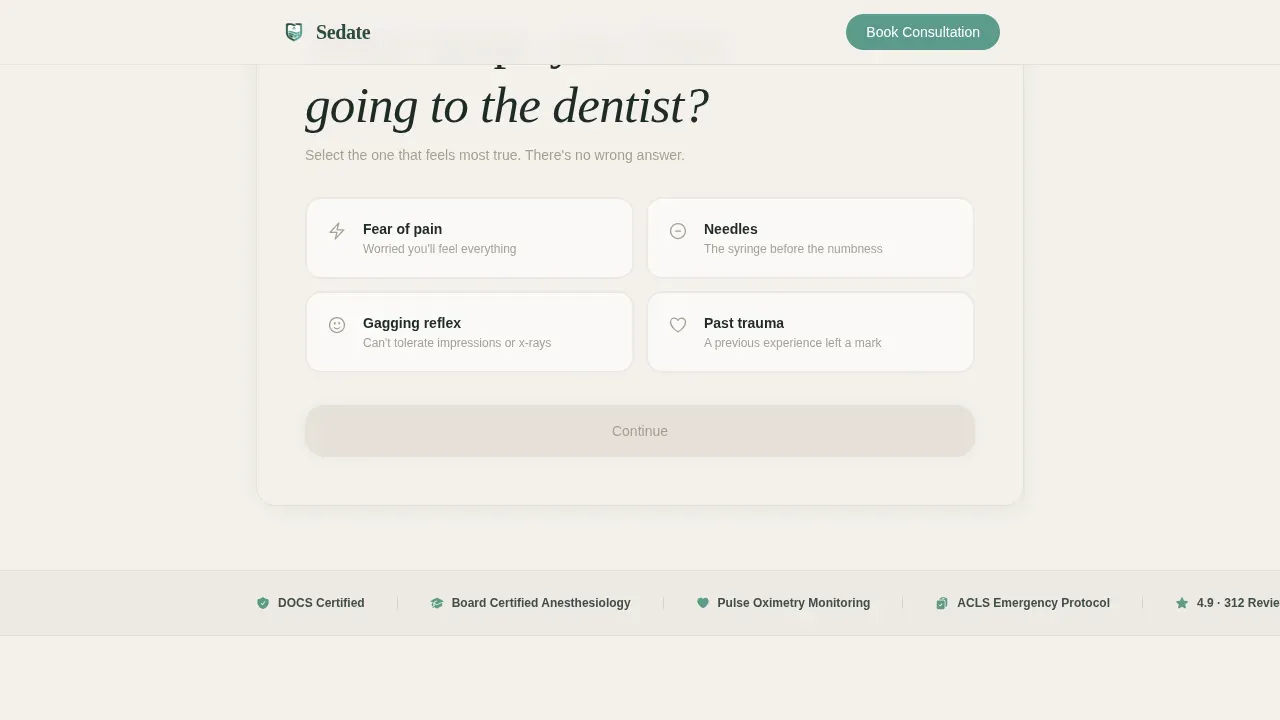
- Multi-step fear-selection form with a three-step horizontal progress bar, four selectable cards, and background tone animation on selection
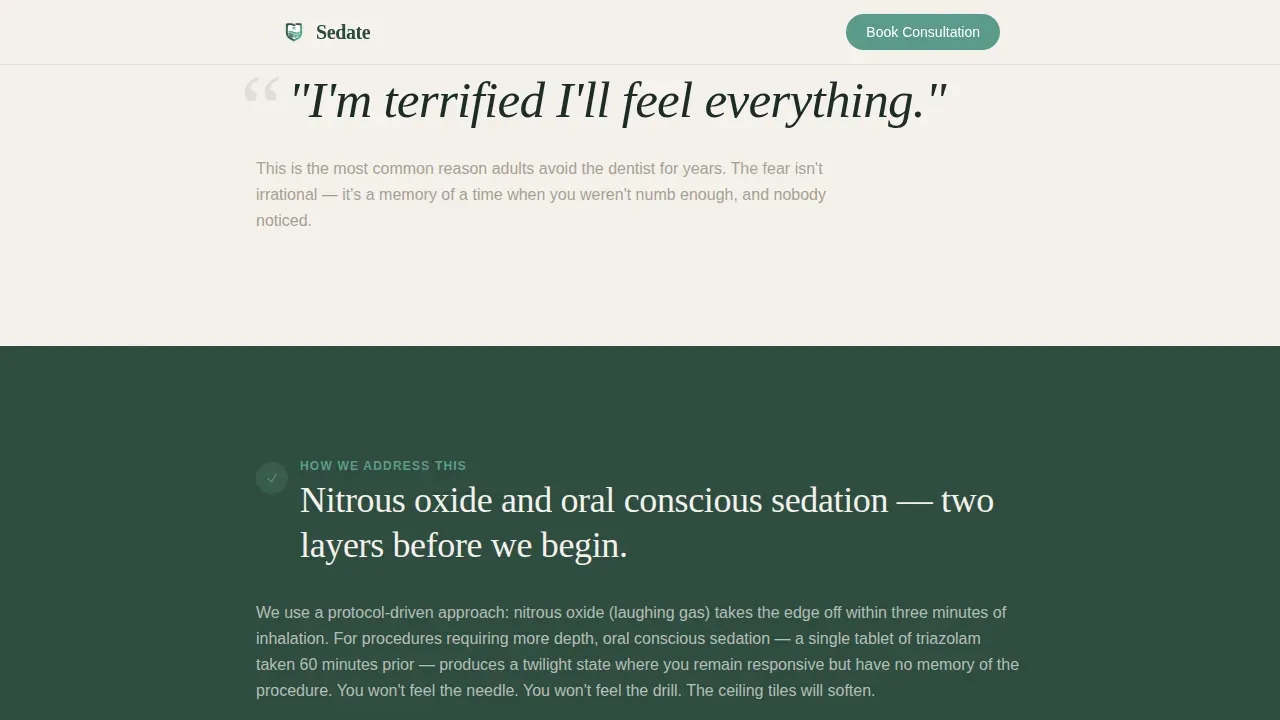
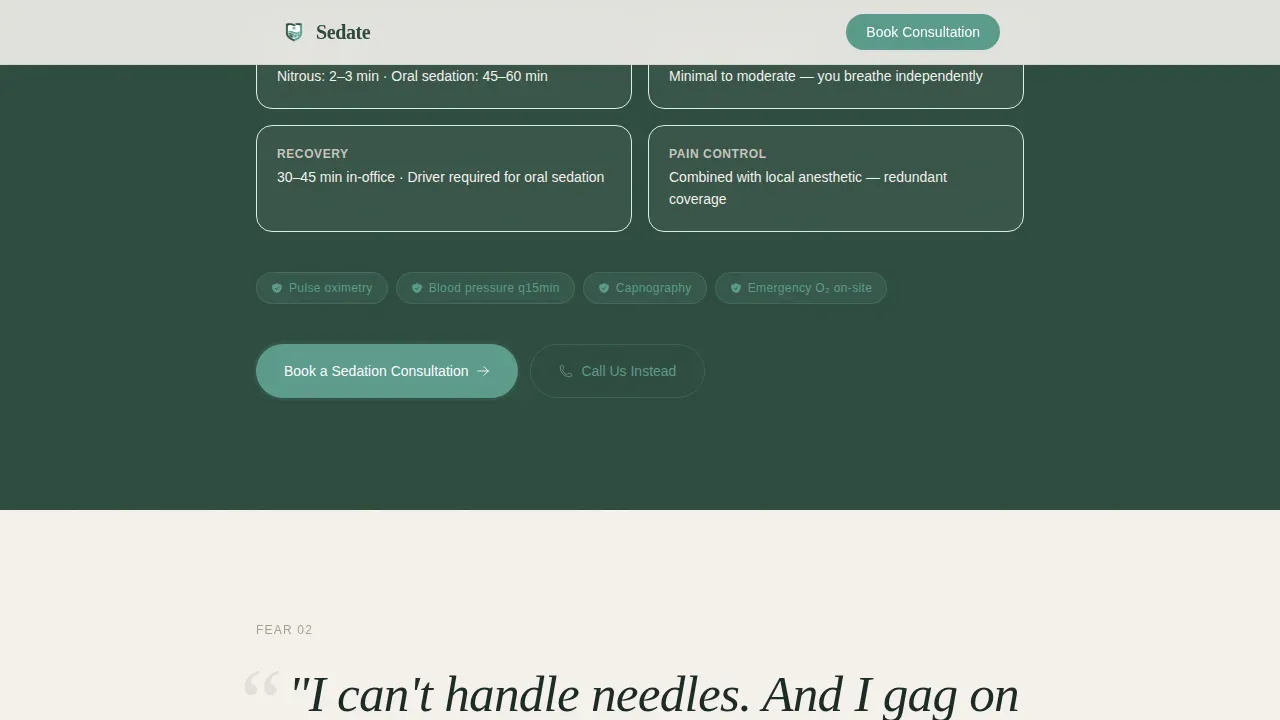
- Three Fear-Solution Arc sections covering nitrous oxide and oral sedation pharmacology, gag reflex management, and IV sedation with monitoring and recovery detail
- Booking section with date selector, phone number input, and a secondary "Call Us Instead" tap-to-dial path for the most hesitant visitors
Feature list
This template includes purpose-built components that work together to support patient trust, patient engagement, and appointment bookings across every stage of the visitor's decision.
Multi-Step Fear-Selection Form
The header opens with a three-step form before the visitor scrolls. Step one presents four selectable cards: fear of pain, needles, gagging, or past trauma. Selecting a card animates a subtle background tone shift, signaling that the page is already responding to what the patient shared. The horizontal progress bar advances through the steps, and by the final step the visitor only needs to choose a date and enter a phone number. This intuitive layout reduces patient intake friction and connects the form directly to the booking flow.
Problem-Solution Arc Sections
Three sequential fear-response sections form the editorial spine of the landing page. Each section opens with a patient's fear stated in their own words, rendered in large serif type. The column then narrows, the background deepens to old-growth green, and a precise clinical explanation follows. The arc escalates from nitrous oxide for a routine cleaning, to topical numbing protocol and gag reflex management, to IV sedation for surgical extraction with monitoring credentials and a recovery timeline. Each answered fear functions like a step on a staircase, building patient confidence one objection at a time and supporting a complete treatment plan conversation before the visitor reaches the booking form.
Persistent Mobile Booking Bar
On mobile devices, a fixed bottom bar keeps the primary call to action visible at all times. Anxious patients researching sedation dentistry late at night do not need to scroll back to find the booking button. The bar is teal-accented and clearly labeled, providing a single, clear call to action that avoids overwhelming hesitant visitors with multiple competing choices.
Social Proof and Credential Blocks
The template includes designated blocks for first-name-only patient voice quotes, sedation certification badge placement, and monitoring credential display. These elements address the fact that patient testimonials and visible professional credentials are essential components of patient trust for any sedation dentist. The template supports before and after images placement within these trust blocks to show positive outcomes and demonstrate clinical competence.
Secondary Contact Path
Alongside the booking form, a "Call Us Instead" section presents a tap-to-dial phone number. This secondary path acknowledges that some of the most anxious patients need to hear a human voice before they commit. Accessible contact details are kept in a prominent position so potential patients can reach the practice without barrier. Offering a free consultation framing within this section keeps the offer low-pressure and welcoming.
Linear Single-Row Footer
The footer follows a Pattern 1 linear single-row layout. It holds contact details, practice information, and any credential or association logo displays. Visible contact information is easy to find and easily accessible from any scroll position on mobile, satisfying a core requirement for sedation dentistry marketing.
Page sections overview
| Section | Purpose |
|---|---|
| Hero Multi-Step Form | Capture fear type, begin booking flow |
| Fear-Solution Arc 1 | Address pain and sensation fear with nitrous oxide and oral sedation explanation |
| Fear-Solution Arc 2 | Address needle and gag reflex fear with topical numbing protocol detail |
| Fear-Solution Arc 3 | Address trauma and distrust with IV sedation, monitoring, and recovery timeline |
| Booking Call to Action | Date selector, phone input, primary booking button |
| Secondary Contact Path | Tap-to-dial number, "Call Us Instead" option |
| Linear Footer | Contact details, credentials, association logos |
Design & branding system
The visual identity follows a Corporate Precision theme grounded in the Forest Trust color system. The palette was chosen deliberately to remove every visual cue that triggers clinical anxiety: no sterile white, no high-contrast blues, no cheerful stock photography of smiling patients. The result feels like a waiting room redesigned by someone who genuinely understands fear.
- Forest Trust color system: old-growth green (#2D4A3E) for deep section backgrounds, clinical linen (#F4F1EC) for primary page tone, birch bark gray (#A8A093) for supporting text and dividers, and reassuring teal (#5B9A8B) reserved for buttons and progress indicators
- Typography pairing: Fraunces serif for fear statements and emotional headlines, DM Sans for body copy and clinical explanations, creating a clear visual contrast between the patient's voice and the practice's authority
- Generous whitespace throughout, scroll-triggered section reveals, and a visually appealing single-column layout that keeps the reading experience calm and uncluttered
Mobile & speed optimization
Over half of all traffic to dental websites arrives on mobile devices, and dental-avoidant patients are especially likely to research sedation options late at night on their phones. This template is built with a mobile-first approach, ensuring that anxious patients on any device can navigate the page without friction. The persistent bottom booking bar on mobile keeps the call to action visible without interrupting the reading flow.
- Static page sections use Server Components to keep rendering fast, while the interactive multi-step form is isolated as a Client Component to avoid unnecessary load overhead
- Single-column flow layout eliminates horizontal scroll, reduces cognitive load, and ensures the page is easy to navigate on small screens without pinching or zooming
- All interactive elements, including the fear-selection cards, progress bar, and booking form, are designed for touch-first interaction on mobile devices
How this template helps you convert
A high converting landing page for a sedation dentist does not work by being louder than competing pages. It works by being the only page that answers the question the visitor was too afraid to type directly. The Sedate template is built around a single conversion principle: earn the click by removing every objection before asking for anything.
- The multi-step form opens before the visitor scrolls, immediately signaling that this dental practice wants to understand them, not just schedule them. Encouraging visitors to self-identify their fear before seeing any clinical content reduces the psychological distance between arrival and action, lifting appointment bookings without pressure.
- Each Fear-Solution Arc section delivers a clinical explanation immediately after stating the patient's own fear in their language. This structure builds patient confidence one section at a time, addressing patient concerns that standard dental landing pages leave unanswered. By the time a potential patient reaches the booking form, they have already read a specific response to their specific fear.
- The persistent mobile booking bar and the secondary tap-to-dial path together ensure that no matter where a visitor stops reading, a clear and easily accessible next step is always within reach, whether that is booking an appointment online or calling the practice directly.
Other information about this template
The Sedate template is suited for dental practices that want to improve their online presence and patient acquisition without investing in a full custom build. It is designed to plug into existing digital marketing workflows and can support a range of dental services beyond core sedation work, including cosmetic dentistry, cosmetic procedures, and more complex dental treatments where patient anxiety is a barrier.
The template is structured around seo best practices for healthcare landing pages, with heading hierarchy, readable paragraph structure, and content depth that helps search engines understand the page's relevance for terms like "sedation dentist near me" and "sleep dentistry." Proper heading and paragraph structure also supports search engine rankings over time by keeping content clear and well organized.
Patient reviews and patient stories are given dedicated structural positions in the social proof blocks. This matters because satisfied patients who overcame dental phobia are among the most persuasive voices for new patients considering the same step. Patient photos, when used with appropriate consent, and professional images of the office and dental team further humanize the practice and reduce the cold, clinical feeling that drives dental-avoidant adults away from other dental websites. High quality images of the office environment, paired with customer testimonials and success stories, function as the visual trust layer that complements the written content.
The template also provides space to communicate financial accessibility. Flexible payment options, accepted insurance information, and any available same day appointments can be surfaced in the booking section or footer to reduce financial anxiety alongside clinical anxiety. Healthcare providers in sedation dentistry who mention financing options and payment plans within the page see fewer drop-offs at the final booking step.
- The Sedate trusted sedation dentistry patient education landing page template is purpose-built for practices that need a high converting landing page with a new landing page architecture centered on emotional safety
- Cosmetic dentistry landing pages that rely on before and after images and transformation narratives can use this template's trust-block structure to present those visuals with appropriate clinical context
- Dental professionals and medical professionals who have completed advanced training in sedation can display their credentials, permit numbers, and monitoring protocols directly within the template's social proof blocks
- The intuitive layout, clear bullet points for key information, and patient-focused copy structure make this template a practical starting point for any dental practice looking to attract local patients and build loyal patients over time
- Marketing strategies built around this landing page can be amplified through content such as explainer videos and patient stories, which the template's section structure is ready to accommodate
- Encourage patients to self-identify their concern at the first interaction by using the fear-selection form as the entry point for all paid and organic traffic, aligning the dental landing with visitor intent from the first click
Theme
Corporate Precision
Creative direction
Problem→Solution Arc
Color system
Forest Trust
Style
Single Column Flow
Direction
Booking/Scheduling
Page Sections
Multi-step Fear-selection Form
Problem-solution Arc with Three Fear Pairs
Persistent Mobile Booking Bar
Social Proof and Credential Blocks
Secondary Tap-to-dial Contact Path
Forest Trust Design System
Related questions
Who is this landing page template designed for?
Can I use this template for a practice that also offers cosmetic dentistry?
Does this template include a contact option for patients who prefer to call?
How does the multi-step form work in this template?
Is this template built for mobile users?



