Anesthesiology Medicine Cost Calculator Website Template
Sedate is a sidebar companion landing page built for anesthesiology telemedicine practices. It leads with an interactive Pre-Op Readiness Estimator, then guides visitors through collapsible checklist modules covering airway assessment, medication reconciliation, and cardiac risk. The page earns trust through clinical precision and closes with a gated toolkit download designed to convert surgical center administrators and OR directors.
by Rocket studio
Quick summary
Sedate is a single-page, sidebar companion landing page for an anesthesiology telemedicine service. It opens with an interactive risk estimator, walks visitors through a guided checklist audit, and ends with a gated PDF toolkit download. The design follows a clinical Educational Guide theme built for surgical center administrators reviewing resources at their workstations.
Who this template is for
This template is designed for anesthesiology telemedicine practices that serve facility-based surgical clients. It speaks directly to the people responsible for keeping operating rooms running on schedule.
- Outpatient surgery center administrators and OR directors managing same-day cancellation risk
- Rural hospital teams without dedicated on-site anesthesia staff
- Cosmetic surgeons who need defensible, thorough pre-operative clearances
What problem this template solves
Same-day surgical cancellations are expensive and preventable. Most facilities lack a structured pre-screening workflow that catches airway risks, medication conflicts, and cardiac concerns before patients arrive. This template frames that gap as something visitors can see and measure.
- Visitors may not realize how many clearance steps their current process skips
- Without a structured walkthrough, the value of remote anesthesia review is hard to convey
- Generic service pages fail to demonstrate clinical expertise or earn the trust of medical administrators
What you get with this template
You get a fully structured, high-interactivity landing page that demonstrates clinical expertise before asking for anything in return. The page is built as a sidebar companion layout, keeping a persistent progress tracker visible throughout the scroll.
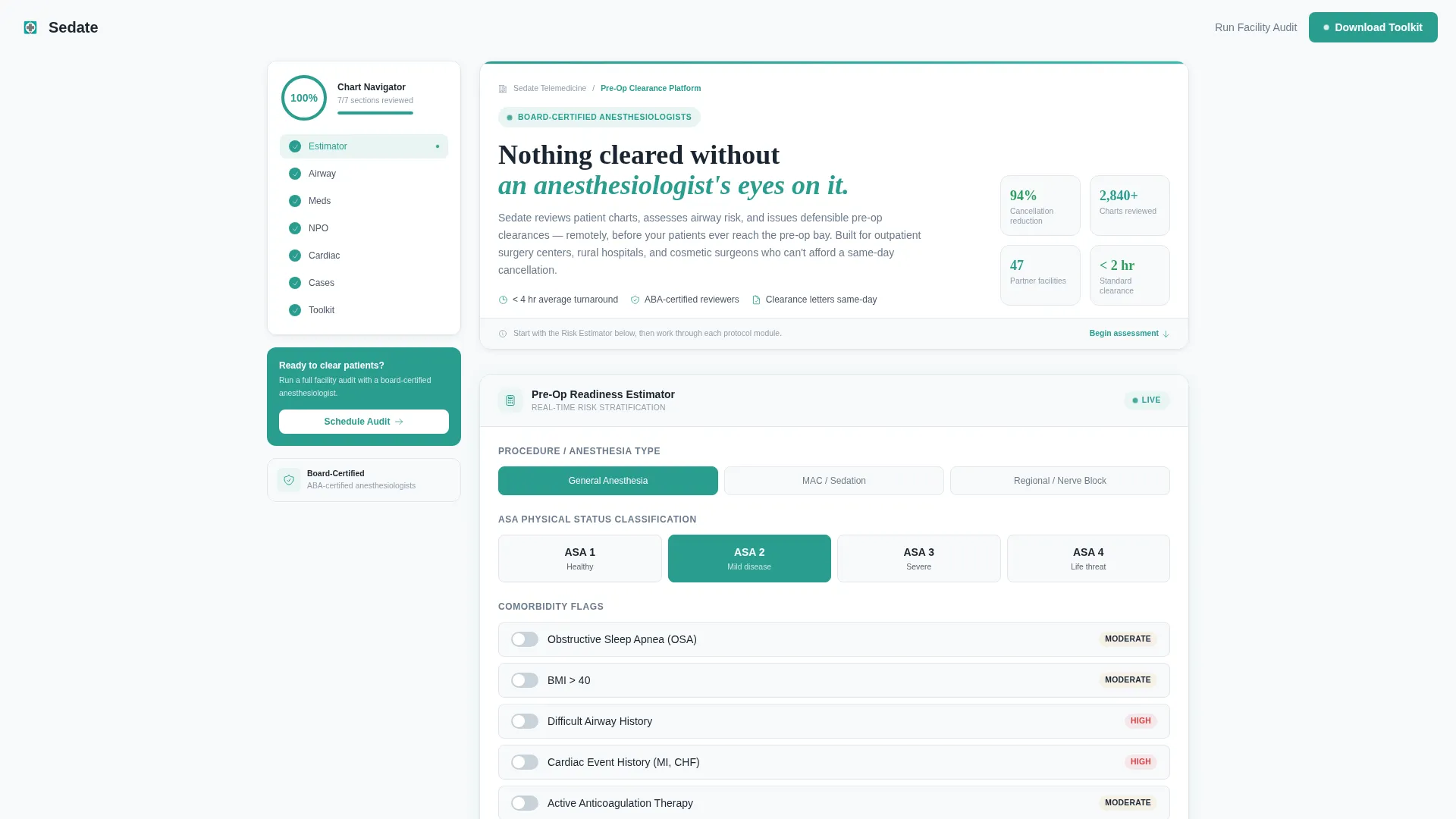
- An interactive Pre-Op Readiness Estimator in the hero section with real-time risk-tier output
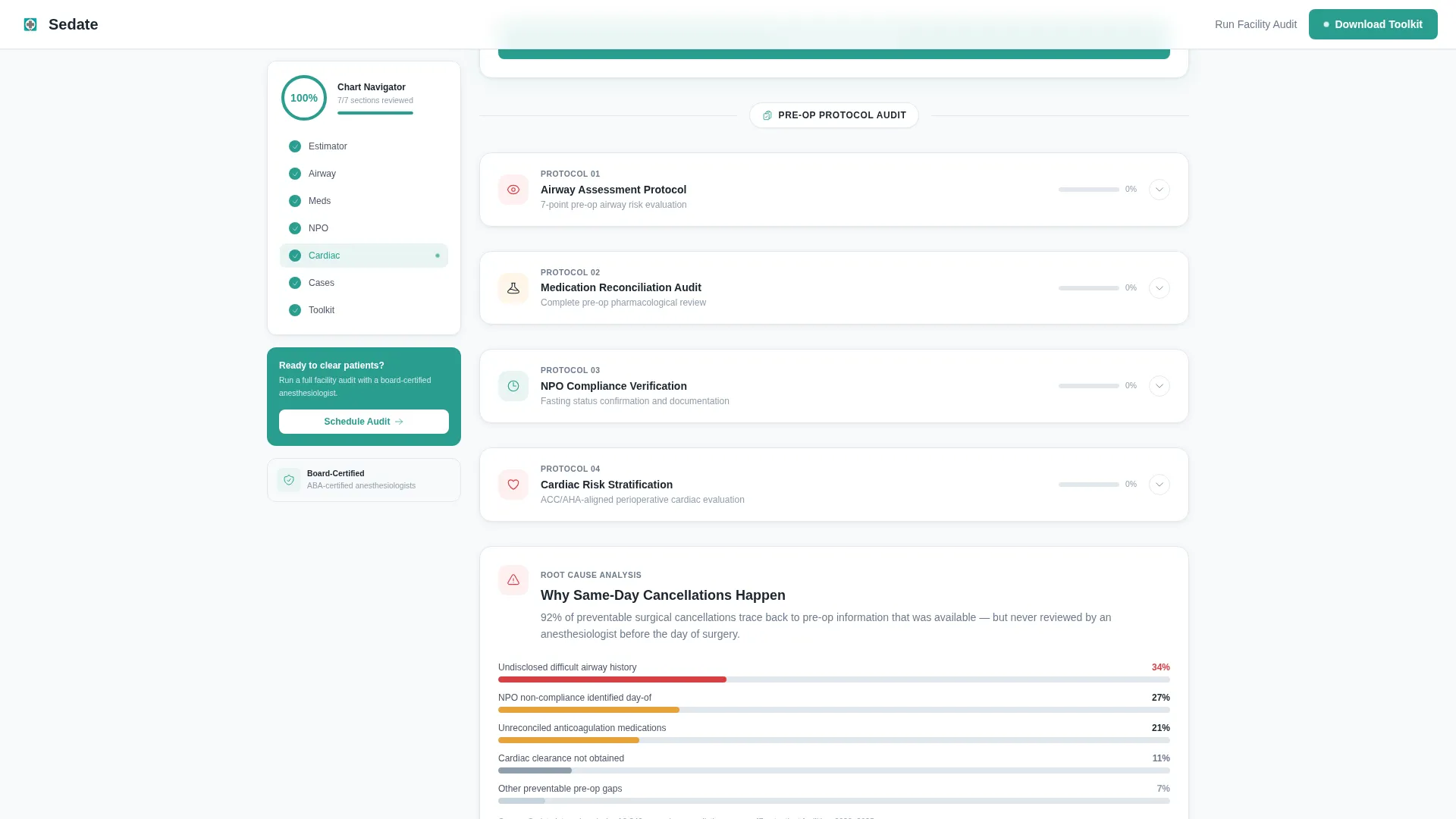
- Four collapsible checklist audit modules with a sidebar progress ring that updates as visitors scroll
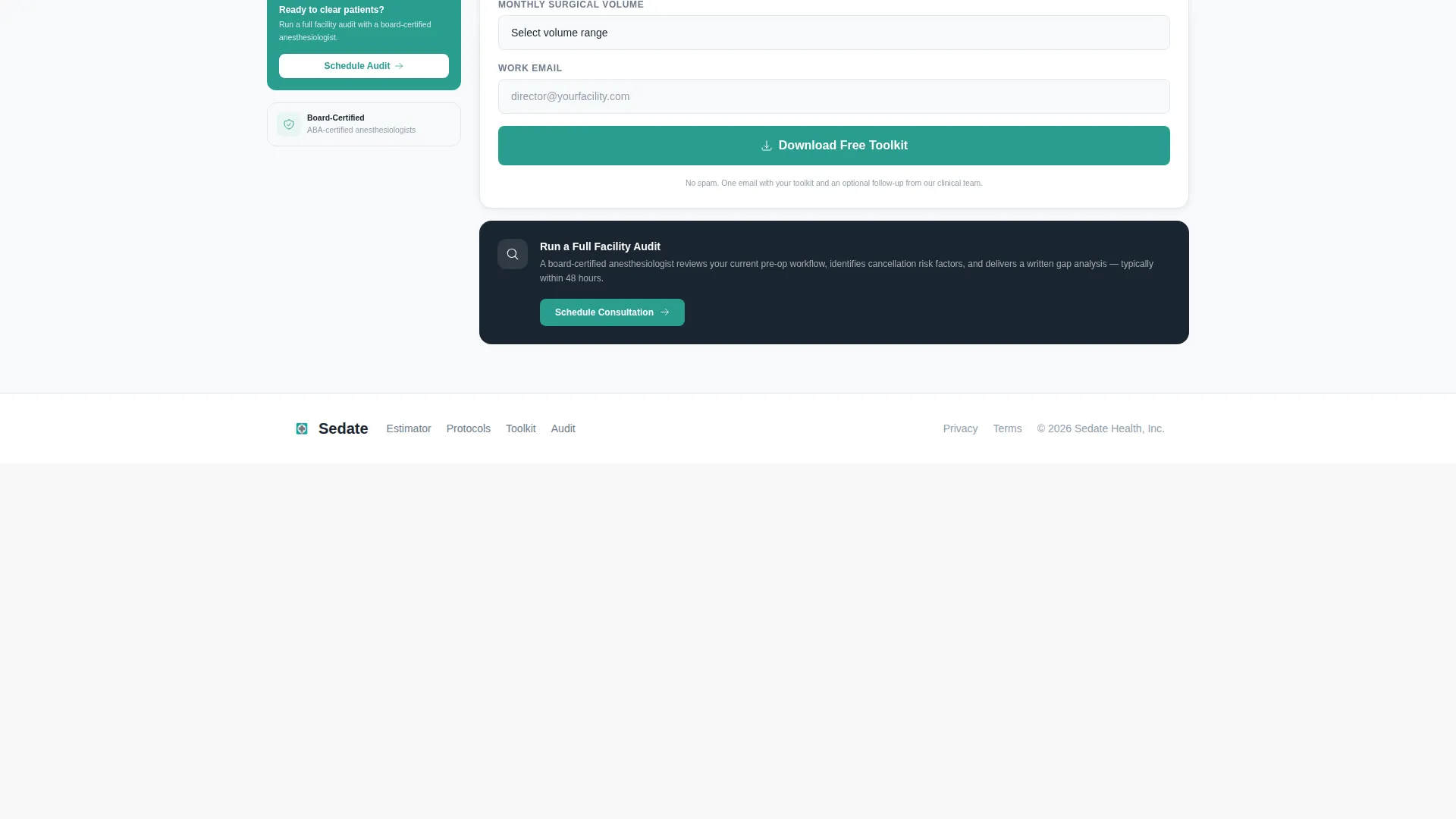
- A gated toolkit download form and a secondary consultation call to action at the page close
Feature list
This template includes purpose-built interactive components designed specifically for the anesthesiology pre-op clearance use case.
Interactive Pre-Op Readiness Estimator
Visitors select procedure type (general, MAC, or regional anesthesia), input the patient's ASA physical status classification, and toggle comorbidity flags such as obstructive sleep apnea, body mass index over 40, and difficult airway history. The estimator outputs a risk-tier badge in green, amber, or red, a recommended clearance pathway, and an estimated turnaround time. Numbers update in real time as selections change, with the teal pulse-monitor accent animating each recalculation like a refreshing vitals readout.
Collapsible Checklist Audit Modules
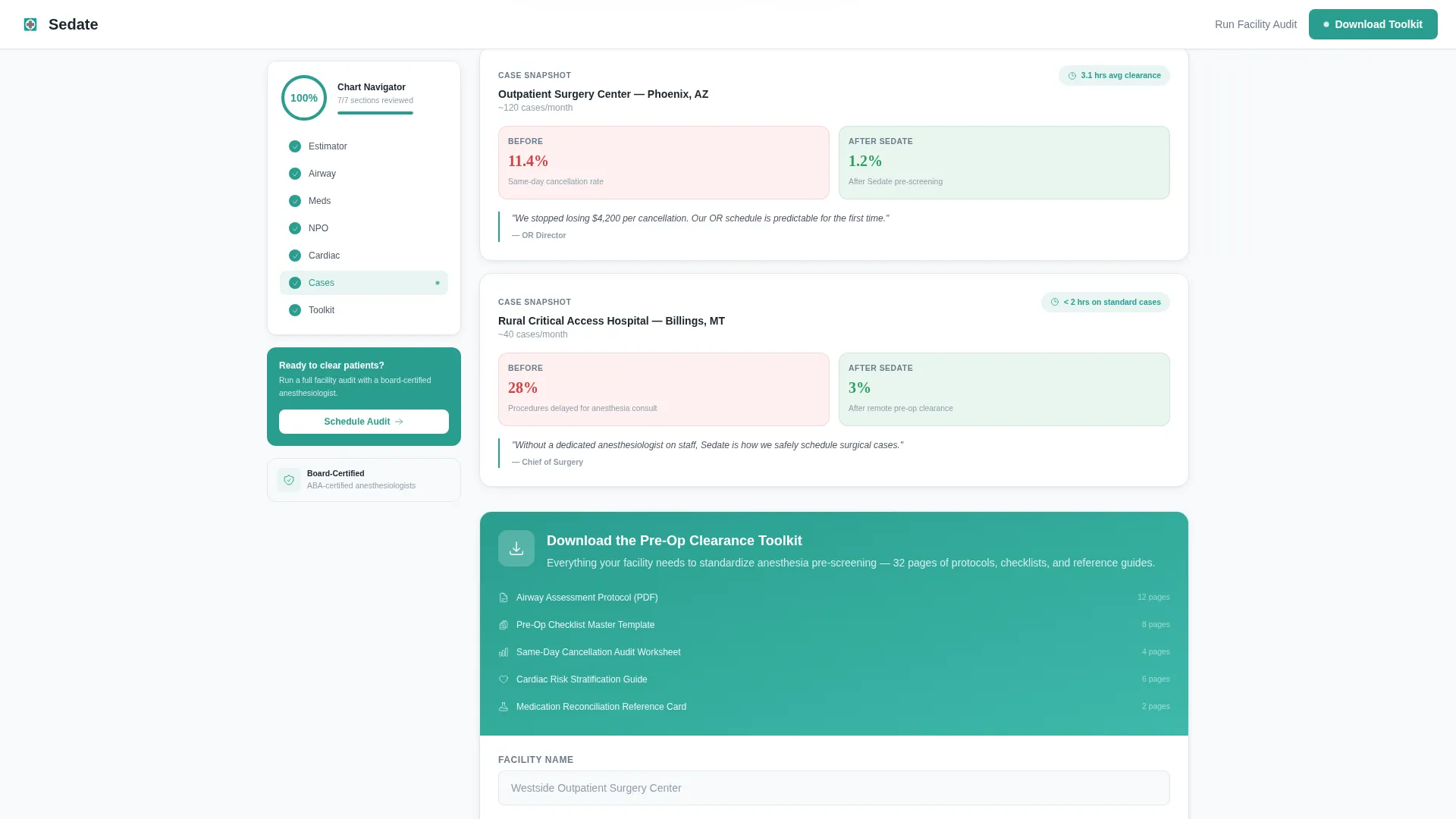
The scroll experience is organized as four collapsible checklist modules: Airway Assessment Protocol, Medication Reconciliation Audit, NPO Compliance Verification, and Cardiac Risk Stratification. Each module opens to reveal what the checklist covers and why skipping it causes cancellations. Sections alternate between educational breakdowns and case snapshots with real turnaround metrics.
Persistent Sidebar Progress Ring
A sidebar navigator remains fixed on screen as visitors scroll. It tracks which checklist modules have been viewed and updates a progress ring in real time. By the time a visitor reaches the bottom of the page, they have effectively audited their own facility's workflow gaps.
Gated Toolkit Download Form
The primary conversion point is a short form gating a comprehensive Pre-Op Clearance Toolkit PDF. Visitors provide their facility name, monthly surgical volume from a dropdown (fewer than 50, 50 to 150, or 150 or more procedures), and a work email address. A secondary call to action offers a scheduled full facility audit consultation.
Clinical Arctic White Design System
The page uses a carefully calibrated color palette: clinical white as the dominant background, instrument-grade steel for body text, pulse-monitor teal for active states and progress indicators, and alert vermillion used sparingly for risk flags. Typography pairs DM Sans for interface and body copy with Fraunces for editorial headings, maintaining a sterile but approachable reading environment.
Page sections overview
| Section | Purpose |
|---|---|
| Hero Estimator | Interactive risk-tier calculator with real-time badge output |
| Airway Assessment Module | Collapsible checklist covering airway screening protocol |
| Medication Reconciliation Module | Collapsible audit of medication conflict review steps |
| NPO Compliance Module | Checklist verifying fasting and NPO guideline adherence |
| Cardiac Risk Module | Stratification checklist for cardiovascular clearance gaps |
| Why Cancellations Happen | Educational breakdown with case snapshot turnaround metrics |
| Toolkit Download Form | Gated PDF form capturing facility name, volume, and email |
| Footer | Linear single-row footer with contact and navigation links |
Design & branding system
The visual identity follows an Educational Guide theme built around an Arctic White color system. The palette feels like a freshly calibrated clinical monitor: sterile but not cold, precise but not intimidating.
- Arctic White (#F8FAFB) background, instrument-grade steel (#6B7B8D) body text, pulse-monitor teal (#2A9D8F) for active states and progress indicators, and alert vermillion (#D64045) for risk flags and critical callouts
- DM Sans handles all body copy and user interface text; Fraunces is used for editorial headings to create visual hierarchy
- Scroll-linked checklist reveals, teal pulse animation on estimator recalculation, and a sidebar progress ring provide medium-level animation throughout
Mobile & speed optimization
This template is designed desktop-first, prioritizing clinical administrators reviewing resources at workstations. The architecture still supports clean rendering across screen sizes.
- Server Components power all static sections, while Client Components handle the estimator, sidebar tracker, and collapsible modules
- The sidebar progress ring and estimator toggle are scoped to client rendering to keep static content delivery fast
- Desktop layout takes priority, with the sidebar companion and estimator side-by-side for optimal clinical review workflow
How this template helps you convert
The page earns conversions by letting visitors use the product's own logic before they ever see a form. By the time someone reaches the call to action, they have already identified gaps in their own facility's workflow.
- The estimator delivers an immediate, personalized risk-tier result, creating a concrete reason to keep reading and to want the reference document.
- The checklist audit modules guide visitors through each screening category, surfacing the exact gaps that lead to same-day cancellations and building trust in the service's depth.
- The gated toolkit download closes the loop: visitors who have already self-audited their facility are primed to enter their details and request the full reference bundle or book a consultation.
Other information about this template
This template is built as a sidebar companion layout, a format that keeps navigational context visible throughout a long-scroll educational page. It suits any anesthesiology telemedicine practice that needs to communicate clinical authority before converting a cautious, detail-oriented audience.
- Template style: Sidebar Companion with a persistent chart-navigator sidebar
- Theme: Educational Guide with a Checklist and Audit creative direction
- Primary call to action: Download the Pre-Op Clearance Toolkit (gated PDF)
- Secondary call to action: Run a Full Facility Audit (scheduled consultation)
- Footer pattern: Linear Single-Row
- Localization: English, United States dollar pricing, MM/DD/YYYY date format, USA market
- Device priority: Desktop-first for clinical administrator workstation use
Theme
Educational Guide
Creative direction
Checklist & Audit
Color system
Arctic White
Style
Sidebar Companion
Direction
Content/Resource
Page Sections
Interactive Pre-op Readiness Estimator
Collapsible Checklist Audit Modules
Persistent Sidebar Progress Ring
Gated Pre-op Clearance Toolkit Form
Clinical Arctic White Design System
Related questions
Who is this landing page template built for?
What does the Pre-Op Readiness Estimator actually do?
What is included in the gated toolkit download section?
Is this template designed for desktop or mobile use?
Can a single-specialty anesthesiology practice use this template?



