Templates
Safety & Emergency
Security Guard & Protection
Sentinel - Guarantee-Led Construction Site Security Landing Page Template
Sentinel - Guarantee-Led Construction Site Security Landing Page Template
Sentinel is a single-column security landing page template built for construction site security businesses. It leads with hard metrics, layered financial guarantees, and incident-report case studies to earn contractor trust before asking for contact details. The Charcoal and Amber color system, pulsing amber rules, and clinical white data cards deliver a floodlit-jobsite aesthetic that feels authoritative around the clock.
by Rocket studio
Quick summary
Sentinel is a guarantee-led security landing page template designed for construction site security operations. It opens with a live-data stats wall, escalates trust through two stacked financial guarantees, and closes with incident report case studies. Every section is built to convert general contractors and site managers into qualified leads before a single form field appears.
Who this template is for
This landing page is built for security companies and monitoring services targeting the construction industry. It fits businesses that need a focused, high-trust security landing page rather than a general corporate website.
- General contractors managing multi-phase builds who need credible, verifiable site protection
- Site managers and developers who have already experienced theft or vandalism and need a fast, deployable security solution
- Security services companies ready to lead with financial guarantees and documented response records
What problem this template solves
Construction sites are among the most vulnerable business locations in any industry. Open perimeters, idle equipment, exposed materials, and minimal overnight access control create serious theft and vandalism risk. Most security landing pages bury their value proposition behind contact forms, which causes visitors to bounce before trust is established.
- Contractors need to see proof before they share company details or request a site assessment
- Generic pages for security systems fail to address job-site-specific concerns like theft of tools, copper, and machinery
- A weak landing page cannot communicate the financial stakes or the speed of deployment that serious buyers require
What you get with this template
This template delivers a complete single-column flow landing page with every section pre-structured for maximum persuasion. You get a ready-to-deploy security landing page that guides visitors from raw data through layered guarantees and into a conversion action.
- A three-stat hero wall with amber-on-charcoal scoreboard figures, two guarantee cards, a monitoring infrastructure section with clinical white data cards, four incident report case study cards, and a linear single-row footer
- A sticky call-to-action bar that pins to the bottom of the viewport on scroll, plus a slide-in assessment form panel collecting company name, number of active sites, project duration, and current security setup
- A secondary conversion path gating a downloadable General Contractor Partnership Kit behind a work email field, giving visitors who are not ready to call a lower-friction way to engage
Feature list
This landing page template packages every element a construction security business needs to lead with authority and close with confidence.
Amber-on-Charcoal Stats Hero
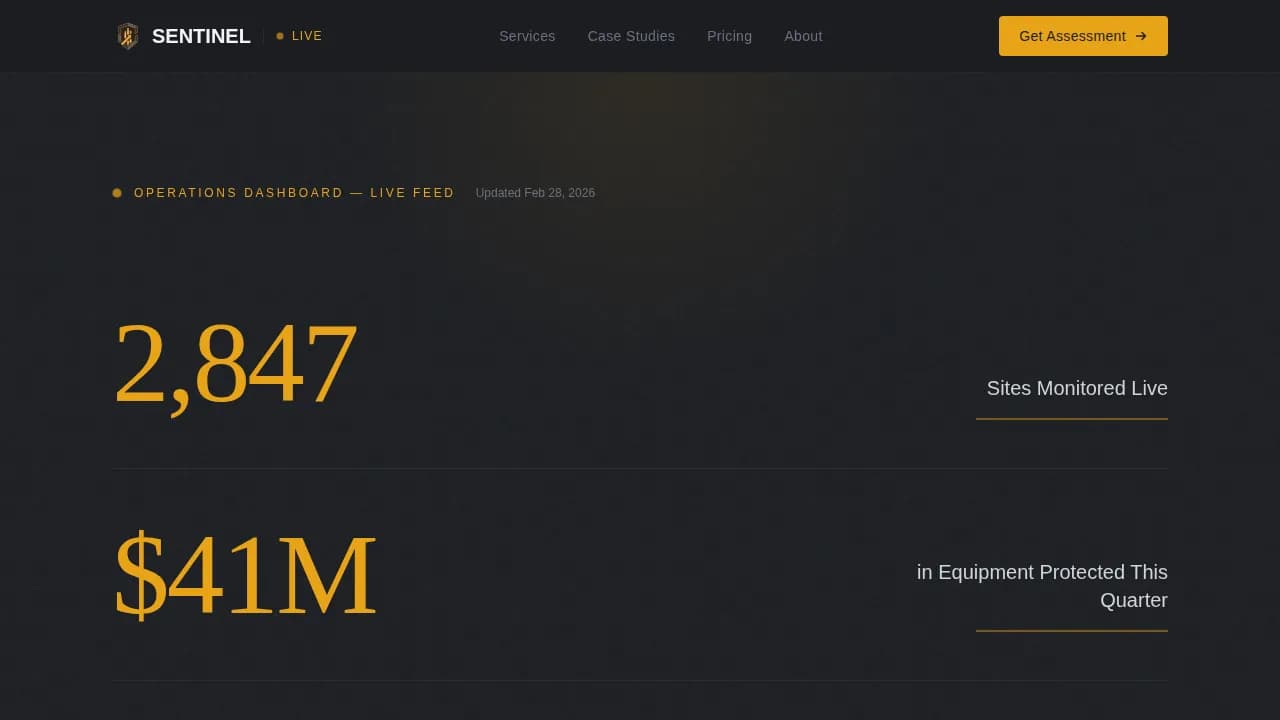
The header renders three massive figures in amber against deep charcoal: sites monitored live, total equipment value protected, and a zero-breach streak. Each stat sits beneath a pulsing amber rule that reinforces urgency without relying on any hero image. The data itself functions as the authority signal.
Layered Guarantee Card System
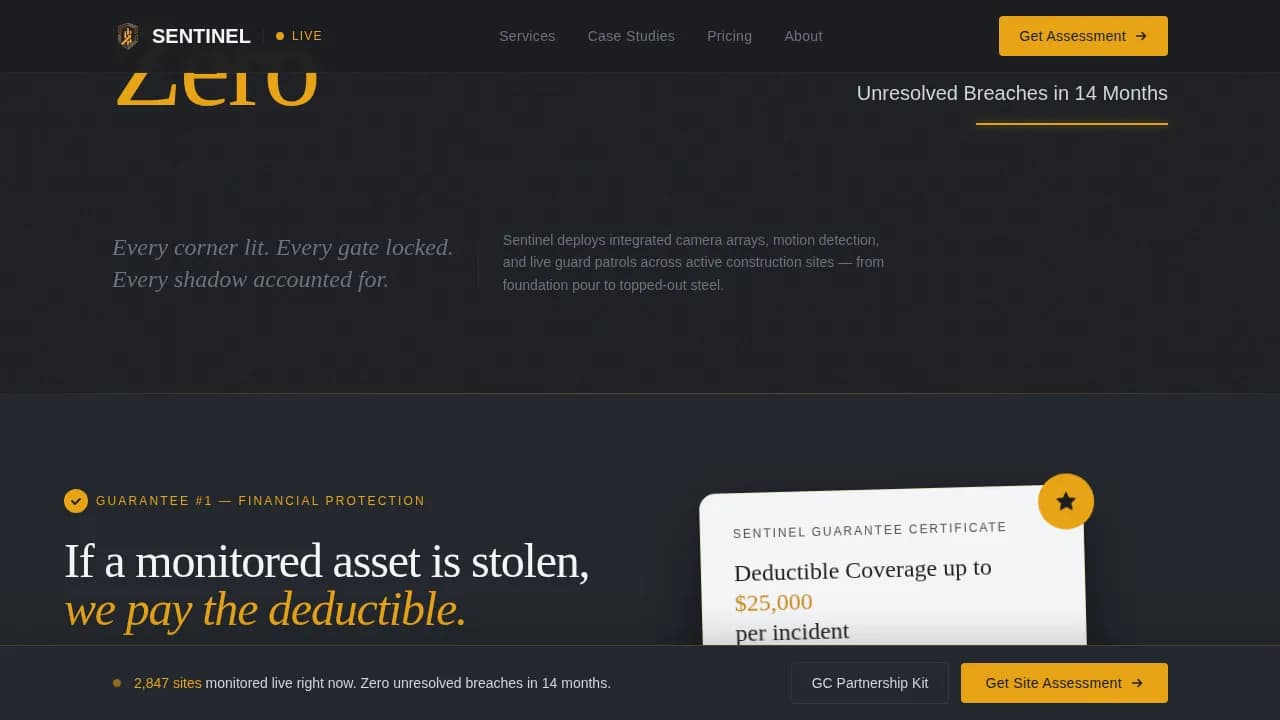
Two guarantee cards appear at calculated scroll depths. The first states a pay-the-deductible promise if a monitored asset is stolen. The second commits to 48-hour deployment or a free first month. Each card is styled with amber badge accents that make the promise visually impossible to miss.
Clinical White Monitoring Infrastructure Cards
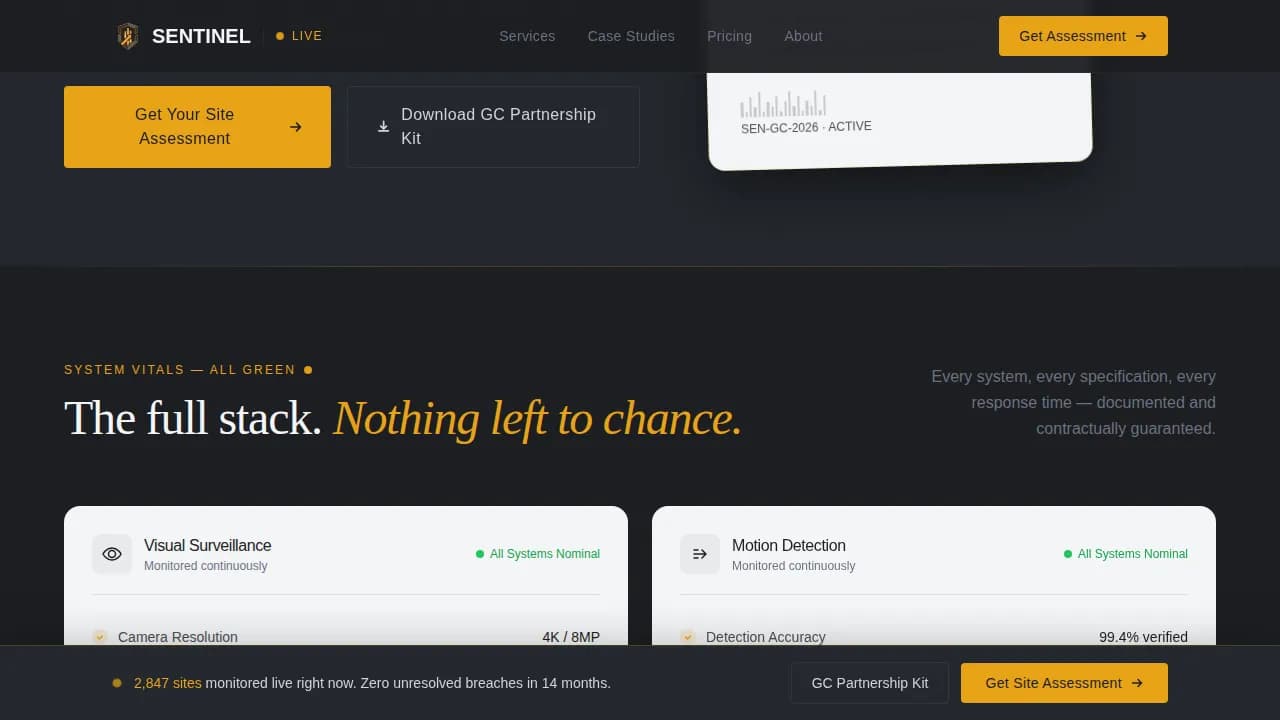
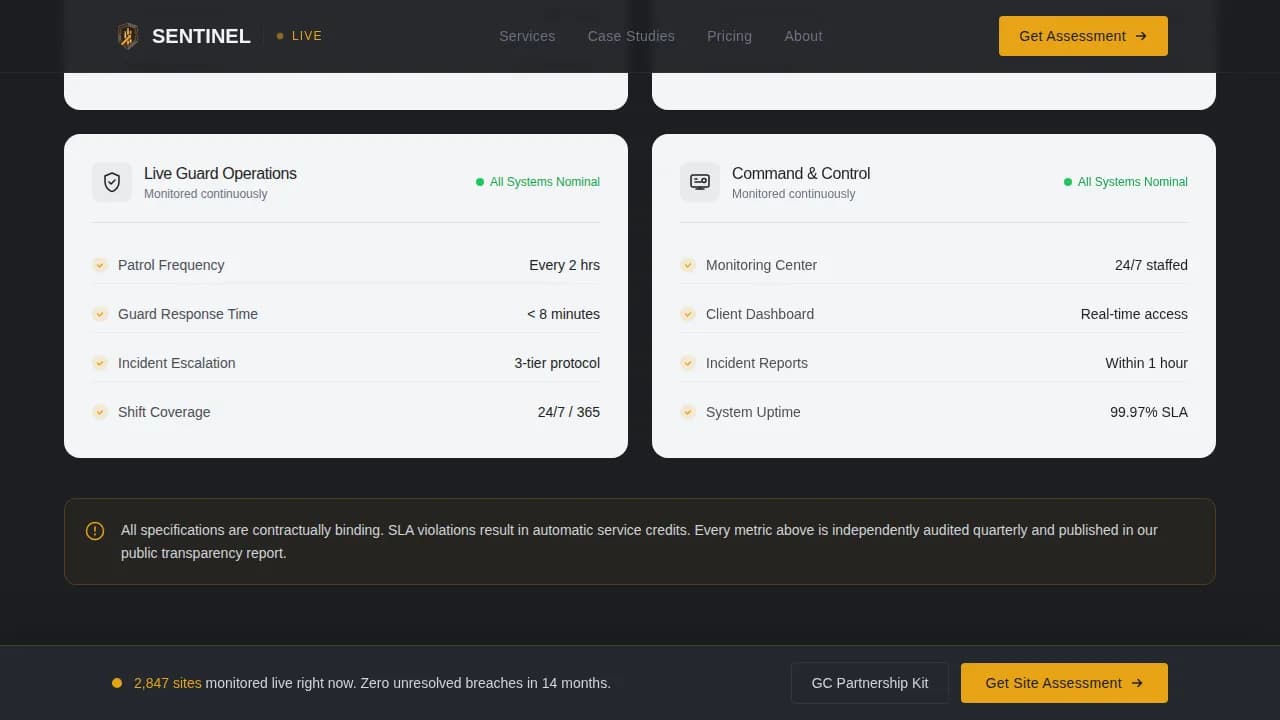
The infrastructure section presents security cameras, response-time service-level agreements, and guard patrol frequencies inside clinical white cards with amber check-marks. The layout mirrors a medical chart, making every reported vital feel verified. This section communicates the depth of the security system without overwhelming the reader.
Incident Report Case Study Cards
Four case study cards are formatted as structured incident reports, each showing date, site type, threat detected, response time, and outcome. This format borrows the credibility of formal security reports. Visitors can quickly analyse patterns across events and see consistent, measurable results.
Sticky Call-to-Action Bar and Slide-In Form Panel
The primary call-to-action, "Get Your Site Assessment," appears after the first guarantee card and then pins to the bottom of the viewport for the full scroll duration. Clicking opens a slide-in panel. The form collects only what is needed to determine site requirements, keeping the barrier to contact low.
PDF Download Gate for Partnership Kit
A secondary conversion path lets visitors who are not ready to call download the General Contractor Partnership Kit in exchange for a work email address. This path captures business leads earlier in the decision cycle and keeps the page effective across the full range of buyer readiness.
Page sections overview
| Section | Purpose |
|---|---|
| Stats Hero Wall | Opens with live metrics to establish authority immediately |
| First Guarantee Card | Commits to deductible payment if a monitored asset is stolen |
| Monitoring Infrastructure | Details cameras, response SLAs, and patrol frequency in data cards |
| Second Guarantee Card | Promises 48-hour deployment or first month free |
| Incident Report Cards | Four case studies formatted as formal security incident reports |
| Footer Row | Single linear footer row per Pattern 1 layout |
Design & branding system
The Charcoal and Amber color system defines every visual decision in this template. Deep site-dark charcoal (#1C1E22) dominates backgrounds, caution-tape amber (#E8A317) marks every interactive element and guarantee badge, poured-concrete mid-gray (#4A4E54) structures section dividers, and clinical white (#F4F5F7) opens data cards so numbers breathe clearly. Typography pairs Fraunces serif display headings with Manrope sans body text for industrial precision.
- Pulsing amber rules beneath each stat create a heartbeat-monitor effect that keeps the Medical Clarity theme coherent from hero to footer
- Amber check-marks inside white infrastructure cards reinforce a security-by-design visual language, where every reported vital reads as confirmed and in control
- Scroll-reveal stagger animations bring each section into view progressively, building certainty with each new piece of evidence
Mobile & speed optimization
The template is desktop-first, reflecting the reality that general contractors most often review vendor pages on office workstations. It is fully responsive across screen sizes. Static sections are built as Server Components to keep initial load fast, while the slide-in form panel and sticky call-to-action bar run as Client Components.
- The sticky call-to-action bar remains accessible at all viewport sizes without obscuring critical content
- The slide-in assessment form panel and the PDF download gate are both optimized for smooth interaction on smaller screens
- Localization is set to English with United States Dollar pricing and MM/DD/YYYY date formatting, matching the industry standard for domestic construction business
How this template helps you convert
This landing page is built around one goal: turning site visitors into qualified security leads. Every scroll depth earns a harder promise, so doubt shrinks before the form appears.
- The stats wall establishes verifiable authority instantly, so visitors have a concrete reason to keep reading before any sales language appears
- The guarantee cards reframe the call-to-action as claiming protection rather than requesting a pitch, which lowers resistance and makes filling in the form feel like a rational business decision
- The secondary PDF gate captures business contacts who are still in the evaluation stage, expanding the total lead pool without requiring a separate landing page or additional website pages
Other information about this template
This template is the Sentinel guarantee-led construction site security landing page template, a purpose-built solution for security companies competing in the construction niche. It addresses the full range of high-stakes concerns specific to active job sites.
- Construction theft costs the industry over one billion dollars every year, making a focused, trust-first security landing page essential for any company in this space; this template is prepared to carry that weight from the first pixel
- Common threats on construction sites include theft of tools, copper, fuel, and machinery, as well as vandalism and after-hours trespassing; the incident report section addresses these events directly in a format contractors already recognize
- Effective security plans integrate risk assessment, access control, and camera surveillance strategies; this template surfaces all three in a logical reading order so visitors can properly evaluate the full solution
- The landing page is built to support CCTV camera specifications, perimeter coverage details, and alarms data within the infrastructure cards, giving security companies a flexible system to present their own detailed information
- Solar-powered options with battery backups are referenced in the brief for remote or off-grid construction sites, and the infrastructure card layout can accommodate those hardware specifications without redesign
- Because landing pages can boost inquiries by up to 55 percent compared to multi-page sites, this focused single-page solution saves money and reduces planning overhead for security companies running paid traffic or email campaigns
- The template stores conversion-ready layout logic in its components, enabling the business to enhance its lead funnel without building additional pages from scratch
- Google Analytics event tracking and other internet-based analytics tools can be connected to monitor visitor behavior, track form submissions, and analyse the effectiveness of each section over its full deployment duration
- Unlike other security systems pages that simply list services, this template leads with financial guarantees and uses incident reports to communicate what a real security company can deliver on behalf of its clients
- The slide-in form and PDF gate both functions as independent lead capture points, giving the business two distinct contact streams from one page; home security or mixed-use security companies can adapt this structure to their own services with minimal changes
Theme
Medical Clarity
Creative direction
Guarantee-Led
Color system
Charcoal & Amber
Style
Single Column Flow
Direction
Partnership/B2B
Page Sections
Amber-on-charcoal Stats Hero Wall
Layered Guarantee Card System
Clinical White Infrastructure Data Cards
Incident Report Case Study Cards
Sticky Call-to-action Bar and Slide-in Form
PDF Partnership Kit Download Gate
Related questions
What type of security business is this template designed for?
Can the guarantee cards be edited to reflect my own service terms?
Does the template include a secondary lead capture path for contractors not ready to call?
How does the incident report section build trust with site managers?
Is this a single-page template or a multi-page website?