Home Security Landing Page Template for Rural Properties
Sentinel is a split-screen landing page template built for home security businesses serving rural and semi-rural property owners. It combines a dramatic Before/After Reveal, a guided five-step assessment quiz, and an Agrarian Root visual identity in weathered steel tones. The template moves visitors from awareness of vulnerability to confident action through a structured, story-driven single-page layout.
by Rocket studio
Quick summary
Sentinel is a single-page, split-screen landing page template designed for home security companies targeting rural homeowners, hobby farmers, and semi-rural families. It uses a Before/After Reveal scroll experience, a five-step coverage assessment quiz, and a stark Monochrome Steel color system to guide visitors from recognizing their blind spots to requesting a personalized coverage plan.
Who this template is for
This template suits home security businesses whose clients live beyond the reach of quick emergency response. If your audience owns acreage, manages outbuildings, or simply needs more than a doorbell camera, Sentinel speaks their language directly.
- Rural homeowners and hobby farmers who protect large properties with long perimeter lines
- Families in semi-rural subdivisions where police response times are measured in tens of minutes
- Home security installers who need a conversion-focused landing page that qualifies leads before the first call
What problem this template solves
Most home security landing pages assume a small suburban lot. They skip the real fears of property owners who have barns, gravel driveways, back gates, and equipment left overnight. Sentinel addresses that gap head-on.
- Visitors cannot visualize where their blind spots are until the Before/After Reveal shows them, section by section
- Generic contact forms fail to qualify rural buyers, leaving installers with vague leads and wasted site visits
- A flat, polished aesthetic feels wrong for an audience that values durability and function over glossy marketing
What you get with this template
Sentinel delivers a complete, ready-to-customize single-page layout built around one clear conversion goal: helping property owners understand their coverage needs and take the next step.
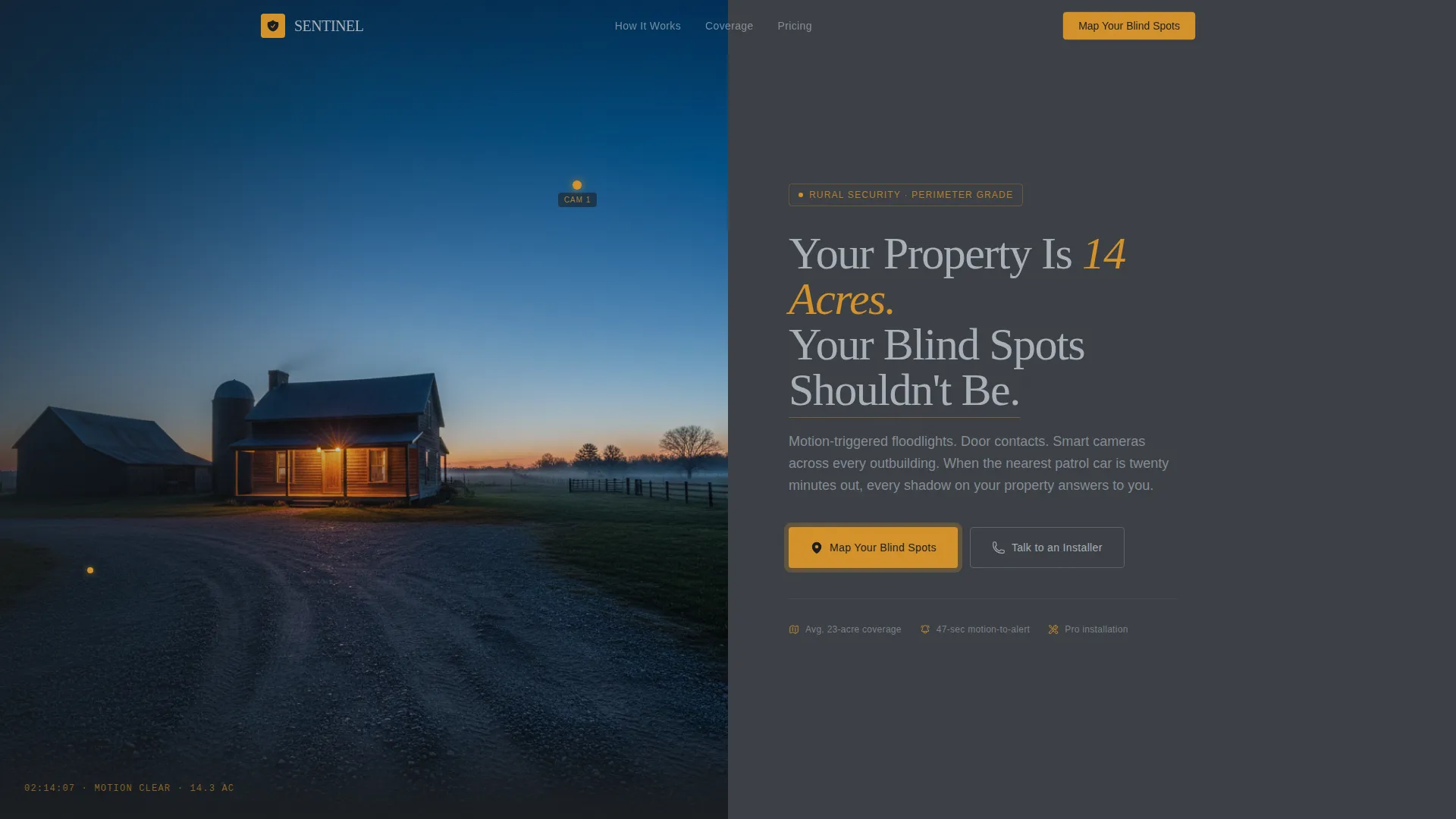
- A half-page photo and text hero section with a pulsing amber call-to-action button
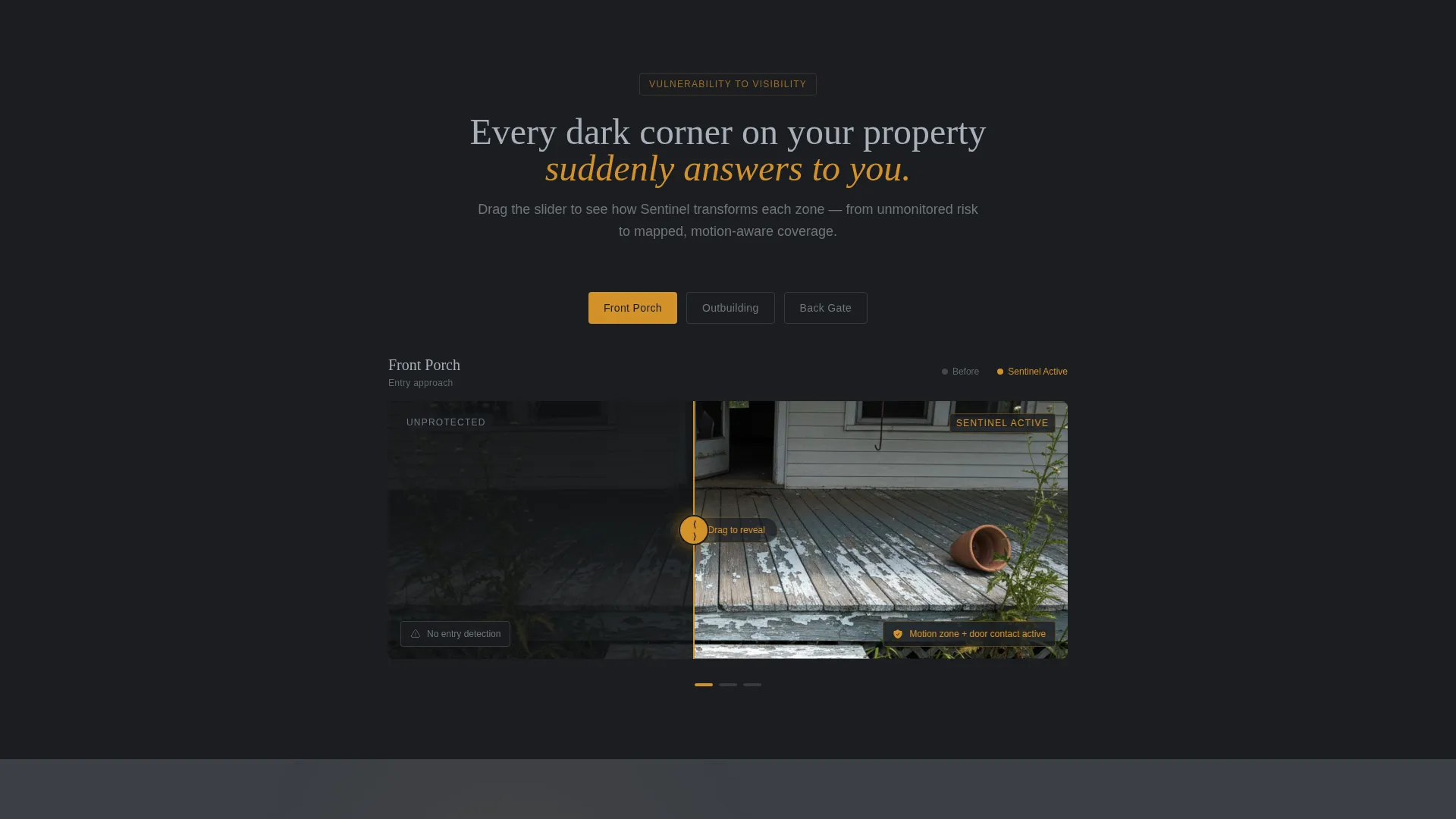
- An interactive Before/After Reveal scroll with draggable sliders across four property zones: porch, outbuilding, back gate, and full aerial perimeter view
- A five-step quiz assessment that produces a personalized coverage diagram and recommended sensor count, plus a secondary "Talk to an Installer" path for buyers who are already decided
Feature list
This section covers the core functional and design capabilities built into the Sentinel template.
Half-Page Hero Split
The header divides the screen 50/50. The left side shows a wide-angle dusk farmstead photograph with a barely visible camera on the eave. The right side holds the headline in galvanized silver against charcoal, with a single amber button that pulses gently to draw the eye.
Interactive Before/After Reveal
Each scroll section splits the screen between an unprotected property view on the left and a security-overlay view on the right. Visitors drag a slider to reveal motion zones drawn in amber, mapped camera angles, and illustrated sensor coverage. The sequence moves through four zones: porch, outbuilding, back gate, and aerial perimeter heat map.
Five-Step Coverage Assessment Quiz
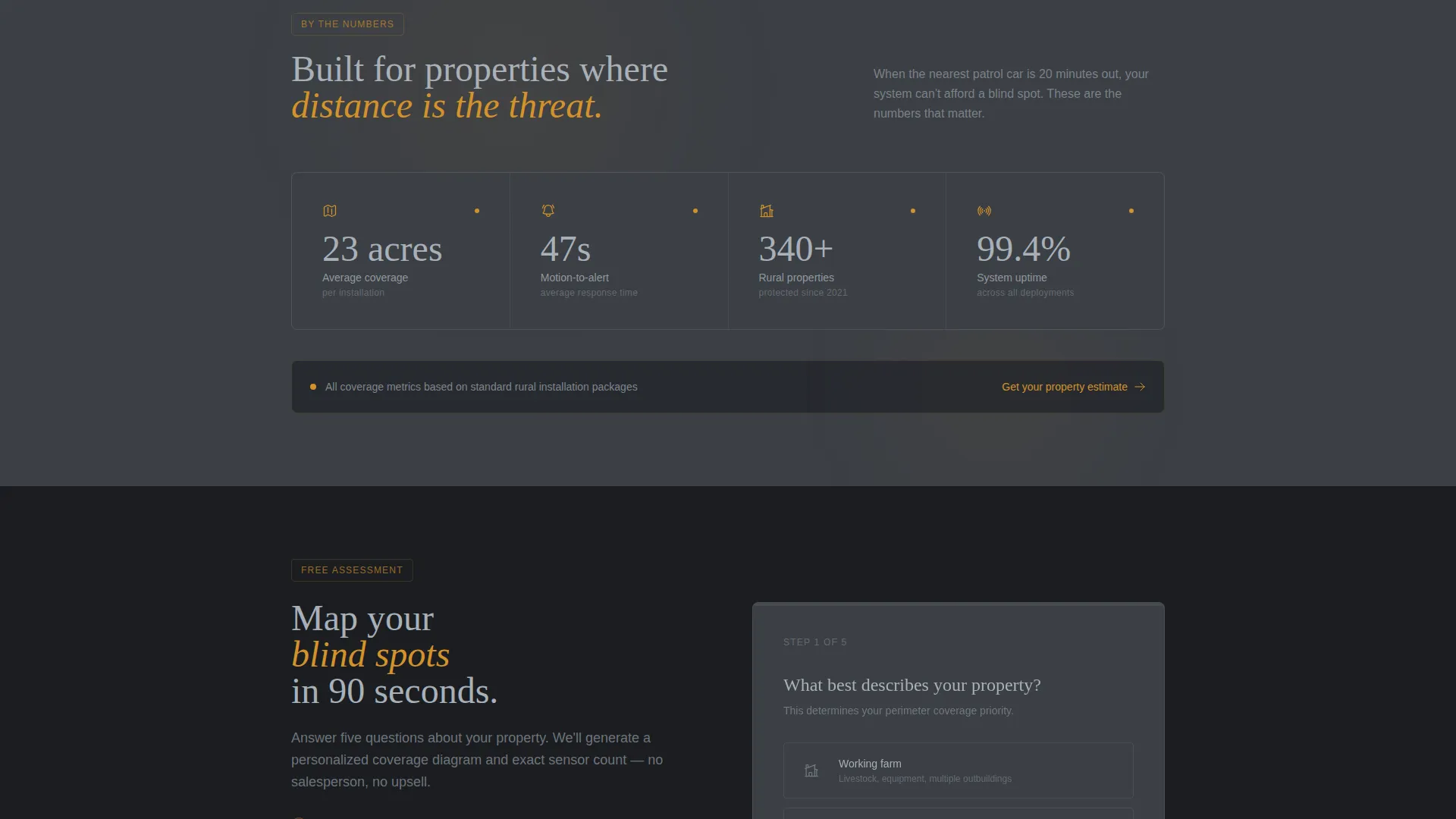
The primary call-to-action opens a guided assessment. Visitors answer five questions: property type, approximate acreage via slider, number of outbuildings, current security setup, and biggest concern. Results return a personalized coverage diagram and a recommended sensor count tailored to their answers.
Dual Conversion Paths
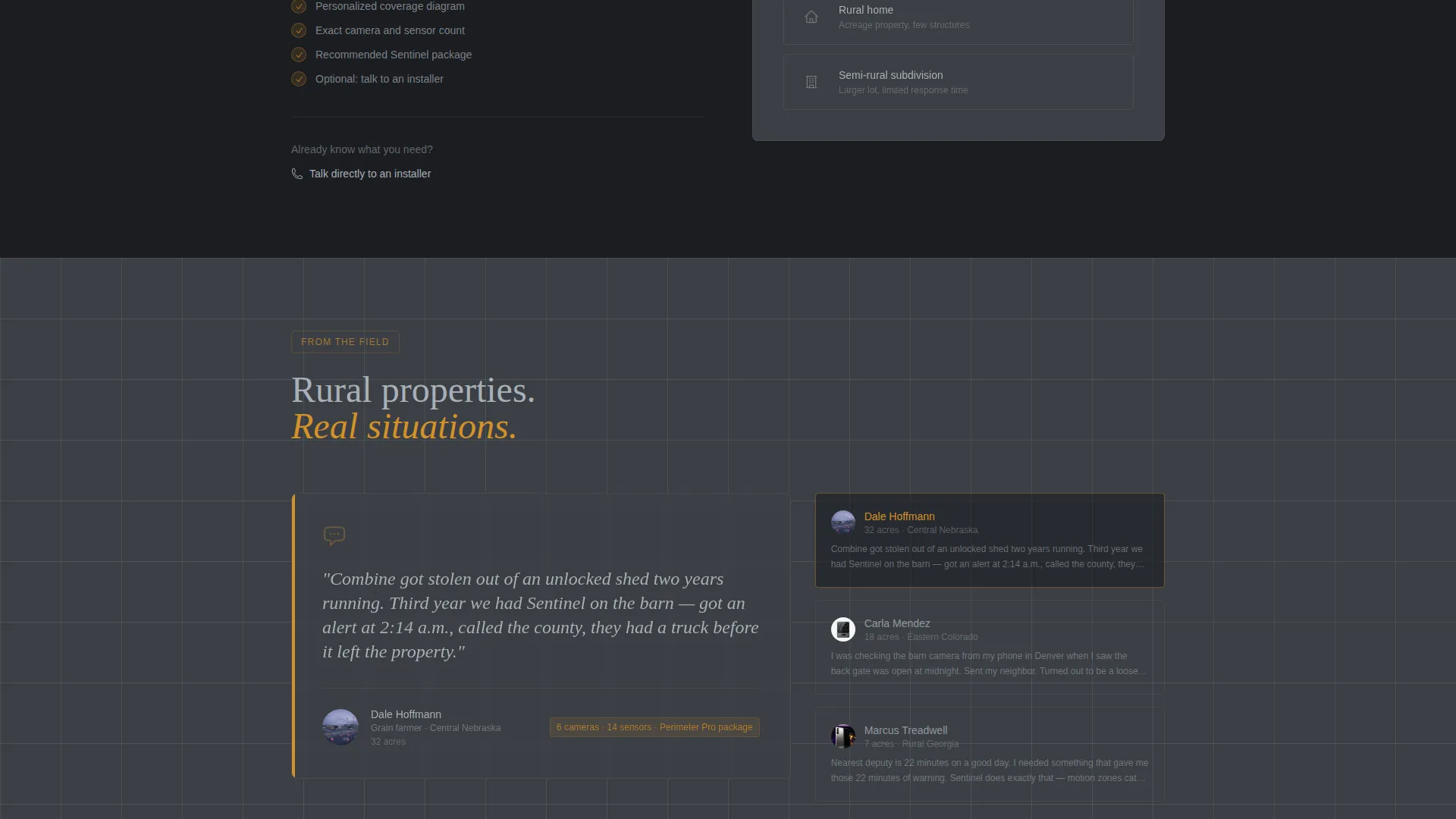
The template offers two clear next steps. "Map Your Blind Spots" guides undecided visitors through the quiz. "Talk to an Installer" gives ready buyers a direct route to a conversation. Both paths serve different intent levels without competing with each other.
Amber Alert Accent System
Every interactive element, call-to-action button, motion-zone overlay, and notification pulse uses the amber alert color (#D4922A). This single accent creates a visual language that mirrors real sensor lights, reinforcing the product concept through the design itself.
Narrative Scroll Architecture
The page is structured as a story. Each scroll section deepens the stakes by moving from a single porch camera to full aerial coverage. The narrative arc from vulnerability to visibility keeps visitors engaged and builds the case for a complete system before the quiz appears.
Page sections overview
| Section | Purpose |
|---|---|
| Hero Split Header | Introduces the property-scale problem with a farmstead photo and headline |
| Porch Reveal Slider | Shows before/after view of an unmonitored front porch versus a secured one |
| Outbuilding Reveal Slider | Contrasts a dark barn interior with a motion-zone and camera overlay |
| Back Gate Reveal Slider | Highlights an unmonitored gate versus a sensor-covered perimeter entry |
| Aerial Perimeter View | Displays a full property heat map showing total coverage density |
| Coverage Assessment Quiz | Guides visitors through five steps to a personalized security recommendation |
| Installer Contact Path | Offers a direct conversion route for visitors who skip the quiz |
Design & branding system
Sentinel follows an Agrarian Root theme expressed through a Monochrome Steel color system. The palette draws from materials that have been outside long enough to earn trust: no polish, no chrome, just functional surfaces.
- Core colors are weathered charcoal (#3B3F45), galvanized silver (#A8B0B8), and barn-shadow black (#1A1D21), used for backgrounds, text, and section alternation
- The single accent, amber alert (#D4922A), is reserved exclusively for calls-to-action, motion-zone overlays, and interactive pulse animations
- Text is set in galvanized silver throughout, and section backgrounds alternate between barn-shadow black and charcoal to create depth without breaking the monochrome discipline
Mobile & speed optimization
The split-screen layout adapts to smaller screens without losing the core visual story. The draggable Before/After sliders are designed to work with touch input, so mobile visitors experience the same reveal interaction as desktop users.
- The 50/50 split stacks vertically on mobile, keeping both the photograph and the headline readable without horizontal scrolling
- The five-step quiz is structured as a single-question-per-step flow, which works cleanly on small screens and reduces friction for thumb-driven navigation
How this template helps you convert
Sentinel is designed around a single conversion goal: turning a curious rural property owner into a qualified lead. Every layout decision supports that outcome.
- The Before/After Reveal builds urgency by showing the visitor exactly where their property is exposed, making the assessment quiz feel like a natural next step rather than an interruption.
- The five-step quiz pre-qualifies each lead by collecting property type, acreage, outbuilding count, current setup, and primary concern, so the installer receives actionable context before the first conversation.
- The dual call-to-action structure ensures that both early-stage browsers and purchase-ready visitors have a clear path forward, reducing drop-off at both ends of the decision spectrum.
Other information about this template
Sentinel is a purpose-built template for the home security system niche, specifically designed for installers and security companies serving properties that standard residential templates overlook.
- The template style is Split Screen (50/50), and the creative direction is Before/After Reveal, making it visually distinctive in a category that often defaults to stock-photo hero sections and generic form pages
- The landing page direction is Quiz/Assessment, which means the primary conversion mechanism collects structured buyer intent data rather than relying on a passive contact form
- The header concept is Half-Page Photo and Text, combining a real-world property photograph with direct, stake-setting copy to establish credibility before the scroll begins
- This template falls under the Construction and Home category, within the Home Security and Automation subcategory, making it a strong fit for regional security installers, property protection consultants, and rural home security system providers
Theme
Agrarian Root
Creative direction
Before/After Reveal
Color system
Monochrome Steel
Style
Split Screen (50/50)
Direction
Quiz/Assessment
Page Sections
Half-page Hero Split Layout
Interactive Before/after Reveal Sliders
Five-step Coverage Assessment Quiz
Dual Call-to-action Conversion Paths
Amber Alert Accent System
Narrative Scroll Story Structure
Related questions
Can I customize the quiz questions for my specific service area?
Does the Before/After Reveal slider work on touch screens?
Can I use my own property photographs in the hero section?
Is this template suitable for a business offering both installation and monitoring?
What if a visitor already knows exactly what they need?



