Zero Missed Alerts Trade Surveillance Landing Page Template
The Sentinel Zero Missed Alerts Trade Surveillance Landing Page Template is a high-authority, comparison-driven single-page build for RegTech and compliance technology teams. It combines a guarantee-led hero, a dense competitor comparison table, objection-handling content sections, and a five-step quiz that scores a visitor's surveillance stack and books a calendar review with a solutions engineer.
by Rocket studio
Quick summary
This template is a purpose-built landing page for a trade surveillance compliance engine. It opens with a bold guarantee headline, walks the visitor through a structured comparison table, answers the objections a compliance officer will raise in sequence, and closes with a five-step quiz that produces a personalized Surveillance Gap Score. Every section exists to make one promise credible: zero missed alerts, or a full-year refund.
Who this template is for
This template is designed for B2B RegTech and financial compliance technology teams that need to convert highly skeptical, senior buyers. The visitor arriving on this page is not a curious browser. They carry real regulatory risk, and they evaluate vendors the way they evaluate audit firms: with controlled suspicion and a very short tolerance for vague claims.
The ideal builder for this template fits one of these profiles:
- A head of compliance at a tier-two bank or proprietary trading firm who needs to replace aging surveillance infrastructure and justify the switch to a board or chief risk officer
- A chief surveillance officer or COO at a broker-dealer who has inherited a patchwork of legacy licenses and Excel-based processes and needs a credible, audit-ready alternative
- A RegTech product or marketing team launching a surveillance engine and requiring a page that communicates authority, specificity, and a measurable value proposition to a sophisticated financial audience
What problem this template solves
Compliance technology buyers do not trust generic landing pages. They have seen too many vendor decks that promise comprehensive coverage but deliver dashboards full of false positives and alert fatigue so severe that analysts stop acting on flagged events. A standard SaaS template does not carry the visual weight or the structural logic that a head of compliance needs to feel safe enough to book a meeting.
This template solves that credibility gap directly:
- It leads with a guarantee that is concrete and financially quantified, which immediately separates the offer from competitors who rely on feature lists and stock photography to fill the hero section
- It structures the page as a sequential objection handler, moving from a competitor comparison table to asset-class coverage to application programming interface (API) architecture to an audit trail sample, so that each scroll answers the next silent question the compliance officer is already forming
- It closes with a quiz that produces a quantified output, giving the visitor a personalized Surveillance Gap Score rather than a generic contact form, which reduces friction and gives the sales team a warm, pre-qualified calendar booking to work from
What you get with this template
This template delivers a complete, production-ready landing page build. Every section is defined, every component has a clear purpose, and the conversion flow from hero to quiz to calendar is fully mapped. The design system is consistent from the top of the page to the footer, and all interactive elements are specified at the component level.
What is included in this template:
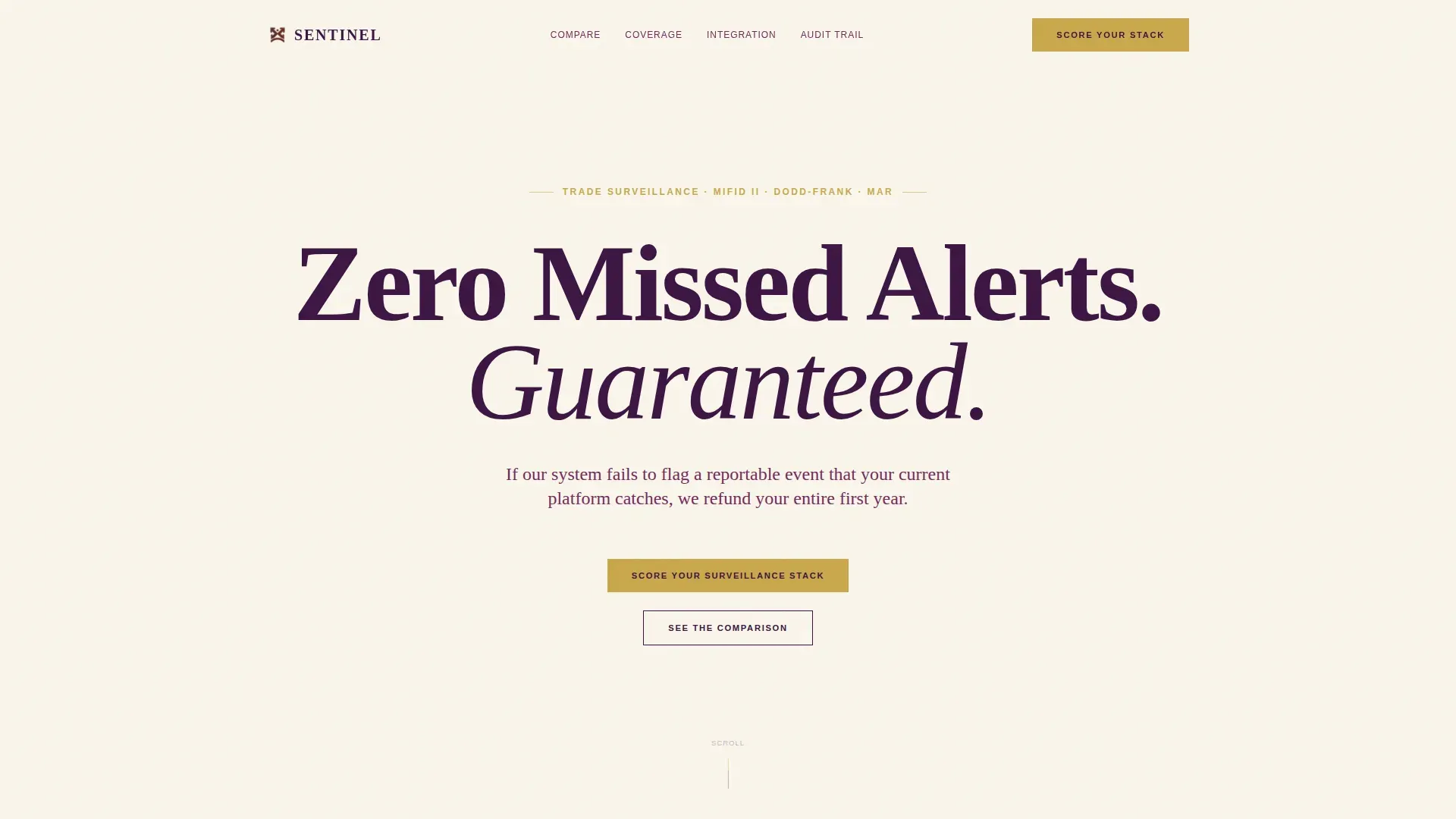
- A guarantee-led hero section with a giant centered serif headline set in deep boardroom plum on warm ivory parchment, a mahogany subline that states the refund terms, no imagery, and no animation, so that the guarantee itself functions as the visual
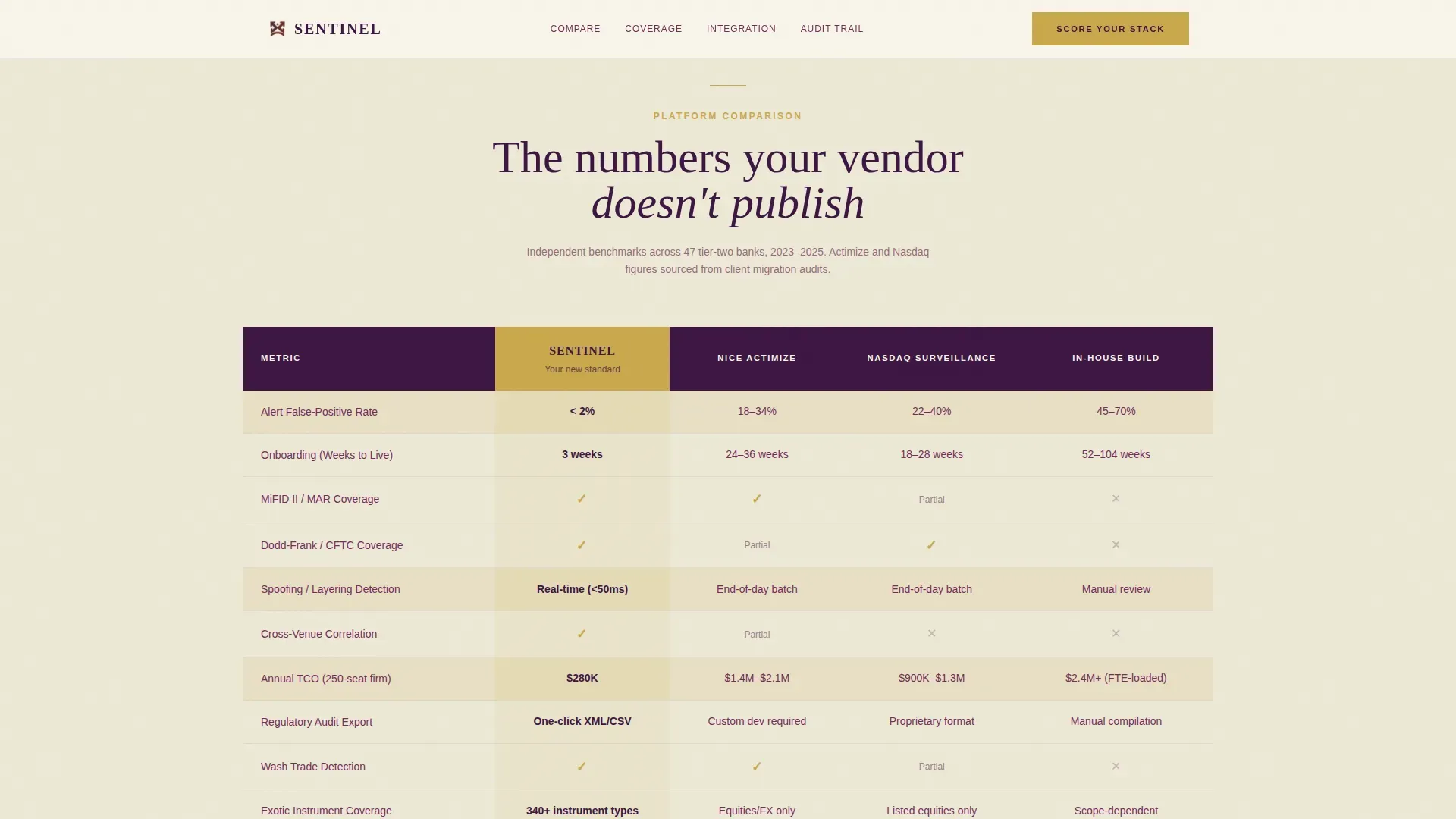
- A full competitor comparison table that positions the surveillance engine against legacy platforms across rows covering alert false-positive rate, onboarding time in weeks, regulatory framework coverage including the Markets in Financial Instruments Directive II (MiFID II) and the Dodd-Frank Wall Street Reform and Consumer Protection Act, and annual total cost of ownership, with muted gold used for checkmarks and highlight rows in the Sentinel column
- A five-step quiz and assessment component with a dropdown for current platform name, a slider for average false positives per week, a numeric input for number of regulated venues monitored, a multi-select for primary regulatory jurisdiction, and an open text field for biggest compliance fear, followed by a personalized Surveillance Gap Score output and a calendar embed for booking a thirty-minute gap review
Feature list
This template is built around a set of specific, functional capabilities that serve the conversion goal for a trade surveillance audience. Each feature listed below is directly grounded in the template brief.
Guarantee-Led Hero with Centered Serif Headline
The hero section carries the entire weight of first impression. A single giant headline is centered on an ivory field, typeset in Cormorant Garamond at roughly eight viewport width units. The subline beneath it states the refund guarantee in plain language. No photograph, no video, no animation competes for attention. The negative space around the text communicates the confidence of a firm that does not need to decorate its promise. This design decision is deliberate: for a compliance buyer who has reviewed dozens of vendor pages, the restraint itself is a signal of seriousness.
Side-by-Side Competitor Comparison Table
The comparison table is the structural centerpiece of the page. It pits the surveillance engine against named legacy platforms across a defined set of rows. Each row corresponds to a dimension that a head of compliance actively evaluates: alert false-positive rate, onboarding duration in weeks, coverage of MiFID II and Dodd-Frank regulatory frameworks, support for SEC Rule 15c3-5 (the Market Access Rule), and annual total cost of ownership. Muted gold checkmarks and deep plum data points draw the eye to the Sentinel column. The table is designed for desktop-first rendering, because compliance officers work at wide monitors and need to read dense data without horizontal scrolling.
Sequential Objection-Handling Content Sections
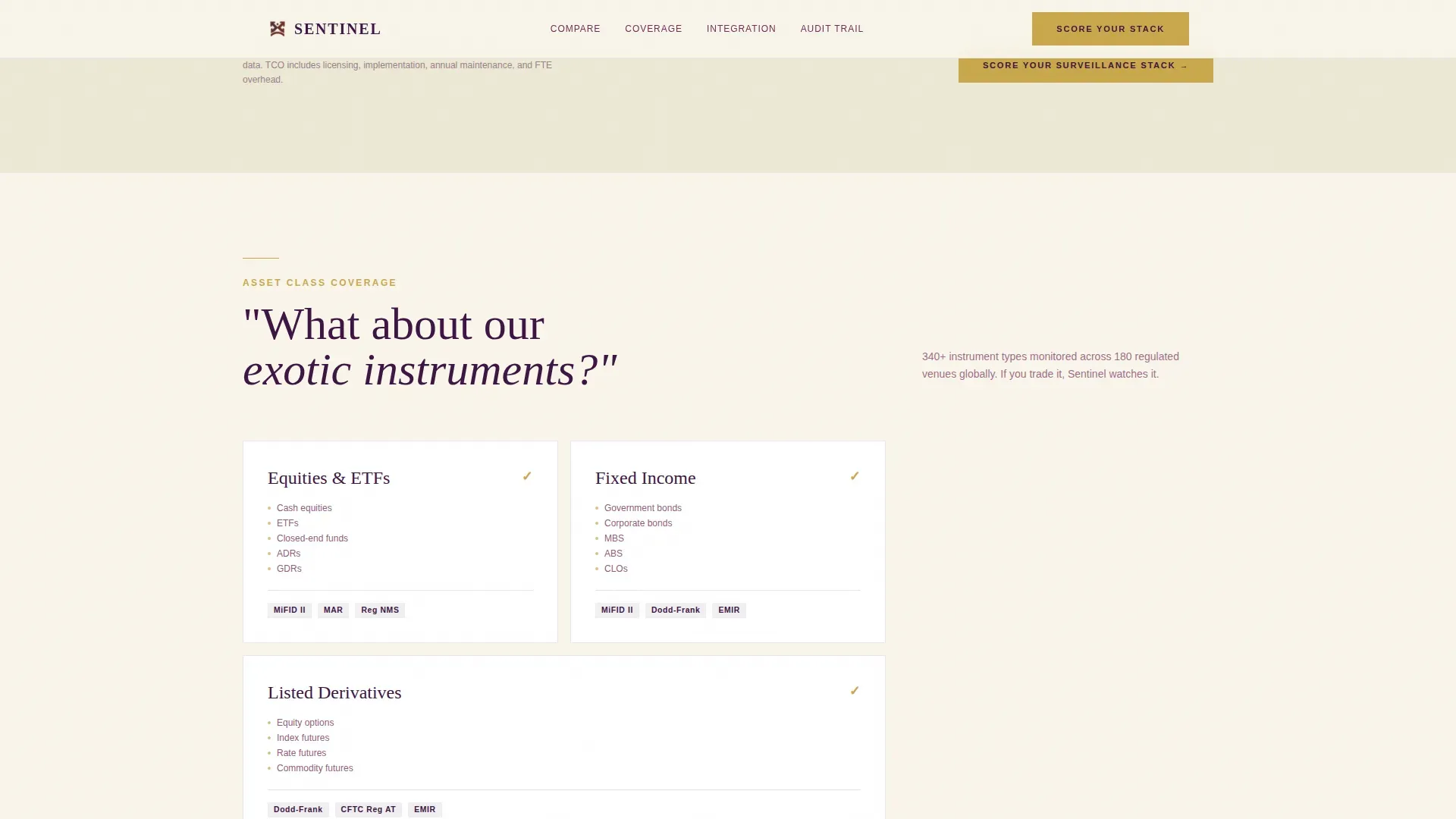
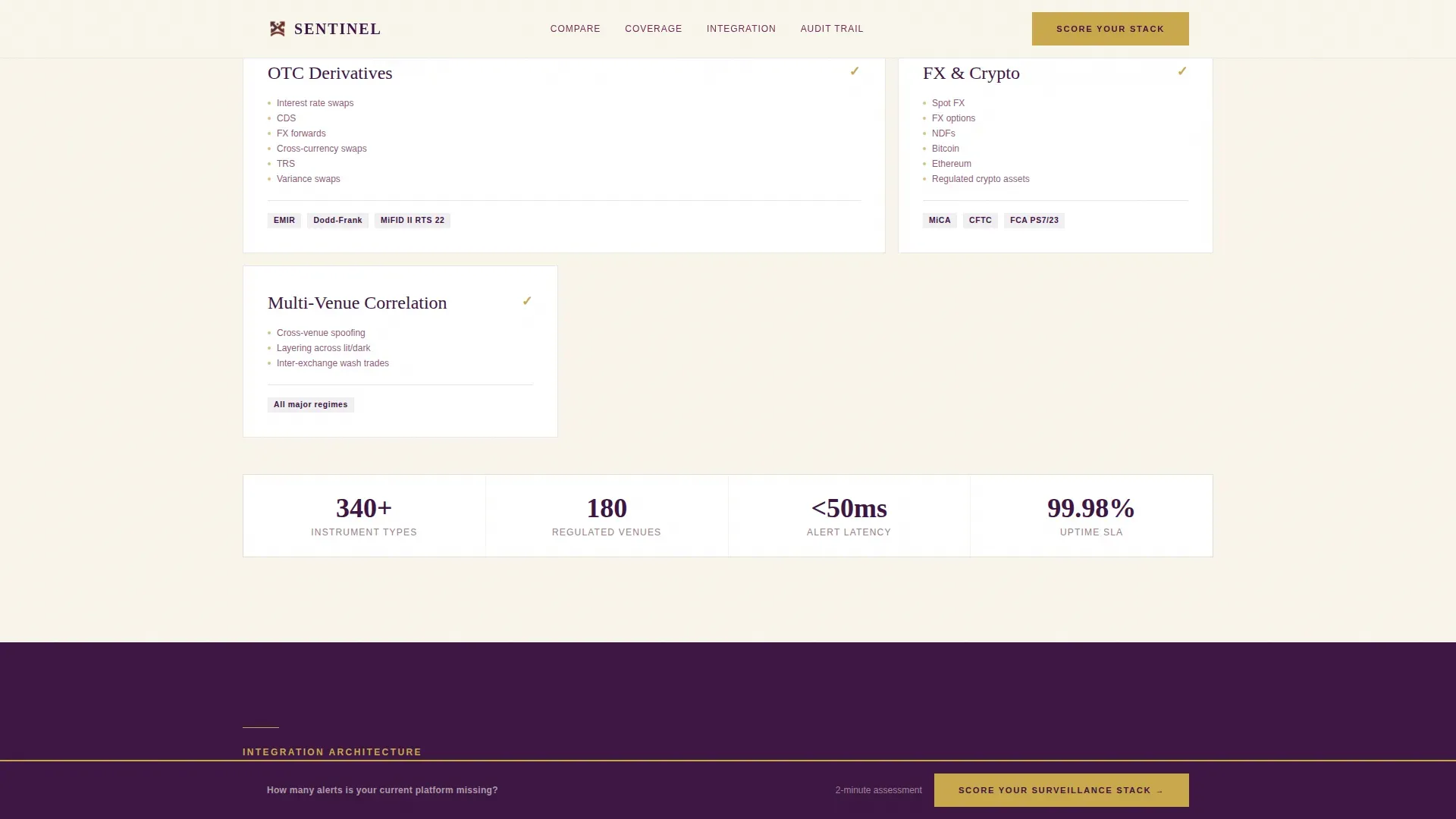
After the comparison table, the page unfolds as a structured answer to the objections that a compliance officer raises in a predictable sequence. One section addresses asset-class coverage, answering the silent question about exotic instruments. The next covers API architecture and order management system (OMS) integration. The third presents a sample regulatory export, addressing the audit trail question. Each section raises the stakes slightly, moving from feature parity to risk elimination to career protection. This escalating structure keeps the visitor engaged and moves them toward the quiz call to action.
Five-Step Quiz and Surveillance Gap Score
The primary conversion mechanism is a five-step quiz that produces a personalized output. The visitor selects their current platform from a dropdown, adjusts a slider for average false positives per week, enters the number of regulated venues they monitor, selects their primary regulatory jurisdictions from a multi-select list, and types their biggest compliance concern into an open text field. On completion, the system returns a Surveillance Gap Score. A calendar embed then surfaces immediately, inviting the visitor to book a thirty-minute gap review with a solutions engineer. This flow replaces the generic contact form with a quantified, personalized result that gives the visitor a reason to engage and gives the sales team a warm lead with pre-collected context.
Persistent Bottom-Bar Call to Action
After the visitor has scrolled past forty percent of the page, a persistent bottom bar appears carrying the primary call to action: Score Your Surveillance Stack. This bar remains visible as the visitor continues reading through the objection-handling sections. It ensures that no moment of intent is missed. The bar uses muted gold for the call-to-action element, consistent with the design rule that gold appears only where a decision is required.
Executive Suite Design System with Plum, Mahogany, Ivory, and Gold
The visual identity is built on four colors with defined roles. Deep boardroom plum dominates headers and the comparison table header row. Warm ivory parchment breathes across all content backgrounds. Polished mahogany anchors body text throughout. Muted gold is reserved strictly for calls to action and table highlight rows. The typographic pairing is Cormorant Garamond for all display and heading text alongside DM Sans for body copy. The combination reads like a leather-bound regulatory filing: authoritative without shouting, expensive without ostentation.
Page sections overview
| Section | Purpose |
|---|---|
| Guarantee hero | Headline and refund subline set reader expectation immediately |
| Competitor comparison table | Side-by-side data rows build factual trust against legacy platforms |
| Asset class coverage | Answers instrument-scope objection for exotic and multi-asset portfolios |
| API architecture section | Addresses OMS integration concern with visual system description |
| Audit trail sample | Shows a sample regulatory export to answer the regulator-readiness question |
| Quiz call to action | Introduces the five-step assessment above the fold of the conversion module |
| Five-step quiz | Collects platform, false-positive rate, venues, jurisdiction, and compliance fear |
| Gap score output | Delivers personalized Surveillance Gap Score and surfaces calendar embed |
| Persistent bottom bar | Repeats primary call to action after forty percent scroll depth |
| Single-row footer | Closes page with minimal navigation using a linear pattern |
Design & branding system
The design language for this template is rooted in what a senior compliance professional already associates with authority: the aesthetic of a corner office, a high-end regulatory filing, and a boardroom presentation that does not need visual decoration to carry weight. Every color choice, typographic decision, and spacing rule reinforces that register.
The complete branding system includes:
- A four-color palette where deep boardroom plum (#3C1642) leads all headers and table header rows, warm ivory parchment (#F9F5EB) serves as the primary background across all sections, polished mahogany (#732C5A) carries all body text to maintain warm contrast on ivory, and muted gold (#C9A84C) is reserved exclusively for call-to-action elements and comparison table highlight rows so that every instance of gold functions as a decision prompt
- Cormorant Garamond as the display and heading typeface at all sizes including the giant hero headline set at roughly eight viewport width units, paired with DM Sans for all body copy and interface labels, creating a pairing that reads as both intellectually serious and practically legible on a dense comparison page
- Low-to-medium scroll reveal animations on table rows and staggered section entries that add motion without decorative noise, keeping focus on content rather than choreography
Mobile & speed optimization
This template is designed desktop-first, reflecting the work environment of its primary user: a compliance officer reviewing vendor options on a wide monitor during business hours. The comparison table is dense by design and requires horizontal width to present its data rows without truncation. That said, the template accounts for responsive behavior across smaller screen sizes.
Key optimization and device notes for this template:
- The comparison table uses a responsive configuration that allows horizontal scroll on smaller viewports, preserving full data visibility rather than collapsing rows into an unreadable stacked format
- The quiz and assessment component is built as a client-side component while all static page sections use server-rendered delivery, so that the interactive element loads separately without blocking the initial page paint for visitors reading the upper sections
- Animation is kept at low-to-medium intensity throughout, with scroll reveals on table rows and staggered entries for each content section, ensuring that motion does not compete with information density or create distraction during the analytical reading process that this audience applies to vendor content
How this template helps you convert
Every structural decision in this template serves the conversion goal: move a skeptical, risk-aware compliance officer from initial skepticism to a booked thirty-minute gap review. The page does not try to close on the first scroll. It earns the click by providing value before asking for it.
The conversion strategy works in three reinforcing steps:
- The guarantee headline creates an immediate sign of unusual confidence, separating the offer from every other vendor page the visitor has reviewed, and giving them a financially concrete reason to keep reading rather than close the tab and return to their current legacy system
- The comparison table and objection-handling sections build layered evidence, addressing false-positive rates, onboarding timelines, regulatory coverage, and audit trail readiness in sequence, so that by the time the visitor reaches the quiz, the case for switching has already been made through data rather than persuasion
- The five-step quiz replaces the generic contact form with a personalized risk quantification tool, and the resulting Surveillance Gap Score gives the visitor a tangible, career-relevant output to act on, which is why the call-to-action reads "Score Your Surveillance Stack" rather than "Request a Demo"
Other information about this template
This template was built to address the specific structural and content requirements of a trade surveillance landing page at the intersection of executive-level financial compliance and modern RegTech product marketing. The sections below cover additional technical and contextual details that buyers and builders should review before implementing.
Relevant additional notes for this template:
- Microsoft Sentinel analytics rules follow a scheduled query rule pattern in which KQL (Kusto Query Language) queries run at regular intervals to examine raw data from a defined lookback period, and this template's comparison table structure is designed to surface the difference in how legacy rule-based systems and modern analytics approaches handle that detection cycle
- Microsoft Sentinel uses the Fusion correlation engine to detect advanced multistage threats by correlating many low-fidelity alerts into high-fidelity incidents, and the template's dashboard section concept is directly informed by this principle: showcasing high-fidelity incidents that traditional rules might miss through effective machine learning correlation
- Analytics rules in Microsoft Sentinel generate alerts that contain information about detected events and the entities involved; alerts are then aggregated and correlated into incidents that can be assigned and investigated, which maps directly to the template's audit trail section and the sample regulatory export component
- You can create analytics rules from scratch or use built-in templates provided in Microsoft Sentinel; the template's configuration and quiz sections draw on the same principle of customizable parameters, allowing users to define their own detection thresholds and query scope
- The set rule logic tab within the Microsoft Sentinel analytics rules creation wizard is where query parameters, scheduled intervals, and entity mapping are defined; the template's quiz slider for false positives per week and numeric input for venue count are conceptually aligned with how threshold and query parameters are set at the rule configuration level
- Microsoft Sentinel analytics rules are scheduled KQL queries that run at regular intervals; the analytics page within Microsoft Sentinel provides a full list of all configured rules and their current status, which the template mirrors with its comparison table's row structure showing platform-level detection capabilities
- On the analytics page, security teams can review, enable, and manage all active rules in a single view; this template's comparison table presents an equivalent single-view format for compliance officers evaluating competing surveillance platforms
- AI-powered log prioritization in Microsoft Sentinel filters out low-value data and enriches key events before they are ingested, and organizations using this approach can reduce log volume by up to fifty percent without losing visibility; the template's false-positive rate comparison row directly reflects this capability difference
- Implementing AI-powered log prioritization helps reduce alert fatigue and improves the efficiency of security operations; the template dedicates a full comparison row to alert false-positive rate precisely because alert fatigue is the primary pain point that drives compliance teams to evaluate alternatives
- Security teams can achieve significant cost savings by filtering out irrelevant and duplicate logs before ingestion into Microsoft Sentinel; this cost efficiency argument is surfaced in the total cost of ownership row of the comparison table
- AI within Microsoft Sentinel learns the normal behavior of an environment to detect anomalies and correlate events across integrated data sources; this behavioral baseline concept informs the template's Intelligent Risk Score description, which relies on intent and sentiment analysis rather than just keyword matching
- The set rule logic tab is also where soc analysts define the query, set the run frequency, and configure alert grouping; the template's quiz multi-select for regulatory jurisdiction maps to the same configuration concept of scope definition
- Microsoft Sentinel encourages the use of analytics rule templates designed by security experts to automatically search for suspicious activity; the template's asset-class coverage section reflects this pattern by showing how surveillance rules can be pre-mapped to over 110 trade scenarios for immediate regulatory context
- Scheduled analytics rules in Microsoft Sentinel are based on Kusto queries that run at regular intervals and examine raw data from a defined lookback period; the time difference between detection and alert generation is a key variable in the comparison table's onboarding and latency rows
- Entity mappings are critical for effective investigation in Microsoft Sentinel, as they tell Sentinel which fields correspond to specific entity types; in a trade surveillance context, entity mapping corresponds to the Contextualized Trade Detail concept, which includes Alert Rule, Proximity to Threshold, Trader and Desk Information, and Instrument and Asset Class for each flagged event
- You can customize the severity, tactics, and other properties of a given instance of an alert in Microsoft Sentinel; at medium severity thresholds, the difference between a system that surfaces actionable incidents and one that generates noise is what the template's false-positive comparison row is designed to make visible
- CK tactics (the MITRE ATT&CK framework classification commonly referenced in Microsoft Sentinel rule configuration) provide a standardized way to describe threat behavior; the template's competitor comparison table uses a similar taxonomy of defined evaluation criteria to create a structured, auditable basis for platform comparison
- You can override the default properties of alerts with content from the underlying query results in Microsoft Sentinel, including creating custom variable names and descriptions for each alert instance; this level of customization is why soc analysts working in Microsoft Sentinel environments value the platform's flexibility over legacy systems with fixed alert schemas
- Many organizations running legacy surveillance platforms find that their alert volume creates more noise than signal, and the template's escalating objection-handling structure is designed to make this problem concrete before offering the quiz as the tool to quantify it
- The analytics page in Microsoft Sentinel provides a centralized location where analysts can search, filter, and manage all configured detection rules; the template's comparison table is structurally inspired by this single-pane-of-glass review model, adapted for a compliance officer audience rather than a security operations team
- IP addresses are one of the key entity types that analytics rules in Microsoft Sentinel map as part of the investigation chain; in a trade surveillance context, the equivalent entity is the trader or desk identifier, which the template surfaces through its Contextualized Trade Detail component
- The Near-Miss Prioritization Score ranks missed alerts based on their resemblance to past regulatory actions or known market manipulation patterns; this concept is surfaced in the template's Pattern Analysis Dashboard section, which visualizes aggregated near-misses to identify patterns that might be missed individually
- Audit-Ready Reporting in this template includes a dedicated space for reasoning tied to specific firm policies for regulatory inquiries, ensuring that the audit trail section of the page gives the compliance officer a concrete, form-level preview of what a regulator would receive
- The False Positive and Negative Ratio component visually represents the comparison between low-risk alerts that were closed versus those that should have been investigated, and it is one of the most conversion-relevant visualizations in the template because it makes the cost of inaction numerically legible
- Threshold Tuning Recommendations in the template suggest tightening or loosening detection thresholds based on alerts with the highest volume of near-misses, which gives the compliance officer a clear path from quiz output to actionable configuration change
- Calibration Tools in the template allow users to test thresholds and backtest scenarios to ensure that no legitimate activity is flagged incorrectly, addressing one of the most common objections raised by compliance teams evaluating a platform switch
- The Missed Alert Trend component is represented as a line chart showing the volume of auto-closed alerts over time, designed to detect spikes in near-miss activity that would otherwise go unnoticed in a system relying solely on high-severity alert counts
- Total Missed and Auto-Closed Alerts is counted over a selected time period to provide a high-level count of alerts that fell below the detection threshold, and this number is the foundation of the Surveillance Gap Score that the quiz produces as its output
- The Unique Alert ID and Name component provides a specific identifier based on the problematic trading model linked to each missed alert, ensuring that every flagged event in the system can be traced back to a defined scenario and a defined rule
- The Click-through Investigation Pane allows analysts to immediately view the full trade lifecycle of a near-miss alert, from order entry through execution to cancellation, giving the compliance team the evidence chain they need for a regulatory response
- Scenario Mapping links each alert to one of the one hundred and ten plus trade scenarios in the surveillance library, establishing regulatory context for every detection event and ensuring that no flagged trade exists in isolation without a defined legal or regulatory basis
- This template is listed in the Finance and Insurance category under the RegTech and Compliance subcategory, and it is specifically scoped to the trade surveillance system niche, making it directly relevant to teams building compliance technology product pages
Theme
Executive Suite
Creative direction
Guarantee-Led
Color system
Plum Executive
Style
Comparison Table
Direction
Quiz/Assessment
Page Sections
Guarantee-led Hero Section
Competitor Comparison Table
Sequential Objection-handling Sections
Five-step Quiz and Gap Score Output
Persistent Bottom-bar Call to Action
Executive Suite Design System
Related questions
What conversion goal does this template support?
Is this template suitable for both desktop and mobile use?
How does the comparison table handle competitor positioning?
What design system does this template use?
Can the quiz inputs and threshold settings be customized?



