Single Parent Pet Insurance Comparison Landing Page
Shelter is a single-page pet insurance comparison landing page built specifically for single-parent households. It walks users through a personalized, three-step form, surfaces a tiered plan comparison table with real-scenario tooltips, and offers a free Pet Budget Kit download. Every section is designed to give first and ask second, earning trust before requesting an email.
by Rocket studio
Quick summary
Shelter is a pet insurance comparison landing page built for single parents who need clear answers fast. The page opens with a two-field form, moves into a three-tier plan comparison table with daily cost equivalents and hover tooltips, and deepens into a resource hub with a budget calculator, a vet visit checklist, and a downloadable Pet Budget Kit. The design is warm, clinical, and fully mobile-first.
Who this template is for
This landing page is designed for pet insurance businesses, independent brokers, and insurtech startups that want to serve budget-conscious single-parent households. It is equally useful for anyone building a content-led comparison page where trust and transparency must come before the ask.
- Single parents shopping for an affordable pet insurance plan on a tight schedule and a tighter budget.
- Foster parents and guardians whose rescue animals need coverage that accounts for unknown health histories and pre existing conditions.
- Pet insurance providers and agencies looking to create a high-converting, resource-rich landing page aimed at underserved family segments.
What problem this template solves
Single parents face a specific kind of frustration when comparing pet insurance online. Most comparison pages are built for dual-income households with time to search, read fine print, and fill out long forms. This template removes that friction entirely.
- Vet bills from a single emergency can unravel a month of carefully balanced costs. The page helps users find a plan they can actually afford before that happens.
- Generic insurance landing pages ignore the emotional and financial picture of single-parent life. This template speaks directly to that experience with scenario-based tooltips and real-context pricing.
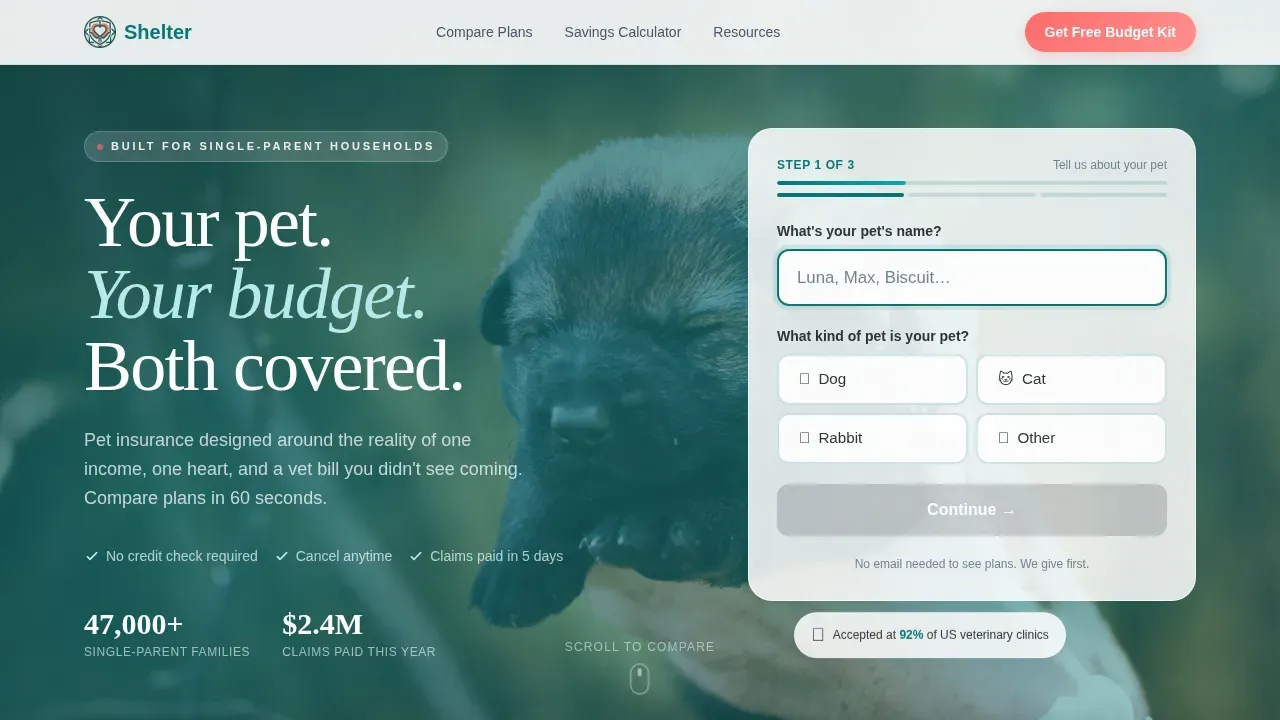
- Forms that ask too much too soon push users away. This page divides the form into smaller parts, asking only a pet's name and species first, so users stay engaged and complete the process.
What you get with this template
This template gives you a fully structured, single-page comparison experience from the first scroll to the final download. Every section has a clear purpose, and every element on the landing page works toward making it easy for users to find the right pet insurance plan and take action.
- A multi-step hero form, a three-tier pet insurance comparison table, a live budget calculator, a resource hub with alternating section blocks, a horizontal-scroll testimonials strip, and a linear single-row footer.
- A Teal Catalyst color system with deep teal primary headers, soft mint table backgrounds, charcoal body text, and coral calls to action, paired with DM Sans body type and Fraunces display headings.
- Intersection-observer animations, staggered table row reveals, accordion tooltip hovers, and a pre-filled email form for the Pet Budget Kit download.
Feature list
This landing page template is built around interactive, high-trust components that serve single parents comparing pet insurance plan options on a phone, often in a short window of time.
Personalized Multi-Step Hero Form
The hero section opens with a two-field form asking only for a pet's name and species. A subtle three-step progress bar keeps users oriented. The form container floats above a soft-focus photo with authentic, editorial grain. Steps 2 and 3 collect breed, age, and pre existing conditions to generate a personalized plan comparison delivered by email. Dividing the form this way makes the process feel less demanding and keeps completion rates strong.
Three-Tier Plan Comparison Table
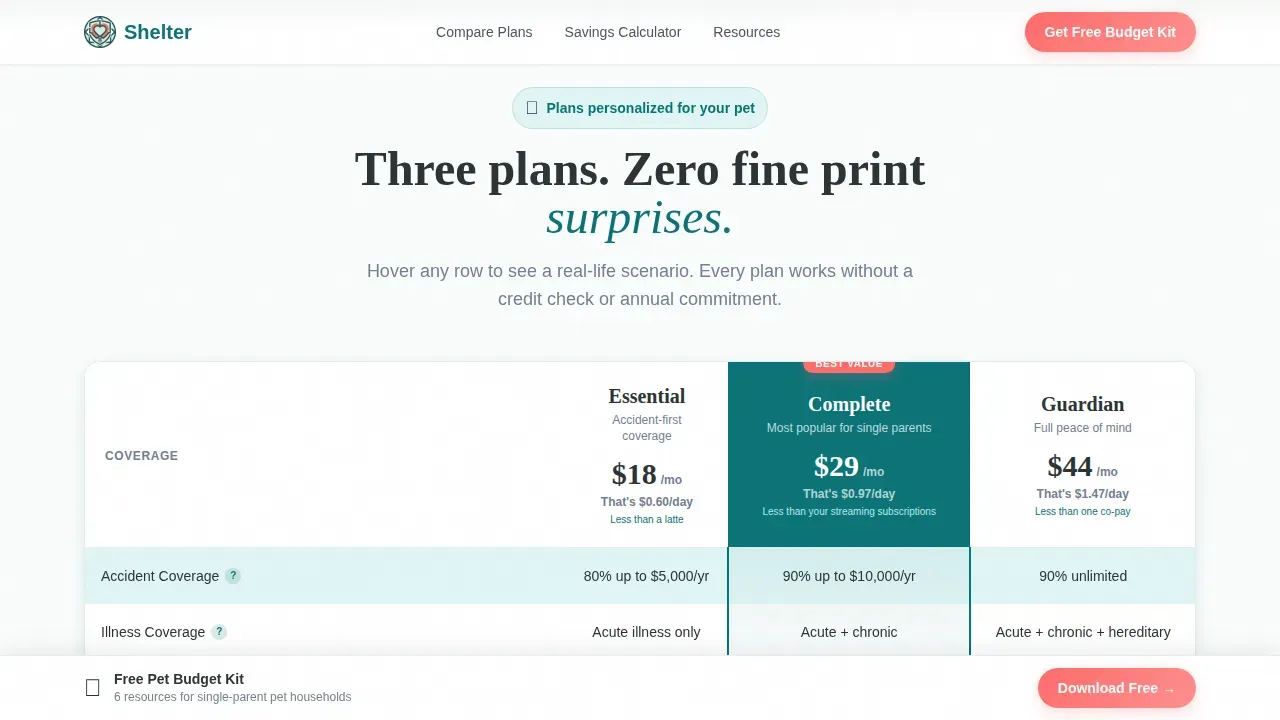
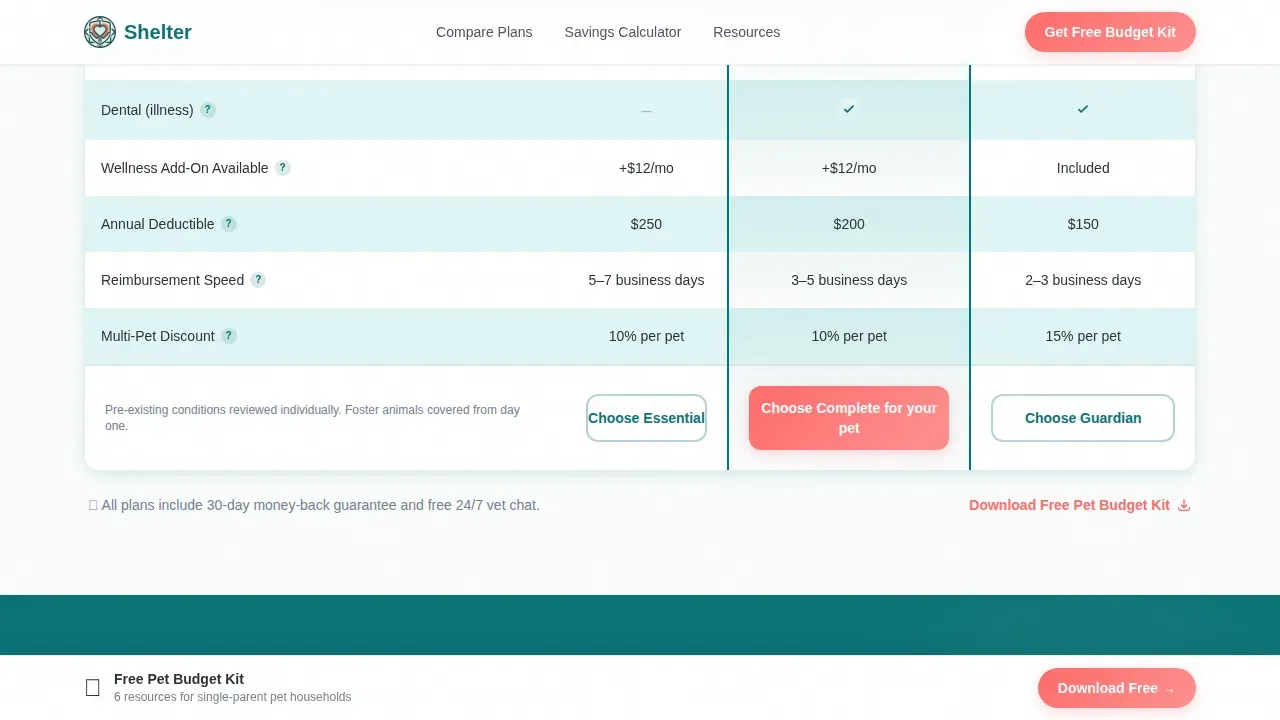
The comparison table pre-filters by pet type the moment the first form input is captured. Three pet insurance plan tiers display side by side, with monthly costs shown as daily equivalents so the price feels grounded and manageable. Each row reveals progressively: accident coverage, illness coverage, wellness add-ons, dental, and prescription food. Hovering any row triggers a real-scenario tooltip, for example, "Luna swallows a hair tie: here is what each plan covers." This level of detail helps users compare with confidence rather than confusion.
Interactive Pet Budget Calculator
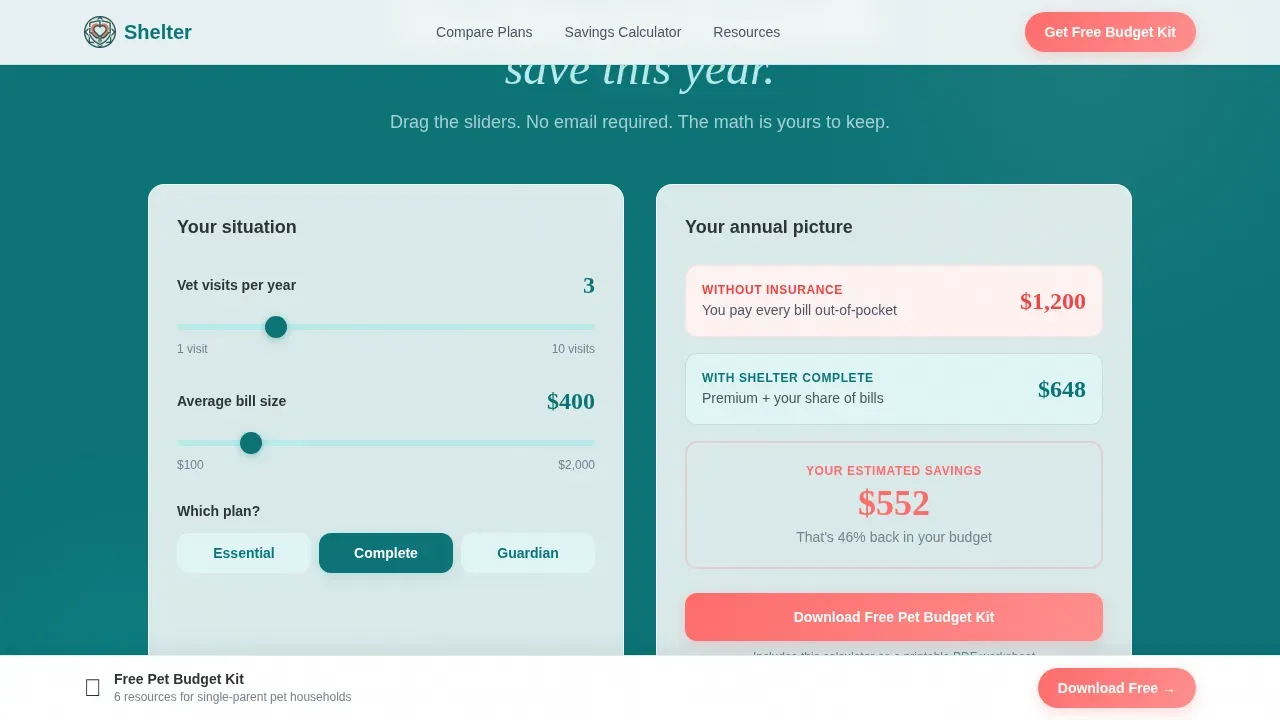
A live calculator lets users drag a slider to see annual savings from pet insurance versus paying vet bills out of pocket. No email is required to use it. The calculator gives first, so when the Pet Budget Kit download appears, it feels like saving work already done rather than paying an entry fee. This approach reduces the resistance that usually kills conversions on insurance landing pages.
Resource Hub with Editorial Content Blocks
Below the calculator, the page deepens into a full resource hub. A budgeting guide for single-parent pet households and a downloadable vet visit checklist alternate between teal and white section backgrounds, building a reading rhythm that rewards continued scrolling. The primary call to action, "Download Your Free Pet Budget Kit," appears pinned at the table footer and again after each resource block, keeping the next step visible without being aggressive.
Horizontal-Scroll Testimonials Strip
A horizontal-scroll testimonials section features real single-parent scenarios: emergency vet bills, names, and outcomes. This kind of social proof answers unspoken doubts better than feature lists alone. Using actual customer testimonials with specific situations builds credibility the way straightforward copy and transparent pricing details do, because readers can picture themselves in the story.
Pre-Filled Email Capture Form
The Pet Budget Kit download form pre-fills the user's email and pet name from the hero interaction. The ask is minimal: just two fields. The secondary path, "Compare My Custom Plan," re-enters the multi-step flow at Step 2 so users who want a personalized plan comparison via email can go deeper without starting over.
Page sections overview
| Section | Purpose |
|---|---|
| Hero Form | Collects pet name and species; launches personalized comparison journey |
| Comparison Table | Displays three insurance plan tiers with daily costs and hover tooltips |
| Budget Calculator | Shows annual savings versus out-of-pocket vet costs via interactive slider |
| Budgeting Guide Block | Editorial content for single-parent pet households with teal background |
| Vet Checklist Block | Downloadable checklist resource on alternating white background |
| Pet Budget Kit call to action | Primary email capture form, pre-filled, pinned and repeated after each block |
| Testimonials Strip | Horizontal-scroll social proof from real single-parent emergency scenarios |
| Single-Row Footer | Linear footer with essential links and secondary plan comparison path |
Design & branding system
The visual identity follows a Dashboard Pro theme built on the Teal Catalyst color system. The palette reads like a banking interface designed by someone who genuinely likes animals: clinical enough to trust with money, warm enough to remind you why you are spending it.
- Colors: deep scrubs teal (#0D7377) for primary headers and trust anchors, soft mint (#E0F5F5) for table backgrounds and alternating rows, charcoal slate (#2D3436) for body text, and catalyst coral (#FF6B6B) reserved for calls to action and savings callouts.
- Typography: DM Sans for all body text and user interface labels, Fraunces as the display serif for hero headlines and section titles, creating a confident editorial contrast.
- Photography direction: soft-focus editorial grain with authentic compositions, for example, a child's hand resting on a sleeping dog's ribs, to avoid stock-photo detachment.
Mobile & speed optimization
This landing page is built mobile-first because the target users are single parents comparing pet insurance plans on their phones, often during short windows like naptime. Every interaction is designed to work cleanly on a small screen with one hand.
- Touch-friendly form fields, large tap targets on the comparison table, and a sticky call-to-action button that remains visible while users scroll through plan details.
- Intersection-observer animations and staggered row reveals keep the page feeling alive without slowing it down; static server components handle non-interactive sections while client components manage the calculator and form.
- The hero form, comparison table, and resource hub all adapt gracefully to narrow viewports so users never need to pinch-zoom to read coverage details or plan costs.
How this template helps you convert
An insurance landing page converts when it answers key questions quickly, keeps the form short, and earns trust before asking for anything. This template follows every one of those principles and adds a layer of personalization that makes the experience feel built for the reader specifically.
- The page gives first: every calculator, checklist, and scenario tooltip works without entering an email, so the Pet Budget Kit download feels like saving progress rather than paying an entry fee. This dramatically reduces abandonment at the conversion point.
- The multi-step form divides a potentially intimidating insurance sign-up into small, friendly steps, starting with just a pet name and species. A clear progress bar shows users exactly how far ahead they are, keeping momentum without creating pressure.
- Personalized content, from the pre-filtered comparison table to the pre-filled download form, makes the entire landing page feel relevant to each visitor. Dynamic content that adjusts to user input is one of the strongest tools for keeping users engaged long enough to convert.
Other information about this template
This template is relevant across the country wherever single-parent households are searching for affordable pet coverage. It is particularly well-suited for markets like California and New York, where vet costs are higher and the value of finding a better price on a pet insurance plan is most immediate.
- Healthy Paws is one example of a pet insurance provider worth mentioning in comparison content: Healthy Paws has no caps on annual or lifetime claims, and Healthy Paws processes most claims within two days. Users can even file claims through the Healthy Paws mobile app.
- Pawlicy Advisor is another useful reference for comparison page context: it helps pet parents find the best pet insurance plan based on a pet's breed, age, and location, and allows users to compare real-time quotes from multiple pet insurance companies side by side.
- Facts worth including in your resource hub: Lemonade is known for the lowest monthly premiums and high customization; Trupanion can pay veterinarians directly to ease financial strain; Fetch Pet Insurance covers certain pre existing conditions for shelter-adopted pets and reimburses up to $1,000 annually for boarding if the owner is hospitalized; and MetLife partners directly with shelters to provide 30 days of coverage to new adopters.
- The shelter trusted single parent pet insurance comparison landing page template is designed to be the one place where a single parent can get a free quote, compare plans honestly, and walk away with real tools, not just a sales pitch.
- RedRover Relief is worth mentioning in your resource hub as an organization that offers urgent care grants for emergency vet care, especially for domestic violence survivors with pets. Many beloved pets end up in shelters simply because their people have fallen on hard times, and connecting users to financial assistance resources builds meaningful goodwill.
- Companies using dedicated landing pages generate significantly more leads than those without them. This template gives your business a purpose-built page that answers the specific questions single parents are asking when they search for pet insurance coverage.
Theme
Dashboard Pro
Creative direction
Comparison Journey
Color system
Teal Catalyst
Style
Comparison Table
Direction
Content/Resource
Page Sections
Multi-step Personalized Hero Form
Three-tier Pet Insurance Comparison Table
Interactive Pet Budget Calculator
Resource Hub with Alternating Content Blocks
Pre-filled Email Capture and Free Download
Horizontal-scroll Testimonials Strip
Related questions
Can I use this template if I am not a pet insurance company?
Does the comparison table support different pet types and plan tiers?
Is the budget calculator available without entering an email?
What happens after a user fills out the hero form?
Can the resource hub content be updated to reflect current vet costs or plan details?



