Patent Agent Resource & FAQ Landing Page Template
Shield is a single-page patent agent landing page template built for intellectual property professionals who serve inventors, startup founders, and in-house counsel. It combines structured comparison tables, a filterable FAQ index, and a testimonial mosaic into one authoritative resource hub. The Monochrome Steel visual system and left-anchored giant headline make every section feel precise, trustworthy, and immediately useful.
by Rocket studio
Quick summary
Shield is a one-page patent agent resource hub designed for IP professionals who need to educate and convert visitors at the same time. It pairs dense comparison tables with human testimonials, a filterable FAQ index, and a checklist download flow. The result is a landing page that feels less like a brochure and more like a well-organized steel filing cabinet.
Who this template is for
This template is built for patent agents and IP attorneys who want a content-forward online presence that earns trust before asking for anything in return. It works equally well for solo practitioners and small patent firms serving a mixed audience of technical and non-technical clients.
- Solo inventors and startup founders looking for clear answers before committing to a filing strategy
- Biotech or deep-tech teams racing to file before a public disclosure deadline
- Patent paralegals and in-house IP counsel who need a reliable reference point during prosecution
What problem this template solves
Most patent agent pages lead with credentials and bury the answers visitors actually need. That disconnect causes smart prospects to leave and find the information somewhere else, often never returning. Shield flips that structure so the most useful content comes first, which keeps visitors on the page long enough to trust the source.
- Visitors arrive with specific, urgent questions and find no organized answers, so they bounce
- Comparison topics like provisional versus non-provisional filings or utility versus design patents are scattered across multiple pages or missing entirely
- There is no clear next step for visitors who are not yet ready to book a consultation
What you get with this template
Shield delivers a fully structured single-page layout with every major content block already in place. You get a living resource hub that serves both the first-time inventor and the experienced IP professional without overwhelming either one.
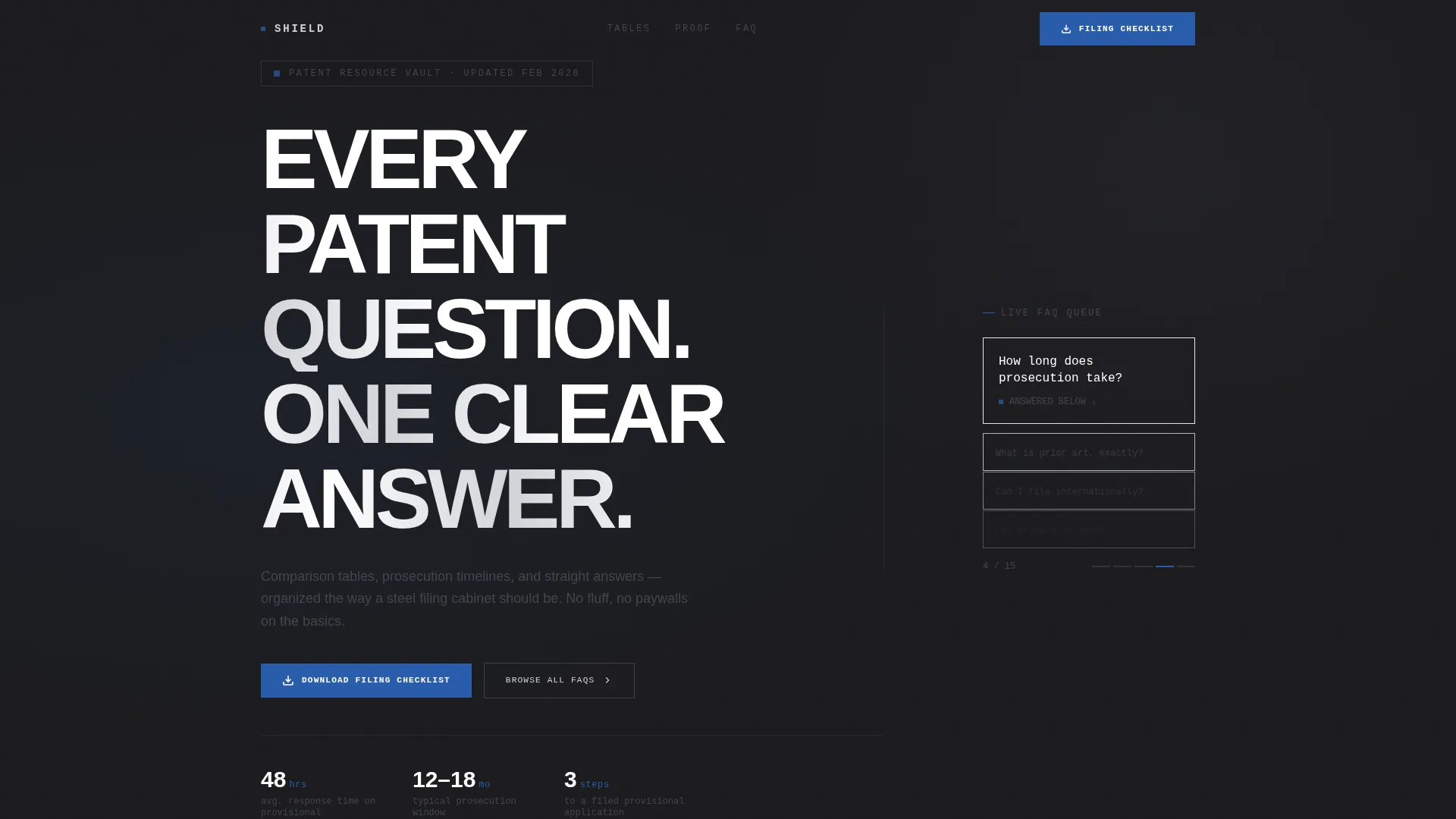
- A giant left-anchored headline section with a cycling micro-question ticker on the right
- Three side-by-side comparison tables covering the most common patent filing decisions
- A staggered testimonial mosaic, a filterable FAQ index, and a dual-path conversion system
Feature list
The following features are built directly into the Shield template layout as described in the source brief.
Giant Headline with Cycling Micro-Questions
The header splits the viewport into two distinct zones. The left two-thirds holds a massive tracked-out sans-serif headline stacked line by line. The right third runs a vertical column of real FAQ snippets in monospaced type, cycling like a departures board to signal depth and relevance immediately.
Side-by-Side Comparison Tables
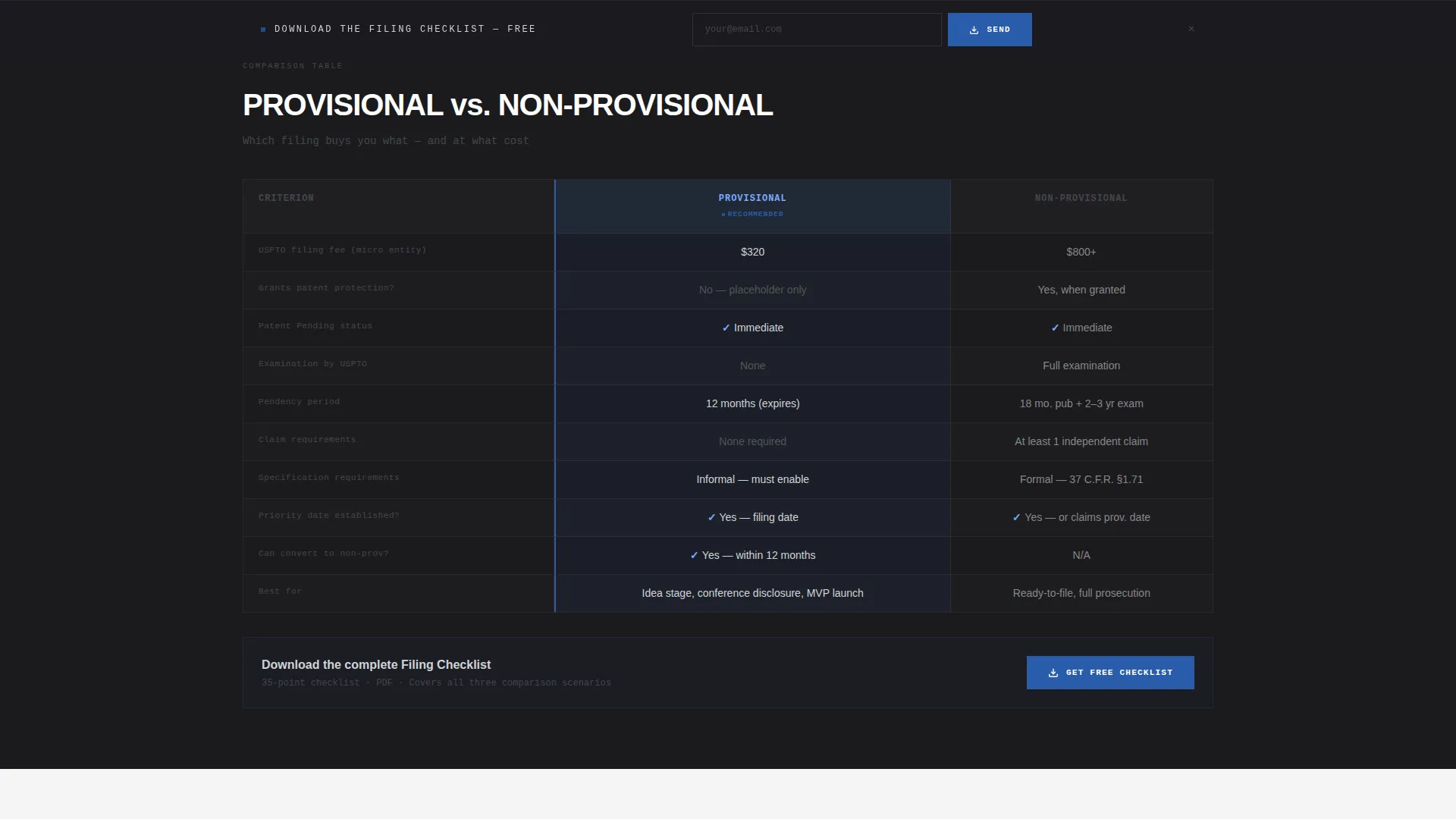
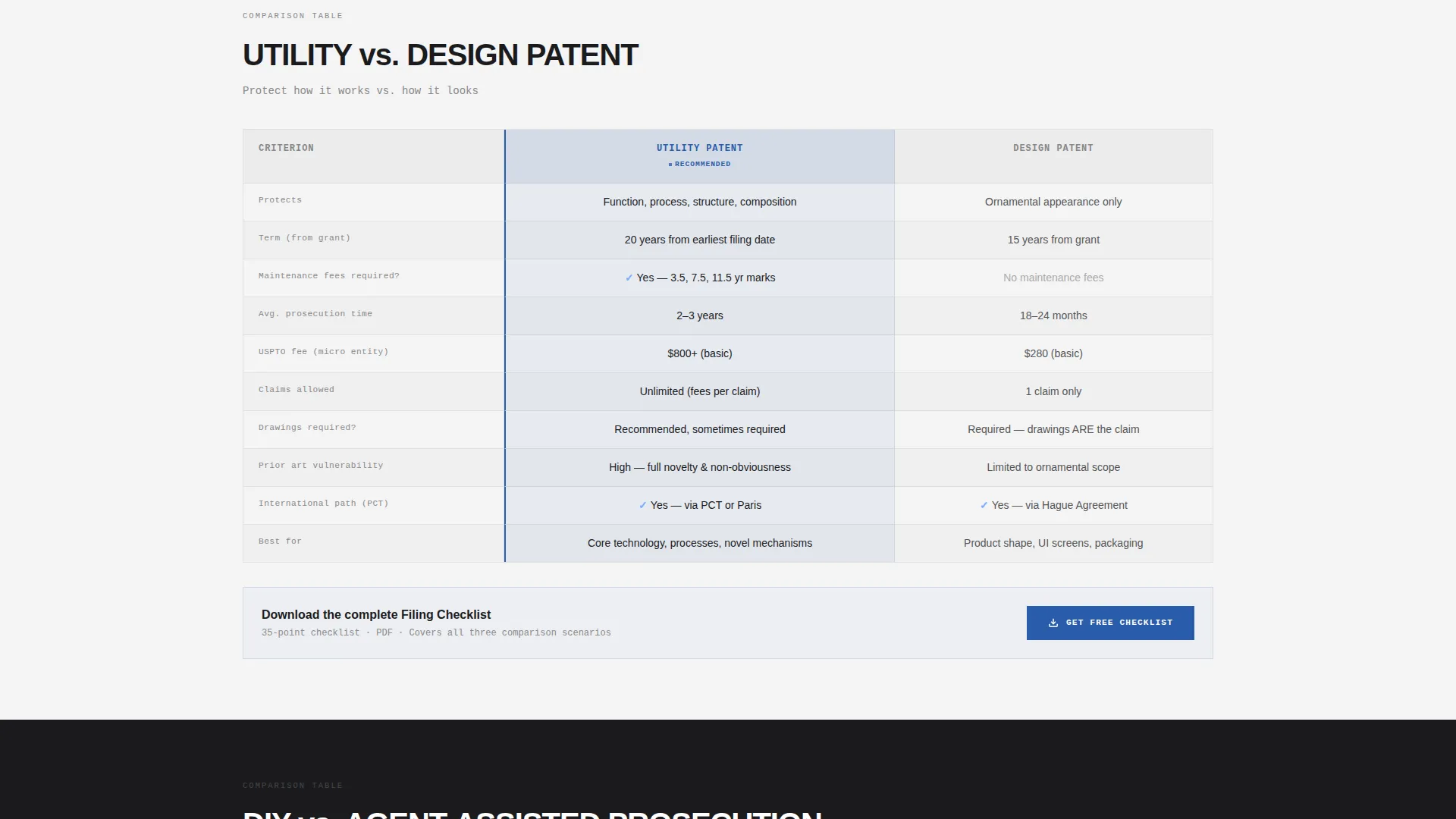
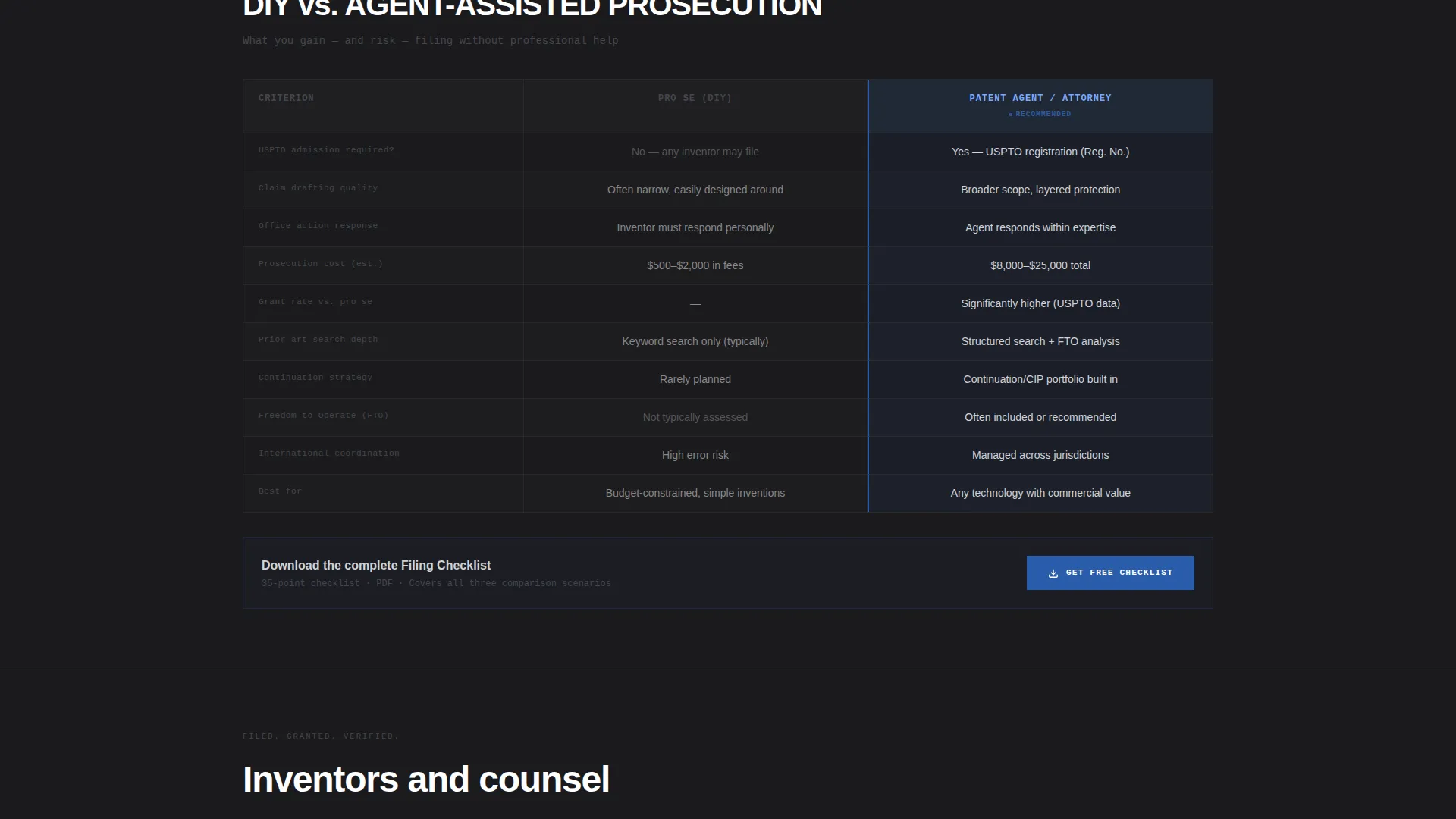
Three structured comparison tables sit at the core of the page. They cover provisional versus non-provisional filings, utility versus design patents, and do-it-yourself versus agent-assisted prosecution. Each table puts the decision criteria in plain view so visitors can orient themselves without needing a consultation first.
Testimonial Mosaic
Between each comparison table, the layout inserts a staggered grid of inventor and attorney testimonials. Each quote is displayed in oversized pull-quote type and tagged with a name, a filing outcome, and a patent number. The alternating rhythm of data and human voice prevents reader fatigue across a long page.
Dual-Path Conversion System
The primary call to action invites visitors to download a filing checklist after providing only an email address and their current filing stage. A secondary path, labeled "Browse All FAQs by Topic," anchors to a filterable index lower on the page. Both paths serve visitors at different levels of readiness without forcing a commitment.
Sticky Download Bar
A sticky bottom bar appears after the visitor has scrolled through roughly 40 percent of the page. It repeats the primary checklist download offer without interrupting the reading flow. The bar stays visible as a low-friction reminder for visitors who are ready to act at any point.
Filterable FAQ Index
A topic-filtered question index sits in the lower portion of the page. It covers questions like what makes an invention patentable, what constitutes prior art, and when to abandon a claim. Visitors who are not ready to exchange an email still have a strong reason to stay, bookmark, and return.
Page sections overview
| Section | Purpose |
|---|---|
| Header Headline Block | Anchors the value proposition and cycles real FAQ teasers |
| Provisional versus. Non-Provisional Table | Compares two core filing strategies side by side |
| Inventor Testimonial Row | Adds human proof between data-heavy tables |
| Utility versus. Design Table | Clarifies patent type decisions for non-specialists |
| Attorney Testimonial Row | Reinforces credibility with professional filing outcomes |
| DIY versus. Agent Table | Helps visitors assess when professional help is worth it |
| Checklist Download Form | Captures email and filing stage for lead segmentation |
| Filterable FAQ Index | Gives visitors a browsable resource without a form gate |
| Sticky Bottom Bar | Persists the download offer after 40 percent scroll depth |
Design & branding system
Shield uses a Monochrome Steel color system that communicates precision and institutional authority. Every color choice is deliberate. The palette avoids warmth or decorative accents, leaning entirely on engineering-grade contrast and spacing to signal expertise.
- Core palette: forge-black (#1B1B1E), brushed gunmetal (#44464D), polished chrome (#D1D3D8), and patent-office blue (#2A5CAA) reserved for links, active table headers, and download icons
- Backgrounds alternate between forge-black and a near-neutral smoke gray (#F4F4F5), with text rendered in chrome and white for maximum contrast
- Typography uses a large tracked-out sans-serif for headlines and monospaced type for the cycling FAQ ticker, reinforcing the structured, reference-grade character of the page
Mobile & speed optimization
The Shield layout is built to remain navigable and readable at every screen width. Long comparison tables and the cycling headline ticker are each structured to reflow cleanly on smaller viewports. The sticky bottom bar remains functional on mobile without blocking critical content.
- Comparison tables are designed to stack or scroll horizontally on narrow screens so no data is hidden
- The testimonial mosaic grid collapses to a single-column flow on mobile, keeping the data-and-voice rhythm intact
- The sticky download bar sits at the bottom of the mobile viewport without obscuring the FAQ index or table content below it
How this template helps you convert
Shield is designed to serve two types of visitors simultaneously: those ready to act and those still researching. The layout guides both toward a conversion point without pressuring either.
- The comparison tables and FAQ index build enough trust and clarity that visitors feel confident enough to share their email in exchange for the filing checklist, producing a segmented lead with a known filing stage.
- The "Browse All FAQs by Topic" secondary path keeps non-ready visitors engaged long enough to bookmark the page, increasing the likelihood of a return visit and a later conversion.
Other information about this template
Shield sits at the intersection of a professional services lead generation page and a structured educational guide. It is particularly well-suited for patent agents who want to establish topical authority in their niche without building a multi-page blog.
- The template style follows a split-screen approach with a 50/50 visual balance in key sections, consistent with a lead generation direction for professional services
- The theme is educational guide, meaning the content hierarchy prioritizes useful answers over promotional claims, which aligns with the resource-vault intent of the brief
- The header concept draws from a press-mentions and authority-signal tradition, using real patent numbers and filing outcomes in testimonials to function as third-party proof
- The filing stage segmentation in the download form (idea stage, ready to file, office action pending) allows for follow-up communication tailored to where each lead sits in the patent process
Theme
Educational Guide
Creative direction
Team & People
Color system
Navy Authority
Style
Split Screen (50/50)
Direction
Lead Generation
Page Sections
Giant Headline with FAQ Ticker
Three Comparison Tables
Staggered Testimonial Mosaic
Filterable FAQ Index
Dual-path Conversion Flow
Sticky Checklist Download Bar
Related questions
What type of patent agent business is Shield best suited for?
Can I customize the comparison table topics?
How does the dual-path conversion system work?
Does the sticky download bar appear on mobile devices?
What makes the testimonial mosaic different from a standard review section?



