Federal Consumer Protection Agency Landing Page
Shield is a split-screen landing page template built for federal consumer protection agencies. It pairs a photograph-driven hero with a scrolling FAQ escalation section, a progressive disclosure complaint form, and an enforcement database search. The design uses deep federal navy, seal gold, and courthouse marble to project institutional authority and move distressed consumers toward filing a complaint.
by Rocket studio
Quick summary
Shield is a single-page federal agency landing page template designed to convert distressed consumers into complaint filers. It opens with a 50/50 split-screen hero, moves through an escalating FAQ section, and closes with a progressive disclosure intake form. Every visual and structural choice signals government authority and earns visitor trust before asking for personal details.
Who this template is for
This template is built for government web teams, agency communications staff, and contractors who need to launch a credible public-facing enforcement portal quickly. It suits anyone standing up a consumer protection presence that must feel official, serious, and approachable at the same time.
- Federal or state consumer protection agencies publishing complaint intake portals
- Government contractors building public-facing enforcement or regulatory web pages
- Public interest organizations presenting enforcement records and consumer guidance
What problem this template solves
Consumers in distress need to trust a page instantly or they leave. Most government portals fail that test: they bury complaint forms behind navigation menus, use bureaucratic language, and never show their enforcement track record before asking for personal information. Shield solves all three failures in a single scrollable page.
- Visitors arrive anxious and suspicious; the institutional design and real enforcement statistics build trust before any form appears
- Complex complaint scenarios confuse users; the FAQ escalation section mirrors their exact words and answers plainly
- Long intake forms cause drop-off; progressive disclosure shows only the fields relevant to each complaint type
What you get with this template
Shield delivers a fully structured landing page with five distinct content zones, each serving a specific role in the conversion flow. Design tokens, typography pairings, and color assignments are built in so your team spends time on content rather than visual decisions.
- Split-screen hero section with photo placement, authority headline area, and primary complaint call-to-action button
- FAQ escalation section with accordion-style reveals, left-panel serif questions, right-panel plain-language answers, and contextual call-to-action placements
- Progressive disclosure complaint intake form, enforcement database search input, enforcement statistics block, and a minimal single-row footer
Feature list
This section covers the core capabilities built into the Shield template as described in the source brief.
Split-Screen Hero with Authority Headline
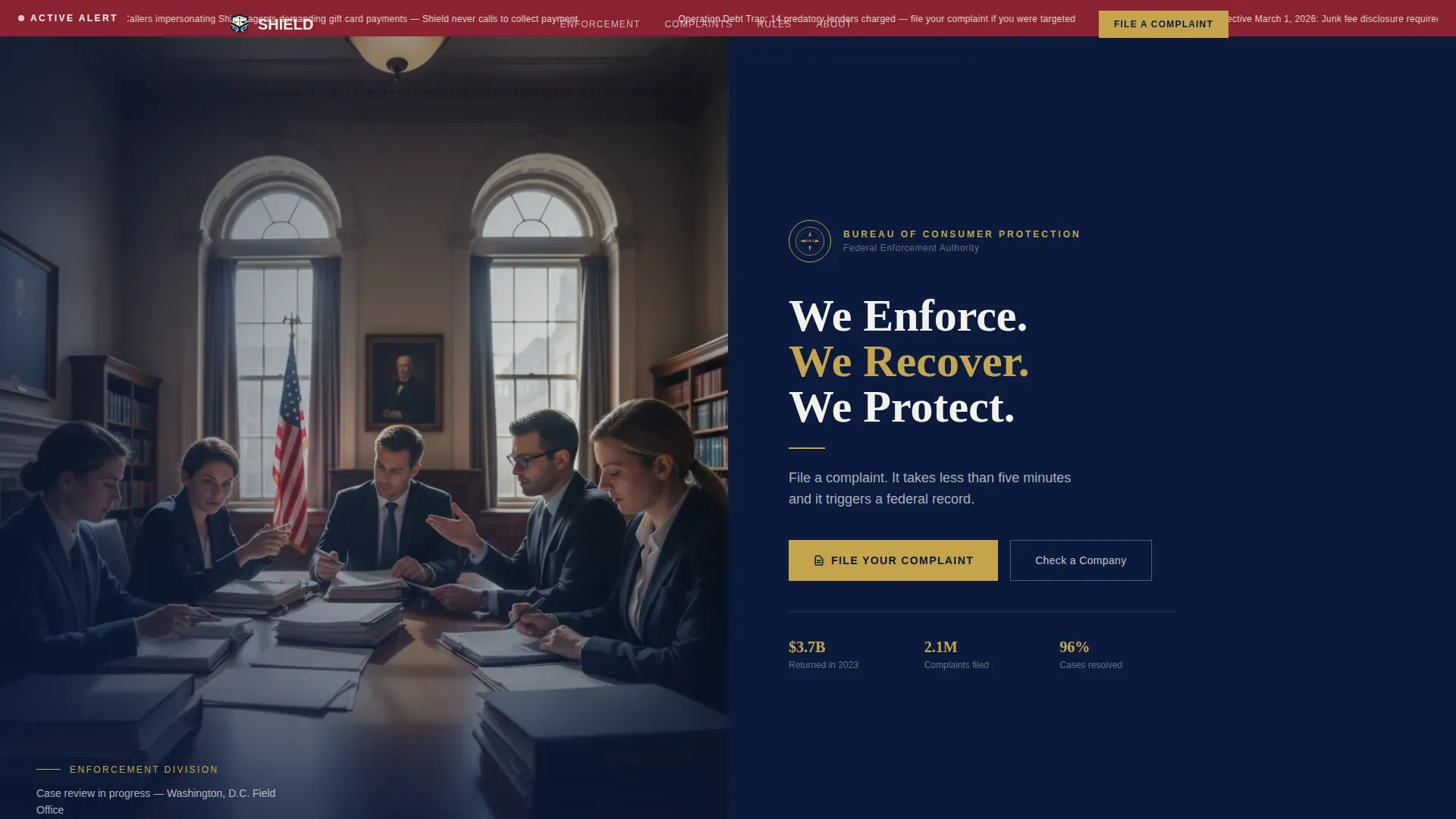
The hero divides the viewport equally. The left half holds a photograph taken at eye level across a government conference table, with natural window light and an American flag softly out of focus. The right half presents a heavy serif headline against deep federal navy, the agency seal, and a single-line subhead that sets the complaint call-to-action immediately.
FAQ Escalation Section
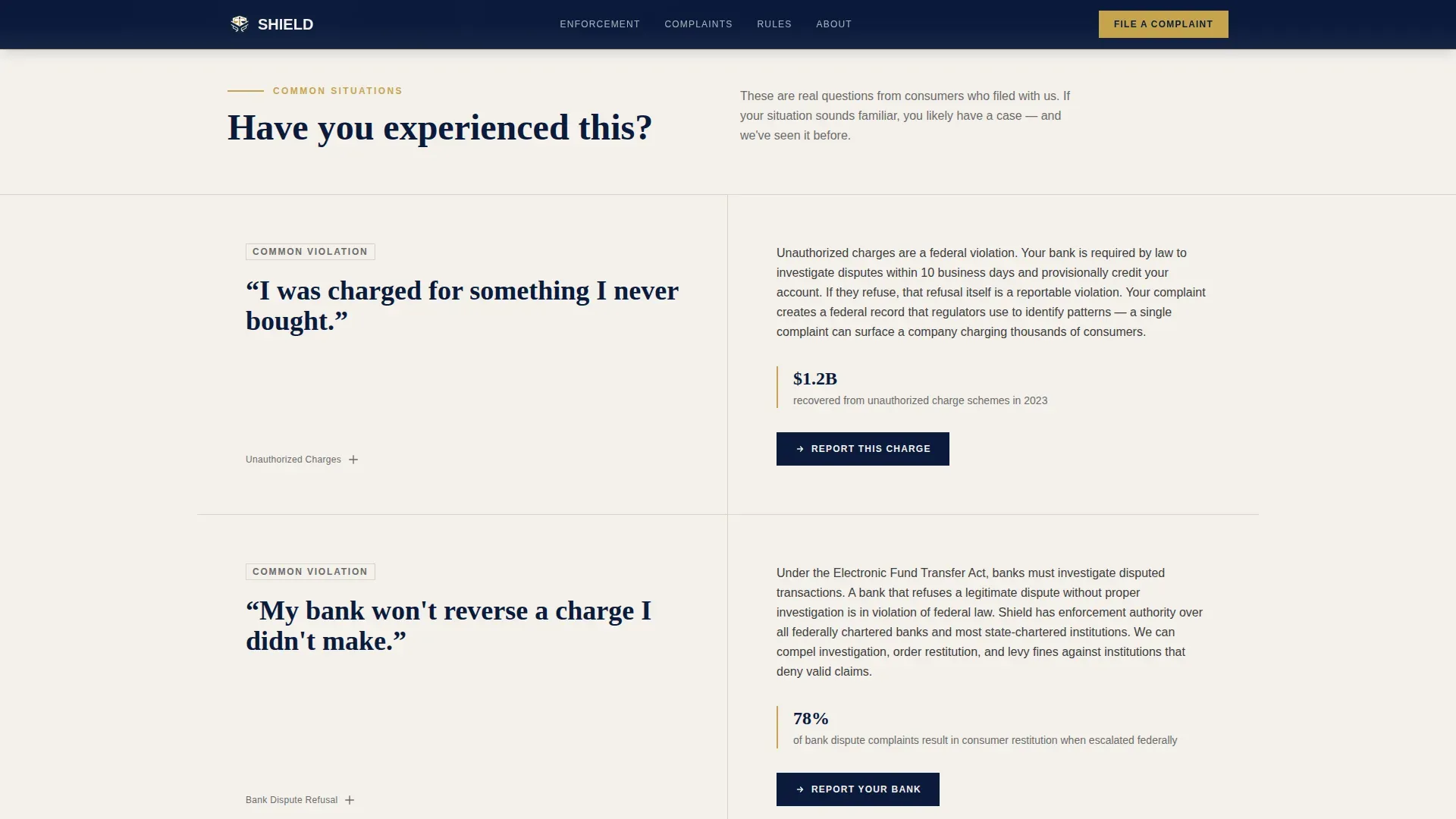
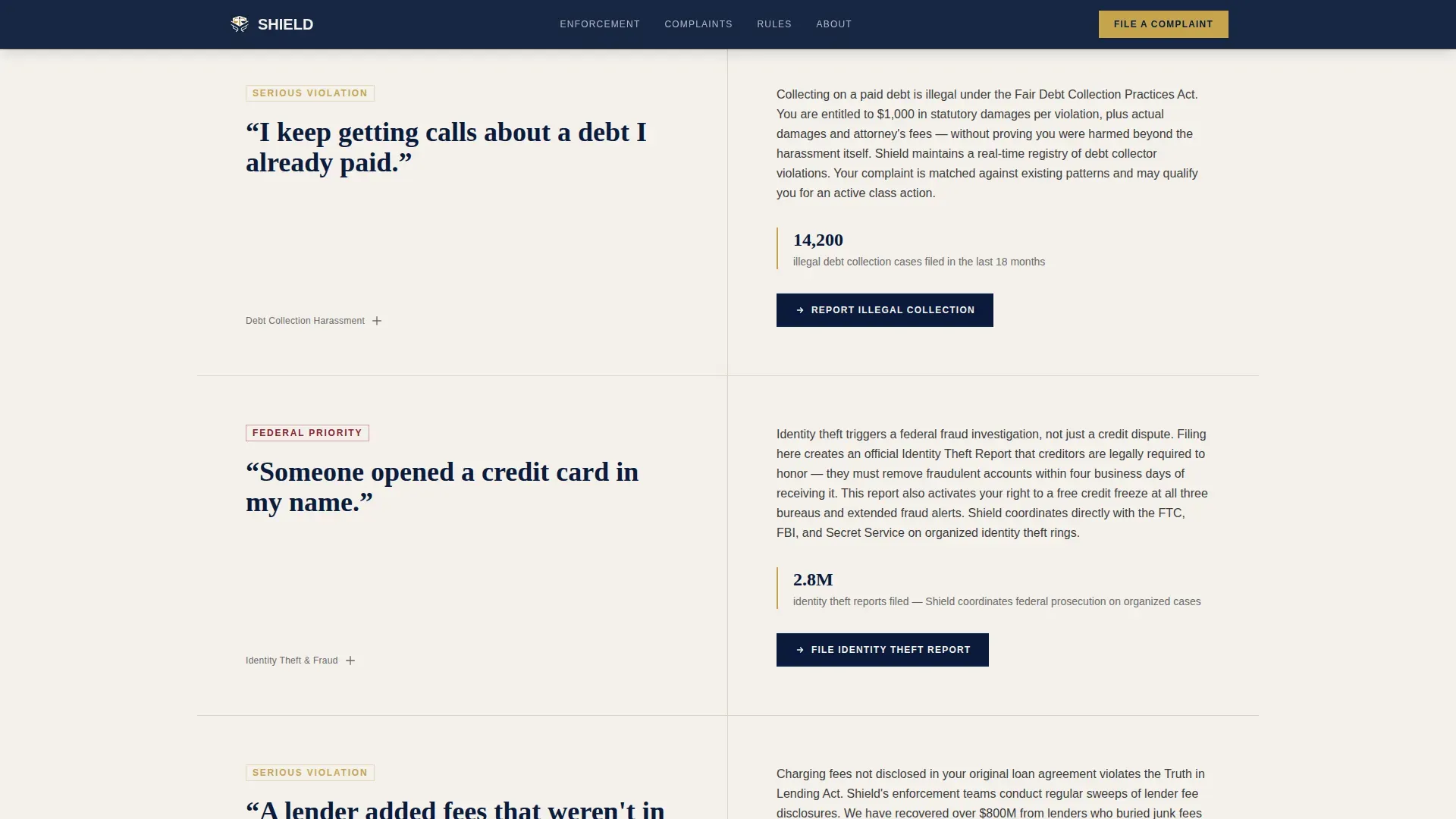
Questions are written in the exact language real consumers use, such as "Someone opened a credit card in my name" or "My bank won't reverse a charge I didn't make." Each left-panel question sits in large serif type on courthouse marble. The right panel responds with plain-language guidance, relevant enforcement statistics, and a contextual complaint button. Questions escalate in severity as the visitor scrolls, building confidence that the agency has seen every situation before.
Progressive Disclosure Complaint Form
The intake form opens with a single dropdown asking "What happened?" Plain-language options like "I was charged for something I didn't buy" or "Someone used my identity" replace bureaucratic categories. Only the fields relevant to the selected complaint type then appear, keeping the form short and focused regardless of scenario complexity.
Enforcement Database Search
A dedicated search input lets visitors look up any company by name and view its violation and enforcement history. This component builds trust before the visitor submits personal details, proving the agency's track record is real and publicly available.
Enforcement Statistics Block
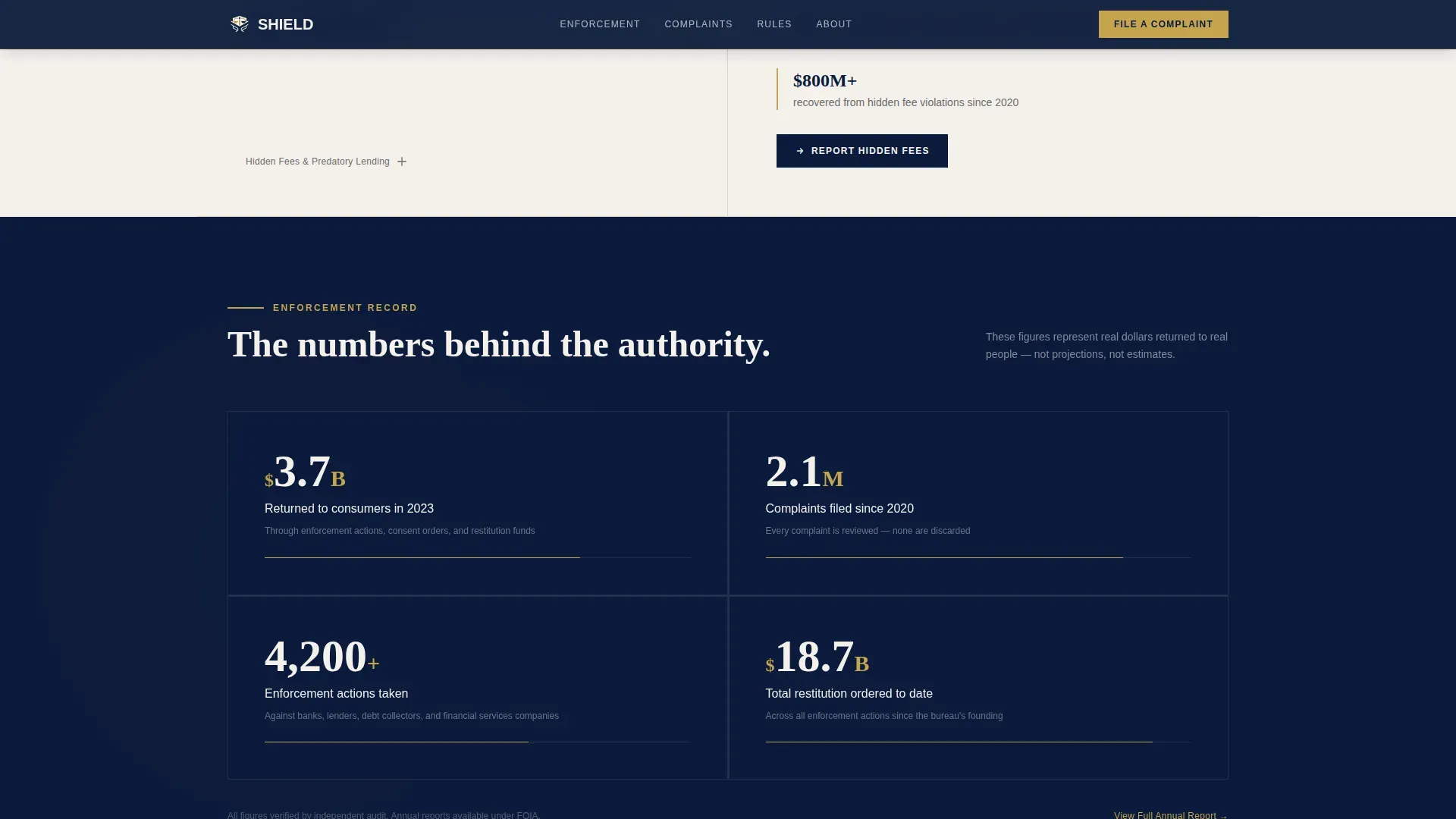
Counter-animated figures display recovery totals, case counts, and restitution returned to consumers. The brief cites $3.7 billion returned to consumers in 2023 as one example figure. Scroll-triggered counter animations bring these numbers to life without distraction.
Institutional Color and Typography System
Deep federal navy (#0B1A3B) dominates headers and the footer. Seal gold (#C5A44E) marks calls to action and trust indicators. Courthouse marble (#F4F1EC) opens up content sections. Regulation red (#8B2332) is reserved strictly for urgent alerts and violation callouts. Fraunces serif handles headlines; DM Sans handles body text and interface elements.
Page sections overview
| Section | Purpose |
|---|---|
| Split-Screen Hero | Establish authority and present the primary complaint call-to-action |
| FAQ Escalation Section | Mirror consumer language, answer plainly, repeat contextual complaint buttons |
| Enforcement Database Search | Let visitors check company violation records before submitting personal details |
| Complaint Intake Form | Capture complaint data through a progressive disclosure single-dropdown flow |
| Enforcement Stats Block | Display recovery totals and case metrics with scroll-triggered counter animations |
| Single-Row Footer | Close the page with a minimal federal-style footer in linear single-row layout |
Design & branding system
The visual identity follows an Institutional Authority theme. Every color and typeface choice references familiar federal design cues so visitors feel the weight of governmental legitimacy the moment the page loads.
- Navy (#0B1A3B) dominates headers and the footer like a uniform; seal gold (#C5A44E) appears sparingly on calls to action, seals, and dividers; courthouse marble (#F4F1EC) gives content sections room to breathe; regulation red (#8B2332) is used only for urgent alerts and violation callouts, never decoratively
- Fraunces serif drives headlines and FAQ question panels; DM Sans handles all body copy, labels, and form interface elements for legibility at any size
- Scroll reveal animations, staggered FAQ item entrances, and counter animations on enforcement statistics add motion without undermining the template's serious, deliberate tone
Mobile & speed optimization
Shield is designed desktop-first to match the government portal aesthetic described in the brief, with a mobile fallback layout included for visitors on smaller screens.
- Static content sections use server component architecture for fast initial rendering; the complaint form and company search input load as client components
- The split-screen 50/50 layout adapts for narrower viewports so the hero photograph and headline stack cleanly without losing hierarchy
- Medium-intensity animations including scroll reveals and staggered FAQ entrances are calibrated to enhance the experience without blocking interaction on mobile devices
How this template helps you convert
Shield is structured around a specific lead generation goal: turning a distressed visitor into a complaint filer in the fewest possible steps. Every section earns the next click rather than demanding it.
- The hero establishes authority and presents the "File Your Complaint" button in seal gold on federal navy before the visitor has scrolled a single pixel, capturing high-intent visitors immediately.
- The FAQ escalation section meets visitors in their own words, answers their specific situation with enforcement statistics, and places a contextual complaint button beside every answer so the path to filing is never more than one click away.
- The enforcement database search lets skeptical visitors verify the agency's track record before sharing any personal information, removing the final barrier to form submission.
Other information about this template
Shield was built for the Government and Public category, specifically the Consumer Protection Federal Agency niche. It is a single-page, section-led landing page with a clear linear scroll flow rather than a multi-page site structure.
- The template targets primary audiences including consumers dealing with unauthorized charges, identity theft, and predatory lending, as well as secondary audiences such as veterans, seniors, and small business owners facing financial deception
- Localization settings are configured for the United States market: English language, USD currency formatting, and MM/DD/YYYY date formatting throughout
- The creative direction is FAQ-Driven, meaning the scroll experience is organized around escalating real consumer questions rather than traditional service-page sections
- The header concept is Half-Page Photo plus Text, a deliberate split between a documentary-style photograph and heavy serif authority copy, avoiding the generic stock-image hero common to most government templates
Theme
Institutional Authority
Creative direction
FAQ-Driven
Color system
Navy Authority
Style
Split Screen (50/50)
Direction
Lead Generation
Page Sections
Split-screen Hero Section
FAQ Escalation with Contextual Ctas
Progressive Disclosure Intake Form
Enforcement Database Search
Animated Enforcement Statistics Block
Institutional Color and Type System
Related questions
What type of agency or organization is this template designed for?
How does the progressive disclosure complaint form work?
Does the template include the enforcement database search component?
Can I customize the FAQ questions and enforcement statistics?
Is this template suitable for both desktop and mobile visitors?



