Preschool Crisis Resource Landing Page Template
Shield is a single-page landing page built for preschool operators facing a compliance or safety crisis. It uses structured comparison tables, a gated Emergency Binder download, and an ungated First 60 Minutes checklist to turn panic into process. The design is steel-toned and deliberate, built for someone who needs answers fast and trust immediately.
by Rocket studio
Quick summary
Shield is a single-page crisis resource landing page for preschool operators. It presents the emergency response process in visible, readable comparison tables, what regulations require, what most centers do, and what best practice looks like. The primary offer is a gated Emergency Binder PDF. The secondary offer is a free First 60 Minutes checklist, available without an email.
Who this template is for
This template is built for people who run preschools and early childhood programs at the operational level. It speaks directly to the person receiving the bad news, not the person writing policy memos.
- Owner-operators running two-to-four-classroom childcare centers facing a licensing complaint or injury report
- Franchise directors managing multiple preschool locations who need a consistent compliance response framework
- In-home daycare providers who have just received a notice from the Department of Children and Family Services (DCFS) for the first time
What problem this template solves
When a preschool crisis hits, the person responsible is usually alone, under time pressure, and uncertain about what the regulation actually requires. Most center operators do not have a compliance attorney on speed dial or a ready-made documentation system. This template closes that gap immediately and visibly.
- Operators do not know the exact documentation window, notification requirements, or insurance trigger points that apply to their state
- There is no single resource that compares regulatory requirements against common practice and best practice in one readable place
- Visitors arriving in a crisis state need something tangible to act on right now, not a generic contact form
What you get with this template
This template delivers a fully structured single-page layout built around the preschool emergency response sequence. Everything is readable on-page before a visitor commits to downloading anything.
- A scrollable series of three-column comparison tables covering five emergency stages: Incident Occurs, Documentation Window, Notification Requirements, Insurance Trigger Points, and Legal Consultation Thresholds
- A gated Emergency Binder download form collecting email, facility name, and state selection, along with an ungated single-page First 60 Minutes checklist
- A Press Mentions ticker bar, section dividers with steel rules, and amber-accented call-to-action states throughout
Feature list
This template is built around a small set of deliberate, high-impact components. Each one earns its place by serving someone in a moment of genuine need.
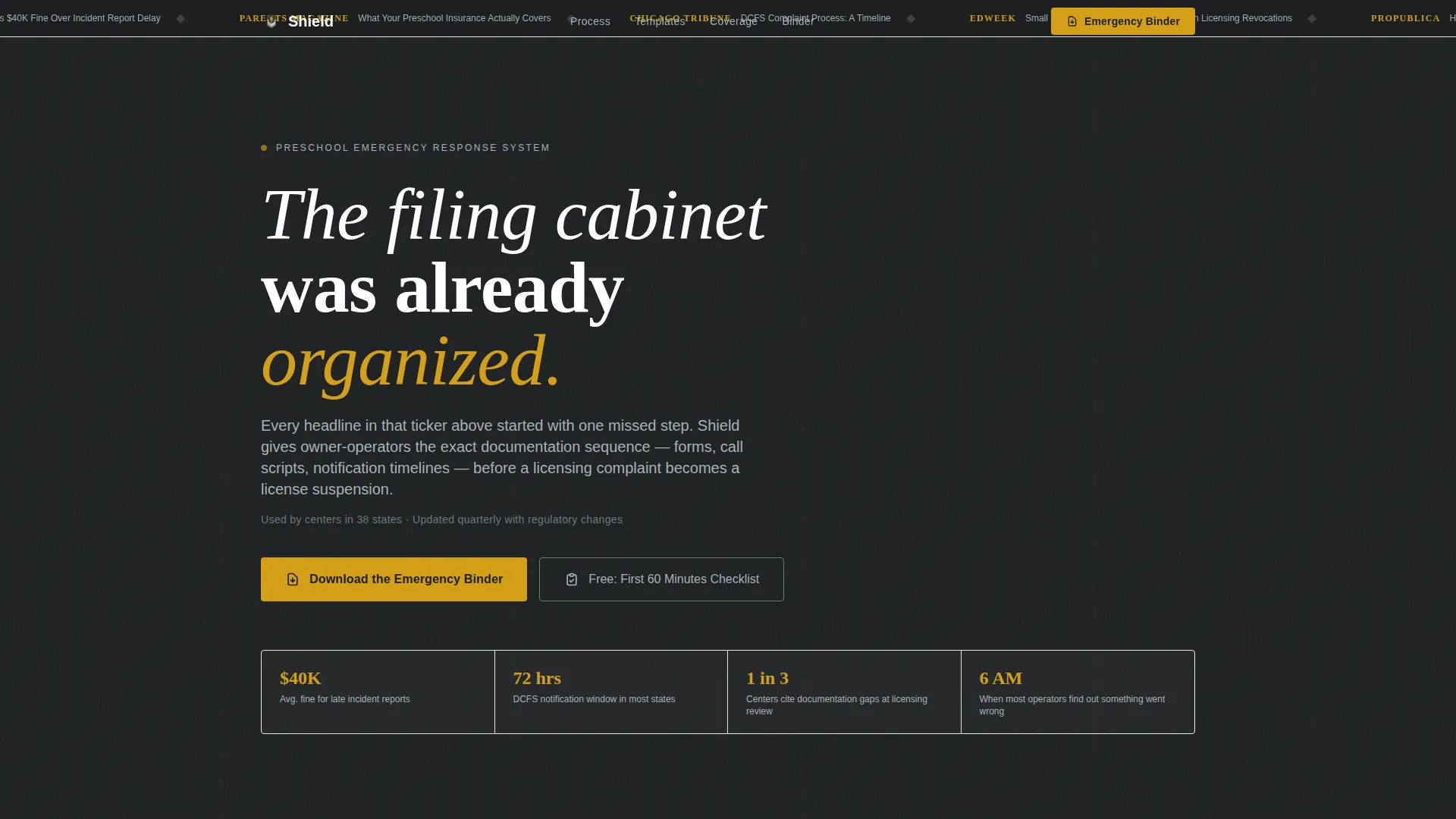
Scrolling Press Mentions Ticker
A horizontal ticker bar opens the page with real media headline fragments from outlets covering childcare compliance. The scroll speed is calibrated to be readable but slightly unsettling, ending with the line: "Every headline above started with one missed step."
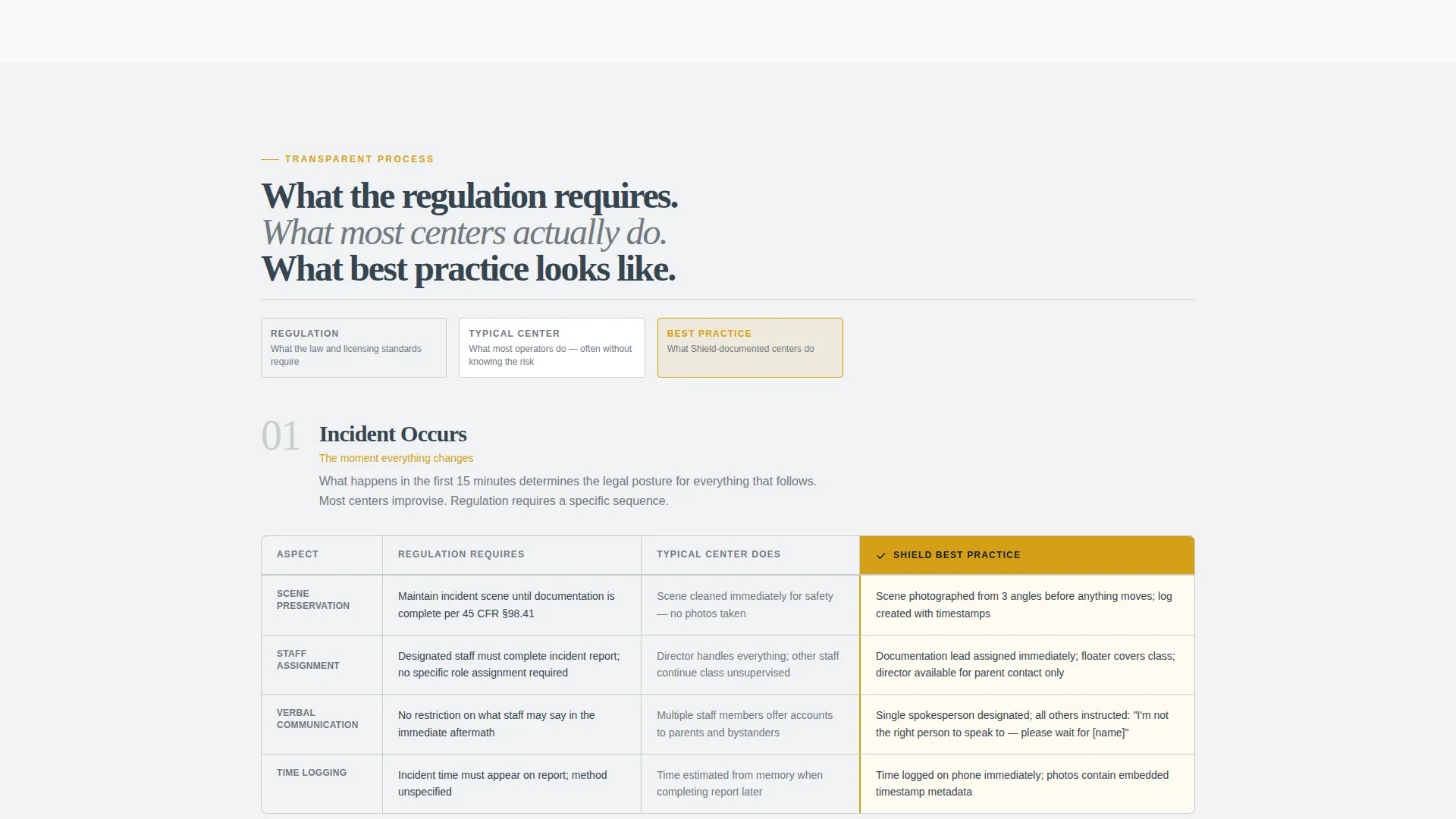
Three-Column Compliance Comparison Tables
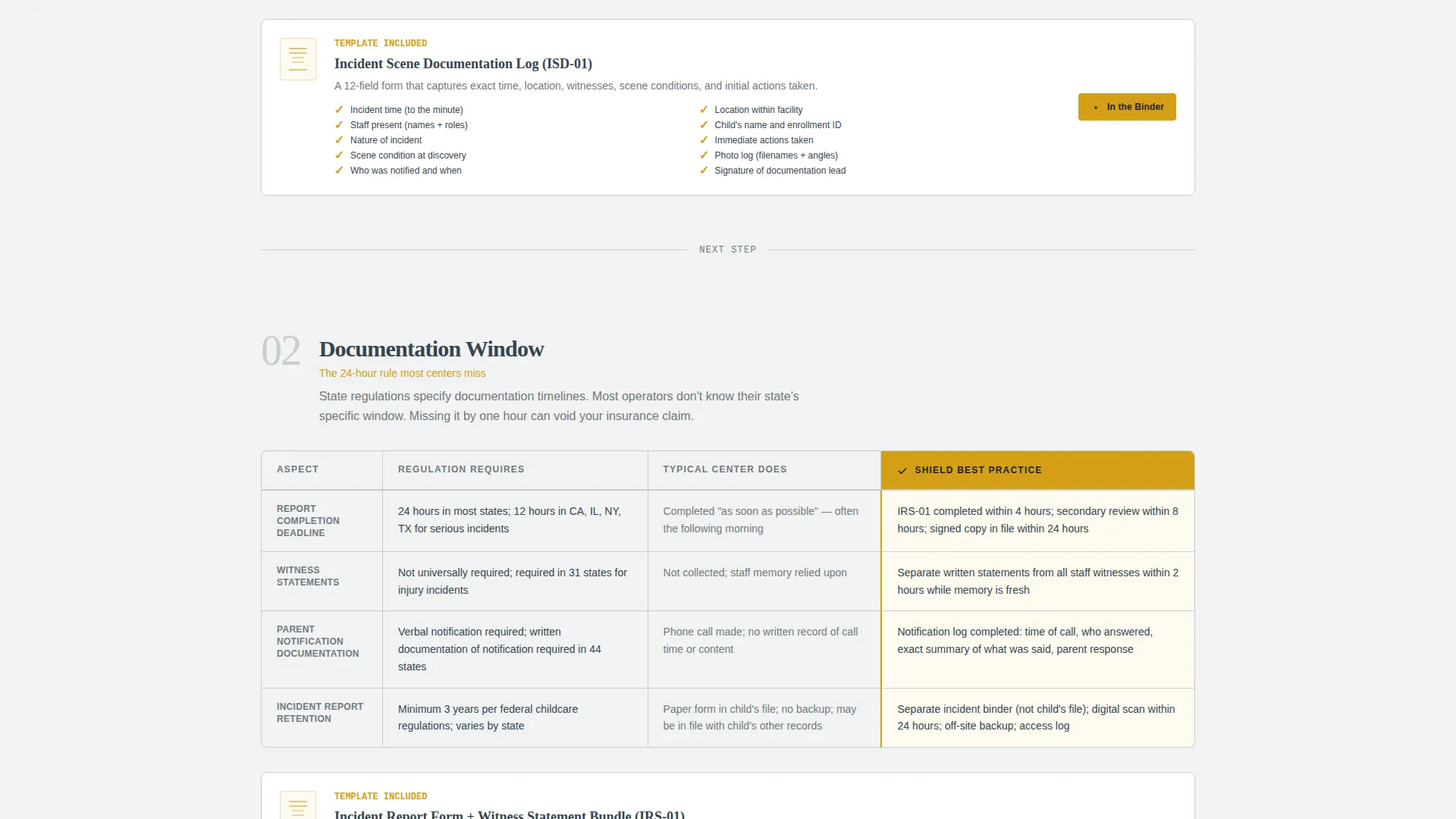
Each scroll section contains a structured table with three columns: what the regulation requires, what most preschools actually do, and what best practice looks like. Amber checkmarks mark the best-practice column. Steel borders frame every table clearly.
Downloadable Resource Anchors
Every comparison table is followed by a linked downloadable resource, the actual form, checklist, or call script referenced in that section. Visitors leave with something actionable regardless of whether they complete the main download form.
Gated Emergency Binder Download
The primary conversion point collects email address, facility name, and a state dropdown before releasing the full PDF toolkit. The state field matters because licensing regulations and DCFS processes vary by state.
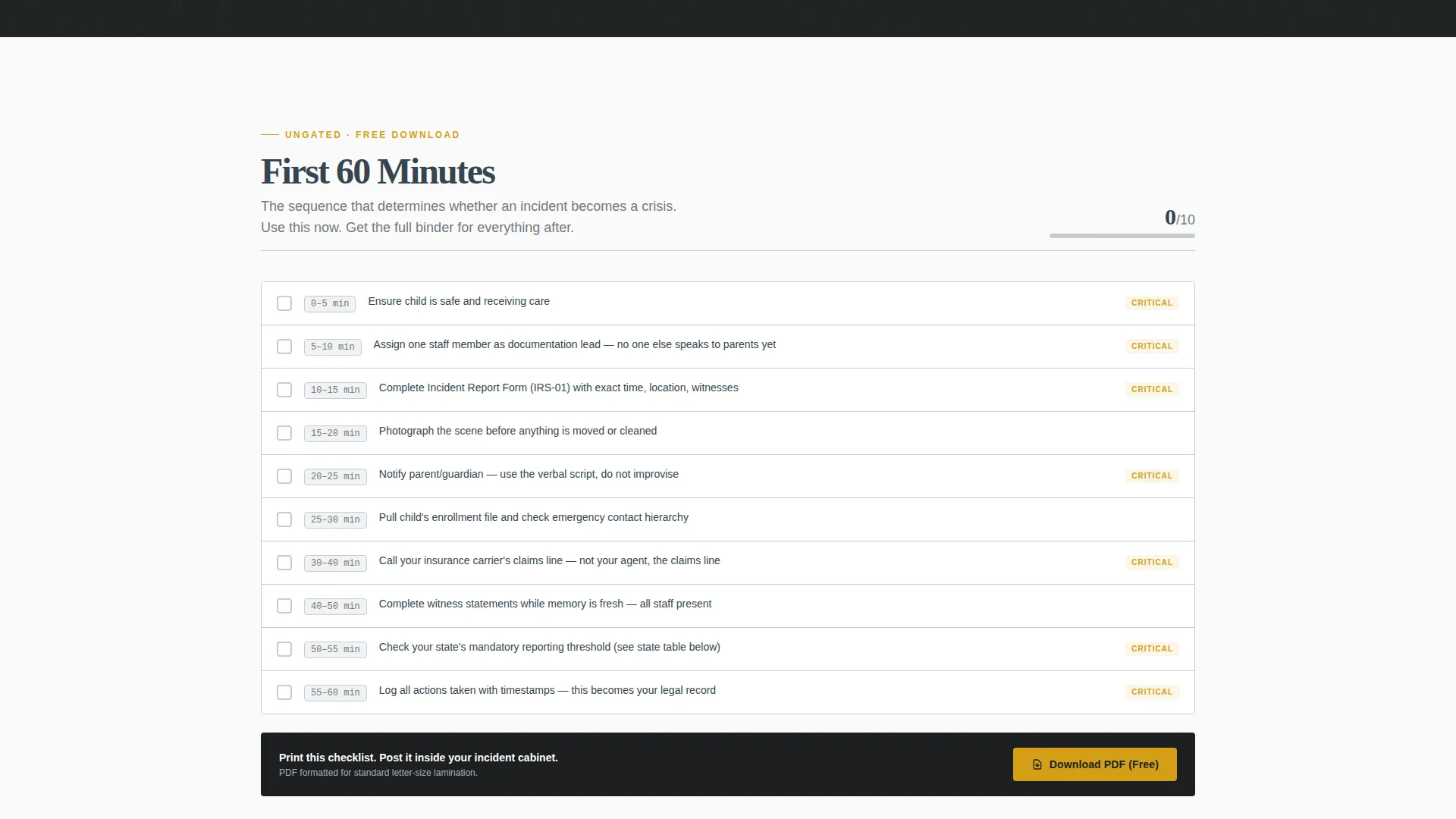
Ungated First 60 Minutes Checklist
A free, single-page checklist is available without any form submission. It demonstrates the depth and structure of the full Emergency Binder and builds trust before asking for contact details.
Editorial Newspaper Typography
Large, serif, newspaper-weight headlines carry the authority of a published record. The typographic system reinforces that this content is institutional and serious, not promotional.
Page sections overview
| Section | Purpose |
|---|---|
| Press Mentions Ticker | Opens with media authority and establishes stakes |
| Opening Hook Line | Sets the consequence frame before any scroll |
| Incident Occurs Table | Shows response gap at the first moment of crisis |
| Documentation Window Table | Clarifies timing obligations most operators miss |
| Notification Requirements Table | Compares regulatory duty against common practice |
| Insurance Trigger Points Table | Identifies actions that affect coverage eligibility |
| Legal Consultation Thresholds Table | Defines when legal advice becomes necessary |
| First 60 Minutes Checklist | Free ungated resource that builds immediate trust |
| Emergency Binder Download | Gated primary conversion with state-specific context |
Design & branding system
The visual identity uses a Monochrome Steel color system built to feel institutional rather than inviting. The palette references the brushed metal surface of a fireproof filing cabinet, which is exactly the emotional register a crisis-state visitor needs.
- Core colors are cold-rolled steel (#71797E), deep graphite (#36454F), and document white (#FAFAFA) for backgrounds and body text, with backgrounds alternating between pure white and a faint steel wash
- Emergency amber (#D4A017) appears only on action states and critical callouts, creating an involuntary attention hierarchy that pulls the eye directly to decision points
- Section dividers use thin steel rules; there are no hero images or stock photography of children anywhere on the page
Mobile & speed optimization
This template is built as a single-page layout with a lean component set. The design choices that serve the crisis-state visitor on desktop also reduce friction on a phone screen, where most panicked first searches happen.
- No hero images or decorative photography means fewer heavy assets competing for load time on a mobile connection
- The comparison tables and checklist sections use clean structural markup that collapses predictably on smaller screens without losing the column logic
- The amber accent system works as a visual tap target on touch screens, making the download and checklist calls to action easy to reach without zooming
How this template helps you convert
The conversion strategy here is transparency. Every table header, step number, and form title is readable before the visitor enters a single keystroke. The template earns the download by giving away the structure.
- The ungated First 60 Minutes checklist creates an immediate trust transaction, proving the content is real and specific before asking for an email address
- The comparison tables make the visitor competent, not just informed, so they arrive at the download form already convinced the full binder is worth their contact details
- The state dropdown on the gated form signals that the Emergency Binder is jurisdiction-aware, which increases perceived value for operators who know regulations vary by state
Other information about this template
This template was designed under the Shield project framework as part of a Professional Services collection focused on preschool marketing and compliance resources. It sits at the intersection of emergency preparedness content and early childhood program administration.
- The template style follows a Sidebar Companion and Editorial Magazine theme, making it compatible with operator-facing resource hubs where additional guides or legal references may live alongside it
- The header concept draws from a Quote/Manifesto direction, using the press ticker and hook line as the authority-building entry point rather than a traditional hero section
- The lp direction aligns with a Partnership and B2B context, making this template well-suited for licensing consultants, compliance attorneys, or early childhood associations offering it as a co-branded resource to member centers
Theme
Editorial Magazine
Creative direction
Logo Wall Authority
Color system
Monochrome Steel
Style
Sidebar Companion
Direction
Partnership/B2B
Page Sections
Three-column Compliance Comparison Tables
Scrolling Press Mentions Ticker
Gated Emergency Binder Download
Ungated First 60 Minutes Checklist
Downloadable Resource Anchors Per Section
Editorial Newspaper Typography System
Related questions
Who is this landing page template designed for?
What does the Emergency Binder download include?
Can visitors access anything without filling out a form?
What emergency stages do the comparison tables cover?
Is this template suitable for a multi-location preschool franchise?



