Expat Disability Coverage Comparison Landing Page
Shield is a single-page landing page template built for international expat disability insurance brokerages. It opens with a benefit-gap calculator, moves through jurisdiction and portability comparison tables, and closes with a progressive lead capture form. The design follows an Executive Suite aesthetic in a Monochrome Steel palette, built to convert senior HR decision-makers and C-suite expats.
by Rocket studio
Quick summary
Shield is a conversion-focused landing page template for portable disability insurance brokerages serving expat executives. A benefit-gap calculator anchors the header, followed by jurisdiction comparison tables, a portability matrix, and a claims-paid ratio chart. The design is austere and data-dense, built to earn trust from HR directors and senior executives before asking for a single click.
Who this template is for
This template is built for financial services businesses that sell portable disability coverage to international executives and the HR teams who manage them. It suits brokerages operating across multiple expat corridors and handling high-value, high-complexity policies.
- HR directors at multinationals relocating C-suite or senior talent across countries
- Independent consultants and C-suite expats on foreign contracts needing portable individual coverage
- Disability insurance brokerages targeting the executive and senior professional segment
What problem this template solves
Most expat executives discover their employer's local group plan has serious gaps only after they need it. Benefits paid in a local currency they cannot spend, medical definitions that exclude common executive injuries, and policies that simply do not transfer when a contract moves to a new country are widespread problems that default HR solutions do not address.
- No visual tool exists on most broker sites to show the actual monthly benefit gap an executive faces
- Jurisdiction-specific policy terms are scattered and hard to compare across expat corridors
- HR directors lack a clear, data-backed resource to justify switching from a default group plan
What you get with this template
You get a complete, ready-to-customize landing page designed around lead generation for executive disability coverage. Every section is built from the premise that the visitor already has coverage that is likely to fail them.
- A live benefit-gap calculator with a slider, dropdown inputs, and an animated output figure styled in boardroom gold
- A multi-section comparison layout covering jurisdiction triggers, portability structures, and claims-paid ratios
- A progressive three-screen lead capture form and a secondary PDF-gated conversion path
Feature list
A concise paragraph describes what this section of the template delivers before each feature block below.
Benefit Gap Calculator
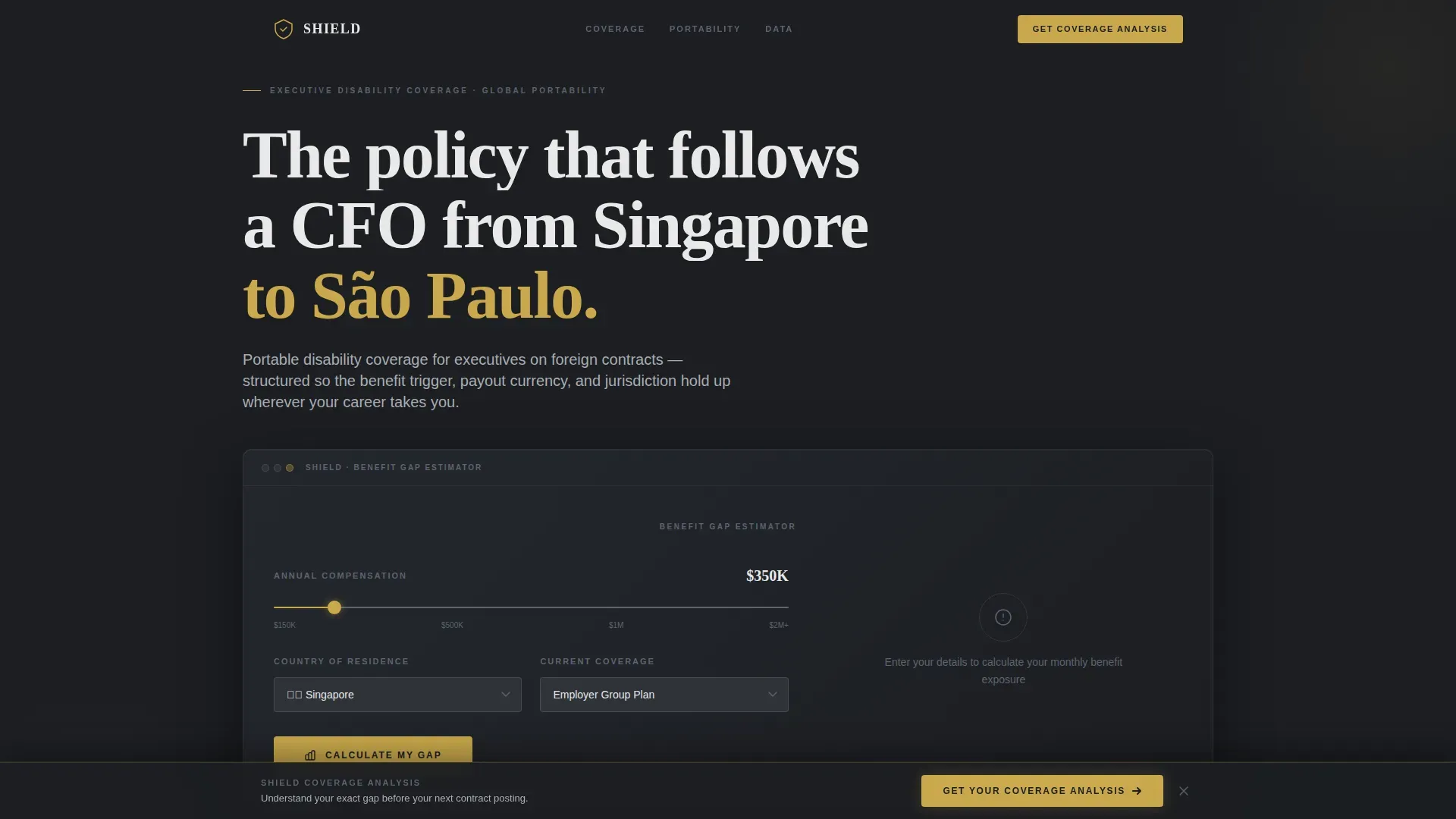
The header calculator accepts three inputs: annual compensation via a USD slider ranging from $150,000 to $2 million and above, country of residence via a dropdown with flag icons, and current coverage status selected from employer group, individual, or none. The tool returns a monthly benefit gap figure in boardroom gold with a single line beneath it reading "This is what you'd lose."
Jurisdiction Comparison Table
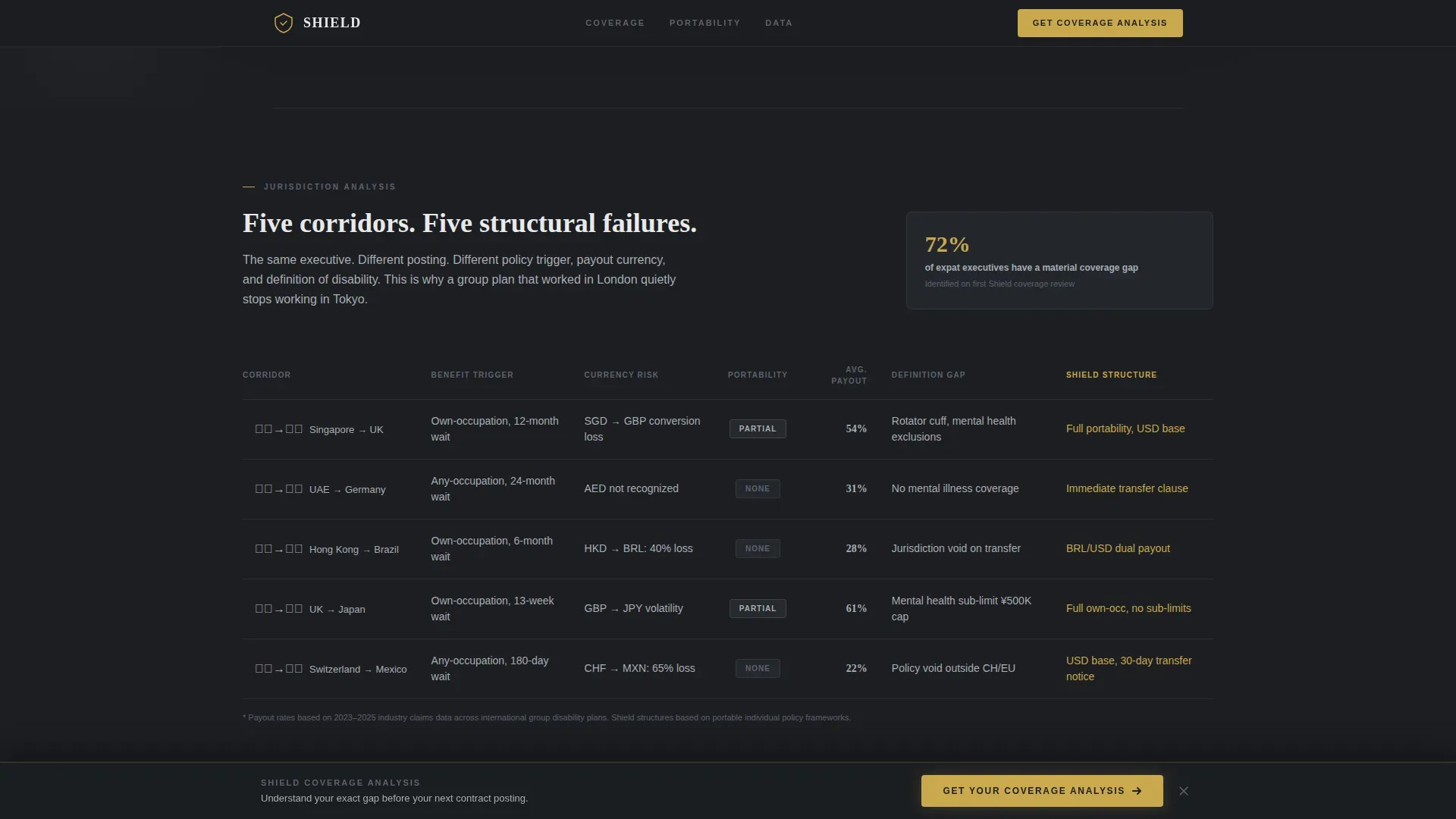
A structured data table contrasts benefit trigger conditions across five major expat corridors. Each row presents how a policy condition is defined or enforced per jurisdiction, giving HR directors and executives a direct, factual comparison rather than generalized marketing copy.
Portability Matrix
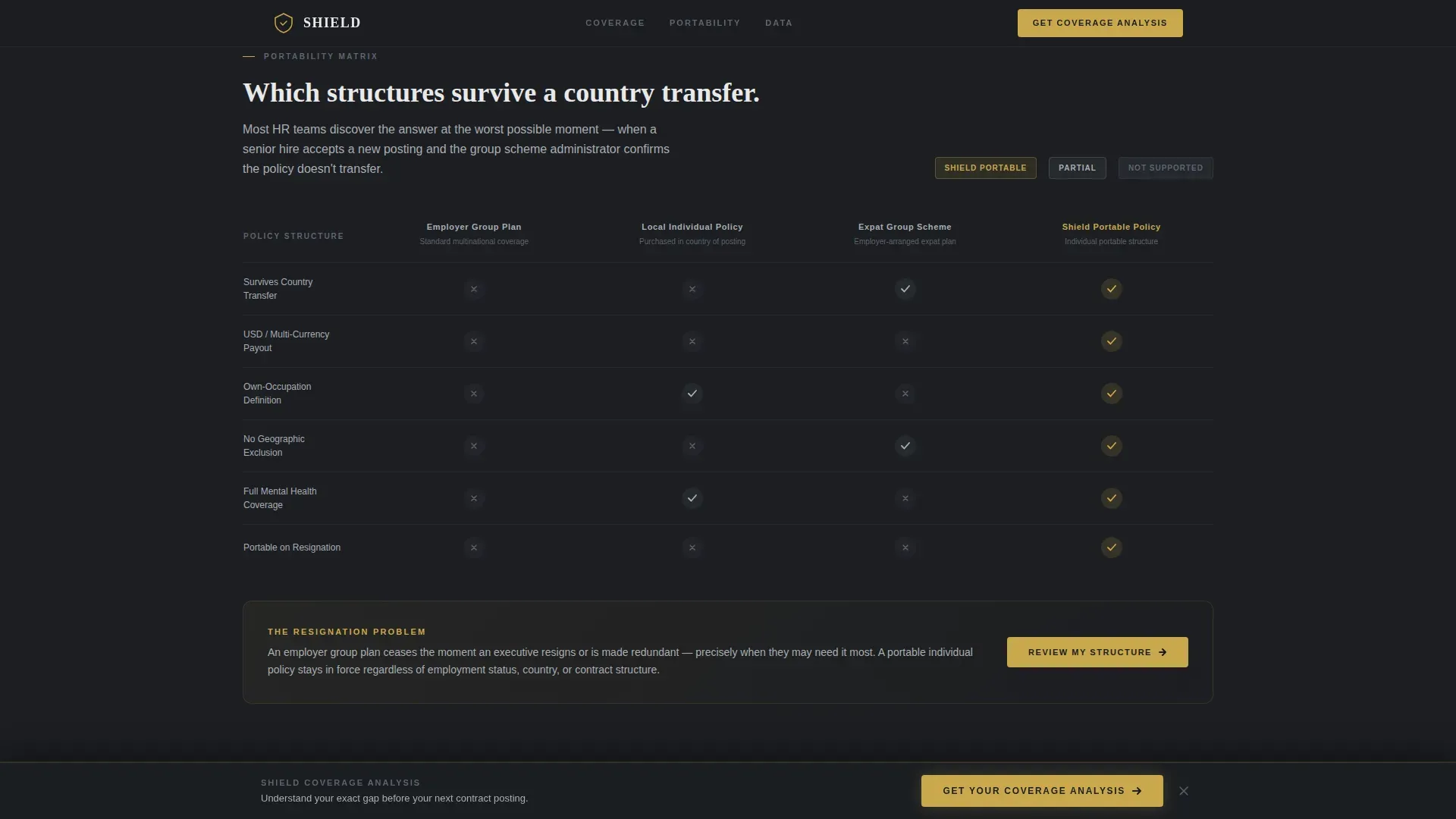
This section presents a matrix showing which policy structures survive a country transfer intact and which ones collapse upon reassignment. It is the clearest single argument for portable individual coverage over employer-tied group plans.
Claims-Paid Ratio Chart
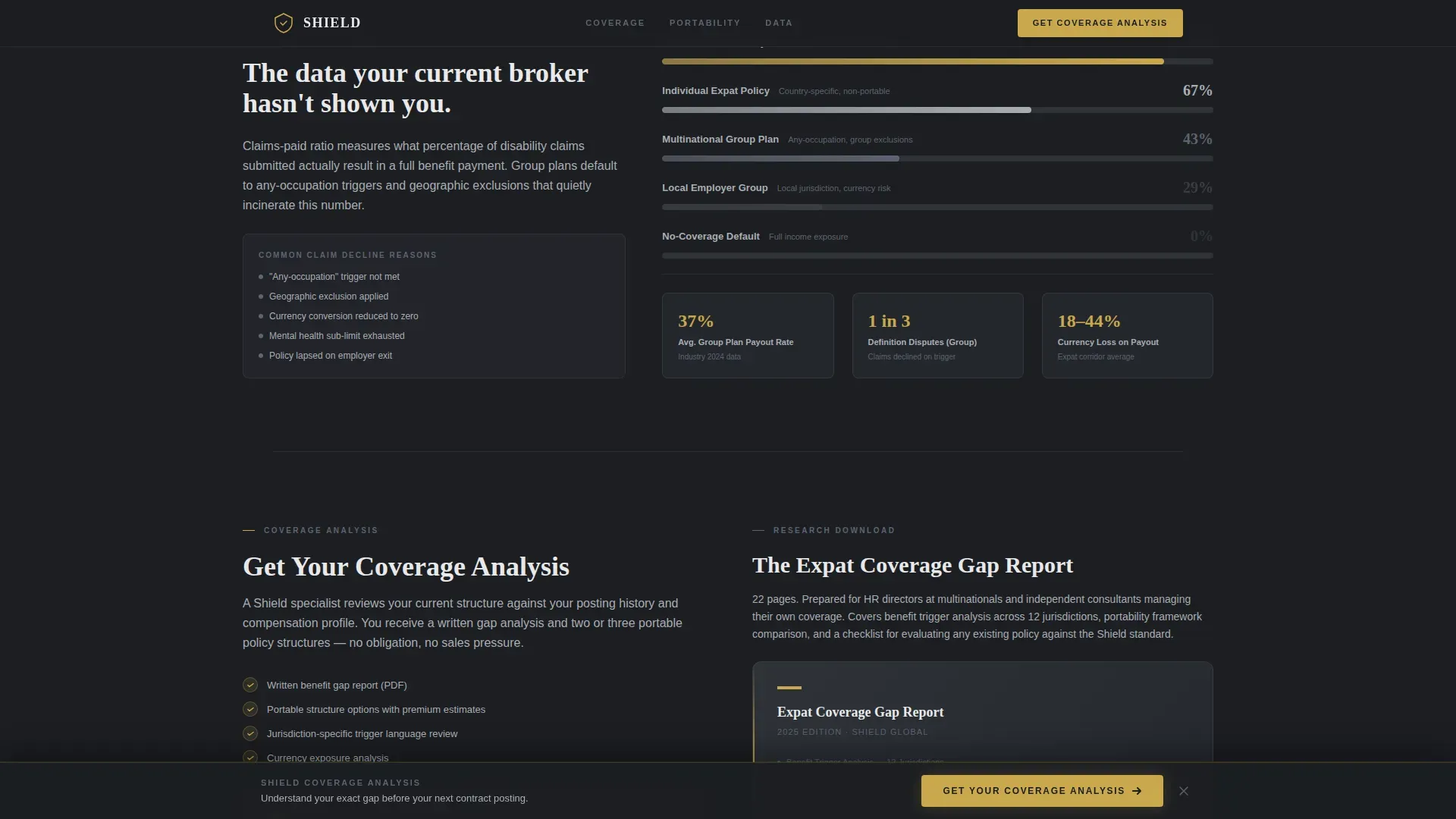
A horizontal bar chart displays claims-paid ratios across plan types, directly comparing portable individual policies against the local group plans most HR teams default to. The data speaks before any editorial commentary is needed.
Progressive Lead Capture Form
The primary call to action, "Get Your Coverage Analysis," is locked to the bottom of the viewport after the calculator interaction. The form runs across three screens: name and email first, then country of residence and employer type, then an optional compensation band and policy upload. A secondary path gates a downloadable PDF report behind email and job title.
GSAP ScrollTrigger Animations
Section reveals use GSAP ScrollTrigger so that data tables and charts appear as the visitor scrolls, reinforcing the industry-report feel. The gold benefit-gap figure in the calculator uses a counter animation on load, adding weight to the output number.
Page sections overview
| Section | Purpose |
|---|---|
| Benefit Gap Calculator | Opens the page with a three-input estimator that surfaces the visitor's monthly coverage shortfall in a prominent gold figure |
| Jurisdiction Comparison Table | Contrasts benefit trigger definitions across five expat corridors to show how local policy terms vary |
| Portability Matrix | Maps which policy structures transfer cleanly across country assignments and which do not survive reassignment |
| Claims-Paid Ratio Chart | Displays payout performance by plan type, positioning portable individual policies against default group plans |
| Progressive Lead Form | Captures leads across three screens with an optional policy upload and a secondary PDF download gate |
| Minimal Footer | Presents a single linear row with essential links and no decorative elements |
Design & branding system
The visual identity is built on an Executive Suite theme using a Monochrome Steel color system. Every color has a defined role and no surface carries decoration for its own sake. Boardroom gold appears only where a decision is required, which keeps its meaning intact throughout the page.
- Deep graphite (#1C1E22) as the primary background, polished chrome (#A8ADB3) for body text, and matte titanium (#5C6370) for secondary text and structural elements
- Boardroom gold (#C9A84C) reserved exclusively for interactive elements, calls to action, and the calculator's output figures
- DM Sans for interface and body typography, Fraunces for display and editorial headers, with no stock photography or decorative imagery anywhere on the page
Mobile & speed optimization
The template is built desktop-first to match the working environment of C-suite executives and HR directors reviewing materials at their desks. Full mobile parity is maintained so the page works cleanly on any device without losing the integrity of the comparison tables or calculator.
- Server components handle all static sections, while client components are scoped to the live calculator and multi-step form
- The sticky call-to-action bar is optimized for viewport behavior on both desktop and mobile screens
- Chart rendering and the progressive form use client-side components to keep static rendering as lean as possible
How this template helps you convert
The page is structured so that each section makes the visitor's coverage gap feel more concrete and more urgent, without any section raising its voice. The calculator quantifies the problem before the visitor has read a single paragraph, and each data table below it adds a new dimension to that gap.
- The benefit-gap calculator creates a personalized, high-visibility output in the first viewport, giving the visitor a specific number to carry through the rest of the page
- The sticky "Get Your Coverage Analysis" call-to-action bar appears after calculator interaction and remains visible throughout the scroll, reducing friction for a high-intent visitor who is ready to act at any point
- The secondary PDF download path captures earlier-stage leads who want the data before committing to a conversation, so no qualified visitor leaves without entering the funnel
Other information about this template
This template is designed specifically for the international expat disability insurance segment within the broader Finance and Insurance category. It is well suited to the executive and senior professional market where trust, data credibility, and design restraint matter more than visual flair.
- The template style is Comparison Table, making it a strong fit for brokerages that need to differentiate portable individual policies from employer group plans in a transparent, side-by-side format
- The Industry Report creative direction and the Monochrome Steel color system together communicate institutional authority without requiring brand recognition to do the heavy lifting
- The lead generation structure supports both high-intent visitors ready to request a coverage analysis and research-stage visitors who prefer to download a gated PDF report first
- Localization context includes USD as the primary currency, with Singapore Dollar (SGD), Brazilian Real (BRL), and Euro (EUR) referenced within the comparison tables to reflect real expat corridor contexts
Theme
Executive Suite
Creative direction
Industry Report
Color system
Monochrome Steel
Style
Comparison Table
Direction
Lead Generation
Page Sections
Live Benefit Gap Calculator
Jurisdiction Comparison Table
Portability Matrix
Claims-paid Ratio Chart
Progressive Three-screen Lead Form
GSAP Scrolltrigger Section Reveals
Related questions
What kind of business is this template built for?
Can I customize the calculator inputs and comparison table data?
Does the template include the PDF report or just the download gate?
Is the progressive lead form ready to connect to an external system?
Who is the intended visitor for this landing page?



