Babysitting Service Marketing Booking Website Template
Shield is a sidebar companion landing page template built for bonded, background-checked babysitting services. It leads with press validation, introduces vetted caregivers by name and credential, and keeps a persistent booking sidebar fixed on screen throughout the scroll. The Navy Authority color system and Legal Shield visual theme build authority before the visitor ever reaches the form.
by Rocket studio
Quick summary
Shield is a single-page, sidebar companion landing page template for professional babysitting services. It opens with a press mentions bar and editorial credibility, then walks visitors through the human infrastructure behind the service. A fixed sidebar carries a live availability count and a progressive booking form from start to finish.
Who this template is for
This template is built for childcare businesses that lead with trust, proof, and professional credentials rather than charm or lifestyle photography.
- Bonded, background-checked babysitting agencies that offer same-day or rapid-dispatch coverage
- Services targeting dual-income couples, single parents, and corporate relocation families in a new city
- Childcare operators running paid search campaigns who need a booking-focused landing page that converts on the first visit
What problem this template solves
Parents searching for last-minute childcare arrive at a page already anxious. Generic service sites do little to calm that anxiety. Shield closes the trust gap quickly by leading with external validation and credential proof before asking for any personal information.
- Most childcare landing pages bury credentials in fine print, giving hesitant parents no reason to stay
- Without a persistent booking path, visitors who feel ready to act lose momentum navigating back to a form
- New-to-city families have no local word of mouth to lean on, so third-party proof must do that job on the page
What you get with this template
Shield delivers a fully structured, conversion-ready layout. Every section is designed to add one more layer of proof before the visitor reaches the booking step.
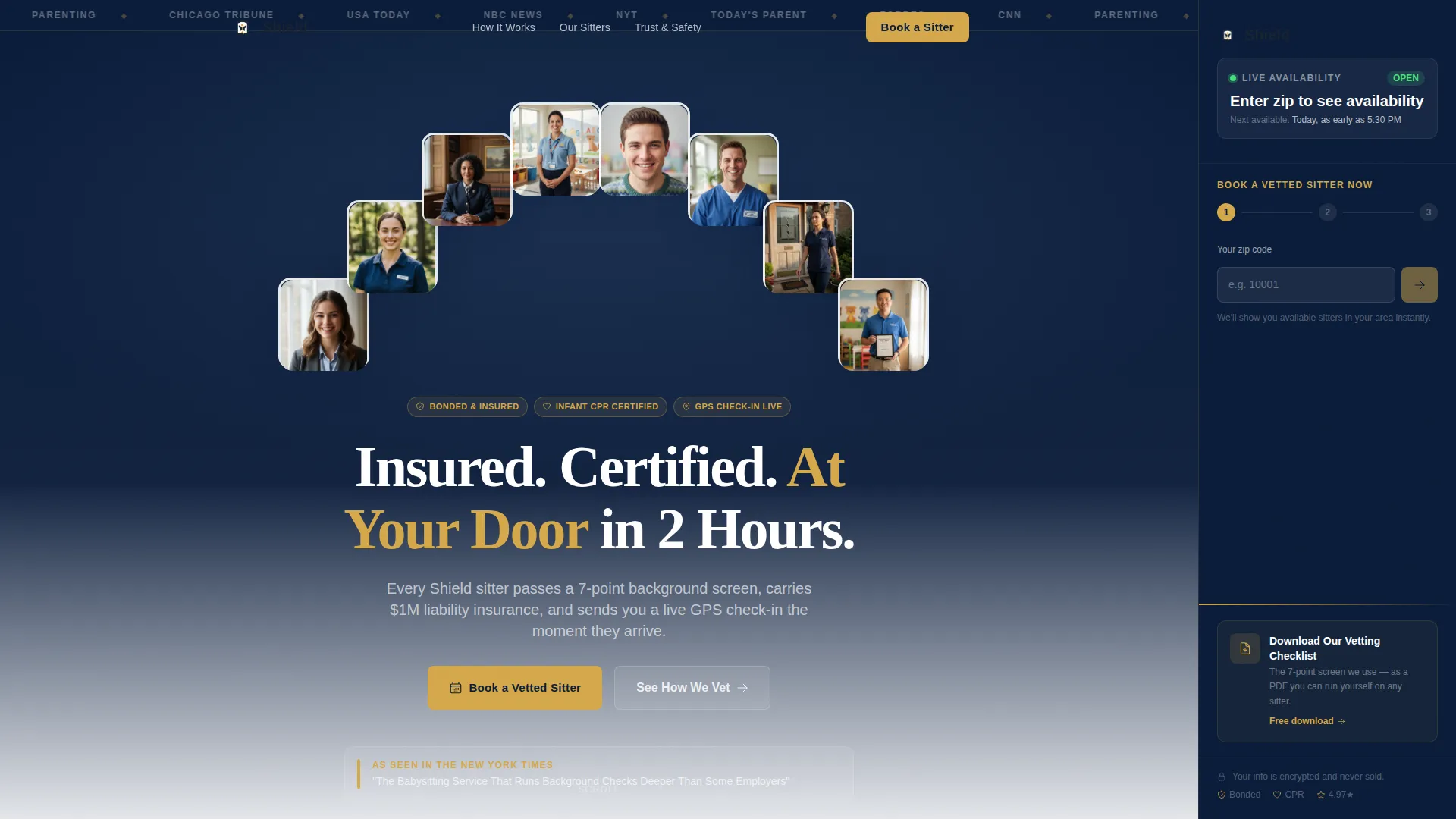
- A press mentions ribbon, split-composition header, and editorial headline screenshot that establish credibility immediately
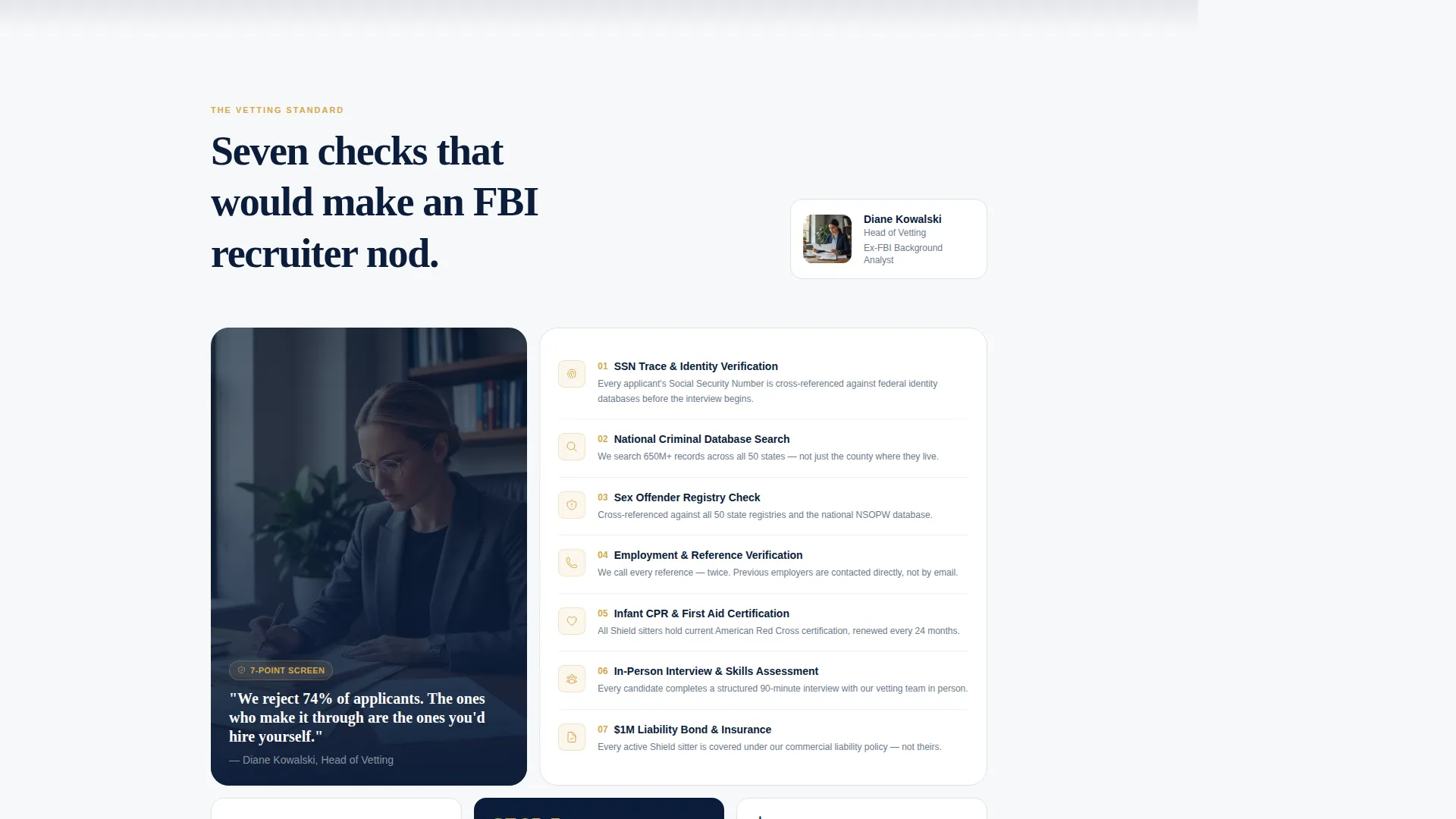
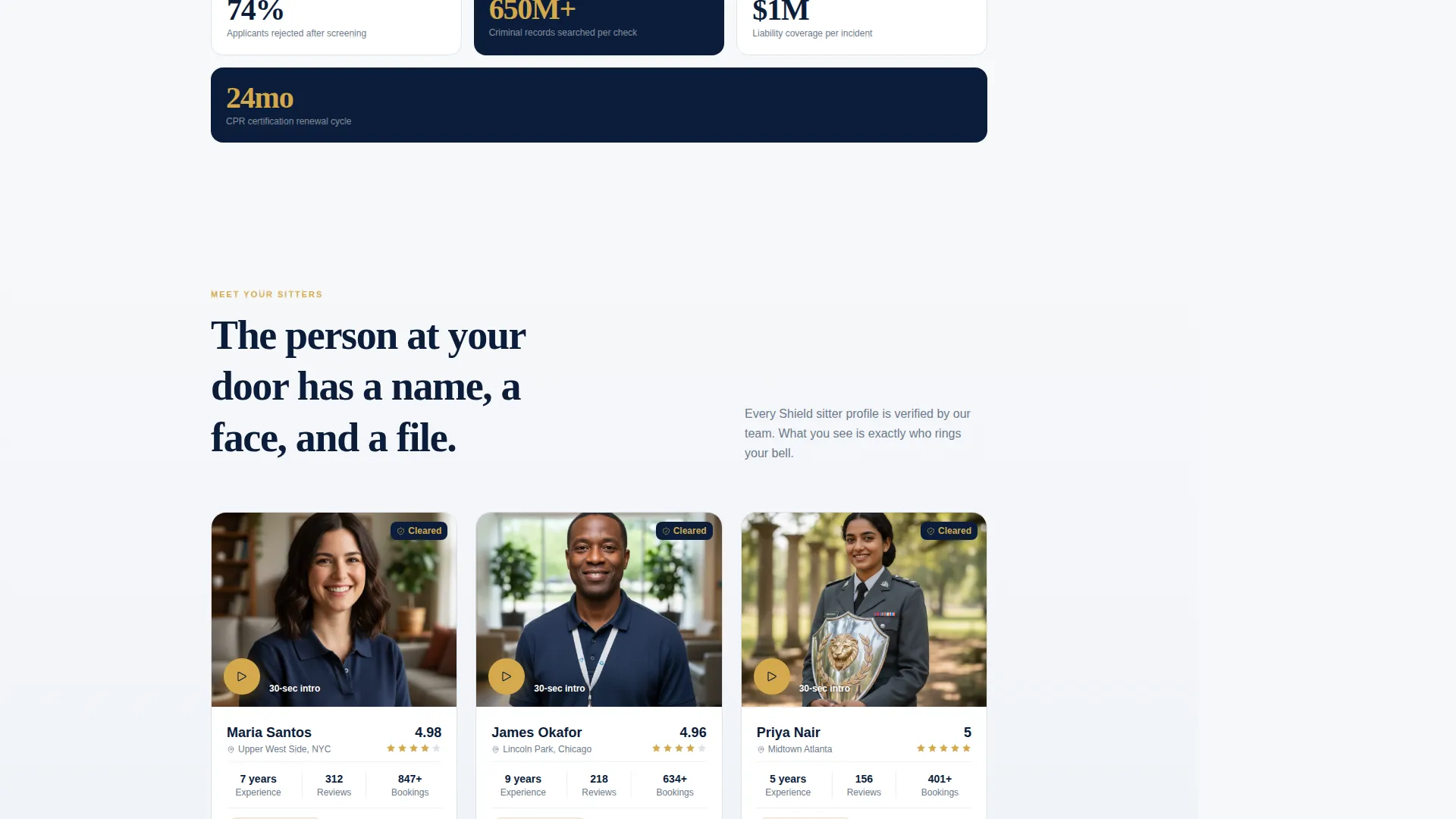
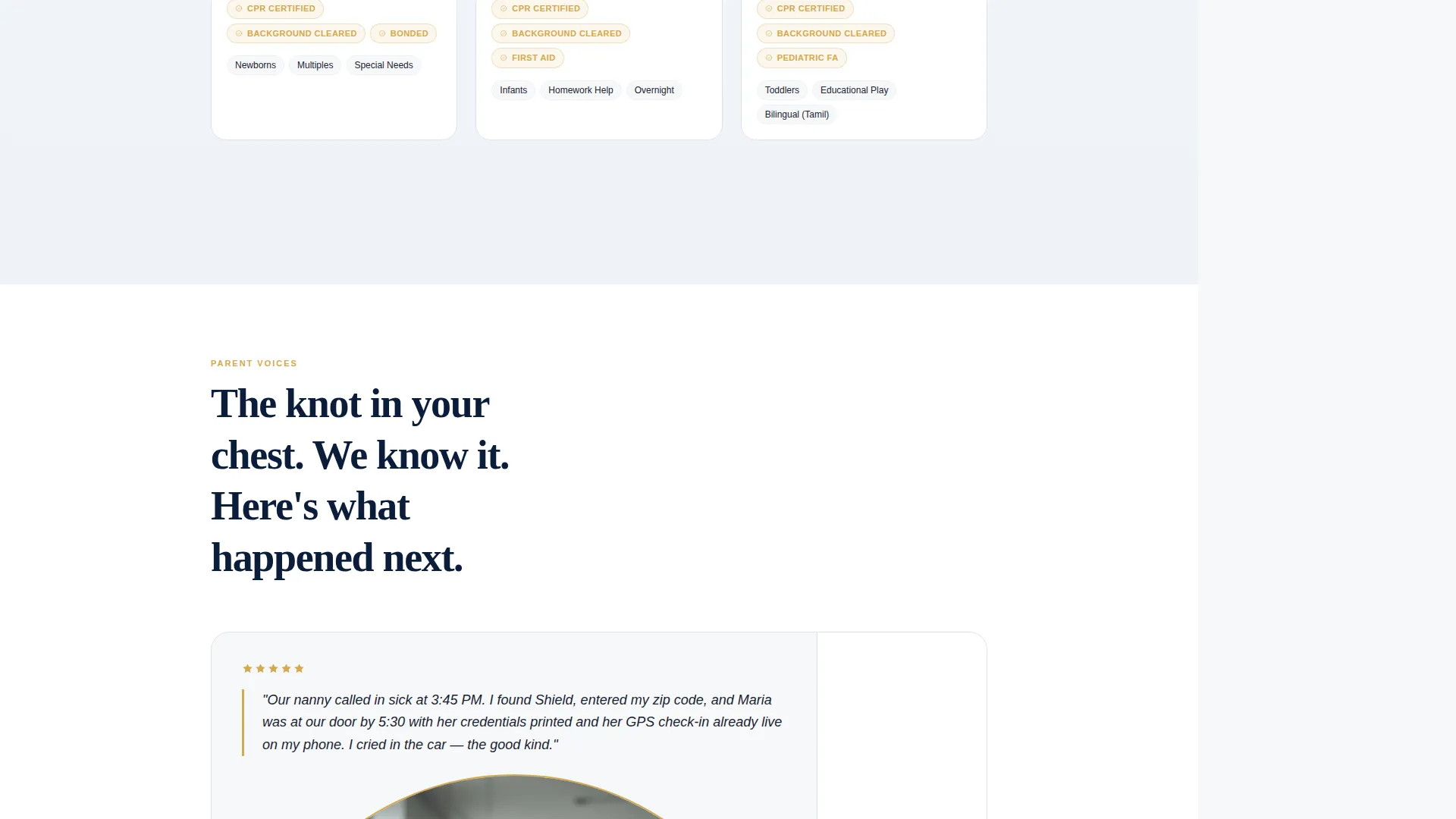
- A team and people section flow introducing the vetting coordinator, a named sitter with certification badges and intro video, and paired parent testimonials
- A fixed sidebar with a live available-sitter count, next-available time slot display, and a three-field progressive booking form alongside a PDF lead magnet option
Feature list
This section describes the core capabilities built into the Shield template layout.
Press Mentions Header Ribbon
A horizontal bar of grayscale media logos and a "Best of City" badge sits above the main header. It frames the page's credibility before a visitor reads a single word of copy.
Split-Composition Hero Section
The header splits into two halves. The left side shows an editorial headline screenshot. The right side shows a uniformed sitter arriving at a front door with a visible lanyard ID under golden-hour porch light.
Team and People Section Flow
Each scroll section introduces one layer of the operation: the vetting coordinator, a named sitter with her certification badges and a 30-second intro video slot, and a parent testimonial paired directly with the sitter being praised.
Persistent Sidebar Booking Panel
The right-side sidebar stays fixed as the visitor scrolls. It displays a live sitter availability count for the visitor's area, the next available time slot, and a compact three-field progressive form starting with zip code.
Progressive Three-Field Booking Form
The form collects zip code first and returns an instant availability count. It then asks for date and time window, followed by child ages and special needs via checkboxes. This sequence reduces friction and builds confidence at each step.
PDF Lead Magnet Conversion Path
A secondary call to action beneath the booking form offers a downloadable vetting checklist for parents not yet ready to book. This captures leads from visitors who need more time before committing.
Page sections overview
| Section | Purpose |
|---|---|
| Press Mentions Bar | Establish media credibility at first glance |
| Split Hero Header | Pair editorial proof with a visual of service arrival |
| Headline Fade-In | Deliver the core service promise in one line |
| Vetting Coordinator | Introduce the person running background checks |
| Named Sitter Profile | Show credentials, badges, and intro video |
| Parent Testimonial | Pair real praise with the sitter being reviewed |
| Persistent Sidebar | Keep booking access visible throughout the scroll |
| Progressive Booking Form | Collect zip, time, and child info in steps |
| PDF Lead Magnet | Capture undecided visitors with a checklist download |
Design & branding system
The Navy Authority color system gives Shield the visual weight of a professional services firm. Every color choice is intentional and tied to a specific trust function on the page.
- Deep command navy (#0B1D3A) anchors the persistent sidebar and page header, while pressed-uniform slate (#3D5A80) fills section backgrounds
- Clean linen white (#F7F8FA) covers content panels to give copy room to breathe, and verification-badge gold (#D4A84B) appears only on trust markers, certification icons, and call-to-action buttons
- The Legal Shield theme treats the palette like embossed professional letterhead: starched, authoritative, and impossible to question at a glance
Mobile & speed optimization
The sidebar companion layout is designed to adapt cleanly to smaller screens without losing the booking path or credential flow.
- The persistent sidebar collapses into a sticky bottom bar on mobile, keeping the booking form accessible without blocking content
- Section backgrounds and image compositions are structured to reflow into single-column stacks on narrow viewports
- Gold call-to-action buttons and trust-marker icons maintain visual prominence at all screen sizes
How this template helps you convert
Shield earns the click by building proof before the ask. The conversion architecture follows a deliberate sequence that reduces doubt at every scroll depth.
- The press mentions bar and editorial header establish third-party credibility before any service claims are made, so the visitor's trust baseline is set high from the first second
- The team and people scroll adds person-by-person proof, turning abstract credentials into named individuals with faces, badges, and testimonials, so doubt has nowhere to anchor by the time the form appears
- The persistent sidebar ensures the booking form is always one tap away, and the secondary PDF lead magnet catches visitors who are almost ready, giving the service a second chance to convert on every visit
Other information about this template
Shield is specifically designed to support babysitting service marketing campaigns where paid search traffic lands on a page that must work hard and fast. The template fits the professional services category and is well suited for agencies running babysitting service Google Ads landing page campaigns.
- The template style is Sidebar Companion, which is distinct from full-width or hero-only layouts
- The booking and scheduling direction means every design choice prioritizes the path to a confirmed appointment over general brand storytelling
- The Legal Shield theme, Navy Authority color system, Team and People creative direction, and Press Mentions header concept are all pre-matched in the template, requiring no configuration to activate the trust architecture
Theme
Legal Shield
Creative direction
Team & People
Color system
Navy Authority
Style
Sidebar Companion
Direction
Booking/Scheduling
Page Sections
Press Mentions Credibility Ribbon
Split-composition Hero Header
Team and People Scroll Sections
Persistent Sidebar Booking Panel
Progressive Three-field Booking Form
PDF Lead Magnet Secondary Path
Related questions
Can I use this template for a babysitting service that offers recurring bookings?
Does the sidebar booking form stay visible on mobile devices?
What is the PDF lead magnet section used for?
Who should be featured in the Team and People scroll sections?
Can this template work without formal press coverage yet?



