Shield — Trusted Growing Family Home Insurance Landing Page Template
Shield is a split-screen growing family home insurance landing page template built for InsurTech providers targeting underinsured homeowners. It pairs a bold teal-and-amber visual identity with a scroll-driven comparison journey, a three-step coverage audit form, and a sticky call-to-action bar, converting anxious parents into qualified insurance leads before asking for commitment.
by Rocket studio
Quick summary
Shield is a 50/50 split-screen landing page template designed for growing family home insurance providers. It guides visitors through three escalating policy comparisons, delivers an instant coverage gap report via a progressive form, and uses a teal-amber color system to move parents from curiosity to confident action.
Who this template is for
This template is built for InsurTech brands and independent insurance agencies targeting homeowners whose policies have not kept pace with their lives.
- Parents between their second child and their first home renovation
- Couples who bought or expanded a home and suspect coverage gaps
- Agencies that need a fast, trust-building lead-capture page for families
What problem this template solves
Many growing families carry policies written when they were renters. Life changes fast; coverage rarely does. This template surfaces that gap visually and urgently.
- Families rarely audit their deductibles until a burst pipe forces it
- Generic policies miss family-activity liability and renovation-inclusive property protection
- Visitors need immediate proof of risk before they will request a quote
What you get with this template
The template delivers a fully structured, high-interactivity landing page ready to customize for your brand and audience.
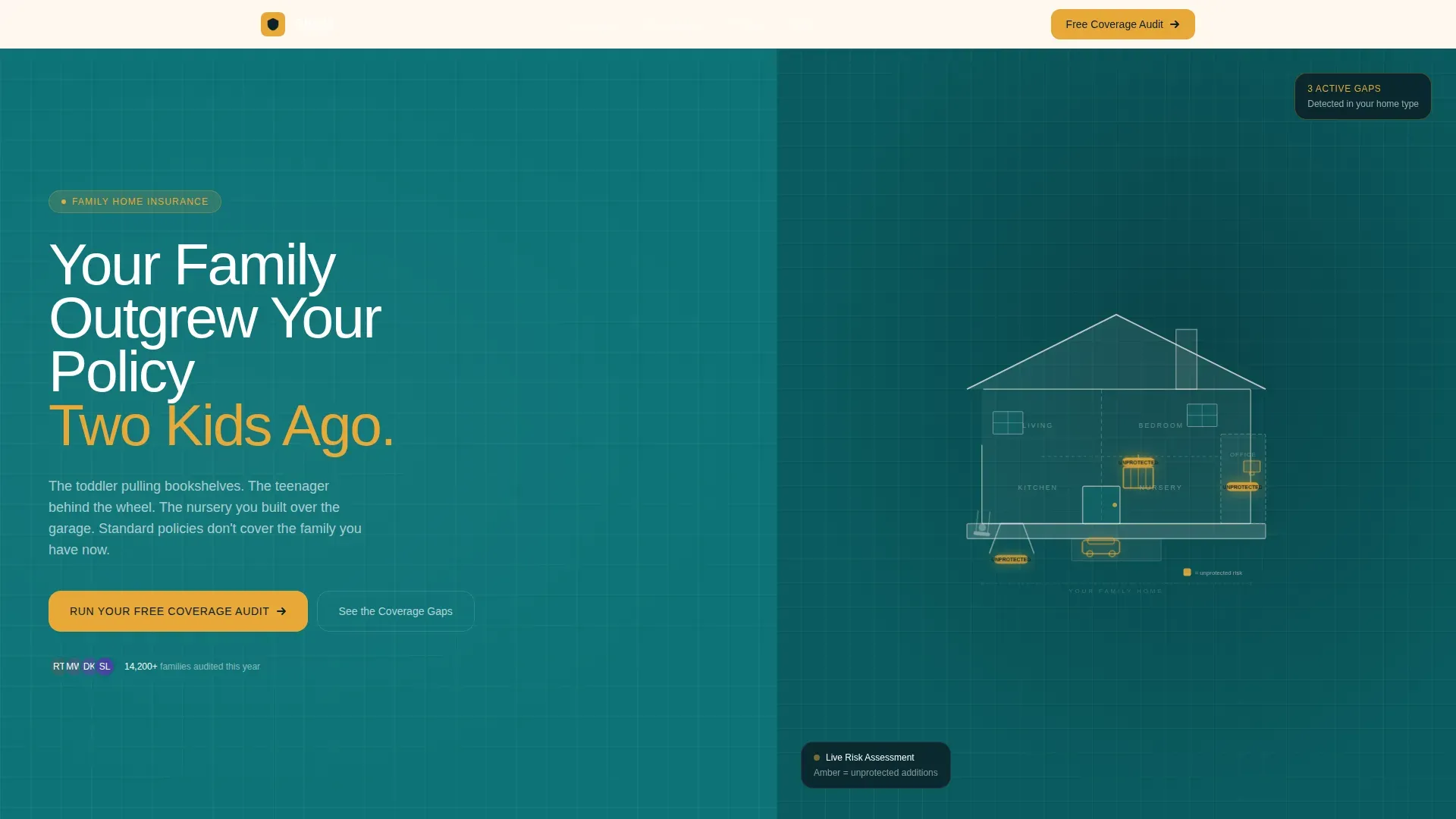
- A 50/50 split-screen hero with animated SVG house illustration and bold condensed headline
- Three scroll-triggered comparison panels with amber gap-callout numbers
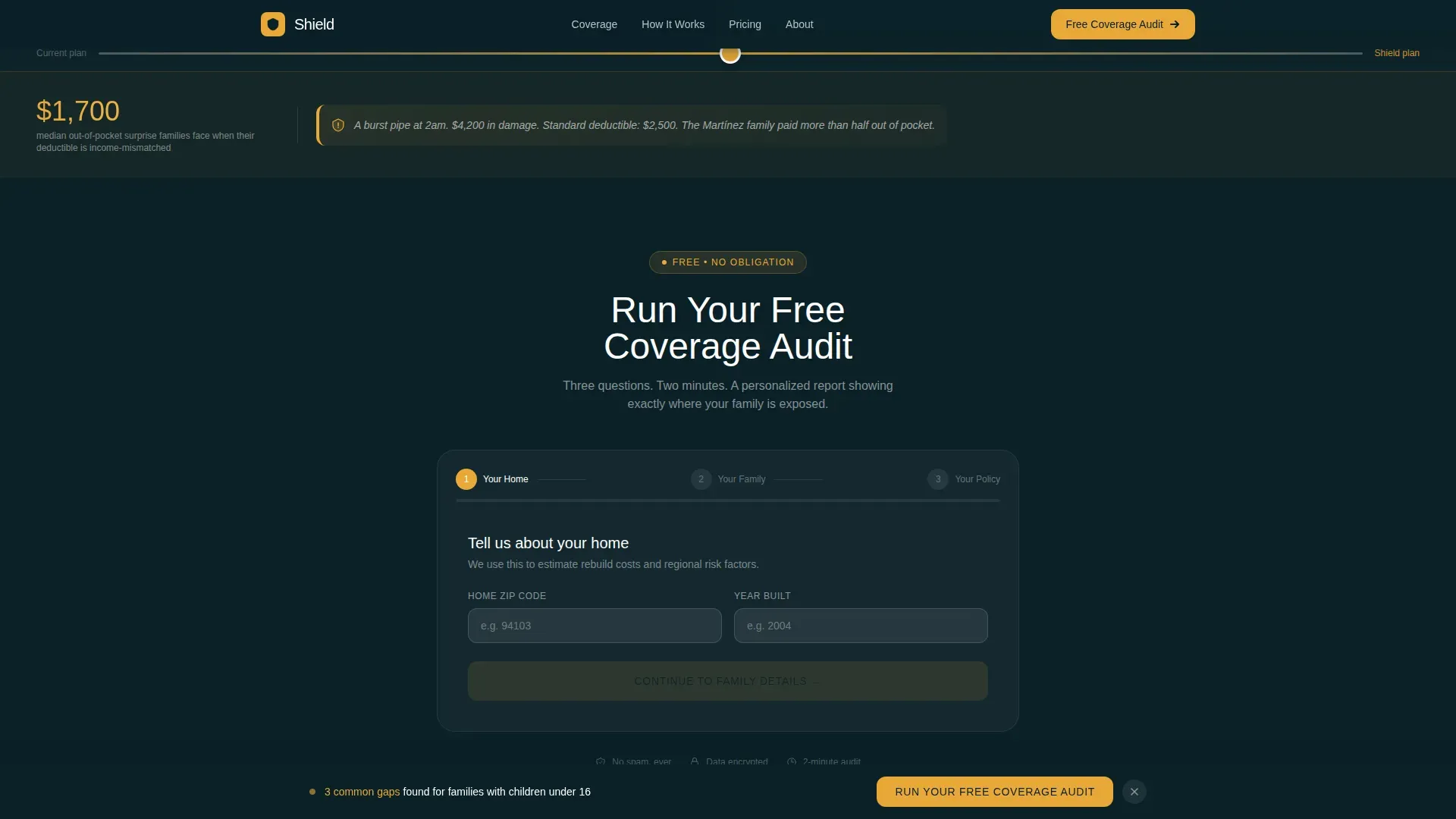
- A three-step progressive coverage audit form with instant gap summary output
- A floating sticky call-to-action bar and a social proof trust bar with ratings and credentials
Feature list
This template features purpose-built components that move a visitor from skepticism to qualified intent without friction.
Split-Screen Comparison Journey
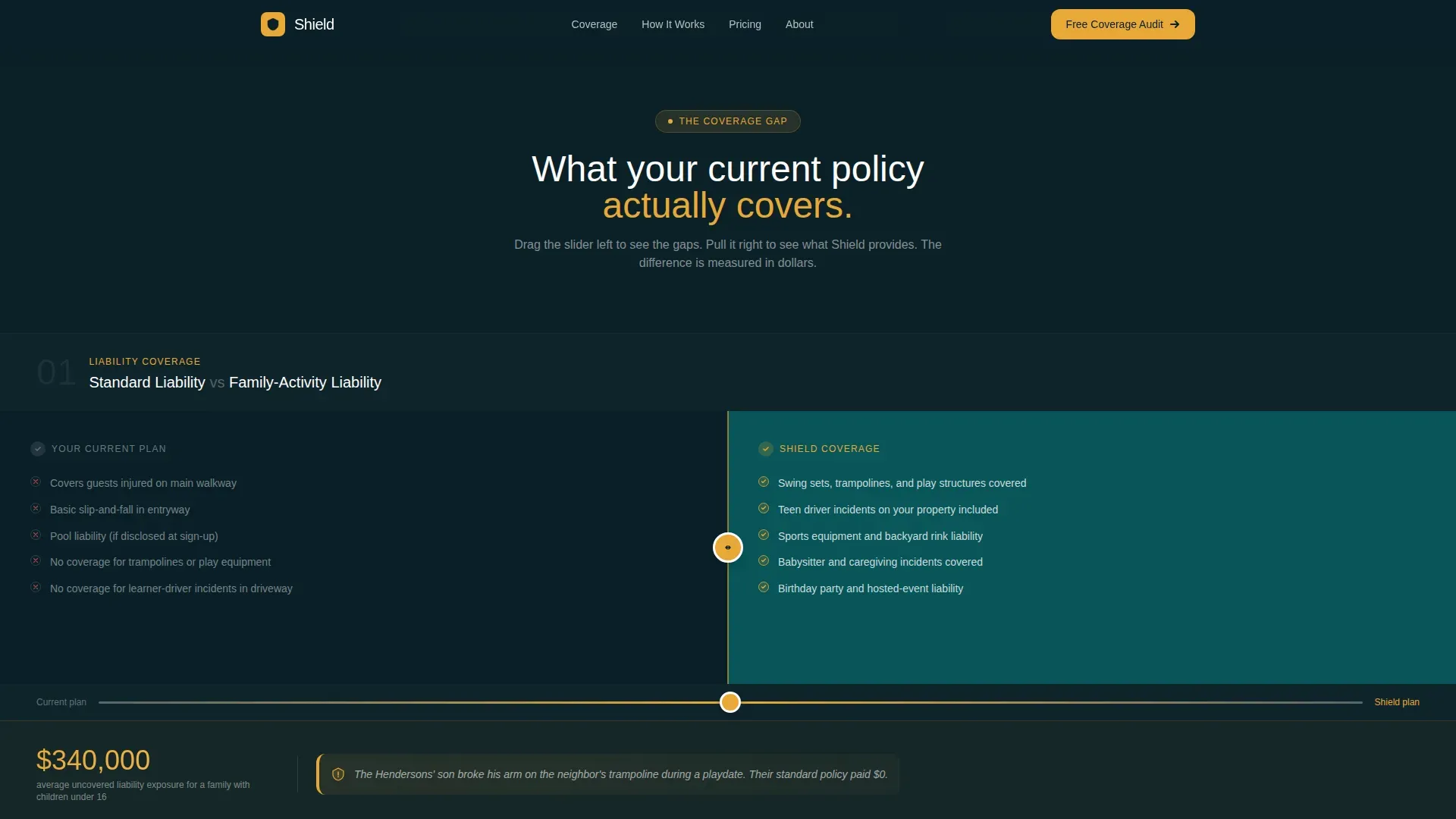
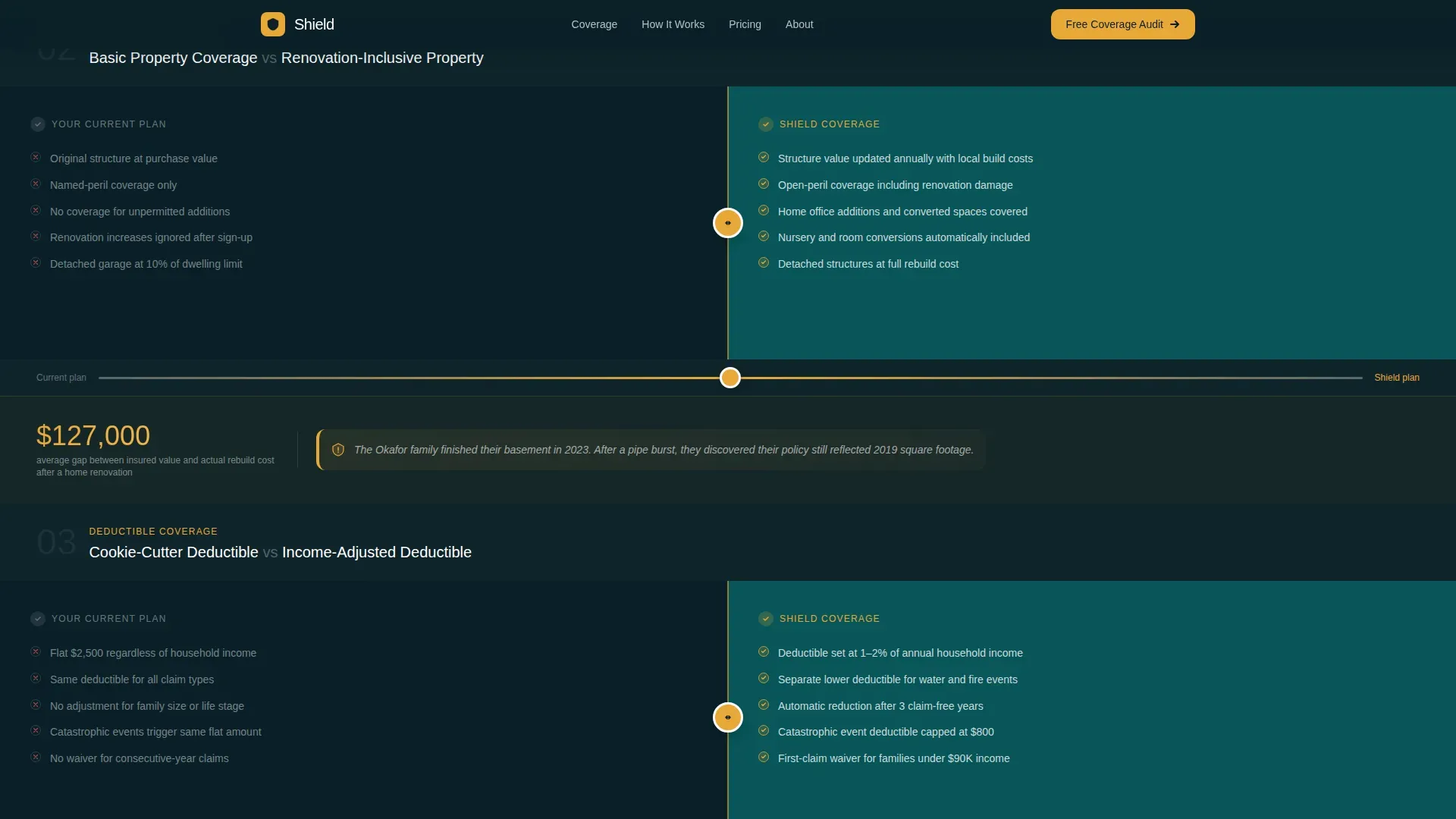
Three escalating left-right panels show generic policy coverage versus real family coverage. Visitors drag a vertical slider or scroll to reveal gaps in liability, property, and deductible terms. Amber callout numbers quantify the risk in real dollars.
Progressive Three-Step Audit Form
The multi-step form reduces friction by collecting one focused set of details per step: home location, household size, and current policy data. On completion, it returns an instant personalized coverage gap summary.
Sticky Call-to-Action Bar
The primary "Run Your Free Coverage Audit" button appears below the hero and re-pins as a floating bar after the second comparison panel. This keeps the key action visible throughout the scroll.
Animated SVG House Illustration
The right panel of the hero shows a blueprint-style house cross-section. Rooms populate as families grow, and each unprotected addition pulses in amber, communicating risk without a single word of copy.
Trust Bar with Social Proof
A dedicated section displays star ratings, client counts, dollar-gap callouts, and advisor credentials. Trust signals like these help families feel confident before they submit any personal information.
Vector-Based Editable Components
Every component is built as a vector-based element for sharp rendering across screen sizes. The organized file structure makes it straightforward to find, modify, and swap individual sections.
Page sections overview
| Section | Purpose |
|---|---|
| Split-Screen Hero | Bold headline and animated house SVG draw immediate attention |
| Comparison Panel One | Standard versus family-activity liability side by side |
| Comparison Panel Two | Basic property versus renovation-inclusive property coverage |
| Comparison Panel Three | Cookie-cutter versus income-adjusted deductible with dollar gaps |
| Coverage Audit Form | Three-step progressive form delivering instant gap summary |
| Trust and Proof Bar | Ratings, client count, advisor credentials, and social proof |
| Single-Row Footer | Linear footer with essential links and brand details |
Design & branding system
The Teal Catalyst color system creates an authoritative yet domestic feel, like a leather-bound folder on a clean kitchen counter.
- Deep teal (#0D7377) fills section backgrounds and the hero header field
- Midnight navy (#0B2027) anchors all body typography for strong contrast
- Warm cream (#FFF8F0) opens breathing room inside comparison panels
- Catalyst amber (#E8A838) fires on every button, toggle state, and alert callout
Mobile & speed optimization
The template is designed desktop-first for the split-screen comparison concept, with a graceful mobile stack built in.
- Comparison panels reflow into a vertical scroll on smaller screens for clear readability
- The multi-step form keeps fields concise per step, reducing cognitive load on mobile
- Scroll-triggered animations and the floating call-to-action bar carry through to mobile viewports
How this template helps you convert
The Freemium/Trial conversion model delivers value before asking for commitment, lowering resistance at every stage.
- The instant coverage gap report gives visitors a personalized, free result, turning the audit form into a reason to engage rather than an obstacle.
- The sticky call-to-action bar keeps "Run Your Free Coverage Audit" visible throughout the comparison scroll, so the decision point is never more than one tap away.
- Amber gap-callout numbers quantify real financial exposure, shifting the emotional weight from inconvenience to urgency before the secondary "Talk to an Advisor" call-to-action appears.
Other information about this template
The Shield trusted growing family home insurance landing page template 480e35 is a specialized design built for a specific, underserved conversion challenge in family InsurTech.
- The template supports all major design tools, keeping workflows flexible for different teams
- Adobe Photoshop files include fully editable shapes for complete brand customization
- A comprehensive font list is included to support consistent collaboration across design teams
- The organized file structure makes it easy to locate and manage every element quickly
- Platforms like Envato and Leadpages host high-converting family insurance templates; this template is built to the same standard of clarity and lead-capture effectiveness
- Pre-designed sample pages and ready-to-use components accelerate the build process significantly
Theme
Legal Shield
Creative direction
Comparison Journey
Color system
Teal Catalyst
Style
Split Screen (50/50)
Direction
Freemium/Trial
Page Sections
Split-screen Comparison Journey
Progressive Three-step Audit Form
Sticky Call-to-action Bar
Animated SVG House Illustration
Trust Bar with Social Proof
Vector-based Editable Components
Related questions
Can I customize the color system and typography?
Does the comparison slider work on mobile devices?
How does the three-step audit form deliver the gap summary?
Is this template suitable for an independent insurance agency?



