Vehicle Insurance & Finance Specialist Privacy Policy Website Template
Shield is a full-width immersive auto insurance landing page template built around an Engineering Blueprint visual theme. It walks visitors through an animated premium teardown, a before-and-after policy comparison, and a three-step inline quote form. The design uses a Monochrome Steel palette to make every cost, coverage gap, and carrier comparison feel precise and credible.
by Rocket studio
Quick summary
Shield is a direct-sales auto insurance landing page template designed to convert skeptical visitors into qualified leads. It pairs a cinematic engine-bay hero with scroll-triggered teardown sections, a carrier comparison panel, and a three-step inline form. The Engineering Blueprint aesthetic signals precision and transparency before a visitor reads a single word.
Who this template is for
This template is built for auto insurance agencies that compete on transparency and price. It suits brokers and agents who want to show prospects the math behind their savings rather than just claim it.
- Independent auto insurance agents and small brokerage storefronts
- Agencies targeting first-time car buyers, families adding teen drivers, and rideshare or gig workers
- Insurance marketers who want a high-interactivity direct-sales page without building from scratch
What problem this template solves
Most insurance landing pages ask for a quote before earning any trust. Visitors arrive skeptical, see a generic form, and leave. Shield flips that sequence by walking people through what they are actually overpaying before asking for their information.
- Visitors can not see where their current premium is bloated, so they do not feel a reason to switch
- Families and new drivers often accept the first quote because no page has ever shown them a line-by-line alternative
- Rideshare and gig drivers need a page that acknowledges their specific coverage situation, not a generic form
What you get with this template
Shield ships as a complete, ready-to-customize landing page with every section pre-built and connected. You get a high-interactivity page that earns the lead before it asks for one.
- A full-bleed hero section with an animated premium counter and a floating call-to-action bar
- A before-and-after policy teardown with scroll-triggered line-item reveals and savings deltas highlighted in arc-weld orange
- A three-step inline quote form plus a secondary email-capture path for a carrier comparison PDF download
Feature list
This template includes carefully scoped components that match the direct-sales flow of a precision insurance agency.
Animated Premium Counter
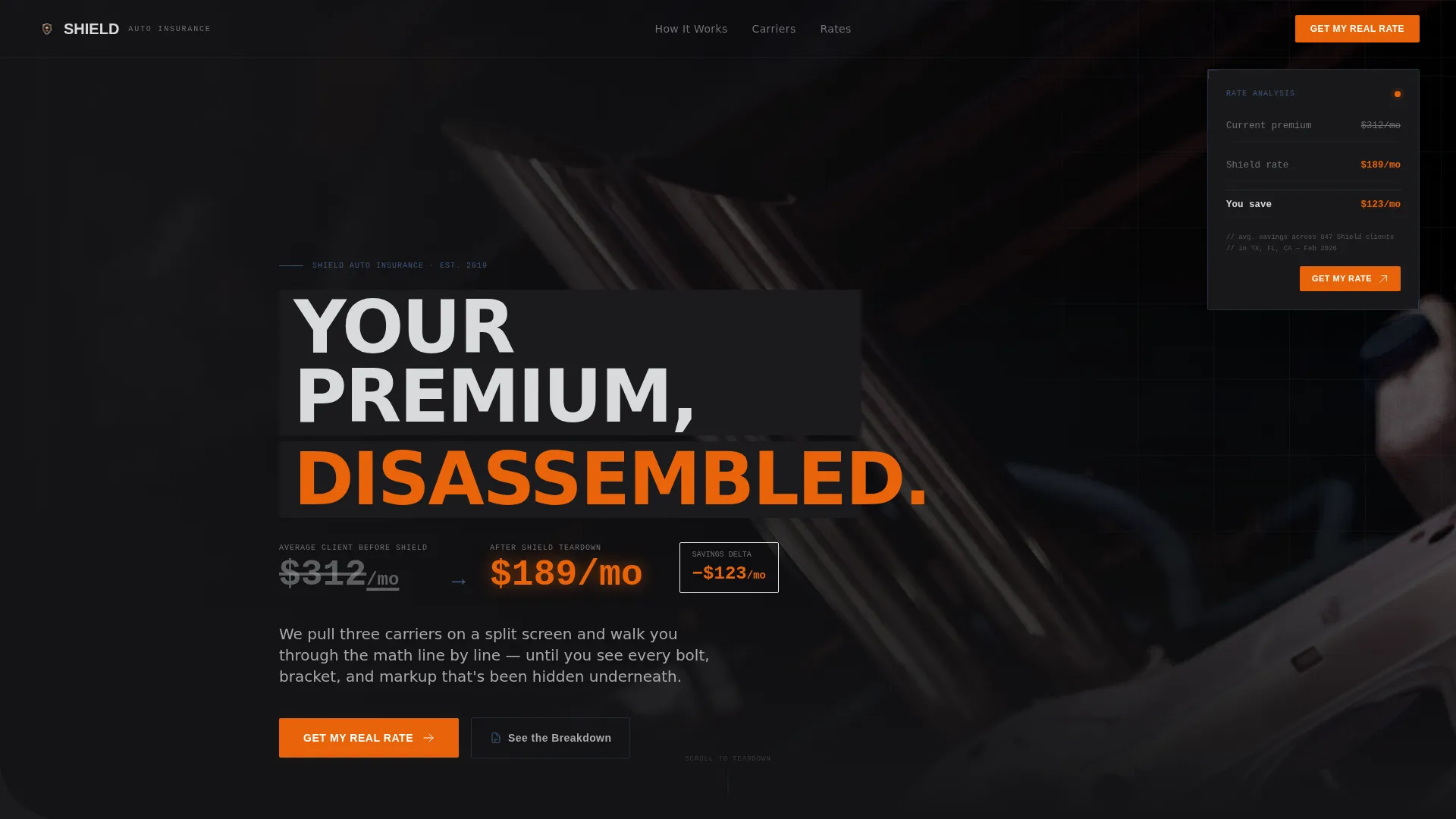
The hero section opens with a counter that ticks from a bloated sample premium down to a leaner number. The savings delta glows in arc-weld orange, creating an immediate visual argument for why visitors should keep scrolling.
Scroll-Triggered Before and After Teardown
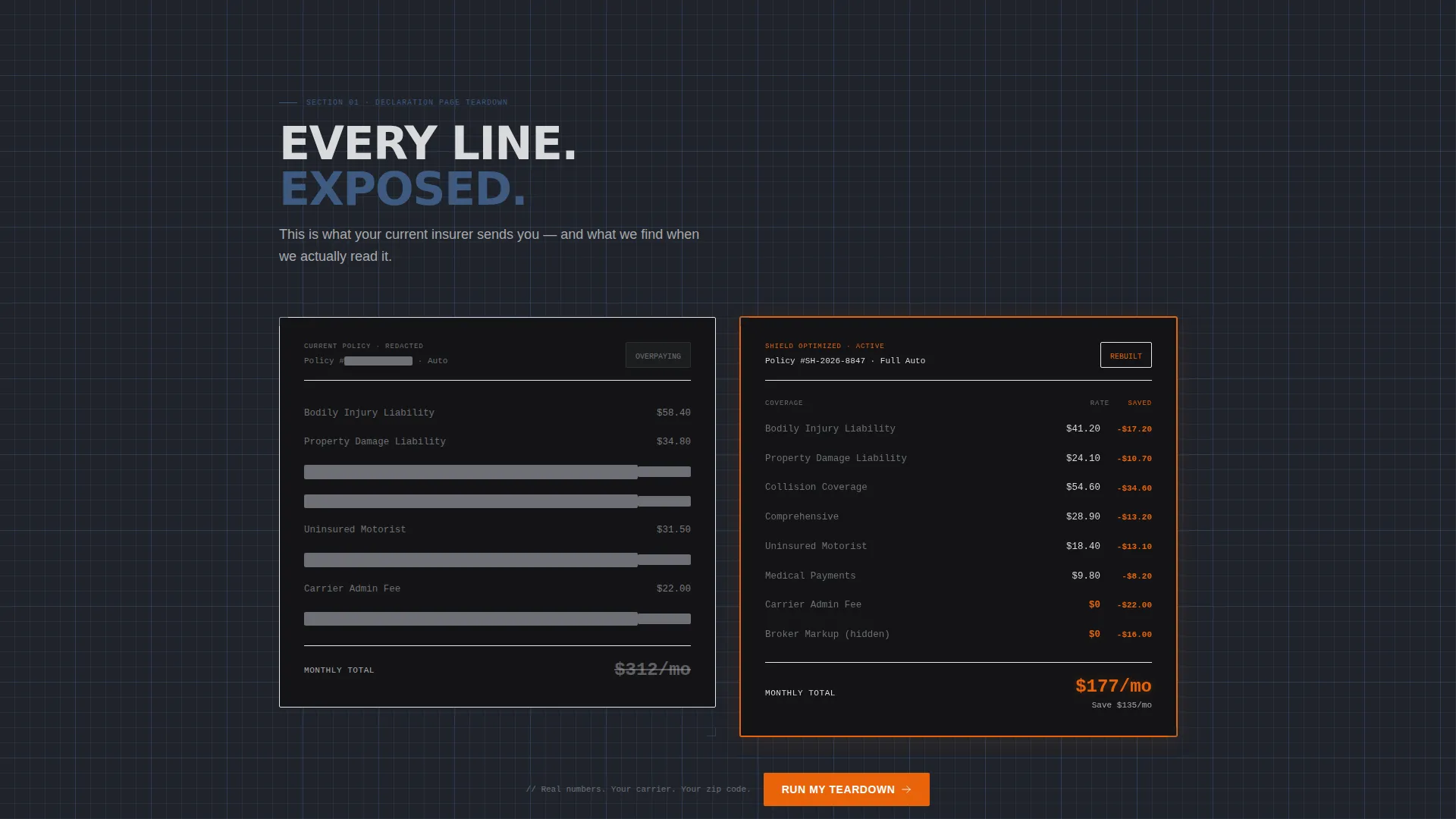
Two side-by-side panels reveal a redacted competitor declaration page against the agency's optimized version. Each line item slides into view as the visitor scrolls, with savings deltas highlighted so the math is impossible to miss.
Coverage Gap Reveal Section
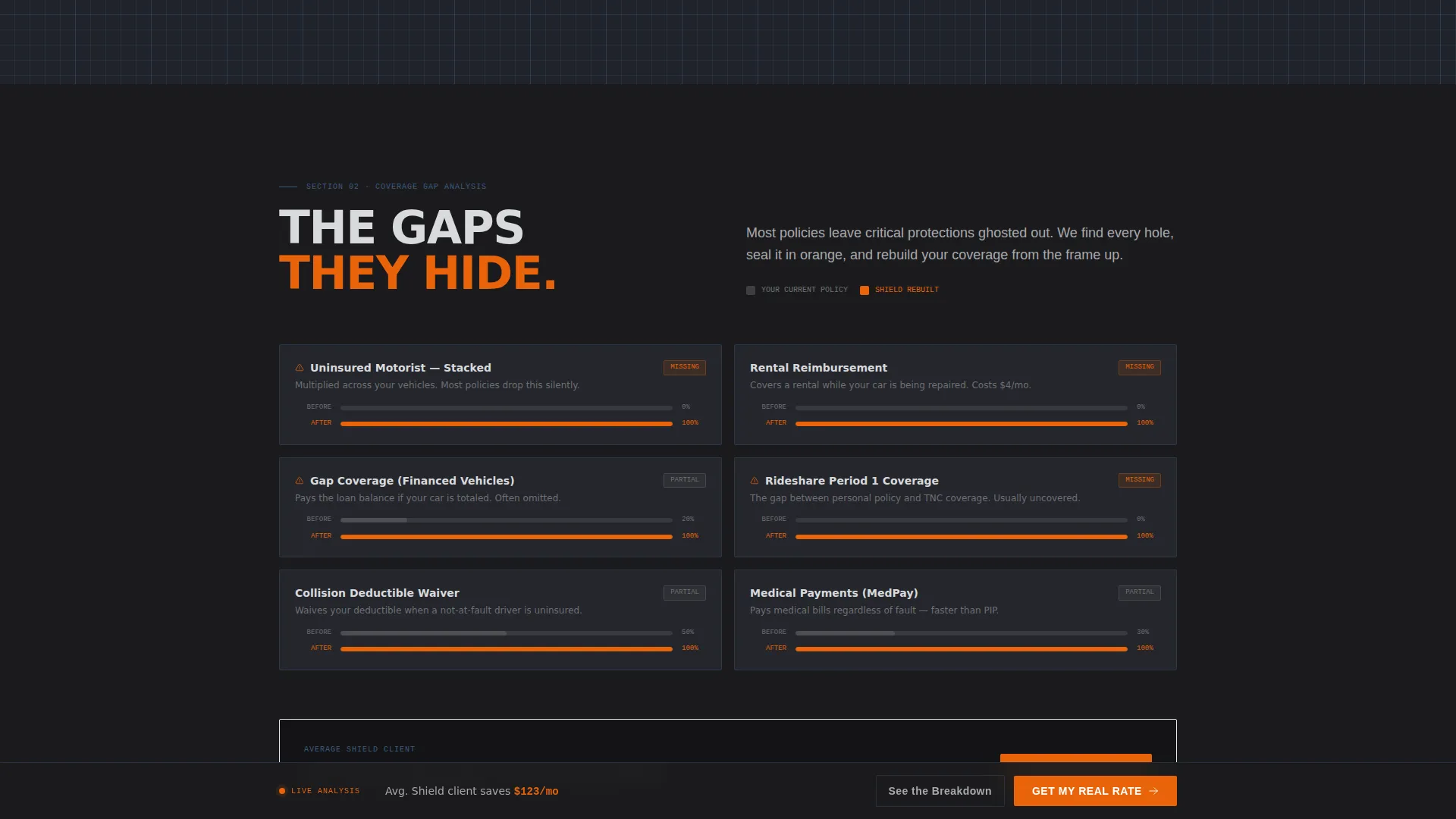
A translucent "before" policy shows missing protections ghosted out. The rebuilt policy version fills every gap in orange. This visual contrast makes abstract coverage shortfalls feel concrete and urgent.
Three-Carrier Split-Screen Comparison
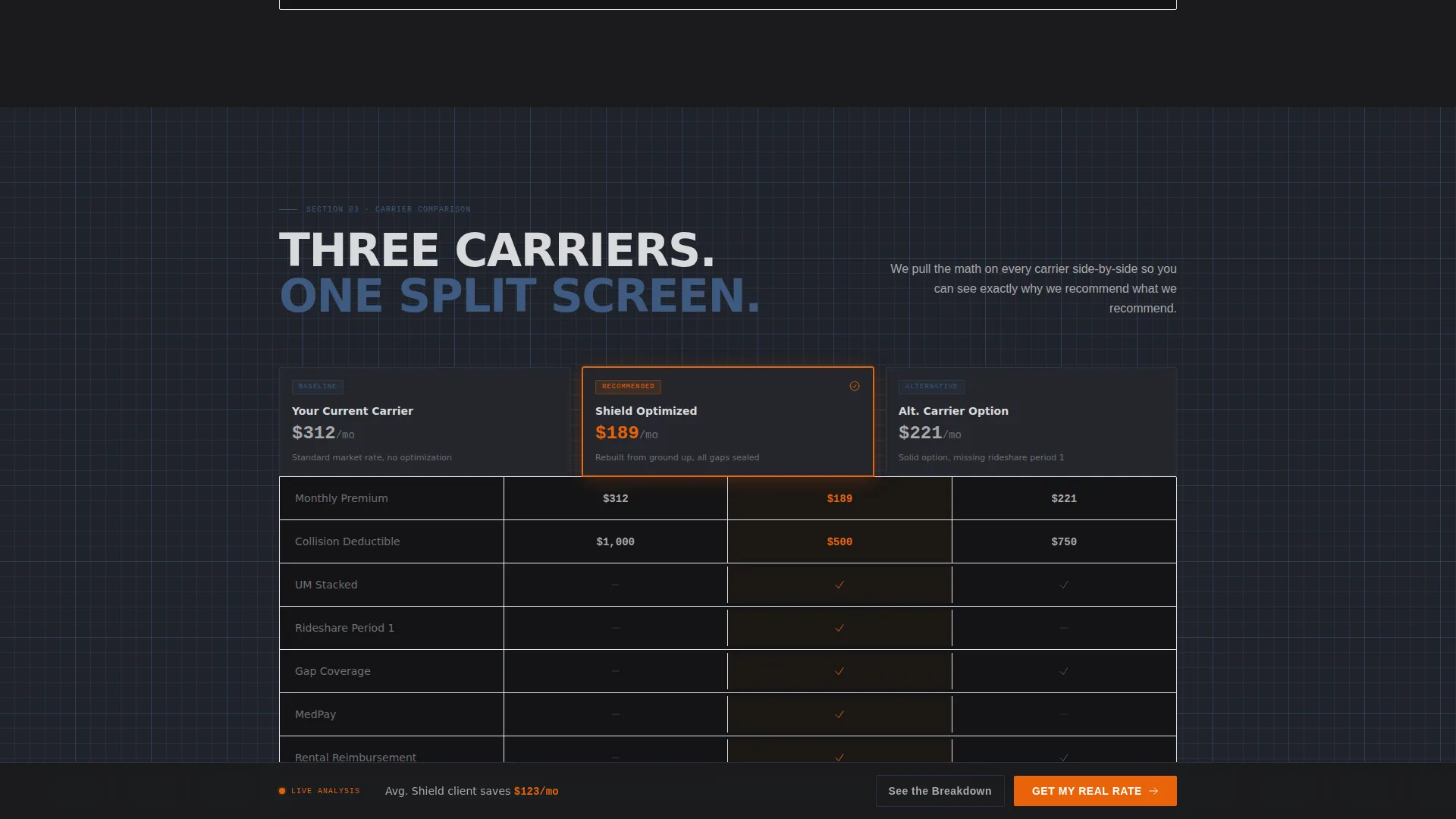
A dedicated section places three carriers side by side with line-by-line figures. Visitors can toggle between carriers to see exactly how each policy stacks up across liability, collision, and comprehensive coverage.
Three-Step Inline Quote Form
The primary conversion form captures zip code and vehicle details in step one, current premium and coverage level in step two, and contact information in step three. The staged flow reduces friction and keeps completion rates higher than a single long form.
Secondary PDF Lead Capture
A "See the Breakdown" call to action lets hesitant visitors download a one-page carrier comparison PDF. It requires only an email address, giving cautious prospects a lower-commitment entry point into the agency's pipeline.
Page sections overview
| Section | Purpose |
|---|---|
| Hero with Counter | Hook visitors with an animated premium savings figure and a primary call to action |
| Teardown Comparison | Show line-by-line savings between a competitor policy and the optimized version |
| Coverage Gap Reveal | Visualize missing protections in the current policy versus a fully rebuilt one |
| Carrier Comparison Panel | Compare three carriers side by side with toggleable line-item figures |
| Three-Step Quote Form | Capture lead details across a staged inline form with minimal friction |
| Footer Row | Minimal single-row developer-style footer with essential links |
Design & branding system
Shield uses a Monochrome Steel palette built around the metaphor of a machinist's workbench under fluorescent light. Every color earns its place, and no surface is decorative without purpose.
- Core colors: forge-black (#1B1B1E) for backgrounds, brushed aluminum (#A8A9AD) for body text and secondary surfaces, and blueprint gridline blue (#3D5A80) for structural accents and grid patterns
- Arc-weld orange (#E8630A) is reserved exclusively for calls to action, savings figures, and coverage gap highlights, making every critical element impossible to overlook
- Typography uses DM Sans for body copy, Manrope for headings, and JetBrains Mono for all numerical and data-heavy displays, reinforcing the precision engineering aesthetic
Mobile & speed optimization
The template is built desktop-first to support its split-screen comparison sections, but every layout adapts cleanly to smaller screens. The stacked mobile view maintains the teardown narrative without losing the scroll-reveal logic.
- Split-screen comparison panels reflow into vertically stacked cards on tablet and mobile viewports
- Scroll-triggered animations and the floating call-to-action bar remain active on mobile without disrupting the reading flow
- Static structural sections use server-rendered components while interactive elements such as the form and animations are handled client-side to keep the page feeling responsive
How this template helps you convert
Shield is structured around a deliberate trust-before-ask sequence. By the time a visitor reaches the form, they have already seen the gap between what they pay and what they could pay.
- The animated counter and hero visual create an immediate reason to scroll, anchoring the visitor's attention on potential savings from the first second on the page.
- The teardown and coverage gap sections build credibility section by section, so visitors arrive at the quote form already convinced rather than cold.
- The two-path conversion strategy, a primary three-step form and a secondary PDF download, catches both ready-to-convert leads and early-stage researchers in the same visit.
Other information about this template
Shield is part of the Automotive and Transport category, sitting specifically within the Vehicle Insurance and Finance subcategory. It is designed for the United States market with USD formatting and MM/DD/YYYY date conventions throughout.
- The template style is Full-Width Immersive, meaning all sections run edge to edge with no boxed or card-constrained layouts outside the comparison panels
- Animation intensity is set to high, with an animated counter, scroll-triggered line-item reveals, sliding before-and-after panels, and a floating call-to-action bar that pins after the second scroll
- The Engineering Blueprint creative direction and the Before and After Reveal structure are the two core design decisions that differentiate Shield from generic insurance page templates
- The footer follows a Pattern 8 minimal single-row developer style, keeping the bottom of the page clean and on-brand
Theme
Engineering Blueprint
Creative direction
Before/After Reveal
Color system
Monochrome Steel
Style
Full-Width Immersive
Direction
Direct Sales
Page Sections
Animated Premium Counter Hero
Scroll-triggered Policy Teardown
Coverage Gap Reveal Panel
Three-carrier Comparison Toggle
Three-step Inline Quote Form
Secondary PDF Lead Capture
Related questions
Can I customize the savings figures and carrier names in the comparison sections?
Does the three-step form connect to a specific platform or tool?
Is Shield suitable for targeting rideshare or gig driver audiences?
How does the secondary PDF download capture work?
What level of technical skill is needed to launch this template?



